GVC311 - Accessoires et périphériques informatiques IOGEAR - Free user manual and instructions
Find the device manual for free GVC311 IOGEAR in PDF.


| Product Type | USB 3.0 to HDMI Adapter |
| Model | GVC311 |
| Brand | IOGEAR |
| Dimensions (L x W x H) | 2.5 x 1.5 x 0.6 in (63.5 x 38.1 x 15.2 mm) |
| Weight | 1.2 oz (34 g) |
| Power Source | Bus-powered via USB |
| Input Interface | USB 3.0 Type-A |
| Output Interface | HDMI Female |
| Maximum Resolution | 1920 x 1080 @ 60Hz |
| Supported Resolutions | 480p, 720p, 1080p |
| Audio Support | Yes, via HDMI |
| Compatible Operating Systems | Windows, macOS, Chrome OS |
| LED Indicator | Yes, power/link |
| Cable Length | 6 in (15 cm) |
| Color | Black |
| Warranty | 1 year limited |
| Package Contents | Adapter, Quick Start Guide |
| Maintenance & Cleaning | Wipe with dry cloth; avoid liquids |
| Safety | Compliant with FCC, CE, RoHS |
| Repairability | Non-repairable; replace unit |
Frequently Asked Questions - GVC311 IOGEAR
User questions about GVC311 IOGEAR
0 question about this device. Answer the ones you know or ask your own.
Ask a new question about this device
Download the instructions for your Accessoires et périphériques informatiques in PDF format for free! Find your manual GVC311 - IOGEAR and take your electronic device back in hand. On this page are published all the documents necessary for the use of your device. GVC311 by IOGEAR.
USER MANUAL GVC311 IOGEAR
HD to VGA Adapter with Audio
GVC311
PART NO. Q1248
Package Contents
1
1 x HD to VGA video adapter with audio output
1 x Quick Start Guide
1 x Warranty Card
System Requirements
Media Source - HD Video Output
Display - VGA Input
Audio - 3.5mm Audio
Overview
2
- HD Connector
- VGA Port
- Micro USB port (For power adapter, if needed)*
- 3.5mm Stereo Mini-Jack

text_image
1 2 ROBEAR 3 4*Not required unless the output current from the media source is less than 200mA (5V power adapter not included).
Installation
3
- Plug in the GVC311 to the HD video output on your computer or media streaming devices.
- Connect the GVC311 to your monitor or projector with a VGA cable.*
- Connect to any amplifier or audio input with 3.5mm stereo cable or 3.5mm to RCA cable*
*Cables are not included.
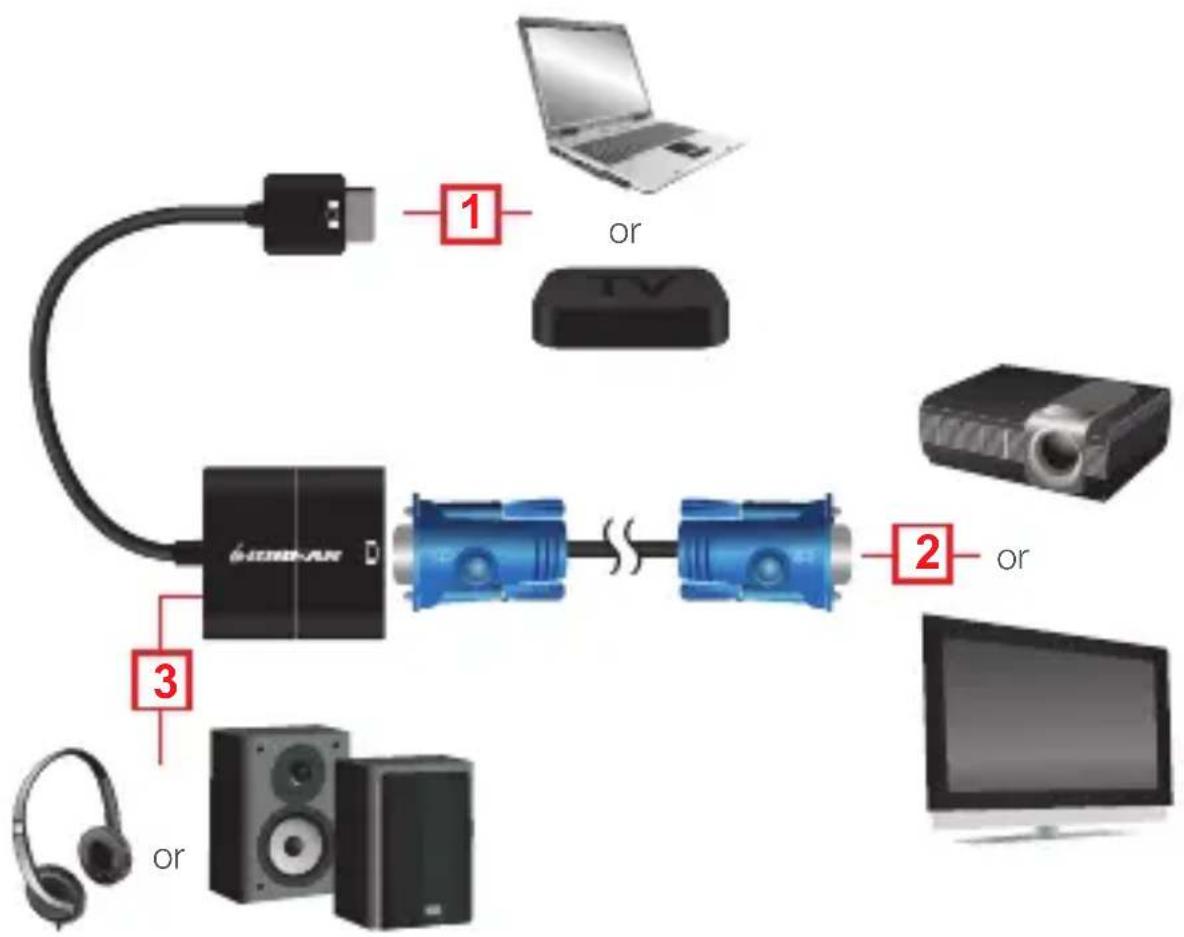
flowchart
graph TD
    A["USB Device"] -->|1| B["Laptop"]
    A -->|2| C["Video Head"]
    A -->|3| D["Headphones"]
    style A fill:#f9f,stroke:#333
    style B fill:#ccf,stroke:#333
    style C fill:#cfc,stroke:#333
    style D fill:#fcc,stroke:#333
This equipment has been tested and found to comply with the limits for a Class B digital device, pursuant to Part 15 of the FCC Rules. These limits are designed to provide reasonable protection against harmful interference in a residential setting. This product generates, uses, and can radiate radio frequency energy and, if not installed and used as directed, it may cause harmful interference to radio communications. Although this product complies with the limits for a Class B digital device, there is no guarantee that interference will not occur in a particular installation.
CE Statement
This device has been tested and found to comply with the following European Union directives: Electromagnetic Capability (2004/108/EC), Low Voltage (2006/95/EC) and R&TTED (1999/5/EC).
WE'RE HERE TO HELP YOU! NEED ASSISTANCE SETTING UP THIS PRODUCT?
Make sure you:
- Visit www.iogear.com for more product information
- Visit www.iogear.com/support for live help and product support
Warranty Information
This product carries a 3 Year Limited Warranty. For the terms and conditions of this warranty, please go to http://www.iogear.com/support/warranty
Register online at http://www.iogear.com/register
Important Product Information
Product Model ____
Serial Number ____
Contact
IOGEAR
iogear.custhelp.com
support@iogear.com
www.iogear.com
19641 Da Vinci,
Foothill Ranch, CA 92610