Elevate Single Surface - Office Anthro - Free user manual and instructions
Find the device manual for free Elevate Single Surface Anthro in PDF.


| Product Type | Height-Adjustable Standing Desk |
| Model | Elevate Single Surface |
| Brand | Anthro |
| Desktop Size | 60" x 30" (152.4 cm x 76.2 cm) |
| Height Range | 29" to 48" (73.7 cm to 121.9 cm) |
| Weight Capacity | 300 lbs (136 kg) |
| Weight | Approximately 120 lbs (54.4 kg) including legs |
| Power Supply | 110-240V AC, 50/60Hz, 2.5A; includes power adapter |
| Motor Type | Dual electric motors with anti-collision technology |
| Speed | 1.5 inches per second (3.8 cm/s) |
| Noise Level | < 50 dB during operation |
| Memory Presets | 4 programmable height positions |
| Control Panel | Up/down buttons, memory presets, and a child lock |
| Cable Management | Built-in wire trough and grommets |
| Materials | Desktop: laminate surface; frame: steel with powder coat finish |
| Color Options | White, black, and silver laminate; frame in silver or black |
| Cleaning Instructions | Wipe with a damp cloth; avoid abrasives and solvents |
| Safety Features | Anti-collision sensor; child lock; tip-over stability tested |
| Spare Parts Availability | Replacement motor, control box, legs, and desktop available through Anthro |
| Repairability | Modular design allows for easy replacement of motor and electronics |
| Warranty | 10 years on frame, 3 years on electronics |
| Certifications | UL 299; GREENGUARD Gold certified for low emissions |
Frequently Asked Questions - Elevate Single Surface Anthro
User questions about Elevate Single Surface Anthro
0 question about this device. Answer the ones you know or ask your own.
Ask a new question about this device
Download the instructions for your Office in PDF format for free! Find your manual Elevate Single Surface - Anthro and take your electronic device back in hand. On this page are published all the documents necessary for the use of your device. Elevate Single Surface by Anthro.
USER MANUAL Elevate Single Surface Anthro
| Elevate Corner | Elevate Adjusta | Elevate Wrap Elevate Single Surface | |||
 | 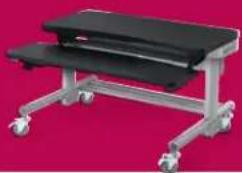 |  | 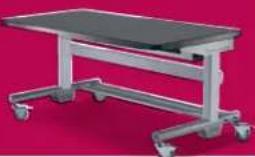 | ||
| Styles and Sizes | L-shaped corner unit measures 72"w x 72"d. | Dual-surface units come in 48" and 60" widths. | Wraparound dual-surface unit measures 69"w. | Single-surface units come in 36", 48", 60", and 72" widths. | |
| Tilt | No tilting surfaces. Tilting keyboard surface. Tilting keyboard surface. No tilting surfaces. | ||||
| Monitor Configurations | Optional articulating arms can hold up to 6 monitors. | Optional articulating arms can hold up to 6 monitors depending on the size of the table. | Optional articulating arms can hold up to 4 monitors. | Optional articulating arms can hold up to 6 monitors depending on the size of the table. | |
| Sit/Stand Height Range | adjusts electrically as high as | 53" 53" 53" 53" | |||
| adjusts electrically as low as | 27" 27" 27" 27" | ||||
| Number of CPUs the table can hold | 2 2 2 2 | ||||
| Cable Management | A 5" deep rear cable trough runs the width of the table. | A 5" deep rear cable trough runs the width of the table. | A 5" deep rear cable trough runs the width of the table. | A 5" deep rear cable trough runs the width of the table. | |
| Maximum Lift Capacity | 250 lbs. 150 lbs. 150 lbs. 150 lbs. | ||||
| Overall Weight Capacity | 300 lbs. 250 lbs. 250 lbs. 250 lbs. | ||||
| Integrated Task Lights | Optional task lights available. | Optional task lights available. | Optional task lights available. | Optional task lights available. | |
| Electric outlets | Optional power strips can fit inside the rear cable trough. | Optional power strips can fit inside the rear cable trough. | Optional power strips can fit inside the rear cable trough. | Optional power strips can fit inside the rear cable trough. | |
| Mobility | Rolls easily then stays in place securely on 4" locking rubber casters. | Rolls easily then stays in place securely on 4" locking rubber casters. | Rolls easily then stays in place securely on 4" locking rubber casters. | Rolls easily then stays in place securely on 4" locking rubber casters. | |
| Warranty | All Elevate tables have a Lifetime Warranty against manufacturing defects on the table and a 1-year warranty on the mechanical and electrical components. Cords and plugs are not warranted. | ||||

For more information on our Elevate family of electric lift tables, give us a call or drop us a note.
800.325.3841 | sales@anthro.com