SP100 - Pregnant Difrnce - Free user manual and instructions
Find the device manual for free SP100 Difrnce in PDF.


| Product Type | Portable Bluetooth Speaker |
| Brand | Difrnce |
| Model | SP100 |
| Dimensions | 10 x 10 x 10 cm (approx) |
| Weight | 500 g |
| Power Source | Rechargeable lithium-ion battery |
| Connectivity | Bluetooth 5.0 |
| Speaker Output | 3W |
| Frequency Response | 80 Hz - 20 kHz |
| Battery Life | Up to 8 hours |
| Charging Time | 2-3 hours |
| Charging Port | Micro USB |
| Water Resistance | IPX5 (splash proof) |
| Controls | Play/Pause, Volume +/- |
| Hands-free | Built-in microphone for calls |
| Included Accessories | USB charging cable, user manual |
| Maintenance | Wipe with a dry soft cloth |
| Safety Notes | Avoid water immersion, extreme heat, or dropping |
| Spare Parts Availability | Not available for this model |
| Repairability | Not user-serviceable |
Frequently Asked Questions - SP100 Difrnce
User questions about SP100 Difrnce
0 question about this device. Answer the ones you know or ask your own.
Ask a new question about this device
Download the instructions for your Pregnant in PDF format for free! Find your manual SP100 - Difrnce and take your electronic device back in hand. On this page are published all the documents necessary for the use of your device. SP100 by Difrnce.
USER MANUAL SP100 Difrnce
natural_image
Black spherical electronic device with perforated grille and small earbuds (no visible text or symbols)SP100 Portable speaker User Manual
Getting started:
Remove speaker from packaging

natural_image
Four sequential images showing hands holding a small object, no text or symbols visible
text_image
Diagram showing USB cable connection to a device with an icon of a computer and a printer, alongside a close-up photo of the device.Charging:
Fully charge the Portable speaker before use. Connect the speaker to the PC via the provided USB cable.
The LED at the base will turn red, indicating that it is on charging mode. The LED will turn off when fully charged.
Listening to Music:
1 Unwind the connector cable around the portable speaker base.

Listening to Music:
3
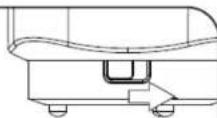
Turn on the Portable speaker ; LED at the base will become green.
2
Plug in the connector to the Music source, e.g. PCs/Laptops, MP3 players or radios.
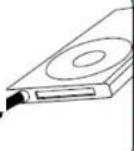
4
Start playing the selected Music.

Volume Adjustment :
SP100 comes with 2 levels of volume.
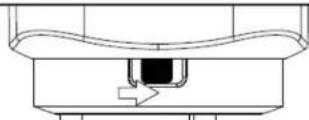
Volume level 1 Button at the middle (Default when turn on)

Volume level 2 Button all the way towards "Right"