GIEI 624410 HF - Cooker GRUNDIG - Free user manual and instructions
Find the device manual for free GIEI 624410 HF GRUNDIG in PDF.


User questions about GIEI 624410 HF GRUNDIG
0 question about this device. Answer the ones you know or ask your own.
Ask a new question about this device
Download the instructions for your Cooker in PDF format for free! Find your manual GIEI 624410 HF - GRUNDIG and take your electronic device back in hand. On this page are published all the documents necessary for the use of your device. GIEI 624410 HF by GRUNDIG.
USER MANUAL GIEI 624410 HF GRUNDIG
Please read this user manual first!
Dear Customer,
Thank you for purchasing this Grundig product. We hope that you get the best results from your product which has been manufactured with high quality and state-of-the-art technology. Therefore, please read this entire user manual and all other accompanying documents carefully before using the product and keep it as a reference for future use. If you handover the product to someone else, give the user manual as well. Follow all warnings and information in the user manual.
Remember that this user manual is also applicable for several other models. Differences between models will be identified in the manual.
Explanation of symbols
Throughout this user manual the following symbols are used:

Important information or useful hints about usage.
Warning of hazardous situations with regard to life and property.

Warning of electric shock.

Warning of risk of fire.
Warning of hot surfaces.
CE
Arçelik A.Ş.
Karaağaç caddesi No:2-6 34445 Sütlüce/Istanbul/TURKEY
Made in TURKEY
TABLE OF CONTENTS
1 Important instructions and warnings for safety and environment 4
General safety....4
Electrical safety....4
Product safety....5
Intended use 7
Safety for children 7
Disposing of the old product......8
Package information......8
2 General information 9
Overview......9
Technical specifications....9
3 Installation 10
Before installation....10
Installation and connection ..... 11
Future Transportation......14
4 Preparation 15
Tips for saving energy 15
Initial use....15
First cleaning of the appliance ... 15
Initial heating 15
5 How to use the hob 16
General information about cooking 16
Using the hobs....18
Control panel....18
6 Maintenance and care 29
General information 29
Cleaning the hob....29
7 Troubleshooting 31
1 Important instructions and warnings for safety and environment
This section contains safety instructions that will help protect from risk of personal injury or property damage. Failure to follow these instructions shall void any warranty.
General safety
- This appliance can be used by children aged from 8 years and above and persons with reduced physical, sensory or mental capabilities or lack of experience and knowledge if they have been given supervision or instruction concerning use of the appliance in a safe way and understand the hazards involved.
Children shall not play with the appliance. Cleaning and user maintenance shall not be made by children without supervision.
• Installation and repair procedures must always be performed by Authorized
Service Agents. The manufacturer shall not be held responsible for damages arising from procedures carried out by unauthorized persons which may also void the warranty. Before installation, read the instructions carefully.
- Do not operate the product if it is defective or has any visible damage. - Ensure that the product function knobs are switched off after every use.
Electrical safety
- If the product has a failure, it should not be operated unless it is repaired by an Authorized Service Agent. There is the risk of electric shock!
- Only connect the product to a grounded outlet/line with the voltage and protection as specified in the "Technical specifications". Have the grounding installation made by a
qualified electrician while using the product with or without a transformer. Our company shall not be liable for any problems arising due to the product not being earthed in accordance with the local regulations.
- Never wash the product by spreading or pouring water onto it! There is the risk of electric shock!
- Never touch the plug with wet hands! Never unplug by pulling on the cable, always pull out by holding the plug.
- The product must be disconnected during installation, maintenance, cleaning and repairing procedures.
- If the power connection cable for the product is damaged, it must be replaced by the manufacturer, its service agent or similarly qualified persons in order to avoid a hazard.
- The appliance must be installed so that it can be completely disconnected
from the mains supply. The separation must be provided by a switch built into the fixed electrical installation, according to construction regulations.
- Any work on electrical equipment and systems should only be carried out by authorized and qualified persons.
- In case of any damage, switch off the product and disconnect it from the mains. To do this, turn off the fuse at home.
• Make sure that fuse rating is compatible with the product.
Product safety
- The appliance and its accessible parts become hot during use. Care should be taken to avoid touching heating elements. Children less than 8 years of age shall be kept away unless continuously supervised.
- Never use the product when your judgment or coordination is impaired by the use of alcohol and/or drugs.
- Be careful when using alcoholic drinks in your dishes. Alcohol evaporates at high temperatures and may cause fire since it can ignite when it comes into contact with hot surfaces.
- Do not place any flammable materials close to the product as the sides may become hot during use.
- Keep all ventilation slots clear of obstructions.
- Do not use steam cleaners to clean the appliance as this may cause an electric shock.
- Unattended cooking on a hob with fat or oil can be dangerous and may result in fire. NEVER try to extinguish a fire with water, but switch off the appliance and then cover flame e.g. with a lid or a fire blanket.
- Danger of fire: Do not store items on the cooking surfaces.
- If the surface is cracked, switch off the appliance to avoid the possibility of electric shock.
• After use, switch off the hob element by its control and do not rely on the pan detector.
- Metallic objects such as knives, forks, spoons and lids should not be placed on the hob surface since they can get hot.
- The appliance is not intended to be operated by means of an external timer or separate remote-control system.
- Vapour pressure that build up due to the moisture on the hob surface or at the bottom of the pot can cause the pot to move. Therefore, make sure that the oven surface and bottom of the pots are always dry.
- Hotplates are equipped with "Induction" technology. Your induction hob that provides both time and money savings must be used with pots suitable for induction cooking; otherwise hotplates will not operate. See. General information about cooking, page 16, selecting the pots.
- As induction hobs create a magnetic field, they may cause harmful impacts for people who use devices such as insulin pump or pacemaker.
- Use only hob guards designed by the manufacturer of the cooking appliance or indicated by the manufacturer of the appliance in the instructions for use as suitable or hob guards incorporated in the appliance. The use of inappropriate guards can cause accidents.
Prevention against possible fire risk!
- Ensure all electrical connections are secure and tight to prevent risk of arcing.
- Do not use damaged cables or extension cables.
- Ensure liquid or moisture is not accessible to the electrical connection point.
Intended use
- This product is designed for domestic use.
Commercial use will void the guarantee.
- This appliance is for cooking purposes only. It must not be used for other purposes, for example room heating.
- The manufacturer shall not be liable for any damage caused by improper use or handling errors.
Safety for children
- Accessible parts may become hot during use. Young children should be kept away.
- The packaging materials will be dangerous for children. Keep the packaging materials away from children. Please dispose of all parts of the packaging according to environmental standards.
- Electrical products are dangerous to children. Keep children away from the product when it is operating and do not allow them to play with the product.
- Do not place any items above the appliance that children may reach for.
Disposing of the old product Compliance with the WEEE Directive and Disposing of the Waste Product:
This product complies with EU WEEE Directive (2012/19/EU). This product bears a classification symbol for waste electrical and electronic equipment (WEEE). This product has been manufactured with high quality parts and materials which can be reused and are suitable for recycling. Do not dispose of the waste product with normal domestic and other wastes at the end of its service life. Take it to the collection center for the recycling of electrical and electronic equipment. Please consult your local authorities to learn about these collection centers.
Compliance with RoHS Directive:
The product you have purchased complies with EU RoHS Directive (2011/65/EU). It does not contain harmful and prohibited materials specified in the Directive.
Package information
- Packaging materials of the product are manufactured from recyclable materials in accordance with our National Environment Regulations. Do not dispose of the packaging materials together with the domestic or other wastes. Take them to the packaging material collection points designated by the local authorities.
2 General information
Overview
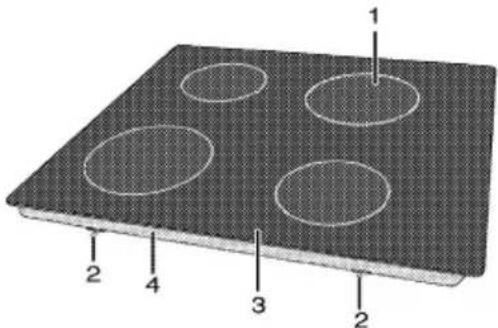
text_image
1 2 4 3 21 Induction cooking plate
2 Assembly clamp
3 Vitroceramic surface
4 Base cover
Technical specifications
| Voltage / frequency | 1N ~ 220-240 V 50 Hz |
| Total power consumption | max. 7200 W |
| Fuse | min. 2 x 16 A |
| Cable type / section | H05V2V2-F 5 x 1,5 mm ^2 |
| External dimensions (height / width / depth) | 55 mm/580 mm/510 mm |
| Installation dimensions (width / depth) | 560 (+2) mm/490 (+2) mm |
| Burners | |
| Rear left | Induction cooking plate |
| Dimension | 180 mm |
| Power | 1800/3000 W |
| Front left | Induction cooking plate |
| Dimension | 180 mm |
| Power | 1800/3000 W |
| Front right | Induction cooking plate |
| Dimension | 145mm |
| Power | 1500/2200 W |
| Rear right | Induction cooking plate |
| Dimension | 210 mm |
| Power | 2000/3700 W |

Technical specifications may be changed without prior notice to improve the quality of the product.

Figures in this manual are schematic and may not exactly match your product.

Values stated on the product labels or in the documentation accompanying it are obtained in laboratory conditions in accordance with relevant standards. Depending on operational and environmental conditions of the product, these values may vary.

Installation
Product must be installed by a qualified person in accordance with the regulations in force. The manufacturer shall not be held responsible for damages arising from procedures carried out by unauthorized persons which may also void the warranty.

Preparation of location and electrical installation for the product is under customer's responsibility.
DANGER:
The product must be installed in accordance with all local electrical regulations.
DANGER:
Prior to installation, visually check if the product has any defects on it. If so, do not have it installed. Damaged products cause risks for your safety.
Before installation
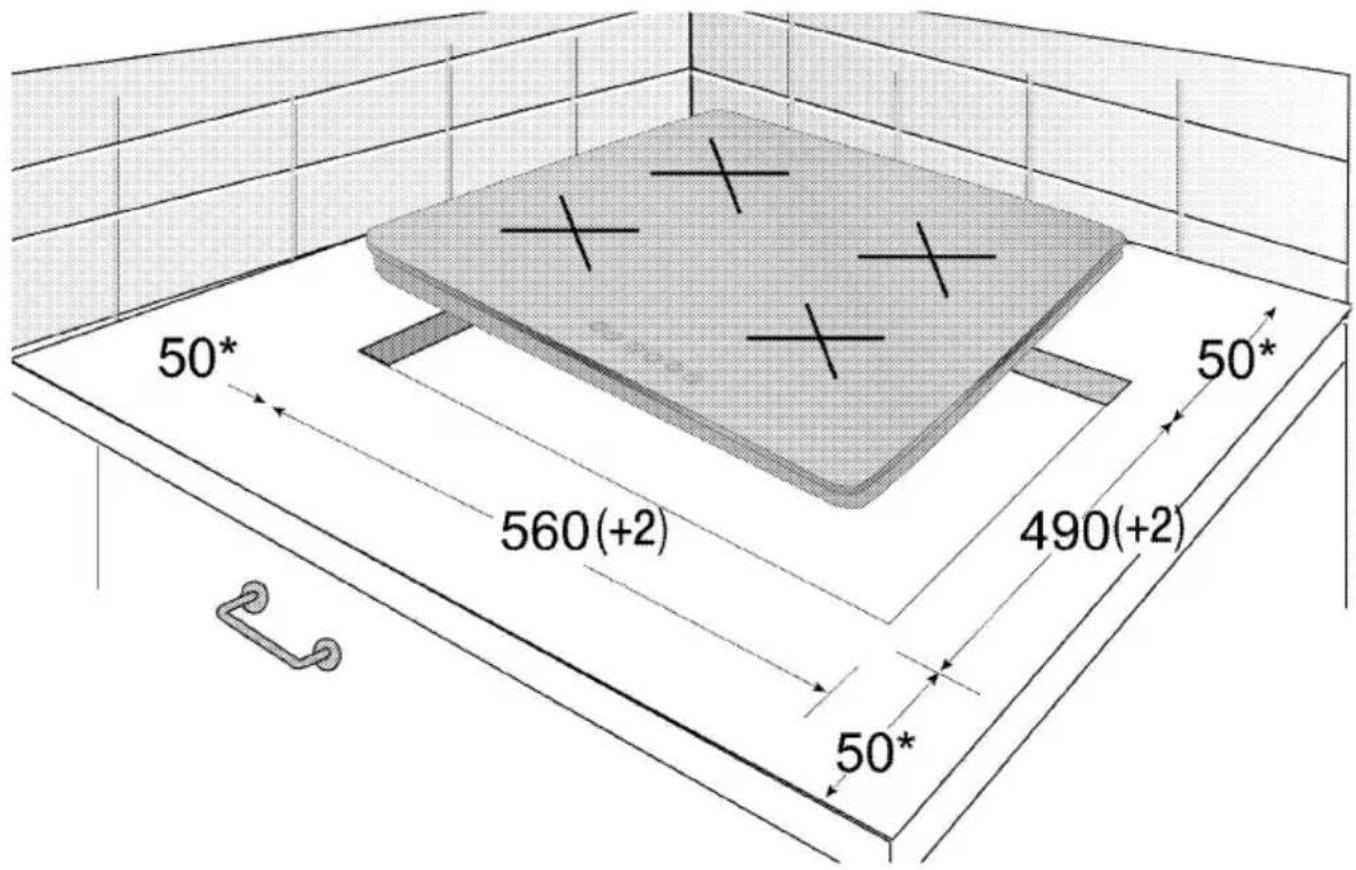
The hob is designed for installation into commercially available work
tops. A safety distance must be left between the appliance and the kitchen walls and furniture. See figure (values in mm).
- It can also be used in a free standing position. Allow a minimum distance of 750 mm above the hob surface.
• (*) If a cooker hood is to be installed above the cooker, refer to cooker hood manufacturer' instructions regarding installation height (min 650 mm) - Remove packaging materials and transport locks.
- Surfaces, synthetic laminates and adhesives used must be heat resistant (100 °C minimum).
- The worktop must be aligned and fixed horizontally.
- Cut aperture for the hob in worktop as per installation dimensions.
text_image
50* 50* 560(+2) 490(+2) 50** min.
Installation and connection
- The product must be installed in accordance with all local gas and electrical regulations.

Do not install the hob on places with sharp edges or corners. There is the risk of breaking for glass ceramic surface!
Electrical connection
Connect the product to a grounded outlet/line protected by a fuse of suitable capacity as stated in the "Technical specifications" table. Have the grounding installation made by a qualified electrician while using the product with or without a transformer. Our company shall not be liable for any damages that will arise due to using
the product without a grounding installation in accordance with the local regulations.

DANGER:
The product must be connected to the mains supply only by an authorised and qualified person. The product's warranty period starts only after correct installation.
Manufacturer shall not be held responsible for damages arising from procedures carried out by unauthorised persons.

DANGER:
The power cable must not be clamped, bent or trapped or come into contact with hot parts of the product.
A damaged power cable must be replaced by a qualified electrician. Otherwise, there is risk of electric shock, short circuit or fire!
- Connection must comply with national regulations.
- The mains supply data must correspond to the data specified on the type label of the product. Type label is at the rear housing of the product.
- Power cable of your product must comply with the values in "Technical specifications" table.
DANGER:
Before starting any work on the electrical installation, disconnect the product from the mains supply. There is the risk of electric shock!

Power cable plug must be within easy reach after installation (do not route it above the hob).
Plug the power cable into the socket.
Installing the product
If the oven is below:
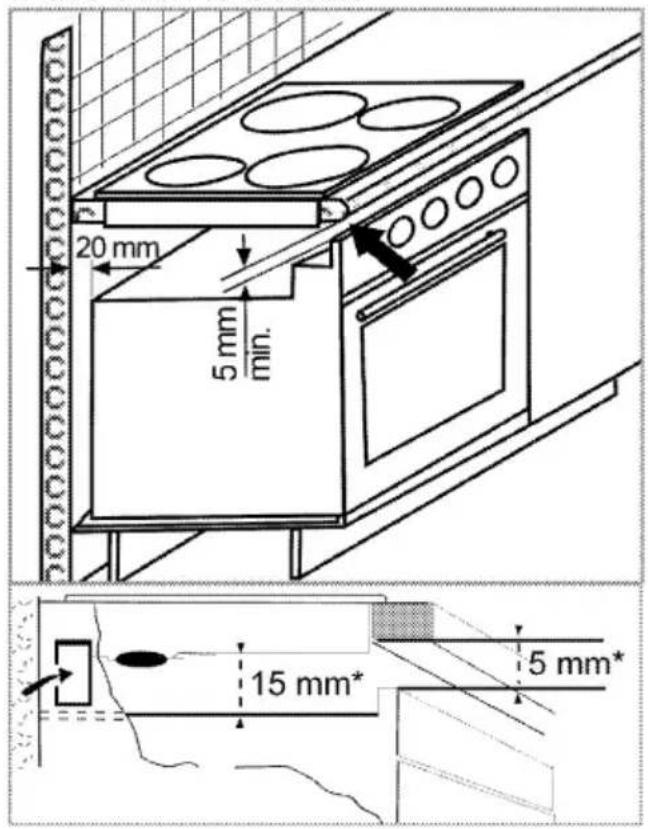
text_image
20 mm 5 mm min. 15 mm* 5 mm** min.
If the board is below:
It is required to leave a ventilation opening of minimum 180 cm ^2 at the rear section of the furniture as illustrated in the following figure.
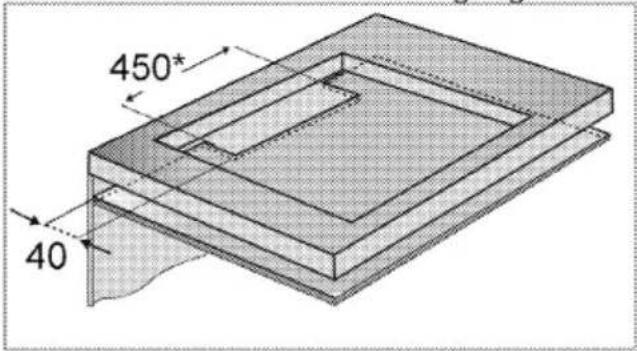
text_image
450* 40* min.
During installation of your induction hob, place the product parallel to the installation surface. Also, apply sealing gasket to the parts of the hob contacting the counter as described below in order to prevent
any liquid from penetrating between the product and the counter.
- Prepare the surface of the counter as shown in the figure.
- Turning the hob upside down, place it on a flat surface.
- The sealing gasket provided in the package must be applied on the lower casing bend around the hob as shown in the figure, during installation of the hob.

natural_image
Close-up of hands holding a dark object with a small protrusion, possibly part of a device or tool (no visible text or symbols)
natural_image
Close-up of a mechanical component with visible traces and mounting holes (no text or symbols)- Fix the mounting springs inserting and screwing them through the holes of the bottom case as shown in the figure.
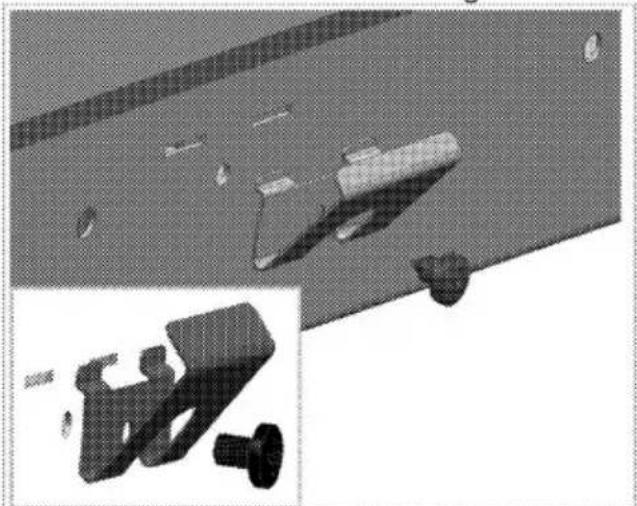
natural_image
3D rendered mechanical parts including a bracket, screw, and housing (no text or symbols visible)- Place the hob on the counter and align it.
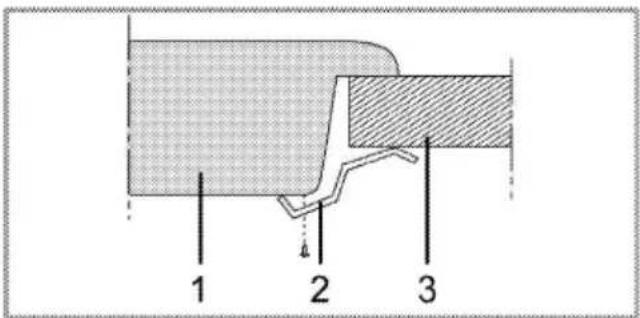
- When the hob is placed on the counter top it will be fixed easily with the help of the clamps. If the counter top dimensions are in appropriate, 2 mounting clamps can be fixed to the front side of the product as shown in the below figure.
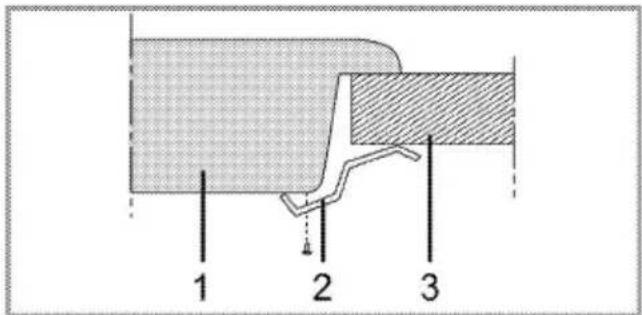
text_image
1 2 31 Hob
2 Installation clamp
3 Counter

When installing the hob onto a cabinet, a shelf must be installed in order to separate the cabinet from the hob as illustrated in the above figure. This is not required when installing onto a built-under oven.
For example, if it is possible to touch the bottom of the product since it is installed onto a drawer, this section must be covered with a wooden plate.
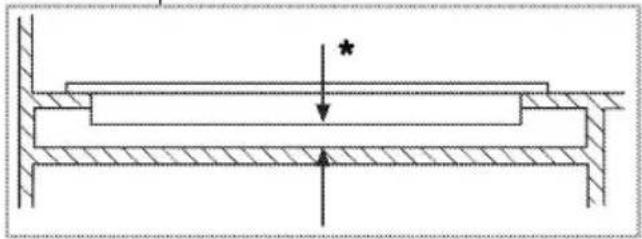
natural_image
Cross-sectional diagram of a structural beam with hatched areas and an arrow indicating force or pressure (no text or symbols)* min. 15 mm
Rear view (connection holes)
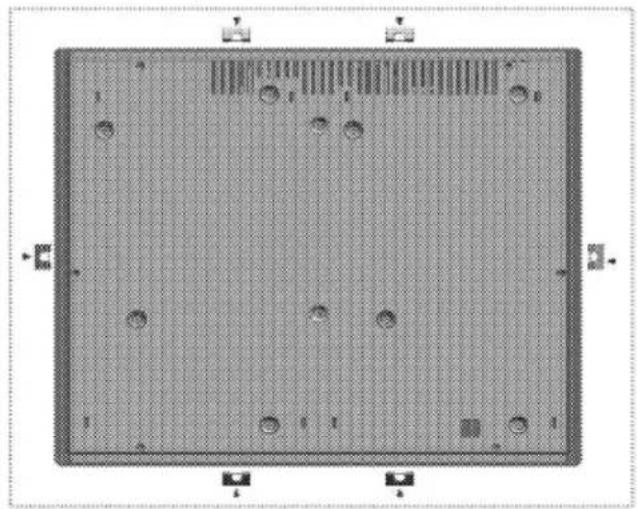
natural_image
Top-down view of a rectangular electronic component with grid pattern and circular holes (no text or symbols)
DANGER:
Making connections to different holes is not a good practice in terms of safety since it can damage the gas and electrical system.
DANGER:
There are gas and electric components on hobs. Therefore stove, only the connection hole shown in this manual should only be fixed to the unit as shown in the manual using the supplied fasteners and screws supplied. Otherwise, it is dangerous to the life and property safety.
Final check
- Plug in the power cable and switch on the product's fuse.
- Check the functions.
Future Transportation
- Keep the product's original carton and transport the product in it. Follow the instructions on the carton. If you do not have the original carton, pack the product in bubble wrap or thick cardboard and tape it securely.

Check the general appearance of your product for any damages that might have occurred during transportation.
4 Preparation
Tips for saving energy
The following information will help you to use your appliance in an ecological way, and to save energy:
- Defrost frozen dishes before cooking them.
- Use pots/pans with cover for cooking. If there is no cover, energy consumption may increase 4 times.
- Select the burner which is suitable for the bottom size of the pot to be used. Always select the correct pot size for your dishes. Larger pots require more energy.
- Pay attention to use flat bottom pots when cooking with electric hobs. Pots with thick bottom will provide a better heat conduction. You can obtain energy savings up to 1/3.
- Vessels and pots must be compatible with the cooking zones. Bottom of the vessels or pots must not be smaller than the hotplate.
- Keep the cooking zones and bottom of the pots clean. Dirt will decrease the heat
conduction between the cooking zone and bottom of the pot.
Initial use
First cleaning of the appliance

The surface might get damaged by some detergents or cleaning materials.
Do not use aggressive detergents, cleaning powders/creams or any sharp objects during cleaning. Do not use harsh abrasive cleaners or sharp metal scrapers to clean the oven door glass since they can scratch the surface, which may result in shattering of the glass.
- Remove all packaging materials.
- Wipe the surfaces of the appliance with a damp cloth or sponge and dry with a cloth.
Initial heating

Smoke and smell may emit for a couple of hours during the initial operation. This is quite normal. Ensure that the room is well ventilated to remove the smoke and smell. Avoid directly inhaling the smoke and the smell that emits.
5 How to use the hob
General information about cooking
Never fill the pan with oil more than one third of it. Do not leave the hob unattended when heating oil. Overheated oils bring risk of fire. Never attempt to extinguish a possible fire with water! When oil catches fire, cover it with a fire blanket or damp cloth. Turn off the hob if it is safe to do so and call the fire department.
- Before frying foods, always dry them well and gently place into the hot oil. Ensure complete thawing of frozen foods before frying.
- Do not cover the vessel you use when heating oil.
- Place the pans and saucepans in a manner so that their handles are not over the hob to prevent heating of the handles. Do not place unbalanced and easily tilting vessels on the hob.
- Do not place empty vessels and saucepans on cooking zones that are switched on. They might get damaged.
-
Operating a cooking zone without a vessel or saucepan on it will cause damage to the product. Turn off the cooking zones after the cooking is complete.
-
As the surface of the product can be hot, do not put plastic and aluminum vessels on it.
Clean any melted such materials on the surface immediately.
Such vessels should not be used to keep foods either. - Use flat bottomed saucepans or vessels only.
- Put appropriate amount of food in saucepans and pans. Thus, you will not have to make any unnecessary cleaning by preventing the dishes from overflowing.
Do not put covers of saucepans or pans on cooking zones.
Place the saucepans in a manner so that they are centered on the cooking zone.
When you want to move the saucepan onto another cooking zone, lift and place it onto the cooking zone you want instead of sliding it.
Saucepan selection
- Glass ceramic surface is heatproof and is not affected by big temperature differences.
- Do not use the glass ceramic surface as a place of storage or as a cutting board.
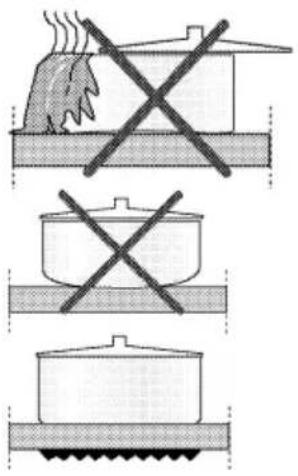
- Use only the saucepans and pans with machined bottoms. Sharp edges create scratches on the surface.
natural_image
Three-step cooking process diagram showing heating, boiling, and cooling steps with crossed X marks (no text or symbols)Spills may damage the glass ceramic surface and cause fire.
Do not use vessels with concave or convex bottoms.
Use only the saucepans and pans with flat bottoms. They ensure easier heat transfer.
For induction hobs, use only vessels suitable for induction cooking.
Saucepan test
Use following methods to test whether your saucepan is compatible with the induction hob or not.
- Your saucepan is compatible if its bottom holds magnet.
- Your saucepan is compatible if "L" does not flash when you place your saucepan on cooking zone and start the hob.
You can use steel, teflon or aluminium saucepans with special magnetic bottom that contains labels or warnings indicating that the saucepan is compatible with induction cooking. Glass and ceramic vessels, pots and the stainless steel vessels with non-magnetic aluminium bottom should not be used.
Saucepan recognition-focusing system
In induction cooking, only the area covered by the vessel on the relevant cooking zone is energised. The vessel's bottom is recognised by the system and only this area is heated automatically. Cooking stops if the cooking vessel is lifted from the cooking zone during cooking. Selected cooking zone and "L" symbol flashes alternately.
Safe use
Do not select high heating levels when you will use a non-sticking (teflon) saucepan with no oil or with very little oil.
Do not put metal items such as forks, knives or saucepan covers onto your hob since they can get heated.
Never use aluminium folio for cooking. Never place food items wrapped with aluminium folio onto the cooking zone.

If there is an oven under your hob and if it is running, sensors of the hob can decrease the cooking level or turn off the oven.

When the hob is running, keep items with magnetic properties such as credit cards or cassettes away from the hob.
Selecting cooking zone suitable to the vessel
| Large cooking zone | Normal cooking zone | Small cooking zone |
| Large cooking zone• Automatically fits to the saucepan.• Distributes the power ideally.• Provides perfect heat distribution. Used to cook dishes such as large crepes or large fishes rare or very rare. | Normal cooking zone• Automatically fits to the saucepan.• Distributes the power ideally.• Provides perfect heat distribution. Used for all kinds of cookings. | Small cooking zone• Used for slow cookings (sauces, creams)• Used to prepare small portions or portions based on number of persons. |
DANGER:
Do not allow any object to drop on the hob. Even small objects such as a saltshaker may damage the hob. Do not use cracked hobs. Water may leak through these cracks and cause short circuit. In case of any kind of damage on the surface (eg., visible cracks), switch off the product immediately to minimize the risk of electric shock.
Control panel
Adjustment area (for temperature level and time setting)
| Light indicating that the relevant key is functioning | |
| On / Off key | |
| Keylock key | |
| Timer Activation / Deactivation key | |
| Quick Heating key / Booster key | |
| Keep Warm key | |
| Stop key | |
| Memory key | |
| ECO | Economy mode key |
| Front Left Cooking Zone Selection key | |
| Rear Left Cooking Zone Selection key | |
| Rear Right Cooking Zone Selection key | |
| Front Right Cooking Zone Selection key |
Graphics and figures are for informational purposes only. Actual displays and functions may vary according to the model of your hob.
Cooking zone display

text_image
1 2 6 5 4 31 Temperature Indicator (temperature setting 0 ... 19)
2 Cooking zone light
3 Cooking Zone Selection key
4 Keep Warm Function symbol (*)
5 Timer symbol
6 Multi-segmented Cooking Zone symbol (*)
* Varies according to the model.

This device is controlled with a touch control panel. Each operation you make on your touch control panel will be confirmed by an audible signal

Always keep the control panel clean and dry. Having damp and soiled surface may cause problems in the functions.
Turning on the hob
- Touch "①" key on the control panel.
Light of the "①" key turns on. The hob is ready for use.

If no operation is performed within 20 seconds, the hob will automatically return to Standby mode.

When any key ("☐" key) is pressed for a long time, the product automatically turns off for safety reasons.
Turning off the hob
- Touch "①" key on the control panel.
The hob will turn off and return to Standby mode.

"H" or "h" symbols that appear on the cooking zone display after the hob is turned off indicates that the cooking zone is still hot. Do not touch cooking zones.
Residual heat indicator
"H" symbol that appears on the cooking zone display indicates that the hob is still hot and may be used to keep a small amount of food warm. This symbol will soon turn to "h" symbol meaning less hot.
When power is cut off, residual heat indicator will not light up and does not warn the user against hot cooking zones.
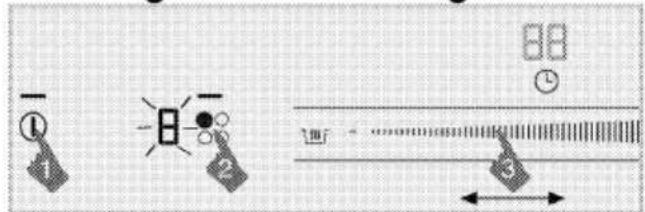
Turning on the cooking zones
text_image
Diagram showing three labeled icons (①, ②, ③) with arrows and symbols, likely representing a camera or navigation system interface.- Touch "①" key to turn on the hob.
- Touch the selection key of the cooking zone you want to turn on. "0" appears on the cooking zone display and the light of the relevant cooking zone illuminates.

If no operation is performed within 20 seconds, the hob will automatically return to Standby mode.
Setting the temperature level
By touching the adjustment area or by sliding your finger across the area, adjust the temperature level between "0" and "19".
Turning off the cooking zones:
A cooking zone can be turned off in 3 different ways:
- By dropping the temperature level to "0"
You can turn the cooking zone off by dropping the temperature level to "0".
- By using the turning off through the timer option for the desired cooking zone
When the time is over, the timer will turn off the cooking zone assigned to it. "0" or "00" will appear on all displays. The "💡" symbol on the hob display will disappear.
When the time is over, an audible alarm will sound. Touch any key on the control panel to silence the audible alarm.
- By touching the relevant cooking zone symbol for 3 seconds.
Touch the symbol of the cooking zone that you want to turn off for about 3 seconds.
High Power (Booster) Function
For rapid heating, you can use booster function. However, this function is not recommended for cooking a long time. Booster function may not be available in all cooking zones.
Selecting Booster directly:
- Touch "①" key to turn on the hob.
-
Select the desired cooking zone by touching the Cooking Zone Selection keys.
-
Touch the "☐" key.
Selected cooking zone will operate at the maximum power and 3 lights will flash on the cooking zone display respectively. When booster time ends, cooking zone turns off.
Selecting Booster when cooking zone is active:
- Touch "###" after cooking zone has operated at least 20 seconds on a certain level.

Cooking zone should complete operating for at least 20 seconds on the selected level.
- Selected cooking zone will operate at the maximum power and 3 lights will flash on the cooking zone display respectively. Once the Booster period is over, the cooking zone switches to the set temperature level and only the selected temperature value is displayed.
Turning off Booster function prematurely:
Touch "###" to turn off booster any time you want.
Quick heating
Qucik heating is a function which facilitates cooking. It can be used for rapid heating for short time period. All cooking zones are equipped with Quick heating function. This function can be operated by setting temperature level beforehand.

Quick heating function can be set within 20 seconds after cooking zone is switched on and temperature level is adjusted.
Selecting Quick heating function:

text_image
Diagram illustrating a process with labeled steps and directional arrows, including icons for lighting, data transmission, and system interaction.- Touch "①" key to turn on the hob.
- Select the desired cooking zone by touching the Cooking Zone Selection keys.
- Adjust the desired temperature level by touching the adjustment area or by sliding your finger across the area.
- Touch the "###" key. The cooking zone you have selected will operate at high power for a certain period of time (see following table). 3 lights and the set temperature value will appear on the cooking zone display respectively.
- Once the Quick heating period is over, the cooking zone switches to the set temperature level and only the selected temperature value is displayed.
Table: Quick Heating Operation Times
| Temperature level | Operation time limit - second |
| 0 | 0 |
| 1 | 10 |
| 1. | 10 |
| 2 | 20 |
| 2. | 30 |
| 3 | 40 |
| 3. | 47 |
| 4 | 56 |
| 4. | 65 |
| 5 | 75 |
| 5. | 85 |
| 6 | 85 |
| 6. | 25 |
| 7 | 25 |
| 7. | 35 |
| 8 | 35 |
| 8. | 45 |
| 9 | 45 |
| 9. | 10 |
Turning off Quick heating function:
Touch "☐" key to turn off the Quick heating function whenever you want.
Cleaning lock
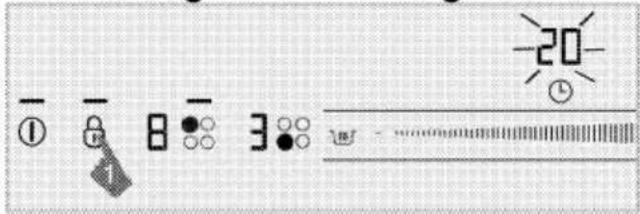
The cleaning lock prevents operation of all keys on the control panel for 20 seconds to allow the user to make a short cleaning while the hob is in use.
Activating the cleaning lock
text_image
Camera control panel interface with icons for settings, zoom, and display- When the hob is in On mode, press and hold "☐" key until a single signal sound is heard.
Cleaning lock light will illuminate and the clock display of the hob will start to count down from 20. None of the keys on the control panel will be functional throughout this period except "①" key.
Deactivating the cleaning lock
You do not have to press any key to deactivate the cleaning lock. The hob will give an audio signal after 20 seconds, keylock light will turn off and the cleaning lock is automatically deactivated.
Child Lock
When the hob is in Standby mode, you can protect the hob with child lock to prevent children from turning on the cooking zones. Child Lock can be activated or deactivated in Standby mode only.
Activating the Child Lock
- When the hob is in Standby model, press and hold "∅" key until two signal sounds are heard.
The Child Lock will be activated and the light of the "∅" key will turn off.

If any key is pressed when the Child Lock is active, the light of the "☐" key flashes.
Deactivating the Child Lock
- When the Child Lock is activated, press and hold "∅" key until a single signal sound is heard.
» Child Lock will be deactivated and the light of the "∅" key will turn off.
Keylock
You can activate the keylock to avoid changing the functions by mistake when the hob is operating.
Activating the keylock
- Touch and hold the "☐" key for a long time to lock the control panel.
Only one signal sound will be heard first. In this case, your hob is switched to Cleaning Lock. Then, keep on touching without lifting your finger until you hear two successive signal sounds.
The light of the "☐" key will flash and all cooking zones will be locked.
You can activate the keylock in operation mode only. When keylock is activated, only the "①" key will be functional. When you touch any other key, the light of the "②" key will flash to indicate that the keylock is active. If you turn the hob off when the keys are locked, the keylock must be deactivated to turn the hob on again.
Deactivating the keylock
- Keep "8" key pressed for 2 seconds.
The operation is confirmed with an audible signal. The light of the " 8 " key turns off and the control panel is unlocked.
Timer function
This function facilitates cooking for you. It will not be necessary to attend the oven for the whole cooking period. Cooking zone will be turned off automatically at the end of the time you have selected.
Activating the timer
- Touch "①" key to turn on the hob.
-
Select the desired cooking zone by touching the Cooking Zone Selection keys.
-
Adjust the desired temperature level by touching the adjustment area or by sliding your finger across the area.
- Touch "☐" key to activate the timer.
"00" appears on the timer display and "💡" symbol starts flashing on the cooking zone display.
- Adjust the desired time period by touching the adjustment area or by sliding your finger across the area.
After flashing for a certain period of time, the "💡" symbol lights up permanently. Lighting up of "💡" symbol continuously indicates that the function is activated.

The timer cay only be set for the cooking zones already in use.

Repeat the above procedures for the other cooking zones for which you wish to set the timer.

Timer cannot be adjusted unless the cooking zone and the temperature value for the cooking zone are selected.

When the timer is activated, only the set time for the selected cooking zone will appear on the timer display.
Deactivating the timer
Once the set time is over, the hob will automatically turn off and give an audible warning.
Press any key to silence the audio warning.
Turning off the timers earlier
If you turn off the timer earlier, the hob will carry on operating at the set temperature until it is turned off. You can turn the timer off in two different ways:
1-Turning off the timer by dropping its value down to "00":
- Select the cooking zone you want to turn off.
- Touch "①" key to select the timer of the relevant cooking zone.
- Decrease the value until "00" appears on the timer display by touching the adjustment area or by sliding your finger across the area.
"💡" symbol flashes on the cooking zone display for a certain time period and then it turns off permanently and the timer is canceled.
2-Turning off the timer by pressing timer key for 3 seconds:
- Select the cooking zone you want to turn off.
- Touch "①" key to select the timer of the relevant cooking zone.
- Touch "💡" key for about 3 seconds.
"💡" symbol flashes on the cooking zone display for a certain time period and then it turns off permanently and the timer is canceled.
Keep warm function (if any)
You can use this function to keep your meal warm after the cooking process is completed. The keep warm function may be used in two different ways: with and without setting the timer.
Activating the keep warm function without setting the timer
- Select the cooking zone that has been set to a certain temperature and you want to use for keeping warm.
- Touch "###" key to activate the keep warm function for the relevant cooking zone.

The cooking zone will go on operating at low temperature.
"###" and "u" symbols appear on the cooking zone display.
Activating the keep warm function by setting the timer
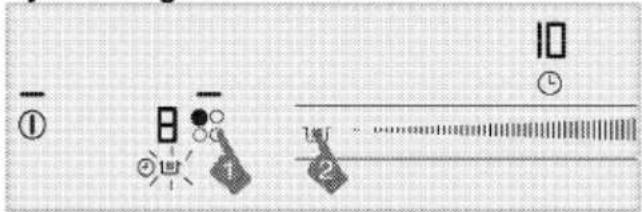
text_image
Camera control panel interface with labeled buttons and indicator lights- Select the desired cooking zone for which the temperature and timer has been set, and you are planning to run the keep warm function.
- Touch "###" key to activate the keep warm function for the relevant cooking zone.
"☐" symbol appears on the cooking zone display.
The cooking zone will keep on operating at the set temperature throughout the set time period. When the time is over, it switches to keep warm function and starts
operating at low temperature. "u" symbol appears on the cooking zone display.
Turning off the keep warm function
- If the timer is activated, select the cooking zone for which the keep warm function is activated. Touch ""###" key to turn off the keep warm function.
The cooking zone will continue operating with the previous time and temperature setting.
- If the timer is deactivated, select the cooking zone for which the keep warm function is activated. Set the desired temperature by touching the adjustment area or by sliding your finger across it in order to deactivate the keep warm function.
The cooking zone will go on operating at the new temperature you have set.

You can cancel the keep warm function by touching the "①" key and turning off the hob entirely.
Stop function
Using this function, you may stop all functions operating on the hob (except timer) for a certain period of time.
If the timer is set for any cooking zone, timer will continue operating during stoppage.
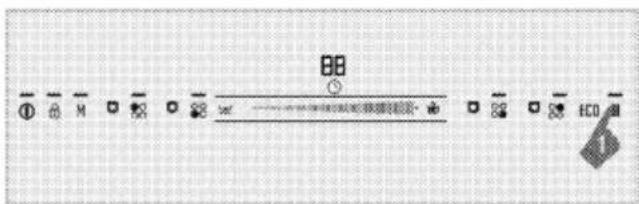
text_image
BB ① ② M ③ ④ ⑤ ⑥ ⑦ ECO- Touch the "II" key when your hob is operating.
All active cooking zones will stop. - Touch "II" key again to restart all stopped cooking zones with previous settings.
Eco mode
You can switch all cooking zones to lower level by using this function.

Economy mode can only be activated for active cooking zones.
- Touch the "eco" key when cooking zone is operating.
» Active cooking zone switches to economy mode and its level drops by half.
Memory function
Your hob can save a certain cooking temperature and time in the memory. Thanks to this function, you can store the cooking temperature and time of a dish you enjoyed.
Only 1 setting can be stored in the memory. As each saved setting will be overwritten on the previous one, the last setting you have saved will remain in the memory.
- Touch "①" key to turn on the hob.
-
Select the desired cooking zone by touching the Cooking Zone Selection keys.
-
Adjust the desired temperature by touching the adjustment area or by sliding your finger across the area.
- Adjust the desired time as well.
- After adjusting the temperature and time, touch the "M" symbol until you hear two warning sounds.
The "M" symbol will light up and the set temperature and time are saved into memory.
Using the settings in the memory
- Select the desired cooking zone by touching the Cooking Zone Selection keys.
- When the temperature value is "0", touch "M" key until you hear a single warning sound.
The selected cooking zone will be set to the temperature and time in the memory, and commence operating with these settings.
Using induction cooking zones safely and efficiently
Operating principles: Induction hob heats directly the cooking vessel as a feature of its operating principles. Therefore, it has various advantages when compared to other hob types. It operates more efficiently and the hob surface does not heat up. Induction hob is equipped with superior safety systems that will provide you maximum usage safety.

Your hob can be equipped with induction cooking zones with a diameter of 145, 180, 210 and 280 mm depending on the model. With induction feature, each cooking zone detects the diameter of each vessel placed on them. Energy builds up only where the vessel contacts with the cooking zone and thus, minimum energy consumption is achieved.
Operation time constraints
The hob control is equipped with an operation time limit. When one or more cooking zones are left on, the cooking zone will automatically be deactivated after a certain period of time (see Table-1). If there is a timer assigned to the cooking zone, the timer display will also turn off later.
Operation time limit depends on the selected temperature level.
Maximum operation time is applied at this temperature level.
The cooking zone may be restarted by the user after it is turned off automatically as described above.
Table-1: Operation time constraints
| Temperature level | Operation time limit - hour |
| 0 | 0 |
| 1 | 6 |
| 1. | 6 |
| 2 | 5 |
| 2. | 5 |
| 3 | 4 |
| 3. | 4 |
| 4 | 3 |
| 4. | 3 |
| 5 | 2,5 |
| 5. | 2,5 |
| 6 | 2 |
| 6. | 2 |
| 7 | 1,5 |
| 7. | 1,5 |
| 8 | 1 |
| 8. | 1 |
| 9 | 0,5 |
| 9. | 0,5 |
| High Power(Booster) Function | 10 minutes |
Overheating protection
Your hob is equipped with some sensors ensuring protection against overheating. Following may be observed in case of overheating:
• Active cooking zone may be turned off.
- Selected level may drop. However, this condition cannot be seen on the indicator.
Overflow safety system
Your hob is equipped with overflow safety system. If there is any overflow that spills onto the control panel, system will cut the power connection immediately and turn off your hob. "E" warning appears on display during this period.
Precise power setting
Induction hob reacts the commands immediately as a feature of its operating principles. It changes the power settings very fast. Thus, you can prevent a meal (water, milk) from overflowing even if it was just about to overflow.
Operating noisy
Some noises may arise from the induction hob. These sounds are normal and a part of induction cooking.
- Noise becomes prominent in high temperature levels.
- Alloy of the saucepan can cause noise.
- In low levels, a regular on/off sound can be heard because of the operating principles.
- Noise can be heard if an empty saucepan is heated. When you put water or meal in it, this sound will clear away.
• The noise of the fan that cools electric system can be heard.
Error codes / warning messages and error sources Table-2:
| Cause of error | Indicator | Display |
| Two or more keys are pressed or overflow spills onto the keys. | "E" symbol flashes | Cooking zone display |
| Hob overheated | "H" symbol flashes | Cooking zone display |
| No proper vessel on the zone. | "L" symbol lights up | Cooking zone display |
| Touch control hardware error. | "Fx**" symbol lights up | Timer display |
| Induction hardware error. | "Ex**" symbol lights up | Cooking zone display |
| Touch-key sensitivity error | "F2" symbol lights up | Timer display |
| Communication | "F3" | Timer |
| error in touch control. | symbol lights up | display |
| Induction hardware error. | "Ex**" symbol flashes | Cooking zone display |
| x**: "1,2,...,9" | ||

For further information about error messages that may appear on the touch control panel, see Table-2. If "Fx" and "Ex" messages display constantly, call Authorized Service Agent.

If the surface of the touch control panel is exposed to intense vapor, entire control system may become deactivated and give "E" error signal. Signal sounds are heard.

Keep the surface of the touch control panel clean. Erroneous operation may be observed.
6 Maintenance and care
General information
Service life of the product will extend and the possibility of problems will decrease if the product is cleaned at regular intervals.

DANGER:
Disconnect the product from mains supply before starting maintenance and cleaning works. There is the risk of electric shock!
DANGER:
Allow the product to cool down before you clean it. Hot surfaces may cause burns!
- Clean the product thoroughly after each use. In this way it will be possible to remove cooking residues more easily, thus avoiding these from burning the next time the appliance is used.
- No special cleaning agents are required for cleaning the product. Use warm water with washing liquid, a soft cloth or sponge to clean the product and wipe it with a dry cloth.
• Always ensure any excess liquid is thoroughly wiped off after cleaning and any spillage is immediately wiped dry. - Do not use cleaning agents that contain acid or chloride to clean the stainless or inox surfaces and the handle. Use a soft cloth with a liquid detergent (not abrasive) to wipe those parts
clean, paying attention to sweep in one direction.

The surface might get damaged by some detergents or cleaning materials.
Do not use aggressive detergents, cleaning powders/creams or any sharp objects during cleaning. Do not use harsh abrasive cleaners or sharp metal scrapers to clean the oven door glass since they can scratch the surface, which may result in shattering of the glass.

Do not use steam cleaners to clean the appliance as this may cause an electric shock.
Cleaning the hob
Glass ceramic surfaces
Wipe the glass ceramic surface using a piece of cloth dampened with cold water in a manner as not to leave any cleaning agent on it. Dry with a soft and dry cloth.
Residues may cause damage on the glass ceramic surface when using the hob for the next time.
Dried residues on the glass ceramic surface should under no circumstances be scraped with hook blades, steel wool or similar tools.
Remove calcium stains (yellow stains) by a small amount of lime remover such as vinegar or lemon juice. You can also use suitable commercially available products.
If the surface is heavily soiled, apply the cleaning agent on a sponge and wait until it is absorbed well. Then, clean the surface of the hob with a damp cloth.
Sugar-based foods such as thick cream and syrup must be cleaned promptly without waiting the surface to cool down. Otherwise, glass ceramic surface may be damaged permanently.
Slight color fading may occur on coatings or other surfaces in time.
This will not affect operation of the product.
Color fading and stains on the glass ceramic surface is a normal condition, and not a defect.
7 Troubleshooting
Water drops occur during cooking.
- The vapour that arises during cooking can condense and form water droplets when it hits cold surfaces of the product. This is not a fault.
Product emits metal noises while heating and cooling.
- When the metal parts are heated, they may expand and cause noise. This is not a fault.
Product does not operate.
- The mains fuse is defective or has tripped. Check fuses in the fuse box. If necessary, replace or reset them.
- Product is not plugged into the (grounded) socket. Check the plug connection.
- If the display does not light up when you switch the hob on again. Disconnect the appliance at the circuit breaker. Wait 20 seconds and then reconnect it.
• Overheat protection is active. →→→ Allow your hob to cool down.
• The cooking pot is not suitable. →→→ Check your pot.
"|=" symbol appears on the cooking zone display.
- You have not placed the pot on the active cooking zone. Check if there is a pot on the cooking zone.
- Your pot is not compatible with induction cooking. Check if your cooking pot is compatible with induction hob.
- The cooking pot is not centered properly or the bottom surface of the pot is not wide enough for the cooking zone. Choose a pot wide enough and center the pot on the cooking zone properly.
- Cooking pot or cooking zone is overheated. Allow them to cool down.
Selected cooking zone suddenly turns off during operation.
- Cooking time for the selected cooking zone may be over. You may set a new cooking time or finish cooking.
• Overheat protection is active. →→→ Allow your hob to cool down. - An object may be covering the touch control panel. Remove the object on the panel.
The pot does not get warm even if the cooking zone is on.
- Your pot is not compatible with induction cooking. Check if your cooking pot is compatible with induction hob.
- The cooking pot is not centered properly or the bottom surface of the pot is not wide enough for the cooking zone. Choose a pot wide enough and center the pot on the cooking zone properly.
Cooling fan continues operating although the hob is turned off.
- This is not a fault. Cooling fan will continue operating until the electronics in the hob cools down to a suitable temperature.
Consult the Authorised Service Agent or technician with licence or the dealer where you have purchased the product if you can not remedy the trouble although you have implemented the instructions in this section. Never attempt to repair a defective product yourself.
INNEBYGD KOMFYR
BRUKERHÅNDBOK
NO
Vennligst les denne bruksanvisningen først!
Kjære kunde,
Tips for energisparing....16
natural_image
Close-up of hands holding a dark object with a grid pattern (no visible text or symbols)
natural_image
Close-up of a computer drive casing with visible internal components (no text or symbols)natural_image
3D rendered mechanical parts including a screw and housing, shown in two views (no text or symbols)-
Plasser komfyren på benken og innjuster den.
-
Når koketoppen er plassert på benkeplaten, festes den enkelt med klemmene. Hvis benkens mål ikke passer, kan to monteringsskruer feste på forsiden av produktet, som vist på bildet.
text_image
1 2 31 Komfyr
natural_image
Pure mechanical cross-section diagram without any text, numbers, or symbols* min. 15 mm
Sett bakfra (tilkoblingshull)

natural_image
Top-down view of a grid-patterned rectangular panel with circular holes and control buttons (no text or symbols)
FARE:
natural_image
Three-step cooking process diagram showing heating, boiling, and cooling steps with crossed x-marks (no text or symbols)Søl kan skade den glasskeramiske overflaten og kan forårsake brann.
text_image
Diagram showing three labeled icons (①, ②, ③) with directional arrows and a measurement scale bar, likely illustrating a measurement or calibration process.- Berør tasten "①" for å slå på komfyren.
- Berør velgerknappen for den kokesonen du vil varme opp. "0" vises på kokesonedisplayet og lyset på den relevante kokesonen tennes.

text_image
Diagram showing a device with labeled components and directional arrows, including symbols like 'I', '2', '3', and '4' with numerical values.text_image
Digital display control interface with icons for alarm, lock, timer, and light indicatortext_image
Camera control panel interface with labeled buttons and indicator lightsnatural_image
Two grayscale images showing a hand holding a tool near a laptop screen and a close-up of a computer case (no visible text or symbols)natural_image
3D rendered mechanical parts including a bolt and a component, shown with an inset close-up of the component (no text or symbols visible)natural_image
Pure mechanical cross-section diagram without any text, numbers, or symbols* min 15 mm
natural_image
Top-down view of a square grid with circular holes and directional arrows, no text or symbols present.
VAARA:
natural_image
Simple line drawing of a roof with steam rising and crossed-out X marks (no text or symbols)