30025 - Alarm clock radio LA CROSSE TECHNOLOGY - Free user manual and instructions
Find the device manual for free 30025 LA CROSSE TECHNOLOGY in PDF.


| Product Type | Alarm Clock Radio |
| Brand | La Crosse Technology |
| Model | 30025 |
| Dimensions (approx.) | 5.5 x 3.5 x 2.5 inches |
| Weight | 0.6 lbs |
| Power Source | AC adapter (included) or 2 AA batteries (backup) |
| Radio Bands | AM / FM |
| Alarm Type | Radio or buzzer alarm |
| Snooze Function | 9-minute snooze |
| Display | LED time display with adjustable brightness |
| Sleep Timer | Yes, 10 to 120 minutes |
| Date Display | Yes |
| Alarm Backup | Battery backup maintains time and alarm settings |
| Material | Plastic casing |
| Color | Black |
| Cleaning Instructions | Wipe with a soft, dry cloth. Do not use liquid or abrasive cleaners. |
| Safety Precautions | Keep away from water, heat sources, and direct sunlight. Unplug during storms. |
| Spare Parts Availability | Not applicable (integrated unit). Contact manufacturer for service. |
| Repairability | Not user-serviceable. Do not open. Contact La Crosse Technology support. |
| Warranty | 1-year limited warranty |
| Additional Features | Dual alarms, dimmer switch, MP3 input (aux) ? |
Frequently Asked Questions - 30025 LA CROSSE TECHNOLOGY
User questions about 30025 LA CROSSE TECHNOLOGY
0 question about this device. Answer the ones you know or ask your own.
Ask a new question about this device
Download the instructions for your Alarm clock radio in PDF format for free! Find your manual 30025 - LA CROSSE TECHNOLOGY and take your electronic device back in hand. On this page are published all the documents necessary for the use of your device. 30025 by LA CROSSE TECHNOLOGY.
USER MANUAL 30025 LA CROSSE TECHNOLOGY
Equity
.9-inch LED Alarm Clock
with USB Charging Port
text_image
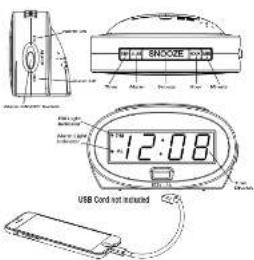
SHOOZE 12:08 USB Cord not installedModel: 30024 & 30025 DC: 081924
POWER UP
- Insert the 120 volt power cord into an outlet.
Optional: Insert "SV" battery (sole separately) for backup.
- The Time Display will flash 12:00, an indication to set the time.
TIME SETTING
Continuously hold down the TIME button while selling your hour and minutes.
-
While holding the TIME button, press the HOUR button to set your hour. Note: The PM Indicator will appear when you advance to PM time.
-
While holding the TIME button, press the MINUTE button to set your minutes.
-
When the correct time is shown on the display, release the TIME button to return to normal time display.
BACKLIGHT
Your backlight has three levels: High, Low, and Off. - Press the SNOOZE/LIGHT button to adjust.
USB CHARGING PORT
- Connect your external device's USB charging cable (not included) to the USB charging port.
• USB Power Output: 5V 1A maximum current.
+ Charge devices that are self-regulating.
Page 1-2
ALARM TIME SETTING & OPERATION
Continuously hold down the ALARM button while setting your alarm hour and minutes.
- While holding the ALARM button, press the HOUR button
to set your alarm hour. Note: The PM indicator will appear when you advance to PM time.
-
While holding the ALARM button, press the MINUTE button to set your alarm minutes.
-
When the porced slann line is shown on the display.
release the ALARM button to return to normal time display.
-
Move the Alarm ON/OFF Switch to the ON position to turn the alarm on. Note: The Alarm Indicator will appear when the alarm is on.
-
To turn off a sounding alarm, move the Alarm ON/OFF Switch to the OFF position
SNOOZE
When alarm sounds, press the SNOOZE button to silence alarm for 8 minutes. Snooze function can be repeated many times if desired.
Note: This is x. According alarm, it will sound with increased frequency for 2 minutes then shut off if no buttons are pressed.
BATTERY BACKUP
- insert one "9V" battery into the battery compartment on the back
of the clock. The battery will keep the alarm and time settings
until the power is restored.
- The LED display will not light-up but the alarm will sound at the
preset warm time.
- If there is no battery installed but the power is interrupted, the
display will flash at 12:30 and the time and alarm need to be set
again
SPECIFICATIONS
Time Format: 12 Hour Time
Time Digit Height: 0.9-inch (2.25cm)
Alarm Deeping Scand. 107-245
Shoulie Baritkin, 6 M. H. K.
Power Requirement: I2DV AC Power
Battery Backup: One 9V Battery (Not Included)
Battery Life: 12 Months with Power Cord Use
Clock Dimensions: 5.00 in L x 2.00 in W x 2.65 in H
|2.7cm L×5.06cm W×7.24cm H|
STAY IN TOUCH
Ask questions, watch detailed setup videos and provide feedback or our
La Crosse Technology social media outlets

[Unreadable]
WARNING: TO REDUCE THE RISK OF FIRE OR ELECTRICAL SHOCK, DO NOT EXPOSE THIS APPLIANCE TO RAIN OR MOISTURE.
Caution: To prevent electrical shock do not use this (polarized) plug with an extension cord, receptacle, or other outlet unless the blades can be fully inserted to prevent blade exposure.
ATTENTION: POUR PRÉVENIR LES CHOCS ÉLECTRIQUES NE PAS UTILISER CETTE FICHE POLARISEE AVEC UN PROLONGATEUR, UNE PRISE DE COURANT, OU UNE AUTRE SORTIE DE COURANT SAUF SI LES LAMES PEUVENT ETRE INSÈREES À FOND SANS EN LAisser AUCUNE PARTIE À DÉCOUNVERT

WARNING: the shield can expose you to chemistries, including everyday life, 1-2Buttonless, and Styrene, which are known to the State of California to cause cancer and birth defects or other reproductive harm. For more information go to: www.E550's.chinastcc.gov
SAFETY INSTRUCTIONS
-
Rate values: 0.4 (the safety and maintenance) more than should be used before the appearance is covered
-
Retail Instructions: The safety and operating instruction should be retained to future reference
-
Water and Moisture. The appliance should not be used near water - for example, near a difficulty, was showed, kitchen use, and the use in a wet, moisture, or snow and running good and the ice.
-
Verification - The appliance should be situated at the location of position, each of which is proper ventilation. But sample, the apparatus should be installed on a beam, including a surface that may block the ventilation opening, or place it in a but installation such as a booklet or circuit that may impede the floor or through the ventilation opening.
-
Host: The appliance should be stowed away from rest sources such as radiation, heat regulation, storage, or other appliances (including an off core that produces heat
-
Power Sources - The operational obstacle is unmarked to operate supply only of the type variable in the use of fine instructions and market on transports.
- Geometric or Standard - Structural section of the lower and upper boundary of an angle as means that appearance is one delayed.
-
Power Cord Protection. Power supply cords should be routed so that they are not likely to be walked on or prolnched by items, slated, upon or against them, paying particular attention to cords at plugs, convenience, equipped, etc. at the point where they will from the platform.
-
Canning - T. aple for should be channel only as recommended by the manufacturer.
- Object and linear F- by - Dev. simple token source particles must be identified as one called into natural and through measurement.
II Damage Requiring Service. The appliance should be services by qualified service
A. The power supply cord or the plug has been damaged.
B. Objects have fallen, or tied has been splice into the appliance.
C. The aspirin C has been coexing X-ray or
performance score
E. The application is too easy enough, it is the environment being. D. However, the use should be obtained in respect to the application expected that the application is not necessary. As other ways, it should be intended to check some extent per person.
Page 18 Page 5 Page 7

Please help the证券投资 of core products and claim-based links to an authorized caseal framework. The casey from the stock provides a link to an exercise period of time.
Warning: Changes or modifications to this unit not expects it approved by the party responsible for company's rights and the law's authority in Mexico in that region.
CARE & MAINTENANCE
- 1.2.3.4.5.6.7.8.9.10.11.12.13.14.15.16.17.18.19.20.21.22.23.24.25.26.27.28.29.30.31.32.33.34.35.36.37.38.39.40.41.42.43.44.45.46.47.48.49.50.51.52.53.54.55.56.57.58.59.60.61.62.63.64.65.66.67.68.69.70.71.72.73.74.75.76.77.78.79.80.81.82.83.84.85.86.87.88.89.90.91.92.93.94.95.96.97.98.99.100
- Ensure the battery is installed with correct polarity (- and -)
- Far away: fallay can be located about it is useful for unenclosed pineal line. - Fully sentence can expn the valley.
WARRANTY & SUPPORT
The buying price was \1.00 per euro, in addition to the stock and the market cap. The buying price was \1.00 per euro. In the state of California, the company is now becoming a factor on the date of the year. December's price such as which will be applied to the product will be replaced by Equity's trading, without change. This company does not have a long or short time to buy any security.
ALL INTENDED WITHOUT ES INCLUDING BUT NOT UNTED TO INTENDED WITHOUT ES OUTLESS AND SPECIFICATIONS ARE LIMITED OR RATES TO A PRICE ENDING TWO YEARS FROM DATE OF PURCHASE
Some actions are not a bit in place on being taken into the necessary table with the abnormal solution may be applied to you. The necessary key provides the right hand and your up
If your product is not being properly, please send:
You were a bike supporting car, over and 100% to engage in driving in
This equipment has been tested and bound to comply with the limits for a
des gried, a prov de teastrab e provision acima, 100 mlul interdersion in
a residential installation. This equipment generates, uses and cer radiates
the instructions. May cause harmful reference to red o communications
However, there is no guarantee that incontinence will not occur in a particular rebellion. It is an enemy, these were harmful with meous in truth up.
television repetition, which can be determined by turning the equipment of
and on, the use is encouraged to try to correct the interference by one or more of the following measures:
• Reagent or reupte the receiving antenna
- Connect the equipment into an outlet on a circuit different from
- enclose socialian between us in place
• Consult the doctor at an experienced role of TV technician for help
This device must not be co-located or operating in conjunction with any other
Corresponding to the
Operation is subject to the following two conditions: (5). This desire may not cause harmful interference,
[2] This device must accept any interference received, including interference
That may cause anestimated operation.
The manufacturer is not responsible for any radio or TV interference caused
by a financial order of modifications to this equipment, such as gas or mobilizations could valid the user authority to operate the equipment.
All rights reserved. This menus may not be reproduced in any form, even if
Part 6: copied or purchased as Rp distone, mass process without the other permission of the publisher.
This booklet may contain errors or misprints. The information it contains is
e quality checkat, of 30 transactions of the case, in subsequent 12 months. We disclaim any responsibility for: one technical error or prior to error, other
consequences. All trademarks and patents are recognized
Page 16