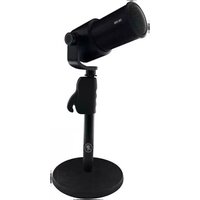
DB-100 - Microphone MACKIE - Free user manual and instructions
Find the device manual for free DB-100 MACKIE in PDF.


| Product Type | Microphone |
| Brand | Mackie |
| Model | DB-100 |
| Microphone Type | Dynamic |
| Polar Pattern | Cardioid |
| Frequency Response | 50 Hz – 15 kHz |
| Impedance | 600 ohms |
| Connector | XLR 3-pin |
| Power Requirement | Passive (no phantom power needed) |
| Weight | 0.3 kg (10.6 oz) |
| Dimensions (Length × Diameter) | 185 mm × 50 mm (7.3″ × 2.0″) |
| Housing Material | Metal |
| Recommended Use | Vocals, instruments, podcasting |
| Included Accessories | Clip, carrying case |
| Maintenance | Wipe with dry cloth; avoid moisture |
| Safety | Keep away from liquids and extreme temperatures |
| Spare Parts & Repair | Contact Mackie support; no user-serviceable parts |
| Manual Availability | Free PDF download on notice-facile.com |
Frequently Asked Questions - DB-100 MACKIE
User questions about DB-100 MACKIE
0 question about this device. Answer the ones you know or ask your own.
Ask a new question about this device
Download the instructions for your Microphone in PDF format for free! Find your manual DB-100 - MACKIE and take your electronic device back in hand. On this page are published all the documents necessary for the use of your device. DB-100 by MACKIE.
USER MANUAL DB-100 MACKIE
natural_image
Circular icon with a stylized white running figure inside, no text or symbols present.DB-100
DESKTOP MICROPHONE BOOM ARM
INSTALLATION INSTRUCTIONS
The DB-100 Desktop Microphone Boom Arm is a versatile mic boom that uses springs to provide support and ideal positioning for microphones up to 2.3 lb / 1.0 kg. The desk clamp allows the DB-100 to easily attach to most desks and studio furniture. Additionally, the boom arm can rotate a full 360 degrees. Best of all, it makes for an efficient and clutter-free creative space.
text_image
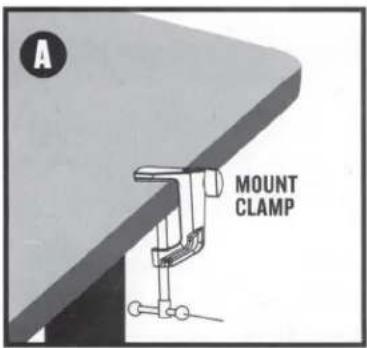
A MOUNT CLAMPConnect the clamp to the desk by hand-tightening.

text_image
B MICROPHONE ANGLE ADJUSTMENT KNOB BOOM ARM BOOM ARM ANGLE KNOB BOOM ARM SAFETY KNOBInsert the boom arm into the clamp and hand-tighten the boom arm safety knob.
natural_image
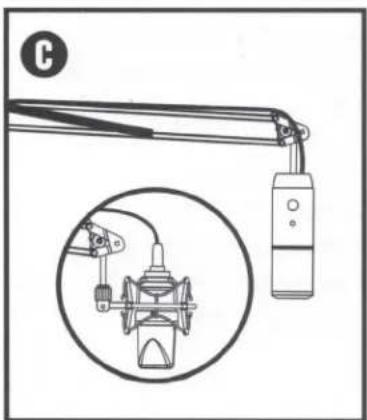
Diagram of a mechanical device with a close-up inset showing internal components (no text or symbols)Connect the microphone and accessories
text_image
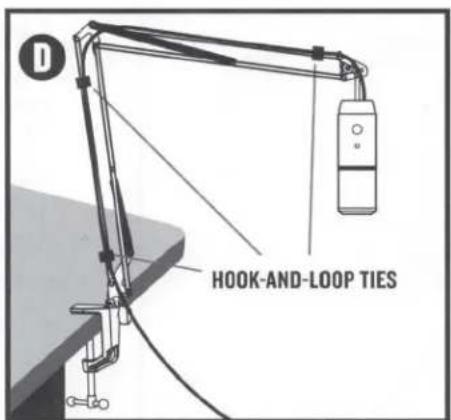
HOOK-AND-LOOP TIESUse the included hook-and-loop ties to secure the mic's cable, leaving a little slack in the cable so the arm can move freely.
FEATURES
- All metal construction
- Black powder-coat paint
- Smooth, quiet operation
SPECIFICATIONS
- Boom Length (top) - 20.8" / 528 mm
- Boom Length (bottom) - 18.5" / 470 mm
• Max Load - 2.3 lb / 1.0 kg - Mount Clamp Thickness - up to 2.1" / 53 mm
ADJUSTING THE SETUP
Loosen the microphone angle adjustment knob. Once in the correct position, hand-tighten to lock.
The boom arm moves the mic higher and lower. Loosen the boom arm angle knob first, adjust the mic to the correct position, then hand-tighten to lock.
Next, hand-tighten the boom arm safety knob to lock the arm rotation.
Once completed, you are ready to record! The mic may have to be adjusted before you find that perfect "sweet spot". Simply follow the steps again.

www.mackie.com
19820 North Creek Parkway #201
Bothell, WA 98011
800.898.3211 • FAX 425.487.4337
Outside the U.S. call +1.425.487.4333