Harriston TBL.15356 - Watch Timberland - Free user manual and instructions
Find the device manual for free Harriston TBL.15356 Timberland in PDF.


| Brand | Timberland |
| Model | Harriston TBL.15356 |
| Product Type | Watch |
| Case Diameter | 43 mm |
| Case Thickness | 12.5 mm |
| Weight | 85 g |
| Case Material | Stainless Steel |
| Strap Material | Leather |
| Movement Type | Quartz |
| Power Source | Battery (SR626SW) |
| Water Resistance | 50 meters (5 ATM) |
| Display | Analog |
| Functions | Time, Date, Chronograph |
| Clasp Type | Buckle |
| Crystal | Mineral Glass |
| Crown | Push-pull |
| Battery Life | Approximately 2 years |
| Warranty | 2 years |
| Maintenance | Clean with soft cloth; avoid chemicals |
| Safety | Not suitable for diving |
| Spare Parts | Available through authorized service centers |
| Repairability | Battery and strap replaceable; other repairs by professional |
Frequently Asked Questions - Harriston TBL.15356 Timberland
User questions about Harriston TBL.15356 Timberland
0 question about this device. Answer the ones you know or ask your own.
Ask a new question about this device
Download the instructions for your Watch in PDF format for free! Find your manual Harriston TBL.15356 - Timberland and take your electronic device back in hand. On this page are published all the documents necessary for the use of your device. Harriston TBL.15356 by Timberland.
USER MANUAL Harriston TBL.15356 Timberland
Timberland and are trademarks of TRL Licensing LLC.
2016 e TBI Licensing LLC. All rights reserved.
Timberland

VR33
INSTRUCTION MANUAL

natural_image
Two adjacent rectangular panels with no text, numbers, or symbols visible.
text_image
Features • 24-hour, hour, minute and second hands • Close • Stopwatch • 2 Stopwatch tracks second and minus hands • The stopwatch or measuring up to 200V • Split time measurement is available 24 Hour Hand Minute Hand Hour Hand Stopwatch Minute Hand Second Hand Stopwatch Second Hand Crewer 12 12 Dote N Normal Position: I-First Class Position II-Second Class Position • Battery Life Behavior When the battery moves to end the second hand moves at two-second intervals instead of the normal one-second intervals. In this case, here the battery replaced with a new one as seen as possible. Note: The wall remains accurate while the second hand is moving at two-second intervals. When the second hand moves at two-second intervals, the stopwatch does not open. If the second hand turns to move at two-second intervals while the stopwatch is measuring, the stopwatch mass reenter is reset and the stopwatch hands return to the V° position. How to set time and date 1. VR32 Pull out to the position 2. VR32 • Pull the crown out to the 1st click position. • Turn the crown counter-clockwise and the other day's data appear. Note: Do not set the code between 8:00 PM and 15:00 PM. Otherwise, the date may not change procedure. 3. 12 PUL out to 2nd position • Pull the crown out to the 2nd click position when the second hand is at the 12 o'clock position. Note: When the stopwatch is or not been measuring or a stopped, if the crown is pulled out to the 2nd click position, it will automatically move the Stopwatch hands to V°. 4. 12 PUL out to 2nd position • Turn the crown to set the hour and minus hands. • Turn the crown clockwise to adopt the hour and minus hands past 12:00 minute. Title will adopt the due to the current drive. • Take AMPH into consideration when setting the hour and minus hands to the desired time.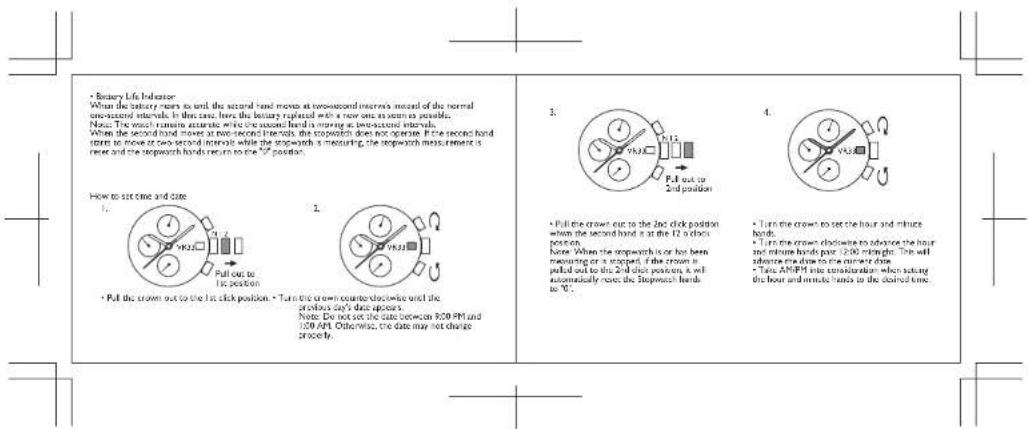
text_image
• Battery Life Indicator When the battery turns to set the second hand moves at two-second intervals (record of the normal one-second intervals. In this case, here the battery replaced with a two-one in room as possible. Note: The wash remains accurate while the second hand is moving at two-second intervals. When the second hand moves at two-second intervals, the stopwatch does not operate. If the second hand turns to move or two-second intervals while the snowwith is measuring, the stopwatch minus remains is reset and the stopwatch hands return to the °C position. How to set time and date 1. • Pull the crown out to the 1st click position 2. • Pull the crown out to the 1st click position • Turn the crown counter-clockwise until the previous only data appear. Note: Do not set the date between ROR PM and ISO AP. Otherwise, the date may not change correctly. 3. • Pull the crown out to the 2nd click position when the second hand is at the 1/2 a door position. Note: When the stopwatch is or has been mounting or a stopped, if the crown is pulled out to the 2nd click position, it will automatically remove the stopwatch hands to "0". 4. • Turn the crown to set the hour and minute hands. • Turn the crown clockwise to adopter the hour and minute hands pour 12:00 midnight. The will adopter time to be a minute time. • Test AMPH into consideration when taking the hour and minute hands to the closed time.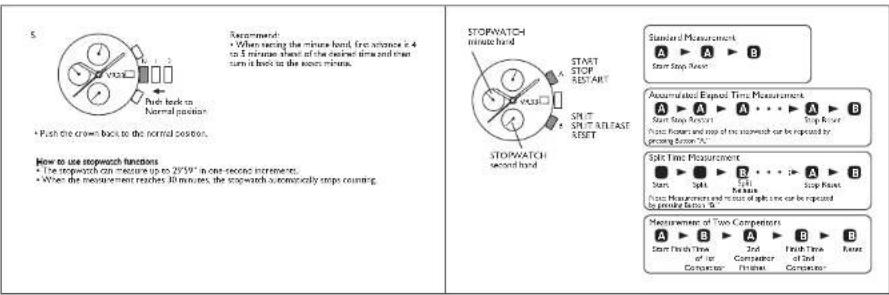
text_image
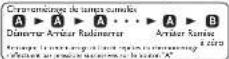
5. • Push the crown back to the normal position. How to use stopwatch functions • The stopwatch can measure up to 29.59" in one-second increment. • When the measurement reaches 30 minutes, the stopwatch automatically stops counting. Recommend: • When testing the minute hand, first advance is 4 to 5 minutes each of the desired time and must turn it back to the second minute. STOPWATCH minute hand START STOP KEY ART SPLIT SPLIT RELEASE RESET STOPWATCH second hand Standard Measurement A ▶ A ▶ B Start Stop Action Assumulated Expost Time Measurement A ▶ A ▶ A • • • ▶ A ▶ B Start Stop Action Stop Rotor Pots Roters and steps of the stopwatch can be repeated by procuring Screen "A" Split Time Measurement Start ▶ Split ▶ Split ▶ Stop Rotor Pots Measurements and steps of split time can be repeated by procuring Panel "B" Measurement of Two Competitors A ▶ B ▶ A ▶ B ▶ B Start Finish Time of a Computer ▶ 2nd Computer Final ▶ Finish Time of 2nd Computer ▶ Event
text_image
• Before using the stopwatch be sure to check that the crown is set at the normal position and that the stopwatch hands are reset to the "0" position. Notes: If the stopwatch hands do not return to the "0" position when the stopwatch is reset to "0", follow the procedure in "stopwatch tape position adjustment". • The stopwatch second hand is capable of timing 30 minutes (160 seconds x 30 times) • The stopwatch minute rate is capable of timing 20 minutes. • Whether the stopwatch hands return to the "0" position in a clockwise rotation or in a smarttledowna rotation is decided depending on the elapsed time the stopwatch has measured. Stopwatch hand position adjustment If the stopwatch hands are not in the "0" position, follow the procedures below to set them to the "0" position. • Pull the crown out to the 2nd click position. Note: While the stopwatch is a ringing or has been stopped while ringing, if the crown is pulled out to the 2nd click position, the stopwatch will be automatically raised. Press A to move the stopwatch hands clockwise. Press B to move the stopwatch hands scents/lockwise. Press Sutton "A" or "B" to use the stopwatch hands to the "0" position. • The movements of the stopwatch minute hand and stopwatch second hand are interfered. To use the stopwatch minute hand to the "0" position continue to move the stopwatch second hand until the stopwatch minute hand reaches the "0" position. Note: The stopwatch minute and second hand more quickly if Sutton "A" or "B" is kept pressed.text_image
Standard-Placmas Start Splice Rückwertung Automaticus-Zachere-zinsierung Start Splice New Start Splice New A B Start Splice New A B Start Splice New A B Start Splice New A B Start Splice New A B Start Splice New A B Start Splice New A B Start Splice New A B Start Splice New A B Start Splice New A B Start Splice New A B Start Splice New A B Start Splice New A B Start Spliced Start Spliced Start Spliced Start Spliced Start Spliced Start Spliced Start Spliced Start Spliced Start Spliced Start Spliced Start Spliced Start Spliced Start Spliced Start Spliced Start Spliced Start Spliced Start Spliced Start Spliced Start Spliced Start Spliced Start Spliced Start Spliced Start Spliced Start Spliced Start Spliced Start Sp sliced Start Spliced Start Spliced Start Spliced Start Spliced Start Spliced Start Spliced Start Spliced Start Spliced Start Spliced Start Spliced Start Spliced Start Spliced Start Spliced Start Spliced Start Spliced Start Spliced Start Spliced Start Spliced Start Spliced Start Spliced Start Spliced Start Spliced Start Spliced Start Spliced Start Sp Siculc Start Sp Siculc Start Sp Siculc Start Sp Siculc Start Sp Siculc Start Sp Siculc Start Sp Siculc Start Sp Siculc Start Sp Siculc Start Sp Siculc Start Sp Siculc Start Sp Siculc Start Sp Siculc Start Sp Siculc Start Sp Siculc Start Sp Siculc Start Sp Siculc Start Sp Siochicl 1.0000000000000000000000000000000000000000000000000000000000000000000000000000000000000000000000000000Betitipan Sw Touse B.
DÉMARRER ARRETER REDEMARRER
TEMPS INTERMEDIARE EFFACER TEMPS INTERMEDIARE REMISE A ZERO



water resistance level
stlineary
water reservoir marking.
3.8196 / 2016
(五)
2.4.10
10.4287100
35 8796 / 2014
2.1.1 陈
The image is too blurry to recognize any text content.
- 问
[Unreadable]
The image is too blurry to recognize any text content.
1996.
[Unreadable]
图
1
三
[Unreadable]
We
[Unreadable]
[Unreadable]
The image is too blurry to recognize any text content.
[Unreadable]
。
1
1
2
1
a
1
1
•
one
C
司
me
C
U
-
。
• Always set the crown in the normal solution
for complexes H and B is consistent
• Sempre ajuno a conca na potásio normal / Aperte a
TOSO DE USCO OBRIGUSAMENTO.
・リュランスは常に通常位置に設定し
When the watch is underwater or wet, never use the pulisher basels, or set the time. Watch cases and
Theorem 1.2. (A) Let () be a finite field in X , and let (x) be the set of all elements of X such that
(removed to appear side)
1-2: Pull crown stopper sideways off the crown.
3-4: Push crown inside to activate the watch
• Using the chrysogran Arclar after or leaving it can security will shorten before. It constrains it is not necessary to
for the chronogravoreous function derivatively. To power of primary power, it is best to stop the chronogravial.
State 4: Non a complete for the Bank of New York to have a contract to hyperbank lending status on the right.
The following table provides the results of the 2016 Annual Report on the Consolidated Financial Statements.
departmental data volume of the local
The source image is illegible due to extreme pixelation and low resolution. No characters, symbols, or punctuation can be reliably identified. Therefore, no valid OCR text can be generated that matches the visual content of the source image.