NT308BPK - Subwoofer NavAtlas - Free user manual and instructions
Find the device manual for free NT308BPK NavAtlas in PDF.


| Product Type | Subwoofer |
| Brand | NavAtlas |
| Model | NT308BPK |
| Dimensions (W x H x D) | 15.7 x 14.2 x 16.5 inches |
| Weight | 22.5 lbs |
| Power Output (RMS) | 150 Watts |
| Frequency Response | 30 Hz - 150 Hz |
| Impedance | 4 Ohms |
| Driver Size | 8 inches |
| Enclosure Type | Bass-Reflex (ported) |
| Inputs | RCA Line In, Speaker Level In |
| Phase Control | 0° / 180° |
| Low-Pass Crossover | 50 Hz - 150 Hz adjustable |
| Power Supply | AC 110-240V, 50/60Hz |
| Power Consumption | 200W max |
| Standby Power | < 0.5W |
| Materials | MDF cabinet, black vinyl finish |
| Placement | Floor-standing, front-firing |
| Cleaning | Wipe with dry cloth; avoid liquids |
| Safety Features | Overload protection, thermal cutoff |
| Spare Parts & Repairability | Contact NavAtlas support for drivers, amplifier modules |
Frequently Asked Questions - NT308BPK NavAtlas
User questions about NT308BPK NavAtlas
0 question about this device. Answer the ones you know or ask your own.
Ask a new question about this device
Download the instructions for your Subwoofer in PDF format for free! Find your manual NT308BPK - NavAtlas and take your electronic device back in hand. On this page are published all the documents necessary for the use of your device. NT308BPK by NavAtlas.
USER MANUAL NT308BPK NavAtlas
text_image
Navitas BMA500MUNIVERSAL DIGITAL SUBFOOFER AMPLIFIER
INSTALLATION/OWNER'S MANUAL
IP66 Rated
NavAtlas™
Preparation
Please read entire manual before installation. Due to the technical nature of amplifiers, it is highly recommended that your amplifier is installed by a professional installer or an authorized dealer.
Before You Start
- Disconnect negative battery terminal (consult qualified technician for instructions).
- Avoid installing the amplifier where it will be subject to high temperatures (such as from direct sunlight) or subject to dust, dirt or excessive vibration.
- Use extreme caution when drilling holes to avoid damaging fuel lines or existing wiring.
text_image
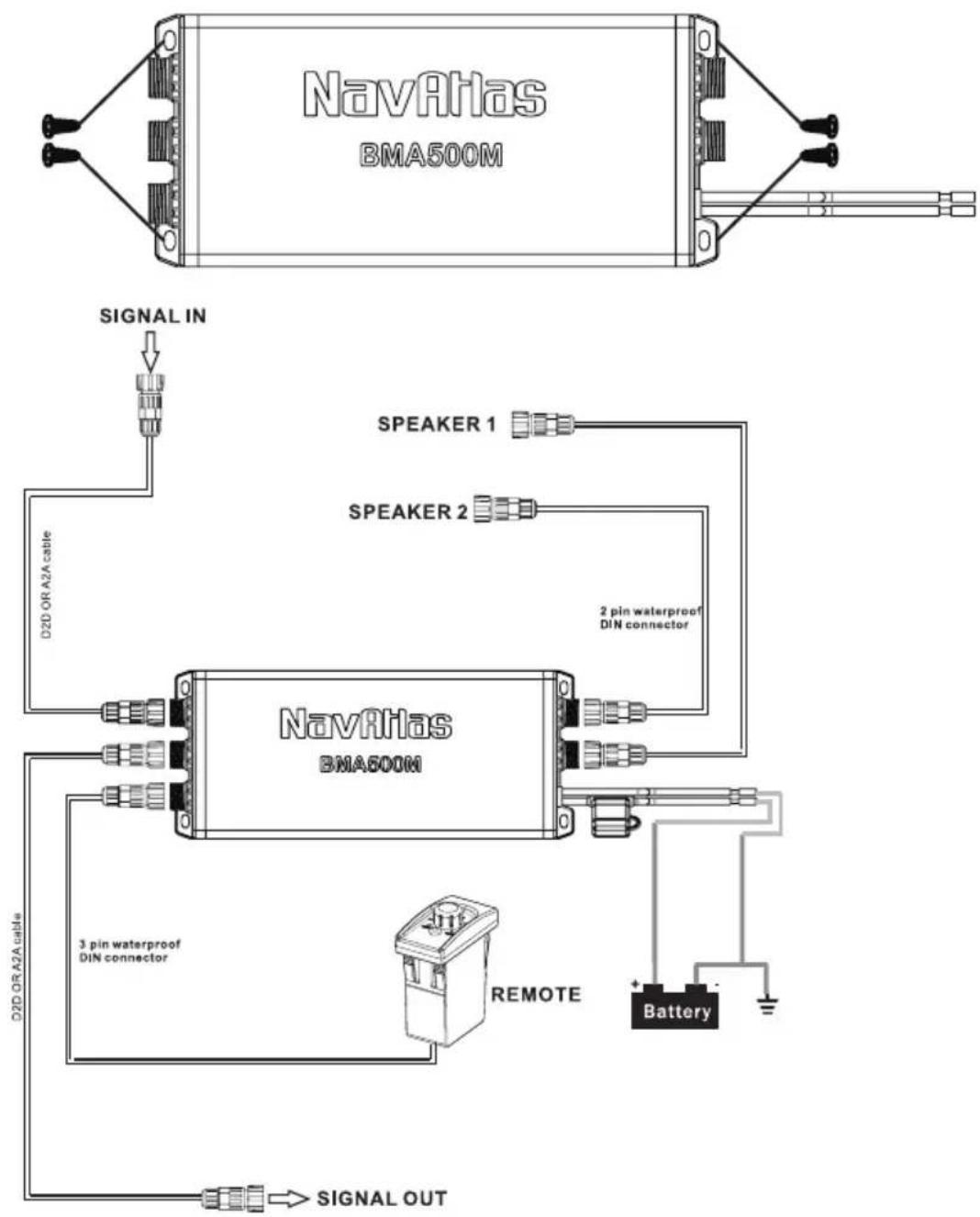
NavRAtlas BMA500M SIGNAL IN SPEAKER 1 D2D OR A2A cable SPEAKER 2 2 pin waterproof DIN connector NavRAtlas BMA500M 3 pin waterproof DIN connector REMOTE + Battery D2D OR A2A cable SIGNAL OUT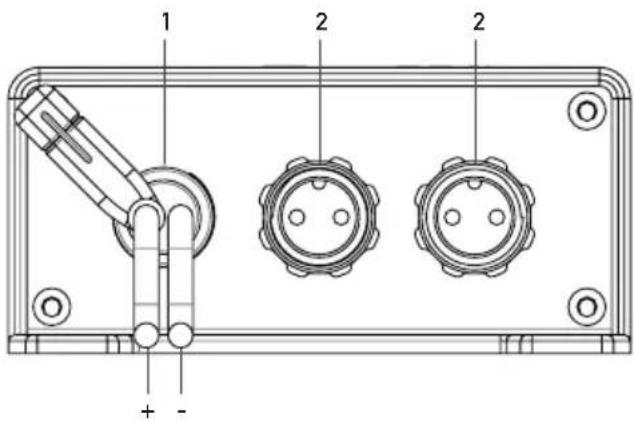
text_image
1 2 2 + -
natural_image
Technical diagram of a three-pin electrical connector panel with mounting holes and labeled pins (no text or symbols beyond basic labels)- 12V+/Ground
- Subwoofer out
- Input Analog/Digital
- Output Analog/Digital (Daisy Chain)
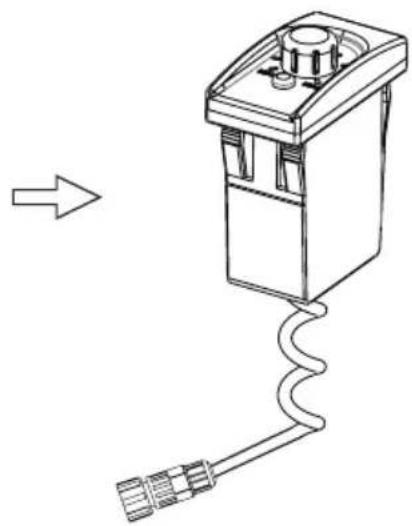
- Bass Knob dash remote control
natural_image
Line drawing of a mechanical device with a coiled cable and connector (no text or symbols)Main Power Connections
Connect +12V, GND wires accordingly. A suitable fuse MUST be installed on the +12V for protection of the vehicle's electrical system.
SPEAKER OUT
Connect using supplied din cables to your speaker, these outputs are mono and can be used with one or two speakers.
REMOTE BASS KNOB
This knob will mount in your dash as a factory switch would, giving you access to control the volume output manually.
INPUT/OUTPUT
This woofer system can be "DAISY CHAINED" to other NavAtlas product to help simplify the installation and reduce the use of extra wiring, giving you a clean looking setup.
Connection Descriptions
The information below should be used as a general guideline only.
Power Wire (+12V)
- Disconnect negative battery terminal before proceeding. Consult a qualified technician for instructions if you are unsure.
- Plan wire routing before cutting any wires to length. Begin by routing the power +12V wire from the battery to the amplifier location. Use a grommet when running wires through the firewall or metal openings.
- Use extreme caution when drilling holes to avoid damaging fuel lines or existing wiring.
- The +12V wire MUST be fused within 18" of the battery for protection of the vehicle's electrical system.
Ground Wire (GND)
- The amplifier ground wire should be as short as possible (no more than 36" or 1 meter). Choose a clean unpainted section of metal or the vehicle chassis when attaching the ground connection. Be sure to clean the area of any dirt or grease.
Remote Turn-on
- The amplifier is signal sensing, once connected to a source unit and audio is playing, the amplifier with turn on. Once sound is stopped, the amp will turn off.
Input/Output (DAISY CHAIN)
- When connected to a source unit, please use the correct din cable for the "DAISY CHAIN" feature to work correctly, refer to installation diagram Pg
NOTE: When adding amplifiers or amplified speakers to your vehicle, please be sure to consider upgrading your factory battery and wires to ensure you get the most from your system
CAUTION
- Never run any wires underneath or outside the vehicle
NOTE: Some 3rd Party Radios/Source Units might have a preout of 1V or less, this will cause the audio output to sound to sound low. We recommend that a RCA line driver be used in this situation to increase the preout voltage and raise the sound level of the amplifier.
Audio Inputs
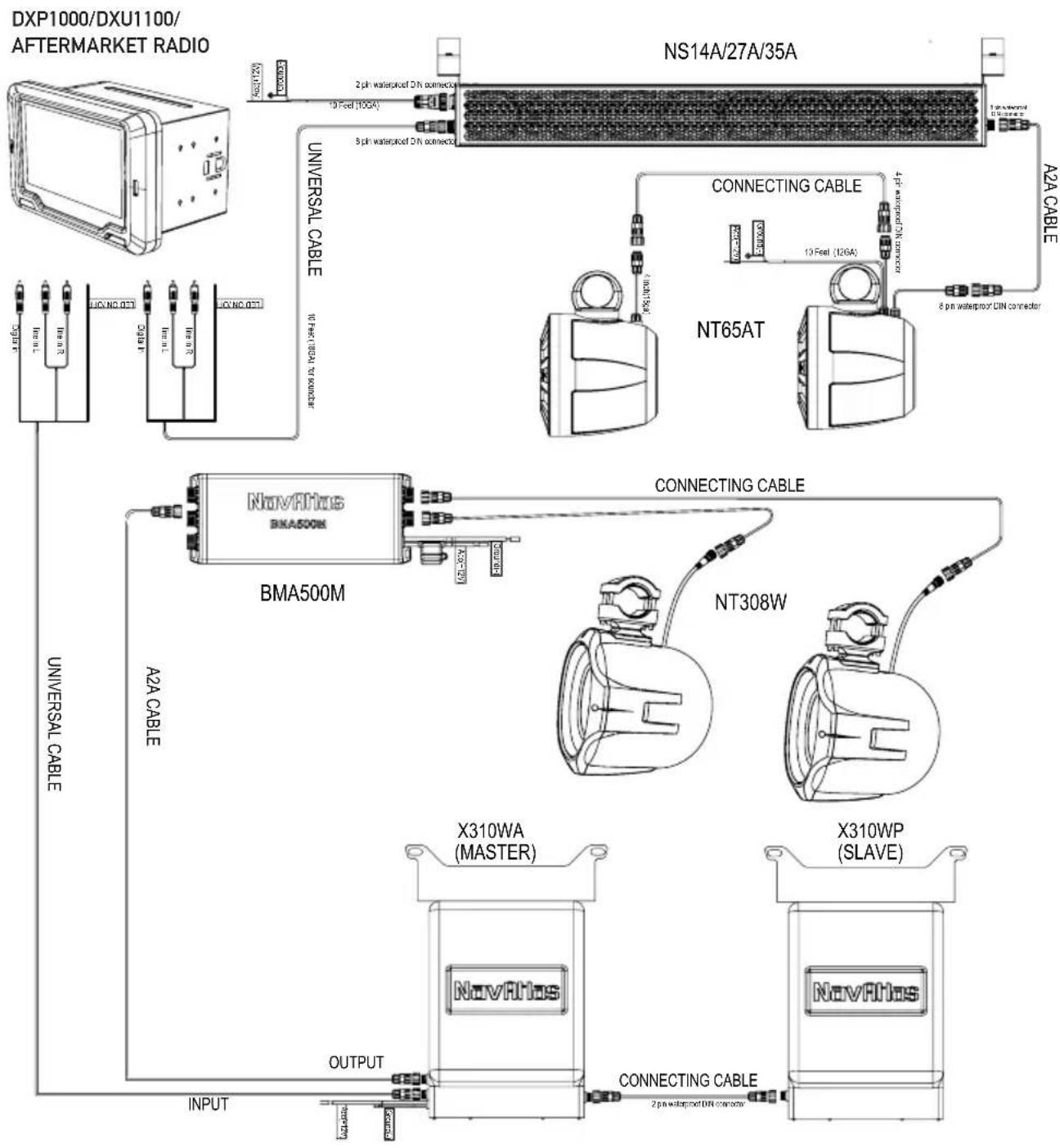
DAISY CHAIN SETUP USING ANALOG SIGNAL
WHEN USING ANALOG RCA FROM A RADIO, THE A2A CABLE (SOLD SEPARATELY) IS REQUIRED FOR DAISY CHAIN FUNCTION TO WORK.
flowchart
graph TD
    A["DXP1000/DXU1100/AFTERMARKET RADIO"] --> B["NS14A/27A/35A"]
    B --> C["UNIVERSAL CABLE"]
    C --> D["BMA500M"]
    D --> E["X310WA (MASTER)"]
    D --> F["X310WP (SLAVE)"]
    B --> G["NT65AT"]
    G --> H["A2A CABLE"]
    H --> I["CONNECTING CABLE"]
    I --> J["OUTPUT"]
    J --> K["CONNECTING CABLE"]
    K --> L["X310WA (MASTER)"]
    K --> M["X310WP (SLAVE)"]
EXAMPLE OF DAISY CHAIN CONFIGURATIONS FOR CAN-AM X3 VEHICLE
*OPTIONAL ACCESSORIES ARE D2Y AND D2D CABLES (SOLD SEPARATELY)

NA1BT/NA2BT/NA30C
NA81MDVR(DIGITAL SOURCE UNITS)

flowchart
graph TD
    A["NS14A/27A/35A"] -->|10 Pin Waterproof DIN Connector| B["BMA500M"]
    A -->|2 Pin Waterproof DIN Connector| C["NT65AT"]
    A -->|8 Pin Waterproof DIN Connector| D["NT308W"]
    B -->|D2D Cable| E["D2D CABLE"]
    B -->|D2D CABLE| F["Y ADAPTER"]
    B -->|D2D CABLE| G["CABLE"]
    B -->|D2D CABLE| H["D2D CABLE"]
    B -->|D2D CABLE| I["Coating Cable"]
    B -->|D2D CABLE| J["Coating Cable"]
    B -->|D2D CABLE| K["Coating Cable"]
    B -->|D2D CABLE| L["Coating Cable"]
    B -->|D2D CABLE| M["Coating Cable"]
    B -->|D2D CABLE| N["Coating Cable"]
    B -->|D2D CABLE| O["Coating Cable"]
    B -->|D2D CABLE| P["Coating Cable"]
    B -->|D2D CABLE| Q["Coating Cable"]
    B -->|D2D CABLE| R["Coating Cable"]
    B -->|D2D CABLE| S["Coating Cable"]
    B -->|D2D CABLE| T["Coating Cable"]
    B -->|D2D CABLE| U["Coating Cable"]
    B -->|D2D CABLE| V["Coating Cable"]
    B -->|D2D CABLE| W["Coating Cable"]
    B -->|D2D CABLE| X["Coating Cable"]
    B -->|D2D CABLE| Y["Coating Cable"]
    B -->|D2D CABLE| Z["Coating Cable"]
Limited One Year Warranty
This warranty gives you specific legal rights. You may also have other rights which vary from state to state.
NavAtlas warrants this product to the original purchaser to be free from defects in material and workmanship for a period of one year from the date of the original purchase.
NavAtlas agrees, at our option, during the warranty period, to repair any defect in material or workmanship or to furnish an equal new, renewed or comparable product (whichever is deemed necessary) in exchange without charges, subject to verification of the defect or malfunction and proof of the date of purchase. Subsequent replacement products are warranted for the balance of the original warranty period.
Who is covered? This warranty is extended to the original retail purchaser for products purchased from an authorized NavAtlas dealer and used in the U.S.A
What is covered? This warranty covers all defects in material and workmanship in this product. The following are not covered: software, installation/removal costs, damage resulting from accident, misuse, abuse, neglect, product modification, improper installation, incorrect line voltage, unauthorized repair or failure to follow instructions supplied with the product, or damage occurring during return shipment of the product.
Factory defects include:
- MID/Tweeter not playing or distorting
- Glue/adhesive separating or not holding correctly
- Tinsel leads not attached/soldered correctly
- LED not working out-of-box
What to do?
- Before you call for service, check the troubleshooting guide in your owner's manual. A slight adjustment of any custom controls may save you a service call.
- If you require service during the warranty period, you must carefully pack the product (preferably in the original package) and ship it by prepaid transportation with a copy of the original receipt from the retailer to an authorized service center.
- Please describe your problem in writing and include your name, a return UPS shipping address (P.O. Box not acceptable), and a daytime phone number with your shipment.
- For more information and for the location of the nearest authorized service center please contact us by one of the following methods:
- Call u s1-562-946-7471
• E-mail us at navcustserv@navatlas.net
Exclusion of Certain Damages: This warranty is exclusive and in lieu of any and all other warranties, expressed or implied, including without limitation the implied warranties of merchantability and fitness for a particular purpose and any obligation, liability, right, claim or remedy in contract or tort, whether or not arising from the company's negligence, actual or imputed. No person or representative is authorized to assume for the company any other liability in connection with the sale of this product. In no event shall the company be liable for indirect, incidental or consequential damages.
EXCHANGE ONLY ON FACTORY DEFECTS, PHYSICAL DAMAGE IS NOT COVERED BY WARRANTY.
Specifications
| 8.5" x 3.8" x 1.6" | 8.5" x 3.8" x 1.6" |
| Power Output(@40hm) | 250W x 1CH |
| Power Output(@20hm) | 500W x 1CH |
| THD | 0.1% |
| Signal to Noise Ratio(A-WTD) | >100dB |
| Frequency Response(-3dB) | 45Hz - 150kHz |
| Input Impedance(Low Level) | 20k Ohms |
| Sensitivity Range | 3V |
| FUSE | 40A x 1 |
Design and specifications subject to change without notice.
NavAtlas™
Support Line: 1-562-946-7471
9AM-5PM PST Monday-Friday
www.navatlas.com
All rights reserved.
NSA0918-V01
Printed in China
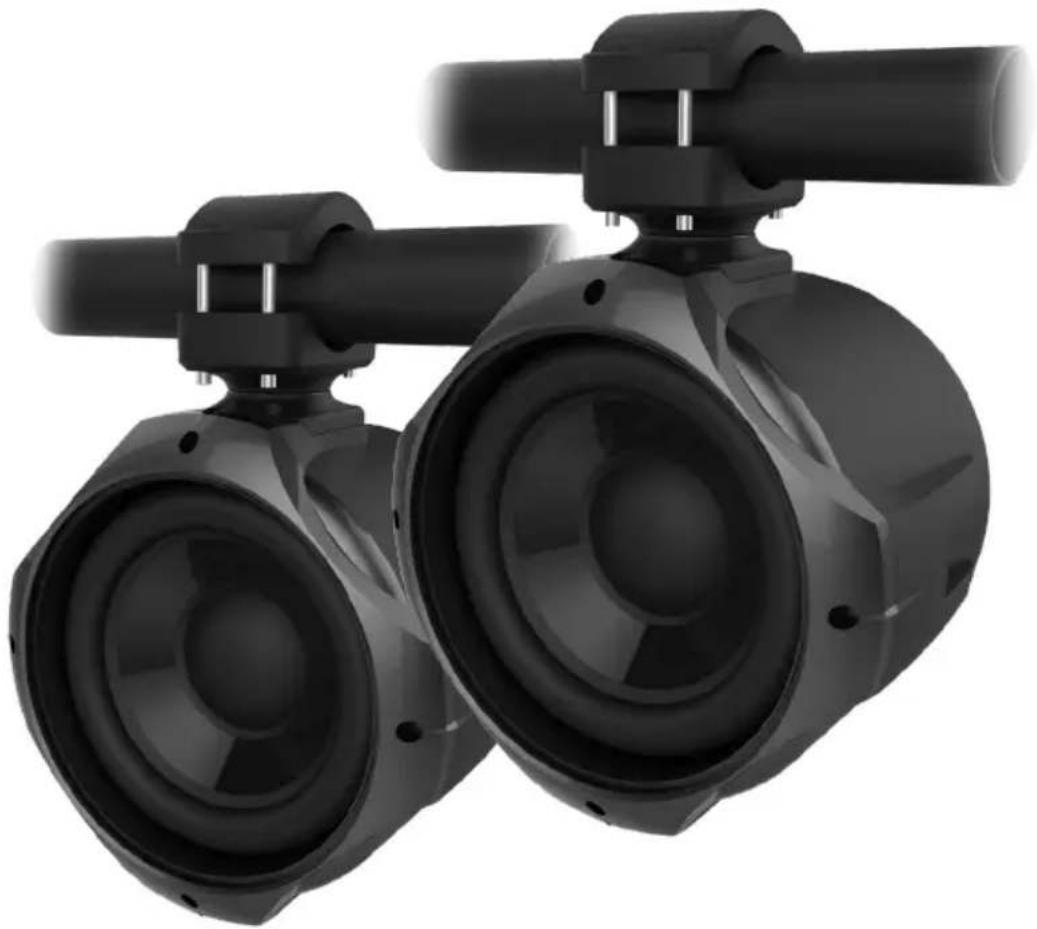
natural_image
Close-up of two black industrial air purifiers with adjustable shafts and mounting feet (no text or symbols visible)NT308W
INSTALLATION/OWNER'S MANUAL
8" Tower Woofer
NavAtlas™
Preparation/Installation
Please read entire manual before installation.
Before You Start
- Disconnect negative battery terminal. Consult a qualified technician for instructions.
- Use extreme caution when drilling holes to avoid damaging fuel lines, hydraulic lines or existing wiring.
- If additional wiring is required, we recommend that you run all wires prior to mounting your speaker in place.
- Use the highest quality connectors for a reliable installation and to minimize signal and power loss.
- Use caution before you drill or cut! Be careful not to cut or drill into gas tanks, fuel lines, hydraulic lines, vacuum lines or electrical wiring.
- Avoid running wires over, near, or through sharp edged surfaces. We suggest you also use rubber grommets to protect any wires routed through metal.
Dimensions

text_image
65mm 2.5" 250.8mm 9.8"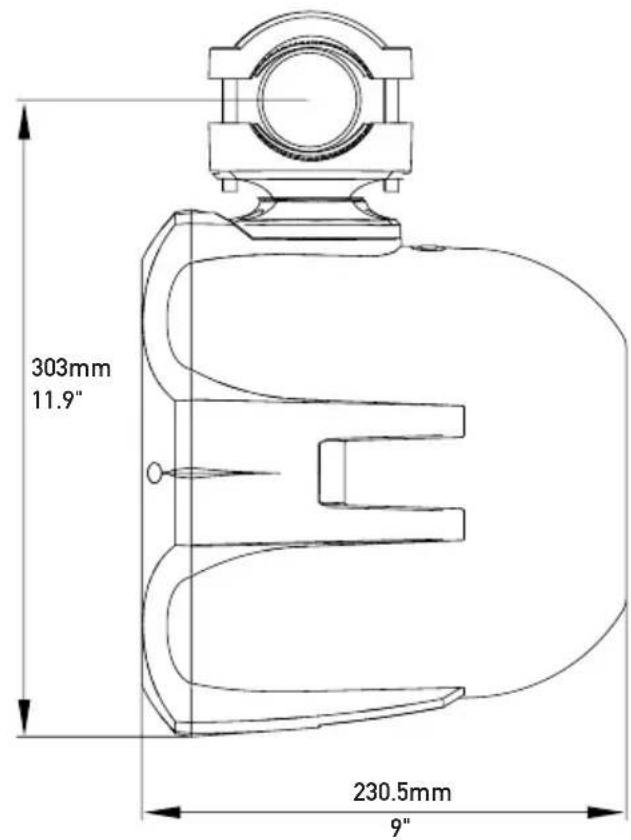
text_image
303mm 11.9" 230.5mm 9"Clamp Mounting
The included clamping system is designed to support structures that utilize round tubing. Oval tubing and flat structures will not work with this clamp. The clamp can be used with tube diameters from 1.5" up to 2.75". Separate bushing sets for all tube sizes at 1/8" increments are included. Refer to the table below to determine optimal configuration.
| Tube Diameter | Tube Circumference | Clamp | Top Bushing | Bottom Bushing |
| 1.54 .71A | 1.50 1.50 | |||
| 1.6255 .10 | A 1.63 1.63 | |||
| 1.75 5.50 | A1 .751 .75 | |||
| 1.8755 .89 | A none 1.88 | |||
| 26 .28B | 2.00 2.00 | |||
| 2.1256 .68 | B 2.13 2.13 | |||
| 2.25 7.07 | B2 .252 .25 | |||
| 2.375 7.46 | B2 .382 .38 | |||
| 2.57 .85B | 2.50 2.50 | |||
| 2.6258 .25 | B 2.68 2.68 | |||
| 2.75 8.64 | Bn onen one |

natural_image
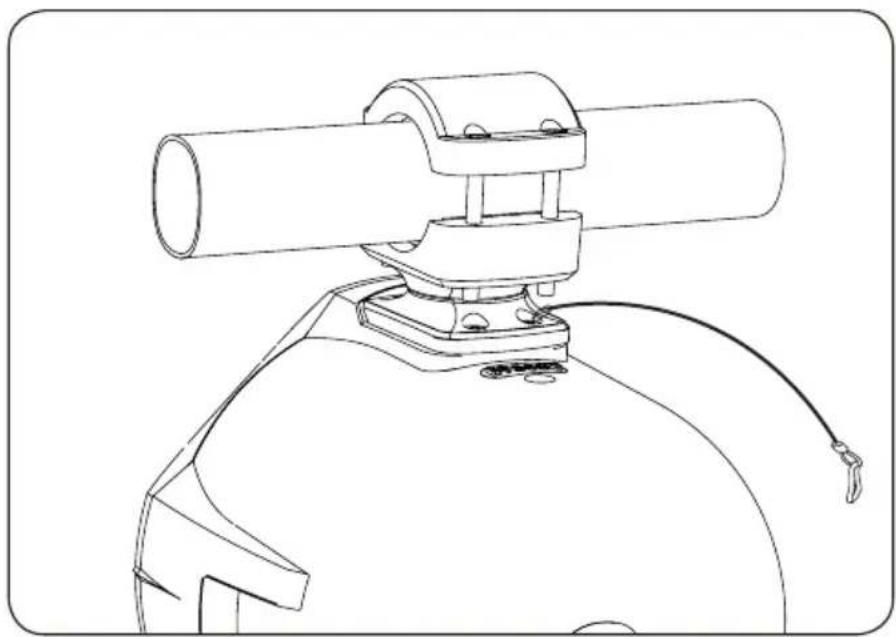
Technical line drawing of a mechanical assembly with cylindrical components and mounting brackets (no text or symbols)Safety Cable
The included safety cable is pre-installed on the unit.
natural_image
Technical line drawing of a mechanical device with cylindrical components and a curved base (no text or symbols)Mounting Bracket Rotation
The mounting bracket rotates 360 degrees, allowing the speaker to rotate in any direction.
Step 1
Loosen screw using the supplied tool.
Step 2
Rotate speaker to desired direction, then tighten screw to lock in place.
Step 3
Attach top bracket to bottom bracket using the four bolts. Make sure brackets are tightened all the way so there is no movement.

text_image
1. 2. 3.Connection Descriptions
SPEAKER CONNECTION (PIGTAIL)
- Tower woofers will connect to BMA500M using waterproof cables supplied with the amplifier, use caution when screwing/tightening waterproof connector as to not strip/break thread or damage gasket.

text_image
INPUT FROM SOURCE UNIT BMA500M INPUT Output CONNECTING CABLE REQUIRES D2D/A2A (SOLD SEPARATELY) OUTPUT CAN CONNECT TO ANY MODEL (NS14A/NS27A/NS35A,NT65AT,BMA500M) NT308WWARNING: ONLY USE THIS PRODUCT WITH THE BMA500M, USE WITH ANY OTHER AFTERMARKET AMPLIFIER WILL RESULT IN DAMAGE AND WILL VOID WARRANTY.
Limited One Year Warranty
This warranty gives you specific legal rights. You may also have other rights which vary from state to state.
NavAtlas warrants this product to the original purchaser to be free from defects in material and workmanship for a period of one year from the date of the original purchase.
NavAtlas agrees, at our option, during the warranty period, to repair any defect in material or workmanship or to furnish an equal new, renewed or comparable product (whichever is deemed necessary) in exchange without charges, subject to verification of the defect or malfunction and proof of the date of purchase. Subsequent replacement products are warranted for the balance of the original warranty period.
Who is covered? This warranty is extended to the original retail purchaser for products purchased from an authorized NavAtlas dealer and used in the U.S.A
What is covered? This warranty covers all defects in material and workmanship in this product. The following are not covered: software, installation/removal costs, damage resulting from accident, misuse, abuse, neglect, product modification, improper installation, incorrect line voltage, unauthorized repair or failure to follow instructions supplied with the product, or damage occurring during return shipment of the product.
Factory defects include:
- MID/Tweeter not playing or distorting
- Glue/adhesive separating or not holding correctly
- Tinsel leads not attached/soldered correctly
- LED not working out-of-box
What to do?
- Before you call for service, check the troubleshooting guide in your owner's manual. A slight adjustment of any custom controls may save you a service call.
- If you require service during the warranty period, you must carefully pack the product (preferably in the original package) and ship it by prepaid transportation with a copy of the original receipt from the retailer to an authorized service center.
- Please describe your problem in writing and include your name, a return UPS shipping address (P.O. Box not acceptable), and a daytime phone number with your shipment.
- For more information and for the location of the nearest authorized service center please contact us by one of the following methods:
- Call u s1-562-946-7471
• E-mail us at navcustserv@navatlas.net
Exclusion of Certain Damages: This warranty is exclusive and in lieu of any and all other warranties, expressed or implied, including without limitation the implied warranties of merchantability and fitness for a particular purpose and any obligation, liability, right, claim or remedy in contract or tort, whether or not arising from the company's negligence, actual or imputed. No person or representative is authorized to assume for the company any other liability in connection with the sale of this product. In no event shall the company be liable for indirect, incidental or consequential damages.
EXCHANGE ONLY ON FACTORY DEFECTS, PHYSICAL DAMAGE IS NOT COVERED BY WARRANTY.
Specifications
| Woofer type | IMPP black (Injection molded polypropylene) |
| Woofer surround | Rubber |
| Woofer size | 8" |
| RMS Power | 200W |
| Peak Power | 400W |
| Sensitivity | 85dB |
| Frequency response | 45Hz - 500Hz |
| ImpedanceEndosure type ABS plastic |
Design and specifications subject to change without notice.
NavAtlas™
Support Line: 1-562-946-7471
9AM-5PM PST Monday-Friday
www.navatlas.com
All rights reserved.
NSA0918-V01
Printed in China