Cue Induction Burner 41000 - Deep fryer Hestan - Free user manual and instructions
Find the device manual for free Cue Induction Burner 41000 Hestan in PDF.


| Product Type | Portable Induction Burner for Deep Frying |
| Brand | Hestan |
| Model | Cue Induction Burner 41000 |
| Power | 1800 W |
| Voltage | 120 V (US standard) |
| Dimensions (W x D x H) | 30.5 x 30.5 x 7.6 cm (12 x 12 x 3 in) |
| Weight | 2.5 kg (5.5 lbs) |
| Number of Cooking Zones | 1 |
| Temperature Range | 100°F – 450°F (38°C – 232°C) |
| Temperature Control | Digital with ±1°F accuracy |
| Timer | Up to 99 minutes with auto shut-off |
| Preset Cooking Modes | Deep fry, boil, simmer, sear, and keep warm |
| Pan Detection | Automatic pan presence sensor |
| Safety Features | Overheat protection, auto shut-off, child lock, pan detection shutdown |
| Display | LED touch screen |
| Housing Material | Brushed stainless steel with ceramic glass top |
| Control Type | Touch capacitive buttons |
| Cleaning | Wipe with damp cloth; glass top can be cleaned with non-abrasive cleaner |
| Maintenance | Keep ventilation slots clear; no user-serviceable parts inside |
| Spare Parts | Replaceable power cord available from Hestan |
| Repairability | Contact Hestan customer service for repairs; DIY not recommended |
| Compatible Cookware | Ferrous (magnetic) pans; suitable for deep frying with pot |
| Warranty | 1 year limited warranty |
| Certifications | ETL, cETL certified |
Frequently Asked Questions - Cue Induction Burner 41000 Hestan
User questions about Cue Induction Burner 41000 Hestan
0 question about this device. Answer the ones you know or ask your own.
Ask a new question about this device
Download the instructions for your Deep fryer in PDF format for free! Find your manual Cue Induction Burner 41000 - Hestan and take your electronic device back in hand. On this page are published all the documents necessary for the use of your device. Cue Induction Burner 41000 by Hestan.
USER MANUAL Cue Induction Burner 41000 Hestan
natural_image
Close-up of raw meat pieces in a pan with a spoon, placed on an induction cooktop (no text or symbols visible)WARNING:
IN ORDER TO PROPERLY MAINTAIN YOUR HESTAN CUE SYSTEM, DO NOT PUT THE HESTAN CUE COOKWARE IN THE DISHWASHER OR THE OVEN.
hestancue.com/support/guides
hscancus.com
For Household Use Only.
Copyright ©2019 Hanan 27th Cook Group, 41 Right Services


The Ground Truth image displays a single, solid horizontal line. According to Rule 2 (UNDERSCORE & LINE RULES), this is a stylistic or background line, not a placeholder underscore. Therefore, the OCR result must ignore it. The provided OCR content is "____", which consists of four underscores. This is an incorrect interpretation of the line as a placeholder, violating the rule that stylistic lines must be ignored. The OCR has hallucinated underscores where none should exist in the GT. Therefore, the OCR result is inconsistent with the Ground Truth.


©19.
Apple and the Apple logo are used to make a Apple Inc. based on the U.S. and its companies, Sector Data is used in most of the market. It is also other companies using any and the operating base are implemented by Apple Inc. The Bluetooth word mark and logo are implemented as a portion by the sector: SIC, Inc., and any use of such marks by Rocket Smart Cooking Inc. (united) stores.
HESTANCUE™
Quick Start Guide

The Hestan Cue™ Cooking System
text_image
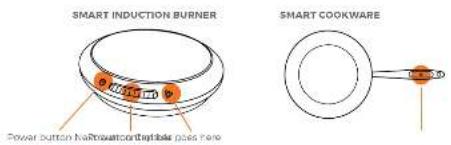
SMART INDUCTION BURNER Power button Nafroelectric stator pass here SMART COOKWARE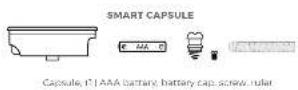
Get the App
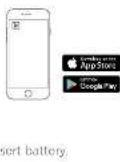
STEP1 - Download the Hestan Cue app to your smart device and follow the in-app prompts to set up your system.
Ready the Hestan Cue Smart Cookware
STEP 2 - Remove battery cap and bottom screw and insert battery.
Reinsert battery cap and rotate 90 degrees to lock."

STEP 3 Install capsule in cookware handle and secure with bottom screw
Contact points MUST be oriented towards the pan body.

text_image
orientedReady the Hestan Cue Smart Induction Burner
STEP 4 - Plug the burner into a dedicated power outlet.
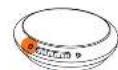

Press the power button to turn or/off Blue light indicates connected mode.
Press the next button when prompted by the app.
Manual Mode — Control Without the Hestan Cue App


Press the power button to turn on/off. White light indicates manual mode (not connected to app).
Swipe the power control bar from left to right to increase the power level from 1-10. Swipe left to decrease power to lowest setting of level 1.