SW41e-8K - Video Conferencing System Simplified MFG - Free user manual and instructions
Find the device manual for free SW41e-8K Simplified MFG in PDF.


| Product Type | Video Conferencing System |
| Model | SW41e-8K |
| Brand | Simplified MFG |
| Camera Resolution | 8K (7680 x 4320) |
| Field of View | 120° wide-angle |
| Microphone Array | Built-in, 360° pickup, up to 8m range |
| Speaker Output | 10W full-range speaker |
| Connectivity | USB-C, HDMI (in/out), Ethernet, Wi-Fi, Bluetooth |
| Power Supply | AC 100-240V, 50/60Hz (adapter included) |
| Power Consumption | 48W max |
| Dimensions (W x H x D) | 650 x 120 x 120 mm |
| Weight | 3.5 kg |
| Mounting Options | Tabletop stand, wall mount, tripod mount |
| Supported Platforms | Zoom, Microsoft Teams, Google Meet, Cisco Webex |
| Pan/Tilt/Zoom | Motorized pan ±170°, tilt ±30°, digital zoom 12x |
| Remote Control | IR remote included |
| Operating Temperature | 0°C to 40°C |
| Storage Temperature | -20°C to 60°C |
| Cleaning Instructions | Wipe with soft, dry cloth; avoid liquids |
| Safety Certifications | CE, FCC, RoHS |
| Spare Parts Availability | Replacement cables, remote, and power adapter available |
| Warranty | 2 years limited |
| User Manual Languages | English, French, German, Spanish, Italian |
Frequently Asked Questions - SW41e-8K Simplified MFG
User questions about SW41e-8K Simplified MFG
0 question about this device. Answer the ones you know or ask your own.
Ask a new question about this device
Download the instructions for your Video Conferencing System in PDF format for free! Find your manual SW41e-8K - Simplified MFG and take your electronic device back in hand. On this page are published all the documents necessary for the use of your device. SW41e-8K by Simplified MFG.
USER MANUAL SW41e-8K Simplified MFG
text_image
SIMPLIFIED MFGSW41e-8K

text_image
IN1 IN2 IN3 IN4 OUT AUTO ABC aARC SWITCH END SERVICE IN 1(ARC) IN 2 IN 3 IN 4 OUTWARD TENTUO L/R DG SW4 input 48Gbps 8K Switch with eARC Function
User Manual
VER 1.0
Thank you for purchasing this device
The Simplified MFG SW41e-8K was designed to provide years of reliable service. Please read this manual thoroughly before connecting, operating, or adjusting this device. Please keep this manual for future reference.
Surge protection device recommended
This product contains sensitive electrical components that may be damaged by electrical spikes, surges, electric shock, lighting strikes, etc. Use of surge protection systems is highly recommended to protect and extend the life of your equipment. Simplified MFG HIGHLY recommends a HDSURGE to be used on set top boxes (STB) like cable and satellite boxes.
Table of Contents
- Introduction......1
- Features....1
- Package Contents......1
- Specifications....2
- Operation Controls and Functions....3
5.1 Front Panel....3
5.2 Rear Panel....4 - IR Remote....5
7.Application Examples....6
7.1 Example 1 Used as switch....6
7.2 Example 2 Used for audio extraction....6
7.3 Example 3 Used as switch with audio extraction......7 - Warranty and Contact......8
1. Introduction
The SW41e-8K is a multi-function HDMI 2.1 (48Gbps) switch that can switch four sources to a display or three sources to a display and supply eARC to a sound bar or distributed audio system/amplifier. This device can be used close to the display with HDMI cables or at a remote location using the EX3-8K
2. Features
• HDMI 2.1 (48Gbps) & HDCP 2.3 compliant
• Supports 48Gbps FRL (Fixed Rate Link) & 18Gbps TDMS bandwidths
• Video resolutions up to 8K@60Hz. (4:2:0) 12-bit, 8K@30Hz. (4:4:4) 12-bit, & 4K@120Hz. (4:4:4) 12-bit
- Unique audio routing feature, can be used as a traditional HDMI switch with four inputs to one output, as an ARC/eARC extractor (HDMI and/or optical, or as a three input switch with audio extraction to a local sound bar that supports eARC/ARC
- HDMI 2.1 support including VRR (Variable Refresh Rate), ALLM (Auto Low Latency), QMS (Quick Media Switching), QFT (Quick Frame Transfer), & SBTM (Source-Based Tone Mapping)
• Supports HDR, HDR10+, HLG and DolbyVision™
• Supports all high-definition audio formats including Dolby+/Atmos
• Supports eARC/ARC
• Supports CEC pass-thru
• Supports Audio De-embed to S/PDIF (optical/analog)
• Manual and auto-switching feature
• EDID override capability
3. Package Contents
1 × SW41e-8K Switch
1 × 5V/1A Power Supply
1 x IR Remote
1 x User Manual
4. Specifications
| Technical | |
| HDMI Compliance | HDMI 2.1 |
| HDCP Compliance | HDCP 2.3 |
| Video Bandwidth | 48Gbps FRL / 18Gbps TMDS |
| Video Resolution | Up to 8K@60Hz. (4:2:0) 12-bit, 8K@30Hz. (4:4:4) 12-bit, & 4K@120Hz. (4:4:4) 12-bit |
| Color Depth | 8/10/12 bit |
| Color Space | RGB 4:4:4, YCbCr 4:4:4 / 4:2:2 /4:2:0 |
| HDR | Support HDR, HDR10+, HLG, Dolby vision |
| Audio Formats | HDMI Input/Output, eARCLPCM 2.0/2.1/5.1/6.1/7.1, Dolby Digital, Dolby TrueHD, Dolby Digital Plus(DD+) Dolby Atmos, DTS-ES, DTS HD Master, DTS HD-HRA, DTS-XOptical OutputLPCM 2.0CH., Dolby/DTS 5.1CH.Analog OutputLPCM 2.0CH |
| ESD Protection | Human body model—±8kV (Air-gap discharge) & ±4kV (Contact discharge) |
| Connection | |
| Input | 4×HDMI Type A (19-pin female) |
| Output | 1×HDMI Type A (19-pin female)1x Optical (S/PDIF)1x 3.5mm Stereo Mini-Jack |
| Control | 1× Micro USB port for factory use |
| Mechanical | |
| Housing Metal Enclosure | |
| Color | Black |
| Dimensions | 176mm/6.93" (W) × 68mm/ 2.7" (D) × 18mm/.71" (H) |
| Weight | 315g / 11.11 oz. |
| Power Supply | Input: AC100 - 240V 50/60Hz, Output: DC 5V/1A (US/EU standards, CE/FCC/UL certified) |
| Power Consumption | 2W (Max) |
| Op. Temperature | 0°C ~ 40°C / 32°F ~ 104°F |
| Storage Temperature | -20°C ~ 60°C / -4°F ~ 140°F |
| Relative Humidity | 20~90% RH (non-condensing) |
5. Operation Controls and Functions
5.1 Front Panel

text_image
IN 1 IN 2 IN 3 IN 4 OUT AUTO eARC eARC SWITCH EDID SERVICE 1 2 3 4 5 6 7 8 9 10| No. | Name | Function Description |
| 1 | IR Window | Receives IR Signals from Remote/ 3^rd Party Control |
| 2 | LED (Power) | Indicates the SW41e-8K is powered on |
| 3 | Input LED Indicators | These LED indicators display which input the SW41e-8K is currently switched to |
| 4 | LED OUT Indicator | Indicates that a display is synced to the SW41e-8K switch (Green) |
| 5 | LED AUTO Indicator | Indicates that the SW41e-8K is in Auto-switch mode. The SW41e-8K will switch to the last input that is connected to the switch |
| 6 | LED eARC Indicator | On – eARC/ARC is enabled and the CEC functions are working properlyBlinking – eARC/ARC is enabled, but CEC communication and/or eARC/ARC functions are not working properlyOff – The eARC/ARC function is turned off |
| 7 | eARC Switch | Enables/disables the eARC/ARC function |
| 8 | Switch Button | Switches sources/enables auto-switchQuick Press – changes inputsLong press (3 sec.) – enables auto switch function |
| 9 | EDID DIP Switch | Sets the EDID Information presented to the source111 – (default), presents displays request to source110 – Video request from display, audio from soundbar101 – FRL 12G,8K,HDR, 2Ch. PCM Audio100 – FRL 12G, 8K, HDR, 5.1 Audio011 – FRL 12G, 8K, HDR, 7.1 Audio010 – FRL 10G, 8K, HDR, 2Ch. PCM Audio001 – FRL 10G, 8K, HDR, 5.1 Audio000 – FRL 10G, 8K, HDR, 7.1 Audio |
| 10 | Service | Firmware port |
5.2 Rear Panel

text_image
IN 1(eARC) IN 2 IN 3 IN 4 OUT(eARC) OPTICAL L/R DC 5V| No. | Name | Function Description |
| 1 | HDMI Inputs | These are the inputs from the sources such as streaming boxes, game consoles, cable/sat boxes or Blu-Ray players. ***NOTE*** When the eARC/ARC function is not enabled, Input 1 is a normal functioning HDMI input. When the eARC/ARC feature is enabled, Input 1 becomes an eARC/ARC output for devices like soundbars, or AVR's. If the AVR is remote, the EX3-8K will extend the eARC to the rack. Please see the examples further on in the manual |
| 2 | Output (eARC) | This is the SW41e’s output that will support eARC/ARC audio from the display. An EXeARC1 can be used here as well if the display is a great distance from the SW41e. |
| 3 | Optical, S/PDIF | Optical Audio Breakout only active up to 5.1 audio formats |
| 4 | L/R | 3.5mm Stereo output, only active in 2Ch. mode |
| 5 | DC 5V | AC Adapter is connected here |
6. IR Remote
text_image
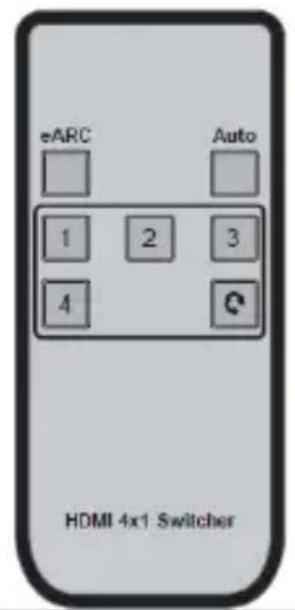
eARC Auto 1 2 3 4 HDMI 4x1 SwitchereARC
Press this button to enable the eARC/ARC function
Auto
Press this button to enable/disable auto switch mode 1/2/3/4
Each numbered button corresponds to an input. By pressing the number, the SW41e-8K will switch to that source

Cycles through the inputs in numerical order
7. Application Examples
7.1 Example 1
SW41e-8K used as a HDMI switch only without eARC or ARC engaged. Audio is passed from the source out to the display or via optical or analog out. Because the SW41eSupports 4K@120, it could be used to switch game consoles as well

flowchart
graph TD
    A["Input"] --> B["HDMI Source"]
    B --> C["HDMI"]
    C --> D["HDMI"]
    D --> E["HDMI"]
    E --> F["HDMI"]
    F --> G["Optical"]
    G --> H["Sound Bar"]
    style A fill:#f9f,stroke:#333
    style B fill:#ccf,stroke:#333
    style C fill:#cfc,stroke:#333
    style D fill:#fcc,stroke:#333
    style E fill:#cff,stroke:#333
    style F fill:#ffc,stroke:#333
    style G fill:#f96,stroke:#333
    style H fill:#9cf,stroke:#333
7.2 Example 2
SW41e-8K used as eARC/ARC/audio extractor. In this case the eARC/ARC is routed through the SW41e-8K to the sound bar and the optical. Note both are "live" as long as the audio format is 5.1 or stereo. Analog is active only with 2Ch analog.

text_image
HDMI Sound Bar HDMI opt call HDMI7.3 Example 3
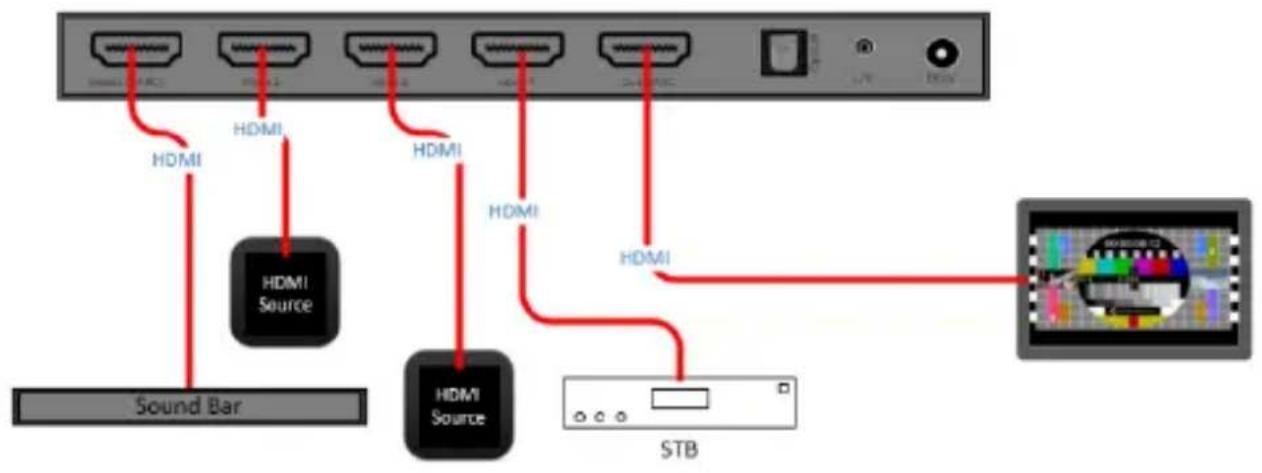
SW41e-8K used for switching and eARC/ARC audio breakout. This is unique because the audio will be extracted from the sources used in inputs 2,3,&4 to the HDMI eARC/ARC output on input 1 regardless if the display is sending eARC or ARC back. An EX3-8K could be used in port 1 to go back to the rack to an amplifier that processes ARC or eARC or it can be used if the display is remote from the SW41e-8K
flowchart
graph TD
    A["Sound Bar"] --> B["HDMI Source"]
    B --> C["HDMI"]
    C --> D["HDMI"]
    D --> E["STB"]
    F["STB"] --> G["HDMI"]
    G --> H["HDMI"]
    H --> I["HDMI"]
    I --> J["HDMI"]
    J --> K["HDMI"]
    K --> L["HDMI"]
    L --> M["HDMI"]
    M --> N["HDMI"]
    N --> O["HDMI"]
    O --> P["HDMI"]
    P --> Q["HDMI"]
    Q --> R["HDMI"]
    R --> S["HDMI"]
    S --> T["HDMI"]
    T --> U["HDMI"]
    U --> V["HDMI"]
    V --> W["HDMI"]
    W --> X["HDMI"]
    X --> Y["HDMI"]
    Y --> Z["HDMI"]
HDMI ^TM
HIGH-DEFINITION MULTIMEDIA INTERFACE
The terms HDMI and HDMI High-Definition Multimedia interface, and the HDMI Logo are trademarks or registered trademarks of HDMI Licensing LLC in the United States and other countries.
8. Warranty and Contact Information
Should you feel that this product does not function adequately due to defects in materials or workmanship, we (referred to as "the warrantor") will, for the length of the period indicated below (starting from the original date of the purchase) either a) repair the product with new or refurbished parts. Or b) Replace the product with new or refurbished product. All Simplified MFG products are covered by a 3-year warranty. During this period there will be no charge for unit repair, replacement of unit components or replacement of the product if deemed necessary. The decision to repair or replace is made by the warrantor. The purchaser must mail in the product during the warranty period. This limited warranty only covers the product purchased as new and is extended to the original purchaser only. It is non-transferrable to subsequent owners, even during the warranty period. A purchase receipt or other proof of purchase date is required for the limited warranty service.
Sales and Tech Support
P. 833-HDMI-411 (833-436-4411)
E. info@simplifiedmfg.com

text_image
SIMPLIFIED MFGSimplified MFG • 550 W Baseline Rd Ste 102-121 • Mesa AZ 85210
© Copyright 2023 Simplified MFG
SIMPLIFIED
MFG
SW41e-8K Quick Start Guide

flowchart
graph TD
    A["AMP"] -->|HDMI| B["HDMI SourceHDMI Source"]
    B -->|HDMI| C["HDMI SourceHDMI Source"]
    C -->|HDMI| D["Output HDMI"]
    D -->|Optical| E["eARC/ARC AudioeARC/ARC Audio"]
    E -->|eARC/ARC AudioeARC/ARC Audio| F["Output HDMI"]
    style A fill:#f9f,stroke:#333
    style B fill:#f9f,stroke:#333
    style C fill:#f9f,stroke:#333
    style D fill:#f9f,stroke:#333
    style E fill:#f9f,stroke:#333
    style F fill:#f9f,stroke:#333
Simplified MFG • 550 W Baseline Road Ste 102-121 • Mesa, AZ 85210 • www.simplifiedmfg.com • 833-HDMI-411 (436-4411)
SW41e-8K
HDMI 2.1 (48Gbps) 8K/4K120Hz.
4 Input Switch with eARC/ARC
SIMPLIFIED
MFG
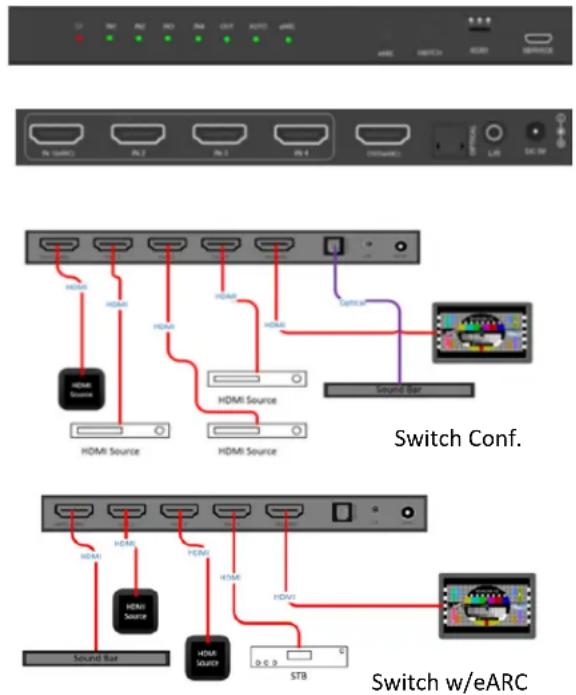
The SW41e-8K is a multi-function HDMI switch that supports eARC and ARC. The switch supports the HDMI 2.1 (48Gbps) format. This includes 8K@60Hz (4:2:0), 8K@30Hz. (4:4:4) and all 4K/UHD formats including 120Hz. The SW41e-8K supports VRR, ALLM, QMS, QFT, and SBTM. The SW41e-8K can be used as a traditional 4 input to 1 output HDMI switch and can also be set to auto switch. In addition, input one can be used as an eARC/ARC output. This is handy when interfacing multiple sources to a display and still using eARC/ARC to an amplified with those capabilities. Control can be done via auto switch, with the supplied IR remote, or by manually pressing the buttons on the front of the unit. There is an optical and analog audio breakout as well.
Features:
• HDMI 2.1 (48Gbps) & HDCP 2.3 compliant
• Supports 48Gbps FRL (Fixed Rate Link) & 18Gbps TDMS bandwidths
• Video resolutions up to 8K@60Hz. (4:2:0) 12-bit, 8K@30Hz. (4:4:4) 12-bit, & 4K@120Hz. (4:4:4) 12-bit
- Unique audio routing feature, can be used as a traditional HDMI switch with four inputs to one output, as an ARC/eARC extractor (HDMI and/or optical, or as a three input switch with audio extraction to a local sound bar that supports eARC/ARC
- HDMI 2.1 support including VRR (Variable Refresh Rate), ALLM (Auto Low Latency), QMS (Quick Media Switching), QFT (Quick Frame Transfer), & SBTM (Source-Based Tone Mapping)
• Supports HDR, HDR10+, HLG and DolbyVision™
• Supports all high-definition audio formats including Dolby+/Atmos
• Supports eARC/ARC
• Supports CEC pass-thru
• Supports Audio De-embed to S/PDIF (optical/analog)
- Manual and auto-switching feature
• EDID override capability
SW41e-8K
HDMI 2.1 (48Gbps) 8K/4K120Hz.
4 Input Switch with eARC/ARC
SIMPLIFIED
MFG
Specifications:
| Technical | |
| HDMI Compliance HDMI 2.1 | |
| HDCP Compliance HDCP 2.3 | |
| Video Bandwidth 48Gbps FRL / 18Gbps TDMS | |
| Video Resolutions | Up to 8K@60Hz. (4:2:0) 12-bit, 8K@30Hz. (4:4:4) 12-bit, & 4K@120Hz. (4:4:4) 12-bit |
| Color Space RGB, YCbCr 4:4:4, YCbCr 4:2:2 | |
| Color Depth | 8-bit, 10-bit, 12-bit at 1080p and at UHD/4K |
| HDR HDR, HDR10+, HLG, and DolbyVision | |
| Audio Formats | HDMI Input/Output, eARCLPCM 2.0/2.1/5.1/6.1/7.1, Dolby Digital, Dolby TrueHD, Dolby Digital Plus(DD+) Dolby Atmos, DTS-ES, DTS HD Master, DTS HD-HRA, DTS-XOptical OutputLPCM 2.0CH., Dolby/DTS 5.1CH.Analog OutputLPCM 2.0CH |
| ESD Protection | Human body model — ±8kV (air-gap discharge) & ±4kV (contact discharge) |
| Connections | |
| Inputs | 4x HDMI Type A [19-pin female]/3 if using eARC/ARC function |
| Outputs | 1×HDMI Type A (19-pin female)1x Optical (S/PDIF)1x 3.5mm Stereo Mini-Jack |
| Control Ports | 1x USB Micro for factory use |
| Mechanical | |
| Housing Metal Enclosure | |
| Color Black | |
| Dimensions | 176mm / 6.93" (W) x 68mm / 2.7" (D) x 18mm / 0.71" (H) |
| Weight 315g / 11.11 Oz. | |
| Power Supply | Input: AC100 - 240V 50/60HzOutput: DC 5V/1A (US/EU standards, CE/FCC/UL certified) |
| Power Consumption 2W (Max) | |
| Operation Temperature | 32 - 104°F / 0 - 40°C |
| Storage Temperature | -4 - 140°F / -20 - 60°C |
| Relative Humidity | 20 - 90% RH (no condensation) |