HSCSA-2 - Audio/video converter Osprey - Free user manual and instructions
Find the device manual for free HSCSA-2 Osprey in PDF.


| Product Type | Audio/Video Converter |
| Model | HSCSA-2 |
| Brand | Osprey |
| Input Interface | HDMI (female) |
| Output Interface | VGA (female) + 3.5mm audio jack |
| Max Resolution | 1920x1080 @ 60Hz |
| Power Supply | USB 5V DC (Micro USB) |
| Dimensions (LxWxH) | 10 x 5 x 2 cm |
| Weight | 150 g |
| Color | Black |
| Audio Support | Stereo L/R via 3.5mm jack |
| Plug and Play | Yes, no driver required |
| Operating Temperature | 0°C to 50°C |
| Storage Temperature | -20°C to 60°C |
| Cable Length | Not applicable (integrated) |
| Maintenance | Clean with dry cloth; avoid liquids |
| Safety Instructions | Use in dry environment; do not expose to moisture |
| Spare Parts Availability | Not available separately |
| Repairability | Not user-serviceable; contact support |
| Warranty | 1 year limited |
| Package Contents | Converter, USB power cable, user manual |
Frequently Asked Questions - HSCSA-2 Osprey
User questions about HSCSA-2 Osprey
0 question about this device. Answer the ones you know or ask your own.
Ask a new question about this device
Download the instructions for your Audio/video converter in PDF format for free! Find your manual HSCSA-2 - Osprey and take your electronic device back in hand. On this page are published all the documents necessary for the use of your device. HSCSA-2 by Osprey.
USER MANUAL HSCSA-2 Osprey
SHCSA-2 (SDI to HDMI) and HSCSA-2 (HDMI to SDI)
natural_image
Abstract geometric icon with overlapping squares and diagonal lines (no text or symbols)FRAME RATE
CONVERSION
natural_image
Silhouette of a USB plug (no text or symbols)USB CONTROLS
natural_image
Abstract composition of horizontal lines and a solid gray rectangle (no text or symbols)INTERLACING DE- INTERLACING
Osprey®
Video
The device settings can be changed by either Dip-Switches (Settings Table printed on the back of the unit) or with a USB Control Software that can be downloaded here

text_image
CONTROL PANEL Connected - 1 Version: 1.0.3.4 SCANNING SHCSA-2 STATUS SCALING / OUTPUT AUDIO SETTINGS OSD STATUS DISPLAY FUNC Custom Name SHCSA-2 Save Firmware Version Ver 1.9.4.2 SDI Input Status 1080p50 HDMI Output Status 720p60 AV Output Status NTSC Audio De-Embedding Status SDI Channel 1-2 HDMI Audio Embedding Status SDI Channel 1-8 HDMI Color Space RGB 4:4:4 Osprey® VideoThe Control Panel Software exposes additional features which are not accessible by the DIP Switches. It also allows the user to create custom settings and profiles which can be saved and later accessed by DIP Switch.
Features only accessible by the Control Panel are:
- Image Flip on SHCSA-2 only. HSCSA-2 has Dip Switches for Image Flip
- OSD (On Screen Display) location (SHCSA-2 and HSCSA-2). The software allows you to place the text overlay for Video Information anywhere within the active screen area. The DIP Switches only let you turn OSD ON or OFF
Video Input Features:
- The device accepts SDI Video input Signals up to 3G data rate
- "ALT SDI IN" is a fail over input in case of signal loss at "SDI IN"
- "SDI LOOPOUT" is for the primary input "SDI IN" only
Audio Input Features:
- Up to 8 Stereo Pairs of embedded SDI Audio
- AES/EBU Audio by 6.35mm barrel connector
- Unbalanced Analog Audio by 3.5mm barrel connector
Video Output Features:
- HDMI and parallel CVBS Output. HDMI up to 1080P60, CVBS either 480i NTSC or 576i PAL
- SDI Loopout of input "SDI IN"
- HDMI Color Space selection of either RGB444, YUV444, YUV422 or DVI RGB444 (no embedded Audio on DVI setting)
Audio Output Features:
- Up to 4 Stereo Pairs of embedded HDMI Audio
- AES/EBU Audio by 6.35mm barrel connector
- Unbalanced Analog Audio by 3.5mm barrel connector
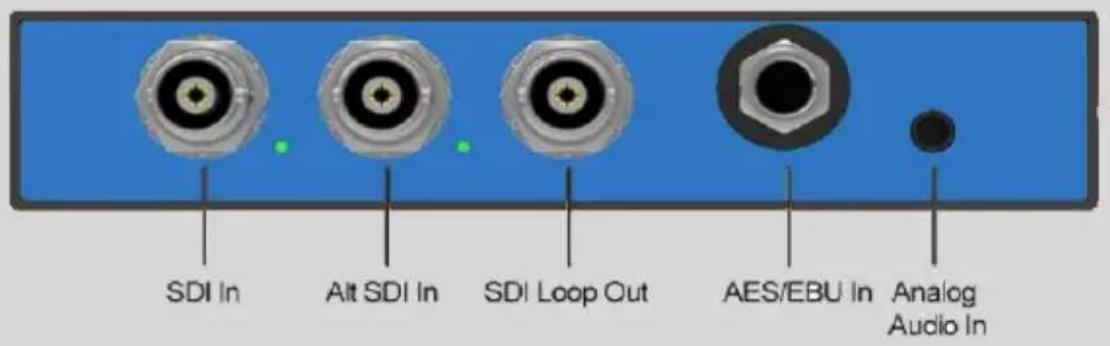
text_image
SDI In Alt SDI In SDI Loop Out AES/EBU In Analog Audio In
text_image
Analog Audio Out AES/EBU Out AV Out HDMI Out USB PowerHDMI Audio Embedding:
- From SDI - Up to 4 Stereo Pairs of embedded HDMI Audio. User can select between first 4 Stereo Pairs or second 4 pairs of SDI Audio
- From AES/EBU – One Stereo Pair of Audio will be embedded into HDMI
- From Unbalanced Analog - One Stereo Pair of Audio will be embedded into HDMI
SDI Audio De-Embedding:
- Any of the 8 SDI Stereo Pairs can be selected for De-Embedding.
- AES/EBU and Analog Audio Out always carry the same stereo pair.
| DIP 1 (1=ON, 0=OFF) | DIP 2 (1=ON, 0=OFF) | |||||||||||
| HDMI Output | SW1 | SW2 | SW3 | SW4 | Audio De-Embedding | SW5 | SW6 | SW7 | AV Out | SW1 | ||
| Follow Input | 1 | 1 | 1 | 1 | SDI CH1-2 | 1 | 1 | 1 | NTSC | 1 | ||
| 1080p60 | 1 | 1 | 1 | 0 | SDI CH3-4 | 1 | 1 | 0 | PAL | 0 | ||
| 1080p50 | 1 | 1 | 0 | 1 | SDI CH5-6 | 1 | 0 | 1 | Status Display | SW2 | ||
| 1080p30 | 1 | 1 | 0 | 0 | SDI CH7-8 | 1 | 0 | 0 | ON | 1 | ||
| 1080p25 | 1 | 0 | 1 | 1 | SDI CH9-10 | 0 | 1 | 1 | OFF | 0 | ||
| 1080p24 | 1 | 0 | 1 | 0 | SDI CH11-12 | 0 | 1 | 0 | Controls | SW3 | SW4 | |
| 1080i60 | 1 | 0 | 0 | 1 | SDI CH13-14 | 0 | 0 | 1 | DIP | 1 | 1 | |
| 1080i50 | 1 | 0 | 0 | 0 | SDI CH15-16 | 0 | 0 | 0 | PC | 1 | 0 | |
| 720p60 | 0 | 1 | 1 | 1 | HDMI Audio Embedding SW8 SW9 | Custom 1 | 0 | 1 | ||||
| 720p50 | 0 | 1 | 1 | 0 | SDI CH1-8 | 1 | 1 | Custom 2 | 0 | 0 | ||
| 720p30 | 0 | 1 | 0 | 1 | SDI CH9-16 | 1 | 0 | |||||
| 720p25 | 0 | 1 | 0 | 0 | AES/EBU | 0 | 1 | |||||
| 720p24 | 0 | 0 | 1 | 1 | Analog | 0 | 0 | |||||
| 576i50 | 0 | 0 | 1 | 0 | HDMI Color Space SW10 SW11 | |||||||
| 480i60 | 0 | 0 | 0 | 1 | RGB 444 | 1 | 1 | |||||
| 576i50 Cut | 0 | 0 | 0 | 0 | YUV 422 | 1 | 0 | |||||
| YUV 444 | 0 | 1 | ||||||||||
| DVI RGB 444 | 0 | 0 | ||||||||||
Video Input Features:
- The device accepts HDMI Video input Signals up to 1080P60
- CVBS/Composite input either 576i PAL or 480i NTSC
- Only one input can be routed to the SDI output at a time
Audio Input Features:
- Up to 4 Stereo Pairs of embedded HDMI Audio
- AES/EBU Audio by 6.35mm barrel connector
- Unbalanced Analog Audio by 3.5mm barrel connector
Video Output Features:
- 3x Parallel SDI Outputs up to 3G
- Video Output selectable from either HDMI or CVBS Input
Audio Output Features:
- Up to 4 Stereo Pairs of embedded SDI Audio
- AES/EBU Audio by 6.35mm barrel connector
- Unbalanced Analog Audio by 3.5mm barrel connector

text_image
Analog Audio In AES/EBU In AV In HDMI In USB Power
text_image
SDI Out 1 SDI Out 2 SDI Out 3 AES/EBU Out Analog Audio OutSDI Audio Embedding:
- From HDMI – All HDMI Stereo Pairs embedded into SDI Audio
- From AES/EBU – One Stereo Pair of Audio will be embedded into SDI
- From Unbalanced Analog - One Stereo Pair of Audio will be embedded into SDI
HDMI Audio De-Embedding:
- The first HDMI Stereo Pair is De-Embedded
- AES/EBU and Analog Audio Out always carry the same stereo pair.
| DIP 1 (1=ON, 0=OFF) | DIP 2 (1=ON, 0=OFF) | |||||||||
| SDI Output | SW1 | SW2 | SW3 | SW4 | SDI Audio Embedding | SW5 | SW6 | Video Input | SW1 | |
| Follow Input | 1 | 1 | 1 | 1 | Follow Input | 1 | 1 | HDMI | 1 | |
| 1080p60 | 1 | 1 | 1 | 0 | AES/EBU | 1 | 0 | AV | 0 | |
| 1080p50 | 1 | 1 | 0 | 1 | Analog | 0 | 1 | Status Display | SW2 | |
| 1080p30 | 1 | 1 | 0 | 0 | Image Flip | SW7 | SW8 | ON | 1 | |
| 1080p25 | 1 | 0 | 1 | 1 | Normal | 1 | 1 | OFF | 0 | |
| 1080p24 | 1 | 0 | 1 | 0 | Horizontal Only | 1 | 0 | Controls | SW3 | SW4 |
| 1080i60 | 1 | 0 | 0 | 1 | Vertical Only | 0 | 1 | DIP | 1 | 1 |
| 1080i50 | 1 | 0 | 0 | 0 | Horizontal & Vertical | 0 | 0 | PC | 1 | 0 |
| 720p60 | 0 | 1 | 1 | 1 | Custom 1 | 0 | 1 | |||
| 720p50 | 0 | 1 | 1 | 0 | Custom 2 | 0 | 0 | |||
| 720p30 | 0 | 1 | 0 | 1 | ||||||
| 720p25 | 0 | 1 | 0 | 0 | ||||||
| 720p24 | 0 | 0 | 1 | 1 | ||||||
| 625i50 | 0 | 0 | 1 | 0 | ||||||
| 525i60 | 0 | 0 | 0 | 1 | ||||||
| 625i50 Cut | 0 | 0 | 0 | 0 | ||||||
HSCSA-2
- HDMI to SDI Converter
- Mounting Brackets
- International 12V Power Supply
- Micro USB Cable (for Software Controls)
- AV Breakout Cable
SHCSA-2
- SDI to HDMI Converter
- Mounting Brackets
- International 12V Power Supply
- Micro USB Cable (for Software Controls)
- AV Breakout Cable
WHEN RELIABILITY MATTERS

text_image
Osprey®Video