AU54 - Ventilateur domestique GPX - Free user manual and instructions
Find the device manual for free AU54 GPX in PDF.


| Product Type | Domestic Fan |
| Brand | GPX |
| Model | AU54 |
| Dimensions (Height x Width x Depth) | 50 cm x 30 cm x 30 cm |
| Weight | 2.5 kg |
| Power Supply | 220-240V, 50/60 Hz |
| Power Consumption | 50 W |
| Fan Speed Settings | 3 speeds (Low, Medium, High) |
| Oscillation | Yes, wide-angle oscillation |
| Tilt Adjustment | Manual tilt up/down |
| Blade Diameter | 40 cm |
| Noise Level | < 60 dB |
| Control Type | Manual rotary switch |
| Safety Features | Overheat protection, stable base |
| Maintenance | Clean with damp cloth; do not immerse in water |
| Spare Parts & Repairability | Replacement blades and grille available; contact GPX support |
| Included Accessories | User manual, safety instructions |
| Warranty | 1 year limited warranty |
Frequently Asked Questions - AU54 GPX
User questions about AU54 GPX
0 question about this device. Answer the ones you know or ask your own.
Ask a new question about this device
Download the instructions for your Ventilateur domestique in PDF format for free! Find your manual AU54 - GPX and take your electronic device back in hand. On this page are published all the documents necessary for the use of your device. AU54 by GPX.
USER MANUAL AU54 GPX
Warnings and Tips for Use
• Do not touch the power supply or electrical
components with wet or camp hands.
- In not put your fingers into the fan blade wire
Do not course disassemie or expose the
batters to high temperatures for extended periods
of one
- To preserve battery life, do not overcharge the fan or allow the battery to deplete for long periods of time.
FCC WARNINGS
WARNING: Chancas email addresses to this unit not spread removed by the party upon the for compliance record on the user's affinity to promote the equipment.
NOTE: The question is the social bonds to copy
The following table is provided in the image:
12 of the PCC kind, like that in the grand power research protection system has limited importance in a particular induction. Two equipocal gardens, non, and various industrial imetry systems and three related materials are used
With the information, may cause further interference to avoid communication. However, there is no guarantee that interference will not occur in a particular situation. If the equipment has detrimental interference to avoid communication, when can be determined by turning the current off and on the rest it is concentrated in try to avoid the interference by one or more of the following measures
• Rabinos kolaik inoxirag akata
• I recommend the operation between the expenses and costs.
- Let us be given that the same address
fran lai to elich la naxion is amontal.
WARNING: To review the project boards, do not change
the unit is not or not as
(4) 2016: When the main plug plug plane requires to be done directly, such as a device shall remain mostly necessary.
Lithium malaria: for all irregularities, are vegetable and should be essential or disposed of according to state and guidelines. They should not be disposed of a normal household who are they should never be exercised, to lay might overlook. Contact your oral government for disposal or recycling practice in your area
WARNING: The product can expose you to chemicals including and, where is known to the State of California to make cancer and kill defects or antimicrobial laws. For more information to any DeWaringa cage. This product needs and couples with required federal product policies.
①
International Support
To download this User's Guide in English, Spanish, or French, or to get answers to frequently asked questions, visit the support section at:
www.gpl.com
Email Supports: prodinfo@dxjmc.com
Email Parler@varian.com
Bhara Sumpets 1,958,300,4215
Warranty
For Warranty information and the most up-to-date version of this User's Guide, go to: www.aps.com

Protect for Today
Sustainfor Tomorrow
GPX

FlexFan Rechargeable Personal Fan
User's Guide for Model AUS4 v3169
①
The image is too blurry to recognize any text content.
- 3 fan speeds low, medium, and high
- adjustable
- Removable fan grill
- Tropod with feable legs
- Вол. тимсия дезяжет
- Micro USB port for battery recharge
Includes
- User's Guide
- Micro USB to USB charging cable
ControlsFeatures
text_image
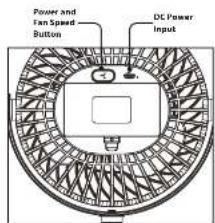
Power and Fan Speed Button DC Power InputIndicator Light
| Indicator Light Status | Meaning |
| Sollicit light charging | |
| Real light off Fully charged or charger disconnected | |
| Sollicit white light fire on | |
| White light off Power off | |
Fan Speed and Battery Life
Press and hold the Power and Fan Speed button to turn the fan. Press the button again to cycle through fan speeds. Press and hold to turn the fan off.
- 1m up to 15 hours
- Medium up to 10 hours
• High up to 5 hours
Charging the Battery
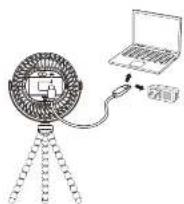
Using a Micro USB to USB cable (included) connect the fan to the USB port of a powered-on computer or USB power adapter (not included) to charge.
Charge time approx. 8-10 hours.
Note: Fan can operate while plugged in and charging.
Charge time while operating is approx. 20 hours
Tripod
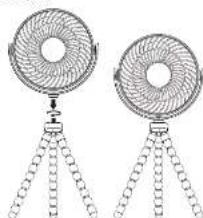
The tripocl features flexible legs to adjust tan height or attach the tan to other surfaces.
To attach the fan to the tripod for the first time, place the fan on the screw in the top of the tripod and turn into place.
natural_image
Two identical fan-shaped devices with three legs, each showing a circular top and chain base (no text or symbols)Cleaning and Maintenance
- Make sure the fan is powered off.
- Grab the front grill and turn it to the left, toward the release position on the image below.
- Wipe the fan blades, interior grill, and air vent with a dry cloth. Using water or liquid clearing solutions may damage the electrical motor.
- Replace the text, girl by turning it instead the name of a picture, so soon be seen.

①
The image is too blurry to recognize any text content.