J-MIC - Microphone Qtx - Free user manual and instructions
Find the device manual for free J-MIC Qtx in PDF.


| Product Type | Wired Handheld Microphone |
| Brand | Qtx |
| Model | J-MIC |
| Dimensions | Approx. 200 mm length, 50 mm diameter |
| Weight | Approx. 300 g |
| Power Source | No battery required (dynamic microphone) |
| Polar Pattern | Cardioid (unidirectional) |
| Frequency Response | 50 Hz - 15 kHz (typical) |
| Connector | XLR (3-pin) |
| Cable Length | Approx. 5 m |
| Applications | Vocal performances, public speaking, karaoke |
| Primary Functions | Audio capture, voice amplification |
| Cleaning Instructions | Wipe with a soft, dry cloth; avoid moisture |
| Safety Precautions | Do not expose to rain or liquids; avoid dropping |
| Spare Parts Available | Replacement grilles available (check retailer) |
| Repairability | Simple repairs possible; consult professional for cable issues |
| Included Accessories | Microphone clip, storage bag |
Frequently Asked Questions - J-MIC Qtx
User questions about J-MIC Qtx
0 question about this device. Answer the ones you know or ask your own.
Ask a new question about this device
Download the instructions for your Microphone in PDF format for free! Find your manual J-MIC - Qtx and take your electronic device back in hand. On this page are published all the documents necessary for the use of your device. J-MIC by Qtx.
USER MANUAL J-MIC Qtx
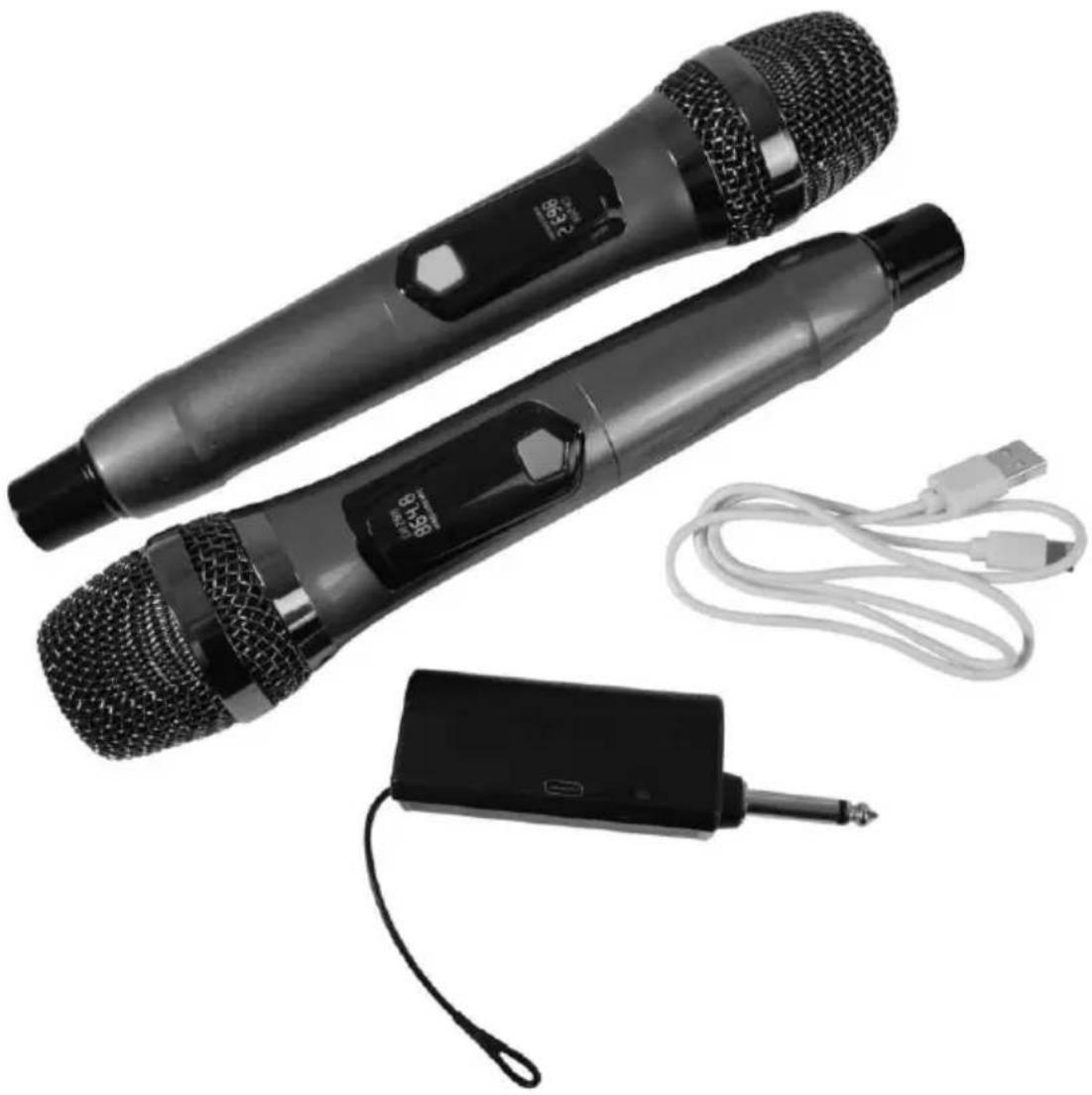
Rechargeable Dual Handheld UHF Wireless Set
User Manual
natural_image
Two black handheld devices with textured surfaces and a connected audio device (no visible text or symbols)Version 1.0

Caution: Please read this manual carefully before operating Damage caused by misuse is not covered by the warranty
Introduction
Thank you for choosing the J-MIC set for your wireless microphone requirements. This system is designed to provide a reliable, cable-free solution with minimal setup and ease of use. Please read and keep this user manual to get the best results from your product and avoid damage through misuse.
Setting up

text_image
Grille Display On/Off Battery Compartment Behind 6.3mm Plug On/Off switch USB-C Charging Port Li-ion Battery Compartment AntennaThe J-MIC set is supplied as 2 individual handheld microphone transmitters and a rechargeable 6.3mm plug-in receiver.
To charge the receiver, connect the supplied USB lead from the type-C socket on the receiver to a USB power supply with the type-A plug.
Note: the audio is not transmitted to the USB port. The USB is for power only.
The internal rechargeable battery is a Li-ion 18650 type and may be replaced if needed by sliding off the cover on the transmitter.
Unscrew the lower part of each handheld transmitter to reveal the battery compartment at the rear. Slide in 2 x AA batteries in tandem with the positive button towards the microphone grille.
Note: The front side of the opened microphone compartment has an aperture labelled "SET". This is not used, as the J-MIC system is pre-set to operate on the UK/EU license-free UHF band.
Replace the lower cover of each microphone once batteries are installed.
Operation
The J-MIC receiver is designed to plug directly into a microphone input jack on a mixer or amplifier. Turn down the volume level on the microphone input of the mixer or amplifier before connecting to avoid loud noises when connecting.
Note: The output of both of the handheld transmitters is mixed to the same single 6.3mm unbalanced jack.
On the plug-in receiver, slide the on/off switch to the on position and a small red LED will light from inside the receiver to show that it is powered on.
Each handheld transmitter has an on/off switch. Press and hold this button to switch on the handheld transmitter and the display will show the UHF carrier frequency of that microphone. At this point, each microphone is live to the receiver. Gradually turn up the volume level on the mixer or amplifier and speak into the handheld microphones in turn until the sound can be heard through the speakers or recording equipment. Increase the volume to the required level.
If the U-MIC set is not being used for long periods, turn down the volume level on the connected mixer or amplifier and switch both handheld microphones and the receiver off. For long term storage, unplug the jack and USB receiver and remove the batteries form the handheld transmitters.
Specifications
| Carrier frequencies | 863.2MHz + 864.8MHz |
| RF power | 10mW |
| Power supply: transmitter | 2 x AA batteries (each) |
| Power supply: receiver | Li-ion Battery (18650), 5Vdc 1000mA (USB) charge |
| Frequency response | 50Hz - 15kHz |
| Capsule | Cardioid dynamic |
| Output connection | Integral 6.3mm mono plug |
| Wireless range | Up to 50m |
| Dimensions: transmitter | 250 x 48mm∅ each |
| Weight: transmitter | 235g each (no battery) |
| Dimensions: receiver | 103 x 33 x 22mm |
| Weight: receiver | 66g |
Disposal: The "Crossed Wheelie Bin" symbol on the product means that the product is classed as Electrical or Electronic equipment and should not be disposed with other household or commercial waste at the end of its useful life. The goods must be disposed of according to your local council guidelines.
Hereby, AVSL Group Ltd. declares that the radio equipment type 171.824UK is in compliance with Directive 2014/53/EU
The full text of the EU declaration of conformity is available at the following internet address: http://www.avsl.com/assets/doc/1/7/171824UK.pdf
Errors and omissions excepted. Copyright© 2024. AVSL Group Ltd. Unit 2-4 Bridgewater Park, Taylor Rd. Manchester M41 7JQ