W72753 - Alarm clock radio LA CROSSE TECHNOLOGY - Free user manual and instructions
Find the device manual for free W72753 LA CROSSE TECHNOLOGY in PDF.


| Product Type | Alarm Clock Radio |
| Brand | La Crosse Technology |
| Model | W72753 |
| Power Source | AC adapter (included) with battery backup (2 x AAA, not included) |
| Radio Bands | AM/FM |
| Alarm Functions | Dual alarms with wake to radio or buzzer |
| Snooze Duration | 9 minutes |
| Display | LED with adjustable brightness (dimmer) |
| Dimensions | Approximately 7.5 x 3.5 x 5 inches (19 x 9 x 13 cm) |
| Weight | Approximately 1.2 lbs (0.54 kg) |
| Battery Backup | Preserves time and alarm settings during power outage |
| Warranty | 1 year limited warranty |
| Cleaning Instructions | Wipe with a soft, dry cloth. Do not use liquid or abrasive cleaners. |
| Safety Certification | UL listed |
| Spare Parts Availability | Contact manufacturer for replacement AC adapter or battery door |
Frequently Asked Questions - W72753 LA CROSSE TECHNOLOGY
User questions about W72753 LA CROSSE TECHNOLOGY
0 question about this device. Answer the ones you know or ask your own.
Ask a new question about this device
Download the instructions for your Alarm clock radio in PDF format for free! Find your manual W72753 - LA CROSSE TECHNOLOGY and take your electronic device back in hand. On this page are published all the documents necessary for the use of your device. W72753 by LA CROSSE TECHNOLOGY.
USER MANUAL W72753 LA CROSSE TECHNOLOGY
Warranty and Support
This product is warranted to be free from defects in material and workmanship under normal use and service for a period of one year from the date of sale to the customer. In accordance with the Song-Beverly Act, in the state of California, the warranty on this item becomes effective on the date of delivery. Warranty will not apply to defects resulting from abuse, accidents, or misuse. If a defect that is covered by this warranty arises during the warranty period, promptly return the clock (postage prepaid) with proof of purchase showing the date the clock was purchased to the following address and such defects will be repaired, or the products will be replaced at La Crosse Clock Company option without charge.
La Crosse Clock Company, Warranty Department 2830 South 26 ^th Street, La Crosse, WI 54601
Phone: 608.782.1610
For Full Warranty Details, Visit: www.lacrossetechnology.com/pages/warranty Patents: www.lacrossetechnology.com/pages/patents
Care and Maintenance
• Always purchase the correct size and grade of battery most suitable for intended use.
- Clean the battery contacts and also those of your clock prior to battery installation.
- Ensure the battery is installed with correct polarity (+ and -).
- Remove battery from equipment when it is not used for an extended period of time.
- Promptly remove an expired battery.

WARNING: This product can expose you to chemicals including acrylonitrile,
1, 3-butadiene, and styrene, which are known to the State of California to cause cancer and birth defects or other reproductive harm.
For more information go to: www.P65Warnings.ca.gov
Made in China - Printed in China

text_image
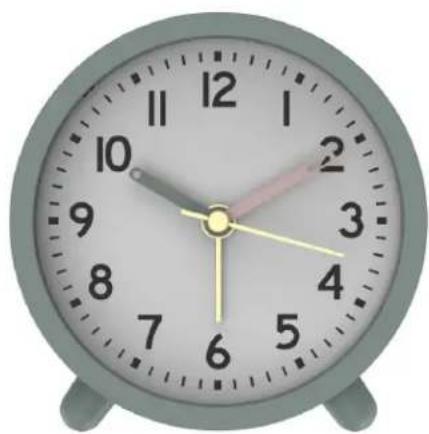
LA CROSSE CLOCK CO.Mini Analog Alarm Clock
natural_image
Close-up of a classic analog clock face with hour and minute hands (no text or symbols visible)Model: W72753 DC: 030124
Power up
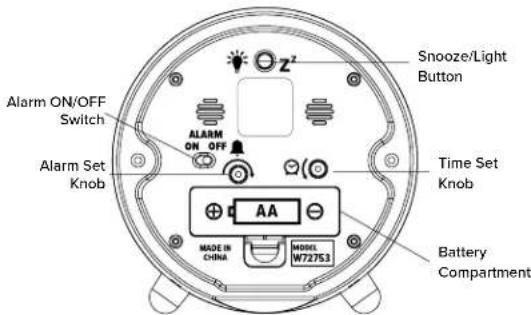
- Insert 1 fresh AA battery into your clock according to the polarity markings.
- Turn the Time Set Knob counter-clockwise to set your time.
text_image
Snooze/Light Button Alarm ON/OFF Switch Alarm Set Knob Time Set Knob AA Made in China MODEL W72753 Battery CompartmentTime Alarm
Set:
Turn the Alarm Set Knob clockwise to set alarm time.
Activate/Deactivate:
- Slide the Alarm ON/OFF switch to ON to activate your alarm.
- Slide the Alarm ON/OFF switch to OFF to deactivate your alarm.
Snooze:
When the alarm sounds, press the ⚙ Z ^2 button to silence the alarm for 4 minutes. Snooze may be repeated.
The alarm will increase in frequency and sound for 45 minutes if not snoozed or turned off.
Backlight
The Backlight will be active for as long as you hold the 🎨 Z ^2 button. When you release the button the light will turn off.
Let's Be Social!
Ask questions, watch set up videos, and provide feedback on our social media outlets. Follow La Crosse Technology on Youtube, Facebook, Instagram, & X (Twitter).

Specifications
Battery Requirements: 1 AA (IEC LR6) Alkaline battery
Battery life: Over 12 months
Movement: Step
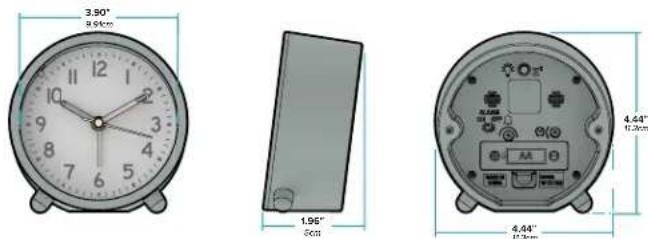
Dimensions: 4.44" W x 1.96" D x 4.4" H (11.3cm W x 5cm D x 11.3cm H)