MonoPix MP-842IS - Optics Carson - Free user manual and instructions
Find the device manual for free MonoPix MP-842IS Carson in PDF.


| Product Type | Monocular |
| Brand | Carson |
| Model | MonoPix MP-842IS |
| Magnification | 8x |
| Objective Lens Diameter | 42 mm |
| Field of View | 6.5° (114 ft @ 1000 yds) |
| Eye Relief | 18 mm |
| Close Focus | 6 ft (1.8 m) |
| Image Stabilization | Yes, electronic |
| Dimensions | 6.3 x 2.4 x 2.4 in (160 x 61 x 61 mm) |
| Weight | 11.6 oz (329 g) |
| Power Source | 1 CR2 lithium battery |
| Battery Life | Approx. 50 hours (without stabilization) |
| Tripod Mountable | Yes, 1/4-20 thread |
| Waterproof/Fogproof | Water-resistant, nitrogen-filled |
| Warranty | Limited lifetime warranty |
| Included Accessories | Neck strap, carrying case, lens cloth, CR2 battery |
Frequently Asked Questions - MonoPix MP-842IS Carson
User questions about MonoPix MP-842IS Carson
0 question about this device. Answer the ones you know or ask your own.
Ask a new question about this device
Download the instructions for your Optics in PDF format for free! Find your manual MonoPix MP-842IS - Carson and take your electronic device back in hand. On this page are published all the documents necessary for the use of your device. MonoPix MP-842IS by Carson.
USER MANUAL MonoPix MP-842IS Carson
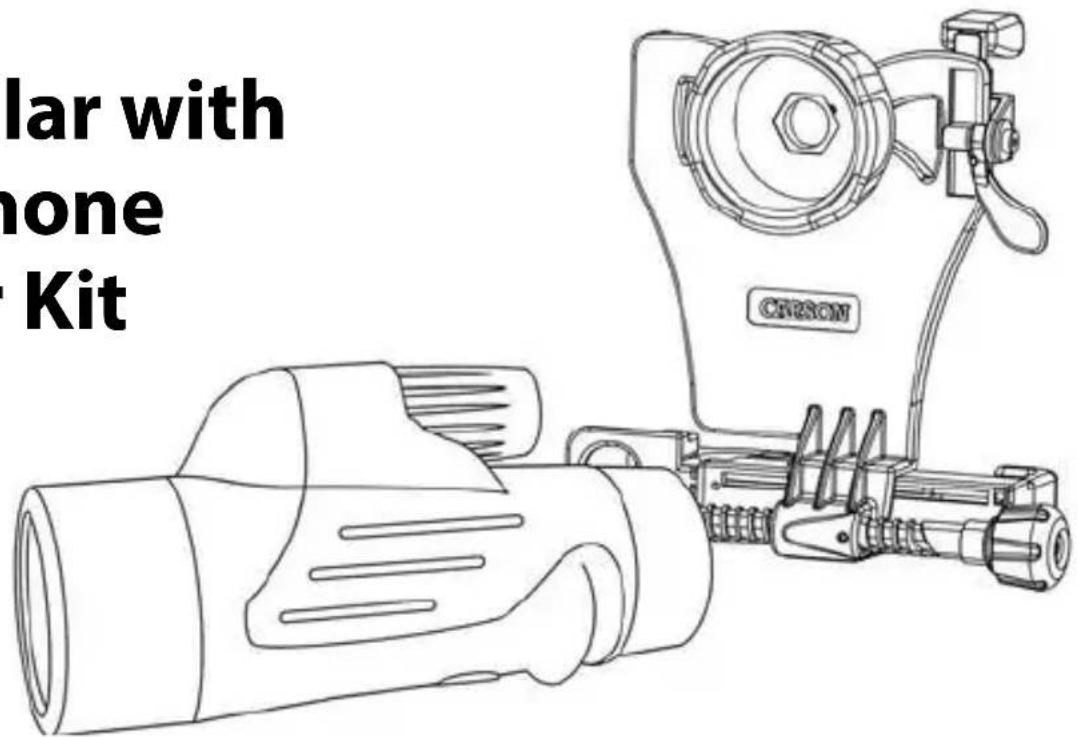
Monocular with Smartphone Adapter Kit
text_image
lar with hone KitInstructions for Use

PDF / 📋 VIDEO: www.carson.com/monopix
English / Français / Español / Deutsch / 日本語
MONOPIX™
Table of Contents
Optic Side Diagram ......2
Phone Side Diagram ....3
Inserting Phone 4-5
Align & Lock 6–7
Attaching to Optic 8–9
Using Monocular
Without Adapter 10
Frequently Asked Questions .....11–14
Tips and Tricks......15
Storage/Cleaning Information....16
Customer Service......16
Carson Optical
2070 5th Avenue
Ronkonkoma, NY 11779
www.carson.com info@carson.com
Tel: 631-963-5000 Fax: 631-427-6749
text_image
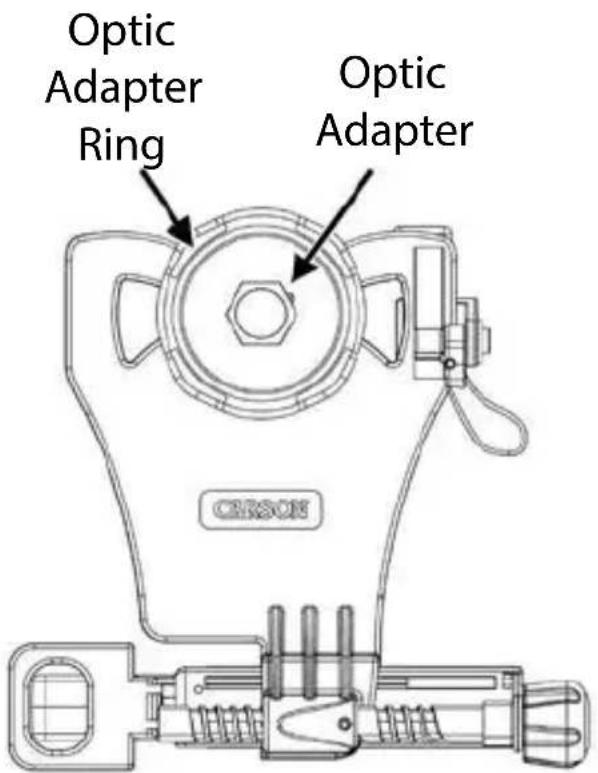
Optic Adapter Ring Optic Adapter CERSONOptic Side

text_image
Top Clamp Camera Cutout Top Clamp Lock Alignment Screw Left Clamp Right ClampPhone Side
Inserting Phone
Fig.1
text_image
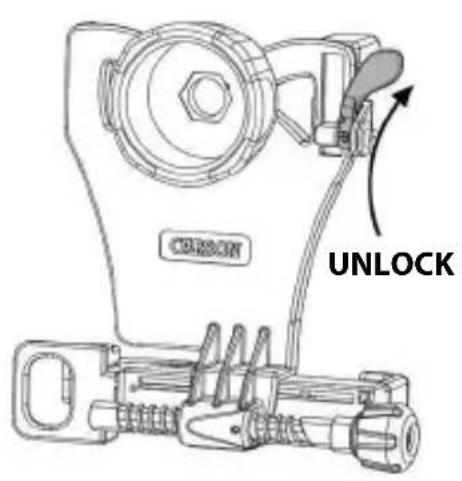
CORSON UNLOCKRotate to unlock top clamp.
Fig.2
natural_image
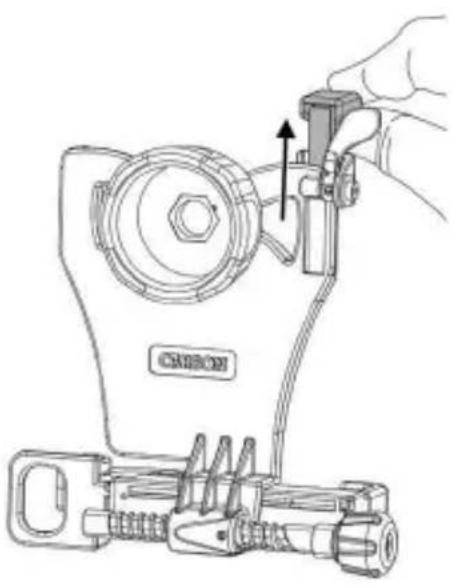
Technical line drawing of a sewing machine with a hand adjusting the handle (no text or symbols present)Slide top clamp into uppermost position.
Fig.3

text_image
Fig.3Insert phone into left clamp.
Inserting Phone (cont.)
Fig.4
Fig.5
Fig.6
natural_image
Line drawing of a hand inserting a USB into a smartphone (no text or symbols)
natural_image
Line drawing of hands holding a smartphone with a lock and adjustment knob (no text or symbols)
natural_image
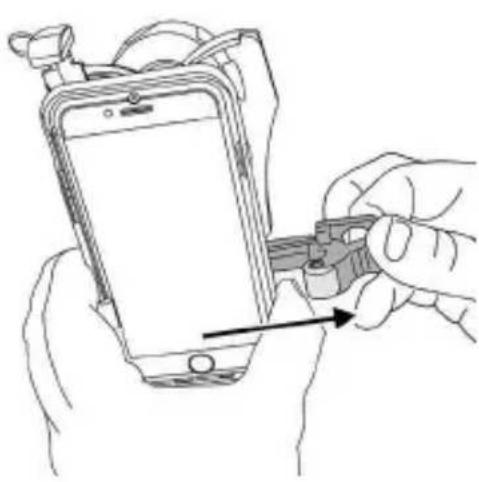
Mechanical assembly diagram showing two configurations with arrows indicating motion direction (no text or symbols)Squeeze and pull right clamp past edge of phone.
Release right clamp to secure phone.
Ensure phone is flat as possible to adapter.
Align & Lock
Fig.7

text_image
Fig.7 QUADICESlide phone vertically until camera is roughly aligned with camera cutout.
Fig.8
text_image
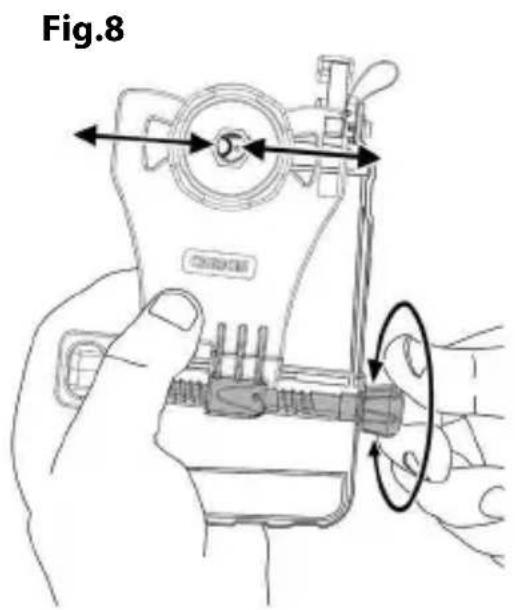
Fig.8Turn alignment screw until camera is centered in camera cutout.
Fig.9
natural_image
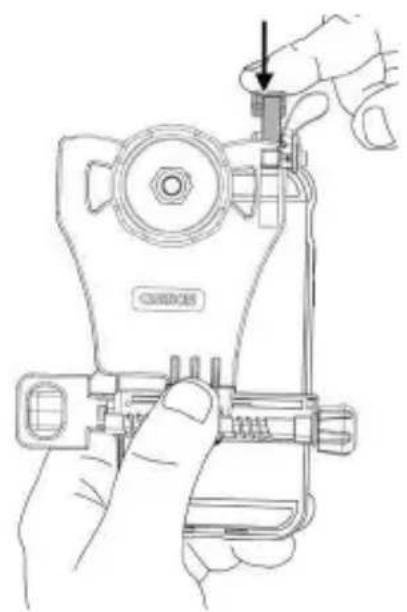
Line drawing of a hand using a handheld device to adjust or install a component, with no visible text or symbols.Slide top clamp down against phone edge.
Align & Lock (cont.)
Fig.10

text_image
LOCKFig.11
natural_image
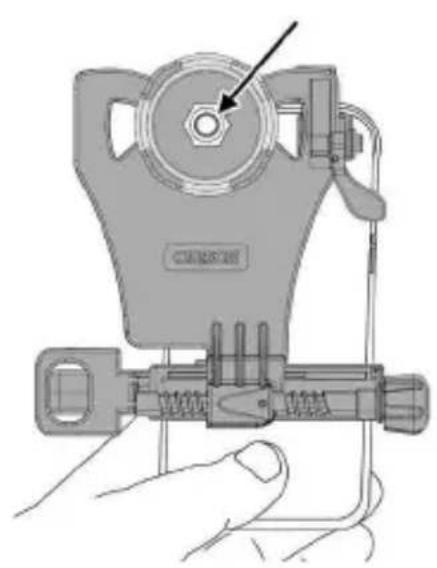
Illustration of a handheld device with a circular component and a hand holding it (no text or symbols visible)While holding top clamp tight to phone, rotate to lock.
Fig.11 shows a properly aligned camera. If needed, use alignment screw and top clamp to make further adjustments.
MULTIPLE-LENS CAMERA PHONE:
If there is more than one rear-facing camera, use the primary one. Typically, the primary is a 1x wide-angle color camera, and the other camera(s) are secondary.
- For Apple dual camera phones, the primary camera is the one closest to the corner. Use photo or video mode only.
- For Android, the primary camera can be determined by which does not show an image in your app while blocking the individual camera.
For the latest instructions on multiple camera phones, please visit:
www.carson.com/multicam.
Attaching to Optic
Fig.12

natural_image
Illustration of two hand positions showing a device being adjusted for a circular component (no text or symbols present)Align optic adapter over eyepiece and press down firmly. Be careful not to move your camera out of alignment.
Fig.13
natural_image
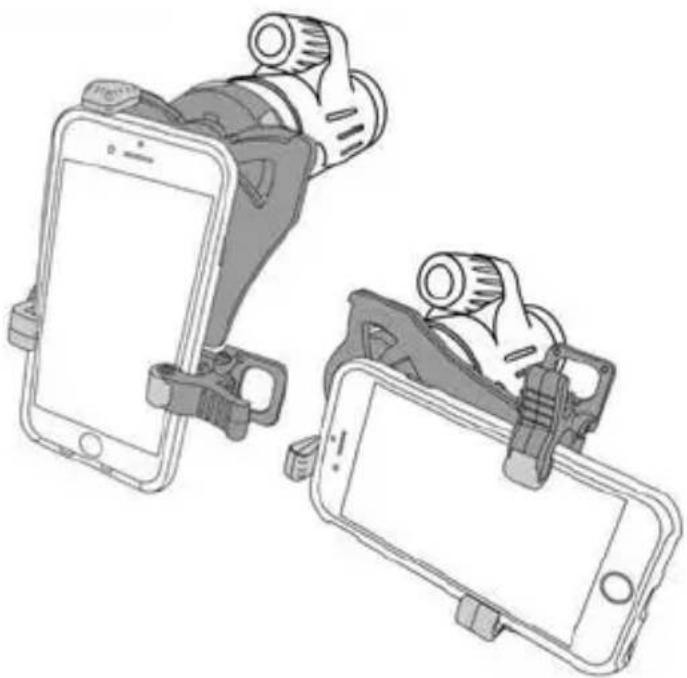
Illustration of two smartphones with camera lenses and clipers, no text or symbols presentPhone can be positioned in either portrait or landscape mode.
Attaching to Optic (cont.)
Fig.14
text_image
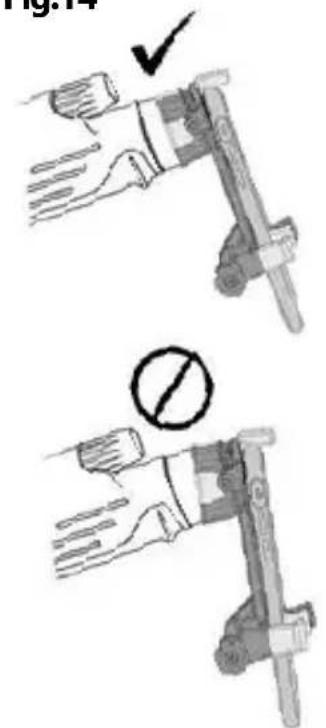
Fig.14 ✓ ○Ensure that optic adapter is flush to the eyepiece of your monocular.
Fig.15
natural_image
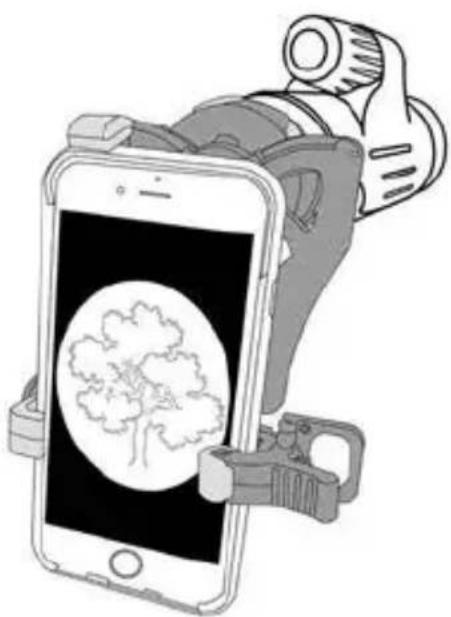
Illustration of a smartphone holding a camera with a tree graphic on screen (no text or symbols)Turn on camera. If image is not centered, repeat alignment steps (Fig. 7–11).
Fig.16

natural_image
Illustration of a hand holding a smartphone displaying a map, with a camera and device attached (no text or symbols visible)To maximize your image, pinch to enlarge image. For best results, use in video mode.
Using Monocular Without Adapter
Fig.17 F
natural_image
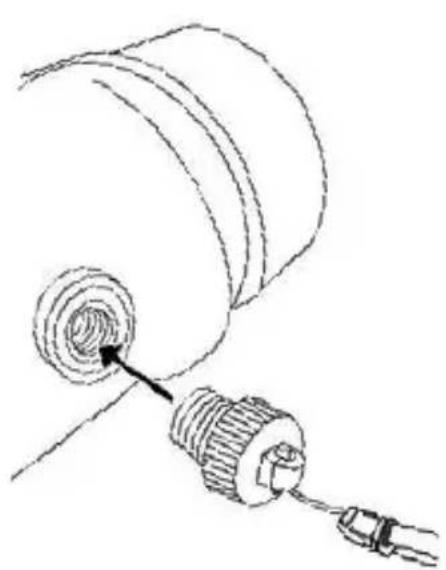
Technical line drawing of a mechanical component with threaded end and connector (no text or symbols)If desired, attach wrist strap by screwing bolt on end of strap into the threaded socket of monocular.
ig.18

natural_image
Diagram showing two mechanical or fluidic components with directional arrows indicating flow or movement (no text or symbols present)For eyeglass wearers, eyecups should be in innermost position. If you do not wear eyeglasses, you may choose to twist eyecup out to block stray light and reflections from your view.
Fig.19
natural_image
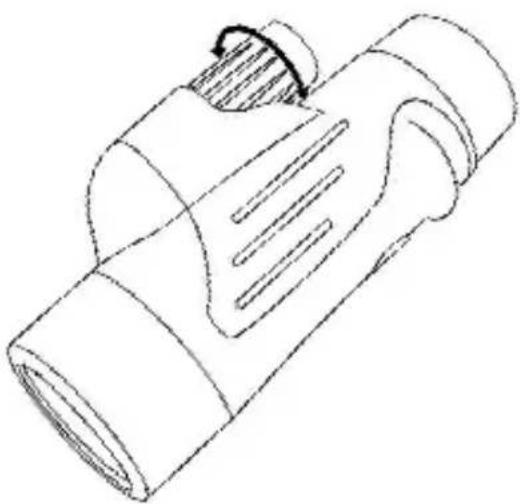
Line drawing of a cylindrical mechanical component with internal grooves and a handle (no text or symbols)Focus monocular by turning center focus knob until viewing image is sharp.
TO REMOVE PHONE FROM ADAPTER:
To save your alignment, make no further adjustments to the top clamp and alignment knob. Simply remove phone using right clamp only as shown in Fig.4.
USING ADAPTER AGAIN:
The alignment of your phone to the adapter should be saved from the initial setup, so many steps can be skipped (Fig.1–2, 7–11) and only a quick fine adjustment of the alignment may be needed.
Frequently Asked Questions:
Q1: Why does the top clamp touch the round corner of my phone, instead of the top flat edge?
A1: This is normal for some models of phones. Just fit as close to rounded edge as possible and lock top clamp as normal.
Q2: Why am I getting reflections and/or glare in my image?
A2: This may occur with indoor lighting. Please avoid overhead lighting or change the angle of the lighting relative to phone. Also, please use without flash to avoid reflections and/or glare in photos. If there's glare on your phone screen that makes image hard to view, increase brightness setting on phone and view from a position with less overhead light.
Q3: I can't align my phone vertically with the top clamp; it won't fit. What should I do?
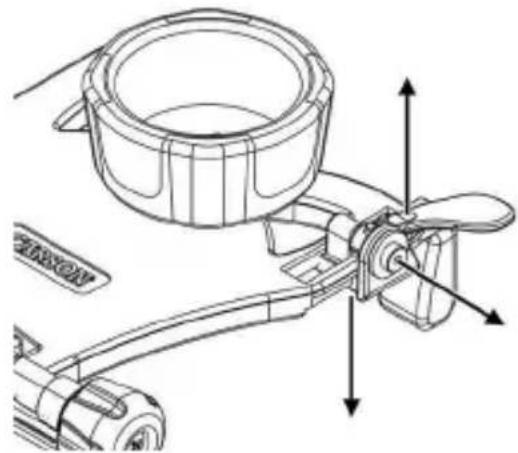
A3: If you go through the alignment process (Fig.7-11), and there is no way to achieve vertical alignment because it's restricted by the top clamp, try removing your phone case.
natural_image
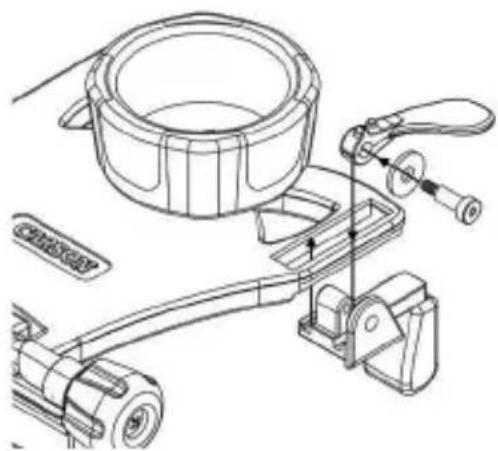
Technical line drawing of a mechanical assembly with no visible text or symbolsAlternatively, you can remove top clamp assembly using screw as shown above. For this configuration, you will not be able to save your vertical alignment between uses. Your phone will have to be adjusted for vertical positioning each time it's placed within the adapter.
natural_image
Technical line drawing of a mechanical assembly with a cylindrical component and clamping mechanism (no text or symbols)We recommend you save these four parts for use with other phones, and you can reassemble the top clamp as shown above in right figure.
Q4: How do I know which phones will work with the adapter?
A4: Please see the smartphone sizing guide below.
SMARTPHONE SIZING GUIDE
If your phone (in its case) fits in “portrait” orientation between the 2 arrows, it will fit the smartphone monocular adapter.
Q5: My phone rotates on the eyepiece when used in landscape (horizontal) mode. What should I do?
A5: To correct, rotate the monocular eyepiece clockwise to its innermost position.
Q6: My other phone camera or flash is covered by adapter. Why is that?
A6: First, we recommend using the device with only the primary rear camera. If problems persist, please contact customer support. Second, the flash can be covered, and is not needed for use with optic. We recommend flash setting is turned off at all times when using adapter.
natural_image
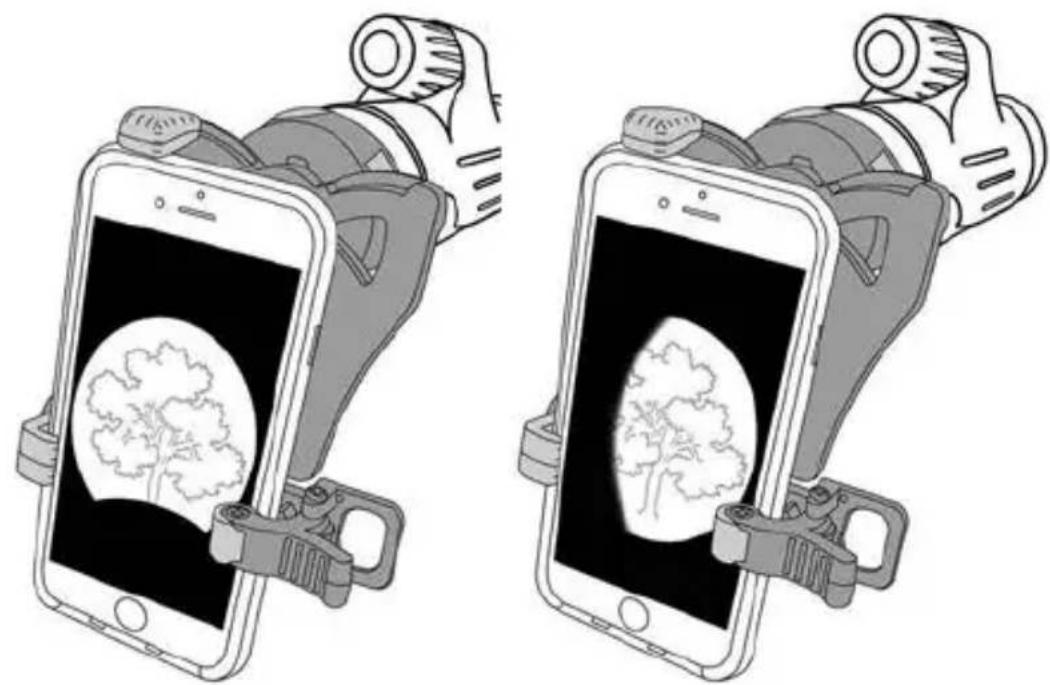
Illustration of two smartphones with camera lenses displaying a heart-shaped brain on screen, no text or symbols presentQ7: My image doesn't appear to be centered or is not a complete round image; what's wrong?
A7: The phone alignment needs to be adjusted in vertical direction using top clamp (Fig.7) and in horizontal direction by using alignment screw (Fig.8). Check that phone is flat on adapter (Fig.6), and adapter is flush with optic (Fig.14).
Tips & Tricks:
PHOTOGRAPHY
- Tap object of interest on your phone screen to autofocus.
- For videos, tap and hold object of interest on phone screen for a second to lock focus.
Tap again to release the focus lock. - In low light conditions, turn your phone screen brightness to its lowest level.
- For long sessions, try using battery cases or phone chargers to prevent your battery from draining.
APPS
- Share photos and videos through various apps (e.g. FaceTime, Messages, Facebook, Instagram, etc.)
STABILIZATION
- To prevent shaking while capturing photos, attach headphones to smartphone and use the volume buttons to activate shutter.
- Attach monocular to a tripod to prevent external vibrations from shaking image.
- Many phones have image stabilization features. Check your phone and turn on this feature if available. If not, there are camera apps with stabilization features.
Storage/Cleaning Information:
- For longest life of springs/plastic, store in dry area at room temperature.
- Adapter should be cleaned with soft, damp cloth only. Do not use any chemicals or abrasives.
-
Cleaning must be done safely and carefully to avoid scratching the lenses and permanently damaging your monocular. Safe cleaning can be accomplished by following the procedure below:
-
Blow away any dust or debris on the lens (or use a soft lens brush).
- To remove dirt, grease or fingerprints, clean with a soft cotton cloth, rubbing in a circular motion. Use of a coarse cloth or unnecessary rubbing may scratch the lens surface and eventually cause permanent damage.
- For a more thorough cleaning, photographic type lens cleaning fluid may be used. Always apply the fluid to the cleaning cloth, never directly on the lens.
- IMPORTANT: Never attempt to clean your monocular internally or try to take it apart.
Customer Service:
If you experience any difficulties, please contact us and we will be happy to help you.
In the U.S.A.
Phone: 1-631-963-5000
Email: info@carson.com
In the U.K.
Phone: +44 (0) 1938 557440
Email: uksupport@carson.com
In the E.U.
Phone: +44 (0) 1938 557440
Email: eusupport@carson.com
For warranty information, visit www.carson.com/warranty
MP-842IS / ©2019 R2