WT-5600 - Alarm clock radio LA CROSSE TECHNOLOGY - Free user manual and instructions
Find the device manual for free WT-5600 LA CROSSE TECHNOLOGY in PDF.


| Product Type | Alarm Clock Radio |
| Brand | La Crosse Technology |
| Model | WT-5600 |
| Color | Black |
| Display Type | LED with bright red digits |
| Dimensions (H x W x D) | 2.5 x 6.5 x 3.5 inches (approx.) |
| Weight | 10.6 oz (300 g) |
| Power Source | AC adapter (included) with battery backup (2 x AAA, not included) |
| Battery Backup | Maintains time and alarm settings |
| Radio Bands | AM/FM |
| Radio Presets | 20 station presets (10 AM, 10 FM) |
| Alarm Features | Dual alarms with choice of radio, buzzer, or both; snooze (9 minutes) |
| Atomic Time | Self-setting via WWVB radio signal |
| Time Zone Selection | Supports Atlantic, Eastern, Central, Mountain, Pacific, Alaska, and Hawaii |
| Backlight | Adjustable high/low/off |
| Additional Functions | Indoor temperature display, calendar, date, and alarm indicator |
| Dimmer Control | Three levels to reduce display brightness at night |
| Maintenance | Wipe with dry soft cloth; do not use liquids or abrasives |
| Safety | Use only provided AC adapter; keep away from water and heat sources; do not disassemble |
| Spare Parts & Repairability | No user-serviceable parts; contact La Crosse Technology support for replacement |
| Warranty | 1-year limited warranty |
Frequently Asked Questions - WT-5600 LA CROSSE TECHNOLOGY
User questions about WT-5600 LA CROSSE TECHNOLOGY
0 question about this device. Answer the ones you know or ask your own.
Ask a new question about this device
Download the instructions for your Alarm clock radio in PDF format for free! Find your manual WT-5600 - LA CROSSE TECHNOLOGY and take your electronic device back in hand. On this page are published all the documents necessary for the use of your device. WT-5600 by LA CROSSE TECHNOLOGY.
USER MANUAL WT-5600 LA CROSSE TECHNOLOGY
Radio Controlled Projection Alarm
Instruction Manual
text_image
12:34:
text_image
SNOOZE 12:34 DATE (●) 10.10. AL/SEL MODE/+ PROJECTIONLA CROSSE
TECHNOLOGY
tools and technology for home and office
TABLE OF CONTENTS
| Topic | Page |
| Inventory of Contents 3 | |
| About WWVB 3 | |
| Quick Set-Up Guide 4 | |
| Detailed Set-Up Guide | |
| Battery Installation 5 | |
| Program Mode | |
| Programming Sequence 6 | |
| Function Buttons 6 | |
| Time Zone Setting 6-7 | |
| Time Setting 7 | |
| Date Setting 8 | |
| 12/24-Hour Mode 8 | |
| DST (Daylight Saving Time) Setting 8 | |
| Features & Operations | |
| Features | 8-9 |
| Radio-Controlled Time 9 | |
| Projection | 10 |
| LCD light 10 | |
| Time Alarm 10-11 | |
| Changing Display Mode 12 | |
| Maintenance & Care | 12 |
| Troubleshooting | 13 |
| Specifications | 13 |
| Warranty and Contact Information | 14 |
INVENTORY OF CONTENTS
1) WT-5600 Alarm Clock
2) AC adapter/transformer
3) Instruction manual and warranty card.
ADDITIONAL EQUIPMENT (not included)
1) Two fresh 1.5V AA batteries (optional for alarm clock)
FEATURES OF PROJECTION ALARM
- Radio-controlled time and date
- Projection of time
- LCD light
- Three modes of date/second display
- Alarm
ABOUT WWVB (Radio Controlled Time)
The NIST (National Institute of Standards and Technology—Time and Frequency Division) WWVB radio station is located in Ft. Collins, Colorado, and transmits the exact time signal continuously throughout the United States at 60 kHz. The signal can be received up to 2,000 miles away through the internal antenna in the Projection alarm. However, due to the nature of the Earth’s Ionosphere, reception is very limited during daylight hours. The Projection alarm will search for a signal every night when reception is best.
The WWVB radio station receives the time data from the NIST Atomic clock in Boulder, Colorado. A team of atomic physicists is continually measuring every second, of every day, to an accuracy of ten billionths of a second per day. These physicists have created an international standard, measuring a second as 9,192,631,770 vibrations of a Cesium-133 atom in a vacuum. For more detail, visit http://www.boulder.nist.gov/timefreq.htm. To listen to the NIST time, call (303)499-7111. This number will connect you to an automated time, announced at the top of the minute in “Coordinated Universal Time”, which is also known as Greenwich Mean Time (GMT). This time does not follow Daylight Saving Time changes. After the top of the minute, a tone will sound for every second. It is possible that your Projection Alarm may not be exactly on the second due to the variance in the quartz. However, the clock will adjust the quartz timing over the course of several days to be very accurate; under .10 seconds per day.
QUICK SET-UP GUIDE
1) Insert two AA batteries into the Projection alarm and/or plug into wall
2) Wait 10 minutes for WWVB reception.
3) If there is no WWVB reception, manually set the time and date (instructions in the Program Mode).
4) Program the settings.
5) Mount the WT-5600 in a suitable location, where WWVB signal can be received.
6) The projector will activate and remain on if the alarm clock is plugged in. If only batteries are used, the projector will only be activated when a button is pressed.
7) See the "Features" section for instructions on projection direction, etc.
DETAILED SET-UP GUIDE
BATTERY INSTALLATION
- Remove the battery cover.
-
Observe the correct polarity and install 2 AA batteries.
-
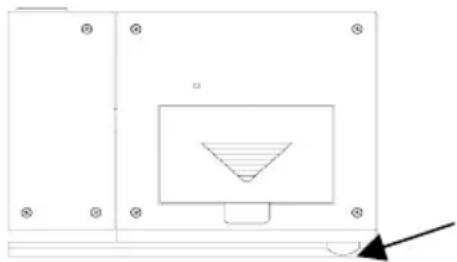
In addition or instead of inserting batteries, the AC adapter can be used. Simply plug the adapter into the receptacle on the bottom of the alarm clock and then plug in adapter.
-
Replace the battery cover.
-
The projector will activate and remain on if the alarm clock is plugged in. If only batteries are used, the projector will only be activated when a button is pressed. The projection is a red light, not harmful under normal usage, although care should be taken to not look directly into the light.
natural_image
Pure technical diagram showing a rectangular component with a triangular cutout and a diagonal line, no text or symbols present.AC adapter receptacle
Note: After the batteries have been installed a tone will sound and the LCD (Liquid Crystal Display) will activate. The date and U.S. map will be displayed and the time will appear as “-:-”. The WWVB search is automatically initiated and a tower icon appears and flashes with the time colon (no tower icon will appear if the WWVB is too weak to be detected and the time display will remain on “-:-”). While the WWVB search is being conducted various numbers will appear in the time display. After 10 minutes, the Projection Alarm will either display the WWVB time, or discontinue the search if the time is not found. If the search is cancelled “-:-” will remain in the time LCD. The Projection Alarm will conduct a WWVB search every hour until the first signal is found. Once the WWVB time is found, a search is automatically conducted nightly at midnight. If the signal is found at midnight, the tower icon will appear. If not, another search will take place every hour (until 6:00 am) until the signal is received successfully. If no signal is found during this period, the tower icon will not appear and the clock will search again at 12:00 am the next night.
PROGRAM MODE
To enter the Program Mode, hold down the “MODE+” button for 2 seconds, until the time zone (“-5” default) flashes in the lower right. The Program Mode Guide is laid out in a manner that allows you to program each function separately, or you can follow the instructions entirely to program the Projection Alarm. Complete programming is usually done for the initial set-up and will require you to skip step 1 of programming sections III through VIII. Press the “SNOOZE” button at any time to exit the Program Mode or wait approximately 15 seconds for the Projection Alarm to automatically return to normal operation.
A. PROGRAMMING SEQUENCE
- Time Zone Setting
- Hour Setting
- Minute Setting
- Year Setting
- Month Setting
- Day Setting
- 12/24-hour Mode
- Daylight Saving Time On/Off
B. FUNCTION BUTTONS
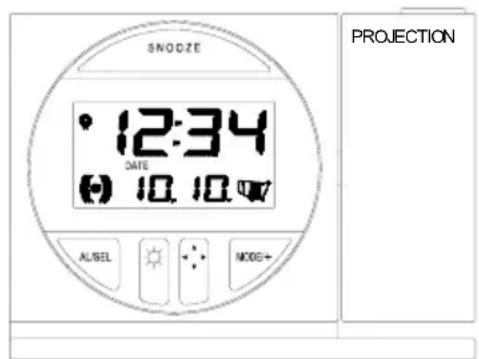
There are 5 function buttons located on the front of the Projection Alarm. The function buttons are labeled: AL, light intensity icon, light direction icon, MODE/+, and SNOOZE (the top bar).
text_image
SNODZE 12:34 DATE 10.10.47 AL/BEL MODE+ PROJECTIONC. TIME ZONE SETTING
- Hold down the “MODE/+” button for 2 seconds, the time zone (“-5” default) will flash in the Date LCD.
- Press the “MODE/+” button to select the appropriate time zone. There are 13 time zones to choose from (based relative to the international time standard of GMT (“Greenwich Mean Time”).
| -4h | Atlantic Time |
| -5h Eastern Time (default setting) | |
| -6h | Central Time |
| -7h | Mountain Time |
| -8h | Pacific Time |
| -9h | Alaskan Time |
| -10h | Hawaiian Time |
| -11h, -12h Next two time zones West of HAW | |
| 0h Greenwich Mean Time | |
| -1h, -2h, -3h Three time zones West of GMT | |
- From -5h to -8h, a US map with the highlighted time zone will also be displayed to the right of the time display.
- Press the “AL” button to move to the hour setting or press the “SNOOZE” button to confirm the time zone and return to the display mode.
D. TIME SETTING
Note: When the WWVB signal is found, that time will over-ride the manually set time.
- Hold down the “MODE/+” button for 2 seconds (the selected time zone will flash), press the “AL” button once until the hour flashes in the time LCD.
- Press the "MODE/+" button to select the hour.
- Press the “AL” button to move to the minute setting. a. Note: When setting the hour, “PM” will appear to the left of the hour display, if it is “AM” nothing will appear.
- Press the "MODE/+" button to select the minutes.
- Press the “AL” button to confirm the time setting and advance to manually set the date or press the “SNOOZE” button to confirm the time and return to the display mode.
E. DATE SETTING
Note: When the WWVB signal is found, that date will over-ride the manually set date.
- Hold down the “MODE/+” button for 2 seconds (the selected time zone will flash), press the “AL” button three times until the year flashes.
- Press the "MODE/+" button to select the year.
- Press the "AL" button to confirm the year and move to the month setting.
- Press the "MODE/+" button to select the month.
- Press the "AL" button to confirm the month and move to the day setting.
- Press the "MODE/+" button to select the day.
- Press the “AL” button to confirm the day and move to the 12/24 Hour display setting, or press the “SNOOZE” button to confirm the date and return to the display mode.
F. 12/24-HOUR MODE
- Hold down the “MODE/+” button for 2 seconds (the selected time zone will flash), press the “AL” button six times until “:12” flashes in the time display.
- Press the “MODE/+” button to toggle between 12 and 24-hour time display.
- Press the “AL” button to confirm the time display setting and move to the Daylight Saving Time setting, or press the “SNOOZE” button to confirm the time display setting and return to the display mode.
G. DAYLIGHT SAVINGS TIME
Note: The DST default is “On”, meaning that the WWVB will automatically change the time according to Daylight Saving Time in the spring and fall. For areas that do not recognize DST changes (Arizona and parts of Indiana) turn the DST to “OFF”.
- Hold down the “MODE/+” button for 2 seconds (the selected time zone will flash), press the “AL” button seven times until “ON” flashes in the date display area and “DST” flashes above the U.S. map.
- Press the “MODE/+” button to toggle between “ON” and “OFF” modes.
- Press the "AL" button to confirm the DST setting and complete the set-up.
FEATURES & OPERATIONS
A. FEATURES
- Radio-controlled time and date
- Projection of time
- LCD light
- Three modes of date/seconds display
- Time alarm
B. RADIO-CONTROLLED TIME AND DATE
- The projection alarm will automatically search for the time signal upon initial set-up and every night.
- When the signal is being received, there will be a “tower” icon flashing to the right of the time display.
- When the time signal has been received successfully, the tower icon will remain steady until midnight.
- The NIST (National Institute of Standards and Technology—Time and Frequency Division) WWVB radio station is located in Ft. Collins, Colorado, and transmits the exact time signal continuously throughout the United States at 60 kHz. The signal can be received up to 2,000 miles away through the internal antenna in the Projection Alarm.
- Due to the nature of the Earth's Ionosphere, reception is very limited during daylight hours. The Projection alarm will search for a signal every night when reception is best.
- The WWVB radio station receives the time data from the NIST Atomic clock in Boulder, Colorado. A team of atomic physicists is continually measuring every second, of every day, to an accuracy of ten billionths of a second per day. These physicists have created an international standard, measuring a second as 9,192,631,770 vibrations of a Cesium-133 atom in a vacuum.
- For more detail visit http://www.boulder.nist.gov/timefreq.htm. To listen to the NIST time call (303) 499-7111. This number will connect you to an automated time, announced at the top of the minute in “Coordinated Universal Time”, which is also known as Greenwich Mean Time (GMT). This time does not follow Daylight Saving Time changes. After the top of the minute a tone will sound for every second.
- It is possible that your Projection Alarm may not be exactly on the second due to the variance in the quartz. However, the clock will adjust the quartz timing over the course of several days to be very accurate; under 0.10 seconds per day.
C. PROJECTION OF TIME
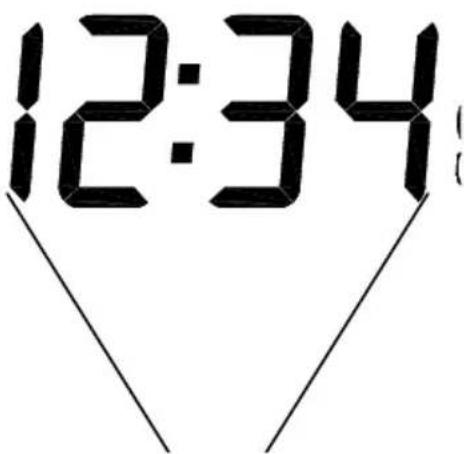
- When plugged into an AC outlet, the projection alarm can continuously project the time.
- When operating on batteries alone, the Projection Alarm will only project when a button is pressed.
- The projection will auto-focus for display from three to six feet away. A dark surrounding will be necessary to clearly see the projection.
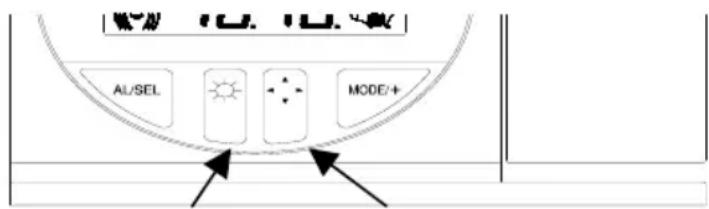
- The direction of the display can be rotated 360^ in 90^ increments by pressing the directional button. There is no display on the LCD that signifies the direction.
- The projector case can be rotated 180^ to further help orient the projected display.
- The intensity of the projection can be adjusted to three different settings as well as turned “off” by pressing the Light Intensity button. When turned off, the projection will only come on when a button is pressed. The intensity cannot be set for the projected display when set to “off”. When only batteries are used, the intensity setting is set to “off” with no other options.
text_image
AI/SEL MODE/+Light Intensity
Projection
Direction
D. LCD LIGHT
- The Projection Alarm has an LCD light designed for night viewing. This will light up for 2 seconds whenever a button is pressed.
- The LCD light cannot be turned on constantly; this would drain the batteries and burn out the light.
E. TIME ALARM.
1. SETTING THE ALARM
a. Press and hold "AL" for two seconds until the alarm time is flashing.
b. Press the "MODE/+" button to select the hour.
NOTE: When setting the hour, “PM” will appear to the left of the alarm time display. If it is set for “AM” nothing will appear.
c. Press the "AL" button to advance to the minute setting.
d. Press the "MODE/+" button to select the minutes.
e. Press the “AL” button to confirm the alarm setting and return to the display mode.
2. ACTIVATING/DEACTIVATING THE ALARM
a. After entering the alarm-setting mode, the alarm is activated.
b. To toggle between activating and deactivating the alarm, press the “AL” button briefly. “(((●)))” will be displayed to the left of the time display when the alarm is activated.
c. When the snooze bar is pressed, the display will show the time the alarm is set to below the time display.
Alarm is Active

text_image
12:34 ALARM 6:003. TURNING ALARM OFF (WHILE SOUNDING)
Note: The alarm will sound for 23 seconds and then increase in volume and speed for another 62 seconds (85 seconds total). If no button is pushed it will shut off and be active for the next day.
a. While the alarm is sounding, press the “SNOOZE” bar to disable the alarm for six minutes.
b. After the “SNOOZE” bar is pressed, the alarm icon will flash in the lower left area of the display.
c. To disable the alarm for 24 hours, press any button other than "SNOOZE" or projection keys.
F. CHANGING DISPLAY MODE (DAY, SECONDS, AND ALARM TIME)
There is three possible display modes to view the date, seconds and alarm time. To change the display (starting at the default of month - date):
- Press the "MODE/+" button and the display will now show seconds.
- Press the "MODE/+" button and the display will now show alarm time.
- Press the "MODE/+" button and the display will now show month - date.
MAINTENANCE & CARE
B. Extreme temperatures, vibrations and shock should be avoided to prevent damage to the units.
C. Clean displays and units with a soft, damp cloth. Do not use solvents or scouring agents—they may mark and damage the displays and casings.
D. Do not submerge in water.
E. Immediately remove all low powered batteries to avoid leakage and damage.
F. Replace with new batteries only and of recommended size.
G. Opening the casings invalidates the warranty. Do not try to repair the units. Contact La Crosse Technology for repairs.
TROUBLESHOOTING
| Problem: | The Projection is faint |
| Solution: | 1) Change intensity setting2) Use AC adapter3) Darken surroundings4) Use fresh batteries (if AC is not used) |
| Problem: | The LCD is faint. |
| Solution: | 1) Replace the batteries. |
| Problem: | No reception of WWVB signal. |
| Solution: | 1) It may help reception to face the front of the Projection alarm in the general direction of Ft. Collins, Colorado.2) Wait overnight for signal.3) Be sure the Projection alarm is at least 6 feet from any electrical devices, i.e. TV sets, computers, or other radio controlled clocks.4) Remove batteries for five minutes, reinsert and leave the unit alone overnight without pressing buttons.5) If problems persist contact La Crosse Technology. |
| Problem: | Hour is incorrect (minute and date are correct). |
| Solution: | 1) Be sure correct time zone and daylight saving time are selected. |
Note: For any questions not answered, please contact La Crosse Technology's Technical Support with the contact information found at the end of this instructional manual.
SPECIFICATIONS FOR WT-5600
| Power source: | |
| AC Adapter (included) Input: 120VAC/60Hz Output: DC 6V/100MA | |
| Battery type: Station: 2 x AA, 1.5V (Alkaline) (optional) | |
| Battery life: Approximately 12 months, depending on projection and light use | |
| Dimensions (L x W x H): | 5.25”W x 3.75”H x 1.25”L |
WARRANTY INFORMATION
La Crosse Technology provides a 1-year warranty on this Projection Alarm. Contact La Crosse Technology immediately upon discovery of any defects covered by this warranty.
Before sending the Projection Alarm in for repairs contact La Crosse Technology. The Projection Alarm will be repaired or replaced with the same or similar model.
This warranty does not cover any defects resulting from improper use, unauthorized repairs, faulty batteries, or the Clocks inability to receive a signal due to any source of interference.
LA CROSSE TECHNOLOGY WILL NOT ASSUME LIABILITY FOR INCIDENTAL, CONSEQUENTIAL, PUNITIVE, OR OTHER SIMILAR DAMAGES ASSOCIATED WITH THE OPERATION OR MALFUNCTION OF THIS PROJECTION ALARM.
THIS PRODUCT IS NOT TO BE USED FOR MEDICAL PURPOSES OR FOR PUBLIC INFORMATION. THIS PRODUCT IS NOT A TOY. KEEP OUT OF CHILDRENS' REACH.
This warranty gives you specific legal rights. You may also have other rights specific to your state. Some states do not allow the exclusion of consequential or incidental damages; therefore the above exclusion of limitation may not apply to you.
For warranty work, technical support, or information contact:
La Crosse Technology
190 Main Street
La Crescent, MN 55947
Phone: 507.895.7095
Fax: 507.895.8000
e-mail: support@lacrossetechnology.com
web: www.lacrossetechnology.com
FCC ID: OMO-01RX (receiver)
THIS DEVICE COMPLIES WITH PART 15 OF THE FCC RULES. OPERATION IS SUBJECT TO THE FOLLOWING TWO CONDITIONS:
-
THIS DEVICE MAY NOT CAUSE HARMFUL INTERFERENCE, AND
-
THIS DEVICE MUST ACCEPT INTERFERENCE RECEIVED, INCLUDING INTERFERENCE THAT MAY CAUSE UNDESIRED OPERATION.