616-1950 - Alarm clock radio LA CROSSE TECHNOLOGY - Free user manual and instructions
Find the device manual for free 616-1950 LA CROSSE TECHNOLOGY in PDF.


User questions about 616-1950 LA CROSSE TECHNOLOGY
0 question about this device. Answer the ones you know or ask your own.
Ask a new question about this device
Download the instructions for your Alarm clock radio in PDF format for free! Find your manual 616-1950 - LA CROSSE TECHNOLOGY and take your electronic device back in hand. On this page are published all the documents necessary for the use of your device. 616-1950 by LA CROSSE TECHNOLOGY.
USER MANUAL 616-1950 LA CROSSE TECHNOLOGY

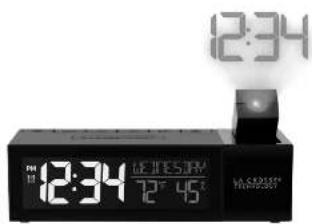
POP-UP PROJECTION
ALARM CLOCK
text_image
12:34 12:34 12° 45° H. S. 2023MODEL: 616-1950 DC:012720
- International Bank under the Suisse Bank plc (SABCB-1019)
text_image
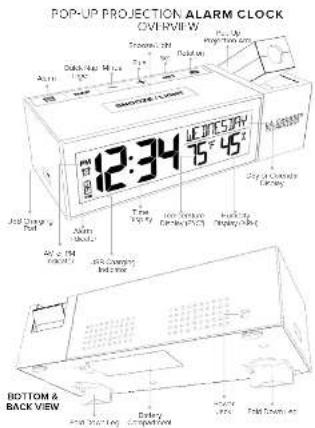
POP-UP PROJECTION ALARM CLOCK OVERVIEW 12:34 UCT 5/4h 15° 45° Top 14 Bottom & BACK VIEWPage 2 Page 3 Page 4
POWER UP
- insert the 5.0 wall-power cord into an outlet, then into the back
- Optional: Install 2 AAA batteries into the bottom of your clock for back-up power supply.
SETTINGS
- Hold the SET button to enter the Settings Menu
- Press the + or - button to adjust the values.
- Press the SET button to confirm adjustments and move
to the next item
Note: Press the SNOOZE/LIGHT button at any time to exit,
Settings Menu Order
• Language: English | Español
-Deep ONTOFF
• Hour
• Minutes
, year
• Mont
· Date
• Fahrenheit | Celsius
- Snooze Duration
Language: Whichever language is selected, the following
instructions and weekday will be presented in that language
Weekday: The Weekday will set automatically when Year, Month and Date are set.
ALARM SETTINGS
Set Alarm Time
- Hold ALARM for to enter alarm settings.
- Press + cr = to actual values.
- Press the ALARM button to confirm adjustments and move to
the next item. The alarm is active when set
Activate/Deactivate Alarm:
- Press the ALARM but can once to view alarm line.
- While viewing the alarm time, press ALARM again to activate
or deactivate the alarm. - When active, the Alarm Icon will show, and will disappear when
deseactivated. - Press ALARM button to stop a sounding alarm for 24 hours.
Source - When the warm sounds over the SNOOZELIGHT button to
snooze the arm for preselected duration.
NAP TIMER
Setting Nap Durations
- Hold the NAP button for to set nap duration.
- Press + or - to adjust values and NAP again to confirm.
Start Nap Timer
- From the main screen, press the NAP button to start the nsp
counideven - Press any button except SNOOZE/LIGHT to turn off the Nap timer.
DISPLAY SETTINGS
Weekday or Calendar Display
- Press the - button to select calendar display.


Calendar Display/Weekday Display
Backlight Intensity:
- Press the SNOOZE/LIGHT button to adjust (4 levels or OFF).
PROJECTION
Projection Arm:
- Push the Pop-Up Projection After to view your projects line.
- Adjust the arm forward and backward until the projection is in your desired location on your wall or ceiling.

Projection Intensity:
- Press the ROTATION to adjust (4 levels or OFF).
Projection Image Rotation:
- Hold the ROTATION button for to rotate your projected image in 90' increments.
USB CHARGING PORT
There is a 1 Amp USB charging pad on the side of your cock.
- Connect your device's USB charging cable (not recoded) to the
USB charging port
- Charging times will vary.
• USB Power Output: 1A maximum current
- Charge IA devices or devices that are self-regulating.
- The USB Charging Indicator will display a flashing lightning bolt when a device is charging, and a full battery when a device is fully charged.

text_image
USB Charging Indicator Device is charging when lightening ball flashes Device is fully charged when ball battery is displaced. 12:34 15° 45' M/800WPage 6 Page 5 Page 7 Page 8
FOLD DOWN LEGS
For viewing at higher angles, try fully opening the Fold Down Legs on the bottom of the alarm

WE'RE HERE TO HELP!
If you require additional support, get in touch with our friendly customer support team based out of Le Crosse, WI.
Phone: 1608 792 1610
Online: o.lycontact_techsupport
Our knowledgeable customer support team is available
Monday-Friday 8am-6pm CST
JOIN THE CONVERSATION
Asc questions: watch detailed setup videos, and provide feedback on our social media pulls.

SPECIFICATIONS
Power: SW Power Coad 005-050200-ALCO1 Oiljet 2 NAAI Industrial for Litter Indoor Temperature: 32\~15°22' - (0°C to 50°C) Indoor Humidity: 10% RH to 99% RH
WARRANTY INFO
La Course Technology, a provider a 1-year mixed time warranty; 100 date of purchase on this week, including a purchase amount of \$500.
Do you know, I'll tell you, and I'll tell you.
• In the case of the case, the case of the case is a result of the case.
• Down the balance flow of service quality
The W2 of the 1000s is seen to be a good company for the first 4 weeks of a stock, particularly in part of the ECG Series. These prices are not traded to provide coverage or protection against the
reference is a standard to be used. This equation can be made in frequency
Energy and (to, Scaled) (in kWh) is calculated with the ±21.0% in any solution of electricity in the same way.
to all-time. I'll be a part of the case that the money is called to have on Wednesday, when
can be determined by turning the equivalent and on, the results of the company may not be
The reference 25 days of the 12 March 2016
• 175042.16.03.2011 (mid-2011)
• Connection of the 100% and 100% out of 100% (the 100% out of 100% out of 100% out of 100% out of 100% out of 100% out of 100% out of 100% out of 100% out of 100% out of 100% out of 100% out of 100% out of 100% out of 100% out of 25
• Compliant general operation of the technician for help
The following table provides the original data:
In the case may be such as little, if all are so and
Fig. 10. The following table is not a table with visible text in the image.
2146 pash
The following table provides the original data:
- vectors are re-tired in extroneq and subforn, but disclam are; suspended by for any technical use or
2017.10.10, 30% of acquisition and purchase of the
WARNING: The person can success your own actions, and it knows to be