VR R40 - Dictaphone AUDIOLINE - Free user manual and instructions
Find the device manual for free VR R40 AUDIOLINE in PDF.


| Product Type | Digital Voice Recorder (Dictaphone) |
| Brand | Audioline |
| Model | VR R40 |
| Dimensions | Approx. 100 x 50 x 20 mm |
| Weight | Approx. 80 g (without batteries) |
| Power Supply | 2 x AAA batteries (not included) |
| Recording Format | MP3 or WAV (depending on settings) |
| Storage Capacity | Internal memory (e.g., 4 GB) and microSD card slot (up to 32 GB) |
| Recording Time | Up to 100 hours (depending on quality) |
| Playback Functions | Play, pause, stop, fast forward/rewind, volume control |
| Special Features | Voice activation (VOR), noise reduction, password protection |
| Connectivity | USB 2.0 for file transfer, headphone jack (3.5 mm) |
| Display | LCD screen with backlight |
| Battery Life | Approx. 20 hours continuous recording |
| Maintenance & Cleaning | Wipe with a dry, soft cloth; do not use liquids |
| Safety Notices | Keep away from magnets, extreme temperatures, and moisture |
| Spare Parts & Repairability | Batteries user-replaceable; other parts not available as spare |
| General Information | Designed for voice recording, meetings, lectures, and personal notes |
Frequently Asked Questions - VR R40 AUDIOLINE
User questions about VR R40 AUDIOLINE
0 question about this device. Answer the ones you know or ask your own.
Ask a new question about this device
Download the instructions for your Dictaphone in PDF format for free! Find your manual VR R40 - AUDIOLINE and take your electronic device back in hand. On this page are published all the documents necessary for the use of your device. VR R40 by AUDIOLINE.
USER MANUAL VR R40 AUDIOLINE
Digitaler VoiceRecorder Digital VoiceRecorder

text_image
AUDIOLINE FN MODE 01 VSS 02 VSS IND HLE C PLAY/STOP FM RADIO Digital RecorderOperating instructions....21
SICHERHEITSHINWEISE
Bedienungsanleitung
natural_image
Three technical illustrations of a device's internal components, showing a close-up of the internal structure with no visible text or symbols.Hinweise:
Name: MANFRED ZINNOW
Safety Information....22
Preparation ......23
Unpacking 23
Installing the batterie.... 23
Operational elements....24
Display symbols ......25
Operation 26
Switching on the VR R40 26
VR R40 Storage Facilities 26
Recording Memos.... 27
Starting next recording directly.... 28
Display remaining recording time.... 28
Direct Recording 28
VOS – Voice Controlled Recording.... 28
Replaying Memos 29
Searching for a memo automatically (Auto Scan) 30
Searching for a memo manually 30
Erasing individual memos 31
Erasing complete archive files.... 31
FM Radio.... 32
Important Information....33
User Lock 33
External Microphone/Loudspeaker Jack 33
Recording other signal sources.... 33
Playback via other equipment 33
Fault Finding 34
Care Instructions.... 35
Guarantee 36
Technical Data 37
Declaration of Conformity ....38
SAFETY INFORMATION
Operating Instructions
Please read these operating instructions carefully. If you should have any questions, please contact our service department on the Hotline number 0180 5 00 13 88. Under no circumstances open the unit yourself and do not try to carry out your own repairs. For any claims under the guarantee, please refer to your dealer.
Battery/Rechargeable Battery
The required battery is included in the scope of supply. When the battery have to be changed, you will need one type AAA 1.5 V battery. Please use new, high quality alkaline or NiMH batteries.
Disposal
If the useful life of the batteries or the complete equipment has expired, please dispose of these carefully in accordance with the statutory requirements and in a manner friendly to the environment. Never open used batteries, short circuit them or throw them into the fire.
CE marking
The unit is approved for use on the European market. This unit fulfils the requirements of the EU Directives. Conformity of the unit with these directives is confirmed by the CE mark. You will find the CE mark on the backside of the AUDIOLINE VR R40.
PREPARATION
UNPACKING
The following parts will be found in the package:
■ VR R40
■ Operating instructions
■ Batteries
Ear piece
■ Audio connection cable
INSTALLING THE BATTERIE
■ Slide the battery cover on the rear of the unit sidewards with a light pressure and open the battery compartment.
■ Now insert the battery and check that the polarity is correct. The wrong polarity can damage both the battery and the unit.
■ Close the battery compartment.
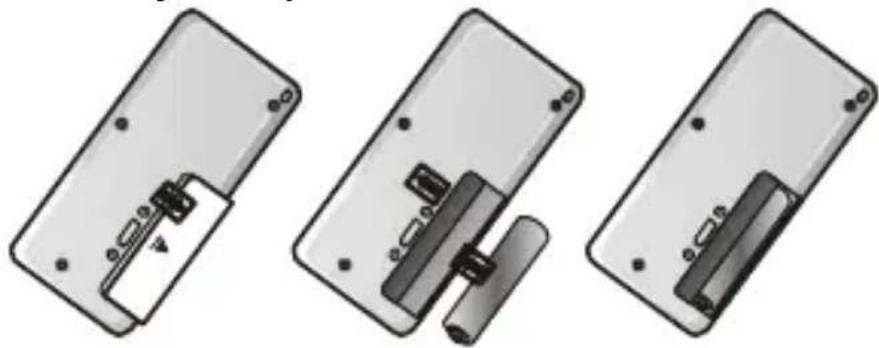
natural_image
Three technical illustrations of a device's internal components, showing a close-up of the internal structure with no visible text or symbols.Note:
When the battery become weak and need to be replaced, the battery symbol 📋 will flash in the display. Never change the battery while recording as otherwise a total loss of data could occur.
OPERATIONAL ELEMENTS

1 REC button 9 PLAY/STOP button
2 ERASE button 10 FILE button/Repeat
3 External power supply 11 Switch FM/PAUSE button
4 Slide control HOLD 12 Record LED (red)
5 Slide control VOS 13 Loudspeaker VOL
6 Rewind button 14 EAR connection
7 Forward button 15 Microphone
8 Loudspeaker 16 MIC connection
DISPLAY SYMBOLS

text_image
1 2 3 4 5 6 7 8 9 10 11 12 A B C D SPLP VOS REC 188888" E F1 Repeat Icon
2 Battery capacity indicator
3 Hold
4 Appears in Long Play Mode (LP) and Standard-Modus (SP)
5 Appears during recording
6 Appears if VOS is on
7 Minutes and Seconds
8 Dynamik Operation Icon
9 Memory indicator
10 Recording time for Playback and Remaining time
11 Memo number indicator from 1 to 99 in the selected archive file
12 Selected archive file indicator A, B, C, D
OPERATION
SWITCHING ON THE VR R40
To switch on the AUDIOLINE VR R40 press the PLAY/STOP button once. Ensure that the HOLD slide switch on the right-hand side has not been moved to the top position. Otherwise, it will not be possible to switch on the AUDIOLINE VR R40 and the display will show the message HOLD for a few seconds.
The AUDIOLINE VR R40 is equipped with a circuit to increase the battery life. If no activity takes place within one minute, the unit switches itself off automatically. The display goes off and the unit must be switched on again.
VR R40 STORAGE FACILITIES
You can store memos, messages, ideas, confidential information, etc. in the AUDIOLINE VR R40 in four separate archive files. The archive files are identified by the letters A, B, C and D. Each archive file can store up to 99 recordings.
The maximum recording time for the AUDIOLINE VR R40 is 129 minutes in standard mode and 281 minutes in long play mode. You will get the better recording quality in standard mode.
Operation
RECORDING MEMOS
■ Ensure that the HOLD slide switch is in the OFF position (slide switch down).
■ Press REC to switch the unit on.
■ Using the FILE button select the required archive file A, B, C or D.
■ Now select the required recording mode SP (Standard) or LP (Long-Play) using the MODE button. The selection will be shown in the display.
■ To start recording, press the REC button once more. The display shows the message “REC” and the red recording LED illuminates. During recording, the length of the message and the number of the message will be shown in the display. Now speak into the microphone on the top of the unit. The minimum recording time is 5 seconds.
■ You can break off recording using the MODE/PAUSE button.
■ Recording is ended by means of the REC button. Every recording will be identified automatically with a number between 1 and 99.
If the maximum capacity of the selected archiving file is reached or if the maximum recording time is exceeded, the display will show the message “FULL”. In order to be able to record new memos you must first erase old or unimportant recordings.
STARTING NEXT RECORDING DIRECTLY
You can start the next recording directly while making the current recording. To do this, press the multi button. The current recording will be stopped and the next recording started immediately under a new number.
You can find out the remaining memory capacity during a recording. To do this, press and hold the FILE button and the display will show you the recording time remaining in minutes and seconds.
DIRECT RECORDING
To start recording directly even when the unit is switched off, press the REC button for 2 seconds.
VOS – VOICE CONTROLLED RECORDING
The voice controlled recording mode (Voice Operated System) can be switched on using the VOS slide switch on the right-hand side of the unit.
When VOS is switched on (slide switch in the direction of the arrow), any pauses that may occur during recording will not be recorded. When not speaking, the AUDIOLINE VR R40 switches the recording to Pause (display shows “SENSE”). On speaking again, the unit automatically continues recording. You can set the VOS to L (low) and H (High).
When VOS is switched off, recording takes place continuously.
Operation
REPLAYING MEMOS
■ Ensure that the HOLD slide switch is in the OFF position (slide switch down).
■ Using the FILE button select the required archive file A, B, C or D.
■ Now use the buttons and to select the required message. The memo number will be shown in the display.
■ The memo can be played back by pressing button
■ You can interrupt play back by using the FM MODE/ button and then continue once more with the multifunction switch ▶/■.
■ To end play back, press the multi switch ▶/□ again or press the REC button.
■ The volume can be adjusted using the small rotary control on the left-hand side of the unit.
Notes: If you want to fast forward or rewind a long memo, please use the buttons ◀ and ▶
The FILE/ 📋 button enables to repeat a required certain message continuously.
SEARCHING FOR A MEMO AUTOMATICALLY (AUTO SCAN)
If you want to find a particular memo within an archive file, you can use the SCAN function. Here, only the first 5 seconds of the memo are played back before switching automatically to the next memo.
■ To do this, press the multi switch ▶/□ for one second. The display shows SCAN. The SCAN function always starts from the number currently set.
■ When you have found the right message, press the multi switch ▶/□ once more to hear this memo in its entirety.
SEARCHING FOR A MEMO MANUALLY
■ To select a different memo, use the buttons and. If you want to search quickly within the archive file, hold the or until you see the required number in the display.
■ You can change automatically to the previous or next memo while you are listening to a memo. To do this, simply use the ◀◀◀ or ▶▶
Operation
ERASING INDIVIDUAL MEMOS
■ First select the message that you want to erase. To do this, use the FILE button and the buttons ◀ and ▶
■ Then press the ERASE button for one second. The memo will be played back and the message “ERASE” will flash in the display.
■ Press the ERASE button once more to erase the memo. If however you want to break off the erasing process, press any button other than the ERASE button.
ERASING COMPLETE ARCHIVE FILES
■ First select the required file A, B, C or D that you want to erase by using the FILE button.
■ Now press both the REC and ERASE buttons simultaneously for three seconds. The display shows the message "AL ERASE".
■ Press the ERASE button once more to erase the memo. If however you want to break off the erasing process, press any button other than the ERASE button.
Operation
FM RADIO
Press FM/MODE button more then 1 second and the VR R40 will be changed to the radio.
Earphone will be used as FM antenna, when the user listen to the radio by earphone. During speaker playback the IN connector can be used as antenna by connecting the earphone to the IN connection.
Press ➤ button, then the unit will search a radio station from 88MHz. If you want to listen to the next station, press the ➤ button again.
After reaching the last radio station at 108 MHz, press the button to search down-wards.
Press FM/MODE button and the radio will changed off.
No frequency band display on the LCD.
IMPORTANT INFORMATION
USER LOCK
The HOLD slide switch can be found on the right-hand side of the unit. If the function is switched on (switch in the direction of the arrow), the unit can no longer be used. This prevents any unintentional recording or play back when carrying, for example. The display shows the message “HOLD” if any button is pressed.
Your AUDIOLINE VR R40 can be used with an external microphone (optional) and ear piece. The connection for the microphone IN and the EAR piece can be found on the top of the AUDIOLINE VR R40.
RECORDING OTHER SIGNAL SOURCES
Using your AUDIOLINE VR R40, you can record signals from other sources such as stereo equipment or a radio, for example. To do this, connect the provided cable between the microphone input IN and the appropriate audio output connection on the required equipment. With these units, use either the headphones output or an audio output and never a loudspeaker connection.
PLAYBACK VIA OTHER EQUIPMENT
You can also reproduce recorded memos on other audio equipment or, for example, save them digitally on a computer. To do this connect the provided cable between the ear piece connector EAR and the appropriate audio input connection on the required equipment. The volume can be adjusted using the VOL control.
FAULT FINDING
The display is blank.
- Switch the unit on using the REC button.
- Check the battery capacity.
- Check the correct polarity of the batteries.
Memos are not recorded.
- Check the position of the HOLD switch.
- Check whether the maximum storage capacity or the maximum number of memos within one archive file has been exceeded.
- Check the battery capacity.
Memos are not played back.
- Check the position of the volume control.
- If you want to listen to the memos using the inbuilt loud-speaker then an ear piece or headphones must not be connected.
- If you want to listen to the memos using a different loud-speaker then the connection cable must be connected correctly.
No Radio station
- Earphone must be used as FM antenna, over the EAR or IN connector.
Reset after malfunction
Important note: All memory will be ereased.
- Take out the batterie.
- Insert the batterie with pressing ERASE and REC together for 3 seconds and release the buttons.
- „AL ERASE“ is displayed and the unit will be reset.
Important Information
CARE INSTRUCTIONS
If used correctly, you will get many years of enjoyment from your AUDIOLINE VR R40. The surface of the case can be cleaned with a soft, dry, lint-free cloth. Never use cleaning agents, particularly aggressive solvents. Never put the unit down in a damp or dusty place. Avoid proximity to sources of heat such as radiators and do not expose the unit to direct sunlight.
GUARANTEE
AUDIOLINE equipment is manufactured and tested in accordance with the most up to date production methods. Selected materials and highly developed technology ensure trouble-free operation and long life. If your unit should develop a fault within the guarantee period, however, please contact the shop where you bought your AUDIOLINE equipment exclusively and have your purchase receipt available for inspection. The guarantee period is 24 months from the day of purchase under the following conditions: within the guarantee period, all defects due to material or manufacturing faults will be repaired free of charge. The guarantee is invalidated if the equipment has been tampered with by the purchaser or third parties. Any damage caused by improper handling or operation, by incorrect positioning or storage, by improper connection or installation or by excessive force or other external influences is not covered by the guarantee. In the case of complaint, we reserve the right to repair or replace defective parts or to exchange the equipment. Exchanged parts or exchanged equipment become our property. Claims for compensation are excluded insofar as they do not relate to criminal intent or gross negligence on the part of the manufacturer. All guarantee claims according to these conditions must be raised exclusively with your dealer. Rights under the guarantee can no longer be enforced after the expiry of one year from purchase and delivery of our products. In the case of unnecessary or unjustified demands on the customer service department, we will levy our usual service charges for materials, time, postage and packing. Any complaints must be reported as soon as a problem is found. The guarantee is valid within the German Federal Republic.
Important Information
TECHNICAL DATA
| Recording time | Standard mode (SP): 129 min.Long play mode (LP): 281 min. |
| Size | 40 x 12,8 x 85 mm (BxT) |
| Weight | 32g without batteries |
| Power supply 1,5V | |
| Power supply external DC 1,5V | |
| Operating time ca. 7 hours in recording modeca. 5 hours in play back mode via loudspeaker at medium volumeca. 6 hours in play back mode via ear piece at medium volume | |
| Storage medium FLASH memory | |
| Number of memos 99 in each archive file | |
| Output power 80 mW at THD 10%, 8 Ohm | |
| Frequency response 600 to 2.900 Hz | |
| Recording source Inbuilt condenser microphone | |
| Input | MIC |
| Output | Ear piece/earphones (mini stereo)Impedance greater than 32 Ohm |
| Loudspeaker | 20 mm, 8 Ohm, dynamic |
| FM Radio | 88 – 108 MHz |
| Ambient temperature | 0 to 40°C |
Technical data are subject to change without previous notice.
Important Information
DECLARATION OF CONFORMITY
WE
AUDIOLINE
GmbH
OF
HELLERSBERGSTR.
2a
41460 NEUSS
GERMANY
DECLARE UNDER OUR SOLE RESPONSIBILITY AS EU DISTRIBU- TOR THAT THE PRODUCT
MODEL:
VR
R40
DESCRIPTION: DIGITAL VOICE RECORDER
IS IN CONFORMITY WITH THE BASIC REQUIREMENTS OF DIRECTIVE: 1999/5/EC
AUTHORISED SIGNATORY:
Signature:
Name:
MANFRED
ZINNOW
Position in the company: MANAGING DIRECTOR
Date of issue: 27.09.2002
A copy of this declaration will be retained for 10 years after cessation of production.

AUDIOLINE GmbH, Hellersbergstr. 2a,
D-41460
NEU:
PRODUCT: VR R40
This product has been developed for use within Germany.
AUDIOLINE GmbH
Neuss
Service Hotline 0180 5 00 13 88