HMV9307 - Microwaves BOSCH - Free user manual and instructions
Find the device manual for free HMV9307 BOSCH in PDF.


| Product Type | Over-the-Range Microwave |
| Brand | Bosch |
| Model | HMV9307 |
| Capacity | 1.6 cu ft |
| Dimensions (W x H x D) | 30" x 16" x 15" |
| Net Weight | 65 lbs |
| Power Source | 120V AC, 60 Hz, 15A |
| Microwave Power | 950 watts |
| Turntable | 13" glass turntable |
| Installation | Over-the-range (recirculating or vented) |
| Control Type | Electronic touch pad |
| Features | 10 power levels, auto cook, defrost, timer, child lock |
| Ventilation | 2-speed fan with charcoal filter |
| Lighting | 2 x 30W halogen cooktop lights |
| Maintenance | Mild detergent; replace charcoal filter periodically |
| Safety | Child lock, interlock system, auto shut-off |
| Spare Parts | Charcoal filter, glass turntable, light bulbs |
| General Info | UL listed, NKSA certified, residential use |
Frequently Asked Questions - HMV9307 BOSCH
User questions about HMV9307 BOSCH
0 question about this device. Answer the ones you know or ask your own.
Ask a new question about this device
Download the instructions for your Microwaves in PDF format for free! Find your manual HMV9307 - BOSCH and take your electronic device back in hand. On this page are published all the documents necessary for the use of your device. HMV9307 by BOSCH.
USER MANUAL HMV9307 BOSCH
natural_image
Black-and-white photo of a breakfast bento box containing various salad ingredients including rice, vegetables, and condiments (no visible text or labels)Over-the-Range Microwave
Use and Care Manual
For Models: HMV9302, HMV9305, HMV9306, HMV9307
PLEASE READ ENTIRE INSTRUCTIONS BEFORE PROCEEDING
IMPORTANT: Save these instructions for the local electrical inspector's use.
INSTALLER: Please leave these Installation Instructions with this unit for the owner.
OWNER: Please retain these instructions for future reference.

Household Appliances
TABLE OF CONTENTS
SAFETY 3-5
Precautions To Avoid Possible Exposure
To Excessive Microwave Energy.... 3
Important Safety Instructions.... 4-5
Grounding Instructions.... 5
UNDERSTANDING YOUR
MICROWAVE OVEN....6-9
Cookware Guide....6
Tips For Microwave Cooking.... 7
Parts And Accessories....8
Control Panel 8-9
Learn About Your Microwave Oven 10
Help.... 10
Clock 10
Kitchen Timer.... 10
Control Set-Up.... 10
Vent HI/LO/Off.... 11
T/Table On/Off.... 11
Child Lock.... 11
Light HI/LO/Off.... 11
Light Timer.... 11
Easy Cook 12
Hold Warm.... 12
Favorite Recipe 12
+/- (More/Less) 12
Cooking At High Power Level 13
Cooking At Lower Power Level.... 13
Cooking With More Than One Cook Cycle.... 13
Cooking Guide For Lower Power Level 14
Sensor Operating Instructions.... 15
Sensor Cooking Guide.... 15
Adding Or Subtracting Cook Time 15
Popcorn 15
Pizza 16
Potato 16
Vegetable 16
Cook....17
Reheat 17
Auto Defrost.... 18
Weight Conversion Chart.... 18
Defrosting Tips.... 18
Auto Defrost Chart.... 19-20
Time Defrost 21
Quick Defrost.... 21
Use Of The Two Position Metal Rack 21
Getting The Best Cooking Results 22
Fish And Shellfish 23
Fish And Shellfish Cooking Table 23
Appetizers/Sauces/Soups 24
Meat....24
Meat Cooking Table 25
Poultry.... 26
Poultry Cooking Table 26
Pasta And Rice 27
Pasta Cooking Table 27
Rice Cooking Table 27
Care And Cleaning....28
Metal Rack....28
Cleaning The Grease Filter....28
Charcoal Filter Replacement 28
Cooktop/Night Light replacement....29
Oven Light replacement 29
TROUBLE SHOOTING.... 30-31
Before Calling For Service 30
Questions And Answers.... 31
PRECAUTIONS TO AVOID POSSIBLE EXPOSURE TO EXCESSIVE MICROWAVE ENERGY
(a) Do not attempt to operate this oven with the door open since open-door operation can result in harmful exposure to microwave energy. It is important not to defeat or tamper with the safety interlocks.
(b) Do not place any object between the oven front face and the door or allow soil or cleaner residue to accumulate on sealing surfaces.
(c) Do not operate the oven if it is damaged. It is particularly important that the oven door closes properly and that there is no damage to the:
(1) Door (bent),
(2) Hinges and latches (broken or loosened),
(3) Door seals and sealing surfaces.
(d) The oven should not be adjusted or repaired by anyone except properly qualified service personnel.
FEDERAL COMMUNICATIONS COMMISSION RADIO FREQUENCY INTERFERENCE STATEMENT (U.S.A. ONLY)
▲ WARNING:
This equipment generates and uses ISM frequency energy and if not installed and used properly, that is in strict accordance with the manufacturer's instructions, may cause interference to radio and television reception. It has been type tested and found to comply with limits for ISM Equipment pursuant to part 18 of FCC Rules, which are designed to provide reasonable protection against such interference in a residential installation.
However, there is no guarantee that interference will not occur in a particular installation. If this equipment does cause interference to radio or television reception, which can be determined by turning the equipment off and on, the user is encouraged to try to correct the interference by one or more of the following:
- Clean door and sealing surface of the oven.
- Reorient the receiving antenna of the radio or television.
- Relocate the Microwave Oven with respect to the receiver.
- Move the microwave oven away from the receiver.
- Plug the microwave oven into a different outlet so that the microwave oven and the receiver are on different branch circuits.
The manufacturer is not responsible for any radio or TV interference caused by unauthorized modification to this microwave oven. It is the responsibility of the user to correct such interference.
IMPORTANT SAFETY INSTRUCTIONS
The safety instructions below will tell you how to use your oven and avoid harm to yourself or damage to your oven.
▲WARNING
- To reduce the risk of burns, elec-
tric shock, fire, injury to persons, or exposure to excessive microwave energy:
- Read all the instructions before using your oven.
- Do not allow children to use this oven without close supervision.
- Read and follow the specific PRECAUTIONS TO AVOID POSSIBLE EXPOSURE TO EXCESSIVE MICROWAVE ENERGY found on page 3.
- Do not use corrosive chemicals or vapors, such as sulfide and chloride, in this appliance. This type of oven is specifically designed to heat, cook, or dry food. It is not designed for industrial or laboratory use.
- Do not use or store this appliance outdoors. Do not use this product near water (for example, near a kitchen sink, in a wet basement near a swimming pool, or similar location.)
- Do not use the cavity for storage purposes. Do not leave paper products, cooking utensils or food in the cavity when not in use.
- Clean the ventilating hood frequently. Do not allow grease to accumulate on the hood or the filters.
- Use care when cleaning the vent hood filters. Corrosive cleaning agents such as lye-based oven cleaners may damage the filters.
- Do not tamper with the built-in safety switches on the oven door. The oven has several built-in safety switches to make sure the power is off when the door is open.
- Always turn fan on HIGH when cooking foods that might flame up, or any time flames occur on the cooktop.
- Suitable for use above both gas and electric cooking equipment 36 inches wide or less.
- Do not use this oven for commercial purposes. It is made for household use only.
- When cleaning the door and the surfaces that touch the door, use only mild, non-abrasive soaps or detergents and a sponge or soft cloth.
- If your oven is dropped or damaged, have it thoroughly checked by a qualified service technician before using it again.
• To avoid a fire hazard:
- Do not severely overcook food. Severely overcooked foods can start a fire in the oven. Watch the oven carefully, especially when you have paper, plastic, or other combustibles in the oven.
- Do not store combustible items (bread, cookies, etc.) in the oven, because if lightning strikes the power lines it may cause the oven to turn on.
- Do not use wire twist-ties in the oven. Be sure to inspect purchased items for wire twist-ties and remove them before placing the item in the oven.
- If a fire should start inside the oven:
- Keep the oven door closed.
- Turn the oven off.
- Disconnect the power cord or shut off the power at the fuse or circuit breaker panel.
• To avoid electric shock:
- This appliance must be grounded. Connect the oven only to a properly grounded outlet. See the electrical GROUNDING INSTRUCTIONS on page 5.
- Do not operate this appliance if it has a damaged cord or plug, if it is not working properly, or if it has been damaged or dropped.
- Do not immerse the electrical cord or plug in water.
- Keep the cord away from heated surfaces.
• To avoid improperly cooking some foods:
- Do not heat any types of baby bottles or baby food. Uneven heating may occur and possibly cause personal injury.
- Do not heat small-necked containers, such as syrup bottles.
- Do not deep-fat fry in your microwave oven.
- Do not attempt home canning in your microwave oven.
- Do not heat the following items in the microwave oven: whole eggs in the shell, water with oil or fat, sealed containers, or closed glass jars. These items may explode.
- Do not cover or block any openings in the oven.
- Use your oven only for the operations described in this manual.
- Do not run the oven empty, without food in it.
- Do not let cord hang over edge of table or counter.
- Preserve the oven floor:
- Do not heat the oven floor excessively.
- Do not allow the gray film on special microwave-cooking packages to touch the oven floor. Put the package on a microwavable dish.

SAFETY
- Do not cook anything directly on the oven floor or turntable. Use a microwavable dish.
- Keep a browning dish at least 3/16 inch above floor. Carefully read and follow the instructions for the browning dish. If you use a browning dish incorrectly, you could damage the oven floor.
• Install or locate this appliance only in accordance with the provided installation instructions.
- This appliance should be serviced only by qualified service personnel. Contact the nearest authorized service facility for examination, repair or adjustment.
- Liquids such as water, coffee, or tea are able to be overheated beyond the boiling point without appearing to be boiling. Visible bubbling or boiling when the container is removed from the microwave oven is not
always present. THIS COULD RESULT IN VERY HOT LIQUIDS SUDDENLY BOILING OVER WHEN THE CONTAINER IS DISTURBED OR A SPOON OR OTHER UTENSIL IS INSERTED INTO THE LIQUID.
To reduce the risk of injury to persons:
- Do not overheat the liquid.
- Stir the liquid both before and halfway through heating it.
- Use extreme care when inserting a spoon or other utensil into the container once heating has begun.
- Do not use straight-sided containers with narrow necks.
- After heating, allow the container to stand in the microwave oven for a short time before removing the container.
SAVE THESE INSTRUCTIONS
Electrical requirements
Observe all governing codes and ordinances. A 120 Volt, 60 Hz, AC only, 15 or 20 amp fused electrical supply is required. (A time-delay fuse is recommended.) It is recommended that a separate circuit serving only this appliance be provided.
WARNING

ELECTRICAL SHOCK HAZARD Plug into a grounded 3 prong outlet. Do not remove ground prong. Do not use an adapter. Do not use an extension cord. Failure to follow these instructions can result in death, fire, or electrical shock.
GROUNDING INSTRUCTIONS
- For all cord connected appliances:
The microwave oven must be grounded. In the event of an electrical short circuit, grounding reduces the risk of electric shock by providing an escape wire for the electric current. The microwave oven is equipped with a cord having a grounding wire with a grounding plug. The plug must be plugged into an outlet that is properly installed and grounded.

natural_image
Illustration of a plug inserted into an electrical outlet with a cable (no text or symbols)Ensure proper ground exists before use
WARNING: Improper use of the grounding can result in a risk of electric shock.
Consult a qualified electrician or serviceman if the grounding instructions are not completely understood, or if doubt exists as to whether the microwave oven is properly grounded. Do not use an extension cord. If the power supply cord is too short, have a qualified electrician or serviceman install an outlet near the microwave oven.
- For a permanently connected appliance:
The microwave oven must be connected to a grounded, metallic, permanent wiring system, or an equipment grounding conductor should be run with the circuit conductors and connected to the equipment grounding terminal or lead on the microwave oven.
SAVE THESE INSTRUCTIONS
Most heat-resistant, non-metallic cookware is safe for use in your microwave oven. However, to test cookware before using, follow these steps:
- Place the empty cookware in the microwave oven.
- Measure 1 cup of water in a glass measuring cup and place it in the oven beside the cookware.
- Microwave on 100% power for 1 minute. If the dish is warm, it should not be used for microwave cooking.
| USE | DO NOT USE |
| Ovenproof Glass•Glass treated for use in high-intensity heat includes utility dishes, bread dishes, pie plates, cake plates, liquid measuring cups, casseroles, and bowls without metallic trim.China•Bowls, cups, serving plates, and platters without metallic trim can be used in your oven.Plastic•When using plastic wrap as a cover, make sure that the dish is deep enough so the plastic wrap does not touch the food. As the food heats, it may melt the plastic wrap wherever the wrap touches the food.•Place plastic wrap loosely over the top of the dish and secure it by pressing the wrap to the sides of the dish.•Vent by turning back one corner of the plastic wrap. This will allow excess steam to escape.•Use plastic dishes, cups, semi-rigid freezer containers, and plastic bags only for short time cooking. Use these with care because the plastic may soften from the heat of the food.Paper•Microwave-safe paper towels, waxed paper, paper napkins, and paper plates with no metallic trim or design can be used in your oven.•Refer to the manufacturer's label for use of any paper product in the microwave oven. | Metal Utensils•Metal shields food from microwave energy and produces uneven cooking. Avoid metal skewers, thermometers, or foil trays.•Metal utensils can cause arcing, which is a discharge of electric current. Arcing can damage your microwave oven.Metal Decoration•Do not use metal-trimmed or metal-banded dinnerware, casserole dishes, etc.CenturaTM Tableware•The Corning Company recommends that you do not use Centura tableware and some CorelleTM closed-handle cups for microwave cooking.Aluminum Foil•Avoid large sheets of aluminum foil because they hinder cooking and may cause arcing.•Use small pieces of foil to shield poultry legs and wings.•Keep all aluminum foil at least 1 inch from the walls and door of the oven.Wood•Wooden bowls, boards, and baskets will dry out and may split or crack when you use them in the microwave oven.Tightly Closed Containers•Tightly closed cookware can explode. Be sure to leave an opening for steam to escape from covered cookware.Brown Paper•Avoid using brown paper bags. They absorb heat and could burn.Metal Twist Ties•Always remove metal twist ties as they can become hot and cause a fire. |
Meat and poultry with high fat content will brown lightly when cooked for 10 or 15 minutes or longer. Foods cooked a shorter time can be brushed with a browning agent, such as Worcestershire sauce, soy sauce, or barbecue sauce.
COVERING
A cover traps heat and steam and causes the food to cook more quickly. Use a lid or microwave-safe plastic wrap with one corner folded back to vent the excess steam. Lids on glass casseroles can become hot during cooking. Handle carefully. Waxed paper will prevent the food from splattering in the oven and help retain heat. When warming bread items, use waxed paper, napkins, or paper towels. To absorb extra moisture, wrap sandwiches and fatty foods in paper towels.
SPACING
Arrange individual foods, such as baked potatoes, cupcakes, and hors d'oeuvres in a circle and at least 1 inch apart. This will help the food cook more evenly.
STIRRING
Stirring blends flavors and redistributes the heat in foods. Always stir from the outside toward the center of the dish. Food at the outside of the dish heats first.
TURNING
Large foods, such as roasts and whole poultry, should be turned during cooking so that the top and bottom cook evenly. Also turn over chicken pieces and chops.
ARRANGEMENT
Do not stack food. Arrange in a single layer in the dish for more even cooking. Because dense foods cook more slowly, place thicker portions of meat, poultry, fish, and vegetables toward the outside of the dish.
TESTING FOR DONENESS
Because foods cook quickly in a microwave oven, you need to test frequently for doneness.
STANDING TIME
Food often needs to stand from 2 to 15 minutes after cooking inside as well as outside the oven. Usually, you need to cover food during standing time to retain heat. Stop the cooking when they are slightly undercooked and they will finish cooking during standing time. The internal temperature of food will rise about 10 °F during standing time.
SHIELDING
To prevent some portions of food in rectangular or square dishes from overcooking, you may need to cover the dish with small strips of aluminum foil to block the microwaves. You can also cover poultry legs and wing tips with foil to keep them from overcooking. Always keep foil at least 1 inch from oven walls to prevent arcing.
PIERCING
Pierce the shell, skin, or membrane of foods before cooking to prevent them from bursting. Foods that require piercing include yolks and whites of eggs, hot dogs, clams, oysters, and whole vegetables such as potatoes and squash.
CLEANING
Wipe the oven inside and outside with a soft cloth and a mild detergent solution. Then rinse and wipe dry. This should be done weekly or more often, if needed. Never use cleaning powders or rough pads. Excessive oil splatters on the inside top will be difficult to remove if left for many days. Wipe splatters with a wet paper towel, especially after cooking chicken or bacon.
REMOVABLE PARTS
The turntable and turntable roller rest are removable. They should be hand-washed in warm (not hot) water with a mild detergent and a soft cloth. Once they are clean, rinse well and dry with a soft cloth. Never use cleaning powders, steel wool, or rough pads.
- The turntable may be cleaned in the sink. Be careful not to chip or scratch the edges as this may cause the turntable to break during use.
- The turntable roller rest should be cleaned regularly.
SPECIAL CARE
For best performance and safety, the inner door panel and the oven front frame should be free of food or grease buildup. Wipe often with a mild detergent; then rinse and wipe dry. Never use cleaning powders or rough pads.
After cleaning the control panel, touch STOP/CLEAR to clear any entries that might have been entered accidentally while cleaning the panel.
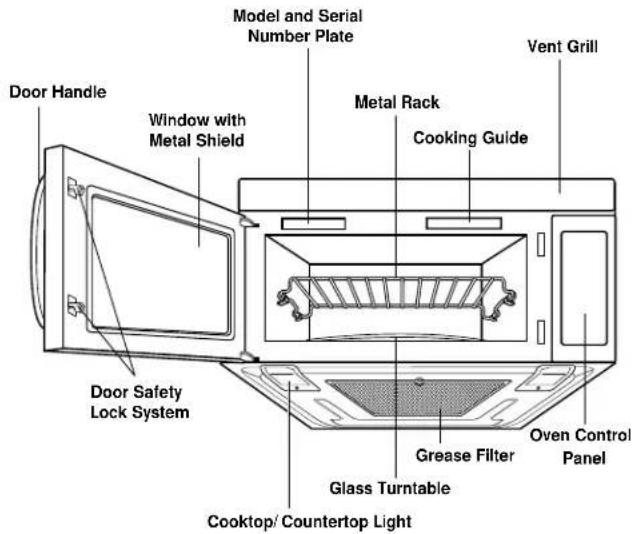
PARTS AND ACCESSORIES
text_image
Door Handle Window with Metal Shield Model and Serial Number Plate Metal Rack Cooking Guide Vent Grill Door Safety Lock System Grease Filter Glass Turntable Cooktop/ Countertop Light Oven Control PanelOVEN SPECIFICATIONS
| Power Supply | 120 VAC, 60 Hz |
| Input Power | 1,500 W |
| Cooking Power | 1,000 W(IEC 60705 Standard) |
| Frequency | 2,450 MHz |
| Rated Current | 13 A |
| Outer Dimensions | (WxHxD) 29^15/16 " x 16^7/16 " x 15^5/8 " |
| Cavity Volume | 1.8 Cu. Ft. |
| Net Weight | 60 lbs. |
CONTROL PANEL

text_image
1 2 3 4 5 6 7 8 9 10 11 12 13 14 15 16 17 18 19 20 21 22 23 24 25 26 27 Popcorn Potato Pizza Cook Reheat Vegetable Favorite Recipe Easy Cook Auto Defrost Time Defrost Quick Defrost 1 2 3 Kitchen Timer 4 5 6 Clock 7 8 9 Light Timer - 0 + Help Stop Clear Control Set-Up Start Power Level Program Hold Warm Vent H/LO/Off T/Table On/Off Light H/LO/Off• See page 9 for control panel features.
NOTE: Styling and features vary by model.
- Display: The Display includes a clock and indicators to tell you time of day, cooking time settings and cooking functions selected.
- Popcorn: Touch this pad when popping popcorn in your microwave oven. The oven's sensor will tell the oven how long to cook depending on the amount of humidity it detects from the popcorn. See page 15 for more information.
- Potato: Touch this pad to cook potatoes. The oven's sensor will tell the oven how long to cook depending on the amount of humidity it detects from the potato. See page 16 for more information.
- Pizza: Touch this pad to reheat pizza. The oven's sensor will tell the oven how long to cook depending on the amount of humidity it detects from the pizza. See page 16 for more information.
- Cook: Touch this pad to cook frozen entrees, casserole and rice. The oven's sensor will tell the oven how long to cook depending on the amount of humidity coming from the food. See page 17 for more information.
- Reheat: Touch this pad to reheat casseroles, dinner plates and soup or sauce. The oven's sensor will tell the oven how long to cook depending on the amount of humidity coming from the food. See page 17 for more information.
- Vegetable: Touch this pad to cook vegetables. The oven's sensor will tell the oven how long to cook depending on the amount of humidity it detects from the vegetables. See page 16 for more information.
- Favorite Recipe: Touch this pad to recall one cooking instruction previously programmed into memory. See page 12 for information.
- Easy Cook: Touch this pad to set and start quickly at 100% power level. See page 12 for more information.
- Auto Defrost: Meat, poultry, fish. Touch this pad to select food type and defrost food by weight. See page 18 for more information.
-
Time Defrost: Touch this pad to defrost most other frozen foods. See page 21 for more information.
-
Quick Defrost: This pad provides Quick defrosting for 1.0 pound of frozen foods. See page 21 for more information.
- Numbers: Touch number pads to enter cooking time, power level, quantities, or weights.
- Kitchen Timer: Touch this pad to set the kitchen timer. See page 10 for more information.
- Clock: Touch this pad to enter the time of day. See page 10 for more information.
- Light Timer: Touch this pad to set the light timer. See page 11 for more information.
- – (Less): Touch this pad to subtract ten seconds of cooking time each time you press it. See page 12 for more information.
-
- (More): Touch this pad to add ten seconds of cooking time each time you press it. See page 12 for more information.
- Help: Touch this pad to learn how to use each oven function. See page 10 for more information.
- Stop/ Clear: Touch this pad to stop the oven or to clear all entries.
- Start: Touch this pad to start a function. If you open the door after oven begins to cook, touch START again.
- Power Level: Touch this pad to select a cooking power level. See page 13 for more information.
- Program: Touch this pad to set a cooking time. See page 13 for more information.
- Hold Warm: Touch this pad to keep hot, cooked foods warm in your microwave oven for up to 99 minutes and 59 seconds. See page 12 for more information.
- Control Set-Up: Touch this pad to change the oven's default settings for sound, clock, display speed and defrost weight from Lbs to Kg. See page 10 for more information.
- T/Table On/Off: Touch this pad to turn off the turntable. OFF will appear in the display. See page 11 for more information.
NOTE: This option not available in sensor cook and defrost modes. - Vent HI/LO/Off: Touch this pad to turn the fan on or off. See page 11 for more information.
- Light HI/LO/Off: Touch this pad to turn on the cooktop/countertop light. See page 11 for more information.
This section discusses the concepts behind microwave cooking and introduces you to the basics you need to know to operate your microwave oven. Please read this information before use.

CAUTION
- To avoid risk of personal injury or property damage, do not run oven empty.
- To avoid risk of personal injury or property damage, do not use stoneware, aluminum foil, metal utensils, or metal trimmed utensils in the oven. See page 6 for details.
HELP
The Help pad displays feature information and helpful hints. Press Help, then select a key pad.
Example: To learn about the Popcorn feature.
PROCEDURE DISPLAY
| 1. Touch Help pad. | TOUCH THIS KEYPAD THEN THE DESIRED FEATURE |
| 2. Touch Popcorn pad. | TOUCH THIS KEYPAD TO POP MICROWAVE POPCORN THE DISPLAY WILL SHOW SENSING UNTIL REMAINING COOK TIME HAS BEEN CALCULATED |
CLOCK
This oven includes a 12-hour clock.
Example: To set 8:00 AM.
PROCEDURE DISPLAY
| 1. Touch Clock pad.(Press once for AM,twice for PM) | AM ENTER TIME OF DAY |
| 2. Touch number keypad[8], [0] and [0]. | 8:00 TOUCH START |
| 3. Touch Start pad. | 8:00 |
KITCHEN TIMER
You can use your microwave oven as a timer. Use the Timer for timing up to 99 minutes and 59 seconds.
Example: To time 3 minutes.
PROCEDURE DISPLAY
| 1. Touch Kitchen Timer pad. | ENTER TIME IN ANY AND SEC |
| 2. Touch number keypad [3], [0] and [0]. | 3:00 TOUCH START |
| 3. Touch Start pad. | Timer and time counting down. |
- When the time is over, you will hear seven beeps and END will display.
CONTROL SET-UP
You can change the default values for beep sound, clock, display speed and defrost weight. (LBS/KG) See following chart for more information.
| No. | Function No. Result | ||
| 1 | Sound ON/OFF 1 Sound ON control | 2 | Sound |
| 2 | Clock ON/OFF control | 1 | Clock ON |
| 2 | Clock | ||
| 3 | Scroll Speed 1 control 2 Normal | Slow speed speed 3 Fast speed | |
| 4 | LBS/KG choice control | 1 | Lbs. |
| 2 | Kg. | ||
Example: To change defrost weight mode from Lbs to Kg.
PROCEDURE DISPLAY
| 1. Touch Control Set-Up pad. | SOUND ON/OFF TOUCH 1 |
| CLOCK ON/OFF TOUCH 2 | |
| SCROLL SPEED TOUCH 3 | |
| LBS/KG CHOICE TOUCH 4 | |
| 2. Touch number [4] pad. | LBS TOUCH 1 |
| KG TOUCH 2 | |
| 3. Touch number [2] pad. | KG |
The Vent moves steam and other vapors from the cooking surface. From the off position, the first touch of the vent pad turn the vent on High speed. Touch the pad again to turn the vent on Low speed, and a third time to turn the fan back off.
NOTE: If the temperature gets too hot around the microwave oven, the fan in the vent hood will automatically turn on at the LOW setting. It may stay on for up to an hour. When this occurs, you cannot turn the vent fan off. Wait until it turns off automatically.
T/TABLE ON/OFF
For best cooking results, leave the turntable on. It can be turned off for large dishes. Press T/TABLE ON/OFF pad to turn the turntable on or off.
NOTE:
- The T/Table On/Off feature does not operate with the DEFROST or SENSOR cooking modes.
- Sometimes the turntable can become hot to touch. Be careful touching the turntable during and after cooking.
- Do not run the oven empty.
CHILD LOCK
Child Lock is a safety feature used to lock the control panel so that so that it cannot be operated. To set Child Lock, touch STOP/CLEAR once. Touch and hold 0 pad more than four seconds LOCKED will appear in the display window and you hear two beeps.
To cancel child lock, touch and hold 0 more than four seconds. LOCKED will disapper and you hear two beeps.
LIGHT HI/LO/OFF
Touch Light pad once for bright light, again for low light and a third time to turn the light back off.
LIGHT TIMER
You can set the Lo Light to turn on and off automatically at any time. The light will come on at the low setting the same time every day and turn off at a set time until reset.
Example: Turn on 2:00 AM, turn off 7:00 AM.
PROCEDURE DISPLAY
- Touch Light Timer pad. (Press once for AM, twice for PM.)
AM ENTER LIGHT ON TIME OR TOUCH CLEAR TO RESET THE TIMER
- Enter the time you want the Light to turn on. Touch number keypad [2], [0] and [0].
- Touch Light Timer pad again. (Press once for AM, twice for PM.)
AM ENTER LIGHT OFF TIME
- Enter the time you want the Light to turn off. Touch number keypad [7], [0] and [0].
7:00 TOUCH START
- Touch Start pad.
Time of day.
NOTE:
- To reset the time to turn on and off the Light, repeat steps 1 to 5.
Example: To cancel the Light Timer.
PROCEDURE DISPLAY
- Touch Light Timer pad.
AM ENTER LIGHT ON TIME OR TOUCH CLEAR TO RESET THE TIMER
- Touch Stop/ Clear pad.
Time of day.
NOTE:
- If you want to cancel the Light Timer in operation, touch Light HI/LO/Off the pad.
A timesaving pad, this simplified control lets you quickly set and start microwave cooking without the need to touch Start pad. This feature cooks for 30 seconds on HI each time you press the pad.
Example: To set Easy Cook for 2 minutes.
PROCEDURE DISPLAY
- Touch Easy Cook pad 4 times.
Time counting down and power 100.
NOTE:
- Easy Cook will add 30 seconds up to 3 minutes. After 3 minutes, every touch will add 1 minute up to 99 minutes and 59 seconds.
HOLD WARM
You can keep cooked food warm in your microwave oven for up to 99 minutes and 59 seconds. You can use Hold Warm by itself or to follow a cooking cycle automatically.
Example: To use Hold Warm.
PROCEDURE DISPLAY
- Touch Hold Warm pad.
Food Type Recommended Quantity
Liquid 1-2 cups
Dry 5-10 ozs.
To make Hold Warm automatically follow another cycle:
- While you are programming the cooking instructions, touch Hold Warm before touching Start.
- When the last cooking cycle is over, you will hear two tones and "WARM" will appear in the oven display.
- You can set Hold Warm to follow Auto Defrost, or multi-cycle cooking.
NOTE:
- HOLD WARM operates for up to 99 minutes 59 seconds.
- Food cooked covered should remain covered during Hold Warm.
- Pastry items (pies, turnovers, etc.) should be uncovered during Hold Warm.
- Complete meals kept warm on a dinner plate can be covered during Hold Warm.
FAVORITE RECIPE
Favorite Recipe lets you recall one cooking instruction previously placed in memory and begin cooking quickly.
Example: To program cooking for 2 minutes.
PROCEDURE DISPLAY
- Touch Favorite Recipe pad.
1:30 TOUCH START OR ENTER NEW TIME
- Enter the cook time. Touch number keypad [2], [0] and [0].
- Touch Favorite Recipe pad.
- When the cook time is over, you will hear four beeps and END will display.
NOTE: Power level will default to Hi, but this setting in modifiable.
+/- (MORE/LESS)
By using the + or - keys, all of the pre-programmed cook and time cook features can be adjusted to cook food for a longer or shorter time.
Pressing + will add 10 seconds of cooking time each time you press it. Pressing – will subtract 10 seconds of cooking time each time you press it.
NOTE: This feature cannot be used during cooking, only when setting the initial cook time.
Example: To cook food for 8 minutes, 30 seconds at 100% power.
PROCEDURE DISPLAY
- Enter the cook time. Touch number keypad [8], [3] and [0].
Time counting down, power 100.
- When the cook time is over, you will hear four beeps and END will display.
HIGH power cooking does not always give you the best results with foods that need slower cooking, such as roasts, baked goods, or custards. Your oven has 10 power settings in addition to HIGH. See cooking guide for power levels, page 14.
Example: To cook food for 7 minutes, 30 seconds at 70% power
PROCEDURE DISPLAY
- Enter the cook time. Touch number keypad [7], [3] and [0].
- Enter the power level. Touch number [7] pad.
P-70 TOUCH START
- Touch Start pad.
Time counting down and power 70.
- When the cook time is over, you will hear four beeps and END will display.
COOKING WITH MORE THAN ONE COOK CYCLE
For best results, some recipes call for one Power Level for a certain length of time, and another Power Level for another length of time. Your oven can be set to change from one to another automatically for up to three cycles, if the first heating cycle is defrost or the last at 0% power.
Example: To cook food for 3 minutes at 100% power and then 70% power for 7 minutes 30 seconds.
PROCEDURE DISPLAY
- Enter the cook time. Touch number keypad [3], [0] and [0].
- Enter the second cook time. Touch number keypad [7], [3] and [0].
- Enter the power level. Touch number [7] pad.
P-70 TOUCH START
- Touch Start pad.
Time counting down.
- When the cook time is over, you will hear four beeps and END will display.
The 10 power levels in addition to HIGH allow you to choose the best power level for the food you are cooking. The power levels are listed below, with examples of foods best cooked at each level and the amount of microwave power output you are using at each Level.
| POWER LEVEL | MICROWAVE OUTPUT | USE |
| 10 HIGH | 100% | ·Boil water·Cook ground beef·Make candy·Cook fresh fruits and vegetables·Cook fish and poultry·Preheat browning dish·Reheat beverages·Bacon slices |
| 9 | 90% | ·Reheat meat slices quickly·Saute onions, celery, and green pepper |
| 8 | 80% | ·All reheating·Cook scrambled eggs |
| 7 | 70% | ·Cook breads and cereal products·Cook cheese dishes or veal·Cook cakes, muffins, brownies or cupcakes |
| 6 | 60% | ·Cook pasta |
| 5 | 50% | ·Cook meats or whole poultry·Cook custard·Cook whole chicken, turkey, spare ribs, rib roast or sirloin roast |
| 4 | 40% | ·Cook less tender cuts of meat·Reheat frozen convenience foods |
| 3 | 30% | ·Thawing meat, poultry or seafood·Cooking small quantities of food·Finish cooking casserole, stew, and some sauces |
| 2 | 20% | ·Soften butter or cream cheese·Heating small amounts of food |
| 1 | 10% | ·Soften ice cream·Raise yeast dough |
| 0 | 0% | ·Standing time (no power output) |
Sensor Cook allows you to cook most of your favorite foods without selecting cooking times and power levels. The oven automatically determines required cooking time for each food item. The display will indicate SENSING during the initial sensing period. When the internal sensor detects a certain amount of humidity coming from the food, it will tell the oven how much longer to heat. The display will show the remaining heating time. For best results for cooking by Sensor, following these recommendations:
- Food cooked with the sensor system should be at normal storage temperature.
- Glass TURNTABLE and outside of container should be dry to assure best cooking results.
- Foods should always be covered loosely with microwavable plastic wrap, waxed paper or a lid.
- Do not open the door or touch the Stop/Clear pad during the sensing time. When sensing time is over, the oven beeps twice and the remaining cooking time will appear in the display window. At this time you can open the door to stir, turn, or rearrange the food.
SENSOR COOKING GUIDE
Appropriate containers and coverings help assure good Sensor cooking results.
- Always use microwavable containers and cover them with lids or vented plastic wrap.
- Never use tight-sealing plastic covers. They can prevent steam from escaping and cause food to overcook.
- Match the amount to the size of the container. Fill containers at least half full for best results.
- Be sure the outside of the cooking container and the inside of the microwave oven are dry before placing food in the oven. Beads of moisture turning into steam can mislead the sensor.
ADDING OR SUBTRACTING SENSOR COOK TIME
If the SENSOR function is too long or too short, you can increase or decrease the cook time by 10 seconds after choosing the function. You can only increase or decrease cook time when sensor is displayed.
Example: If you want to add to the Sensor Cook casserole cooking time.
PROCEDURE DISPLAY
| 1. Touch Cook pad. | SELECT MENU I TO 3-- SEE COOKING GUIDEBEHIND DOOR |
| 2. Choose food category.Touch number [2] pad. | CASSEROLE(Display once) |
| SENSING | |
| 3. Touch number [9] pad. | MORE |
| Cook Time Touch Pad Number | |
| Less 7 | |
| Normal 8 | |
| More 9 | |
POPCORN (SENSOR)
POPCORN lets you pop 3.0 and 3.5 ounce bags of commercially packaged microwave popcorn. Pop only one package at a time. If you are using a microwave popcorn popper, follow manufacturer's instructions.
Example: To pop popcorn.
PROCEDURE DISPLAY
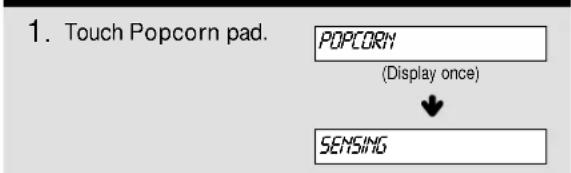
text_image
1. Touch Popcorn pad. POPCORN (Display once) SENSING- When the cook time is over, you will hear four beeps and END will display.
CAUTION
- DO NOT leave microwave oven unattended while popping corn.
PIZZA lets you reheat one or several slices of pizza without selecting cooking times and power level.
Example: To reheat 2 slices of pizza.
PROCEDURE DISPLAY
- Touch Pizza pad.
PIZZR
(Display once)

SENSING
- When the reheat time is over, you will hear four beeps and END will display.
- Recommended amounts: 1-3 slices (about 5 ozs. each)
POTATO (SENSOR)
POTATO lets you bake one or several potatoes without selecting cooking times and power levels.
Example: To cook 2 potatoes.
PROCEDURE DISPLAY
- Touch Potato pad.
POTATO
(Display once)

SENSING
- When the cook time is over, you will hear four beeps and END will display.
- Recommended amounts: 1-4 potatoes (about 8-10 ozs. each)
NOTE:
• Before baking, pierce potato with fork several times.
• After baking, let stand for 5 minutes.
VEGETABLE (SENSOR)
VEGETABLE has preset cook powers for 3 food categories: Fresh, Frozen and Canned.
Example: To cook frozen vegetables.
PROCEDURE DISPLAY
- Touch Vegetable pad.
FRESH TOUCH!
FROZEN TOUCH 2
CANNED TOUCH 3
- Choose food category. Touch number [2] pad.
FROZEN VEGETABLE
(Display once)

SENSING
- When the cook time is over, you will hear four beeps and END will display.
NOTE:
Place the canned vegetable in a microwavable bowl or casserole. Cover with plastic wrap and vent. Let stand 5 minutes.
• Recommended amounts: 1-4 cups
- Recommended 1/4"-1/2" venting of cover.
COOK lets you heat common microwave-prepared foods without needing to program times and Power Levels. COOK has preset power for 3 food categories: Frozen Entree, Casserole and Rice.
Example: To cook rice.
PROCEDURE DISPLAY
| 1. Touch Cook pad. | SELECT MENU TO 3 -- SEE COOKING GUIDE BEHIND DOOR |
| 2. Choose food category. Touch number [3] pad. | RICE (Display once) |
| SENSING |
| Category Touch | Pad Number |
| Frozen Entree 1 | |
| Casserole 2 | |
| Rice 3 |
- When the cook time is over, you will hear four beeps and END will display.
- Recommended amounts:
| Category Quantities | |
| Frozen Entree 10-21 | ozs. |
| Casserole 1-4 cups | |
| Rice | 12 -2 cups |
NOTE:
Use only long grain rice with sensor cook program.
See page 27 to cook other types of rice.
REHEAT (SENSOR)
Reheat lets you heat foods without needing to program times and Power Levels.
Reheat has preset Power Levels for 3 categories: Casserole, Dinner Plate and Soup/Sauce.
| Category Touch Pad Number | |
| Casserole 1 | |
| Dinner Plate 2 | |
| Soup/Sauce 3 | |
Example: To reheat Casserole.
PROCEDURE DISPLAY
| 1. Touch Reheat pad. | SELECT MENU TO 3 -- SEE COOKING GUIDE BEHIND DOOR |
| 2. Choose food category. Touch number [1] pad. | CASSEROLE (Display once) |
| SENSING |
- When the cook time is over, you will hear four beeps and END will display.
- Recommended amounts:
| Category Quantities | |
| Casserole 1-4 cups | |
| Dinner Plate 1-2 servings | |
| Soup/Sauce | 1-4 cups |
Your microwave oven is preset with three defrost sequences. Using AUTO DEFROST is the best way to defrost frozen foods. The Auto Defrost Chart on pages 19 - 20 provides some basic guidelines for using the three defrost sequences.
| Category Touch | Pad Number |
| Meat 1 | |
| Poultry 2 | |
| Fish 3 |
Example: To defrost 1.2 lbs. of ground beef.
PROCEDURE DISPLAY
| 1. Touch Auto Defrost pad. | MEAT TOUCH 1POULTRY TOUCH 2FISH TOUCH 3 |
| 2. Choose food category. Touch number [1] pad. | ENTER WEIGHT |
| 3. Enter the weight by touching pad [1] and [2]. | 1.2 LBS TOUCH START |
| 4. Touch Start pad. | Time counting down and DEFROST. |
NOTE:
When you touch the START pad, the display changes to defrost time count down. The oven will beep during the DEFROST cycle. At this time, open the door and turn, separate, or rearrange the food.
Remove any portions that have thawed.
Return frozen portions to the oven and touch START to resume the defrost cycle.
WEIGHT CONVERSION CHART
To enter food weight in Auto Defrost, you must specify pounds and tenths of a pound. If the weight on the food package is in fractions of a pound, you can use the following chart to convert the weight to decimals.
| Equivalent Ounce Weight | Pounds |
| 1.6 | .10 |
| 3.2 .20 | |
| 4.0 .25 (One-Quarter Pounds) | |
| 4.8 | .30 |
| 6.4 | .40 |
| 8.0 .50 (One-Half Pounds) | |
| 9.6 | .60 |
| 11.2 | .70 |
| 12.0 .75 (Three-Quarter Pounds) | |
| 12.8 | .80 |
| 14.4 | .90 |
| 16.0 1.00 (One Pound) | |
DEFROSTING TIPS
- When using Auto Defrost, the weight to be entered is the net weight in pounds and tenths of pounds (the weight of the food minus the container).
- Use Auto Defrost only for raw food. Auto Defrost gives best results when food to be thawed is a minimum of 0^ (taken directly from a freezer). If food has been stored in a refrigerator-freezer that does not maintain a temperature of 5^ or below, always program a lower food weight (for a shorter defrosting time) to prevent cooking the food.
- If the food is stored outside the freezer for up to 20 minutes, enter a lower food weight.
- The shape of the package alters the defrosting time. Shallow rectangular packets defrost more quickly than a deep block.
- Separate pieces as they begin to defrost. Separated pieces defrost more easily.
- You can use small pieces of aluminum foil to shield foods like chicken wings, leg tips, and fish tails, but the foil must not touch the side of the oven. Foil causes arcing, which can damage the oven lining. See page 6.
- Shield areas of food with small pieces of foil if they start to cook too fast.
- For better results, a preset standing time is included in the defrosting time.
- For best results, elevate food to be defrosted on a microwave safe roasting rack. This prevents the possibility of warm meat juices cooking food during defrost.
Meat of irregular shape and large, fatty cuts of meat should have the narrow or fatty areas shielded with foil at the beginning of a defrost sequence.
| FOOD | AT BEEP | SPECIAL INSTRUCTIONS |
| BEEF | ||
| Ground Beef, Bulk | Remove thawed portions with fork. Turn over. Return remainder to oven. | Do not defrost less than 1/4 lb. Freeze in doughnut shape. |
| Ground Beef, Patties | Separate and rearrange. | Do not defrost less than 2 oz. patties. Depress center when freezing. |
| Round Steak | Turn over. Cover warm areas with aluminum foil. | Place on a microwavable roasting rack. |
| Tenderloin Steak | Turn over. Cover warm areas with aluminum foil. | Place on a microwavable roasting rack. |
| Stew Beef | Remove thawed portions with fork. Separate remainder and return to oven. | Place in a microwavable baking dish. |
| Pot Roast, Chuck Roast | Turn over. Cover warm areas with aluminum foil. | Place on a microwavable roasting rack. |
| Rib Roast | Turn over. Cover warm areas with aluminum foil. | Place on a microwavable roasting rack. |
| Rolled Rump Roast | Turn over. Cover warm areas with aluminum foil. | Place on a microwavable roasting rack. |
| LAMB | ||
| Cubes for Stew | Remove thawed portions with fork. Return remainder to oven. | Place in a microwavable baking dish. |
| Chops(1 inch thick) | Separate and rearrange. | Place on a microwavable roasting rack. |
| PORK | ||
| Chops(1/2 inch thick) | Separate and rearrange. | Place on a microwavable roasting rack. |
| Hot Dogs | Separate and rearrange. | Place on a microwavable roasting rack. |
| Spareribs Country-style Ribs | Turn over. Cover warm areas with aluminum foil. | Place on a microwavable roasting rack. |
| Sausage, Links | Separate and rearrange. | Place on a microwavable roasting rack. |
| Sausage, Bulk | Remove thawed portions with fork. Turn over. Return remainder to oven. | Place in a microwavable baking dish. |
| Loin Roast, Boneless | Turn over. Cover warm areas with aluminum foil. | Place on a microwavable roasting rack. |
| FOOD | AT BEEP | SPECIAL INSTRUCTIONS |
| CHICKEN | ||
| Whole (up to 6 lbs.) | Turn over (finish defrosting breast-side down). Cover warm areas with aluminum foil. | Place chicken breast-side up on a microwavable roast rack. Finish defrosting by immersing in cold water. Remove giblets when chicken is partially defrosted. |
| Cut-up | Separate pieces and rearrange. Turn over. Cover warm areas with aluminum foil. | Place on a microwavable roasting rack. Finish defrosting by immersing in cold water. |
| CORNISH HENS | ||
| Whole | Turn over. Cover warm areas with aluminum foil. | Place on a microwavable roasting rack. Finish defrosting by immersing in cold water. |
| TURKEY | ||
| Breast (under 6 lbs.) | Turn over. Cover warm areas with aluminum foil. | Place on a microwavable roasting rack. Finish defrosting by immersing in cold water. |
Fish Setting
| FOOD | AT BEEP | SPECIAL INSTRUCTIONS |
| FISH | ||
| Fillets | Turn over. Separate fillets when partially thawed if possible. | Place in a microwavable baking dish.Carefully separate fillets under cold water. |
| Steaks | Separate and rearrange. | Place in a microwavable baking dish.Run cold water over to finish defrosting. |
| Whole | Turn over. | Place in a microwavable baking dish.Cover head and tail with foil; do not let foil touch sides of microwave. Finish defrosting by immersing in cold water. |
| SHELLFISH | ||
| Crabmeat | Break apart. Turn over. | Place in a microwavable baking dish. |
| Lobster tails | Turn over and rearrange. | Place in a microwavable baking dish. |
| Shrimp | Separate and rearrange. | Place in a microwavable baking dish. |
| Scallops | Separate and rearrange. | Place in a microwavable baking dish. |
NOTE: Food to be defrosted must be not more than 6.0 lbs. (4.0 Kg). Available weight is 0.1-6.0 lbs (0.1-4.0 Kg).
This feature allows you to choose the time you want to defrost. The Time Defrost Chart (see page 22) provides some basic guidelines for using Time Defrost.
Example: To defrost for 2 minutes.
PROCEDURE DISPLAY
- Touch Time Defrost pad.
ENTER DEFROST TIME
- Enter the defrosting time you want. Touch number keypad [2], [0] and [0].
2:00 TOUCH START
- Touch Start pad. (Defrost starts)
Time counting down and DEFROST.
- When the defrost time is over, you will hear four beeps and END will display.
QUICK DEFROST
The Quick Defrost feature provides rapid defrosting for 1 lb. of frozen food. The oven automatically sets the defrosting time for ground beef.
Example: To defrost 1 lb. ground beef.
PROCEDURE DISPLAY
- Touch Quick Defrost pad.
Time counting down and DEFROST.
NOTE:
- The microwave will beep and defrosting will pause so the door can be opened and the meat can be turned. If the door is not opened at this time, the countdown will resume.
- Any ground meat can be used with Quick Defrost, but this feature works best with ground beef.
USE OF THE TWO POSITION METAL RACK
The two position metal rack gives you extra space when cooking in more than one container at the same time. The metal rack can be turned upside down to accommodate different container sizes.
To use rack:
- Place rack securely in the four plastic supports.
- Rack MUST NOT touch metal walls or back of microwave oven.
- Place equal amounts of food both ABOVE and BELOW rack.
- Amount of food must be approximately the same in both containers to balance out cooking energy.

natural_image
Diagram showing a microwave oven with a rotary tray and a close-up of the interior (no text or symbols)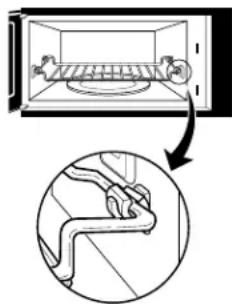
text_image
Diagram showing a microwave oven with a piping bag inside, and a magnified view of the interior structure.CAUTION
To avoid risk of property damage:
- Do not use rack to pop popcorn.
- Rack must be on the four plastic supports when used.
- Use the rack only when cooking food on two positions.
- Do not cook with rack on floor of the oven.
| FOOD | TIME | SPECIAL INSTRUCTIONS |
| MEATBacon (1 lb.)Ground meat (1 lb.)Roasts (1 lb.)Steaks, chops and cutlets | 2 - 4 minutes 4^1/2 - 6 minutes 4^1/2 - 6 minutes 4^1/2 - 6 minutes per lb. | Turn meat over at beep. Let stand for 5 minutes after defrosting.Turn meat over at beep. Let stand for 5 minutes after defrosting.Turn meat over at beep. Shield warm areas with foil.Stand for 5 to 10 minutes.Same as above. |
| POULTRYChicken cut up, broiler-fryer ( 2^1/2 to 3 lbs.)Chicken whole (2 to 3 lbs.)Cornish hen | 13 - 16 minutes15 - 18 minutes5 - 7 minutes per lb. | Turn meat over at beep. Shield warm areas with foil.Let stand for 20 to 30 minutes. Cover with foil.Turn meat over at beep. Shield warm areas with foil.Let stand for 20 to 30 minutes. Cover with foil.Turn meat over at beep. Shield warm areas with foil.Let stand for 20 to 30 minutes. Cover with foil. |
| FISH & SEAFOODFillets (1 lb.)Shellfish, small pieces (1 lb.) | 4 - 5^1/2 minutes4 - 5 minutes | Place fish in casserole. Turn food over and break up after beep. Stand for 5 minutes. |
NOTE: Defrost times are approximate and are intended as guidelines.
GETTING THE BEST COOKING RESULTS
To get the best results from your microwave oven, read and follow the guidelines below.
- Storage Temperature: Foods taken from the freezer or refrigerator take longer to cook than the same foods at room temperature. The times in this book are based on the normal storage temperature of the food.
- Size: Small pieces of food cook faster than large ones: pieces similar in size and shape cook more evenly. For even cooking, reduce the power when cooking large pieces of food.
- Natural Moisture: Very moist foods cook more evenly because microwave energy is attracted to water molecules.
- Stir foods such as casseroles and vegetables from the outside to the center to distribute the heat evenly and speed cooking. Constant stirring is not necessary, occasional stirring is sufficient.
-
Turn over foods like pork chops, whole potatoes, roasts, or whole cauliflower halfway through the cooking time to expose all sides equally to microwave energy.
-
Place delicate areas of foods, such as asparagus tips, toward the center of the dish.
- Arrange unevenly shaped foods, such as chicken pieces or salmon steaks, with the thicker, meatier parts toward the outside of the dish.
- Shield parts of food that may cook quickly, such as wing tips and leg ends of poultry with small pieces of aluminum foil.
- Let Stand: After you remove the food from the microwave, cover food with foil or casserole lid and let it stand to finish cooking in the center and avoid overcooking the outer edges. The length of standing time depends on the density and surface area of the food.
- Wrapping in waxed paper or paper towel: Sandwiches and many other foods containing prebaked bread should be wrapped prior to microwaving to prevent drying out.
Cooking Fish and Shellfish: General Directions
• Prepare the fish for cooking:
- Completely defrost the fish or shellfish.
- Arrange unevenly shaped pieces with thicker parts toward the outside of the dish. Arrange shellfish in a single layer for even cooking.
- The type of cover you use depends on how you cook. Poached fish needs a microwavable lid or vented plastic wrap. Baked fish, coated fish, or fish in sauce needs to be covered lightly with waxed paper to keep the coating crisp and sauce from getting watery.
- Always set the shortest cooking time. Fish is done when it turns opaque and the thickest part begins to flake. Shellfish is done when the shell turns from pink to red and the flesh is opaque and firm.
- The Fish and Shellfish Cooking Table below provides specific directions with Power Level and Cooking Time settings for most types of fish and shellfish.
FISH AND SHELLFISH COOKING TABLE
| FISH | POWER LEVEL | COOKING TIME | DIRECTIONS |
| Fish fillets | HI | 31/2 -41/2 minutes | Arrange fish in a single layer with thickest portion toward outside edge of 11/2 quart microwavable baking dish. Brush with melted butter and season, if desired. Cook covered with vented plastic wrap. Let stand covered 2 minutes. If you are cooking more than 1 lb. of fish, turn the fish halfway through cooking. |
| Fish steaks | HI | 41/2 -51/2 minutes | |
| Whole fish | 7 | 41/2 -6 minutes | |
| Scallops | HI | 31/2 -5 minutes | |
| Shrimp, shelled | HI | 31/2 -5 minutes | Arrange in a single layer. Prepare as directed above, except stir instead of turning the shellfish. |
Cooking Appetizers: Tips and Techniques
- Crisp crackers, such as melba toast, shredded wheat, and crisp rye crackers are best for microwave use. Wait until party time to add the spreads. Place a paper towel under the crackers while they cook in the microwave oven to absorb extra moisture.
- Arrange individual appetizers in a circle for even cooking.
- Stir dips to distribute heat and shorten cooking time.
Cooking Sauces: Tips and Techniques
- Use a microwavable casserole or glass measuring cup that is at least 2 or 3 times the volume of the sauce.
- Sauces made with cornstarch thicken more rapidly than those made with flour.
Cooking Soups: Tips and Techniques
- Cook soups in a microwavable dish which holds double the volume of the recipe ingredients to prevent boil-over, especially if you use cream or milk in the soup.
- Generally, cover microwaved soups with VENTED plastic wrap or a microwavable lid.
• Cover foods to retain moisture. Uncover foods to retain crispness. - Avoid overcooking by using the minimum suggested time. Add more time, if necessary, only after checking the food.
Not Recommended
- Appetizers with a crisp coating or puff pastry are best done in a conventional oven with dry heat.
- Breaded products can be warmed in the microwave oven but will not come out crisp.
- Cook sauces made with cornstarch or flour uncovered so you may stir them 2 or 3 times during cooking for a smooth consistency.
- To adapt a conventional sauce or gravy recipe, reduce the amount of liquid slightly.
- Stirring occasionally will help blend flavors, distribute heat evenly, and may even shorten the cooking time.
- When converting a conventional soup recipe to cook in the microwave, reduce the liquid, salt, and strong seasonings.
MEAT
Cooking Meat: General Directions
• Prepare the meat for cooking:
- Defrost completely.
- Trim off excess fat to avoid splattering.
- Place the meat, fat side down, on a microwavable rack in a microwavable dish.
- Use oven cooking bag for less tender cuts of meat.
- Arrange the meat so that thicker portions are toward the outside of the dish.
- Cover the meat with waxed paper to prevent splattering.
• Tend the meat as it cooks.
- Drain juices as they accumulate to reduce splattering and keep from overcooking the bottom of the meat.
- Shield thin or bony portions with strips of foil to prevent overcooking.
NOTE:
Keep the foil at least 1 inch from the oven walls, and do not cover more than one-third of the meat with foil at any one time.
- Let the meat stand covered with foil 10-15 minutes after you remove it from the oven. The internal temperature of the meat may rise from 5 - 10^ during standing time.
The Meat Cooking Table on page 25 provides detailed directions, Power Level, and Cooking Time settings for most cuts of meat.
| MEAT | POWER LEVEL | COOKING TIME | DIRECTIONS |
| BEEFHamburgers, Fresh or defrosted (4 oz. each)1 patty2 patties4 patties | HI | 1-11/2 minutes11/2 -2 minutes21/2-3 1/2 minutes | Form patties with thumb depression in center of each.Place on microwavable roasting rack and brush with browning agent, if desired. Cover with waxed paper.Turn over halfway through cooking.Let stand covered 1 minute. |
| Sirloin tip roast (3-4 lbs.) | 5 | RARE (135°F):8-10 minutes per poundMEDIUM (155°F):11-13 minutes per pound | Place roast fat side down on microwavable roasting rack.Add desired seasonings and cover with waxed paper.Turn meat over halfway through cooking and shield if necessary. Remove roast from microwave oven when desired temperature is reached. Let stand covered with foil 15 minutes. (Temperature may rise about 10°F). |
| LAMB Lamb roast, rolled boneless (3-4 lbs.) | 5 | RARE (135°F):11-12 minutes per poundMEDIUM (145°F):12-13 minutes per poundWELL (155°F):13-14 minutes per pound | Place roast fat side down on microwavable roasting rack.Brush lamb with marinade or desired seasonings such as rose-mary, thyme or marjoram. Cover with waxed paper.Turn roast over after 15 minutes, and again after 30 minutes.Shield if necessary.Remove roast from microwave when desired temperature is reached. Let stand covered with foil 15 minutes (temperature may rise about 10°F during standing.) |
| PORK Bacon slices2 slices4 slices6 slices10 slices | HI | 11/2 -2 minutes2-3 minutes4-5 minutes7-8 minutes | Place bacon slices on microwavable roasting rack.Cover with paper towels.After cooking, let stand 1 minute. |
| Chops (5-7 oz. each)2 chops4 chops | 3 | 18-20 minutes per pound15-17 minutes per pound | Place chops in microwavable baking dish.Add desired seasonings and cover with vented plastic wrap.Cook until no longer pink or until internal temperature reaches 170°F. Turn chops over halfway through cooking.Let stand covered 5 minutes temperature may rise about 10°F during standing. |
| Loin roast, rolled, boneless (31/2- 41/2lbs.) | 3 | 25-27 minutes per pound (165°F) | Place roast in cooking bag in microwavable dish.Add seasonings and browning agent if desired. Close bag loosely with microwavable closure or string. After cooking, let stand in bag 15 minutes (temperature may rise about 10°F during standing). Internal temperature of pork should reach 170°F before serving. |
| Sausage links, Fresh (or frozen and defrosted)(1-2 oz. each)2 links4 links6 links10 links (8 oz. pkg.) | HI | 45-60 seconds1-11/2 minutes11/2 -2 minutes13/4 -2 minutes | Pierce links and place on microwavable roasting rack.Cover with waxed paper or paper towel.Turn over halfway through cooking.After cooking, let stand covered 1 minute. |
Cooking Poultry: General Directions
• Prepare the poultry for cooking:
- Defrost completely.
- Arrange poultry pieces with thicker pieces at the outside edge of the baking dish. When cooking legs, arrange them like the spokes of a wheel.
- Cover the baking dish with waxed paper to reduce splattering.
- Use a browning agent (such as worcestershire sauce) or cook with a sauce to give a browned appearance.
- Watch the poultry as it cooks.
- Drain and discard juices as they accumulate.
- Shield thin or bony pieces with small strips of aluminum foil to prevent overcooking. Keep foil at least 1 inch from the oven walls and other pieces of foil.
- Poultry is done when it is no longer pink and the juices run clear. When done, the temperature in the thigh meat should be 180-185°F.
- Let the poultry stand after cooking covered with foil for 10 minutes.
The Poultry Cooking Table below provides detailed directions, Power Level, and Cooking Time settings for most cuts and types of poultry.
POULTRY COOKING TABLE
| POULTRY | POWER LEVEL | COOKING TIME | DIRECTIONS |
| Chicken pieces (21/2 -3 lbs.) | HI | 4 1/2 -5 1/2 minutes per pound | Before cooking, wash pieces and shake the water off. Place pieces in a single layer in a microwavable baking dish with thicker pieces to the outside. Brush with butter or browning agent and seasonings, if desired. Cover with waxed paper. Cook until no longer pink and juices run clear. Let stand covered 5 minutes. |
| Chicken whole (3-31/2 lbs.) | HI | 12-13 minutes per pound | Before cooking, wash and shake off water. Place breast side down on a microwavable roasting rack. Brush with butter, or browning agent and seasoning if desiredan cover. Cover with waxed paper. Cook 1/3 of estimated time. Turn breast side up, brush with butter, or browning agent. Replace waxed paper. Cook 1/3 of estimated time again. Shield if necessary. Cook remaining 1/3 of estimated time, or until no longer pink and juices run clear. Let stand covered with foil 10 minutes (the temperature may rise about 10°F while standing). The temperature in the high should be 180°F-185°F when the poultry is done. |
| Cornish Hens whole (1-11/2 lbs. each) | HI | 6-7 minutes per pound | Before cooking, wash and shake the water off. Tie wings to body of hen and the legs to tail. Place hens breast side down on microwavable rack. Cover with waxed paper. Turn breast side up halfway through cooking. Shield bone ends of drumsticks with foil.Remove and discard drippings. Brush with butter or browning agent and seasonings if desired. Cook until no longer pink and juices run clear. Remove hens from microwave when they reach desired temperature.Let stand covered with foil 5 minutes. (Temperature may rise about 10°F while standing). Temperature in breast should be 170°F before serving. |
Microwave cooking and conventional cooking of pasta, rice, and cereal require about the same amount of time, but the microwave is a more convenient method because you can cook and serve in the same dish. There is no stirring needed and leftover pasta tastes just like fresh cooked when reheated in the microwave oven.
Cooking Pasta and Rice: Tips and Techniques
- If you are planning to use rice or pasta in a casserole, undercook it so it is still firm.
- Allow for standing time with rice, but not for pasta.
- The Pasta and Rice Cooking Tables below provide specific directions, with Power Level and cooking time settings for most common types of pasta and rice.
PASTA COOKING TABLE
| PASTA | POWER LEVEL | COOKING TIME | DIRECTIONS |
| Spaghetti4 cups waterAdd 8 ozs. spaghetti | HI5 | 9-10 minutes7 12 -8 12 minutes | Combine hot tap water and salt, if desired.Use a 2-quart microwavable baking dish and cover with vented plastic wrap for spaghetti and lasagna noodles.Use microwavable lid or vented plastic wrap for macaroni and egg noodles.Cook at Power Level HI for the time indicated in chart or until water boils.Stir in pasta after water boils cook covered at Power Level 5 as directed in chart (or until tender).Drain in a colander. |
| Macaroni3 cups waterAdd 2 cups macaroni | HI5 | 6-7 minutes5 12 -6 12 minutes | |
| Lasagna noodles4 cups waterAdd 8 ozs. lasagna noodles | HI5 | 7-8 minutes11-12 12 minutes | |
| Egg noodles6 cups waterAdd 4 cups noodles | HI5 | 8-10 minutes5 12 -6 12 minutes |
RICE COOKING TABLE
| RICE | POWER LEVEL | COOKING TIME | DIRECTIONS |
| Long grain21/4 cups waterAdd 1 cup rice | HI5 | 5-6 minutes15 minutes | Combine hot tap water and salt, if desired, in 2 quart microwavable casserole.Cover with microwavable lid or vented plastic wrap.Cook as directed in chart at Power Level HI or until water boils.Stir in rice and any seasonings.Cook covered as directed in chart at Power Level 5 or until water is absorbed and rice is tender.Let stand covered 5 to 10 minutes.Fluff with fork. |
| Brown21/2 cups waterAdd 1 cup rice | HI5 | 41⁄2 -5 1⁄2 minutes28 minutes | |
| Long grain and wild rice mix21/3 cups waterAdd 6 oz. package | HI5 | 4-5 minutes24 minutes | |
| Quick cooking1 cup waterAdd 1 cup rice | HI | 2-3 minutes | Cook water until it boils.Stir rice into boiling water and let stand, covered 5 to 10 minutes or until water is absorbed and rice is tender.Fluff with fork. |
For best performance and safety, keep the oven clean inside and outside. Take special care to keep the inner door panel and the oven front frame free of food or grease build-up. Never use rough powder or pads. Wipe the microwave oven inside and out, including the hood bottom cover, with a soft cloth and a warm (not hot) mild detergent solution. Then rinse and wipe dry. Use a chrome cleaner and polish on chrome, metal and aluminum surfaces. Wipe spatters immediately with a wet paper towel, especially after cooking chicken or bacon. Clean your oven weekly or more often, if needed.
METAL RACK
Wash the metal rack with a mild soap and a soft or nylon scrub brush. Dry completely. Do not use abrasive scrubbers or cleaners to clean rack.
CLEANING THE GREASE FILTER
The grease filter should be removed and cleaned often, at least once a month.
- To remove grease filter, slide filter to the side. Pull filter downward and push to the other side. The filter will drop out.
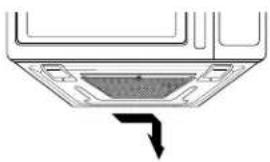
natural_image
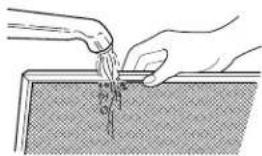
Diagram of a ceiling-mounted air duct with a black arrow indicating direction (no text or symbols)- Wash in dishwasher or soak grease filter in hot water and a mild detergent. Rinse well and shake to dry. Do not use ammonia or place in a dishwasher. The aluminum filter will darken.
natural_image
Illustration of hands pouring liquid into a container with a textured surface (no text or symbols)- To reinstall the filter, slide it into the side slot, then push up and toward oven center to lock.

CAUTION
To avoid risk of personal injury or property damage, do not operate oven hood without filter in place.
CHARCOAL FILTER REPLACEMENT
If your oven is vented inside, the charcoal filter should be replaced every 6 to 12 months, and more often if necessary. The charcoal filter cannot be cleaned.
- Unplug the oven or turn off power at the main power supply.
- Remove the two vent grill mounting screws. (2 middle screws)

- Tip the grill forward, then lift itout.
- Remove old filter.

natural_image
Line drawing of a hand inserting a grid into a car air vent (no text or symbols)- Slide a new charcoal filter into place. The filter should rest at the angle shown.

natural_image
Line drawing of a cabinet interior with a mesh grille and ventilation grilles (no text or symbols)- Slide the bottom of the grill into place. Push the top until it snaps into place. Replace the mounting screws. Turn the power back on at the main power supply and set the clock.
COOKTOP LIGHT REPLACEMENT
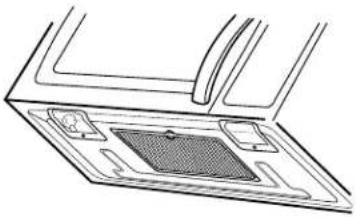
- Unplug the oven or turn off power at the main power supply.
natural_image
Diagram of a device interior with a central grid and surrounding components (no text or symbols)- Remove the bulb cover and mounting screws.
- Replace bulb(s) with 30 or 40 watt appliance bulb(s).
- Replace bulb cover and mounting screws.
- Turn the power back on at the main power supply or plug in the oven.

CAUTION
To avoid personal injury or property damage, wear gloves when replacing light bulb.
OVEN LIGHT REPLACEMENT
- Unplug oven or turn off power at the main power supply.
- Remove the vent cover mounting screws. (2 middle screws)
- Tip the cover forward, then lift out to remove.

natural_image
Line drawing of a door frame with handle and mounting bracket (no text or symbols)- Remove bulb holder.

natural_image
Technical line drawing of a mechanical assembly with a component and an arrow indicating direction (no text or symbols)- Lift up the bulb holder.

- Replace bulb with a 30 or 40 watt appliance bulb.
- Replace the bulb holder.
- Slide the bottom of the vent cover into place. Push the top until it snaps into place. Replace the mounting screws. Turn the power back on at the main power supply or plug in the oven.
TROUBLE SHOOTING
BEFORE CALLING FOR SERVICE
Check the following list to be sure a service call is necessary. Reviewing additional information on items to check may prevent an unneeded service call.
| Problem | Possible Causes |
| If nothing on the oven operates... | · check for a blown circuit fuse or a tripped main circuit breaker.· check if oven is properly connected to electric circuit in house.· check that controls are set properly. |
| If the oven interior light does not work... | · the light bulb is loose or defective. |
| If oven will not cook... | · check that control panel was programmed correctly.· check that door is firmly closed.· check that Start Pad was touched.· check that timer wasn't started instead of a cooking function. |
| If oven takes longer than normal to cook or cooks too rapidly... | · be sure the Power Level is programmed properly. |
| If the time of day clock does not always keep correct time... | · check that the power cord is fully inserted into the outlet receptacle.· be sure the oven is the only appliance on the electrical circuit. |
| If food cooks unevenly... | · be sure food is evenly shaped.· be sure food is completely defrosted before cooking.· check placement of aluminum foil strips used to prevent overcooking. |
| If food is undercooked... | · check recipe to be sure all directions (amount, time, and power levels) were correctly followed.· be sure microwave oven is on a separate circuit.· be sure food is completely defrosted before cooking. |
| If food is over cooked... | · check recipe to be sure all directions (amount, power level, time, size of dish) were followed. |
| If arcing (sparks) occur... | · be sure microwavable dishes were used.· be sure wire twist ties were not used.· be sure oven was not operated when empty.· make sure metal rack (if used) is properly installed on 4 supports. |
| If the display shows a time counting down but the oven is not cooking... | · check that door is firmly closed.· check that timer was not started instead of a cooking function. |
| If you vent fan starts automatically... | · If the temperature gets too hot around the microwave oven, the fan in the vent hood will automatically turn on at the LOW setting to cool the oven. It may stay on up to an hour to cool the oven. |
TROUBLE SHOOTING
WARNING
To avoid electrical shock which can cause severe personal injury or death, do not remove outer case at any time. Only an authorized servicer should remove the outer case.
QUESTIONS AND ANSWERS
| Question | Answer |
| Can I use a rack in my microwave oven so that I may reheat or cook in two rack positions at a time? | Only use the rack that is supplied with your microwave oven.Use of any other rack can result in poor cooking performance and/or arcing and may damage your oven. Do not use the rack when sensor cooking. |
| Can I use either metal or aluminum pans in my microwave oven? | Usable metal includes aluminum foil for shielding (use small, flat pieces). Never allow metal to touch walls or door. See page 6. |
| Sometimes the door of my microwave oven appears wavy. Is this normal? | This appearance is normal and does not affect the operation of your oven. |
| What are the humming noises I hear when my microwave oven is operating? | This is the sound the transformer makes when the magnetron tube cycles on and off. |
| Why does the dish become hot when I microwave food in it? | As the food becomes hot it will conduct the heat to the dish.Use hot pads to remove food after cooking.Dish also may not be microwave safe. See page 6. |
| What does standing time mean? | Standing time means that food should be taken out of the oven and covered for additional time after cooking. This process allows the cooking to finish, saves energy, and frees the oven for other purposes.In some dishes, the food temperature will continue to rise during this time. |
| Can I pop popcorn in my microwave oven?How do I get the best results? | Yes. Pop packaged microwave popcorn following manufacturer's guidelines or use the preprogrammed Popcorn pad. See page 15.Do not use regular paper bags with unpopped corn - - use only pre-packaged, Microwavable Popcorn. Use the listening test by stopping the oven as soon as the popping slows to a pop every one or two seconds. Do not try to repop unpopped kernels. You can also use special microwave poppers: When using a popper, be sure to follow manufacturer's directions. Do not pop popcorn in glass utensils. |
| Why does steam come out of the air exhaust vent? | Steam is normally produced during cooking.The microwave oven has been designed to vent this steam out the top vent. |