9724 - Network card / adapter DEVOLO - Free user manual and instructions
Find the device manual for free 9724 DEVOLO in PDF.


| Product Type | Network Card / Adapter |
| Brand | Devolo |
| Model | 9724 |
| Interface | PCI Express |
| Data Transfer Rate | 10/100/1000 Mbps |
| Connector Type | RJ-45 |
| Number of Ports | 1 |
| Chipset | Realtek RTL8111 |
| Dimensions (W x H x D) | 2.0 x 0.8 x 5.5 in (51 x 20 x 140 mm) |
| Weight | 1.6 oz (45 g) |
| Power Consumption | 2.5 W (typical) |
| Operating Temperature | 0°C to 40°C |
| Storage Temperature | -20°C to 70°C |
| Compliance | IEEE 802.3, IEEE 802.3u, IEEE 802.3ab |
| Supported Operating Systems | Windows, Linux, macOS |
| Energy Efficient Ethernet | Yes |
| Jumbo Frame Support | Up to 9K |
| Wake-on-LAN | Supported |
| LED Indicators | Link/Activity |
| Driver Installation | Plug and Play for most systems |
| Maintenance & Cleaning | Keep dry and dust-free; use compressed air for cleaning |
| Safety Precautions | Install in a static-free environment; avoid exposure to liquids |
| Spare Parts & Repairability | Non-serviceable; replace unit if faulty |
Frequently Asked Questions - 9724 DEVOLO
User questions about 9724 DEVOLO
0 question about this device. Answer the ones you know or ask your own.
Ask a new question about this device
Download the instructions for your Network card / adapter in PDF format for free! Find your manual 9724 - DEVOLO and take your electronic device back in hand. On this page are published all the documents necessary for the use of your device. 9724 by DEVOLO.
USER MANUAL 9724 DEVOLO
GreenPhy Module SDK How-To
DESCRIPTION
The dLAN® Green PHY Module is an integrated device for transmitting and receiving data over the power line. It holds all functions necessary for the easy creation of Green PHY network devices.
The QCA7000 Green PHY processor is supported by an LPC1758 host processor for additional interfaces and functionality.
Delivery status:
- The module supports Ethernet to PLC bridging functionality.
- It will automatically join a standard powerline network with default network password "HomePlugAV". The network password may be changed by user interaction.
- A TFTP client boot loader is executed at start up and loads firmware from a TFTP server.
Customers are enabled to add or adapt functionality to their special needs by modifying the host processor firmware using this SDK (Software Development Kit).
For further hardware related issues, please see Green PHY Module data sheet.
Version
V1.0.1: Initial release
V1.0.2: 'Changing the Build Configuration' added
V1.0.3: Minor changes
V2.0.0: Added Support for Clickboard Sensors (mikroBUS standard)
V2.1.0: MQTT Protocol (for relay and other cloud platforms) implemented, DNS and DHCP Client added
GreenPhy Module SDK How-To
Contents
1 Introduction 4
1.1 Deliverables....4
2 Installation....5
2.1 Download, install and activate LPCXpresso 5
2.2 Import of the SDK Sources 5
3 Components....8
3.1 LPCXpresso 8
3.2 Included Projects 8
3.3 GreenPhy Module SDK supporting Packages 8
3.3.1 CMSIS v2.00 8
3.3.2 FreeRTOS V7.1.0....8
3.3.3 Hardware Support 8
3.3.4 Application Support 9
3.4 GreenPhy Module Firmware 9
3.4.1 Firmware Standalone 9
3.4.2 Firmware Image for TFTP update 9
3.5 Configuration 9
4 Usage....11
4.1 Configuration of the firmware build 11
4.2 Building the firmware....11
4.2.1 Changing the Build Configuration 12
4.3 Programming the firmware to the Module 13
4.3.1 JTAG 13
4.3.2 UART0....13
4.3.3 TFTP 14
5 Examples 15
5.1 ETH GreenPhy Bridge 15
5.2 Webserver 15
5.3 Bootloader with TFTP client for firmware update....15
6 Evaluation Board....16
6.1 mikroBUS 21
6.2 Webserver 21
6.3 Clickboards....16
6.3.1 DALI Click....14
6.4 Add new Clickboards 17
GreenPhy Module SDK How-To
7 relayr cloud - The Internet of Things....19
8 relayr cloud - The Internet of Things....19
8.1 MQTT Protocol....19
8.2 Configure Evaluation Board 20
8.3 Testing....20
9 License....21
9.1 FreeRTOS....21
9.2 Swedish Institute of Computer Science 29
9.3 Adam Dunkels....30
9.4 devolo AG....31
GreenPhy Module SDK How-To
1 Introduction
Thank you for using the Software Development Kit for the GreenPhy Module. With the SDK you will be able to create software running on the module's micro processor, and change and expand it to your desire. The complete source code necessary to build the currently shipped firmware functionality of version 2.0 will be provided within the SDK, including the Ethernet-To-GreenPhy-Bridge as a working turn key solution.
The source code is based on FreeRTOS, which is mainly C with some assembly code for platform adaptation. All hardware based tasks like receiving and sending frames to Ethernet or Power line are encapsulated by hardware drivers, easy to use and tested, so you don't need to think about how to use the GreenPhy QCA7000. You can focus to your Power line application running on the microprocessor LPC1758.
1.1 Deliverables
The SDK consists of this document, describing all necessary steps to install suggested tools, build and use the firmware, and all needed sources zipped to one archive. So, the SDK consists of:
• GreenPhy Module SDK How-To (this document)
- Zipped Sources
You also will receive complete hardware documentation for the module itself, if requested at devolo AG.
All other components needed to get a working firmware like a tool chain, an IDE or a debugger must be used from third party vendors. devolo AG suggests using the LPCXpresso IDE from NXP/Code Red Technologies, based on eclipse. It contains all necessary things like the compiler and all binary tools. Also programming the module via JTAG ^1 and debugging the software with the integrated GNU debugger is included. The introduction to LPCXpresso can be found at http://ics.nxp.com/lpcxpresso/, but if you only want a brief introduction how to use the SDK, you can simply read on this document.
GreenPhy Module SDK How-To
2 Installation
To use the SDK sources, you have to compile them to a working binary and program it to the microprocessor's internal flash memory. devolo AG suggests to use LPCXpresso for all these tasks. To install LPCXpresso, you first must obtain a copy, and install it to your system. After that, the SDK sources have to be imported to the IDE. Then you are ready to configure, build, program and debug the firmware.
2.1 Download, install and activate LPCXpresso
To download LPCXpresso, you have to create an account at Code Red, who provides LPCXpresso. Please visit http://lpcxpresso.code-red-tech.com/LPCXpresso/ and follow all steps to register and to create an account at Code Red Technologies.
After the login with your account data, a quick start guide is presented. Please follow these instructions and start downloading LPCXpresso for Windows ^2 . The current version is v7.9. Install the application and install also additional driver packages from Code Red Technologies coming with the install package to be able to use the Red Probe + ^3 JTAG adapter. Activate LPCXpresso afterwards. With the activation, you will be able to build, program and debug binary firmware files for the LPC1758 target up to the size of 128 KB, which is sufficient for the current SDK features.
2.2 Import of the SDK Sources
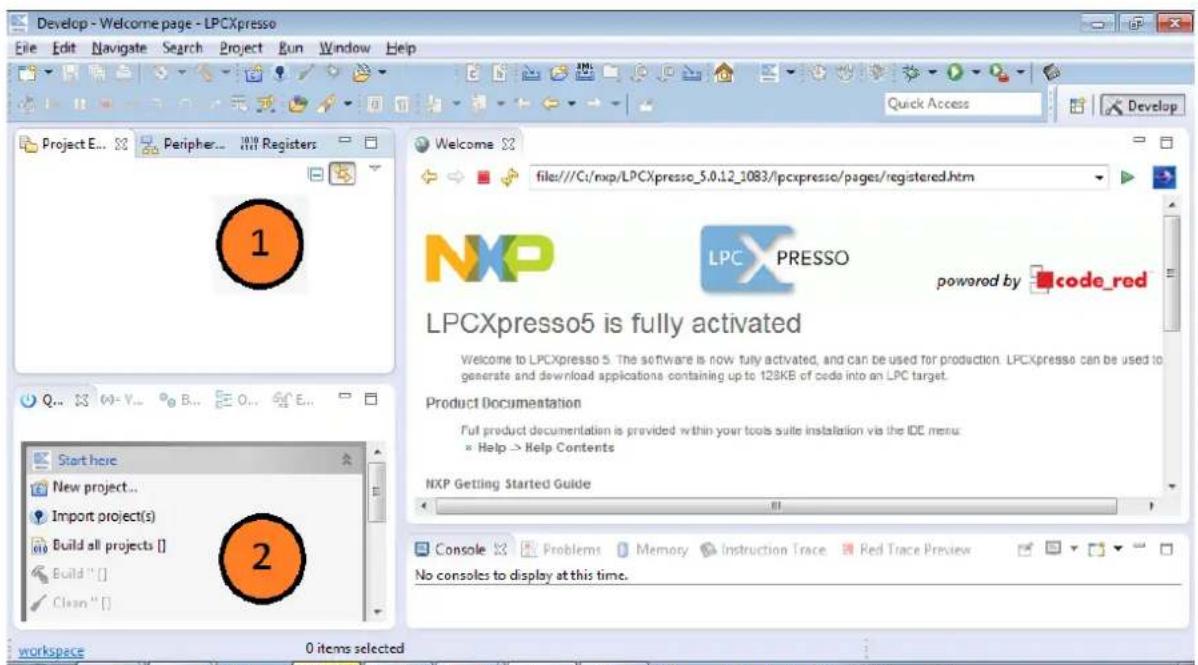
After the installation and the activation of LPCXpresso, you can start to import the SDK sources. Open the IDE, open the context menu of the Project Explorer by right clicking into it. See Picture 1 to find the Project Explorer.
text_image
Develop - Welcome page - LPCXpresso File Edit Navigate Search Project Run Window Help Project E... Peripher... 1010 Registers Quick Access Develop Welcome file:///C:/nxp/LPCXpresso_5.0.12_1083/lpcxpresso/pages/registered.htm NXP LPC PRESSO powered by code_red LPCXpresso5 is fully activated Welcome to LPCXpresso 5. The software is now fully activated, and can be used for production. LPCXpresso can be used to generate and download applications containing up to 128KB of cede into an LPC target. Product Documentation Full product documentation is provided within your tools suite installation via the IDE menu: Help > Help Contents NXP Getting Started Guide Start here New project... Import project(s) Build all projects [] Build "": [] Clean "": console Problems Memory Instruction Trace Red Trace Preview No consoles to display at this time. workspace 0 items selectedPicture 1 Find the Project Explorer View (1) and Quick Start View (2)
GreenPhy Module SDK How-To
Select 'Import...' from the context menu to start the dialog to import the GreenPhy Module SDK sources to LPCXpresso.
The import dialog pops up. Choose 'General->Existing Projects into Workspace' and click 'Next >' to proceed to the next step of the dialog. See Picture 2 for this first step of the dialog.

text_image
Import Select Create new projects from an archive file or directory. Select an import source: type filter text General Archive File Existing Projects into Workspace File System XML Import projects(s) from XML description Preferences C/C++ CVS Install Run/Debug Team < Back Next > Finish CancelPicture 2 Choose ,Existing Project'
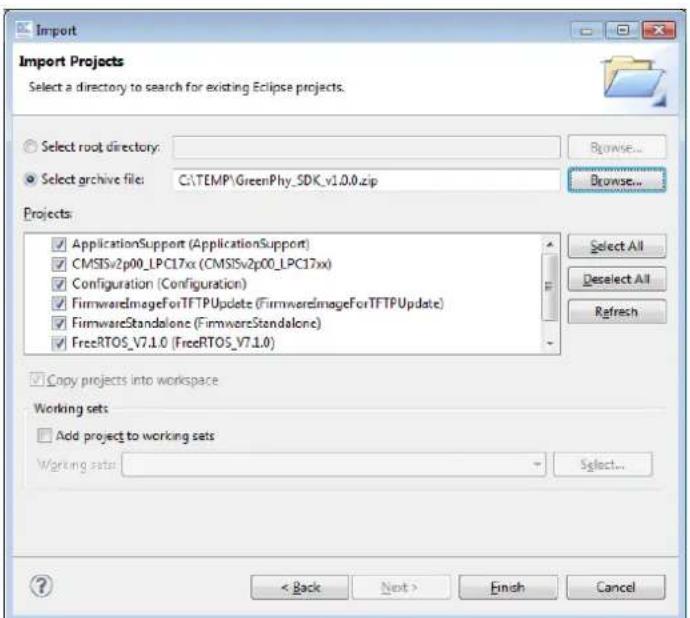
In the next dialog step, select the radio button, Select archive file ^4 , browse to the zipped SDK sources and open it. All included Projects shall be selected. See Picture 3 for this step.
text_image
Import Import Projects Select a directory to search for existing Eclipse projects. Select root directory: Browse... Select archive file: C:\TEMP\GreenPhy_SDK_v1.0.0.zip Browse... Projects: ✓ ApplicationSupport (ApplicationSupport) ✓ CMSISv2p00_LPC17xx (CMSISv2p00_LPC17xx) ✓ Configuration (Configuration) ✓ FirmwareImageForTFTPUpdate (FirmwareImageForTFTPUpdate) ✓ FirmwareStandalone (FirmwareStandalone) ✓ FreeRTOS_V7.1.0 (FreeRTOS_V7.1.0) Select All Deselect All Refresh ✓ Copy projects into workspace Working sets: ✓ Add project to working sets Working sets: Select... < Back Next > Finish CancelPicture 3 Select archive file
GreenPhy Module SDK How-To
Just press 'Finish' to finish the import dialog. The GreenPhy SDK is now imported to the IDE and is ready to use.
GreenPhy Module SDK How-To
3 Components
The components used to get a working firmware image for the GreenPhy Module are on the one hand LPCXpresso used as IDE to view, edit and change the source code, to compile the firmware itself and program it by using JTAG adapter, and on the other hand the sources itself.
The sources are in principle divided into supporting components resp. projects build into static libraries used by the firmware and the firmware itself. There are two flavors of the firmware: It can be built as a standalone application, and as an image which can be used to be remotely programmed to the GreenPhy Module by using TFTP.
3.1 LPCXpresso
To install the IDE, please follow chapter 2. After the installation process an introducing document called 'Getting started with NXP LPCXpresso' is opened, which helps first time users a lot. LPCXpresso itself contains also a huge and good help system. Furthermore, LPCXpresso is based on eclipse, which is described online and in many books, but for the very first steps to build a GreenPhy Module firmware this document contains all necessary information.
3.2 Included Projects
The SDK contains seven projects, visible in the Project Explorer View.
• There are four supporting components:
CMSIS v2.00
- FreeRTOS V7.1.0
- Hardware Support Package
- Application Support Package
• The two firmware flavors:
- Firmware Standalone
- Firmware Image for TFTP update
• And a central configuration:
- Configuration
3.3 GreenPhy Module SDK supporting Packages
These four supporting projects are built as static libraries to be linked to the firmware of the GreenPhy Module.
3.3.1 CMSIS v2.00
The used microprocessor LPC1758 contains an ARM Cortex M3 core, which is described by the ARM Cortex Microcontroller Software Interface Standard, CMSIS. This is used as a kind of abstraction software layer to define C structures, fitting to the microprocessor. In the CMSIS project itself is a docs directory containing further documentation and useful links.
3.3.2 FreeRTOS V7.1.0
As operation system, FreeRTOS is used in this firmware. It provides the preemptive scheduler together with tasks. Also queues and timers are used. For more documentation, please visit http://www.freertos.org/.
3.3.3 Hardware Support
In the hardware support project, all lower functionality is collected. You find also the netdevice interface used as abstraction for the Ethernet and the GreenPhy communication.
GreenPhy Module SDK How-To
3.3.4 Application Support
In the application support project, all higher functionality is collected. There, the sources of the following components can be found:
- Bridge This is the fundamental application receiving frames from Ethernet, transmitting them to Power line and vice versa.
- CLI This is a small command line interface using UART0 at 115k2/8N1/no flow control, which is used for production testing.
- IP A small uIP stack implementation.
- HTTP A small webserver.
- TFTP_IAP
The TFTP application flashing a firmware image and used as bootloader.
• ACTORS and SENSORS Please read Chapter 6 for further Information
• DNS and DHCP Client Only in SDK 2.1 and higher
All applications can be started as FreeRTOS tasks and use the Ethernet resp. GreenPhy driver interface. There is further documentation in the source code itself.
3.4 GreenPhy Module Firmware
The firmware itself can be build and linked as a standalone application or as an image used to be flashed to the microcontroller's flash memory via TFTP. For each of these purposes, a separate project is added to the SDK. Basically the linking process is changed. The standalone firmware will be linked to address 0x0, and the firmware image for the TFTP update process will be linked to address 0x10000, so the flash memory up to 0xffff is reserved for the used boot loader.
The configuration of all the projects in terms of what components are included is centralized in the project Configuration, see chapter 3.5 for further information.
3.4.1 Firmware Standalone
If you want to build and link the firmware as a stand alone application, use this project. The shipped boot loader in the GreenPhy Module firmware itself is build and linked this way. If you want to get rid of the boot loader, e.g. to reduce boot time, just build your application as a standalone firmware, see 'Building the firmware' chapter 4.2, and program it via JTAG or UART, see chapter 4.3.1 and 4.3.2.
3.4.2 Firmware Image for TFTP update
When using the build in TFTP firmware update feature of the GreenPhy Module, you have to provide a properly build and linked image; so this project can be used to create the upload image. Read 'Building the firmware', chapter 4.2, for further details. For programming the image to the module by using TFTP, see chapter 4.3.3.
3.5 Configuration
The configuration project contains manly header files used to influence the firmware build. The central file for including or excluding components to the GreenPhy Module firmware is named 'greenPhyModuleConfig.h' and can be found here. For a more detailed introduction see 'Configuration of the firmware build' in chapter 4.1 or the 'Examples' in chapter 5. The other files
GreenPhy Module SDK How-To
bear other configuration options, e.g. to set another default debug level, use the file 'debugConfig.h', or to configure FreeRTOS, please use the file 'FreeRTOSConfig.h'.
GreenPhy Module SDK How-To
4 Usage
In order to use the SDK firmware, you first have to configure the desired features (or write some features and code of your own) build the firmware and program it to the flash memory of the LPC1758. All these steps are explained here.
4.1 Configuration of the firmware build
Open the file 'greenPhyModuleConfig.h' of the Configuration project described in chapter 3.5. In the first part of the file there are some C define statements used to define some basic things like the VERSION_STRING of the firmware, or simply ON and OFF, or the usable devices. Following the basic definitions, all implemented feature definitions usable to configure the build are cleared by the statement '#undef' and the feature name. The features currently available are:
- ETHERNET_OVER_SPI_TO_ETHERNET_BRIDGE this is the 'bridging' functionality
- ETHERNET_LPC1758_FLOW_CONTROL you can turn the Ethernet flow control ON or OFF
- COMMAND_LINE_INTERFACE used for production test
- HTTP_SERVER used as an example in MT2490, the GreenPhy Module Test Device.
- TFTP_CLIENT_IAP used in the shipped boot loader code.
- DHCP_CLIENT Use DHCP or static IP, see chapter 7 for details
- IP_STACK_DEVICE this is the device used for the HTTP server or the TFTP client, if configured. Currently, only one device can be served, just because the implemented 'bridging' functionality is not a full featured mature bridge, and can not be used together with such a service.
After the basic definitions some configuration can be made, using the previous defines. This is the interesting and easy usable part of the file. Here, you can include whole components like the CLI to the firmware by e.g. '#define COMMAND_LINE_INTERFACE ON', or enabling the HTTP_SERVER. All settings are valid and possible, except those combinations which are actively checked in the last part of the file.
At the end, after the configuration part, there are some basic checks regarding the configuration. These checks are needed to guarantee a meaningful and valid configuration. Due to restrictions in the used software, e.g. the HTTP server can not be used together with the TFTP client, or the implemented 'bridging' functionality is not a full featured mature bridge, and can not be used together with an IP stack.
If you want to change other aspects of the firmware, please examine the other configuration files there, and read the documentation in the source code itself.
4.2 Building the firmware
After you have configured the firmware, building the firmware is an easy task. The only thing you have to decide is: Do you want to build a standalone firmware, or do you want to build a firmware image which is suitable to be flashed via TFTP. The project Firmware Standalone is bound to build a standalone firmware, and the project Firmware Image for TFTP update is bound to build a firmware image which is suitable to be flashed via TFTP. So just choose the right project by left
GreenPhy Module SDK How-To
clicking it in the Project Explorer View, e.g. FirmwareStandalone, and after that choose 'Build 'FirmwareStandalone' [DEBUG ^4 ]' in the Quick Start View.
Using the default configuration, the output files are stored in the 'Debug' sub directory of the selected project folder (see File - Properties - C/C++ Build)

text_image
Develop - Welcome page - LPCXpresso File Edit Navigate Search Project Run Window Help Project E... Peripher... UV Registers ApplicationSupport CMSIS2p00_LPC17xx Configuration FirmwareImageForTFTPUpdate FirmwareStandalone FreeRTOS_V7.1.0 HardwareSupport Start here New project... Import project(s) Build all projects [Debug] Build! FirmwareStandalone' [Debug] Clean FirmwareStand Build the project for the current configuration Welcome file:///C:/nxp/LPCXpresso_5.0.12_1083/lpcxpresso/pages/registered.htm NXP LPC PRESSO powered by code_red LPCXpresso5 is fully activated Welcome to LPCXpresso 5. The software is now fully activated, and can be used for production. LPCXpresso can be used to generate and download applications containing up to 12KB of code into an LPC target. Product Documentation Full product documentation is provided within your tools suite installation via the DE menu: * Help -> Help Contents NXP Getting Started Guide Console Problems Memory Instruction Trace Red Trace Preview No consoles to display at this time. NXP LPC1758 (FirmwareStandalone) FirmwareStandalonePicture 4 Building the firmware
4.2.1 Changing the Build Configuration
The debug build contains some debugs being printed out to UART0, where the release build strips all these debug prints by using the C preprocessor. You can configure the desired debug level in the file 'debugConfig.h' in the Configuration project, or change it by the CLI, which can be added in the file 'greenPhyModuleConfig.h'.
GreenPhy Module SDK How-To
Changing the build configuration from the 'Debug' to the 'Release' configuration is an easy task and can be accomplished by different approaches. The shortest one is:
• Mark all projects in the Project Explorer
- Open the context menu by right clicking the marked projects
- Use 'Build Configurations->Set Active' and choose the desired configuration, e.g. 'Release (Release build)'

text_image
Develop - We File Edit Nav New Go Into Copy Ctrl+C Paste Ctrl+V Delete Delete Source Move... Rename... F2 Import... Export... Build Project Clean Project Refresh F5 Close Project Close Unrelated Projects Build Configurations Make Targets Index Convert To... Run As Debug As Profile As Team Set Active ✓ 1 Debug (Debug build) Manage... Build All Clean All Build Selected... 1206 17/12/2012 Quick Access Develop Welcome 23 file:///C:/nap/LPCXpresso_5.0.12_1083/lpcxpresso/pages/registered.htm LPC PRESSO powered by code_red LPCXpresso5 is fully activated Welcome to LPCXpresso 5. The software is now fully activated, and can be used for production. LPCXpresso can be used to generate and download applications containing up to 128KB of code into an LPC target. Product Documentation Full product documentation is provided within your tools suite installation via the IDE menu: a. Help > Help Contents Start here New projes Import pro Build all pr Build "" | Clean "" | workspacePicture 5 Change Build Configuration
4.3 Programming the firmware to the Module
The build firmware can be flashed by using LPCXpresso via JTAG, using ISP-in circuit programming via UART0 with the NXP protocol, or, if the TFTP boot loader standalone application is already stored in the GreenPhy Module and the firmware is build and linked as a firmware image for TFTP upload, by using a standard TFTP server
4.3.1 JTAG
Programming the firmware using LPCXpresso via JTAG is automatically done if you use the Quick Start View and left-click the 'Debug 'FirmwareStandalone' [DEBUG ^5 ], similar as you build the firmware in chapter 4.2. The debugger will automatically be started after the firmware is written to the flash memory. To gain further knowledge regarding all the debug features please read the official LPCXpresso documentation. A good starting point is http://ics.nxp.com/support/documents/microcontrollers/pdf/lpcxpresso.getting.started.pdf.
4.3.2 UART0
To program the flash via UART0, you can use a third party software, e.g. "Flash Magic®". Please see http://www.flashmagictool.com for more information.
GreenPhy Module SDK How-To
4.3.3 TFTP
If the TFTP boot loader standalone application is already stored in the GreenPhy Module, which is the default for shipped modules, you can use a TFTP server to store the build flash image to the module.
Note: This function is only available if DHCP_CLIENT is set to OFF, to use a static IP address! Every time the module is powered on or reset, the stand alone boot loader is executed. It will use the 192.168.0.127 as its own IP address at the Ethernet interface of the module to connect to a TFTP server at IP 192.168.0.5. The stand alone boot loader will use the fixed Ethernet MAC address 00:0b:3b:7f:7d:9a, so only one module is allowed to be connected to the Ethernet at a time. Ethernet auto negotiation is done at power up, and at plugging in the cable. But the timeout for connecting to the TFTP server is round about 5 seconds. If the TFTP server at 192.168.0.5 is up and running, the module tries to download the file 'greenphy.dvl ^6 ' and flashes it. There is no check before doing so, so every file named 'greenphy.dvl' will be stored to flash memory.
After flashing, after connect timeout or after not finding the file 'greenphy.dvl' on the TFTP server, the boot loader checks the firmware flash. If there is a valid firmware stored, it is executed, but if the flash content is not valid, the boot loader loops to connect to the TFTP server again. If the server was down, or the file was not found, the timeout for the looping is 10 seconds, if the file was invalid, the timeout is set to infinite. The boot loader is executing this loop endlessly.
GreenPhy Module SDK How-To
5 Examples
The given examples here are very simple and only focused to the configuration file 'greenPhyModuleConfig.h'. Remember that you have to decide whether you want to build a stand alone application or an image which can be flashed via TFTP, see 4.2 Building the firmware.
5.1 ETH GreenPhy Bridge
define ETHERNET_OVER_SPI_TO_ETHERNET_BRIDGE ON
define ETHERNET_LPC1758_FLOW_CONTROL ON
define COMMAND_LINE_INTERFACE_OFF
define HTTP_SERVER_OFF
define TFTP_CLIENT_IAP_OFF
define IP_STACK_DEVICE LPC1758 ^7
5.2 Webserver
define ETHERNET_OVER_SPI_TO_ETHERNET_BRIDGE_OFF
define ETHERNET_LPC1758_FLOW_CONTROL_ON
define COMMAND_LINE_INTERFACE_OFF
define HTTP_SERVER_ON
define TFTP_CLIENT_IAP_OFF
define IP_STACK_DEVICE_LPC1758 ^8
5.3 Bootloader with TFTP client for firmware update
define ETHERNET_OVER_SPI_TO_ETHERNET_BRIDGE OFF
define ETHERNET_LPC1758_FLOW_CONTROL ON
define COMMAND_LINE_INTERFACE_OFF
define HTTP_SERVER_OFF
define TFTP_CLIENT_IAP_ON
define IP_STACK_DEVICE LPC1758 ^9
GreenPhy Module SDK How-To
6 Evaluation Board
natural_image
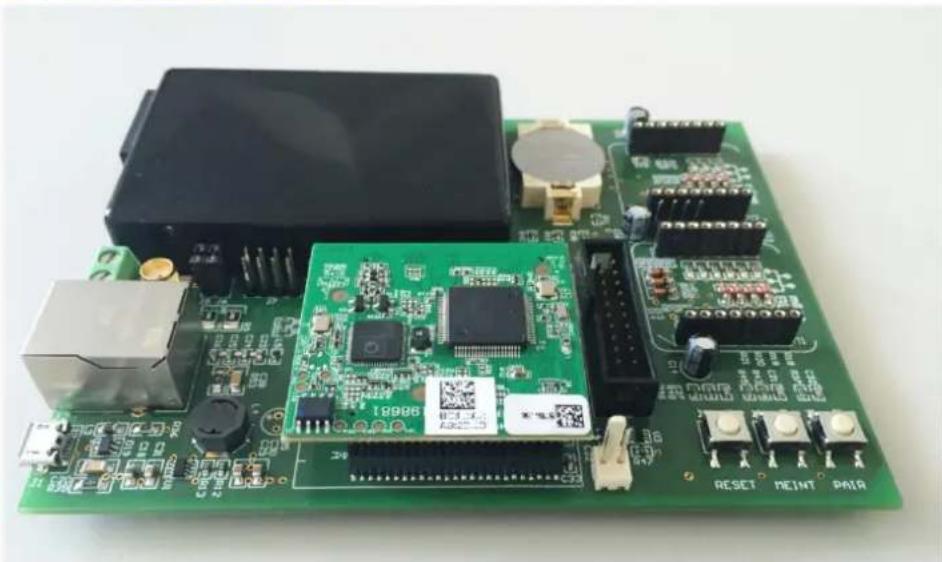
Green printed circuit board with various electronic components and connectors (no readable text or symbols)Picture 6 Evaluation Board
The Evaluation Board, designed for the GreenPhy, offers you esay access to the GreenPhy'S Ethernet, PLC and UART interfaces to start your own Applications. It also features a standard JTAG Port for easy debugging and flashing. Ethernet and PLC are directly connected to the GreenPhy and working "out-of-the-box". You can choose the PLC interface from AC-Line or twisted-pair (SMA Coaxial-Connector or Screw-Terminal) by jumper J7/8. To integrate your GreenPhy into any existing dLAN Network, just press the PAIR button and the EvalBoard will connect to the standard dLAN "HomePlugAV" Network.
IMPORTANT! All functions below are only working with "GreenPhy_Module-SDK-v2.0" or higher! Make sure you have flashed the latest version as described in chapter 4.2.
6.1 mikroBUS
The GreenPhy Evaluation Board offers two mikroBUS expansion slots connected to the intern LPC NXP1785 microcontroller. With the mikroBUS standard you can choose from many different sensors (called Clickboards) and connect them to the board by a simple "plug-in" without hardware configuration. You can find further information regarding the Clickboards and the mikroBUS standard here: http://www.mikroe.com/click.
This SDK features 5 different Clickboards (HDC1000 Click, Relay Click, DALI Click, Color Click and UV Click) giving you examples to start your own project.
To activate the modules just connect it to one of the mikroBUS Ports M1 or M2, power on the Board and configure the Port on http://192.168.0.127/clickconfig.shtml.
Just choose the Clickboard and its Port and hit the "Save" button.
You can find the examples in "ApplicationSupport/src/SENSORS" or "ApplicationSupport/src/ACTORS".
6.2 Webserver
Configuration is done on the GreenPhy's website. Go to your GreenPhy's IP address 192.168.0.127. You can change the IP address by replacing the "configIP_ADDRX" in "Configuration/netConfig.h". In the header you can switch to the Clickboard Config menu or view
GreenPhy Module SDK How-To
the data of you specified sensors. You have to choose a clickboard to view its data, otherwise you will be redirected to the Clickboard Config menu.
devolo AG | Clickboard Config | Task Stats | Run Time Stats | TCP Stats | Connections | FreeRTOS | IO | Sensors | DALI | Relay
Clickboard Configuration File
| M1 | M2 | |
| Temperature/Humidity | ○ | ○ |
| Relay | ○ | ○ |
| DALI | ○ | ○ |
| Color | ○ | ○ |
| UV | ● | ○ |
| None | ○ | ● |
Save
Picture 7 GreenPhy Website
6.3 Clickboards
This SDK divides all Clickboards into SENSORS and ACTORS. All Clickboards which offer registers/data you can only read from (e.g. Temperaturesensor) are SENSORS and Clickboards you can interact with in any way (e.g. Relay) are ACTORS.
The five examples show you how to communicate with the most common interfaces of the LPC1758:
- I^2C :
The HDC1000 Clickboard consists of a temperature and humidity sensors communication through I²C. This example will configure the GreenPhy to use the LPC1758's I²C interface and receive the temperature and humidity from the HDC1000 to show the information on webserver if it is enabled. In this case the information will be updated every 10 seconds but it is up to you to change the interval.
• SPI:
The UV Click communicates through the SPI interface of the LPC1758. If enabled, it displays the ultraviolet light in W/mc² on the webserver.
- GPIO:
The Relay Click shows how to interact with the GPIO-Ports of the LPC1758. You can switch the Relays directly from the webserver.
6.3.1 DALI Click
The DALI Click features a DALI Master Controller. Digital Addressable Lighting Interface is the new standard to control lights in buildings. Just imagine each lamp (called slave) in your house has its own address and you can switch it on and off again just with one click on your computer. Connect the DALI Click to a DALI Bus and control each slave from the GreenPhy's website http://192.168.0.127/dali.shtml.
You can address up to 64 slaves on one bus separately or put as many as you wish into 16 different groups to control more slaves with a single command. A DALI command is 16bit long, consisting of 8 bit address information followed by 8 bit command.
GreenPhy Module SDK How-To
On the website you can send a command in HEX, just type the address and command in each field and hit the submit button.
Each slave on the bus needs its own address to react to these commands. This example provides a method to auto-assign each slave on the bus starting by address 1. The slave will light up during this process when it receives an address. Hit the "Find Slaves" button to start the addressing, a message will inform you how many slaves were found.
For more information please visit http://www.dali-ag.org.
6.4 Add new Clickboards
You can easily add other Clickboards and make your own applications. Make sure the LPC1758 supports the interface and provide additional drivers if needed. All included drivers can be found under "HardwareSupport/src". Missing drivers can be downloaded from
https://www.lpcware.com/content/nxpfile/lpcopen-software-development-platform-lpc17xx-packages, just include the source files (e.g. lpc17xx_i2c.c) and headerfiles to the HardwareSupport folder.
Each Clickboard should be configured to run as a FreeRTOS task. Doing so saves resources and it is easy to start and stop the task if it is no longer needed. To support a new Clickboard, you can orient yourself to the examples in this SDK or view the example code for your sensors from mikroelektronika on http://www.libstock.com.
GreenPhy Module SDK How-To
7 DHCP and DNS Client
The SDK of version 2.1 or higher have both a DNS and DHCP Client integrated. It makes use of the implementation by Adam Dunkels.
The Evaluation Board is configured to use DHCP by default. If there is a DHCP Server in your network, it will try to receive a valid IPv4 address. You can deactivate the DHCP Client in LPCXPRESSO in 'greenPhyModuleConfig.h' by switching '#define DHCP_CLIENT' from 'ON' to 'OFF'. In that case, it will use 192.168.0.127/24 as its own IP address.
The Evaluation Board is also able to do DNS requests. If the DHCP client is activated and it received a valid DNS server, the Evaluation Board will ask this server for any hostnames rather than use the IP address. It does not have a DNS table, so any new request will be send to the server.
8 relayr Cloud – The Internet of Things
With SDK v2.1 the Evaluation Board is able to send the collected data from the Clickboards to the relayr Cloud.
The relayr Cloud platform offers you to save your data in the cloud, to observe them from anywhere with any browser and an API to create your own applications for iOS, Android etc.
You have to create a developer account to use their services, please visit https://www.relayr.io for further information.
When you have successfully created a developer account, go to your developer dashboard. Click "ADD NEW DEVICE" on the bottom left. Give you prototype a name. Relayr will generate new credentials for your device.
8.1 MQTT Protocol
The MQTT Protocol was originally developed by IBM to observe oil pipelines. It's a lightweight protocol with a small overhead. It implements the observer pattern: many clients report their status to one server and the server report it back to the clients. Each client is identified by a "Client ID" and reports its status to a "Topic". The Topic consist of a String, separated by a "/". Different Clients can subscribe to one or more topics an receive information from the broker on that channel.
Relayr uses the username to construct a unique topic (e.g.: "/v1/username/data", remember the "data" after your username is necessary). The Evaluation Board will send the data to that topic.
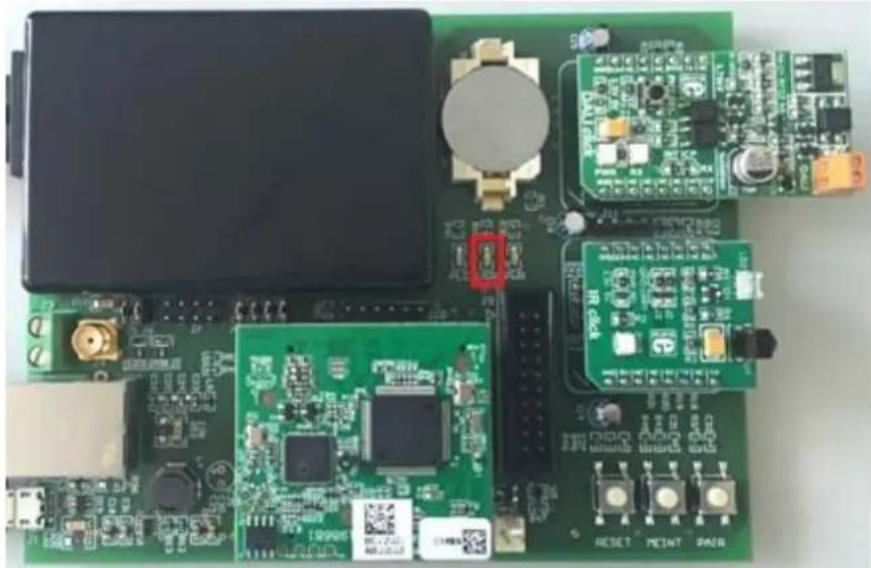
Relayr also generates the topic "/v1/username/cmd" you can subscribe to for each device you add. By default, the Evaluation Board will subscribe to that and the server will now inform you when the data on that topic changes. Relayr uses it to send command in the MQTT payload to toggle a LED. The Evaluation Board will toggle the USR LED (see Picture 8), but it is up to you to extend different commands and implement other methods.
As long as the cloud uses the standard MQTT protocol, you could connect the Evaluation Board to any cloud you want.
See www.mqtt.org for details.
GreenPhy Module SDK How-To
natural_image
Close-up of a green printed circuit board with various electronic components and connectors (no readable text or symbols)Picture 8 USR LED
8.2 Configure Evaluation Board
To communicate with the relayr cloud, you will have to provide valid credentials first. Go to http://192.168.0.127/relayr.shtml and activate the relayr cloud. If activated, you can provide the credentials given by relayr. You can either type in an IP Address or the hostname. The Evaluation Board will try a DNS search if a hostname is given, if it fails, it will try to connect to default mqtt.relayr.io.
Submit a username, password, client id and the topic to successfully connect to the cloud. By default, the Evaluation Board will send new sensor data immediately to the cloud. It will never close the connection, if the remote does, it will try to reconnect every 30 seconds. You can change this value to fit your requirements.
8.3 Testing
We recommend that you first test you implementation against a local MQTT Broker, before connecting to the relayr cloud. For example you can use the Eclipse Paho MQTT Client/Server. It is written in python displays all messages with all options you send, easy for debugging. Visit http://www.eclipse.org/paho/clients/testing/ for download and further information.
GreenPhy Module SDK How-To
9 License
The source code of this SDK is covered by various licenses. Please take also a look to the sources itself.
9.1 FreeRTOS
The FreeRTOS.org source code is licensed by the modified GNU General Public License (GPL) text provided below. The FreeRTOS download also includes demo application source code, some of which is provided by third parties AND IS LICENSED SEPARATELY FROM FREERTOS.ORG.
For the avoidance of any doubt refer to the comment included at the top of each source and header file for license and copyright information.
This is a list of files for which Real Time Engineers Ltd are not the copyright owner and are NOT COVERED BY THE GPL.
1) Various header files provided by silicon manufacturers and tool vendors that define processor specific memory addresses and utility macros. Permission has been granted by the various copyright holders for these files to be included in the FreeRTOS download. Users must ensure license conditions are adhered to for any use other than compilation of the FreeRTOS demo applications.
2) The uIP TCP/IP stack the copyright of which is held by Adam Dunkels. Users must ensure the open source license conditions stated at the top of each uIP source file is understood and adhered to.
3) The lwIP TCP/IP stack the copyright of which is held by the Swedish Institute of Computer Science. Users must ensure the open source license conditions stated at the top of each lwIP source file is understood and adhered to.
4) Various peripheral driver source files and binaries provided by silicon manufacturers and tool vendors. Permission has been granted by the various copyright holders for these files to be included in the FreeRTOS download. Users must ensure license conditions are adhered to for any use other than compilation of the FreeRTOS demo applications.
5) The files contained within FreeRTOS\Demo\WizNET_DEMO_TERN_186\tern_code, which are slightly modified versions of code provided by and copyright to Tern Inc.
Errors and omissions should be reported to Richard Barry, contact details for whom can be obtained from http://www.FreeRTOS.org.
The GPL license text follows.
A special exception to the GPL is included to allow you to distribute a combined work that includes FreeRTOS without being obliged to provide the source code for any proprietary components. See the licensing section of http://www.FreeRTOS.org for full details. The exception text is also
GreenPhy Module SDK How-To
included at the bottom of this file.
GNU GENERAL PUBLIC LICENSE
Version 2, June 1991
Copyright (C) 1989, 1991 Free Software Foundation, Inc.
59 Temple Place, Suite 330, Boston, MA 02111-1307 USA
Everyone is permitted to copy and distribute verbatim copies of this license document, but changing it is not allowed.
Preamble
The licenses for most software are designed to take away your freedom to share and change it. By contrast, the GNU General Public License is intended to guarantee your freedom to share and change free software--to make sure the software is free for all its users. This General Public License applies to most of the Free Software Foundation's software and to any other program whose authors commit to using it. (Some other Free Software Foundation software is covered by the GNU Library General Public License instead.) You can apply it to your programs, too.
When we speak of free software, we are referring to freedom, not price. Our General Public Licenses are designed to make sure that you have the freedom to distribute copies of free software (and charge for this service if you wish), that you receive source code or can get it if you want it, that you can change the software or use pieces of it in new free programs; and that you know you can do these things.
To protect your rights, we need to make restrictions that forbid anyone to deny you these rights or to ask you to surrender the rights. These restrictions translate to certain responsibilities for you if you distribute copies of the software, or if you modify it.
For example, if you distribute copies of such a program, whether gratis or for a fee, you must give the recipients all the rights that you have. You must make sure that they, too, receive or can get the source code. And you must show them these terms so they know their rights.
We protect your rights with two steps: (1) copyright the software, and (2) offer you this license which gives you legal permission to copy, distribute and/or modify the software.
Also, for each author's protection and ours, we want to make certain that everyone understands that there is no warranty for this free software. If the software is modified by someone else and passed on, we want its recipients to know that what they have is not the original, so that any problems introduced by others will not reflect on the original authors' reputations.
Finally, any free program is threatened constantly by software patents. We wish to avoid the danger that redistributors of a free program will individually obtain patent licenses, in effect making the
GreenPhy Module SDK How-To
program proprietary. To prevent this, we have made it clear that any patent must be licensed for everyone's free use or not licensed at all.
The precise terms and conditions for copying, distribution and modification follow.
GNU GENERAL PUBLIC LICENSE TERMS AND CONDITIONS FOR COPYING, DISTRIBUTION AND MODIFICATION
- This License applies to any program or other work which contains a notice placed by the copyright holder saying it may be distributed under the terms of this General Public License. The "Program", below, refers to any such program or work, and a "work based on the Program" means either the Program or any derivative work under copyright law: that is to say, a work containing the Program or a portion of it, either verbatim or with modifications and/or translated into another language. (Hereinafter, translation is included without limitation in the term "modification".) Each licensee is addressed as "you".
Activities other than copying, distribution and modification are not covered by this License; they are outside its scope. The act of running the Program is not restricted, and the output from the Program is covered only if its contents constitute a work based on the Program (independent of having been made by running the Program). Whether that is true depends on what the Program does.
- You may copy and distribute verbatim copies of the Program's source code as you receive it, in any medium, provided that you conspicuously and appropriately publish on each copy an appropriate copyright notice and disclaimer of warranty; keep intact all the notices that refer to this License and to the absence of any warranty; and give any other recipients of the Program a copy of this License along with the Program.
You may charge a fee for the physical act of transferring a copy, and you may at your option offer warranty protection in exchange for a fee.
- You may modify your copy or copies of the Program or any portion of it, thus forming a work based on the Program, and copy and distribute such modifications or work under the terms of Section 1 above, provided that you also meet all of these conditions:
a) You must cause the modified files to carry prominent notices stating that you changed the files and the date of any change.
b) You must cause any work that you distribute or publish, that in whole or in part contains or is derived from the Program or any part thereof, to be licensed as a whole at no charge to all third parties under the terms of this License.
c) If the modified program normally reads commands interactively when run, you must cause it, when started running for such interactive use in the most ordinary way, to print or display an announcement including an appropriate copyright notice and a notice that there is no warranty (or else, saying that you provide a warranty) and that users may redistribute the program under these conditions, and telling the user how to view a copy of this License. (Exception: if the Program itself is interactive but
GreenPhy Module SDK How-To
does not normally print such an announcement, your work based on the Program is not required to print an announcement.)
These requirements apply to the modified work as a whole. If identifiable sections of that work are not derived from the Program, and can be reasonably considered independent and separate works in themselves, then this License, and its terms, do not apply to those sections when you distribute them as separate works. But when you distribute the same sections as part of a whole which is a work based on the Program, the distribution of the whole must be on the terms of this License, whose permissions for other licensees extend to the entire whole, and thus to each and every part regardless of who wrote it.
Thus, it is not the intent of this section to claim rights or contest your rights to work written entirely by you; rather, the intent is to exercise the right to control the distribution of derivative or collective works based on the Program.
In addition, mere aggregation of another work not based on the Program with the Program (or with a work based on the Program) on a volume of a storage or distribution medium does not bring the other work under the scope of this License.
- You may copy and distribute the Program (or a work based on it, under Section 2) in object code or executable form under the terms of Sections 1 and 2 above provided that you also do one of the following:
a) Accompany it with the complete corresponding machine-readable source code, which must be distributed under the terms of Sections 1 and 2 above on a medium customarily used for software interchange; or,
b) Accompany it with a written offer, valid for at least three years, to give any third party, for a charge no more than your cost of physically performing source distribution, a complete machine-readable copy of the corresponding source code, to be distributed under the terms of Sections 1 and 2 above on a medium customarily used for software interchange; or,
c) Accompany it with the information you received as to the offer to distribute corresponding source code. (This alternative is allowed only for noncommercial distribution and only if you received the program in object code or executable form with such an offer, in accord with Subsection b above.)
The source code for a work means the preferred form of the work for making modifications to it. For an executable work, complete source code means all the source code for all modules it contains, plus any associated interface definition files, plus the scripts used to control compilation and installation of the executable. However, as a special exception, the source code distributed need not include anything that is normally distributed (in either source or binary form) with the major components (compiler, kernel, and so on) of the operating system on which the executable runs, unless that component itself accompanies the executable.
If distribution of executable or object code is made by offering access to copy from a designated place, then offering equivalent access to copy the source code from the same place counts as
GreenPhy Module SDK How-To
distribution of the source code, even though third parties are not compelled to copy the source along with the object code.
-
You may not copy, modify, sublicense, or distribute the Program except as expressly provided under this License. Any attempt otherwise to copy, modify, sublicense or distribute the Program is void, and will automatically terminate your rights under this License. However, parties who have received copies, or rights, from you under this License will not have their licenses terminated so long as such parties remain in full compliance.
-
You are not required to accept this License, since you have not signed it. However, nothing else grants you permission to modify or distribute the Program or its derivative works. These actions are prohibited by law if you do not accept this License. Therefore, by modifying or distributing the Program (or any work based on the Program), you indicate your acceptance of this License to do so, and all its terms and conditions for copying, distributing or modifying the Program or works based on it.
-
Each time you redistribute the Program (or any work based on the Program), the recipient automatically receives a license from the original licensor to copy, distribute or modify the Program subject to these terms and conditions. You may not impose any further restrictions on the recipients' exercise of the rights granted herein. You are not responsible for enforcing compliance by third parties to this License.
-
If, as a consequence of a court judgment or allegation of patent infringement or for any other reason (not limited to patent issues), conditions are imposed on you (whether by court order, agreement or otherwise) that contradict the conditions of this License, they do not excuse you from the conditions of this License. If you cannot distribute so as to satisfy simultaneously your obligations under this License and any other pertinent obligations, then as a consequence you may not distribute the Program at all. For example, if a patent license would not permit royalty-free redistribution of the Program by all those who receive copies directly or indirectly through you, then the only way you could satisfy both it and this License would be to refrain entirely from distribution of the Program.
If any portion of this section is held invalid or unenforceable under any particular circumstance, the balance of the section is intended to apply and the section as a whole is intended to apply in other circumstances.
It is not the purpose of this section to induce you to infringe any patents or other property right claims or to contest validity of any such claims; this section has the sole purpose of protecting the integrity of the free software distribution system, which is implemented by public license practices. Many people have made generous contributions to the wide range of software distributed through that system in reliance on consistent application of that system; it is up to the author/donor to decide if he or she is willing to distribute software through any other system and a licensee cannot impose that choice.
This section is intended to make thoroughly clear what is believed to
GreenPhy Module SDK How-To
be a consequence of the rest of this License.
-
If the distribution and/or use of the Program is restricted in certain countries either by patents or by copyrighted interfaces, the original copyright holder who places the Program under this License may add an explicit geographical distribution limitation excluding those countries, so that distribution is permitted only in or among countries not thus excluded. In such case, this License incorporates the limitation as if written in the body of this License.
-
The Free Software Foundation may publish revised and/or new versions of the General Public License from time to time. Such new versions will be similar in spirit to the present version, but may differ in detail to address new problems or concerns.
Each version is given a distinguishing version number. If the Program specifies a version number of this License which applies to it and "any later version", you have the option of following the terms and conditions either of that version or of any later version published by the Free Software Foundation. If the Program does not specify a version number of this License, you may choose any version ever published by the Free Software Foundation.
- If you wish to incorporate parts of the Program into other free programs whose distribution conditions are different, write to the author to ask for permission. For software which is copyrighted by the Free Software Foundation, write to the Free Software Foundation; we sometimes make exceptions for this. Our decision will be guided by the two goals of preserving the free status of all derivatives of our free software and of promoting the sharing and reuse of software generally.
NO WARRANTY
-
BECAUSE THE PROGRAM IS LICENSED FREE OF CHARGE, THERE IS NO WARRANTY FOR THE PROGRAM, TO THE EXTENT PERMITTED BY APPLICABLE LAW. EXCEPT WHEN OTHERWISE STATED IN WRITING THE COPYRIGHT HOLDERS AND/OR OTHER PARTIES PROVIDE THE PROGRAM "AS IS" WITHOUT WARRANTY OF ANY KIND, EITHER EXPRESSED OR IMPLIED, INCLUDING, BUT NOT LIMITED TO, THE IMPLIED WARRANTIES OF MERCHANTABILITY AND FITNESS FOR A PARTICULAR PURPOSE. THE ENTIRE RISK AS TO THE QUALITY AND PERFORMANCE OF THE PROGRAM IS WITH YOU. SHOULD THE PROGRAM PROVE DEFECTIVE, YOU ASSUME THE COST OF ALL NECESSARY SERVICING, REPAIR OR CORRECTION.
-
IN NO EVENT UNLESS REQUIRED BY APPLICABLE LAW OR AGREED TO IN WRITING WILL ANY COPYRIGHT HOLDER, OR ANY OTHER PARTY WHO MAY MODIFY AND/OR REDISTRIBUTE THE PROGRAM AS PERMITTED ABOVE, BE LIABLE TO YOU FOR DAMAGES, INCLUDING ANY GENERAL, SPECIAL, INCIDENTAL OR CONSEQUENTIAL DAMAGES ARISING OUT OF THE USE OR INABILITY TO USE THE PROGRAM (INCLUDING BUT NOT LIMITED TO LOSS OF DATA OR DATA BEING RENDERED INACCURATE OR LOSSES SUSTAINED BY YOU OR THIRD PARTIES OR A FAILURE OF THE PROGRAM TO OPERATE WITH ANY OTHER PROGRAMS), EVEN IF SUCH HOLDER OR OTHER PARTY HAS BEEN ADVISED OF THE POSSIBILITY OF SUCH DAMAGES.
END OF TERMS AND CONDITIONS
How to Apply These Terms to Your New Programs
If you develop a new program, and you want it to be of the greatest
GreenPhy Module SDK How-To
possible use to the public, the best way to achieve this is to make it free software which everyone can redistribute and change under these terms.
To do so, attach the following notices to the program. It is safest to attach them to the start of each source file to most effectively convey the exclusion of warranty; and each file should have at least the "copyright" line and a pointer to where the full notice is found.
This program is free software; you can redistribute it and/or modify it under the terms of the GNU General Public License** as published by the Free Software Foundation; either version 2 of the License, or (at your option) any later version.
This program is distributed in the hope that it will be useful, but WITHOUT ANY WARRANTY; without even the implied warranty of MERCHANTABILITY or FITNESS FOR A PARTICULAR PURPOSE. See the GNU General Public License for more details.
You should have received a copy of the GNU General Public License along with this program; if not, write to the Free Software Foundation, Inc., 59 Temple Place, Suite 330, Boston, MA 02111-1307 USA
Also add information on how to contact you by electronic and paper mail.
If the program is interactive, make it output a short notice like this when it starts in an interactive mode:
Gnomovision version 69, Copyright (C) year name of author Gnomovision comes with ABSOLUTELY NO WARRANTY; for details type 'show w'. This is free software, and you are welcome to redistribute it under certain conditions; type 'show c' for details.
The hypothetical commands `show w' and `show c' should show the appropriate parts of the General Public License. Of course, the commands you use may be called something other than `show w' and `show c'; they could even be mouse-clicks or menu items--whatever suits your program.
You should also get your employer (if you work as a programmer) or your school, if any, to sign a "copyright disclaimer" for the program, if necessary. Here is a sample; alter the names:
Yoyodyne, Inc., hereby disclaims all copyright interest in the program 'Gnomovision' (which makes passes at compilers) written by James Hacker.
This General Public License does not permit incorporating your program into proprietary programs. If your program is a subroutine library, you may consider it more useful to permit linking proprietary applications with the library. If this is what you want to do, use the GNU Library General Public License instead of this License.
GreenPhy Module SDK How-To
The FreeRTOS GPL Exception Text:
Any FreeRTOS source code, whether modified or in it's original release form, or whether in whole or in part, can only be distributed by you under the terms of the GNU General Public License plus this exception. An independent module is a module which is not derived from or based on FreeRTOS.
Clause 1:
Linking FreeRTOS statically or dynamically with other modules is making a combined work based on FreeRTOS. Thus, the terms and conditions of the GNU General Public License cover the whole combination.
As a special exception, the copyright holder of FreeRTOS gives you permission to link FreeRTOS with independent modules that communicate with FreeRTOS solely through the FreeRTOS API interface, regardless of the license terms of these independent modules, and to copy and distribute the resulting combined work under terms of your choice, provided that
+ Every copy of the combined work is accompanied by a written statement that details to the recipient the version of FreeRTOS used and an offer by yourself to provide the FreeRTOS source code (including any modifications you may have made) should the recipient request it.
+ The combined work is not itself an RTOS, scheduler, kernel or related product.
+ The independent modules add significant and primary functionality to FreeRTOS and do not merely extend the existing functionality already present in FreeRTOS.
Clause 2:
FreeRTOS may not be used for any competitive or comparative purpose, including the
publication of any form of run time or compile time metric, without the express permission of Real Time Engineers Ltd. (this is the norm within the industry and is intended to ensure information accuracy).
GreenPhy Module SDK How-To
9.2 Swedish Institute of Computer Science
* Copyright (c) 2001, Swedish Institute of Computer Science.
* All rights reserved.
*
* Redistribution and use in source and binary forms, with or without
* modification, are permitted provided that the following conditions
* are met:
* 1. Redistributions of source code must retain the above copyright notice, this list of conditions and the following disclaimer.
* 2. Redistributions in binary form must reproduce the above copyright notice, this list of conditions and the following disclaimer in the documentation and/or other materials provided with the distribution.
* 3. Neither the name of the Institute nor the names of its contributors * may be used to endorse or promote products derived from this software * without specific prior written permission.
* THIS SOFTWARE IS PROVIDED BY THE INSTITUTE AND CONTRIBUTORS ``AS IS'' AND
* ANY EXPRESS OR IMPLIED WARRANTIES, INCLUDING, BUT NOT LIMITED TO, THE * IMPLIED WARRANTIES OF MERCHANTABILITY AND FITNESS FOR A PARTICULAR PURPOSE * ARE DISCLAIMED. IN NO EVENT SHALL THE INSTITUTE OR CONTRIBUTORS BE LIABLE * FOR ANY DIRECT, INDIRECT, INCIDENTAL, SPECIAL, EXEMPLARY, OR CONSEQUENTIAL * DAMAGES (INCLUDING, BUT NOT LIMITED TO, PROCUREMENT OF SUBSTITUTE GOODS
* OR SERVICES; LOSS OF USE, DATA, OR PROFITS; OR BUSINESS INTERRUPTION) * HOWEVER CAUSED AND ON ANY THEORY OF LIABILITY, WHETHER IN CONTRACT, STRICT * LIABILITY, OR TORT (INCLUDING NEGLIGENCE OR OTHERWISE) ARISING IN ANY WAY * OUT OF THE USE OF THIS SOFTWARE, EVEN IF ADVISED OF THE POSSIBILITY OF * SUCH DAMAGE.
* This file is part of the lwIP TCP/IP stack.
* Author: Adam Dunkels adam@sics.se
*
* /
GreenPhy Module SDK How-To
9.3 Adam Dunkels
* Copyright (c) 2001-2003, Adam Dunkels.
* All rights reserved.
*
* Redistribution and use in source and binary forms, with or without
* modification, are permitted provided that the following conditions
* are met:
* 1. Redistributions of source code must retain the above copyright notice, this list of conditions and the following disclaimer.
* 2. Redistributions in binary form must reproduce the above copyright notice, this list of conditions and the following disclaimer in the documentation and/or other materials provided with the distribution.
* 3. The name of the author may not be used to endorse or promote
* products derived from this software without specific prior
* written permission.
* THIS SOFTWARE IS PROVIDED BY THE AUTHOR 'AS IS' AND ANY EXPRESS
* OR IMPLIED WARRANTIES, INCLUDING, BUT NOT LIMITED TO, THE IMPLIED
* WARRANTIES OF MERCHANTABILITY AND FITNESS FOR A PARTICULAR PURPOSE
* ARE DISCLAIMED. IN NO EVENT SHALL THE AUTHOR BE LIABLE FOR ANY
* DIRECT, INDIRECT, INCIDENTAL, SPECIAL, EXEMPLARY, OR CONSEQUENTIAL
* DAMAGES (INCLUDING, BUT NOT LIMITED TO, PROCUREMENT OF SUBSTITUTE
* GOODS OR SERVICES; LOSS OF USE, DATA, OR PROFITS; OR BUSINESS
* INTERRUPTION) HOWEVER CAUSED AND ON ANY THEORY OF LIABILITY,
* WHETHER IN CONTRACT, STRICT LIABILITY, OR TORT (INCLUDING
* NEGLIGENCE OR OTHERWISE) ARISING IN ANY WAY OUT OF THE USE OF THIS
* SOFTWARE, EVEN IF ADVISED OF THE POSSIBILITY OF SUCH DAMAGE.
* This file is part of the uIP TCP/IP stack.
*/
GreenPhy Module SDK How-To
9.4 devolo AG
/ *
* Copyright (c) 2012, devolo AG, Aachen, Germany.
* All rights reserved.
*
* This Software is part of the devolo GreenPHY-SDK.
* Usage in source form and redistribution in binary form, with or without
* modification, are permitted provided that the following conditions * are met:
* 1. Usage in source form is subject to a current end user license agreement * with the devolo AG.
* 2. Neither the name of the devolo AG nor the names of its contributors * may be used to endorse or promote products derived from this software * without specific prior written permission.
* 3. Redistribution in binary form is limited to the usage on the GreenPHY module of the devolo AG.
* 4. Redistribution in binary form must reproduce the above copyright * notice, this list of conditions and the following disclaimer in the * documentation and/or other materials provided with the distribution.
* THIS SOFTWARE IS PROVIDED BY THE COPYRIGHT HOLDERS AND CONTRIBUTORS "AS IS"
* AND ANY EXPRESS OR IMPLIED WARRANTIES, INCLUDING, BUT NOT LIMITED TO, THE
* IMPLIED WARRANTIES OF MERCHANTABILITY AND FITNESS FOR A PARTICULAR PURPOSE
* ARE DISCLAIMED. IN NO EVENT SHALL THE COPYRIGHT HOLDER OR CONTRIBUTORS BE * LIABLE FOR ANY DIRECT, INDIRECT, INCIDENTAL, SPECIAL, EXEMPLARY, OR
* CONSEQUENTIAL DAMAGES (INCLUDING, BUT NOT LIMITED TO, PROCUREMENT OF
* SUBSTITUTE GOODS OR SERVICES; LOSS OF USE, DATA, OR PROFITS; OR BUSINESS
* INTERRUPTION) HOWEVER CAUSED AND ON ANY THEORY OF LIABILITY, WHETHER IN
* CONTRACT, STRICT LIABILITY, OR TORT (INCLUDING NEGLIGENCE OR OTHERWISE)
* ARISING IN ANY WAY OUT OF THE USE OF THIS SOFTWARE, EVEN IF ADVISED OF THE
* POSSIBILITY OF SUCH DAMAGE.
* /
© 2012 devolo AG, Germany. All rights reserved.
The information and data included in this document is provided without guarantee and is subject to change at any time without prior notification.