
USB4 PD100W - Nicht kategorisiert MSI - Kostenlose Bedienungsanleitung
Finden Sie kostenlos die Bedienungsanleitung des Geräts USB4 PD100W MSI als PDF.


| Produkttyp | USB4-Erweiterungskarte |
| Marke | MSI |
| Modell | USB4 PD100W |
| Abmessungen | 5,2 Zoll x 4,1 Zoll (13,2 cm x 10,4 cm) |
| Gewicht | ca. 100 g |
| Schnittstelle | PCIe 4.0 x4 |
| Stromversorgung | 6-Pin PCIe-Stromanschluss |
| USB-Anschlüsse | 2x USB4 USB-C (bis zu 40 Gbit/s) |
| DisplayPort-Eingänge | 2x DisplayPort 1.4 |
| Unterstützte Aufladung | USB1: bis zu 100 W; USB2: bis zu 27 W |
| Betriebssystem | Windows 11 22H2 und neuer |
| Verpackungsinhalt | 1x USB4 PD100W-Karte, 1x UA-Header-Kabel, 1x USB-2.0-Kabel |
| Kompatible Motherboards | MPG Z790 CARBON MAX WIFI, MPG Z790 EDGE TI MAX WIFI, MAO BTNOM MORTAR WIFI II u. a. |
| PCIe-Steckplatzanforderung | PCIe 4.0 x4-Steckplatz (unterstützt durch PCH) |
| DisplayPort-Spezifikation | DisplayPort 1.4 |
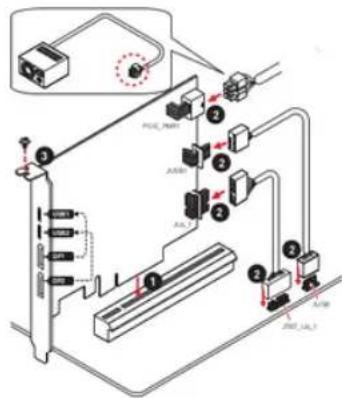
| Installationshinweise | Karte in PCIe-Steckplatz einsetzen, JUSB1 und JUSB4 anschließen, PCI-PWR an Netzteil, mit Schraube sichern |
| Reinigung und Pflege | Mit trockenem Tuch reinigen; keine Flüssigkeiten verwenden |
| Sicherheit | Gerät vor Feuchtigkeit und Überhitzung schützen; nur in geeigneten Gehäusen verwenden |
| Reparierbarkeit / Ersatzteile | Keine vom Benutzer austauschbaren Teile; bei Defekt Fachpersonal konsultieren |
Häufig gestellte Fragen - USB4 PD100W MSI
Benutzerfragen zu USB4 PD100W MSI
0 Frage zu diesem Gerät. Beantworten Sie die, die Sie kennen, oder stellen Sie Ihre eigene.
Eine neue Frage zu diesem Gerät stellen
Laden Sie die Anleitung für Ihr Nicht kategorisiert kostenlos im PDF-Format! Finden Sie Ihr Handbuch USB4 PD100W - MSI und nehmen Sie Ihr elektronisches Gerät wieder in die Hand. Auf dieser Seite sind alle Dokumente veröffentlicht, die für die Verwendung Ihres Geräts notwendig sind. USB4 PD100W von der Marke MSI.
BEDIENUNGSANLEITUNG USB4 PD100W MSI

msi
Specification
 | Aonemedia®*242 USB4 Host Controller |
| External connector | • 2x USB4 USB-CPI ports• Supports up to 400bps with USB 4.0 devices• Supports up to 20VISA 100W power charging for USB1• Supports up to PVISA, 27W power charging for USB2• Supports USB4 Display need to connect the DisplayPort output port on the motherboard or discrete graphics card to the DisplayPort input port on the USB4 PD/USB4 carrier/tech Type C ports only support USB4 data transmission.)• 2x DisplayPort Inputsport.• DisplayPort 1.4 specification• 1x 10-pin UA header• 1x USB 2.0 header• 1x 6-pin power connector |
| Interface | • PCIe 4.0 x 65 substrands on motherboard supportive slot |
| Operating system | • Windows 11 22MHz and later |
| Farm factor | • 5.2 inch x 4.1 inch (13.2 inch x 10.4 inch) |
| Package contents | • 1x USB4 PD/USB4 card• 1x UA header cable• 1x USB 2.0 cable |
| Compatible Motherboard list | • MPG Z790 CARBON MAX WIFI• MPG Z790 CARBON WIFI II• MPG Z790 CARBON MAX WIFI III• MPG Z790 EDGE TIMAX WIFI• MAO Z790 TOMAHAWK MAX WIFI• PRO Z790-A MAX WIFI• Z790 GAMING PLUS WIFI• Z790 PROJECT ZERO• MFD BTNOM EDGE TI WIFI• MAO BTNOM MORTAR WIFI II• MAO BTNOM MORTAR III |
Installing the USB4 PD100W card
- Insert the USB4 PD100W card into the PCIe 4.0 x4 slot supported by the PCH
- Connect JUSBI and JU4. 1 connectors at the USB4 PD100W card to the motherboard. And
connect the PCI, PWR to the power supply - Use the screw to secure the USB4 PD100W card in the case bay.

- The DisplayPort signal input by DP1 can only be output via USB1, and input by DP2 can only be
dputat na 1582
- When use only one DisplayPort input, it is recommended to use DP1 as the priority input.

(2) 电驱(100%30%)
次数×68
(依法登) 100112
(2) 本次股东大会的决议
Marke : MSI
Modell : USB4 PD100W
Kategorie : Nicht kategorisiert