
GMC-F3 - Monitor GODOX - Kostenlose Bedienungsanleitung
Finden Sie kostenlos die Bedienungsanleitung des Geräts GMC-F3 GODOX als PDF.


| Produkttyp | Kamerasteuerungskabel für Godox-Monitore und Fuji-Kameras |
| Marke | Godox |
| Modell | GMC-F3 |
| Funktionen | Auslösen, Aufnahme, Autofokus |
| Kompatible Kameras | Ausgewählte Fuji-Modelle (X-E3, X-H1, X-T2, X-T20, X-T3, X-T30, X-T4, X100V, X-T1*, X-Pro2*, X-Pro3*, X100T*, X-T10*); *eingeschränkte Funktionen |
| Anschluss Monitorseite | 2,5mm vierpolig |
| Anschluss Kameraseite | 2,5mm dreipolig |
| Kabelmaterial | TPE (thermoplastisches Elastomer) |
| Steckermaterial | Sandgestrahlt, korrosionsbeständig |
| Schutz | Mehrschichtig, kratzfest, antioxidativ |
| Sicherheit | Nicht zerlegen; trocken halten; Umgebungstemperatur unter 50°C |
| Kompatibilitätshinweis | HDMI- und Steuerkabel können nicht gleichzeitig an der Kamera eingesteckt werden; ggf. Adapterkabel erforderlich |
| Garantie | 12 Monate auf das Kabel |
| Zertifizierungen | FCC Teil 15, CE (Richtlinie 2014/30/EU) |
Häufig gestellte Fragen - GMC-F3 GODOX
Benutzerfragen zu GMC-F3 GODOX
0 Frage zu diesem Gerät. Beantworten Sie die, die Sie kennen, oder stellen Sie Ihre eigene.
Eine neue Frage zu diesem Gerät stellen
Laden Sie die Anleitung für Ihr Monitor kostenlos im PDF-Format! Finden Sie Ihr Handbuch GMC-F3 - GODOX und nehmen Sie Ihr elektronisches Gerät wieder in die Hand. Auf dieser Seite sind alle Dokumente veröffentlicht, die für die Verwendung Ihres Geräts notwendig sind. GMC-F3 von der Marke GODOX.
BEDIENUNGSANLEITUNG GMC-F3 GODOX
Godox
Official Account
神牛微信公众号
深圳市神牛摄影器材有限公司
地址:深圳市宝安区福海街道塘尾社区耀川工业区厂房2栋
电话:0755-29609320(8062)传真:0755-25723423邮箱:godox@godox.com
GODOX Photo Equipment Co., Ltd.
Add.: Building 2, Yaochuan Industrial Zone, Tangwei Community, Fuhai Street, Bao'an District, Shenzhen 518103, China
Tel: +86-755-29509320(8062) Fax: +86-755-25723423 E-mail: godox@godox.com
www.godox.com
Made in China | 705-GMCF30-00

natural_image
Technical line drawing of a mechanical component with cylindrical and linear features (no text or symbols)GMC-F3
高亮监视器富士相机控制线
Ultra Bright Monitor Camera Control Cable for Fuji
使用手册
Instruction Manual
Foreword
Thank you for purchasing!
This monitor camera control cable is a plug and play accessory cable for Godox ultra bright camera monitor series and Fuji cameras. With this cable, the monitor can realize the certain functions of camera control. Read this manual carefully before using to make sure the correct operation and exert the optimum function.
Main Features
- TPE fixed wire connector, ensuring long using life span;
- Adopt sandblasting process, anti-rust and corrosion resistance;
- Multiple-layer protected, scratch-proof and antioxidant;
- Consummate craft, solid and durable;
- Rigorous testing and security control.
Warning
Don't disassemble!
△ Always keep this product dry!
Do not leave or store the product if the ambient temperature reads over 50°C.
Do not leave the product in the presence of flammable gas. In certain circumstance, please pay attention to the relevant warning.
⚠️ Please carefully read and observe the warning or direction offered by the manufacture.
△ Changes made to the specifications or designs may not be reflected in this manual.
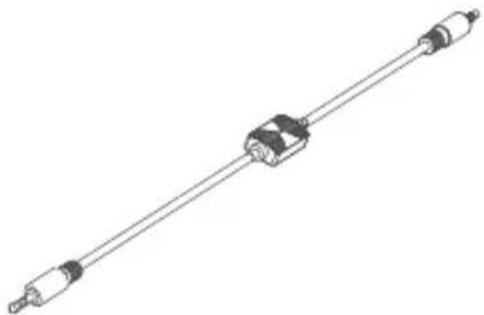
Product Structure

natural_image
Pure mechanical shaft assembly diagram without any text, numbers, or symbolsConnection Guidance
natural_image
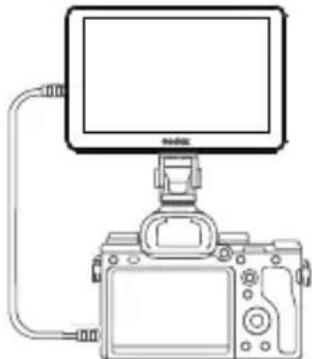
Line drawing of a DSLR camera with a monitor and cable, no text or symbols presentInsert the 2.5mm four-stage plug of the monitor camera control cable into the interface of monitor, and the other 2.5mm three-stage end into compatible Fuji cameras.
-09-
Camera Control Operation Instruction
- Connect the monitor and camera with HDMI cable and monitor camera control cable respectively.
- Turn on the remote control setting on the camera (some models no need to set), and camera control setting on the monitor.
- Slide leftwards from the screen edge to bring out the camera control menu. The background color of the menu will lighten on if successfully connected, otherwise, it will be gray. Single-click the video area to hide the camera control menu.
- Click the following function buttons to use: shooting, recording and auto focus.
Notes: 1. This camera control cable can only control shooting, recording and auto focus functions of certain Fiji cameras.
- This camera control cable supports dual control recording is controllable when shooting, and shooting is also controllable when recording.
-10-
Camera Control Function Introduction of GM6S/GM7S
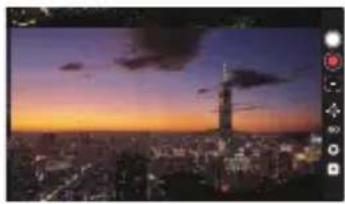
Camera control menu:
natural_image
Cityscape at sunset with a tall tower and city lights, no visible text or symbols● Shooting. Click to control the camera to shoot.
Recording: Recording: Click to control the camera to record.
Auto focus: Click to control the camera to automatically focus.
☐ Focusing: Click to enter the focal length adjustment secondary menu to increase or decrease the focal length manually.
ISO: Display the current photosensibility, click to enter the photosensibility adjustment secondary menu to increase or decrease the photosensibility manually.
Aperture: Display the current aperture, click to enter the aperture adjustment secondary menu to increase or decrease the aperture manually.
☐ Shutter: Display the current shutter speed, click to enter the shutter speed adjustment secondary menu to increase or decrease the shutter speed manually.
Compatible Camera Models
| Models\Functions | Shooting | Recording | Auto focus |
| X-E3* | √ | √ | √ |
| X-H1 | √ | √ | √ |
| X-H2 | √ | √ | √ |
| X-T2* | √ | √ | √ |
| X-T20 | √ | √ | √ |
| X-T3 | √ | √ | √ |
| X-T30 | √ | √ | √ |
| X-T4 | √ | √ | √ |
| X100V | √ | √ | √ |
| X-T1* | √ | × | √ |
| X-Pro2* | √ | × | √ |
| Models\Functions | Shooting | Recording | Auto focus |
| X-Pro3* | √ | × | √ |
| X100T* | √ | × | √ |
| X-T10* | √ | × | √ |
Due to the design of the camera, the camera control cable and HDMI cable can't be inserted into the camera jack port at the same time, a conversion cable is suggested.
* Real time output is unavailable when connected to external HDMI monitor, but functions of control control cable are available.
Tip: The compatibility list may continue to be updated without notice, please check the latest compatibility list on our official website, a conversion cable is suggested.
FCC Statement
This device complies with part 15 of the FCC Rules. Operation is subject to the following two conditions: (1) This device may not cause harmful interference, and (2) this device must accept any interference received, including interference that may cause undesired operation.
Any Changes or modifications not expressly approved by the party responsible for compliance could void the user's authority to operate the equipment.
Note: This equipment has been tested and found to comply with the limits for a Class B digital device, pursuant to part 15 of the FCC Rules. These limits are designed to provide reasonable protection against harmful interference in a residential installation. This equipment generates uses and can radiate radio frequency energy and, if not installed and used in accordance with the instructions, may cause harmful interference to radio communications. However, there is no guarantee that interference will not occur in a particular installation. If this equipment does cause harmful interference to radio or television reception, which can be determined by turning the equipment off and on, the user is encouraged to try to correct the interference by one or more of the following measures:
- Reorient or relocate the receiving antenna.
- Increase the separation between the equipment and receiver.
- Connect the equipment into an outlet on a circuit different from that to which the receiver is connected.
- Consult the dealer or an experienced radio/TV technician for help.
Declaration of Conformity
GODOX Photo Equipment Co., Ltd. hereby declares that this equipment are in compliance with the essential requirements and other relevant provisions of Directive 2014/30/EU. They are allowed to be used in all EU member states.
For more information of DoC, Please click this web link: https://www.godox.com/DOC/Godox_GMC-F3_DOC.pdf
产品保修
尊敬的用户,本保修卡是申请保修服务的重要凭证,请您配合销售商填写并妥善保管,谢谢!
| 产品信息 | 型号 | 产品条码 |
| 用户信息 | 姓名 | 联系电话 |
| 通信地址 | ||
| 销售商信息 | 名称 | |
| 联系电话 | ||
| 通信地址 | ||
| 销售日期 | ||
| 备注 | ||
注:此表应由销售商盖章确认。
产品信息
本文件适用于相关《产品保修信息》(见后面说明)所列产品,其他非属此范围的产品或部件(如促销品、赠品及其他出厂后附加的部件等)不在此保修承诺内。
保修期
本文件适用于相关《产品保修信息》(见后面说明)所列产品,其他非属此范围的产品或部件(如促销品、赠品及其他出厂后附加的部件等)不在此保修承诺内。
如何获得保修服务
要保修服务,您可直接与产品销售商或授权服务机构联系,也可拨打神牛产品售后服务电话,与我们联系,由我们的服务人员为您安排服务。申请保修时,您应提供有效的保修卡作为保修凭证,方可获得保修。如您不能提供有效的保修卡,则在我们可确认产品或部件属于保修范围的情况下,也可以为您提供保修,但这不作为我们的义务。
不适用保修的情况
如产品存在下列情况,本文件项下的保证和服务将不适用①产品或部件超过相应保修期;②错误或不适当使用、维护或保管导致的故障或损坏,如:不当搬运非按产品合理预期用途使用,不当插拔外接设备,跌落或外力挤压;接触或暴露于不适当温度、溶剂、酸碱、水浸或潮湿环境;③由非神牛授权机构或人员安装、修理、更改、添加或拆卸造成的故障或损坏;④产品或部件原有识别信息被修改变更或除去;⑤无有效保修卡;⑥使用非合法授权、非标准或非公开发行的软件造成的故障或损坏;⑦因不可抗力或意外事件造成的故障或损坏;⑧其他非因产品本身质量问题导致的故障或损坏。遇上述情况,您应向相关责任方寻求解决,神牛对此不承担任何责任。因非在保修期或保修范围内的部件、附件或软件导致产品不能正常使用的,不是保修范围内的故障。产品使用过程中正常的脱色,磨损和消耗,不是保修范围内的故障。
产品保修和服务支持信息
产品的保修期和服务类型按以下《产品保修信息》执行:
| 产品类别 | 选件名称 | 保修期(月) | 保修服务类型 |
| 部件 | 电路板 | 12 | 客户送修 |
| 电池 | 3 | 客户送修 | |
| 充电器等带电性能的部件 | 12 | 客户送修 | |
| 其他 | 如电源线、同步线、电池盒、防风棉、防风毛罩、锁紧装置、手提绳、扎带、魔术贴、领夹、便携袋、包装等 | 无 | 无保修 |
神牛产品售后服务电话:0755-29609320-8062
Warranty
Dear customers, as this warranty card is an important certificate to apply for our maintenance service, please fill in the following form in coordination with the seller and safekeep it.
Thank you!
| Product Information | Model | Product Code Number |
| Customer Information | Name | Contact Number |
| Address | ||
| Seller Information | Name | |
| Contact Number | ||
| Address | ||
| Date of Sale | ||
| Note: | ||
Note: This form shall be sealed by the seller.
Applicable Products
The document applies to the products listed on the Product Maintenance information (see below for further information). Other products or accessories (e.g. promotional items, giveaways and additional accessories attached, etc.) are not included in this warranty scope.
Warranty Period
The warranty period of products and accessories is implemented according to the relevant Product Maintenance Information. The warranty period is calculated from the day (purchase date) when the product is bought for the first time, and the purchase date is considered as the date registered on the warranty card when buying the product.
How to Get the Maintenance Service
If maintenance service is needed, you can directly contact the product distributor or authorized service institutions. You can also contact the Godox after-sale service call and we will offer you service. When applying for maintenance service, you should provide valid warranty card. If you cannot provide valid warranty card, we may offer you maintenance service once confirmed that the product or accessory is involved in the maintenance scope, but that shall not be considered as our obligation.
Inapplicable Cases
The guarantee and service offered by this document are not applicable in the following cases:(1). The product or accessory has expired its warranty period, (2). Breakage or damage caused by inappropriate usage, maintenance or preservation, such as improper packing, improper usage, improper plugging in/out external equipment, falling off or squeezing by external force, contacting or exposing to the improper temperature, solvent, acid, base, flooding and damp environments, etc; (3). Breakage or damage caused by non-authorized institution or staff in the process of installation, maintenance, alternation, addition and detachment, (4). The original identifying information of product or accessory is modified, alternated, or removed; (5). No valid warranty card, (6). Breakage or damage caused by using illegally authorized, nonstandard or non-public released software,(7). Breakage or damage caused by force majeure or accident; (8). Breakage or damage that could not be attributed to the product itself. Once met these situations above, you should seek solutions from the related responsible parties and Godox assumes no responsibility. The damage caused by parts, accessories and software that beyond the warranty period or scope is not included in our maintenance scope. The normal discoloration, abrasion and consumption are not the breakage within the maintenance scope.
Maintenance and Service Support Information
The warranty period and service types of products are implemented according to the following Product Maintenance Information:
| Product Type | Name | Maintenance Period(month) | Warranty Service Type |
| Parts | Product Main Body | 12 | Customer sends the product to designated site |
| Battery | 3 | Customer sends the product to designated site | |
| Charger, Electrical Parts etc. | 12 | Customer sends the product to designated site | |
| Other Items | Power Cable, Sync Cable, Battery Case, Windscreen Foam, Wind Cap, Locking Device, Lanyard, Tie, Velcro Tape, Clip, Bag, Package etc. | No | Without warranty |
Godox After-sale Service Call 0755-29609320-8062
- 深圳市神牛摄影器材有限公司
- GODOX Photo Equipment Co., Ltd.
- Foreword
- Main Features
- Warning
- Product Structure
- Connection Guidance
- Camera Control Operation Instruction
- Camera Control Function Introduction of GM6S/GM7S
- FCC Statement
- Declaration of Conformity
- 产品保修
- 产品信息
- 保修期
- 如何获得保修服务
- 不适用保修的情况
- 产品保修和服务支持信息
- Warranty
- Applicable Products
- Warranty Period
- How to Get the Maintenance Service
- Inapplicable Cases
- Maintenance and Service Support Information
Marke : GODOX
Modell : GMC-F3
Kategorie : Monitor