
QP0029 - Auto Halterung LOGILINK - Kostenlose Bedienungsanleitung
Finden Sie kostenlos die Bedienungsanleitung des Geräts QP0029 LOGILINK als PDF.


| Produkttyp | USB 3.0 2-Bay Docking Station |
| Modellnummer | QP0029 |
| Marke | LogiLink |
| Kompatible Laufwerke | 2,5" (6,35 cm) und 3,5" (8,89 cm) SATA HDD/SSD |
| Maximale Speicherkapazität | Bis zu 12 TB pro Laufwerk |
| Schnittstelle | USB 3.0 (abwärtskompatibel zu USB 2.0/1.1) |
| Übertragungsrate | Bis zu 5 Gbit/s |
| Stromversorgung | Externes Netzteil 12V/3A |
| Funktionen | Klonen ohne PC, Hot-Plug, Plug-and-Play, Ein-/Ausschalter, LED-Anzeige |
| Unterstützte Betriebssysteme | Windows, Linux, Mac OS |
| Lieferumfang | Docking Station, USB 3.0 Kabel (Typ A auf B), Netzteil, Bedienungsanleitung |
| Abmessungen (ca.) | 150 x 100 x 80 mm |
| Gewicht (ca.) | 500 g |
| Gehäusematerial | Kunststoff |
| Sicherheitshinweise | Nicht mit nassen Händen verwenden, vor Feuchtigkeit schützen |
| Reinigung | Mit einem trockenen Tuch abwischen |
| Reparatur | Keine reparaturfähigen Teile im Inneren |
| Ersatzteile | Netzteil als Ersatzteil erhältlich |
| Garantie | 2 Jahre (Herstellergarantie) |
| Artikelnr. | QP0029 |
Häufig gestellte Fragen - QP0029 LOGILINK
Benutzerfragen zu QP0029 LOGILINK
0 Frage zu diesem Gerät. Beantworten Sie die, die Sie kennen, oder stellen Sie Ihre eigene.
Eine neue Frage zu diesem Gerät stellen
Laden Sie die Anleitung für Ihr Auto Halterung kostenlos im PDF-Format! Finden Sie Ihr Handbuch QP0029 - LOGILINK und nehmen Sie Ihr elektronisches Gerät wieder in die Hand. Auf dieser Seite sind alle Dokumente veröffentlicht, die für die Verwendung Ihres Geräts notwendig sind. QP0029 von der Marke LOGILINK.
BEDIENUNGSANLEITUNG QP0029 LOGILINK

natural_image
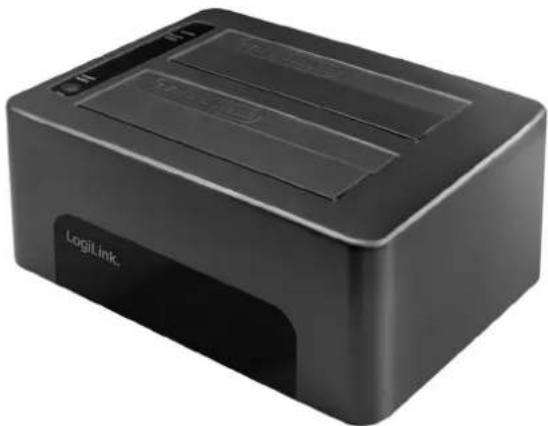
Black LogitLink printer with two drive bays and a USB port (no visible text or symbols on the device body)LogiLink®
USB3.0 2-Bay Docking Station
For 2.5" (6.35cm) & 3.5" (8.89cm)
SATA HDD/SSD
Art. No.: QP0029
The compact sized portable USB3.0 2-Bay Docking Station, file backup is never easier!
Features:
» Compliant with USB3.0 specification
» Backward compatible with USB3.0/2.0/1.1 devices up to 5Gbps
» Support 2.5"/3.5" SATA HDD up to 12TB
» Use Clone function without connecting to a computer
» With External Power adapter
» Power On/Off switch and LED indicator for HDD activity
» Support USB Hot Plug and Plug-and-Play
» Support Windows, Linux and Mac OS


natural_image
Black LogiLink device with red LED display showing '36' (no readable text or symbols beyond branding)
natural_image
Front view of a black electronic device rear panel with ports labeled USB3.0, ON/OFF, and DC 12V (no readable text beyond labels)Install the SATA HDD/SSD and connect to PC
natural_image
Black LogiLink printer with two drive bays and a logo (no visible text or symbols on device body)LogiLink®
USB3.0 2-Bay Docking Station
For 2.5" (6.35cm) & 3.5" (8.89cm)
SATA HDD/SSD
Art. No.: QP0029


Package Contents:
» 1 x USB3.0 Docking Station
» 1 x USB3.0 Cable (Type-A to Type-B)
» 1 x Power Adapter (12V/3A)
» 1 x User Manual
Packaging Information:
» Packing Dimension: mm
» Packing Weight: kg
» Carton Dimension: mm
» Carton Q'ty: pcs
» Carton Weight: kg

natural_image
Front view of a black electronic device with two rectangular panels and control buttons (no visible text or symbols)
natural_image
Black hard drive organizer with two metallic components, no visible text or symbolsNote:
» HDD2 hard drive (target) must have larger or equal capacity to HDD1 hard drive (source), or else Clone function will not work.
» Do not support hard drive's capacity greater than 3TB in Windows XP.


Marke : LOGILINK
Modell : QP0029
Kategorie : Auto Halterung