
BP48VPT01 - Batterie CyberPower - Kostenlose Bedienungsanleitung
Finden Sie kostenlos die Bedienungsanleitung des Geräts BP48VPT01 CyberPower als PDF.


| Produkttyp | Blei-Säure-Batterie (VRLA) |
| Marke | CyberPower |
| Modell | BP48VPT01 |
| Nennspannung | 48 V |
| Kapazität (typisch) | 9 Ah |
| Abmessungen (ca.) | 198 × 166 × 166 mm |
| Gewicht (ca.) | 12 kg |
| Anschlusstyp | Kabelschuhe (M6) |
| Einsatzbereich | USV-Systeme, Notstromversorgung |
| Ladezyklus | Konstantspannung 54,4–55,2 V |
| Wartung | Wartungsfrei, versiegelt |
| Betriebstemperatur | −20 °C bis +50 °C |
| Sicherheit | Überladeschutz, Kurzschlusssicher |
| Zertifikate | CE, UL |
| Entsorgung | Getrennte Sammlung gemäß lokaler Vorschriften |
Häufig gestellte Fragen - BP48VPT01 CyberPower
Benutzerfragen zu BP48VPT01 CyberPower
0 Frage zu diesem Gerät. Beantworten Sie die, die Sie kennen, oder stellen Sie Ihre eigene.
Eine neue Frage zu diesem Gerät stellen
Laden Sie die Anleitung für Ihr Batterie kostenlos im PDF-Format! Finden Sie Ihr Handbuch BP48VPT01 - CyberPower und nehmen Sie Ihr elektronisches Gerät wieder in die Hand. Auf dieser Seite sind alle Dokumente veröffentlicht, die für die Verwendung Ihres Geräts notwendig sind. BP48VPT01 von der Marke CyberPower.
BEDIENUNGSANLEITUNG BP48VPT01 CyberPower
CyberPower®
BP48VPT01
User's Manual
K01-0000760-00
IMPORTANT SAFETY INSTRUCTION
This manual contains important instructions that should be followed during installation and maintenance of the Extended Battery Module and batteries. Please read and follow all instructions carefully during installation and operation of the unit. Read this manual thoroughly before attempting to unpack, install, or operate.
CAUTION! To prevent the risk of fire or electric shock, install in a temperature and humidity controlled indoor area, free of conductive contaminants. Please see specifications for acceptable temperature and humidity range.
CAUTION! To reduce the risk of electric shock, do not remove the cover, except to service the battery. There are no serviceable parts inside, except for the battery.
CAUTION! DO NOT USE THE EXTENDED BATTERY MODULE ON ANY TRANSPORTATION! To reduce the risk of fire or electric shock, do not use the unit on any transportation such as airplanes or ships. The effect of shock or vibration caused during transit and the damp environment can cause the unit to short out.
CAUTION! Dispose of or recycle the unit after the end of its life, it should be in accordance with local regulations.
CAUTION! DO NOT USE WITH OR NEAR AQUARIUMS! To reduce the risk of fire, do not use with or near aquariums. Condensation from the aquarium can come in contact with metal electrical contacts and cause the machine to short out.
CAUTION! DO NOT INSTALL THE UNIT WHERE IT WOULD BE EXPOSED TO DIRECT SUNLIGHT OR NEAR A STRONG HEAT SOURCE!
CAUTION! DO NOT BLOCK OFF VENTILATION OPENINGS AROUND THE HOUSING!
OVERVIEW
The CyberPower BP48VPT01 Battery Pack provides extended runtime (XL) for the PR2200ELCDSXL and PR3000ELCDSXL. The Tower BP48VPT01 Battery Pack matches the esthetics of these UPSs. The heavy gauge power cord has a plug-n-play DC connector for easy installation. When combining with UPS, the Extended Battery Module provides extended runtime with a 48VDC external connection.
Product Features
- Form Factor – Tower configuration keeps
● Metal Housing – Rigid metal construction provides greater durability and safety. - Back-panel fuse – User replaceable fuse is easily accessed from the rear panel.
UNPACKING
(1) Battery Pack BP48VPT01 (2) User's Manual
INSTALLATION GUIDE
CAUTION! Before connecting the Battery Pack to the UPS, completely turn off and unplug the main UPS from the wall receptacle.
CAUTION! Do not disconnect the any Battery Packs when the UPS is turned on or plugged into a wall receptacle.
CAUTION! Do not add more Battery Packs to the UPS. This will damage the unit and void the warranty.
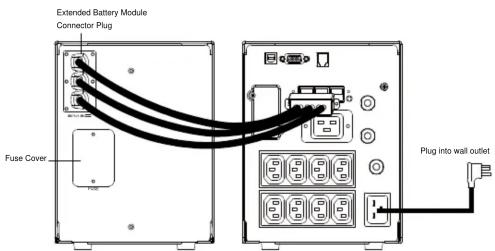
Step 1: Turn off your existing UPS system
Safely power-down your UPS system and unplug it from the wall receptacle.
Step 2: Connect the Battery Pack to the UPS.
Step 3: Turn on your UPS system.
Plug your UPS system into the wall receptacle, and safely power-up your UPS system and connected equipment. The Battery pack will be charged by the main UPS.
Battery Pack Configuration
In order for the UPS to recognize the addition of the Battery Pack, you must configure the UPS to recognize the presence of the additional battery packs.
Step 1: Access the SETUP menu on the UPS.
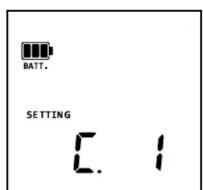
Press ENTER button for 2 seconds to acess the SETUP mode.
Step 2: Configure the UPS to recognize the Battery Packs
Srcoll down the SETUP menu and press ENTER into "External Battery Pack" Page to select YES.
ENTER →
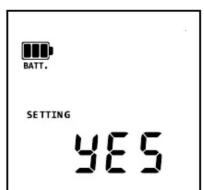
External Battery Pack
SETUP Page
BATTERY REPLACEMENT
CAUTION! Read and follow the IMPORTANT SAFETY INSTRUCTIONS before servicing the battery. Service the battery under the supervision of personnel knowledgeable of batteries and their precautions.
CAUTION! When replacing batteries, replace with the same type and number of batteries or battery packs.
CAUTION! Use only the specified type of battery. See your dealer for replacement batteries.
CAUTION! The battery may present the risk of electrical shock. Do not dispose of batteries in a fire, as they may explode. Follow all local ordinances regarding proper disposal of batteries.
CAUTION! Do not open or mutilate the batteries. Released electrolyte is harmful to the skin and eyes and may be toxic.
SHOCK! The likelihood of such shock will be reduced if such grounds are removed during installation and maintenance (applicable to a UPS and a remote battery supply not having a grounded circuit)
CAUTION - RISK OF EXPLOSION IF BATTERY IS REPLACED BY AN INCORRECT TYPE. DISPOSE OF USED BATTERIES ACCORDING TO THE INSTRUCTIONS.
CAUTION! A battery can present a high risk of short circuit current and electrical shock. Take the following precautions before replacing the battery:
-
Remove all watches, rings or other metal objects.
-
Only use tools with insulated handles.
- DO NOT lay tools or other metal parts on top of battery or any battery terminals.
- Disconnect the charging source prior to connecting or disconnecting battery terminals.
- Wear rubber gloves and boots.
- Determine if the battery is inadvertently grounded. If inadvertently grounded, remove source of ground. CONTACT WITH A GROUNDED BATTERY CAN RESULT IN ELECTRICAL
REMINDER: Batteries are considered HAZARDOUS WASTE and must be disposed of properly. Almost any retailer that sells lead-acid batteries collects used batteries for recycling.
BATTERY REPLACEMENT PROCEDURE:
- Disconnect the Extended Battery Module from your UPS.
- Remove faceplate and unscrew the screws on battery cover.
- Remove the battery cover.
- Pull out the battery packs and replace with new ones.
- Install the battery cover, screws and front panel.
- Connect the battery pack to the UPS.


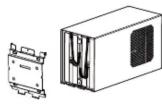
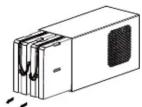
Reminder: Check and modify the setting of Extended Battery Module on your UPS through LCD module, PowerPanel® Business Edition software or RMCARD interface (if installed) to ensure the UPS performs expected runtime.
TROUBLESHOOTING
| Problem | Possible Cause | Solution |
| The UPS LCD does not perform expected runtime. | Do not set the UPS to recognize the battery pack(s). | By pressing the display toggle to select functions. Then, set up the correct battery pack numbers. The default setting is 0. |
| The battery pack does not work. | Batteries are not fully charged. | Allow the battery pack to charge for 24 hours. Do not expect full runtime during this initial charge period. |
| Specified battery pack models can use AC to shorten charge time. | ||
| The status of circuit breaker is off. | Switch on the circuit breaker. | |
| The fuse blew. | Contact CyberPower Systems. | |
| Open the cover on the rear panel and replace the new fuse. |
Additional troubleshooting information can be found at www.cyberpower.com
TECHNICAL SPECIFICATIONS
| Model | BP48VPT01 |
| Output | |
| Output Voltage | 48VDC |
| Output Current | 70A Max. |
| Physical | |
| Maximum Dimensions (LxWxH) | 221 x 170 x 432 mm |
| Weight (kg) | |
| Battery | |
| Battery | Sealed Maintenance Free Lead Acid Battery |
| Operation Environment | |
| Temperature | 32°F to 104°F (0°C to 40°C) |
| Relative Humidity | 0% - 95% Non-condensing |
| Elevation | 0 - 10000 feet (0 - 3000 meters) |
| Storage Environment | |
| Temperature | 5°F to 113°F (-15°C to 45°C) |
| Relative Humidity | 0% - 95% Non-condensing |
| Elevation | 0 - 50000 feet (0 - 15000 meters) |
For more information, visit www.cyberpower.com or contact
Cyber Power Systems, Inc.
E-MAIL: sales@cpsww.eu
All rights reserved. Reproduction without permission is prohibi


- CYBERPOWER®
- BP48VPT01
- USER'S MANUAL
- IMPORTANT SAFETY INSTRUCTION
- OVERVIEW
- PRODUCT FEATURES
- UNPACKING
- INSTALLATION GUIDE
- BATTERY PACK CONFIGURATION
- BATTERY REPLACEMENT
- CAUTION - RISK OF EXPLOSION IF BATTERY IS REPLACED BY AN INCORRECT TYPE. DISPOSE OF USED BATTERIES ACCORDING TO THE INSTRUCTIONS
- BATTERY REPLACEMENT PROCEDURE
Marke : CyberPower
Modell : BP48VPT01
Kategorie : Batterie