
CS-15R - Mikrofon ROLAND - Kostenlose Bedienungsanleitung
Finden Sie kostenlos die Bedienungsanleitung des Geräts CS-15R ROLAND als PDF.


| Produkttyp | Dynamisches Mikrofon |
| Richtcharakteristik | Nierencharakteristik |
| Frequenzbereich | 80 Hz - 15 kHz |
| Impedanz | 300 Ω |
| Empfindlichkeit | -75 dB (1 kHz) |
| Anschluss | XLR (3-polig) |
| Abmessungen (L x Ø) | 170 mm x 50 mm |
| Gewicht | 300 g |
| Stromversorgung | Phantomspeisung nicht erforderlich |
| Farbe | Schwarz |
| Material | Metallgehäuse |
| Lieferumfang | Mikrofon, Mikrofonklemme, Bedienungsanleitung |
| Anwendung | Live-Gesang, Sprache, Instrumente |
| Besonderheiten | Rückkopplungsarm, robuste Bauweise |
| Reinigung | Mit trockenem Tuch abwischen; Korb vorsichtig reinigen |
| Sicherheitshinweise | Nicht fallen lassen; vor Feuchtigkeit schützen |
| Ersatzteile | Ersatzkorb und Kapsel bei Roland erhältlich |
| Reparatur | Durch autorisierten Service; keine Selbstreparatur |
| Garantie | 2 Jahre (abhängig vom Händler) |
Häufig gestellte Fragen - CS-15R ROLAND
Benutzerfragen zu CS-15R ROLAND
0 Frage zu diesem Gerät. Beantworten Sie die, die Sie kennen, oder stellen Sie Ihre eigene.
Eine neue Frage zu diesem Gerät stellen
Laden Sie die Anleitung für Ihr Mikrofon kostenlos im PDF-Format! Finden Sie Ihr Handbuch CS-15R - ROLAND und nehmen Sie Ihr elektronisches Gerät wieder in die Hand. Auf dieser Seite sind alle Dokumente veröffentlicht, die für die Verwendung Ihres Geräts notwendig sind. CS-15R von der Marke ROLAND.
BEDIENUNGSANLEITUNG CS-15R ROLAND
安全上のご注意
火災・感電・傷害を防止するには
!
警告
| 取扱いを誤った場合に、使用者が死亡または重傷を負う可能性が想定される内容を表わしています。 |
注意
| 取扱いを誤った場合に、使用者が傷害を負う危険が想定される場合および物的損害のみの発生が想定される内容を表わしています。 |
| ※物的損害とは、家屋・家財および家畜・ペットにかかわる拡大損害を表わしています。 |
図記号の例
!
| △は、注意(危険、警告を含む)を表わしています。具体的な注意内容は、△の中に描かれています。左図の場合は、「一般的な注意、警告、危険」を表わしています。 |
(no text)
| ☒は、禁止(してはいけないこと)を表わしています。具体的な禁止内容は、☒の中に描かれています。左図の場合は、「分解禁止」を表わしています。 |
B
| ●は、強制(必ずすること)を表わしています。具体的な強制内容は、●の中に描かれています。左図の場合は、「電源プラグをコンセントから抜くこと」を表わしています。 |
以下の指示を必ず守ってください
注意
- この機器を分解したり、 したりしないでください。


● 修理/部品の交換 取扱説明書に書かれて いことは、絶対にしない ください。必ずお買い上 店またはローランド・サ ビスに相談してください。


- 次のような場 所での使保存はしないでください。 ○温度が極端に高い場所
(直射 日光の当たる 場 暖房 機器の近く、発 熱 る機器の上など)
○ 水 気の近く(風、呂場面 台、濡れた床 など) 湿度の高い場所 ○ 雨に濡れる場所
○ ホコリの多い場所 ○ 振動の多い場所
- この機器に、異物(燃えやいもの、硬貨、針金など)や液体(水、ジュースなど)を絶対に入れないでください。


- 電池は、充電、加熱、分解たり、または火や水の中に入れたりしないでください。


注意
● 次のような場合は、直ちに電源を切って、お買い上げ店またはローランド・サービスに修理を依頼してください。
○ 煙が出たり、異臭がしたとき ○ 異物が内部に入ったり、液体がこぼれたりし、たとき
○ 機器が(雨などで)濡れたとき ○ 機器に異常や故障が生じたとき
● お子様のいるご家庭で使用する場合、お子様の取り扱いやいたずらに注意してください。必ず大人のかたが、監視/指導してあげてください。
● この機器を落としたりの機器に強い衝撃を与えいでください。

● 電池を、日光、炎、また同様の過度の熱にさらさいでください。

● 接続したコードやケープ類は、繁雑にならないように配慮してください。特に、コードやケープル類は、お子様の手が届かないように配慮してください。

● この 機器 の 上に 乗機器の上 に重いも のを置ないでください。

注意
- 電池 の使いかたを周違えと、破裂 したり、液漏れたり します。次のことに意してください。

○ 電池の + と - を問いように、指示 どおり入れてください。

○長時間使用しないときは、電池を取り 出しておいてください。

○液漏れを起こした場合は、柔らがい布で電池ケースについてた液をよくふきとってから新しい電池を入れてください。また、漏れた液が身体についた場合は、皮膚に炎症を起こす恐れがあります。また眼に入ると危険ですのですぐに水でよく洗い流してください。
○ 電池を、金属性 のボールペン、ネック レス、ヘアピンなどとー 緒に携帯したり、保管した りしないでください。
● 使用済みの 電池は、各村 のゴミ分別 収集のしに従って、捨ててください。

● 付属の電池、変換 ダプターは、小さなお が誤って飲み込んだり ことのないようお子様 の届かないところへ保 てください。

使用上のご注意
電池のセットや交換について
- 電池のセットや交換は、誤動作やスピーカーなどの破損を防ぐため、他の機器と接続する前にこの機器の電源を切った状態で行なってください。
- この機器には、電池が付属されています。この電池は、機器の動作確認用のため、寿命が短い場合があります。
● 接続するときは、誤動作やスカーなどの破損を防ぐため、必ずすべての機器の電源を切ってくださ
設置について
- この機器の近くにパワー・アンプなどの大型トランスを持つ機器があると、ハム(うなり)を誘導することがあります。この場合は、この機器との間隔や方向を変えてください。
● 携帯電話などの無線機器を本機の近くで使用すると、着信時や発信時、通話時に本機から雑音が出ることがあります。この場合は、それらの機器を本機から遠ざけるか、もしくは電源を切ってください。
- 極端に温湿度の違う場所に移動すると、内部に水滴がつく(結露)ことがあります。そのまま使用すると故障の原因になりますので、数時間放置し、結露がなくなってから使用してください。
お手入れについて
●通常のお手入れは、柔らかい布で乾一拭きするか、堅く絞った布で汚れを拭き取ってください。汚れが激しいときは、中性洗剤を含んだ布で汚れを拭き取ってから、柔らかい布で乾拭きしてください。
●変色や変形の原因となるベンジンシンナーおよびアルコール類は、使用しないでください。
●変色や変形の原因となるベンジンシンナーおよびアルコール類は、使用しないでください。
修理について
●お客様がこの機器を分解、改造された場合、以後の性能について保証できなくなります。また、修理をお断りする場合もあります。
その他の注意について
●ケーブルの抜き差しは、ショートや断線を防ぐため、プラグを持ってください。
●音楽をお楽しみになる場合、隣近所に迷惑がかからないように、特に夜間は、音量に十分注意してください。
● マイクロホンとスピーカーの位置によっては、ハウリング音(キーンという音)が出ることがあります。その場合は、以下のように対処してください。
- マイクロホンの向きを変える
-
マイクロホンをスピーカーから遠ざける
-
音量を下げる
サービスの窓口
製品に関するお問い合わせは・・・
下記のお客様相談センターまでご相談ください。 なお、お問い合わせの際には取扱説明書をご用意ください。
修理に関するお問い合わせは...
商品をお求めの販売店か、下記のお客様相談センターまでご相談ください。なお、保証期間内の場合は保証書を添えてご依頼ください。
ローランドお客様相談センター
<受付時間> 月曜日~土曜日 10:00~17:30(年末年始を除く)
<電話番号> 050-3101-2555
※IP電話からおかけになって繋がらない場合には、お手数ですが、電話番号の前に“0000”(ゼロ4回)をつけてNTTの一般回線からおかけいただくか、携帯電話をご利用ください。
最新サポート情報
製品情報、イベント/キャンペーン情報、サポートに関する情報など
ローランド・ホームページ
http://www.roland.co.jp/
※上記窓口の名称、所在地、電話番号等は、予告なく変更することがありますのでご了承ください。
'07.10.1現在
Roland
CS-15R
STEREO MICROPHONE
取扱説明書
この機器を正しくお使いいただくために、ご使用前に「安全上のご注意」と「使用上のご注意」をよくお読みください。また、この機器の優れた機能を十分ご理解いただくためにも、取扱説明書をよくお読みください。取扱説明書は必要なときにすぐに見ることができるよう、手元に置いてください。
LR44電池

マイク・スタンド

変換ネジ・アダプター
(5/8"-27 3/8"-16)

主な特長
● 狙った方向の音をステレオで収録できるワンポイント・ステレオ・マイクロホン
● 高音質エレクトレット・コンデンサー型
● LR44 電池で駆動
- 小型、軽量で可搬性に優れ、フィールド・レコーディングに最適
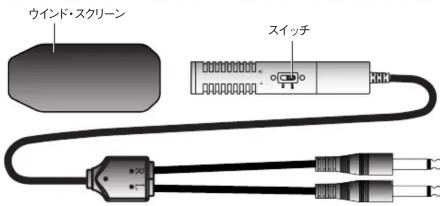
● 吹かれノイズに強い、大型ウインド・スクリーン付属
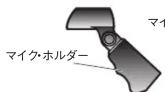
● 卓上スタンドやグリップ型マイク・ホルダーも付属
接続と操作
※ 他の機器と接続するときは、誤動作やスピーカどの破損を防ぐため、必ずすべての機絞った状態で電源を切ってください。
- LR44 電池 1 個をマイク本体にセットします。 ※ 「電池の取り付け方」を参照してください。
- 本体の電源スイッチをオンにします。
- ご使用後は、電源スイッチを必ずオフにしてください。
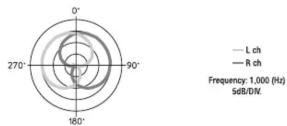
指向特性
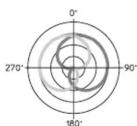
— L ch
— R ch
Frequency: 1,000 (Hz)
5dB/DIV.
周波数特性
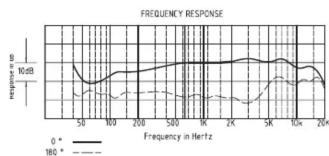
FREQUENCY RESPONSE
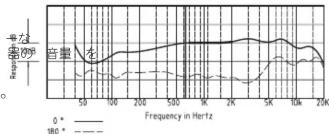
line
| Frequency in Hertz | 0° | 180° | | ------------------ | ------ | ------ | | 50 | - | - | | 100 | - | - | | 200 | - | - | | 500 | - | - | | 1K | - | - | | 2K | - | - | | 5K | - | - | | 10K | - | - | | 20K | - | - |電池の取り付け方

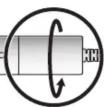
- 丸で囲った部分を矢印方向に回して、カバーをはずします。
- 製品に貼付けのシールに従い、電池を入れてください。
電池のはずしかた
- 電池ケースの裏側の 2 つの穴に、細いドライバーなどを差し込んで、電池を押してください。
主な仕様
形式:ステレオ・エレクトレット・コンデンサー型
感度:-41.5 ± 4 dB (0dB=1V/1Pa,1kHz)
指向性:単一指向性(ステレオ)
インピーダンス:1,300 Ω
周波数特性:200 \~ 17,000 Hz
最大許容入力音圧:119 dB SPL (3% THD at 1kHz)
定格動作電圧:1.5 V
消費電流:0.6 mA
電池寿命:約 200 時間(連続使用時)
外形寸法:21 × 118 mm(直径×全長)
重量:150 g(マイク本体+ケーブル)
コード: 3.0 m
プラグ: φ6.3 標準 x2
付属品:ウインド・スクリーン、キャリング・ケース、
マイク・スタンド、マイク・ホルダー
変換ネジ・アダプター、LR44電池
※ 製品の仕様および外観は、改良のため予告なく変更することがあります。
USING THE UNIT SAFELY
INSTRUCTIONS FOR THE PREVENTION OF FIRE, ELECTRIC SHOCK, OR INJURY TO PERSONS
About ⚠ WARNING and ⚠ CAUTION Notices
| WARNING | Used for instructions intended to alert the user to the risk of death or severe injury should the unit be used improperly. |
| CAUTION | Used for instructions intended to alert the user to the risk of injury or material damage should the unit be used improperly.* Material damage refers to damage or other adverse effects caused with respect to the home and all its furnishings, as well to domestic animals or pets. |
About the Symbols
| △ | The △ symbol alerts the user to important instructions or warnings. The specific meaning of the symbol is determined by the design contained within the triangle. In the case of the symbol at left, it is used for general cautions, warnings, or alerts to danger. |
| ⊗ | The ⊕ symbol alerts the user to items that must never be carried out (are forbidden). The specific thing that must not be done is indicated by the design contained within the circle. In the case of the symbol at left, it means that the unit must never be assembled. |
| € | The △ symbol alerts the user to things that must be carried out (are forbidden). The specific thing but done is indicated by the design contained within the circle. In the case of the symbol at left, it means that the power-cord plug must be unplugged from the outlet. |
ALWAYS OBSERVE THE FOLLOWING
CAUTION
- Do not open or perform any internal modifications on the unit.

- Do not attempt to repair the unit, or replace parts within it (except when this manual provides specific instructions directing you to do so). Refer all servicing to your retailer, the nearest Roland Service Center, or an authorized Roland distributor.

- Never use or store the unit in places that are:
- Subject to temperature extremes (e.g., direct sunlight in an enclosed vehicle, near a heating duct, on top of heat-generating equipment); or are
- Damp (e.g., baths, washrooms, on wet floors); or are
- Humid, or are
- Exposed to rain or are
- Exposed to fall
- Dusty: or are
- Subject to high levels of vibration.
- Do not allow any objects (e.g., flammable material, coins, pins); or liquids of any kind (water, soft drinks, etc.) to penetrate the unit.

- Protect the unit from strong impact. (Do not drop it!)


CAUTION
- Immediately turn the power off, and request servicing by your retailer, the nearest Roland Service Center, or an authorized Roland distributor, as listed on the "Information" page when: - If smoke or unusual odor occurs - Objects have fallen into, or liquid has been spilled onto the unit; or - The unit has been exposed to rain (or otherwise has become wet); or - The unit does not appear to operate normally or exhibits a marked change in performance.

- In households with small children, an adult should provide supervision until the child is capable of following all the rules essential for the safe operation of the unit.
- Batteries must never be recharged, heated, taken apart, or thrown into fire or water.


- Never expose Battery to excessive heat such as sunshine, fire or the like.

- Try to prevent cords and cables from becoming entangled. Also, all cords and cables should be placed so they are out of the reach of children.

- Never climb on top of, nor place heavy objects on the unit.

CAUTION
- If used improperly, batteries may explode or leak and cause damage or injury. In the interest of safety, please read and observe the following precautions.
- Carefully follow the installation instructions for batteries, and make sure you observe the correct polarity.
- Remove the batteries whenever the unit is to remain unused for an extended period of time.
- If a battery has leaked, use a soft piece of cloth or paper towel to wipe all remnants of the discharge from the battery compartment. Then install new batteries. To avoid inflammation of the skin, make sure that none of the battery discharge gets onto your hands or skin. Exercise the utmost caution so that none of the discharge gets near your eyes. Immediately rinse the affected area with running water if any of the discharge has entered the eyes.
- Never keep batteries together with metallic objects such as ballpoint pens, necklaces, hairpins, etc.
• Used batteries must be disposed of in compliance with whatever regulations for their safe disposal that may be observed in the region in which you liv

- Keep the included Battery and SCREW ADAPTOR in a safe place out of children's reach, so there is no chance of them being swallowed accidentally.

IMPORTANT NOTES Use of Batteries
- When installing or replacing batteries, always turn off the power on this unit and disconnect any other devices you may have connected. This way, you can prevent malfunction and/or damage to speakers or other devices.
- A battery is supplied with the unit. The life of this battery may be limited, however, since its primary purpose was to enable testing.
- Before connecting this unit to other devices, turn off the power to all units. This will help prevent malfunctions and/or damage to speakers or other devices.
Placement
- Using the unit near power amplifiers (or other equipment containing large power transformers) may induce hum. To alleviate the problem, change the orientation of this unit; or move it farther away from the source of interference.
- Noise may be produced if wireless communications devices, such as cell phones, are operated in the vicinity of this unit. Such noise could occur when receiving or initiating a call, or while conversing. Should you experience such problems, you should relocate such wireless devices so they are at a greater distance from this unit, or switch them off.
- When moved from one location to another where the temperature and/or humidity is very different, water droplets (condensation) may form inside the unit. Damage or malfunction may result if you attempt to use the unit in this condition. Therefore, before using the unit, you must allow it to stand for several hours, until the condensation has completely evaporated.
Maintenance
- For everyday cleaning wipe the unit with a soft, dry cloth or one that has been slightly dampened with water. To remove stubborn dirt, use a cloth impregnated with a mild, non-abrasive detergent. Afterwards, be sure to wipe the unit thoroughly with a soft, dry cloth.
- Never use benzine, thinners, alcohol or solvents of any kind, to avoid the possibility of discoloration and/or deformation.
Additional Precautions
- When connecting / disconnecting all cables, grasp the connector itself—never pull on the cable. This way you will avoid causing shorts, or damage to the cable's internal elements.
- To avoid disturbing your neighbors, try to keep the unit's volume at reasonable levels (especially when it is late at night).
-
Howling could be produced depending on the location of microphones relative to speakers. This can be remedied by: 1. Changing the orientation of the microphone(s).
-
Relocating microphone(s) at a greater distance from speakers.
-
Lowering volume levels.
Roland CS-15R STEREO MICROPHONE Owner's Manual
Before using this unit, carefully read the sections entitled: "USING THE UNIT SAFELY" and "IMPORTANT NOTES." These sections provide important information concerning the proper operation of the unit. Additionally, in order to feel assured that you have gained a good grasp of every feature provided by your new unit, owner's manual should be read in its entirety. The manual should be saved and kept on hand as a convenient reference.
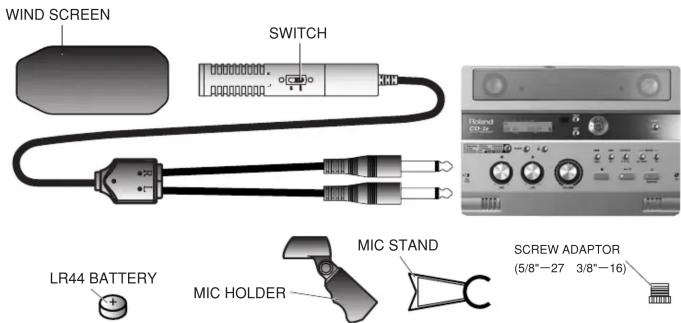
Features
- One-point stereo microphone that allows stereo capture of the sound in the direction you aim the microphone
• Electret condenser design for high audio quality - LR44 battery-operated
- Compact and light-weight for excellent portability; ideal for field recording
• Large windscreen included for good rejection of wind noise - Tabletop stand and grip-type microphone holder also included
Operation
* To prevent malfunction and/or damage to speakers or other devices, always turn down the volume, and turn off the power on all devices before making any connections.
1. Install the LR44 battery in the microphone.
* For details, refer to "Installing the battery."
- Turn on the microphone's power switch.
- When you've finished using the microphone, be sure to turn off the power switch.
Polar Patterns
Frequency Response
Installing the battery
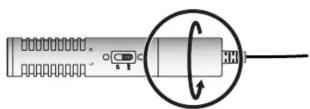
- Turn the portion marked by the circle in the direction indicated by the arrow, and remove the cover.
- Insert the battery as shown on the label affixed to the microphone.
Removing the battery
- By inserting a small screwdriver or similar object, push on the battery through the two holes at the back of the battery compartment, so the battery pops out.
Main Specifications
Element: Electret Condenser
Polar Pattern Uni Directional x 2
Frequency Response: 200–17,000 Hz
Open Circuit Sensitivity: -41.5±4 dB (0dB=1V/1Pa, 1kHz)
Impedance: 1,300
Maximum Input S.P.L: 119 dB SPL (at 1kHz, 3% THD)
Battery: 1.5 V
Battery Current0.6 mA
Battery Life: 200 Hours (continuous use)
Dimensions (Diameter x Length): 21 x 118 mm 7/8 x 4-11/16 inches
Weight: 150 g / 6 oz
Cord: 3.0 m / 118-1/8 inches
Plug: 1/4 inch Phone Plug
Accessories:
Wind screen, Carrying case, Mic stand, Mic holder, Screw adaptor, LR44 battery
* In the interest of product improvement, the specifications and/or appearance of this unit are subject to change without prior notice.
- 安全上のご注意
- 火災・感電・傷害を防止するには
- 注意
- 使用上のご注意
- 電池のセットや交換について
- 設置について
- お手入れについて
- 修理について
- その他の注意について
- サービスの窓口
- 製品に関するお問い合わせは・・・
- 修理に関するお問い合わせは...
- ローランドお客様相談センター
- 最新サポート情報
- Roland
- CS-15R
- STEREO MICROPHONE
- 取扱説明書
- 主な特長
- 接続と操作
- 指向特性
- 周波数特性
- 電池の取り付け方
- 電池のはずしかた
- 主な仕様
- USING THE UNIT SAFELY
- INSTRUCTIONS FOR THE PREVENTION OF FIRE, ELECTRIC SHOCK, OR INJURY TO PERSONS
- ALWAYS OBSERVE THE FOLLOWING
- CAUTION
- IMPORTANT NOTES Use of Batteries
- Placement
- Maintenance
- Additional Precautions
- Roland CS-15R STEREO MICROPHONE Owner's Manual
- Features
- Operation
- Polar Patterns
- Frequency Response
- Installing the battery
- Removing the battery
- Main Specifications
Marke : ROLAND
Modell : CS-15R
Kategorie : Mikrofon