
Alexa SWU501 - Smartwatch Manta - Kostenlose Bedienungsanleitung
Finden Sie kostenlos die Bedienungsanleitung des Geräts Alexa SWU501 Manta als PDF.


| Produkttyp | Smartwatch |
| Marke | Manta |
| Modell | Alexa SWU501 (SWU501GD / SWU501PK / SWU501SL) |
| Abmessungen (ohne Armband) | 43 x 43 x 6,8 mm |
| Gewicht (ohne Armband) | 25 g |
| Display | 1,3 Zoll AMOLED, 360 x 360 dpi, Touchscreen |
| Akku-Typ | Lithium-Polymer |
| Akku-Kapazität | 185 mAh |
| Ladespannung | 5 V / 0,5–1 A |
| Betriebsdauer | Bis zu 7 Tage |
| Konnektivität | Bluetooth 5.0 (BLE) |
| Kompatibilität | Android 4.4+ (Bluetooth 4.0) und iOS 9.0+ |
| App | QWatch Pro (im Apple Store und Google Play) |
| Sensoren | Herzfrequenz, Blutsauerstoff, Blutdruck, Schrittzähler, Schlafüberwachung |
| Sportmodi | 22 Modi |
| Wasserdichtigkeit | IP67 (alltagswassergeschützt) |
| Sprachen | 20 Sprachen (synchronisiert mit Telefon) |
| Zusatzfunktionen | Schrittzähler, Schlafüberwachung, Herzfrequenzmessung, Blutdruckmessung, Blutsauerstoffmessung, weiblicher Zyklus, Benachrichtigungen, Musiksteuerung, Fernauslöser, Stoppuhr, Atemtraining, Bildschirmhelligkeit anpassbar, „Nicht stören“-Modus, Telefon finden |
| Lieferumfang | Smartwatch, Ladekabel, Bedienungsanleitung |
| Garantie | 24 Monate |
| Service-Hotline | +48 22 123 96 60 (Mo–Fr, 9:00–17:00 Uhr) |
Häufig gestellte Fragen - Alexa SWU501 Manta
Benutzerfragen zu Alexa SWU501 Manta
0 Frage zu diesem Gerät. Beantworten Sie die, die Sie kennen, oder stellen Sie Ihre eigene.
Eine neue Frage zu diesem Gerät stellen
Laden Sie die Anleitung für Ihr Smartwatch kostenlos im PDF-Format! Finden Sie Ihr Handbuch Alexa SWU501 - Manta und nehmen Sie Ihr elektronisches Gerät wieder in die Hand. Auf dieser Seite sind alle Dokumente veröffentlicht, die für die Verwendung Ihres Geräts notwendig sind. Alexa SWU501 von der Marke Manta.
BEDIENUNGSANLEITUNG Alexa SWU501 Manta

natural_image
Abstract black-and-white circular logo with curved lines forming a stylized shape (no text or symbols)MANTA
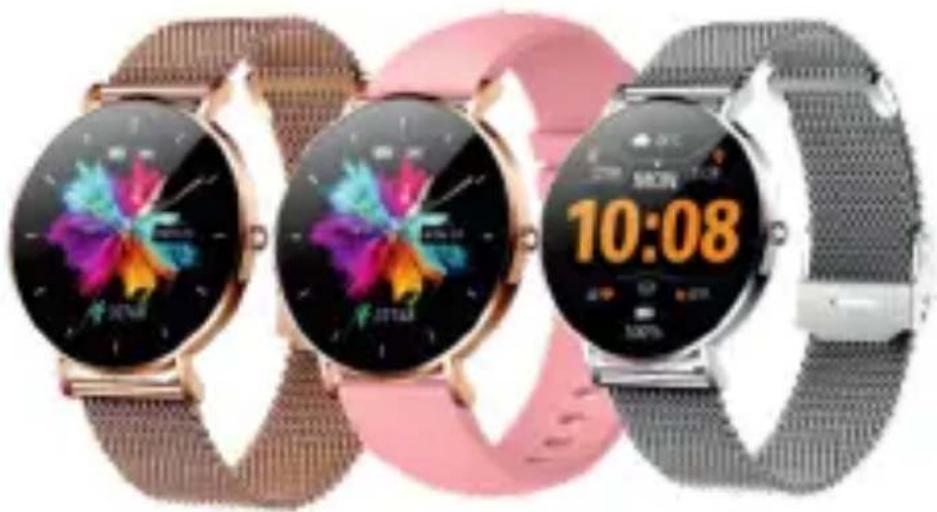
SMARTWATCH ALEXA
SWU501GD
SWU501PK
SWU501SL
natural_image
Three smartwatches with colorful flower graphics and digital display, displayed on a patterned surface (no readable text or symbols)INSTRUKCJA OBSŁUGI / USER'S MANUAL
Instrukcją oryginalną jest instrukcja angielska. Pozostałe języki są thumaczone z wersji oryginalnej.
I. Instrukcje wyglądu

①Obudowa zegarka ②Przycisk zasilania ③Wyświetlacz dotykowy
④ Pasek ⑤ Czujnik ⑥ Kontakt ładowania ⑦ Kabel ładowania
II. Pobierz i zainstaluj aplikację i dopasowuj
- Długo naciśnij przycisk zasilania, aby włączyć; Upewnij się, że bateria jest pełna po raz pierwszy. Jeśli bateria jest niska, nie może być normalnie włączona.

- Użyj telefonu komórkowego, aby Zeskanować Kod QR po prawej stronie do pobrania i zainstalować aplikację;
Lub wyszukaj "QWatch Pro" w Apple Store/Android App Market do pobrania i zainstalowania.
Kompatybilne systemy: Android4.4 i powyżej, telefon komórkowy Bluetooth 4.0; iPhone iOS 9.0 i powyżej
Podczas instalacji APP należy przekazać wszystkie uprawnienia, w przeciwnym razie nie będzie działać normalnie.
- Włącz aplikację mobilną, upewnij się, że Bluetooth i GPS są włączone, kliknij "Zarządzanie urządzeniami" ("Zarządzanie wiązaniami") i wyszukaj urządzenie, które ma być powiązane.
*Podczas dopasowania należy potwierdzić, że jest on zgodny z adresem MAC Bluetooth wyświetlanym na opasce.
III. Instrukcje operacyjne
- Włączenie: długo naciśnij przycisk zasilania przez 3 sekundy, aby włączyć, a następnie wprowadzić interfejs czasu
- Wyłączenie: W stanie interfejsu czasowego długo naciśnij przycisk zasilania przez 3-sekundy, aby wejść do interfejsu wyłączania, a następnie długo naciśnij przycisk zasilania lub ekran, aby potwierdzić wyłączenie.
- Rozjaśnij ekran: Naciśnij przycisk zasilania, aby rozjaśnić ekran lub obrócić nadgarstek w ustawieniach APP, aby nadgarstek był obracany, aby rozjaśnić ekran.

flowchart
graph TD
    A["10 Languages"] --> B["Interactive description"]
    A --> C["Clock on"]
    A --> D["Diagonal screen and light"]
    A --> E["Double-up and down"]
    A --> F["Long Press"]
    G["App Features"] --> H["10 Language"]
    H --> I["Interactive description"]
    H --> J["Clock on"]
    H --> K["Diagonal screen and light"]
    H --> L["Double-up and down"]
    H --> M["Long Press"]
SWU501 - PL
IV. Instrukcje dotyczące głównych funkcji
- Interfejs czasu: 1 niestandardowa tarcza (wybierz ulubione zdjęcie jako tło w "niestandardowym interfejsie" w aplikacji) +1 stałe tarcze +2APP tarcze push tarcze (wybierz ulubione tarcze w "Wybierz tarcze" na APP do wymiany); Długo naciśnij interfejs pokręcenia, aby przełączyć pokręcenie.
*W silnym świetle należy wybrać odpowiednią tarczę i jasność ekranu.
2. Ustawienia języka: Po podłączeniu zegarka do aplikacji telefonu komórkowego, automatycznie zsynchronizuje język telefonu komórkowego. W razie potrzeby może również ustawić język na zegarku, a obecnie obsługuje 20-języki;
3. Liczenie kroków: rejestruj liczbę kroków, przebieg sportowy i ciepło zużyte w dniu i synchronizuj dane z aplikacją;
4. Sleep: Automatycznie wykrywaj czas snu i stan od 10:00 pm do 8:00 godziny i synchronizuj dane z aplikacją. Może wykrywać dane tylko nosząc opaskę do snu;
5. Pomiar tętna: Kliknij interfejs tętna opaski, aby "Rozpocząć pomiar"; Pomiar tętna przez cały dzień: włącz "Pomiar czasu tętna" w aplikacji "Zarządzanie urządzeniami";
6.Sports: Po pomyślnym połączeniu Bluetooth z aplikacją na telefon komórkowy dane zostaną zsynchronizowane z aplikacją; Kliknij "Rozpocznij pomiar" na interfejsie sportowym, aby wybrać potrzebny tryb sportowy, a następnie wejdź do interfejsu trybu sportowego, zostaną wyświetlone dane sportowe: przebieg/zużycie/tętno i przesuń ekran w prawo, aby wyjść z trybu sportowego.
7. Pomiar ciśnienia krwi: Wejdź do interfejsu pomiaru ciśnienia krwi, proszę utrzymać swoje ciało zrelaksowane podczas pomiaru, a wartość ciśnienia krwi zostanie wyświetlona po 30-sekundach;
8. Pomiar tlenu we krwi: Wejdź do interfejsu pomiaru tlenu we krwi, proszę utrzymać swoje ciało zrelaksowane podczas pomiaru, a nasycenie tlenem we krwi zostanie wyświetlone po 30-sekundach;
SWU501 - PL
- Kobiecy cykl fizjologiczny: Dla kobiet użytkowników rejestrowany będzie każdy etap ich cyklu fizjologicznego;
- Ustawienia przypomnień: Włącz aplikację, ustaw "Przypomnienie o budziku", "Przypomnienie o wodzie pitnej", Nadmierne przypomnienie o siedzeniu, Przypomnienie o wiadomościach, Przypomnienie o połączeniu i Oprogramowanie społecznościowe (QQ, WeChat, Twitter, Facebook, Whatsapp itp.) w interfejsie "Zarządzanie urządzeniami" "Ustawienia przypomnień".
- Zdalne sterowanie Fotografowanie: Android: System włącza aplikację telefonu komórkowego, a zegarek wchodzi w funkcję fotografowania zdalnego sterowania i kliknie "Rozpocznij fotografowanie", aby zakończyć fotografowanie; IOS: wprowadź "Sterowanie fotografią" na zegarku, włącz aparat w telefonie komórkowym i kliknij "Rozpocznij fotografowanie", aby zakończyć fotografowanie.
- Kontrola muzyki: Utrzymuj połączenie między zegarkiem a aplikacją telefonu komórkowego, wejdź do menu oglądaj muzykę i kliknij przycisk Odtwarz, aby pomyślnie odtwarzać muzykę w telefonie komórkowym; Kliknij, ▶ aby zatrzymać lub wznowić, kliknij, aby ▶ odtworzyć poprzednią piosenkę, kliknij ▶ aby odtworzyć następną piosenkę)
- Znajdź telefon komórkowy: Kliknij "Znajdź telefon komórkowy" w rozwijanym menu skrótów zegarka, a telefon komórkowy będzie wibrował w zakresie połączenia, co jest łatwe do znalezienia telefonu komórkowego.
- Nie zakłócaj trybu: kliknij "Nie zakłócaj trybu" w rozwijanym menu skrótów zegarka, a nie otrzyma on żadnych przypomnień o wibracjach z telefonu komórkowego.
- Dostosowanie jasności: Kliknij "Dostosowanie jasności" w rozwijanym menu skrótów zegarka, aby dostosować jasność ekranu zegarka do środowiska.
- StopWatch: Może realizować funkcję stopera.
- Reset danych fabrycznych: Dane fabryczne można zresetować w menu ustawień zegarka.
- Trening oddechowy: użytkownicy dostosowują swój stan oddechowy zgodnie z wybranym rytmem.
SWU501 - PL
V. Środki ostrożności
- Podłączanie Bluetooth:
1.1 Upewnij się, że Bluetooth i GPS telefonu komórkowego są włączone i zegarek jest włączony;
1.2 Podczas wyszukiwania Bluetooth należy upewnić się, że zegarek nie był związany innymi kontami;
1.3 Podczas wyszukiwania Bluetooth spróbuj utrzymać zegarek i telefon komórkowy w bliższej odległości.
2. Jeśli inne oprogramowanie, takie jak menedżer mobilny, jest zainstalowane w telefonie komórkowym użytkownika, w celu zapewnienia normalnego działania aplikacji w tle, włącz powiadomienie push i zezwól na uprawnienie do obsługi w tle na telefonie komórkowym, w przeciwnym razie powiadomienie nie może zostać wypchane.
3. Wymagania ładowania: użyj ładowarki o specyfikacji 5V 0.5\~1A do ładowania. Do ładowania należy użyć dedykowanej linii ładowania. Po ładowaniu odłącz kabel danych od ładowarki, aby uniknąć zagrożenia zwarciem spowodowanego adsorpcją na metalu. Jeśli nie używasz go przez długi czas, wyłącz go i ładuj raz w miesiącu.
Dodatek / Parametr podstawowy
| Główny układ sterujący | RTL8762 |
| Transmisja danych | BLE 5.0 |
| Typ akumulatora | Polimerowa bateria litowa |
| Pojemność baterii | 185mAh |
| Napięcie ładowania | 5.0V |
| Temperatura robocza | -5~45 |
| Wodoodporny | Codziennie wodoodporny |
Wyłączenie odpowiedzialności
Ostrzeżenie: Ten produkt nie jest wyrobem medycznym, a opaska i jej zastosowanie nie mogą być używane do diagnostyki, leczenia ani profilaktyki chorób i objawów. Jeśli chcesz zmienić nawyki sportowe, snu itp., skonsultuj się najpierw z wykwalifikowanym profesjonalnym personelem medycznym, aby uniknąć poważnych ofiar. Nasza firma zastrzega sobie prawo do modyfikacji i ulepszania wszelkich funkcji opisanych w niniejszej instrukcji bez uprzedniego powiadomienia. Tymczasem nasza firma zastrzega sobie prawo do ciągłej aktualizacji treści produktu, a wszystkie treści będą podlegać przedmiotom materialnym.
I. Appearance Instructions

①Watch case ②Power button ③Touch display
④ Strap ⑤ Sensor ⑥ Charging contact ⑦ Charging cable
II. Download and Install APP and Match
- Long press the power button to power on; please make sure that the battery is full for the first time. If the battery is low, it cannot be powered on normally.

- Use the mobile phone to scan the QR code on the right to download and install the APP;
Or search for "QWatch Pro" in Apple Store/Android App Market to download and install.
Compatible systems: Android4.4 and above, Bluetooth 4.0 mobile phone; Iphone iOS 9.0 and above
- Turn on the mobile APP, make sure Bluetooth and GPS are turned on, click "Device Management" - "Binding Management", and search for the device to be bound.
*When matching, please confirm that it is consistent with the Bluetooth MAC address displayed on the wristband.
III. Operational Instructions
- Power on: long press the power button for 3 seconds to power on, and then enter the time interface
- Power off: In the time interface state, long press the power button for 3 seconds to enter the power-off interface, and then long press the power button or the screen to confirm the power-off.
- Brighten screen: Press the power button to brighten screen, or rotate wrist in the APP settings, so that the wrist is rotated to brighten screen.

flowchart
graph TD
    A["10 Languages"] --> B["Interactive"]
    A --> C["Description"]
    B --> D["Clock on"]
    C --> E["Window with light"]
    C --> F["Display up and down"]
    C --> G["Long Press"]
    H["App Features"] --> I["Clock on"]
    H --> J["Window with light"]
    H --> K["Display up and down"]
    H --> L["Long Press"]
    M["Smart Speaker"] --> N["24t"]
    N --> O["24t"]
    O --> P["24t"]
    P --> Q["24t"]
    Q --> R["24t"]
    R --> S["24t"]
    S --> T["24t"]
    T --> U["24t"]
    U --> V["24t"]
    V --> W["24t"]
    W --> X["24t"]
    X --> Y["24t"]
    Y --> Z["24t"]
    Z --> AA["24t"]
IV. Main Functions Instructions
- Time Interface: 1 custom dial (select your favorite picture as the background in the "custom interface" on the APP) +1 fixed dials +2APP push dials (select your favorite dial in the "Dial Market" on the APP for replacement); Long press on the dial interface to switch the dial.
* Under strong light, please select the appropriate dial and screen brightness. - Language Settings: After the watch is connected to the mobile phone APP, it will automatically synchronize the mobile phone language. If necessary, it can also set the language on the watch, and currently, it supports 20 languages;
- Step-counting: Record the number of steps, sports mileage and heat consumed on the day, and synchronize the data with app;
- Sleep: Automatically detect sleep time and status from 10:00 pm to 8:00 am, and synchronize data with app. It can detect data only by wearing a wristband to sleep;
- Heart Rate Measurement: Click the wristband heart rate interface to "Start Measuring"; Measure the heart rate all day: Turn on "Heart Rate Timing Measurement" in APP "Device Management";
- Sports: After Bluetooth successfully connects with the mobile phone App, the data will be synchronized to the APP; Click "Start Measuring" on the sports interface to select the sports mode you need, and enter the sports mode interface, the sports data will be displayed: mileage/consumption/heart rate, and swipe the screen to the right to exit the sports mode.
- Blood Pressure Measurement: Enter the blood pressure measurement interface, please keep your body relaxed during the measurement, and the blood pressure value will be displayed after 30 seconds;
- Blood Oxygen Measurement: Enter the blood oxygen measurement interface, please keep your body relaxed during the measurement, and the blood oxygen saturation will be displayed after 30 seconds;
SWU501 - EN
- Female Physiological Cycle: For female users, each stage of their physiological cycle will be recorded;
- Reminder Settings: Turn on the App, set "Alarm Clock Reminder", "Drinking Water Reminder", Excessive Sitting Reminder, Message Reminder, Call Reminder and Social Software Reminder (QQ, WeChat, Twitter, Facebook, Whatsapp, etc.) in the interface of "Device Management"- "Reminder Settings".
- Remote Control Photographing: Android: The system turns on the mobile phone APP, and the watch enters the remote control photographing function and clicks "Start Photographing" to complete the photographing; IOS: enter the "Photographing Control" on the watch, turn on the camera on the mobile phone, and click "Start Photographing" to complete the photographing.
- Music Control: Keep the connection between the watch and the mobile phone APP, enter the watch music menu, and click Play to successfully play the music in the mobile phone; Click ▶ to pause or resume, click ➤ to play the previous song, click ➤ to play the next song)
- Find Mobile Phone: Click "Find mobile phone" in the drop-down shortcut menu of watch, and the mobile phone will vibrate within the connection range, which is easy to find mobile phone.
- Do Not Disturb Mode: Click "Do Not Disturb Mode" in the drop-down shortcut menu of watch, and it will not receive any vibration reminder from mobile phone.
- Brightness Adjustment: Click "Brightness Adjustment" in the drop-down shortcut menu of watch to adjust the brightness of watch's display screen according to the environment.
- Stopwatch: It can realize the stopwatch function.
- Factory Data Reset: Factory data can be reset in the settings menu of watch.
- Breathing training: users adjust their breathing state according to the selected rhythm.
V. Precautions
- Connecting Bluetooth:
1.1 Please ensure that Bluetooth and GPS of mobile phone are turned on and watch is turned on;
1.2 When searching for Bluetooth, please ensure that the watch has not been bound by other accounts;
1.3 When searching for Bluetooth, try to keep the watch and mobile phone within a closer distance.
2. If other software such as mobile manager is installed in the user's mobile phone, in order to ensure the normal operation of background APP, please turn on the push notification and allow the background operation permission on the mobile phone, otherwise the notification cannot be pushed.
3. Charging requirements: use the charger with the specification of 5V 0.5\~1A for charging. Please use a dedicated charging line for charging. After charging, unplug the data cable from the charger to avoid short-circuit hazard caused by adsorption on metal. If you don't use it for a long time, please turn it off and recharge it once every month.
Appendix / Basic parameter
| Master control chip | RTL8762 |
| Data transmission | BLE 5.0 |
| Battery type | Polymer lithium battery |
| Battery capacity | 185mAh |
| Charging voltage | 5.0V |
| Working temperature | -5~45 |
| Waterproof | Daily waterproof |
Disclaieme
Warning: This product is not a medical device, and the wristband and its application shall not be used for diagnosis, treatment or prevention of diseases and symptoms. If you want to change the habits of sports, sleep, etc., please consult qualified professional medical personnel first to avoid major casualty. Our company reserves the right to modify and improve any function described in this instruction without prior notice. Meanwhile, our company reserves the right to constantly update the product contents, and all contents shall be subject to the material objects.
Specyfikacja:
• Kompatybilność: Android + iOS
• Wyświetlacz AMOLED 1.3" 360*360dpi
• Ekran dotykowy
• Wodoszczelność IP67
• Wytrzymała bateria 185mAh
• Czas pracy do 7 dni
• Wymiary urządzenia bez paska: (Dł x Sz x Gr): 43*43*6.8mm
• Waga netto urządzenia bez paska: 25 g
- Bluetooth : 5.0
• Aplikacja: Qwatch Pro
• 22 tryby sportowe
- Sensory: Natlenienie krwi, puls, pedometr, ciśnienie krwi, monitorowanie snu
• Gwarancja: 24 miesiące
Specifications:
• Compatibility: Android + iOS
• AMOLED 1.3" 360*360dpi display
• Control: touch screen
• Waterproof IP67
• Battery: 185mAh
• Working time up to 7 days
• Device dimensions without strap: (L x W x T): 43*43*6.8mm
• Net weight of the device without strap: 25g
- Bluetooth : 5.0
• Application: Qwatch Pro
• 22 sport modes
- Sensors: blood oxygen, heart rate,pedometer, blood pressure, sleep monitoring
• Warranty: 24 months

natural_image
Abstract black-and-white circular logo with interlocking shapes (no text or symbols)MANTA
since 1998
INFOLINIA SERWISOWA
tel: +48 22 123 96 60 lub e-mail: serwis@manta.com.pl
od poniedziałku do piątku w godz. 9:00-17:00
Producent zastrega bole modwok uprawnieru zmian w specyfikacja produktu bez upredentia.
SERVICE INFOLINE
tel: +48 22 123 96 60 or e-mail: serwis@manta.com.pl
from Monday to Friday, 9:00-17:00
The manufacturer knows the right to make changes to product specifications without notice.


Made in P.R.C.
FOR MANTA EUROPE
Previdows utilizacja urzadeuń.
To emaczenie informuje, do produktu nie należy utylniewać verat z odpadami z gospodatorów domowych ze całej i/ni Europejnej. Aby uniknąć esentualnych osób dla środowiska i celweka i powodowanych nalekontrokwania utylacją odpadów, należy poddżewat je odpowiedziałemu odrzytoweń w os la multiarka z internawathene penowne wykocryptanie nasowole materiatających. Aby wordt wykocyttane uziądzenie, należy diorzytań z odpowiednich systemów zweratu i zielviti odpadów lub dozentakcena się za opredanecą uziądzenia. W taścim punkcie i ztralje multiarkać produtania uzytełoń odrzytoweń w operat biopierency dla środowiska.
Uwrigal
Kostruktura produktu i parametry techniczne mogąół zmińki het wozelnlejszega powlastowierda. Dotacje te prazo do实践中 paramatratie technicznych, oprogramowania, adjąć oraz podręczka użytkownika. Nirkający podręczka użytkownika skuty ogni hij orientacji dotyczącej stolsiąt produktu. Producent i dytrybutor nie pomerzą tadnej odpowiedzial hości tyrałum odzkadowania na jakości leśek miedziskoid wynikające z bijdów w opirsch wystąpujących w nirkiernej instrukacji użytkownika.
Manta S.A. niniejszym oświadcza, że urządzenie
SWU501GD / SWU501PK / SWU501SL
jest zgodne z dyrektywą RED 2014/53/UE.
Pelny tekst deklaracji zgodności dostępny jest pod adresem www.manta.com.pl
Manta S.A. hereby declares that the device
SWU501GD / SWU501PK / SWU501SL
complies with the RED Directive 2014/53/EU.
The full text of the declaration of conformity is available at www.manta.com.pl


- MANTA
- SMARTWATCH ALEXA
- Pobierz i zainstaluj aplikację i dopasowuj
- Instrukcje operacyjne
- SWU501 - PL
- Instrukcje dotyczące głównych funkcji
- Środki ostrożności
- Wyłączenie odpowiedzialności
- Download and Install APP and Match
- Operational Instructions
- Main Functions Instructions
- SWU501 - EN
- Precautions
- Disclaieme
- Specyfikacja:
- Specifications:
Marke : Manta
Modell : Alexa SWU501
Kategorie : Smartwatch