
BL-818GT - Gps Qstarz - Kostenlose Bedienungsanleitung
Finden Sie kostenlos die Bedienungsanleitung des Geräts BL-818GT Qstarz als PDF.


| Produkttyp | GPS-Empfänger mit 10 Hz Aktualisierungsrate |
| Marke | Qstarz |
| Modell | BL-818GT |
| Stromversorgung | Wiederaufladbarer Lithium-Ionen-Akku, bis zu 20 Stunden Betriebsdauer (typisch) |
| Ladeanschluss | Micro-USB |
| Ladezeit | Erste vollständige Ladung erforderlich; LED grün leuchtet beim Laden, erlischt bei voller Ladung |
| Betriebstemperatur | -10 °C bis 60 °C |
| Lagertemperatur | -20 °C bis 60 °C |
| Ladetemperatur | 0 °C bis 45 °C |
| GNSS-Chip | Hochempfindlicher GNSS-Chip mit 3-Achsen-Beschleunigungsmesser |
| Bluetooth | Bluetooth 4.0 |
| Aktualisierungsrate | Bis zu 10 Hz (alle 0,1 Sekunden) |
| LED-Anzeigen | 5 LEDs für Strom, Speicher, GPS, Bluetooth, Alarm |
| G-Sensor | Kalibrierung per Knopfdruck (1 Sekunde gedrückt halten) |
| Firmware-Update | Über Micro-USB per Dateikopie (FW.qst) möglich |
| Kompatibilität | Kompatibel mit den meisten iOS- und Android-Geräten über Qstarz BLE GPS View App |
| Zubehör im Lieferumfang | BL-818GT Gerät, Lithium-Ionen-Akku, Micro-USB-Kabel |
| Entsorgung | Lithium-Akku gemäß den örtlichen Vorschriften entsorgen |
| Wartung | Akku bei längerer Nichtnutzung entnehmen und kühl/trocken lagern; nicht zerlegen |
| Sicherheitshinweis | Explosionsgefahr bei falschem Akkutausch; Gerät nicht hohen Temperaturen (>60°C) aussetzen |
Häufig gestellte Fragen - BL-818GT Qstarz
Benutzerfragen zu BL-818GT Qstarz
0 Frage zu diesem Gerät. Beantworten Sie die, die Sie kennen, oder stellen Sie Ihre eigene.
Eine neue Frage zu diesem Gerät stellen
Laden Sie die Anleitung für Ihr Gps kostenlos im PDF-Format! Finden Sie Ihr Handbuch BL-818GT - Qstarz und nehmen Sie Ihr elektronisches Gerät wieder in die Hand. Auf dieser Seite sind alle Dokumente veröffentlicht, die für die Verwendung Ihres Geräts notwendig sind. BL-818GT von der Marke Qstarz.
BEDIENUNGSANLEITUNG BL-818GT Qstarz

Quick Start Guide

What's in the box
Please make sure you have everything included in the package.
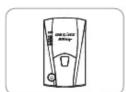
BL-818GT unit
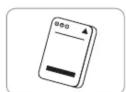
Li-Ion Rechargeable Battery
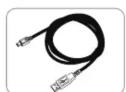
Micro USB cable
Note
Product operation guide and download info, please find the Download Index file stored in the memory of BL-818GT and you can read or install accordingly under internet connection.

Installing the Battery
①Remove the back cover by pushing the battery cover release tab with your thumbnail.
②Insert the battery, and align the battery contacts with the terminals in the battery compartment.
③Place the back cover over the battery compartment, and press it downward until it clicks into place.
Note
Do not stick anything on back cover.


Charging the BL-818GT
Please FULLY charge the BL-818GT for the first time use by connecting the supplied Micro USB cable through computer or car's cigarette adaptor.

Green LED On: On Charging
Green LED Off: Fully Charged
Note
Risk of explosion if Battery is replaced by an incorrect type. Dispose of used batteries according to the instructions.

BL-818GT Function buttons Acquiring Satellite Signal

① Power button: Power button: Press and hold to power on/off.
② G-Sensor button: Press & hold 1 second to calibrate G-sensor.
③ Micro USB Jack: Device Charging and Updating firmware.
④ Reset Button: Shut down the device. (Inside the rubber cover)

LED Indicators
| LED symbol | LED Color | Status | Description |
| Power | Orange | Flashing | Low Power |
| Green | On | Recharging | |
| Off | N/A | 1. Fully charged.2. Device power off | |
| Memory | Off | N/A | Device power off |
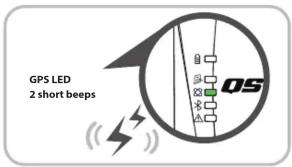
| GPS | Green | On | GPS position is fixed |
| Off | N/A | 1. Searching for GPS satellite signal2. Device power off | |
| Bluetooth | Blue | Flash | Searching for device |
| Blue | On | Bluetooth connected | |
| Alarm | Orange | On | GPS is not connected with satellite |
| Off | N/A | 1. GPS position is fixed2. Device power off |

Beep Code
| Status | Beep code | Description |
| Power On | 1 short beep | 1 short beep when device switch On. |
| Power Off | 1 long and short beep | 1 long and short beep when device switch Off. |
| GPS fixed | 2 short beep | 2 short beep when GPS location is fixed. |
| G-Sensor Calibration | 2 long beep | 2 long beep when G-Sensor button being pressed. |
Hold on Power button to power on BL-818GT.
Place the device outside under clear view of sky to acquire GPS signals.
Acquiring GPS signals may take few minutes. The GPS LED is turning to solid green when it has connected with GPS satellites.
Note
Before exporting the data to computer please turn off the power.

Update firmware
① Download and extract the firmware from Qstarz web site http://racing.qstarz.com/Download.html
② Power off BL-818GT and connect with computer via Micro USB cable.
③ Copy the firmware file FW.qst to the root directory of BL-818GT internal memory.
④ Unplug the Micro USB cable, and firmware update will begin automatically. LEDs will light on alternately during the update process.
⑤ Once firmware update is completed, the device will turn off automatically.
Note
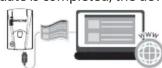
Connect your BL-818GT device with Computer, and browse the root directory of BL-818GT in My Computer. Find the "DownloadIndex_BL-818GT.html" file and click it with internet connection. A download webpage will pop-up, then click on the link and you can have latest product information for BL-818GT.

Product Compatibility
BL-818GT is compatible with most iOS and Android devices via the Qstarz BLE GPS View App. Expect for no brand and newest devices.
*Download the Qstarz BLE GPS View APP on App Store or Google Play Store.

QRacing APP
(iOS version / Android version)

QRacing

Please download QRacing APP on App Store or Google Play. QRacing APP is a racing data analysis APP combining GPS data with video overlay support. Read the operating guide on the manual of QRacing APP.

Start Racing
* The mobile phone photo is illustrated by iPhone. The support OS and versions for QRacing APP, please refer to the description on Qstarz website.
① Switch On BL-818GT
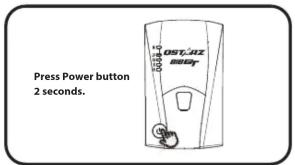
② Confirm GPS position is fixed
③ Turn on your mobile device's Bluetooth feature -iPhone Setting > General > Bluetooth > On -Android phone Settings > Wireless & Networks > Bluetooth: On
④ Start QRacing APP on your mobile phone

⑤ Register a new account. Login and add your BL-818GT in Setting Page of QRacing APP
⑥ Start to real-time Racing

⑦ View Analysis Data on your QRacing APP

Note
Picture Screen might be slightly varied according to different APP version. For detail operation, please refer to the operating guide on manual of QRacing APP.

Product Specifications
A 10Hz BLE GPS Receiver and provide real time lap timing via QRacing APP
Adopt high sensitivity GNSS chip and 3-axis accelerometer Bluetooth 4.0 enabled device
Update rate up to 10Hz excellent for High speed racing (updating every 0.1 second)
G-Sensor button design to calibrate G-sensor immediately 5 LED indications to view device status
Case: Rugged, without water-resistant
Power Supply: Rechargeable Lithium-Ion battery, 20 hours operation (typical use)
Temperature: Operating -10\~60°C/ Charging 0\~45°C/ Storage -20\~60°C

Product Care
Please take out the battery and store it in dry/cool places when not use for a long period.
If the device isn't used in temperature between -10ircC 60ircC , its battery charging capability will decrease.
Leave the device far from heat or high temperature environment. And also, do not expose your device in temperature higher than 145irc F/60°C to prevent the inside battery from overheating, exploding or burning itself. The Lithium battery inside the device should be recycled.
Do not attempt to dismantle the device by yourself. Unauthorized hacking may damage the unit, and void your warranty.
Marke : Qstarz
Modell : BL-818GT
Kategorie : Gps