
RD-960BX - Kassettenrekorder ROTEL - Kostenlose Bedienungsanleitung
Finden Sie kostenlos die Bedienungsanleitung des Geräts RD-960BX ROTEL als PDF.


| Produkttyp | Kassettenrekorder (Stereo-Kassettendeck) |
| Marke | Rotel |
| Modell | RD-960BX |
| Abmessungen (B x H x T) | 440 mm x 121 mm x 329 mm |
| Gewicht | 6,0 kg |
| Stromversorgung | 115 V / 230 V AC, 50/60 Hz, 30 W |
| Frequenzgang | 30–18.000 Hz ±3 dB (Typ 4), 30–17.000 Hz ±3 dB (Typ 2), 30–16.000 Hz ±3 dB (Typ 1) |
| Gleichlaufschwankungen | 0,035 % wrms, 0,1 % DIN |
| Signal-Rausch-Verhältnis | 55 dB (NR aus), 65 dB (Dolby B), 74 dB (Dolby C) |
| Klirrfaktor | 0,9 % (Typ 4, Rec/Play 400 Hz, 0 dB) |
| Eingangsempfindlichkeit/Impedanz | 50 mV / 33 kOhm |
| Ausgangspegel/Impedanz | 740 mV / 1,5 kOhm |
| Tonkopf | Kombikopf aus Hart-Permalloy (Wiedergabe/Aufnahme), Ferrit-Löschkopf |
| Rauschunterdrückung | Dolby B, Dolby C, HX PRO |
| Besondere Funktionen | Music Search, Memory Rewind, Repeat, MPX-Filter, BIAS-Einstellung, Fernbedienung |
| Anzeige | FL-Display, kalibriert von –20 dB bis +8 dB, Zähler/Zeit |
| Bandgeschwindigkeit | 4,8 cm/s |
| Spuren | 4 Spuren / 2 Kanäle |
| Reinigung und Wartung | Köpfe und Antrieb regelmäßig mit reinem Alkohol reinigen; Entmagnetisierung alle 50 Betriebsstunden empfohlen |
| Sicherheit | Netzstecker ziehen bei längerem Nichtgebrauch; kein Benutzerservice im Inneren; Gerät vor Feuchtigkeit schützen |
| Lieferumfang | Bedienungsanleitung, Fernbedienung, Cinch-Verbindungskabel |
| Herstellungsland | Japan (basierend auf Marke Rotel, typischerweise) |
Häufig gestellte Fragen - RD-960BX ROTEL
Benutzerfragen zu RD-960BX ROTEL
0 Frage zu diesem Gerät. Beantworten Sie die, die Sie kennen, oder stellen Sie Ihre eigene.
Eine neue Frage zu diesem Gerät stellen
Laden Sie die Anleitung für Ihr Kassettenrekorder kostenlos im PDF-Format! Finden Sie Ihr Handbuch RD-960BX - ROTEL und nehmen Sie Ihr elektronisches Gerät wieder in die Hand. Auf dieser Seite sind alle Dokumente veröffentlicht, die für die Verwendung Ihres Geräts notwendig sind. RD-960BX von der Marke ROTEL.
BEDIENUNGSANLEITUNG RD-960BX ROTEL
ROTEL
RD 960BX
Stereo Cassette Tape Deck
Owners Manual
Please write the serial number and purchase date of this RD 960BX for your records in the space provided.
Serial Number
Purchase date
WARNING:
To reduce the risk of fire or electric shock, do not expose this appliance to rain or moisture.
CAUTION
RISK OF ELECTRIC SHOCK DO NOT OPEN
CAUTION: TO REDUCE THE RISK OF ELECTRIC SHOCK, DO NOT REMOVE COVER (OR BACK). NO USER-SERVICEABLE PARTS INSIDE. REFER SERVICING TO QUALIFIED SERVICE PERSONNEL.
Explanation of Graphical Symbols
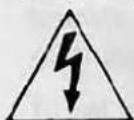
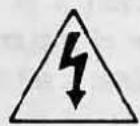
The lightning flash with arrowhead symbol, within an equilateral triangle, is intended to alert the user to the presence of uninsulated 'dangerous voltage' within the product's enclosure that may be of sufficient magnitude to constitute a risk of electric shock to persons.
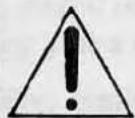
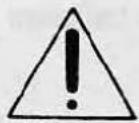
The exclamation point within an equilateral triangle is intended to alert the user to the presence of important operating and maintenance instructions in the literature accompanying the appliance.
SAFETY INSTRUCTIONS
-
Read Instructions - All the safety and operating instructions should be read before the appliance is operated.
-
Retain Instructions - The safety and operating instructions should be retained for future reference.
-
Heed Warnings - All warnings on the appliance and in the operating instructions should be adhered to.
-
Follow Instructions - All operating and use instructions should be followed.
-
Water and Moisture - The appliance should not be used near water - for example, near a bathtub, kitchen sink, laundry tub, in a wet basement or near a swimming pool, etc.
-
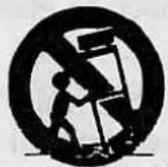
Carts and Stands - The appliance should be used only with a cart or stand that is recommended by the manufacturer.
6A. An appliance and cart combination should be moved with care. Quick stops, excessive force and uneven surfaces may cause the appliance and cart combination to overturn.
-
Wall or Ceiling Mounting - The appliance should be mounted to a wall or ceiling only as recommended by the manufacturer.
-
Ventilation - The appliance should be situated so that its location or position does not interfere with its proper ventilation. For example, the appliance should not be situated on a bed, sofa, rug, or similar surface that may block the ventilation openings; or placed in a built-in installation, such as a bookcase or cabinet that may that may impede the flow of air through the ventilation openings.
-
Heat - The appliance should be situated away from heat sources such as radiators, heat registers, stoves or other appliances (including amplifiers) that produce heat.
-
Power Sources - The appliance should be connected to a power supply only of the type described in the operating instructions or as marked on the appliance.
-
Grounding or Polarization - The precautions that should be taken so that the grounding or polarization means of an appliance is not defeated.
-
Power-Cord Protection - Power supply cords should be routed so that they are not likely to be walked on or pinched by items placed upon or against them, paying particular attention to cords and plugs, convenience receptacles and the point where they exit from the appliance.
-
Cleaning - The appliance should be cleaned only as recommended by the manufacturer.
-
Nonuse Periods - The power cord of the appliance should be unplugged from the outlet when left unused for a long period of time.
-
Object and Liquid Entry - Care should be taken so that objects do not fall and liquids are not spilled into the enclosure through the openings.
-
Damage Requiring Service - The appliance should be serviced by qualified factory-authorized service personnel when:
• The power-supply cord or the plug has been damaged; or
- Objects have fallen, or liquid has been spilled into the appliance; or
• The appliance has been exposed to rain; or
- The appliance does not appear to operate normally or exhibits a marked change in performance; or
• The appliance has been dropped, or the enclosure damaged.
- Servicing - The user should not attempt to service the appliance beyond that described in the operating instructions. All other servicing should be referred to qualified factory-authorized service personnel.
PORTABLE CART
WARNING
A WORD FROM AII OF US AT ROTEL
We thank you for purchasing our RD 960BX Compact Cassette Deck. We have been designing and manufacturing high quality, high performance audio electronics for more than 30 years. This cassette deck was designed to offer lifelike recording and playback and is a natural extension of our love for music. Our passion for good sound and our love of music is well known. We believe that the music recorded and played back by the RD 960BX will be a source of enjoyment to you for many years to come.
Rotel is committed to making quality products to enhance your life. We have designed this cassette deck to be durable, easy to use and to make recordings with high fidelity to the original sound. Please read the owners manual to ensure that the RD 960BX is properly installed and able to offer optimum performance. We appreciate being a part of your life.
FEATURES OF THE RD 960BX CASSETTE DECK
This is a good sounding cassette deck that will bring a lively, entertaining source of music and recording capabilities to your stereo system. The display is designed to be informative and will readout the tape position with digits or time. The tape type is selected automatically when a tape is inserted and the door is closed. The display will show the tape type (Normal = Type 1, Special (CrO₂) = Type 2, Metal = Type 4) in red. We have included a MPX filter switch to allow you to have maximum fidelity when not recording from a tuner. Many makers include this filter without a defeat switch. The combination Record/Play head is made from Hard Permalloy for maximum sound quality. The Erase head is made from Ferrite. We have included DOLBY B and DOLBY C Noise Reduction with HX PRO to make clear, quiet recordings. The Recording BIAS is adjustable to optimize the machine for operation with various brands of good quality tape.
We have included MUSIC SEARCH, MEMORY REWIND and REPEAT play. The Remote Control will operate the main functions on the cassette deck and is easy to operate. The FL Display is calibrated from -20 dB to +8 dB for recording and playback. This display can be read easily. We believe the RD 960BX will be a musical source of pleasure to you.
INSTALLATION OF THE RD 960BX
Please place the unit on a DRY, level surface away from direct sunlight. Avoid placing objects on top of the RD 960BX. Do not allow water to fall onto or into the RD-960BX as this could damage the circuitry. Avoid installing the cassette deck in a location where excessive heat, humidity, vibration, magnetic hum fields or moisture will be a problem.
We recommend installing the RD 960BX in furniture designed to house audio components. This will allow the cassette deck to be on its own shelf with nothing stacked on top of it. This will minimize potential interference from hum fields created by other components in your system, such as your receiver, integrated or power amplifier. Component furniture will also reduce or suppress vibration and all audio components will provide improved sound when free from vibration. Ask your ROTELhi fi Authorized Dealer for advice about component furniture and proper installation of audio components.
ELECTRICAL REQUIREMENTS
This cassette deck is designed to work on AC voltage and the correct voltage is displayed on the Back Panel. Do not attempt to operate the RD 960BX on incorrect voltage as this will damage the circuitry and will void your warranty. If you are in doubt about the correct voltage for this cassette deck we suggest that you please read the label on the back panel or consult your ROTELhi fi Authorized Dealer for confirmation of the correct voltage.
Connect the Power Cord to your wall socket for AC power. When you wish to disconnect the power cord from the wall, always hold the plug firmly and then pull it out of the wall socket. Do not unplug the power cord from the wall by pulling the cord only. This may damage the power cord and create a hazardous condition. We recommend that the RD 960BX be connected to the mains' wall socket or a power line filter.
If you wish to clean the cabinet on the RD 960BX we suggest that you clean it with a soft, DRY cloth. Never use cleaning compounds or solvents to clean the cabinet as they may damage the finish or remove the labels. They could also damage the circuitry, tape heads or drive mechanisms if any residue falls inside the cassette deck.
There are NO user serviceable parts inside the RD 960BX. Please do not open the cabinet as this will expose you to the risk of potentially dangerous high voltage and the risk of shock. This could also damage the circuits and possibly void your warranty.
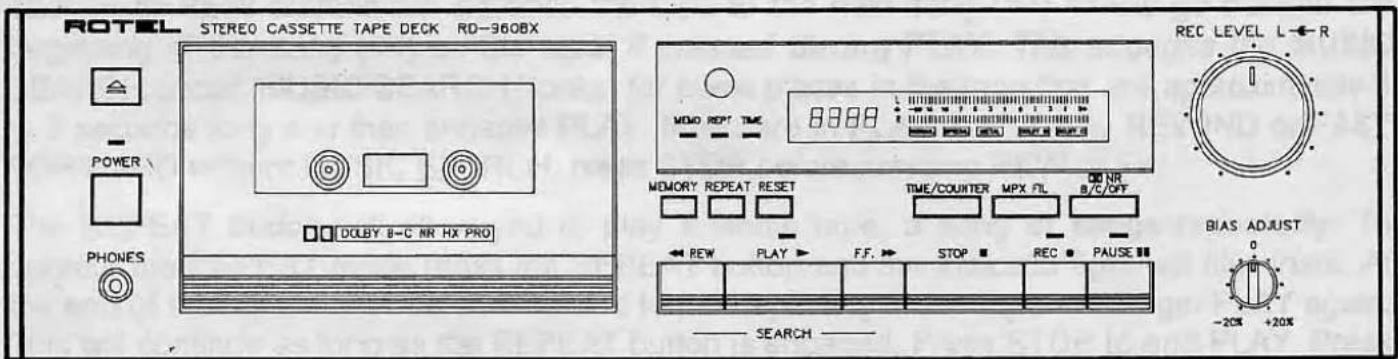
Please refer to this drawing of the Front Panel when reading the section about Controls and the Display on the RD 960BX.
CONTROLS ON THIS CASSETTE DECK
The POWER button will turn the CD player ON and OFF. Push it in and the RD 960BX will turn ON. The POWER INDICATOR LIGHT and the DISPLAY will illuminate at the same time. If you push the Power button again the power will go OFF and the Power Indicator Light and the Display will extinguish.
The OPEN button, located above the POWER button, will open the door after you have pushed it. Insert a cassette into the cassette holder on the door and push the door closed by hand. The OPEN button will not function when PLAY is engaged. Please do not try to force the door open during PLAY or RECORD as this may damage the mechanism. First press the STOP button and then the OPEN button.
The REWIND, PLAY, FAST FORWARD, STOP, RECORD AND PAUSE buttons are underneath the FL Display. The RECORD LEVEL and BIAS ADJUST controls are to the right of the display.
The DISPLAY will show the signal level from the source and will help you to set the correct levels for the tape and music type when in the RECORD mode. It will also show the signal level on the tape during PLAY. Levels at 0 dB or higher will show in red to indicate that you are approaching the saturation point of the tape. This varies by tape type and the spectral content of the music you are recording.
For advice about tape types and correct setting of the REC LEVEL control during RECORD consult your ROTELhi fi AUTHORIZED DEALER. The BIAS ADJUST circuit will affect the recording performance as well. We recommend high performance tapes be used exclusively.
The Display panel includes the REMOTE SENSOR for receiving the Infra Red signals from the REMOTE CONTROL handset. Please be certain not to block this as the Remote Control handset will not function if this is covered or blocked. The Display on the RD 960BX will normally show a "0000" when first turned on. It will show the current position of the tape in minutes and seconds or in digits during PLAY, FF or REW. Select the readout you prefer with the TIME COUNTER button.
Pressing the PAUSE button will make the cassette deck stay in the same place on the tape and the PAUSE indicator light will flash. No sound will be heard until you press the PLAY button.
Pressing the FF (>>) button will cause the cassette deck to FAST FORWARD to the end of the tape. Pressing REW (<<) will cause the cassette deck to REWIND to the beginning of the tape. If you are in PAUSE and press the FF or REW button, it will cancel PAUSE and wind to the end (FF) or beginning (REW) of the tape.
The FF or REW buttons will advance the tape to the next song (>>) or will go back to the beginning of the song (<<) on the tape, if pressed during PLAY. This engages the MUSIC SEARCH circuit. MUSIC SEARCH "looks" for blank places in the tape that are approximately 4 to 5 seconds long and then engages PLAY. If you are in PLAY and wish to REWIND or FAST FORWARD without MUSIC SEARCH, press STOP before pressing REW or FF.
The REPEAT button will allow you to play a whole tape, a song or songs repeatedly. To operate the REPEAT mode press the REPEAT button and the indicator light will illuminate. At the end of the tape, RD 960BX will rewind to the beginning of the tape and begin PLAY again. This will continue as long as the REPEAT button is engaged. Press STOP to end PLAY. Press REPEAT a second time to cancel this function.
To operate the MEMORY REWIND mode, press the button and the indicator light will illuminate. Then choose the point you wish to return to and press the RESET button to "Zero" the display. When the RD 960BX reaches the end of the tape it will rewind to Zero, the MEMORY REWIND point, and then stop. This may be combined with REPEAT to create a continuous play mode. Press the MEMORY button a second time to end this function.
The TIME COUNTER button, if pressed once, will change the Display readout from digits to Time elapsed on the tape. Pressing it again will return the display to digits.
The MPX button engages a high frequency filter that is designed to remove the 19 kHz pilot tone from the MPX signal of an FM Stereo tuner. This should be used only when recording from your tuner. It reduces the high frequency response of the RD 960BX above 15 kHz when it is engaged.
The NR B/C/OFF button engages the DOLBY B and C Noise Reduction circuits. The DOLBY circuits provide improved signal to noise ratios during recording and playback of your tapes. The DOLBY B circuit will improve the signal to noise ratio by approximately 10 dB. DOLBY C will add another 10 dB or so improvement to the signal to noise ratio. You should use the same NR during PLAY that you have used during RECORD for maximum fidelity.
We have included the DOLBY HX PRO circuit to improve the high frequency response of the recordings of NORMAL and SPECIAL tapes made with the RD 960BX. This circuit has been included to more closely approximate the performance of METAL tapes with NORMAL or SPECIAL tape types. DOLBY HX PRO works during RECORD with TYPE 1 or NORMAL and TYPE 2, CrO₂ or SPECIAL tapes only. The best way to describe how this circuit works would be to imagine that the cassette deck is reading the musical score and adjusting the recording bias dynamically to enable the tape to accept the maximum amount of high frequency energy, without overloading, that the music requires.
High level high frequency sounds tend to be additive to the high frequency bias signal that makes the recording process possible. This results in overbiasing the tape, which leads to a dull sounding recording with poor high frequency response. The HX PRO circuit will "see" the high level high frequency sounds and dynamically reduce the recording bias momentarily to minimize the possibility of saturating the tape. The result is a correctly biased tape with improved headroom at high frequencies and better sounding recordings of your favorite music. This works in conjunction with the BIAS ADJUST control.
The BIAS ADJUST control makes it possible to optimize the RECORD BIAS level for various high performance brands of tape. We suggest making a recording from your tuner of the FM hiss sound between stations. (Defeat the Mute circuit on the tuner to do this.) Set the REC LEVEL so that the meter reads -15 or -20 dB and make a recording of the hiss. Compare the sound of the tape recording to the sound from the tuner (not for volume level) for similarity of the high frequency sound. Rotate the BIAS ADJUST control for the best sonic match by repeating the recording and listening process. If you have a test CD, we suggest this be done with an 8 kHz tone at -20 dB. This adjustment should be done with the DOLBY NR turned OFF.
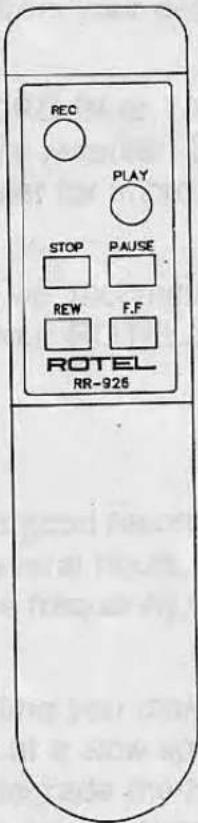
The REMOTE CONTROL handset duplicates the REW, PLAY, FF, STOP, REC and PAUSE functions on the Front Panel of the RD 960BX. The RD 960BX may be operated by the front panel buttons or by the remote control.
TO RECORD WITH RD 960BX
Select the Dolby NR (B, C or OFF) you intend to use for your recording. Press the PLAY button and wait five seconds before pressing STOP. This will advance the cassette past the beginning leader.
Press the REC button, the REC light will illuminate and RD 960BX will be in Recording Pause mode. Play the source you intend to record and adjust the REC LEVEL control to the level appropriate for your musical selection and tape type.
As a general guide, we would suggest that the peak recording level for Normal tape should be +3 dB, Special should be +3 to +5 dB and Metal +5 to +8 dB. Music with high level high frequencies should be recorded at a reduced level to avoid tape saturation. You may wish to ADJUST BIAS as well to optimize the RD 960BX to the brand of tape you have selected. (See ADJUST BIAS)
Press the PLAY button, start the source music and the RD 960BX will begin recording. The REC and PLAY lights will be on. Press PAUSE if you wish to make a momentary interruption of the recording.
When you wish to stop the RECORD mode, press the STOP button. This will stop the cassette deck, turn the recording circuits and indicator lights OFF.
TO PLAYBACK WITH RD 960BX
Note the Dolby NR system used during the recording of the cassette tape you intend to play. Set the Dolby NR of the RD 960BX to the same setting as the tape. Insert the cassette into the door holder and close the door. The tape playback equalization will be selected automatically by the RD 960BX.
Press the PLAY button to commence playing the tape and the PLAY indicator light will illuminate. To stop the tape momentarily, you may
select the pause mode by pressing the PAUSE button on the RD 960BX or on the remote control. The PAUSE light will flash. To continue, press PLAY. If you wish to stop the tape press the STOP button.
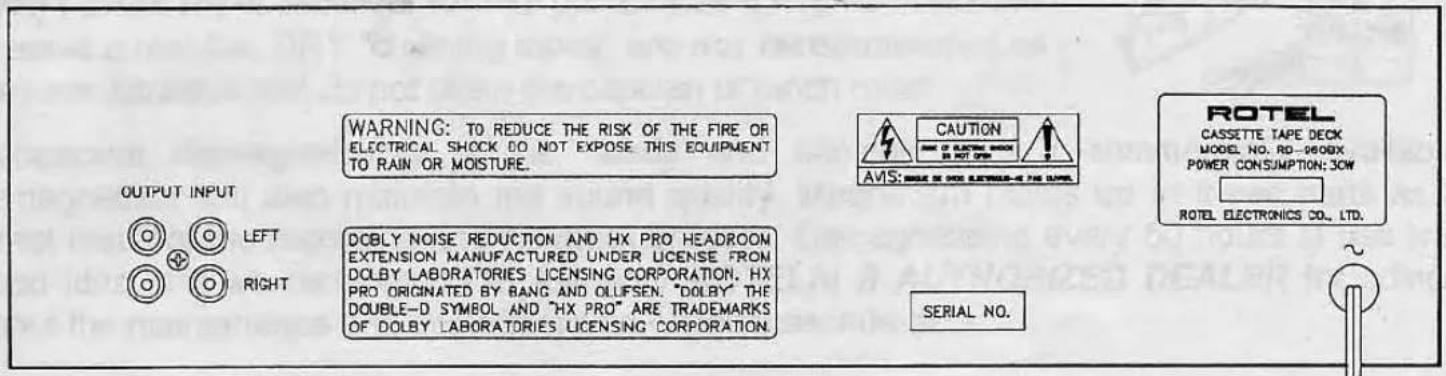
Please refer to this drawing of the Rear panel of the RD 960BX when connecting to your stereo system.
CONNECTING THE RD 960BX TO YOUR STEREO SYSTEM
The rear panel of the RD 960BX has the INPUT and OUTPUT connections for the cassette deck. These are RCA jacks and are designed to be connected to the TAPE Inputs and TAPE Outputs of your stereo integrated amplifier, receiver or preamplifier. Please observe the correct Left and Right Channel connections for optimum enjoyment of your stereo system.
The INPUT connections on the RD 960BX should receive signals from the RECORD OUT or TAPE OUT connections on your preamplifier, integrated amplifier, tuner preamplifier or receiver. Use the supplied patch cables or purchase high performance cables from your dealer for improved sound quality.
The OUTPUT connections on the RD 960BX should send signals to the RECORD IN or TAPE IN connections on your preamplifier, integrated amplifier, tuner preamplifier or receiver. Use the supplied patch cables or purchase high performance cables from your dealer for improved sound quality.
High performance patch cables will improve the sound of your stereo and we recommend them. We suggest auditioning them at home with your stereo system. Ask your ROTELhi fi AUTHORIZED DEALER for advice about cables for analog and digital signals.
MAINTENANCE OF THE RD 960BX CASSETTE DECK
A cassette deck needs to have CLEAN heads and drive mechanisms to make a good recording or to sound good on playback. If you play this cassette deck every day for several hours, the heads will need to be cleaned about once a week with excellent tapes and more frequently with inexpensive tapes.
We suggest cleaning the cassette deck heads and drive mechanisms every time you make a recording to improve the sound of your recordings. The compact cassette runs at a slow speed and even a small amount of oxide buildup from the tape onto the heads will degrade the high frequency sounds quite a lot. As a general guide; a clean cassette deck is a good sounding cassette deck.
The door may be removed from the cassette holder to facilitate cleaning by pressing the OPEN button and then gently pulling up on the sides of the door panel. Installation should be done carefully to ensure a proper alignment of the door on the cassette holder and then press down gently to install it.
The heads (Erase and Record/Play), pinch roller (rubber wheel) and the capstan (drive shaft) should be cleaned with pure (not rubbing) alcohol and cotton swabs, cotton buds or "Q" tips.
This should be done gently as the proper head alignment is critical to the sound quality of the RD 960BX. Pure distilled grain alcohol (Don't drink it!) is excellent for this purpose as it has no impurities to leave a residue. DRY "cleaning tapes" are not recommended as they are abrasive and do not clean the capstan or pinch roller.
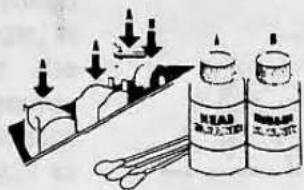
Occasional demagnetizing of the heads and capstan with a commercially available demagnetizer will also maintain the sound quality. Magnetism builds up in these parts as a direct result of the recording and playback process. Demagnetizing every 50 hours of use is a good idea and we recommend it. Ask your ROTELhi fi AUTHORIZED DEALER for advice about the maintenance and demagnetizing of your cassette deck.
A FINAL WORD FROM ROTEL ABOUT THIS CASSETTE DECK
The compact cassette is a very popular music source for many people and we believe the RD 960BX will be a valued addition to your musical enjoyment. We have designed this cassette deck for high performance using test equipment and the human ear. We believe that both methods are useful in the design of audio electronics. This is time consuming but we feel that the music benefits from this care and attention to detail. We realize that there are many choices available in the market today and we thank you again for choosing our RD 960BX Compact Cassette Deck to record and play your cassette tapes. Enjoy recording and playing the music!
SPECIFICATIONS
RD 960BX COMPACT CASSETTE DECK
| Frequency Response | 30-18,000 Hz ± 3 dB (Type 4) |
| 30-17,000 Hz ± 3 dB (Type 2) | |
| 30-16,000 Hz ± 3 dB (Type 1) | |
| Wow and Flutter | 0.035 % wrms, 0.1% DIN |
| Motor | Electronic governor type |
| Tape Speed | 4.8 cm / sec. |
| Tracks | 4 Track / 2 channel |
| Signal to Noise Ratio(Wtd, 0 dB, CrO2 tape) | 55 dB NR Off |
| 65 dB Dolby B NR | |
| 74 dB Dolby C NR | |
| Total Harmonic Distortion(Rec/Play 400 Hz, 0 dB) | 0.9% (Type 4) |
| Input Sensitivity/Impedance | 50 mV / 33 kohms |
| Output Level/Impedance | 740 mV / 1.5 kohms |
| Power Requirements | 115 volts AC 50/60 Hz |
| 230 volts AC 50/60 Hz | |
| Power Consumption | 30 watts |
| Weight | 6.0 Kgs / 13.2 Lbs |
| Dimensions | 440mm (W) x 121mm (H) x 329 mm (D) |
| 17-3/8" (W) x 4-13/16" (H) x 13" (D) |
- All specifications are accurate at the time of printing. Rotel reserves the right to make improvements without notice.
- Dolby Noise Reduction and HX PRO headroom extension manufactured under license from Dolby Laboratories Licensing Corporation.
- HX PRO originated by Bang and Olufsen. "Dolby", the double-D symbol, and "HX PRO" are trademarks of Dolby Laboratories Licensing Corporation.
- ROTEL
- RD 960BX
- Owners Manual
- WARNING:
- CAUTION
- Explanation of Graphical Symbols
- SAFETY INSTRUCTIONS
- A WORD FROM AII OF US AT ROTEL
- FEATURES OF THE RD 960BX CASSETTE DECK
- INSTALLATION OF THE RD 960BX
- ELECTRICAL REQUIREMENTS
- CONTROLS ON THIS CASSETTE DECK
- TO RECORD WITH RD 960BX
- TO PLAYBACK WITH RD 960BX
- CONNECTING THE RD 960BX TO YOUR STEREO SYSTEM
- MAINTENANCE OF THE RD 960BX CASSETTE DECK
- A FINAL WORD FROM ROTEL ABOUT THIS CASSETTE DECK
- SPECIFICATIONS
Marke : ROTEL
Modell : RD-960BX
Kategorie : Kassettenrekorder