
PlasmaSync 42VR5 - Bildschirm NEC - Kostenlose Bedienungsanleitung
Finden Sie kostenlos die Bedienungsanleitung des Geräts PlasmaSync 42VR5 NEC als PDF.


| Produkttyp | Plasma-Bildschirm |
| Marke | NEC |
| Modell | PlasmaSync 42VR5 |
| Bildschirmdiagonale | 42 Zoll (ca. 106 cm) |
| Auflösung | 1024 x 768 Pixel (XGA) |
| Kontrastverhältnis | 3000:1 |
| Helligkeit | 1000 cd/m² |
| Gewicht (ohne Standfuß) | ca. 30 kg |
| Abmessungen (B x H x T) | ca. 1020 x 610 x 95 mm |
| Stromversorgung | 100-240 V AC, 50/60 Hz |
| Leistungsaufnahme (Betrieb) | ca. 300 W |
| Leistungsaufnahme (Standby) | < 1 W |
| Anschlüsse | VGA, DVI-D, Composite, S-Video, Komponente |
| Funktionen | Bild-in-Bild, Zoom, Seitenverhältnis-Einstellungen |
| Lautsprecher | Integriert, 2x 10 W |
| Reinigung | Nur mit trockenem, weichem Tuch; keine aggressiven Reinigungsmittel |
| Sicherheit | Lüftungsschlitze frei halten; nicht in Feuchträumen aufstellen |
| Ersatzteile und Reparatur | Original-Netzteil, Lüfter, Fernbedienung über NEC-Service |
| Umgebungstemperatur | 0 °C bis 40 °C |
Häufig gestellte Fragen - PlasmaSync 42VR5 NEC
Benutzerfragen zu PlasmaSync 42VR5 NEC
0 Frage zu diesem Gerät. Beantworten Sie die, die Sie kennen, oder stellen Sie Ihre eigene.
Eine neue Frage zu diesem Gerät stellen
Laden Sie die Anleitung für Ihr Bildschirm kostenlos im PDF-Format! Finden Sie Ihr Handbuch PlasmaSync 42VR5 - NEC und nehmen Sie Ihr elektronisches Gerät wieder in die Hand. Auf dieser Seite sind alle Dokumente veröffentlicht, die für die Verwendung Ihres Geräts notwendig sind. PlasmaSync 42VR5 von der Marke NEC.
BEDIENUNGSANLEITUNG PlasmaSync 42VR5 NEC
42VR5/ 42XR3 Installation Guide
42" Plasma Displays
v1.3
Contents
Product Description and Notes Page 1 Ventilation Requirements Page 2
Display Dimensions
| F | r | o | n | t | , | T | o | p | & | P | e | g | e | 0 | t | t | o | m |
| R | e | a | r | |||||||||||||||
| L | e | f | t | & | R | i | g | h | t | P | a | g | e | 5 | d | e |
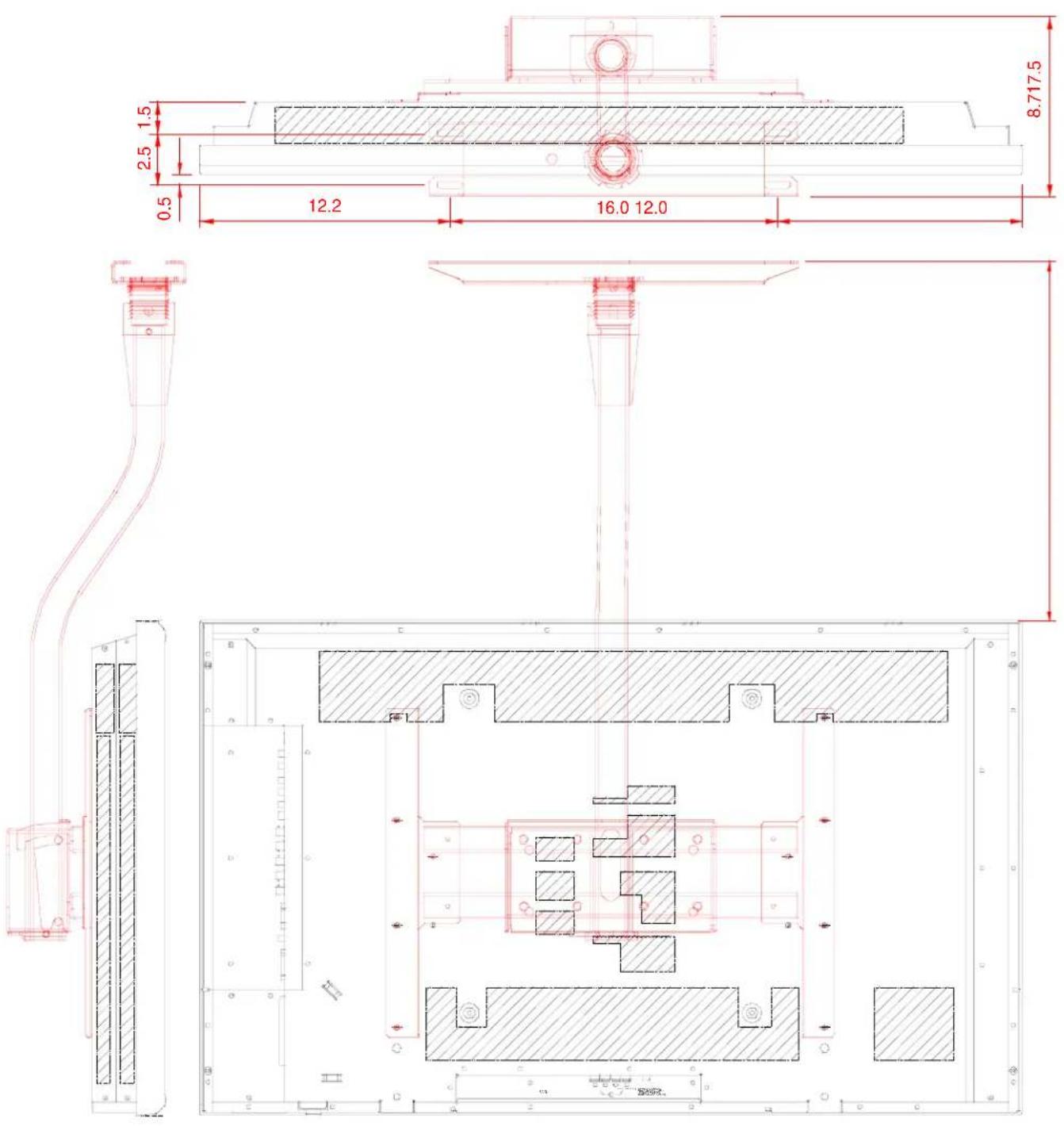
Display Dimensions w/Optional Speakers and Stand____ Page 6 Dimensions w/Optional Flat Wall Mount____ Page 7 Dimensions w/Optional Tilt Wall Mount____ Page 8 Dimensions w/Optional Ceiling Mount____ Page 9 C o n n e c t i o n s____ Page 10 Control Codes____ Page 11
natural_image
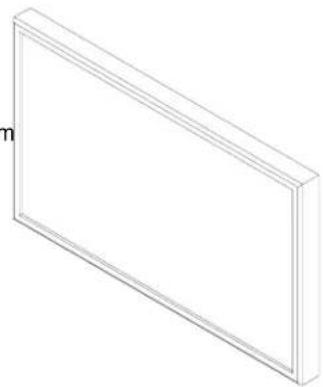
Isometric line drawing of a rectangular frame with no text or symbolsProduct Description
| Type: | Plasma | Display | Screen | Surface: | Anti-Reflective |
| Resolution: | 42VR5: | 853x480 | Dimensions: | 40"(W) x 24"(H) x 3.5"(D) | |
| 42XR3: | 1024x768 | Weight: | 42VR5: | 62.8 lbs | |
| Aspect Ratio: | 16:9 | 42XR3: | 65.0 lbs | ||
Color Correction: NEC CCF (Capsulated Color Filter, in panel)
and AccuCrimson (in front filter)
Notes
This document is intended to be used as a reference guide to supply useful information for a design or installation. It is not intended to be a step-by-step procedure for installation.
- Any ceilings or walls must be strong enough to support the display and the installation must be in accordance with any local building codes. All mounts should make secure contact to wood studs.
- 4:3 sources can be displayed on the 16:9 screen in either normal aspect ratio with bars on the left or right, or stretched horizontally to fill the screen using the menus (see "Aspect Modes" in menus and user manual).
■ Distances are in inches, for millimeters multiply by 25.4.
- Distances may vary ±5%.
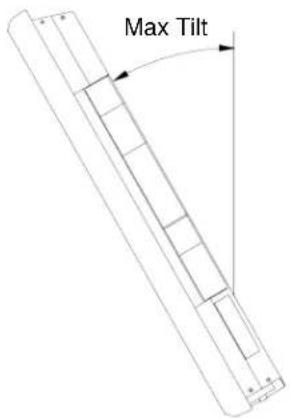
Maximum Tilt Angles
Below are the maximum angles that the display can be tilted in both landscape and portrait mode
Landscape 30°
Ventilation Requirements (all models)
Dimensions below are minimum required for proper ventilation.
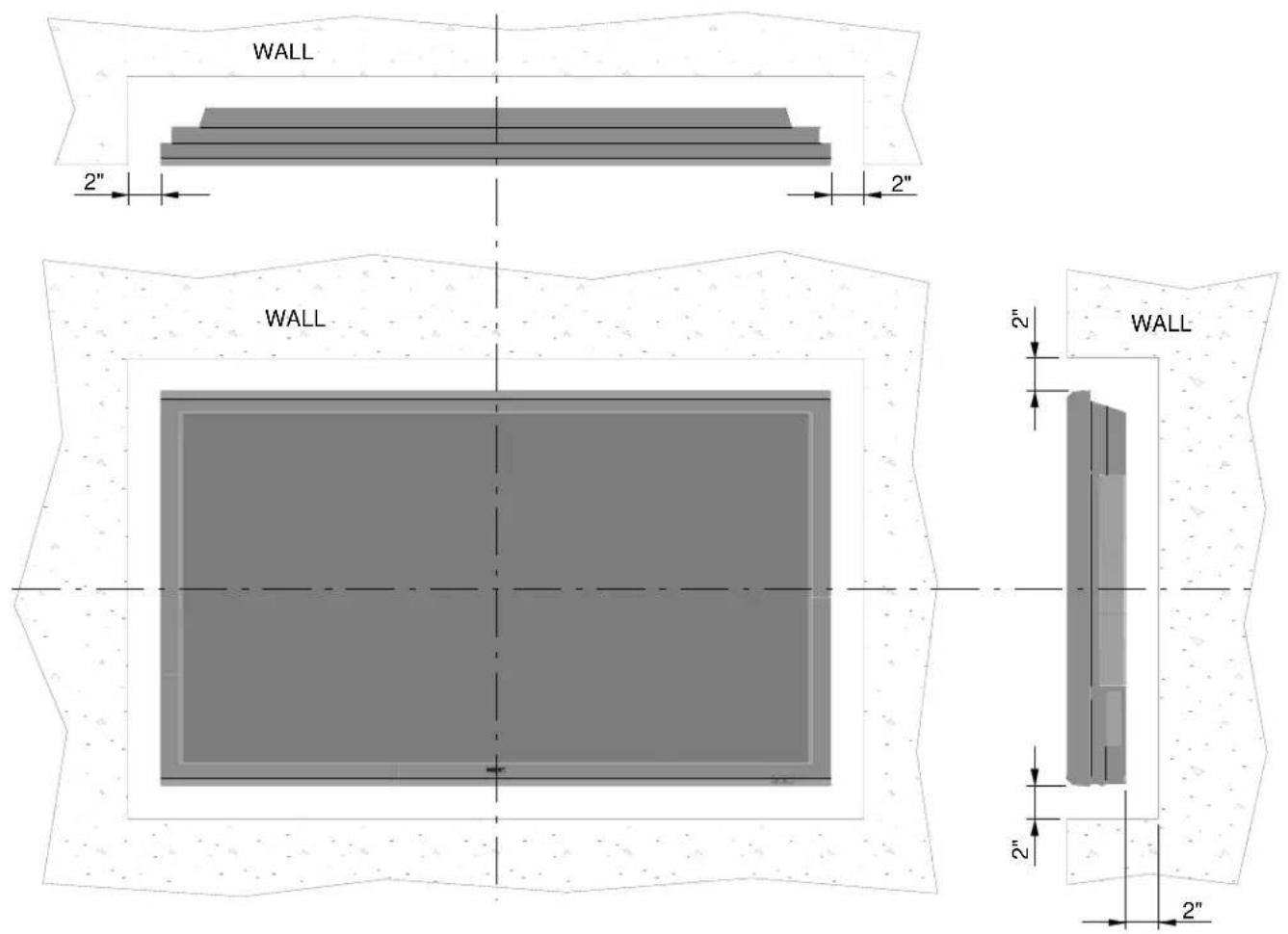
NOTE: The ventilation space should not be covered or closed off at the front of the opening. If for some reason the opening needs to be covered, other means of ventilation will need to be incorporated into the design. Contact NEC for design review and recommendations.
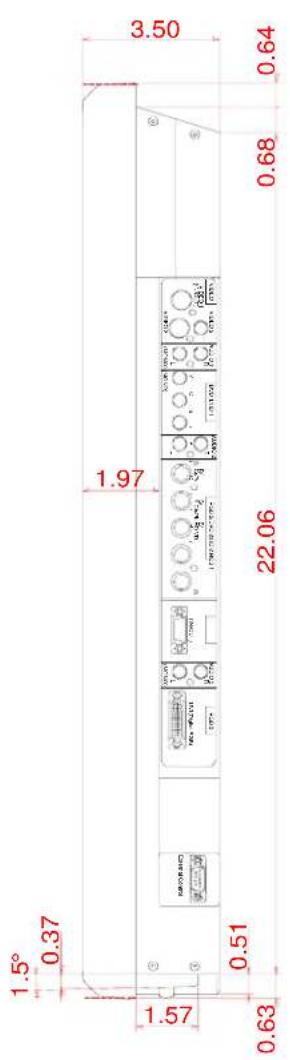
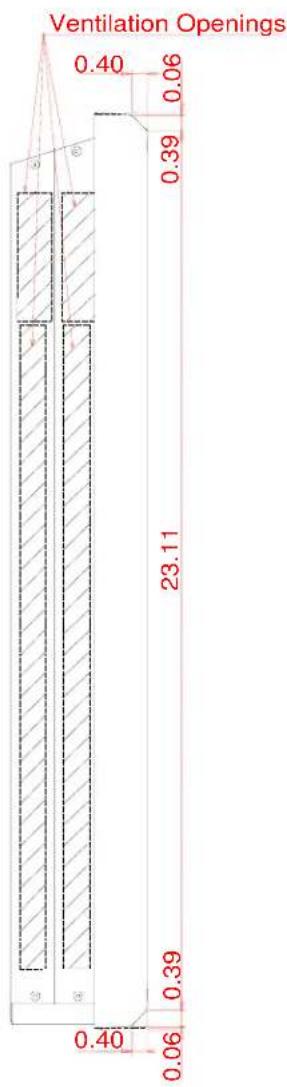
Display dimensions
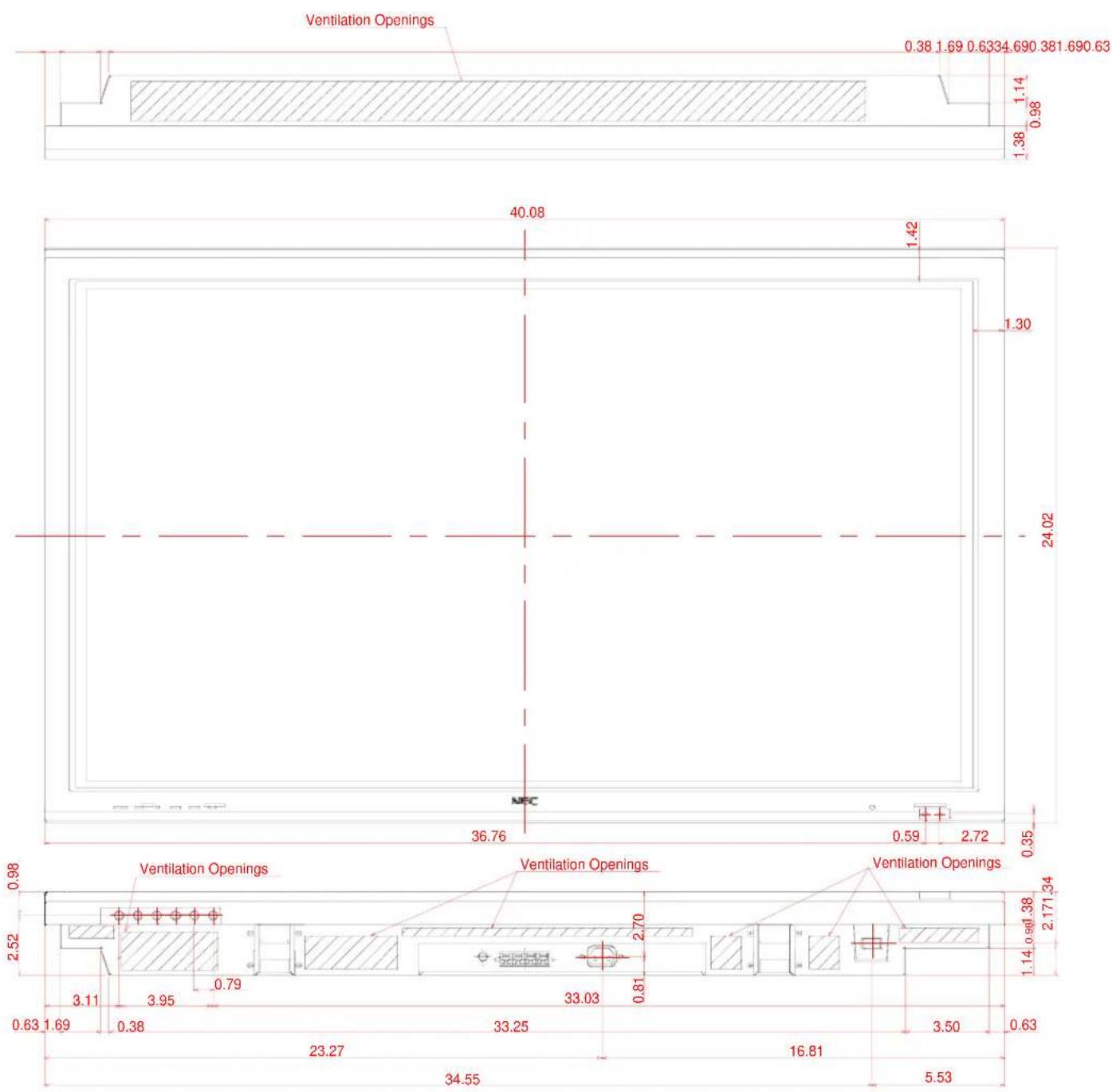
Display dimensions (cont.)
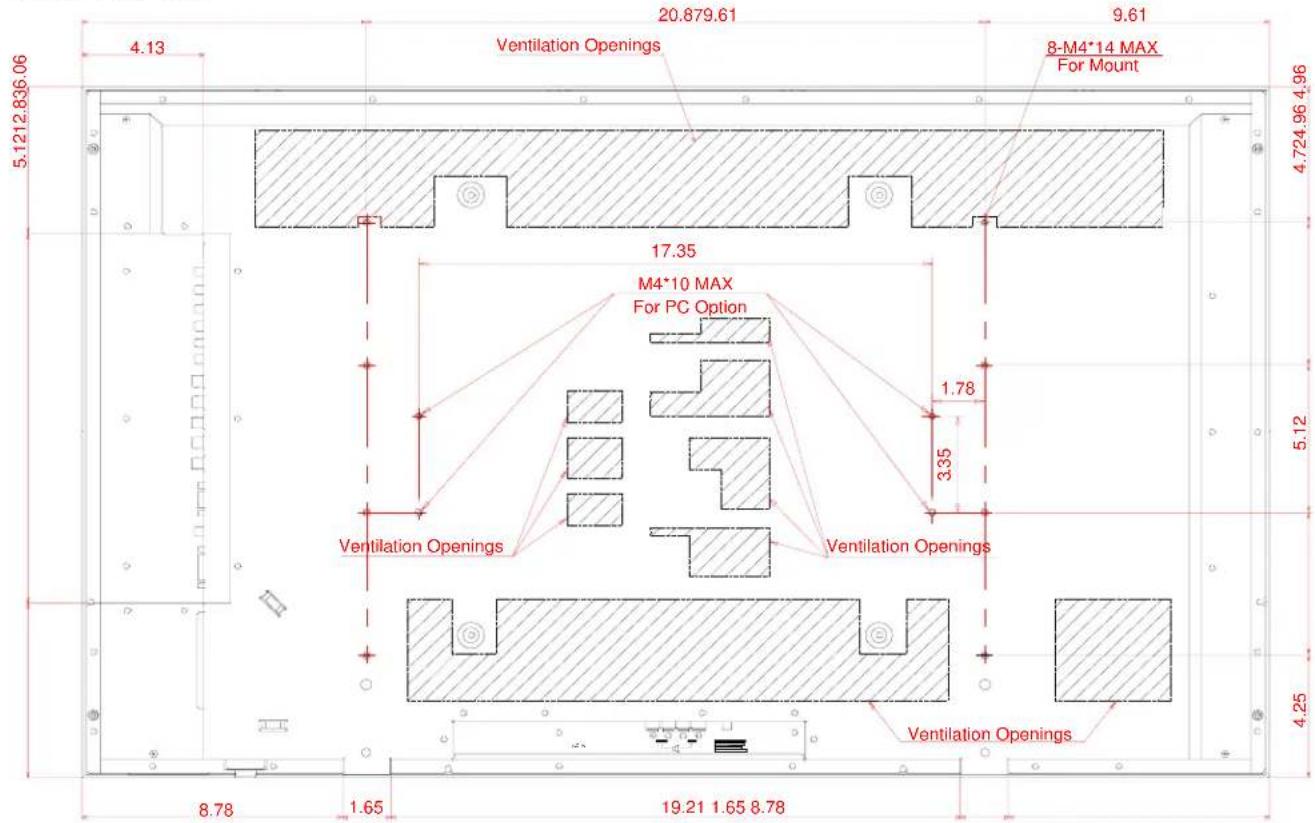
42VR5 Rear View
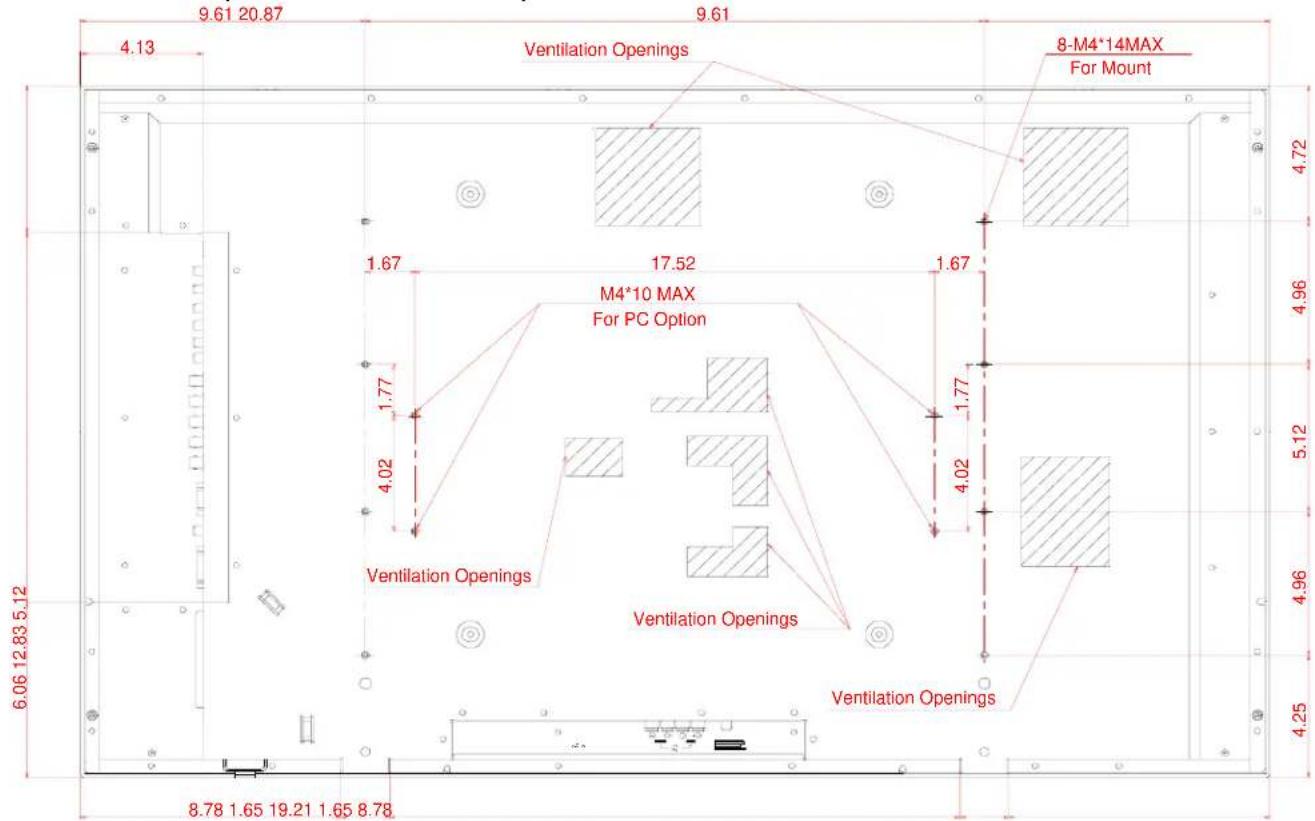
42XR3 Rear View (rear ventilation different)
other
| Location | Dimension (m) | | -------- | ------------- | | M4*10 MAX For PC Option | 17.52 | | 8-M4*14MAX For Mount | 17.52 | | Ventilation Openings | 1.67 | | Ventilation Openings | 1.77 | | Ventilation Openings | 1.67 | | Ventilation Openings | 1.77 | | Ventilation Openings | 1.67 | | Ventilation Openings | 1.77 | | Ventilation Openings | 1.67 | | Ventilation Openings | 1.77 | | Ventilation Openings | 1.67 | | Ventilation Openings | 1.77 | | Ventilatior (Left) | 9.61 (20.87) | | Ventilator (Right) | 8.78 (1.65) | | Ventilator (Left) | 19.21 (1.65) | | Ventilator (Right) | 8.78 (1.65) | | Ventilator (Left) | 6.06 (12.83) | | Ventilator (Right) | 4.25 (5.12) | | Ventilator (Left) | 4.96 (4.96) | | Ventilator (Right) | 4.96 (4.96) | | Ventilator (Left) | 4.72 (4.72) | | Ventilator (Right) | 4.72 (4.72) | | Ventilator (Left) | 4.02 (4.02) | | Ventilator (Right) | 4.02 (4.02) | | Ventilator (Left) | 1.67 (1.67) | | Ventilator (Right) | 1.67 (1.67) | | Ventilator (Left) | 1.77 (1.77) | | Ventilator (Right) | 1.77 (1.77) | | Ventilator (Left) | 1.67 (1.67) | | Ventilator (Right) | 1.67 (1.67) | | Ventilator (Left) | 4.02 (4.02) | | Ventilator (Right) | 4.02 (4.02) | | Ventilator (Left) | 4.96 (4.96) | | Ventilator (Right) | 4.96 (4.96) | | Ventilator (Left) | 4.96 (4.96) | | Ventilator (Right) | 4.96 (4.96) | | Ventilator (Left) | 4.96 (4.96) | | Ventilator (Right) | 4.96 (4.96) | | Ventilator (Left) | 4.96 (4.95) | | Ventilator (Right) | 4.96 (4.95) | | Ventilator (Left) | 4.96 (4.95) | | Ventilator (Right) | 4.96 (4.95) | | Ventilator (Left) | 4.96 (4.95) | | Ventilator (Right) | 4.96 (4.95) | | Ventilator (Left) | 4.96 (4.94) | | Ventilator (Right) | 4.96 (4.94) | | Ventilator (Left) | 4.96 (4.93) | | Ventilator (Right) | 4.96 (4.93) | | Ventilator (Left) | 4.96 (4.92) | | Ventilator (Right) | 4.96 (4.92) | | Ventilator (Left) | 4.96 (4.91) | | Ventilator (Right) | 4.96 (4.91) | | Ventilator (Left) | 4.96 (4.90) | | Ventilator (Right) | 4.96 (4.90) | | Ventilator (Left) | 4.96 (4.89) | | Ventilator (Right) | 4.96 (4.89) | | Ventilator (Left) | 4.96 (4.88) | | Ventilator (Right) | 4.96 (4.88) | | Ventilator (Left) | 4.96 (4.87) | | Ventilator (Right) | 4.96 (4.87) | | Ventilator (Left) | 4.96 (4.86) | | Ventilator (Right) | 4.96 (4.86) | | Ventilator (Left) | 4.96 (4.85) | | Ventilator (Right) | 4.96 (4.85) | | Ventilator (Left) | 4.96 (4.84) | | Ventilator (Right) | 4.96 (4.84) | | Ventilator (Left) | 4.96 (4.83) | | Ventilator (Right) | 4.96 (4.83) | | Ventilator (Left) | 4.96 (4.82) | | Ventilator (Right) | 4.96 (4.82) | | Ventilator (Left) | 4.96 (4.81) | | Ventilator (Right) | 4.96 (4.81) | | Ventilator (Left) | 4.96 (4.80) | | Ventilator (Right) | 4.96 (4.80) | | Ventilator (Left) | 4.96 (4.80) | | Ventilator (Right) | 4.96 (4.80)Display dimensions (cont.)
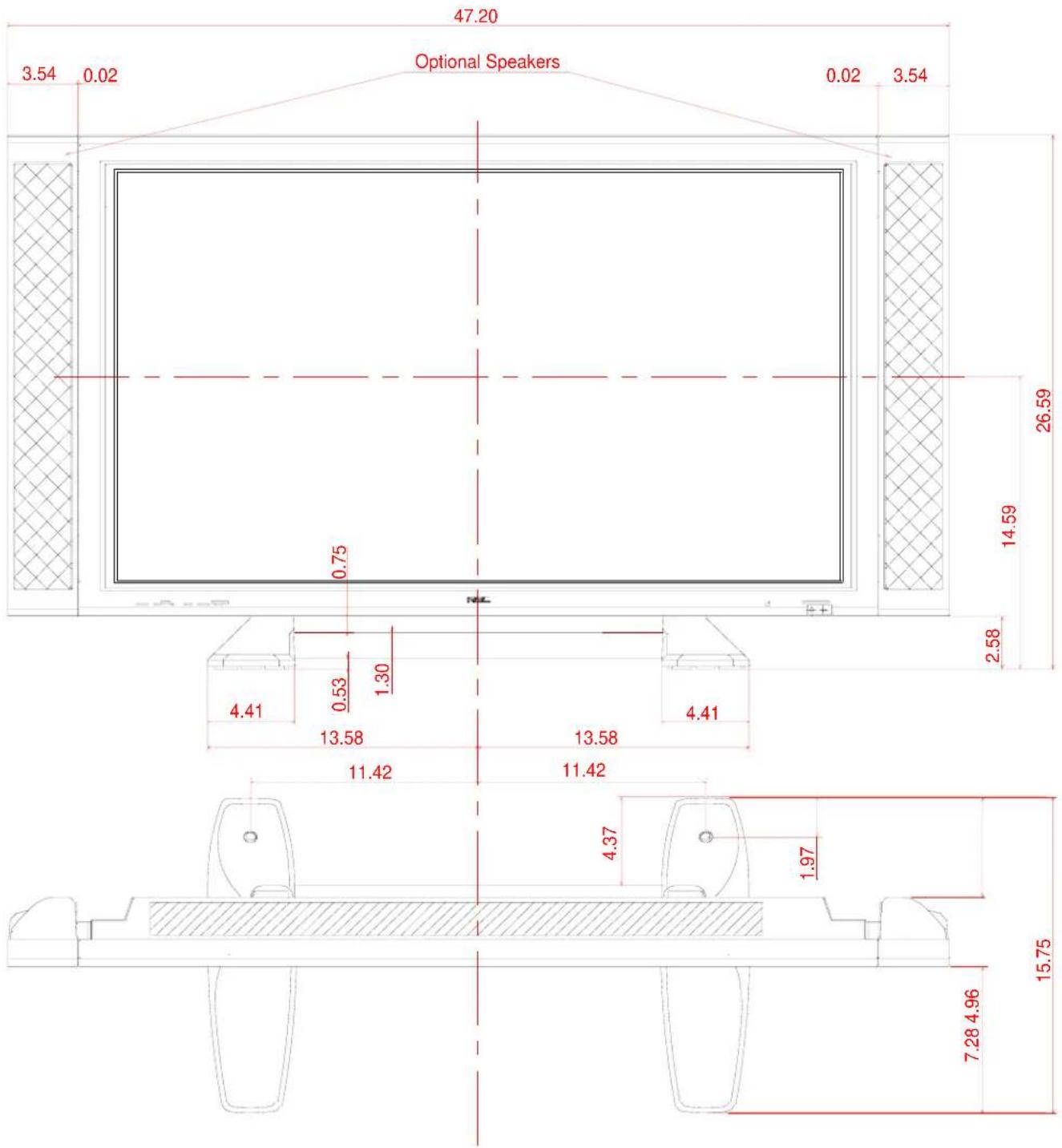
Dimensions with optional speakers and stand
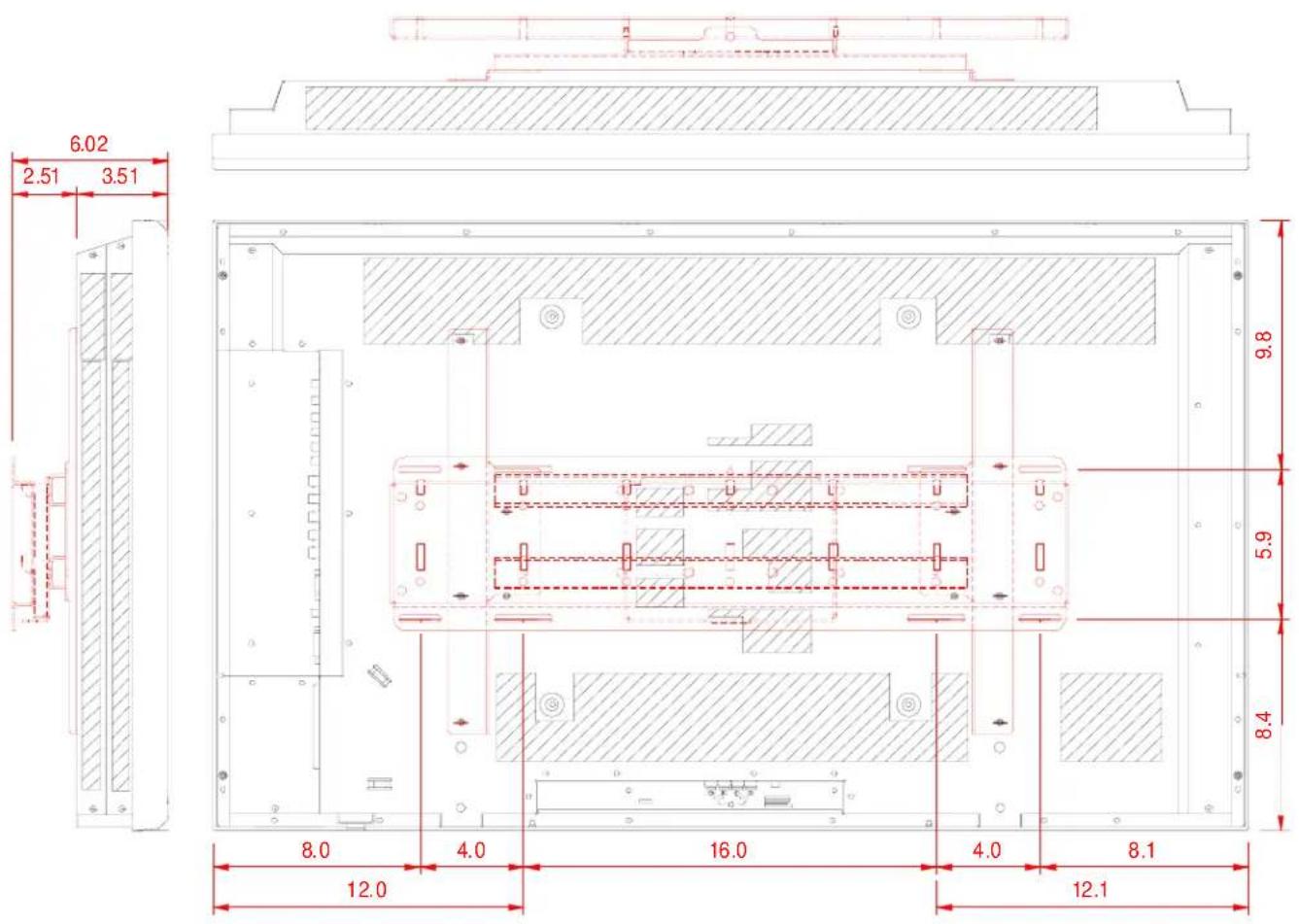
Dimensions with optional Flat Wall Mount Kit (FWMK)
Dimensions with optional Tilt Wall Mount Kit (TWMK)
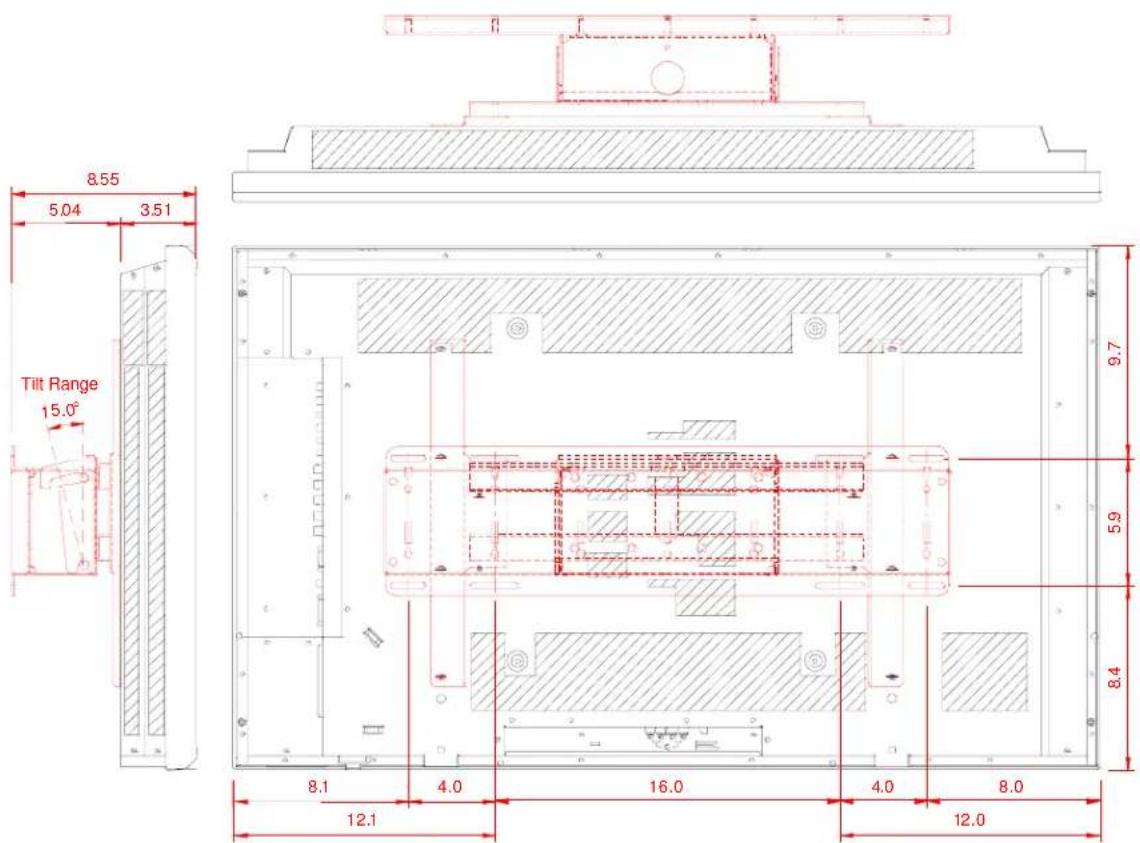
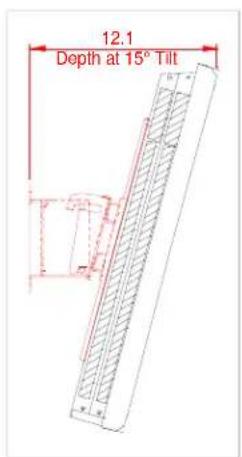
Dimensions with optional Ceiling Mount Kit (CMK)
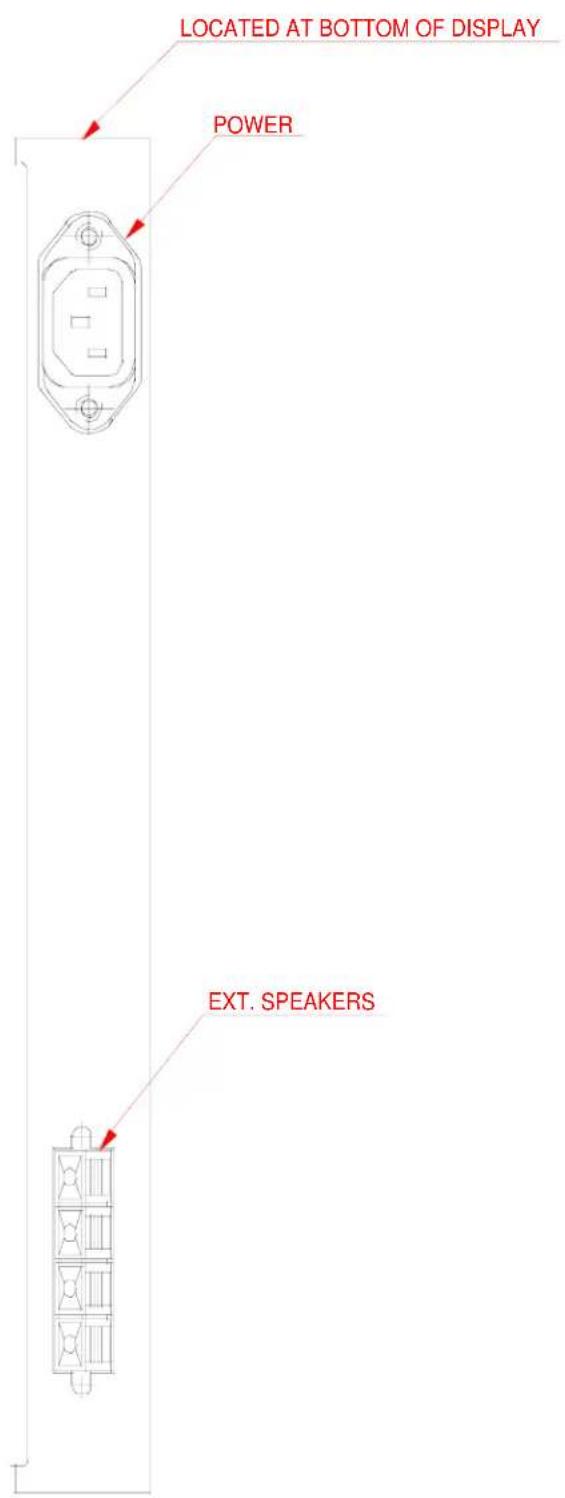
Connections

Control Codes
| Function | Code | Data | ||||||||||
| POWER | ON | 9FH | 80H | 60H | 4EH | 00H | CDH | |||||
| O F F | 9 F H | 8 0 H | 6 0 H | |||||||||
| INPUT | SWITCH | VIDEO1 (BNC) | DFH | 80H | 60H | 47H | 01H | 01H | 08H | |||
| VIDEO2 (RCA) | DFH | 80H | 60H | 47H | 01H | 02H | 09H | |||||
| VIDEO3 (S-Video) | DFH | 80H | 60H | 47H | 01H | 03H | 0AH | |||||
| DVD1/HD1 (RCA/Component) | DFH | 80H | 60H | 47H | 01H | 05H | 0CH | |||||
| DVD2/HD2 (5BNC/Component) | DFH | 80H | 60H | 47H | 01H | 06H | 0DH | |||||
| RGB1 (15pin HD) | DFH | 80H | 60H | 47H | 01H | 07H | 0EH | |||||
| RGB2 (5BNC/RGB) | DFH | 80H | 60H | 47H | 01H | 08H | 0FH | |||||
| RGB3 (DVI) | DFH | 80H | 60H | 47H | 01H | 0CH | 13H | |||||
| AUDIO | MUTE | ON | 9FH | 80H | 60H | 3EH | 00H | BDH | ||||
| O F F | 9 F H | 8 0 H | 6 0 H | 3 | ||||||||
| PICTURE | MODE | NORMAL | DFH | 80H | 60H | 0AH | 01H | 02H | CCH | |||
| THEAT.1 | DFH | 80H | 60H | 0AH | 01H | 02H | CDH | |||||
| THEAT.2 | DFH | 80H | 60H | 0AH | 01H | 03H | CEH | |||||
| DEFAULT | DFH | 80H | 60H | 0AH | 01H | 04H | CEH | |||||
| SCREEN | MODE: | STADIUM | DFH | 80H | 60H | 51H | 01H | 02H | 13H | |||
| ZOOM | DFH | 80H | 60H | 51H | 01H | 03H | 14H | |||||
| NORMAL | DFH | 80H | 60H | 51H | 01H | 04H | 15H | |||||
| FULL | DFH | 80H | 60H | 51H | 01H | 05H | 16H | |||||
| AUTO PICTURE | ON | DFH | 80H | 60H | 7FH | 03H | 03H | 09H | 00H | 4DH | ||
| OFF | DFH | 80H | 60H | 7FH | 03H | 03H | 09H | 01H | 4EH | |||
| CINEMA MODE | ON | DFH | 80H | 60H | C1H | 01H | 01H | 82H | ||||
| OFF | DFH | 80H | 60H | C1H | 01H | 02H | 83H | |||||
4 F H 0 0 H
F H 0 0 H B
NOTE: Contact your NEC rep for codes not listed.
NOTE: Use a cross/reverse/null modem cable.
Cable Connection
Communication Protocol:
| Interface: | RS-232C | Parity: | Odd | |
| Communication: | Asynchronous | Stop Bit: | 1 bit | |
| Baud Rate: | 9600 bps | Communication Code: | Hex | |
| Data Length: | 8 bits |
PC Control Connector (D-Sub 9P)
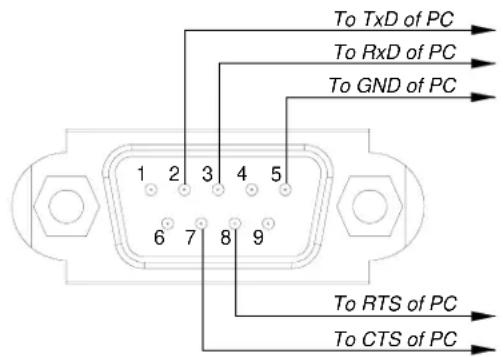
NOTE: Jumper "Request to send" and "Clear to Send" together on both ends of the cable to simplify cable connection.

- 42VR5/ 42XR3 Installation Guide
- 42" Plasma Displays
- Contents
- Product Description
- Notes
- Maximum Tilt Angles
- Ventilation Requirements (all models)
- Display dimensions
- Display dimensions (cont.)
- Dimensions with optional speakers and stand
- Dimensions with optional Flat Wall Mount Kit (FWMK)
- Dimensions with optional Tilt Wall Mount Kit (TWMK)
- Cable Connection
Marke : NEC
Modell : PlasmaSync 42VR5
Kategorie : Bildschirm