
A-USB3-HDMIVGA-01 - Videoadapter Cablexpert - Kostenlose Bedienungsanleitung
Finden Sie kostenlos die Bedienungsanleitung des Geräts A-USB3-HDMIVGA-01 Cablexpert als PDF.


| Produkttyp | USB 3.0 zu HDMI/VGA Adapter |
| Marke | Cablexpert |
| Modell | A-USB3-HDMIVGA-01 |
| Abmessungen (ca.) | 8,5 x 3,5 x 1,5 cm |
| Gewicht (ca.) | 45 g |
| Stromversorgung | Bus-powered über USB-Anschluss |
| Eingang | USB 3.0 Typ A Stecker |
| Ausgänge | HDMI (weiblich), VGA (weiblich) |
| Maximale Auflösung (HDMI) | 1920 x 1080 @ 60 Hz |
| Maximale Auflösung (VGA) | 1920 x 1200 @ 60 Hz |
| Unterstützte Betriebssysteme | Windows, Mac OS, Linux |
| Farbe | Schwarz |
| Material | Kunststoff |
| Zertifizierungen | CE, FCC |
| Lieferumfang | Adapter, Bedienungsanleitung |
| Funktionen | Bildschirm erweitern, spiegeln, Hauptbildschirm |
| Reinigung | Mit einem trockenen, fusselfreien Tuch reinigen |
| Sicherheitshinweis | Nicht mit Wasser oder Flüssigkeiten in Kontakt bringen |
| Reparatur | Nicht öffnen, keine reparablen Teile im Inneren |
| Entsorgung | Elektroschrott gemäß lokalen Vorschriften entsorgen |
Häufig gestellte Fragen - A-USB3-HDMIVGA-01 Cablexpert
Benutzerfragen zu A-USB3-HDMIVGA-01 Cablexpert
0 Frage zu diesem Gerät. Beantworten Sie die, die Sie kennen, oder stellen Sie Ihre eigene.
Eine neue Frage zu diesem Gerät stellen
Laden Sie die Anleitung für Ihr Videoadapter kostenlos im PDF-Format! Finden Sie Ihr Handbuch A-USB3-HDMIVGA-01 - Cablexpert und nehmen Sie Ihr elektronisches Gerät wieder in die Hand. Auf dieser Seite sind alle Dokumente veröffentlicht, die für die Verwendung Ihres Geräts notwendig sind. A-USB3-HDMIVGA-01 von der Marke Cablexpert.
BEDIENUNGSANLEITUNG A-USB3-HDMIVGA-01 Cablexpert
WELCOME
USB 3.0 to HDMI/VGA Adapter
User Guide
If you have any questions about the product, you can contact us by mail.
Introduction
USB 3.0 to HDMI Adapter is used to connected USB-enabled devices (such as laptop, desktop) with a HDMI-enabled devices( such as monitor, projector, TV) for multi-monitor solution, extending working space with split-screen, mirroring display, etc.
This USB to HDMI convertor have extend mode let your laptop for visibility of multiple tasks at the same time; Mirror mode gives your laptop to a large screen for a visual enjoyment. Suit for games entertainment, home theater, video conference, corporate training, etc.
Package Contents:
1* USB 3.0 to HDM/VGAI adapter 1* User Manual
Features:
- The product has a built-in installation driver, which is very easy to install. - Resolution: When connected to the USB3.0 or USB2.0 port of a PC / laptop, it is displayed as 1920 * 1080.
Attention:
Please turn off your anti-virus software and computer protection software when using.
Please be assured that our driver will not cause damage to the system. The screen may be off and on during the installation and resolution setting may be adjusted due to the installation.
Step 1: Turn off and exit the antivirus software. After connecting the board to the computer, double-click "MDDisplay_USM_v..."
in "Removable Disk"

Step 2: Click "Browse" to choose where to install, and then click "Next"

Step 3: Click "Install" to install
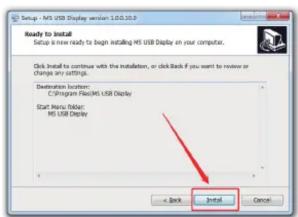
Step 4: If a prompt pops up during the installation process, always select "Install" and check Always trust

Step 5: After the installation is complete, the computer needs to be restarted to be effective

Step 6: After restarting the computer, there is an icon in the lower right corner, which means the installation issuccessful

Warranty:
One-year warranty for this USB 3.0 to HDMI adapter.
Just contact us through the email address in our support letter
included when there is any question or problem in using our product.
Marke : Cablexpert
Modell : A-USB3-HDMIVGA-01
Kategorie : Videoadapter