
PowerChannel USB Charger - USB-Ladegerät DOMETIC - Kostenlose Bedienungsanleitung
Finden Sie kostenlos die Bedienungsanleitung des Geräts PowerChannel USB Charger DOMETIC als PDF.


| Produkttyp | USB-Ladegerät für PowerChannel |
| Marke | Dometic |
| Modell | PowerChannel USB Charger |
| Kompatible Schiene | PowerChannel |
| Stromversorgung | Über PowerChannel Schiene (Dauerstrom) |
| Anzahl USB-Anschlüsse | 1 (Typ-A) |
| Ausgangsspannung | 5 V (typisch USB) |
| Betriebsanzeige | LED leuchtet bei Stromversorgung |
| Zertifizierung | FCC (Teil 15) |
| Montage | In PowerChannel einsetzen, Ausrichtungsmarkierung beachten, um 90° drehen zum Verriegeln |
| Demontage | Federbasis anheben, um 90° drehen und herausziehen |
| Betrieb | Immer eingeschaltet, solange auf Schiene montiert |
| Anwendungsbereich | Innen- und Außenbereich (bei Montage an geeigneter Stelle) |
| Lieferumfang | USB-Ladegerät, Bedienungsanleitung |
| Hinweis zur Reise | Zubehör während der Fahrt entfernen (laut Anleitung) |
Häufig gestellte Fragen - PowerChannel USB Charger DOMETIC
Benutzerfragen zu PowerChannel USB Charger DOMETIC
0 Frage zu diesem Gerät. Beantworten Sie die, die Sie kennen, oder stellen Sie Ihre eigene.
Eine neue Frage zu diesem Gerät stellen
Laden Sie die Anleitung für Ihr USB-Ladegerät kostenlos im PDF-Format! Finden Sie Ihr Handbuch PowerChannel USB Charger - DOMETIC und nehmen Sie Ihr elektronisches Gerät wieder in die Hand. Auf dieser Seite sind alle Dokumente veröffentlicht, die für die Verwendung Ihres Geräts notwendig sind. PowerChannel USB Charger von der Marke DOMETIC.
BEDIENUNGSANLEITUNG PowerChannel USB Charger DOMETIC
DOMETIC
AWNINGS
POWER CHANNEL

Power Channel Accessories
Installation and Operating Manual
USA & Canada
Service Office
Dometic Corporation
1120 North Main Street
Elkhart, IN 46514
Service Center & Dealer Locations
Visit:
www.dometic.com
Read these instructions carefully. These instructions MUST stay with this product.
NOTICE
Do not leave the accessories installed while traveling. Failure to obey this notice could result in product or property damage.

to the instructions included with the Power Channel Rail for important safety information.
1 INSTALLING AND REMOVING POWER CHANNEL ACCESSORIES
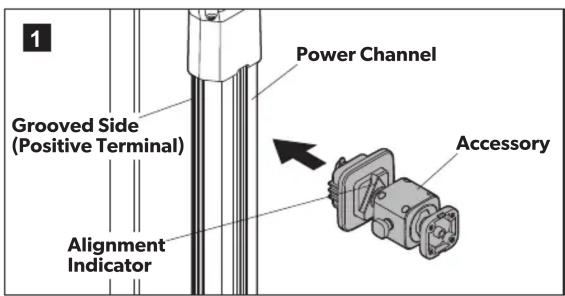
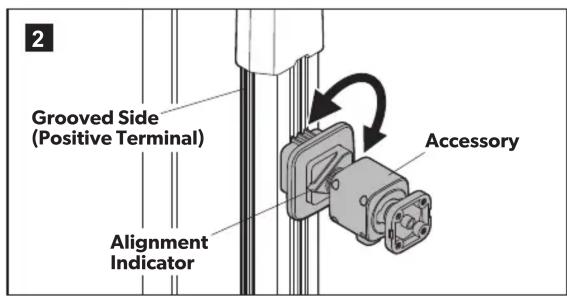
▶ Align the alignment indicator with the power channel and insert the accessory into the power channel.
To lock the accessory into place, rotate it 90^ so the alignment indicator is pointing towards the grooved side of the power channel rail.
To remove the accessory, lift the spring-loaded base on the accessory, rotate the accessory 90^ so the alignment indicator is aligned with the power channel, and remove.
2 OPERATING THE ACCESSORIES
2.1 Single and dual speaker
▶To turn ON the speaker, press the power button for one second.
▶ Scan for Dometic speakers on a Bluetooth compatible device.
▶Select to connect to the desired speaker.
▶ To disconnect the speaker from Bluetooth, press the power button for one second.
▶ To turn OFF the speaker, press the power button for two to three seconds.
2.2 Fan, LED floodlight, and LED spotlight
▶To turn ON the device, press the power button.
▶ To turn OFF the device, press the power button for two to three seconds.
2.3 USB charger
The USB charger is always ON when installed onto the power channel. The power indicator will be illuminated.
FCC STATEMENT
- This device complies with the Code of Federal Regulations, Title 47, Part 15, Radio Frequency Devices. Operation is subject to the following two conditions:
(1) This device may not cause harmful interference.
(2) This device must accept any interference received, including interference that may cause undesired operation.
2. Changes or modifications not expressly approved by the party responsible for compliance could void the user's authority to operate the equipment.
NOTE: This equipment has been tested and found to comply with the limits for a Class B digital device, pursuant to Part 15 of the FCC Rules. These limits are designed to provide reasonable protection against harmful interference in a residential installation.
This equipment generates, uses, and can radiate radio frequency energy and, if not installed and used in accordance with the instructions, may cause harmful interference to radio communications. However, there is no guarantee that interference will not occur in a particular installation. If this equipment does cause harmful interference to radio or television reception, which can be determined by turning the equipment off and on, the user is encouraged to try to correct the interference by one or more of the following measures:
Reorient or relocate the receiving antenna.
Increase the separation between the equipment and receiver.
Connect the equipment into an outlet on a circuit different from that to which the receiver is connected.
Consult the dealer or an experienced radio/TV technician for help.
Marke : DOMETIC
Modell : PowerChannel USB Charger
Kategorie : USB-Ladegerät