
WeatherPro Control Kit - Nicht kategorisiert DOMETIC - Kostenlose Bedienungsanleitung
Finden Sie kostenlos die Bedienungsanleitung des Geräts WeatherPro Control Kit DOMETIC als PDF.


| Produkttyp | Funkfernbedienungsset (Key FOB Kit) für WeatherPro Markisensteuerung |
| Modellnummern | 3307906.010, 3307906.036 |
| Kompatible Steuerungen (3307906.010) | 3307843.007, 3307844.005, 3308014.004 |
| Kompatible Steuerungen (3307906.036) | 3309424.004, 3309424.012, 3309424.038, 3310287.002, 3310287.010, 3310287.028, 3310287.036 |
| Lieferumfang 3307906.010 | 1 Schlüsselanhänger (3307906.028), 1 Programmieranleitung (3307996.029) |
| Lieferumfang 3307906.036 | 1 Schlüsselanhänger (3309706.044), 1 Programmieranleitung (3307996.029) |
| Spannungsversorgung | 12 V DC (über die elektronische Steuerung) |
| Programmierverfahren | Programmiertaste an der Steuerung drücken, dann Verlängertaste am Schlüsselanhänger für 4 Sekunden halten |
| Sicherheitshinweise | Warnung vor statischer Aufladung; keine Metallgegenstände in die Steuerung einführen; nur nichtleitendes Material zum Drücken der Programmiertaste verwenden |
| Anwendung | Zur Steuerung von WeatherPower-Markisen (Auf- und Einfahren) |
| Hersteller | Dometic |
| Serviceadresse (USA) | Dometic Corporation, 1120 North Main Street, Elkhart, IN 46514 |
| Serviceadresse (Kanada) | Dometic Corporation, 46 Zatonski, Unit 3, Brantford, ON N3T 5L8 |
| Weitere Informationen | www.eDometic.com |
Häufig gestellte Fragen - WeatherPro Control Kit DOMETIC
Benutzerfragen zu WeatherPro Control Kit DOMETIC
0 Frage zu diesem Gerät. Beantworten Sie die, die Sie kennen, oder stellen Sie Ihre eigene.
Eine neue Frage zu diesem Gerät stellen
Laden Sie die Anleitung für Ihr Nicht kategorisiert kostenlos im PDF-Format! Finden Sie Ihr Handbuch WeatherPro Control Kit - DOMETIC und nehmen Sie Ihr elektronisches Gerät wieder in die Hand. Auf dieser Seite sind alle Dokumente veröffentlicht, die für die Verwendung Ihres Geräts notwendig sind. WeatherPro Control Kit von der Marke DOMETIC.
BEDIENUNGSANLEITUNG WeatherPro Control Kit DOMETIC
USA
SERVICE OFFICE
Dometic Corporation
1120 North Main Street
Elkhart, IN 46514
CANADA
Dometic Corporation
46 Zatonski, Unit 3
Brantford, ON N3T 5L8
CANADA
SERVICE CENTER &
DEALER LOCATIONS
Please Visit
www.eDometic.com
WeatherPro
Power Awning
3307906.010
3307906.036
WeatherPro Key FOB Kit
Programming Instructions
SERVICE INSTRUCTIONS
MODEL
3307906.010
3307906.036
SAFETY INSTRUCTIONS
This manual has safety information and instructions to help users eliminate or reduce the risk of accidents and injuries.
RECOGNIZE SAFETY INFORMATION
natural_image
Warning symbol: white exclamation mark inside a triangle on black background (no text or numbers)This is the safety-alert symbol. When you see this symbol in this manual, be alert to the potential for personal injury.
Follow recommended precautions and safe operating instructions.
UNDERSTAND SIGNAL WORDS
A signal word, WARNING OR CAUTION is used with the safety-alert symbol. They give the level of risk for potential injury.
WARNING
Indicates a potentially hazardous situation which, if not avoided, could result in death or serious injury.
CAUTION
entially hazard-
ous situation which, if not avoided, may result in minor or moderate injury.
CAUTION
out the safety
alert symbol indicates, a potentially hazardous situation which, if not avoided, may result in property damage.
Read and follow all safety information and instructions.
GENERAL INSTRUCTIONS
Each replacement Key FOB must be programmed to match the Electronic Control being operated. These instructions will take you through the steps necessary to program the Electronic Control.
3307906.010 WeatherPro Key FOB Kit contains:
1-3307906.028 Key FOB
1-3307996.029 Key FOB Programming Instructions
3307906.036 WeatherPro Key FOB Kit contains:
1-3309706.044 Key FOB
1-3307996.029 Key FOB Programming instructions
Important: These instructions cover several different Electronic Controls. Identify which one you have and follow the corresponding instructions. The Electronic Control is usually located in a storage compartment.
3307906.010 Key FOB Kit is for the following Electronic Control Kits.
3307843.007 Electronic Control Kit
3307844.005 Electronic Control Kit
3308014.004 Electronic Control Kit
Important: It is recommended that programmingprocedureforKit3307906.010bedonebya Service Center or a qualified service technician.
CAUTION
The electronic board is susceptible to static charge. Do not insert metal object inside control box. Damage to electronic board will occur if a short is created. Use only a non-conductive material to depress programming button inside Electronic Control.
3307906.036 Key FOB Kit is for the following Electronic Control Kits:
3309424.004 Electronic Control Kit (OEM)
3309424.012 Electronic Control Kit (Aftermarket)
3309424.038 Electronic Control Kit (OEM 10 Pack)
3310287.002 Electronic Control Kit (OEM)
3310287.010 Electronic Control Kit (Aftermarket)
3310287.028 Electronic Control Kit (1 Pack - No Wind Sensor)
3310287.036 Electronic Control Kit (10 Pack - No Wind Sensor)
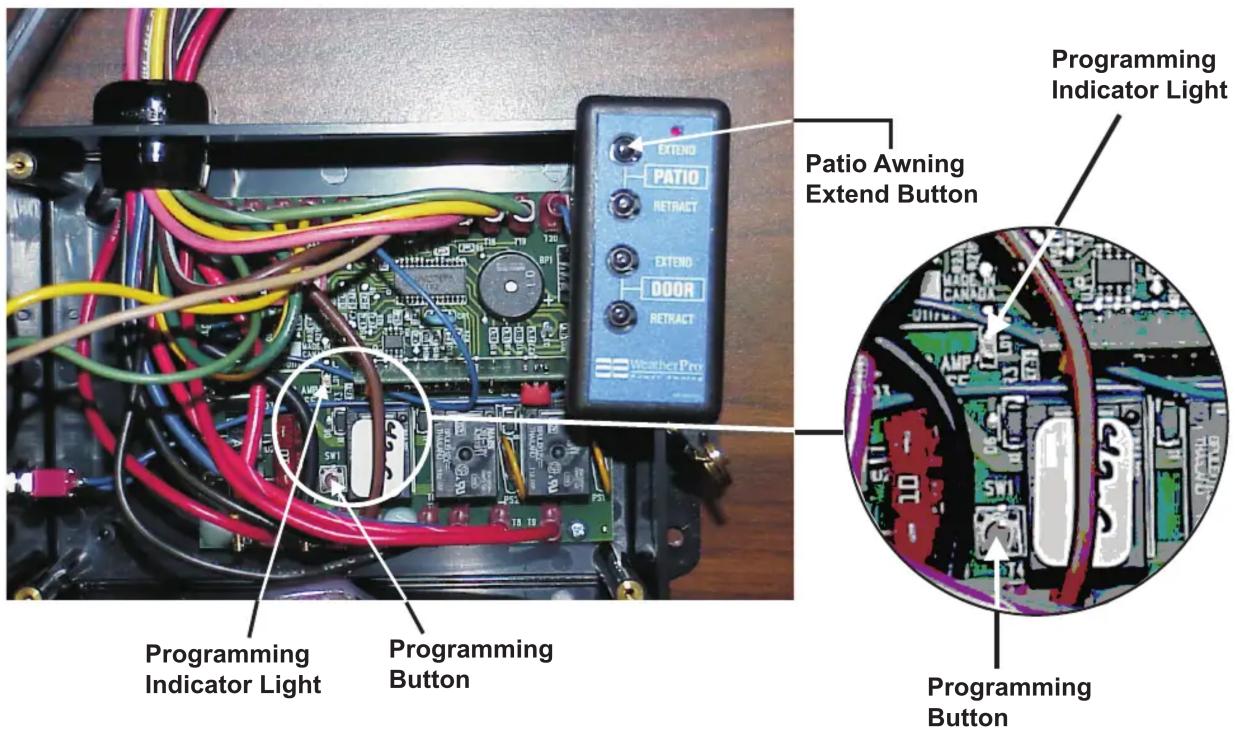
3307843.007, 3307844.005 & 3308014.004 Electronic Control Kit Programming Instructions
-
Remove four (4) screws from Electronic Control cover and lift cover to expose circuit board.
-
Press and release Programming Button . Programming Indicator Light will illuminate.
-
Press and hold Key FOB Patio Awning Extend Button for four (4) seconds.
-
Release Key FOB Patio Awning Extend Button. This completes the programming process.
-
Place cover on Electronic Control and secure with four (4) screws.
-
Check awning operation.
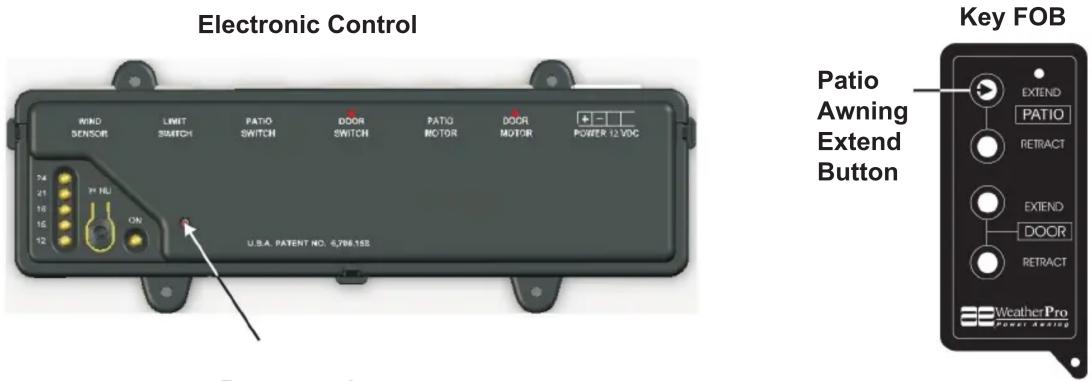
3309424.004, 3309424.012, 3309424.038, 3310287.002, 3310287.010, 3310287.028 (1 Pack), and 3310287.036 (10 Pack) Electronic Control Kit Programming Instructions
-
Insert a non conductive material through the hole in cover and press and release Programming Button.
-
Press and hold Key FOB Patio Awning Extend Button for four (4) seconds.
-
Release Key FOB Patio Awning Extend Button. This completes the programming process.
-
Check awning operation.
Marke : DOMETIC
Modell : WeatherPro Control Kit
Kategorie : Nicht kategorisiert