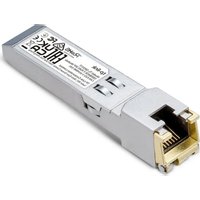
TL-SM331T - Nicht kategorisiert TP-LINK - Kostenlose Bedienungsanleitung
Finden Sie kostenlos die Bedienungsanleitung des Geräts TL-SM331T TP-LINK als PDF.


| Produkttyp | SFP-Modul (Gigabit) |
| Modell | TL-SM331T |
| Normen und Protokolle | IEEE 802.3, IEEE 802.3u, IEEE 802.3ab, SFF-8472 |
| Schnittstelle | 1000BASE-X (MAC) |
| Datenrate (max.) | 1,25 Gbit/s |
| Leistungsaufnahme (max.) | 0,8 W |
| Übertragungsmedium | RJ45 (Kupfer) |
| Kabellänge | 1000BASE-T: max. 100 m (Cat.5e oder höher) 100BASE-TX: max. 100 m (Cat.5 oder höher) |
| Hot-Swap-fähig | Ja |
| RX_LOS | Nicht unterstützt |
| TX_Fault | Nicht unterstützt |
| TX_Disable | Ja |
| DDM (Digital Diagnostics Monitoring) | Nicht unterstützt |
| Betriebstemperatur | 0 °C bis 70 °C |
| Lagertemperatur | -40 °C bis 85 °C |
| Luftfeuchtigkeit (Betrieb) | 10 % bis 90 % RH, nicht kondensierend |
| Kompatibilität | Gigabit SFP-Steckplätze (1000BASE-X) |
| Sicherheitshinweise | Gerät vor Wasser, Feuer und hohen Temperaturen schützen. Nicht zerlegen oder reparieren. |
| Reinigung | Mit einem trockenen, fusselfreien Tuch abwischen. Keine Flüssigkeiten verwenden. |
| Reparatur | Bei Defekt nur durch autorisiertes Personal öffnen lassen. Keine Selbstreparatur. |
Häufig gestellte Fragen - TL-SM331T TP-LINK
Benutzerfragen zu TL-SM331T TP-LINK
0 Frage zu diesem Gerät. Beantworten Sie die, die Sie kennen, oder stellen Sie Ihre eigene.
Eine neue Frage zu diesem Gerät stellen
Laden Sie die Anleitung für Ihr Nicht kategorisiert kostenlos im PDF-Format! Finden Sie Ihr Handbuch TL-SM331T - TP-LINK und nehmen Sie Ihr elektronisches Gerät wieder in die Hand. Auf dieser Seite sind alle Dokumente veröffentlicht, die für die Verwendung Ihres Geräts notwendig sind. TL-SM331T von der Marke TP-LINK.
BEDIENUNGSANLEITUNG TL-SM331T TP-LINK
Installation Guide
RJ45 SFP / RJ45 SFP+ Module
To ask questions, find answers, and communicate with TP-Link users or engineers, please visit https://community.tp-link.com to join TP-Link Community.
For technical support and other information, please visit https://www.tp-link.com/support, or simply scan the QR code.
If you have any suggestions or needs on the product guides, welcome to email techwriter@tp-link.com.cn.

Note: Images may differ from the actual products.
Installing the RJ45 SFP / RJ45 SFP+ Module
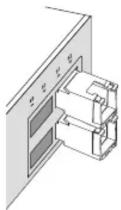
- Lock the yellow latch into place and insert the module into an SFP / SFP+ slot with label side up.
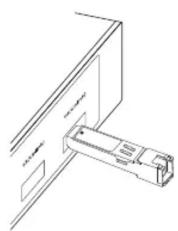
natural_image
Pure technical line drawing of a mechanical assembly without any text, numbers, or symbols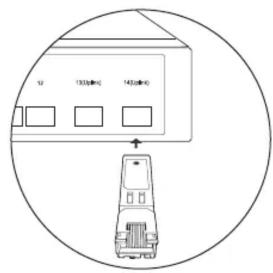
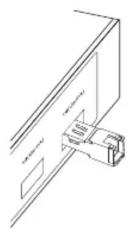
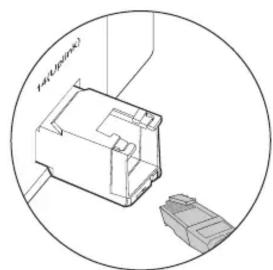
- Gently push the module into the slot until you hear a click. Then, insert the RJ45 network cable.
natural_image
Technical line drawing of a mechanical component with two connectors, enclosed in a circular boundary (no text or symbols)Removing the RJ45 SFP / RJ45 SFP+ Module
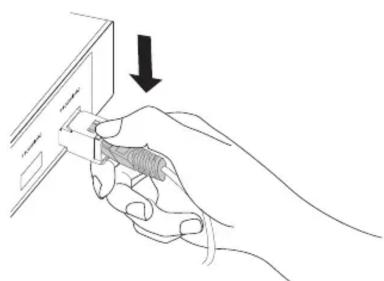
- Press the RJ45 crystal head and pull out the cable.
natural_image
Line drawing of a hand inserting a card into a banknote (no text or symbols present)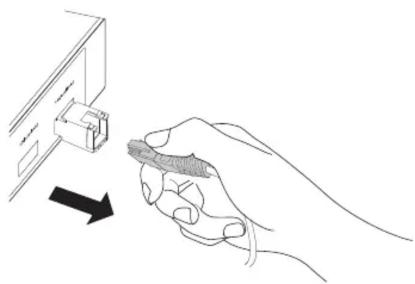
natural_image
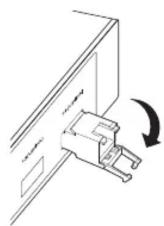
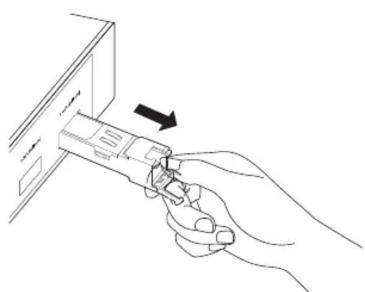
Line drawing of a hand inserting a cable into a device (no text or symbols)- Pull down the latch and remove the module.
natural_image
Line drawing of a hand inserting a device into a folder (no text or symbols)Positioning the 10G RJ45 SFP+ Modules
The 10G RJ45 SFP+ modules consume more power than optical modules. This may result in higher heat. To avoid overheating, it is recommended to place the modules separated by multiple optical transceivers or empty slots. When used in high temperature environments, additional cooling must be applied.
The figures below only show the recommended positioning. The actual number of modules that can be inserted depends on the switch's heat dissipation and power margin.
Scenario 1:
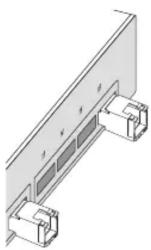
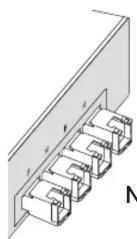
Not RecommendedRecommende
Scenario 2:
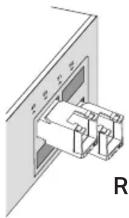
Recommended Not Recommended
Specifications
General Specifications
| Normal | TL-SM331T | TL-SM5310-T |
| Standards and Protocols | IEEE 802.3 | IEEE 802.3 |
| IEEE 802.3u | ||
| IEEE 802.3ab | ||
| SFF-8472 | IEEE 802.3bz | |
| IEEE 802.3an | ||
| SFF-8472 | ||
| SFF-8431 | ||
| MAC Interface | 1000BASE-X | XFI |
| Data Rate ^1 (max.) | 1.25 Gbps | 10.3125 Gbps |
| Power Consumption (max.) | 0.8 W 2.5 W | |
| Cable Distance | 1000BASE-T: UTP cat.5e or above (max. 100m) | 100BASE-TX: UTP cat.5 or above (max. 100m) |
| 1000BASE-T/2.5GBASE-T/5GBASE-T: UTP cat.5e or above (max. 100m) | ||
| 10GBASE-T: UTP cat.6a or above (max. 30m) | ||
| RX_LOS | / | / |
| TX_Fault | / | / |
| TX_Disable | Yes | Yes |
| Hot Swappable | Yes | Yes |
| LLF | / | / |
| LFP | / | / |
| DDM | / | Yes(temperature and voltage) |
Environmental and Physical Specifications
| Product Operating Temperature 0°C to 70°C (32°F to 158°F) |
| Storage Temperature -40°C to 85°C (-40°F to 185°F) |
| Operating Humidity 10% to 90% RH, Non-condensing |
| Storage Humidity 5% to 90% RH, Non-condensing |
Compatibility
| Normal | TL-SM331T | TL-SM5310-T |
| SupportedGigabit SFP Slot (SFP Slot) | ||
| Supported ^2 10G SFP+SFP+SFP ^3 Slot | ||
We recommend that you use only TP-Link modules on your TP-Link devices.
To check the compatible TP-Link devices of your module, please visit our website:
- TL-SM331T:
https://www.tp-link.com/tl-sm331t/product-list/
TL-SM5310-T:
- https://www.tp-link.com/tl-sm5310-t/product-list/


Note:
- TL-SM331T does not support the data rate of 10 Mbps or 100 Mbps.TL-SM5310-T does not support the data rate of 10 Mbps, but supports 100 Mbps / 1 Gbps / 2.5 Gbps / 5 Gbps / 10 Gbps.
- When a Gigabit RJ45 SFP module is inserted into a 10 Gbps SFP+ slot, extra configuration may be required.
- When the 10G RJ45 SFP+ module is inserted into a 10 Gbps SFP+ slot and the maximum rate of the peer connection port is 5 Gbps, 2.5 Gbps, 1 Gbps, or 100 Mbps, the flow control for the 10 Gbps SFP+ slot needs to be manually enabled.
Safety Information
- Keep the device away from water, fire, humidity or hot environments.
- Do not touch the device while it is operating.
- To prevent potential risks caused by heat, do not place your network device on non-heat-resistant paper, cloth, fabrics, plastics, or any other surface that doesn't provide space beneath your device for heat dissipation.
- The air flow around the device should be increased, or the overall ambient temperature should be lowered to keep the temperature of the modules within the recommended range.
- Do not attempt to disassemble, repair, or modify the device. If you need service, please contact us.
EU Declaration of Conformity
TP-Link hereby declares that the device is in compliance with the essential requirements and other relevant provisions of directives 2014/30/EU, 2014/35/EU, 2009/125/EC, 2011/65/EU and (EU)2015/863.
The original EU declaration of conformity may be found at https://www.tp-link.com/en/support/ce.
UK Declaration of Conformity
TP-Link hereby declares that the device is in compliance with the essential requirements and other relevant provisions of the Electromagnetic Compatibility Regulations 2016 and Electrical Equipment (Safety) Regulations 2016. The original UK Declaration of Conformity may be found at https://www.tp-link.com/support/ukca



Marke : TP-LINK
Modell : TL-SM331T
Kategorie : Nicht kategorisiert