
TL-FC1420 - Audio-/Video-Konverter TP-LINK - Kostenlose Bedienungsanleitung
Finden Sie kostenlos die Bedienungsanleitung des Geräts TL-FC1420 TP-LINK als PDF.


| Produkttyp | 14-Slot Rackmount-Chassis für Medienkonverter |
| Marke | TP-Link |
| Modell | TL-FC1420 |
| Abmessungen (B×T×H) | 482 × 309 × 86 mm |
| Eingangsspannung | 100–240 V ~, 50/60 Hz, 1.8 A (max) |
| Ausgangsspannung (gesamt) | 12 V, 6.25 A (max) |
| Ausgang pro Steckplatz (TL-FC1420) | 5 V, 0.6 A |
| Anzahl Steckplätze | 14 (Hot-Swap-fähig) |
| LED-Anzeigen | Power, Lüfter |
| Rackmontage | 19-Zoll (EIA-Standard) |
| Optionale redundante Stromversorgung | Ja (AC oder DC) |
| Überlastschutz | Ja |
| Betriebstemperatur | 0 °C bis 50 °C (32 °F bis 122 °F) |
| Lagertemperatur | −40 °C bis 70 °C (−40 °F bis 158 °F) |
| Betriebsluftfeuchtigkeit | 10 % bis 90 % RH (nicht kondensierend) |
| Lagerluftfeuchtigkeit | 5 % bis 90 % RH (nicht kondensierend) |
| Sicherheitshinweise | Fernhalten von Wasser, Feuer, Feuchtigkeit; nicht öffnen; nur gemäß Anleitung verwenden |
| Konformität | EU-Richtlinien 2014/30/EU, 2014/35/EU, 2009/125/EC, 2011/65/EU |
| Lieferumfang | Chassis, Netzkabel, 14 Halteplatten, Installationsanleitung |
Häufig gestellte Fragen - TL-FC1420 TP-LINK
Benutzerfragen zu TL-FC1420 TP-LINK
0 Frage zu diesem Gerät. Beantworten Sie die, die Sie kennen, oder stellen Sie Ihre eigene.
Eine neue Frage zu diesem Gerät stellen
Laden Sie die Anleitung für Ihr Audio-/Video-Konverter kostenlos im PDF-Format! Finden Sie Ihr Handbuch TL-FC1420 - TP-LINK und nehmen Sie Ihr elektronisches Gerät wieder in die Hand. Auf dieser Seite sind alle Dokumente veröffentlicht, die für die Verwendung Ihres Geräts notwendig sind. TL-FC1420 von der Marke TP-LINK.
BEDIENUNGSANLEITUNG TL-FC1420 TP-LINK
Installationsanleitung
14-Steckplatz-Rackmount-Gehäuse
Um Fragen zu stellen, Antworten zu finden und mit TP-Link-Benutzern oder Ingenieuren zu kommunizieren, besuchen Sie bitte https://community.tp-link.com, um der TP-Link-Community beizutreten. Für technischen Support und weitere Informationen besuchen Sie bitte https://www.tp-link.com/support oder scannen Sie einfach den QR-Code. Wenn Sie Vorschläge oder Anforderungen an die Produktanleitungen haben, senden Sie bitte eine E-Mail an techwriter@tp-link.com.cn.
© 2020 TP-Link 7106509020 REV3.2.1

Packungsinhalt: Gehäuse, Netzkabel, vierzehn Halteplatten, Installationsanleitung
Die Abbildungen dienen nur zur Veranschaulichung. Das tatsächliche Produkt kann im Aussehen von der Darstellung abweichen.
Installation
Schritt 1: Installieren Sie die Medienkonverter im Gehäuse
Hinweis:
Es wird empfohlen, TP-Link-Medienkonverter zu verwenden. Produkte anderer Hersteller können inkompatibel sein.
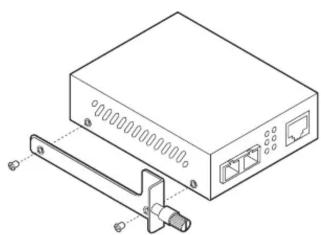
- Drehen Sie die beiden Schrauben am Medienkonverter heraus. Befestigen Sie dann die Halteplatte (im Lieferumfang des Gehäuses enthalten) mit den entfernten Schrauben am Medienkonverter.
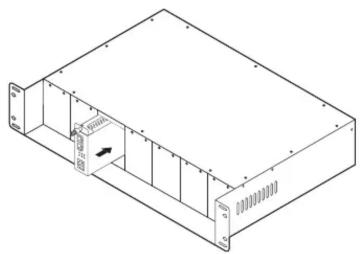
- Entfernen Sie die vordere Metallplatte des Steckplatzes am Gehäuse, schieben Sie dann den Medienkonverter vorsichtig in den Steckplatz und verriegeln Sie ihn fest mit dem Verriegelungsknopf.
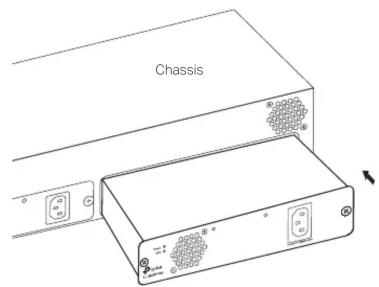
Schritt 2: (Optional) Installieren Sie das redundante Netzteilmodul
Entfernen Sie die Schutzkappe am Steckplatz des Netzteilmoduls des Gehäuses. Schieben Sie dann das Modul vorsichtig hinein und stecken Sie es fest in den Anschluss.
Schritt 3: Montieren Sie das Gehäuse am Rack
Hinweis:
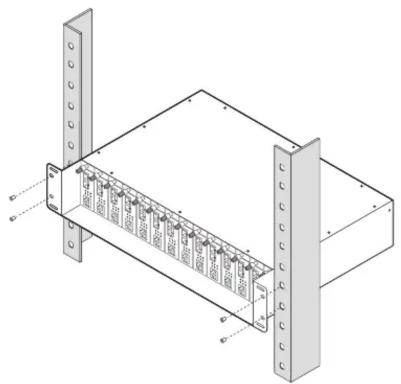
- Das Chassis unterstützt EIA-Standard-19-Zoll-Racks.
- Aus Sicherheitsgründen wird empfohlen, das Chassis wie unten gezeigt zu installieren.
Befestigen Sie das Chassis mit Schrauben durch die Löcher der Halterungen an jeder Seite am Rack.
Schritt 4: Einschalten
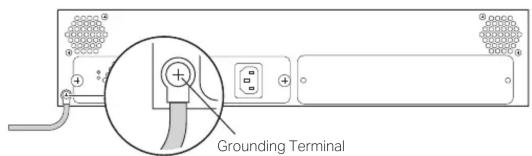
- Verbinden Sie den Erdungsanschluss auf der Rückseite des Chassis elektrisch mit dem Erdungskabel mit der Erde.
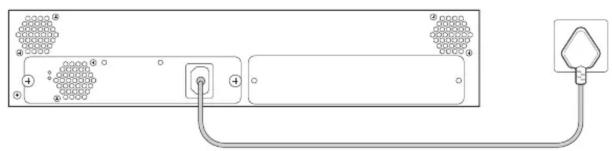
- Schließen Sie das Chassis mit dem mitgelieferten Netzkabel an die Steckdose an.
Panel-Layout
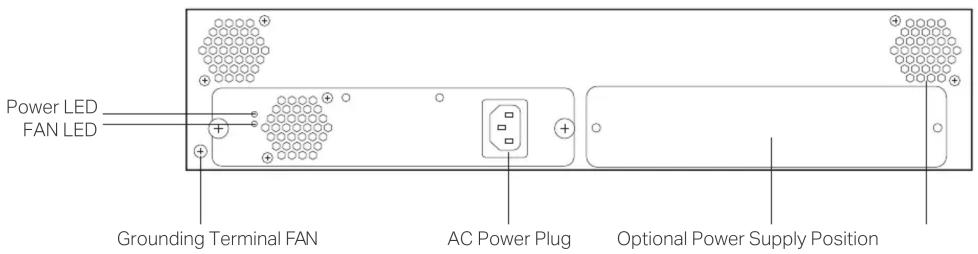
Hinweis: Eine optionale AC- oder DC-Stromversorgung ist für die Installation in der optionalen Stromversorgungsposition verfügbar.
LED-Erklärung

Strom
Ein: Strom eingeschaltet Aus: Strom ausgeschaltet

LÜFTER
Ein: Die Lüfter funktionieren ordnungsgemäß. Aus: Die Lüfter funktionieren nicht ordnungsgemäß.
Spezifikationen
Spezifikationen Umwelt- und physische Spezifikationen
| AC Power Supply | Input: 100–240 V ~ 50/60 Hz 1.8 A (Max)Output: 12 V, 6.25 A (Max)Ripple & Noise: < 180 mV (0 °C to 50 °C);< 250 mV (-10 °C to 0 °C) |
| DC Power Output per Slot | TL-MC1400: 9 V/0.6 ATL-FC1420: 5 V/0.6 A |
| Power, FANLED | |
| Dimensions(W×D×H) | 482 × 309 × 86 mm |
| YesHot-swappable | |
| YesOverload Protection |
| Operation Temperature | TL-MC1400: 0°C to 40°C (32°F to 104°F)TL-FC1420: 0°C to 50°C (32°F to 122°F) |
| Storage Temperature -40°C to 70°C (-40°F to 158°F) | |
| Operation Humidity 10% to 90% RH non-condensing | |
| Storage Humidity 5% to 90% RH non-condensing | |
Sicherheitsinformationen
- Halten Sie das Gerät von Wasser, Feuer, Feuchtigkeit oder heißen Umgebungen fern.
- Versuchen Sie nicht, das Gerät zu zerlegen, zu reparieren oder zu modifizieren. Wenn Sie Service benötigen, kontaktieren Sie uns bitte.
- Vermeiden Sie die Verwendung dieses Produkts während eines Gewitters. Es besteht ein entferntes Risiko eines elektrischen Schlags durch Blitzschlag.
- Das Etikett befindet sich auf der Unterseite des Produkts.
- Platzieren Sie das Gerät mit der Unterseite nach unten.
- Die Steckdose sollte in der Nähe des Geräts installiert und leicht zugänglich sein.
Bitte lesen und befolgen Sie die oben genannten Sicherheitsinformationen beim Betrieb des Geräts. Wir können nicht garantieren, dass keine Unfälle oder Schäden durch unsachgemäße Verwendung des Geräts auftreten. Bitte verwenden Sie dieses Produkt mit Vorsicht und auf eigenes Risiko.
EU-Konformitätserklärung
TP-Link erklärt hiermit, dass das Gerät die wesentlichen Anforderungen und andere relevante Bestimmungen der Richtlinien 2014/30/EU, 2014/35/EU, 2009/125/EG, 2011/65/EU und (EU)2015/863 erfüllt. Die ursprüngliche EU-Konformitätserklärung finden Sie unter https://www.tp-link.com/en/ce.


- INSTALLATIONSANLEITUNG
- INSTALLATION
- SCHRITT 1: INSTALLIEREN SIE DIE MEDIENKONVERTER IM GEHÄUSE
- SCHRITT 2: (OPTIONAL) INSTALLIEREN SIE DAS REDUNDANTE NETZTEILMODUL
- SCHRITT 3: MONTIEREN SIE DAS GEHÄUSE AM RACK
- SCHRITT 4: EINSCHALTEN
- PANEL-LAYOUT
- LED-ERKLÄRUNG
- STROM
- LÜFTER
- SPEZIFIKATIONEN
- SICHERHEITSINFORMATIONEN
- EU-KONFORMITÄTSERKLÄRUNG
Marke : TP-LINK
Modell : TL-FC1420
Kategorie : Audio-/Video-Konverter