
P1250B - Projektor ACER - Kostenlose Bedienungsanleitung
Finden Sie kostenlos die Bedienungsanleitung des Geräts P1250B ACER als PDF.


| Produkttyp | DLP-Projektor |
| Native Auflösung | XGA (1024 x 768) oder WXGA (1280 x 800) |
| Maximale Auflösung | UXGA (1600 x 1200), 1080p, WUXGA |
| Projektionssystem | DLP |
| Objektiv | F 2,59-2,87, f=16,88-21,88 mm, 1:1,3 manueller Zoom und Fokus |
| Bildschirmgröße (diagonal) | 60“ - 300“ (152 cm - 762 cm) |
| Gewicht | ca. 2,4 kg |
| Abmessungen (B x T x H) | 299,5 x 220 x 91,6 mm (ohne Stellfüße), 299,5 x 220 x 105,1 mm (mit Stellfüßen) |
| Stromversorgung | 100-240 V AC, 50/60 Hz |
| Leistungsaufnahme (Standard) | 260 W |
| Leistungsaufnahme (ECO) | 205 W |
| Leistungsaufnahme (Standby) | < 0,5 W |
| Trapezkorrektur | ±30° vertikal, ±20° horizontal, manuell und automatisch |
| Digitalzoom | 0,8x - 2x |
| Lautsprecher | 10 W (1x) |
| Anschlüsse | 2x VGA-Eingang, 1x VGA-Ausgang, 1x Composite Video, 1x HDMI/MHL, 1x HDMI, 1x USB Mini B, 1x USB A, 1x RJ45, 1x RS232, 2x 3,5 mm Audio (Ein-/Ausgang) |
| Betriebstemperatur | 0°C bis 40°C |
| Farben | 1,07 Milliarden Farben |
| Reinigung und Pflege | Linse mit weichem, trockenem Tuch reinigen. Keine aggressiven Reinigungsmittel. Für ausreichende Belüftung sorgen. |
| Sicherheit | Nicht in Wasser tauchen. Netzstecker bei längerem Nichtgebrauch ziehen. �--ffnung nur durch Fachpersonal. |
| Ersatzteile und Reparierbarkeit | Ersatzlampen über autorisierte Händler. Reparaturen nur durch Fachkräfte. |
Häufig gestellte Fragen - P1250B ACER
Benutzerfragen zu P1250B ACER
0 Frage zu diesem Gerät. Beantworten Sie die, die Sie kennen, oder stellen Sie Ihre eigene.
Eine neue Frage zu diesem Gerät stellen
Laden Sie die Anleitung für Ihr Projektor kostenlos im PDF-Format! Finden Sie Ihr Handbuch P1250B - ACER und nehmen Sie Ihr elektronisches Gerät wieder in die Hand. Auf dieser Seite sind alle Dokumente veröffentlicht, die für die Verwendung Ihres Geräts notwendig sind. P1250B von der Marke ACER.
BEDIENUNGSANLEITUNG P1250B ACER



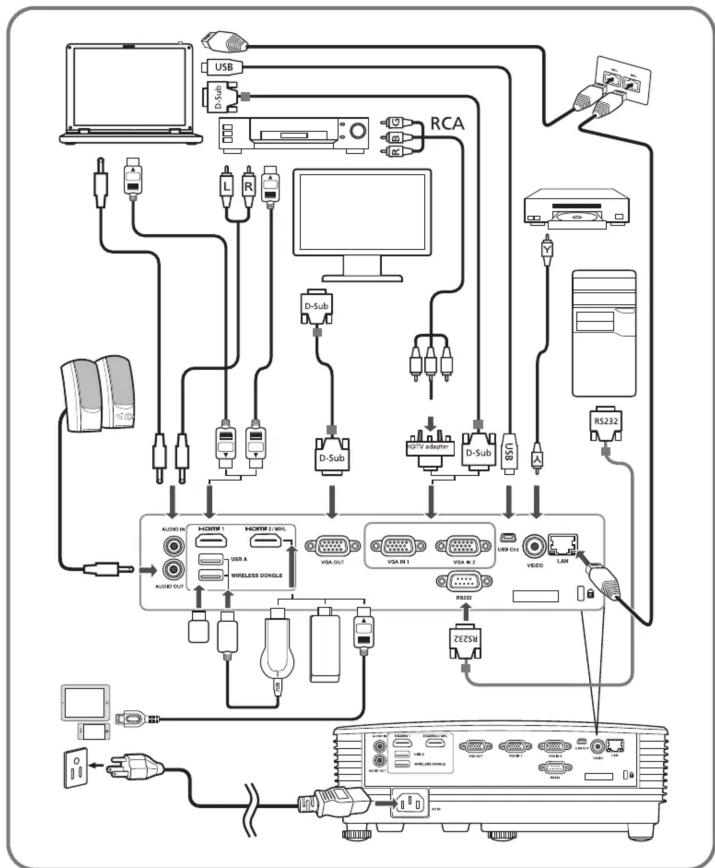
flowchart
graph TD
    A["Computer"] --> B["USB"]
    B --> C["D-Sub"]
    C --> D["PC"]
    D --> E["RCA"]
    E --> F["D-Sub"]
    F --> G["D-Sub"]
    G --> H["D-Sub"]
    H --> I["RS232"]
    I --> J["Video"]
    J --> K["USB CH"]
    K --> L["RS232"]
    L --> M["Audio OUT"]
    M --> N["HDMI 1"]
    M --> O["HDMI 2 / W/PL"]
    M --> P["USB A"]
    M --> Q["WIRELESS MODULE"]
    M --> R["USB OUT"]
    M --> S["USB A"]
    M --> T["USB CH"]
    M --> U["USB OUT"]
    M --> V["USB A"]
    M --> W["USB CH"]
    M --> X["USB OUT"]
    M --> Y["USB A"]
    M --> Z["USB CH"]
    style A fill:#f9f,stroke:#333
    style B fill:#ccf,stroke:#333
    style C fill:#cfc,stroke:#333
    style D fill:#fcc,stroke:#333
    style E fill:#cff,stroke:#333
    style F fill:#ffc,stroke:#333
    style G fill:#cfc,stroke:#333
    style H fill:#cfc,stroke:#333
    style I fill:#cfc,stroke:#333
    style J fill:#cfc,stroke:#333
    style K fill:#cfc,stroke:#333
    style L fill:#cfc,stroke:#333
    style M fill:#cfc,stroke:#333
    style N fill:#cfc,stroke:#333
    style O fill:#cfc,stroke:#333
    style P fill:#cfc,stroke:#333
    style Q fill:#cfc,stroke:#333
    style R fill:#cfc,stroke:#333
    style S fill:#cfc,stroke:#333
    style T fill:#cfc,stroke:#333
    style U fill:#cfc,stroke:#333
    style V fill:#cfc,stroke:#333
SPECIFICATIONS
| Projection system | DLP^TM |
| Resolution • XGA: | |
| Native: XGA (1024 x 768)Maximum: UXGA (1600 x 1200), 1080p (1920 x 1080),WUXGA (1920 x 1200) (supports reduce blanking only)• WXGA:Native: WXGA (1280 x 800)Maximum: UXGA (1600 x 1200), 1080p (1920 x 1080),WUXGA (1920 x 1200) (supports reduce blanking only) | |
| Computer compatibility | IBM PC and compatibles, Apple Macintosh, iMac and VESA standards: VGA, SVGA, XGA, SXGA, SXGA+, WXGA, WXGA+, WSXGA+, HD720, HD1080, WUXGA (VGA source)IBM PC and compatibles, Apple Macintosh, iMac and VESA standards: VGA, SVGA, XGA, SXGA, SXGA+, WXGA, WXGA+, HD720, HD1080, WUXGA (HDMI source) |
| Video compatibility | NTSC (3.58/4.43), PAL (M/N), PAL 60, SECAM, HDTV (720p, 1080i, 1080p),EDTV (480p, 576p), SDTV (480i, 576i) |
| Aspect ratio • XGA: Auto, 4:3 (native), 16:9• WXGA: Auto, 4:3, 16:9, Full, L.Box | |
| Displayable colors | 1.07 billion colors |
| Projection lens • XGA: | |
| F = 2.59 - 2.87, f = 16.88 mm - 21.88 mm, 1:1.3 Manual Zoom and Manual Focus• WXGA:F = 2.59 - 2.87, f = 16.88 mm - 21.88 mm, 1:1.3 Manual Zoom and Manual Focus | |
| Projection screen size (diagonal) | 60" - 300" (152 cm - 762 cm) |
| Projection distance with clear focus | • XGA:W: 1.85 m - 5.54 m (6.1' - 18.2')T: 2.40 m - 7.20 m (7.9' - 23.6')• WXGA:W: 1.57 m - 4.71 m (5.2' - 15.5')T: 2.04 m - 6.12 m (6.7' - 20.1') |
| Throw ratio • XGA: | 1.51 - 1.97 (65" + _ 3% @ 2 m)• WXGA: 1.21 - 1.57 (77" + _ 3% @ 2 m) |
| Horizontal scan rate | 15 - 100 KHz |
| Vertical refresh scan rate | 24 - 120 Hz |
| Keystone correction +/-30 Degrees (Vertical) / +/-20 Degrees (Horizontal), Manual & Auto | |
| Digital zoom | 0.8 - 2 X |
| Audio 10W speaker x 1 | |
| Weight Approximate | 2.4 kg (5.29 lbs.) |
| Dimensions(W x D x H) | 299.5 x 220 x 91.6 mm (11.8" x 8.7"x 3.6")299.5 x 220 x 105.1 mm (11.8" x 8.7"x 4.1") (with tilt adjusting wheels) | |
| Power supply | Universal AC input 100 - 240 V, input frequency 50/60 Hz | |
| Power consumption Standard mode: 260 W @100 VACECO mode: 205 W @ 100 VACStandby mode: < 0.5 W | ||
| Operating temperature | 0°C to 40°C / 32°F to 104°F | |
| I/O connectors | Power socket x 1USB (Type mini B) x 1VGA input x 2VGA output x 1RS232 x 13.5 mm audio jack input x 13.5 mm audio jack output x 1 | Composite video x 1HDMI/MHL x 1HDMI x 1USB A input x 1RJ45 LAN input x 1Wireless dongle input x 1 |
Note:
- The specifications listed above are subject to change without notice.
- For final specifications, please refer to Acer's published marketing specifications.
- Find manuals and other documents for your Acer product on the official Acer support website.

Scan to get user's manual.



Marke : ACER
Modell : P1250B
Kategorie : Projektor