
THOR TPS-6 - Soundbar Hifonics - Kostenlose Bedienungsanleitung
Finden Sie kostenlos die Bedienungsanleitung des Geräts THOR TPS-6 Hifonics als PDF.


| Produkttyp | Soundbar |
| Marke | Hifonics |
| Modell | THOR TPS-6 |
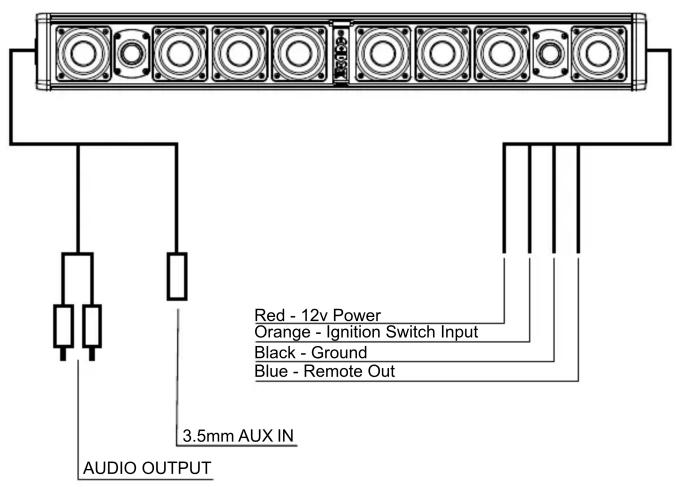
| Stromversorgung | 12V Gleichstrom (Rot: +12V, Schwarz: Masse, Orange: Zündung) |
| Bluetooth | Ja, Bluetooth-Kopplung |
| AUX-Eingang | 3,5 mm Klinke |
| Steuerung | Tastenfeld (Power, Lautstärke, Titel, Wiedergabe/Pause) |
| Kartenlicht | Integriert, schaltbar |
| Beleuchtung | Einstellbare Beleuchtungsmodi |
| Audioausgang | Lautsprecher integriert (Mehrkanal) |
| Abmessungen (ca.) | 1200 x 100 x 80 mm |
| Gewicht (ca.) | 2,5 kg |
| Material | Kunststoffgehäuse |
| Reinigung | Mit trockenem, weichem Tuch abwischen |
| Sicherheitshinweise | Von beweglichen Teilen und heißen Oberflächen fernhalten |
| Kompatible Geräte | Smartphones, Tablets, MP3-Player mit Bluetooth oder AUX |
| Hersteller | Hifonics / Maxxsonics USA |
Häufig gestellte Fragen - THOR TPS-6 Hifonics
Benutzerfragen zu THOR TPS-6 Hifonics
0 Frage zu diesem Gerät. Beantworten Sie die, die Sie kennen, oder stellen Sie Ihre eigene.
Eine neue Frage zu diesem Gerät stellen
Laden Sie die Anleitung für Ihr Soundbar kostenlos im PDF-Format! Finden Sie Ihr Handbuch THOR TPS-6 - Hifonics und nehmen Sie Ihr elektronisches Gerät wieder in die Hand. Auf dieser Seite sind alle Dokumente veröffentlicht, die für die Verwendung Ihres Geräts notwendig sind. THOR TPS-6 von der Marke Hifonics.
BEDIENUNGSANLEITUNG THOR TPS-6 Hifonics
Congratulations on your choice of Hifonics THOR Sound Bars. This “Quick Start” Installation guide is meant to help you complete a basic installation. For more detailed information about the product, please visit our website at Hifonics.com
Wiring
The wiring and connections should be secure and away from any moving parts or extremely hot surfaces.
Controls
1 Power - Will turn the unit on or off / Five second hold/ quick push will switch inputs.
2 Track BACKWARDS - Press to restart the current track or to back up to previous tracks.
③ Volume UP - Each press will increase the volume.
4 Volume DOWN - Each press will decrease the volume.
5 Track FORWARD - Press to advance to the next track.
6 Map Light / Illumination - Turn on Map Light, cycle through illumination settings.
7 PLAY / PAUSE - Press once to pause. Press again to play.

Bluetooth Device Pairing
The pairing process can vary based on your particular device. Refer to the operating instructions of your device. Below is the general process to connect.
During unit power up, the blue LED on the bottom of the control panel will blink indicating that it is in Bluetooth search mode.
During this process “THOR” should show up in your list of Bluetooth devices when the search has connected with your device. When the connection is made the blue LED will change to a solid color.
Once a device has been paired, the unit will reconnect at power up to that device when in range.
To connect to a different device, the first device will need to be disconnected.
When a phone call is received, the audio signal will mute but not disconnect.
To switch to 3.5mm press the power button quickly.
To switch back to BT press the power button again quickly.

HIFONICS
Operators Guide

natural_image
Pure electrical circuit lines without any symbols
natural_image
Front view of a multi-tiered electronic device with five circular speakers and a central connector (no text or symbols visible)THOR TPS6/TPS10 Soundbars
Visit Hifonics.com
Hifonics products are designed and engineered in the USA by
MAXXSONICS®
www.maxxsonics.com
HF THOR SBAR QSG 01 - rev1

Marke : Hifonics
Modell : THOR TPS-6
Kategorie : Soundbar