
New Orleans 900 DSP - Empfänger BLAUPUNKT - Kostenlose Bedienungsanleitung
Finden Sie kostenlos die Bedienungsanleitung des Geräts New Orleans 900 DSP BLAUPUNKT als PDF.


| Produkttyp | Autoradio-Empfänger |
| Modell | New Orleans 900 DSP |
| Marke | Blaupunkt |
| Bildschirmgröße | 9 Zoll (229 x 130 x 45 mm) |
| Bildschirmauflösung | 1280 x 720 Pixel |
| Gewicht | 0,82 kg |
| Stromversorgung | 12 V DC (10 V - 16 V), max. 10 A |
| Maximale Ausgangsleistung | 4 x 50 W |
| FM-Radiofrequenzbereich | 87,5 - 108 MHz, 18 Senderspeicher |
| AM-Radiofrequenzbereich | 522 - 1620 kHz, 12 Senderspeicher |
| Audiofrequenzgang | 32 Hz - 16 kHz |
| Equalizer | Parametrisch, 48 Bänder |
| Bluetooth-Funktionen | HFP, PBAP, A2DP, AVRCP, HSP, SPP |
| USB-Anschluss | USB 2.0, unterstützt MP3, FLAC, AVI, MP4, JPG |
| Sonstige Eingänge | Aux-in, GPS-Antenne (optional), 4G-Antenne (optional) |
| Smartphone-Integration | PhoneLink für iOS (1-Wege) und Android (2-Wege) |
| Betriebstemperatur | -20 °C bis 60 °C |
| Reinigung | Nur trockenes oder leicht feuchtes Tuch verwenden |
| Sicherheitshinweise | Nicht selbst zerlegen; Reparaturen nur durch Fachpersonal |
| Lieferumfang | Bedienungsanleitung, Anschlusskabel, AVN-Kabelbaum, externes Mikrofon, GPS-Antenne, 4G-Antenne |
| Garantie | Keine Garantie bei unsachgemäßer Verwendung; USA/Kanada: 'as-is' |
Häufig gestellte Fragen - New Orleans 900 DSP BLAUPUNKT
Benutzerfragen zu New Orleans 900 DSP BLAUPUNKT
0 Frage zu diesem Gerät. Beantworten Sie die, die Sie kennen, oder stellen Sie Ihre eigene.
Eine neue Frage zu diesem Gerät stellen
Laden Sie die Anleitung für Ihr Empfänger kostenlos im PDF-Format! Finden Sie Ihr Handbuch New Orleans 900 DSP - BLAUPUNKT und nehmen Sie Ihr elektronisches Gerät wieder in die Hand. Auf dieser Seite sind alle Dokumente veröffentlicht, die für die Verwendung Ihres Geräts notwendig sind. New Orleans 900 DSP von der Marke BLAUPUNKT.
BEDIENUNGSANLEITUNG New Orleans 900 DSP BLAUPUNKT

BLAUPUNKT

VELOCITY POWER
MULTIMEDIA-NAVIGATION
NEW ORLEANS 900 DSP
NEW ORLEANS 1000 DSP
NEW ORLEANS 900 DSP 9.0"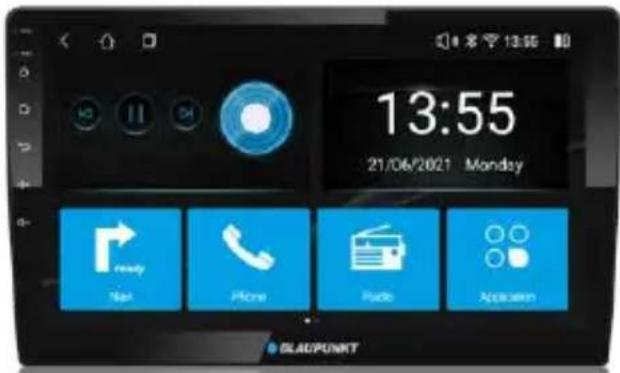
NEW ORLEANS 1000 DSP 10.1"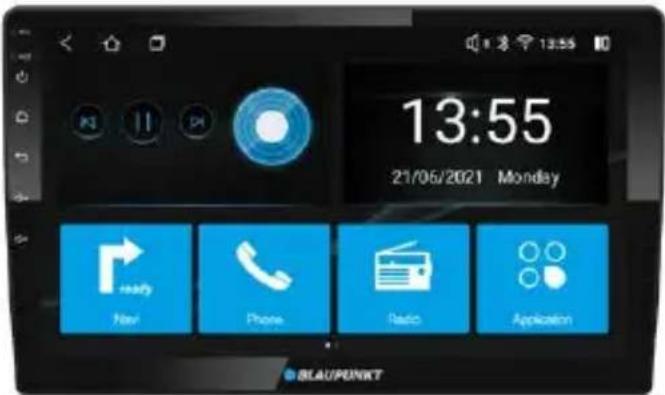
BETTOMATIALL
Viel Spaß.
WARNUNGEN
Sicherheitshinweise
Dieses Autoradio wurde gemäß den etablierten Sicherheitsrichtlinien hergestellt. Dennoch können Gefahren auftreten, wenn die Sicherheitshinweise in dieser Anleitung nicht beachtet werden. Diese Anleitung soll den Benutzer mit den wichtigen Funktionen des Autoradios vertraut machen. Lesen Sie diese vor der Verwendung des Autoradios sorgfältig durch. Bewahren Sie diese Anleitung an einem leicht zugänglichen Ort auf. Beachten Sie außerdem die Anweisungen der Geräte, die in Verbindung mit diesem Autoradio verwendet werden.
Straßenverkehrssicherheit
Beachten Sie stets die folgenden Hinweise zur Verkehrssicherheit: - Das Autoradio muss so verwendet werden, dass die Sicherheit des Benutzers beim Führen des Fahrzeugs nicht beeinträchtigt wird. Es wird empfohlen, an einer geeigneten Stelle anzuhalten, wenn Sie das Autoradio bedienen. Während der Fahrt wird empfohlen, keine Anwendungen zu nutzen, die ablenken können, z. B. Streaming von Medien usw.
- Radios mit Navigation: Es wird empfohlen, vorgeschlagene Fahrrouten nur dann zu befolgen, wenn sie nicht gegen Verkehrsregeln verstoßen. Lokale Verkehrszeichen und -regeln haben immer Vorrang vor den vorgeschlagenen Routen.
Der Benutzer wird gebeten, die Lautstärke des Autoradios auf einem moderaten Niveau zu halten, um die Ohren zu schützen und die Fähigkeit zu erhöhen, Notfallwarnsignale (z. B. Polizei- und Krankenwagensirenen) zu hören. Erhöhen Sie die Lautstärke des Autoradios nicht, während es stummgeschaltet ist, da es nicht hörbar ist. Die Lautstärke des Autoradios kann zu laut sein, wenn die Stummschaltung aufgehoben wird.
Allgemeine Sicherheitshinweise:
Beachten Sie Folgendes zum Schutz vor Verletzungen: Dieses Autoradio ist für den Einbau und Betrieb in einem Fahrzeug mit 12-V-Bordnetz vorgesehen, daher muss das Radiogerät in einem DIN-Schacht installiert werden. Beachten Sie die Ausgangsleistungsgrenzen des Autoradios. Zerlegen oder modifizieren Sie das Autoradio nicht; Installation und Reparaturen sollten, falls erforderlich, von einem Fachmann durchgeführt werden. Wir haften nicht für Schäden oder Verluste, die durch unbefugte Demontage oder Modifikation des Produkts verursacht werden.
- Die Kernkomponenten dieses Autoradios können beschädigt werden, wenn das Auto über einen längeren Zeitraum auf holprigen Straßen gefahren wird oder wenn nicht standardmäßige oder stark beschädigte Discs abgespielt werden.
- Betreiben Sie das Autoradio nicht unter extremen Temperaturbedingungen (extrem hohe oder extrem niedrige Temperaturen); stellen Sie sicher, dass die Temperatur im Fahrzeug zwischen -20 °C und 70 °C liegt, bevor Sie das Autoradio an die Stromversorgung anschließen.
- Bei Anomalien beachten Sie bitte den Abschnitt "Fehlerbehebung". Wenn das Problem nicht behoben werden kann, drücken Sie bitte die Reset-Taste, um die Werkseinstellungen wiederherzustellen. Andernfalls wenden Sie sich bitte direkt an den jeweiligen Installateur/Händler.
- Da SD-/USB-Dateiformate, Codecs, Bitraten, Auflösungen und andere Parameter auf dem Markt nicht alle gleich sind, gibt es keine Garantie, dass dieses Autoradio alle Mediendateiformate abspielen kann.
- Verschiedene Autos können unterschiedliche Konfigurationen haben. Es ist normal, dass einige CAN-Bus-Funktionen nicht aktiviert werden können, weil sie vom Fahrzeug des Benutzers oder von diesem Autoradio nicht unterstützt werden.
- Lösungsmittel, Reinigungs- und Scheuermittel sowie Armaturenbrettsprays und Kunststoffpflegemittel können Materialien enthalten, die die Oberfläche und den Bildschirm des Autoradios beschädigen können. Verwenden Sie nur ein trockenes oder leicht angefeuchtetes Tuch, um die Oberfläche und den Bildschirm des Autoradios zu reinigen.
Dieses Handbuch kann von Zeit zu Zeit ohne Vorankündigung aktualisiert werden.
Haftungsausschluss
In keinem Fall haftet Blaupunkt für direkte, indirekte, punitive, zufällige, besondere Folgeschäden an Eigentum oder Leben, die sich aus der Nutzung oder dem Missbrauch unserer Produkte ergeben oder damit zusammenhängen.
USA & KANADA: Dieses Produkt ist nicht für den Verkauf in den Vereinigten Staaten und Kanada bestimmt. Wenn es in den USA oder Kanada gekauft wird, wird dieses Produkt auf einer "wie besehen"-Basis gekauft. In den USA oder Kanada wird keine ausdrückliche oder stillschweigende Garantie gewährt.
VORSICHTSMASSNAHMEN
Entsorgungshinweise
Entsorgen Sie Ihr Altgerät nicht über den Hausmüll! Nutzen Sie die Rückgabe- und Sammelsysteme, die für die Entsorgung des Altgeräts zur Verfügung stehen.
Radios mit abnehmbarem Bedienteil - Schäden am Bedienteil
• Lassen Sie das Bedienteil niemals fallen. - Transportieren Sie das Bedienteil so, dass es vor Stößen geschützt ist und die Kontakte nicht verschmutzen können. - Setzen Sie das Bedienteil nicht direktem Sonnenlicht oder einer anderen Wärmequelle aus. • Vermeiden Sie direkten Hautkontakt
Lieferumfang
- Bedienungsanleitung
- Anschlusskabel AVN-Kabelbaum • 360 AVM (optional) • USB-Kabel
- Externes Mikrofon GPS-Antenne 4G-Antenne
TASTENFUNKTIONEN
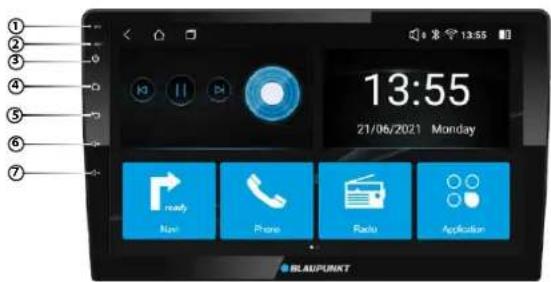
Funktionen
- Mikrofon
- RESET-Taste
- Ein-/Ausschalter
• Gedrückt halten zum Ein- oder Ausschalten - Drücken zum Stummschalten oder Aufheben der Stummschaltung
- Startseite
- Zurück-Taste
- Lautstärke erhöhen
- Lautstärke verringern
BETRIEB
STARTSEITE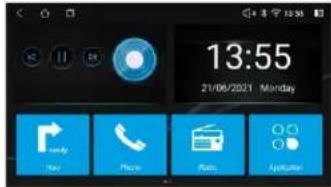
BT - Vor dem Koppeln Stellen Sie sicher, dass Ihr Mobiltelefon die Bluetooth-Funktion unterstützt. Verschiedene Mobiltelefone haben unterschiedliche Sendeleistungen. Für die beste Verbindung wird ein Abstand von 3 m ohne Hindernisse empfohlen. - Koppeln - Aktivieren Sie Bluetooth auf Ihrem Mobiltelefon. (Weitere Informationen zur Bedienung von Bluetooth finden Sie in der Bedienungsanleitung Ihres Mobiltelefons.) "NEW ORLEANS 900 DSP" oder "NEW ORLEANS 1000 DSP" sollte in Ihrer Liste der verfügbaren Bluetooth-Geräte erscheinen. - Wählen Sie "NEW ORLEANS 900 DSP" oder "NEW ORLEANS 1000 DSP" und geben Sie bei Bedarf das Passwort "0000" ein. Bestätigen Sie die Kopplungsanfrage, wenn die entsprechende Meldung erscheint. *Nach erfolgreicher Kopplung erscheint das Symbol in weiß auf der Startseite. PHONELINK Android - Unterstützt iOS & Android • Vor dem Koppeln PhoneLink iOS: Unterstützt 1-Wege-Steuerung - Gehen Sie in den Einstellungen Ihres Mobiltelefons zu den persönlichen Hotspot-Einstellungen und aktivieren Sie den Hotspot. Android: Unterstützt 2-Wege-Steuerung - Gehen Sie in den Einstellungen Ihres Mobiltelefons zu den Bluetooth-Einstellungen und verbinden Sie sich mit dem Autoradio (für die Audioausgabe) und aktivieren Sie USB-Debugging (weitere Informationen zur Bedienung von USB-Debugging und Bluetooth finden Sie in der Bedienungsanleitung Ihres Mobiltelefons). - Koppeln iOS: Unterstützt 1-Wege-Steuerung - Verbinden Sie das Gerät über den iOS-Hotspot mit Ihrem Smartphone, aktivieren Sie die Bildschirmfreigabe auf dem Smartphone und projizieren Sie den Bildschirm des Smartphones, wenn die Kopplung erfolgreich ist. Android: Unterstützt 2-Wege-Steuerung - Verbinden Sie das Gerät über ein USB-Kabel mit Ihrem Smartphone. Das Gerät beginnt, den Bildschirm des Smartphones zu projizieren, wenn die Kopplung erfolgreich ist.
ALLGEMEIN
| Power supply (12V) | 10 V ~ 16 V DC |
| Current consumption | max. 10 mA |
| Max. power output | 4 x 50W |
| Dimension (WxLxH) | 229 x 130 x 45mm (9") |
| 252 x 147 x 47mm (10.1") | |
| Weight | 0.82kg (9") |
| 0.93kg (10.1") | |
| Operation temperature | -20°C ~ 60°C |
| Screen size | 9 inch/ 10.1 inch |
| Resolution | 1280 x 720 pixel |
| Aspect ratio | 4:3 / 16:9 |
FM-Stereoradio
| Frequency range | 87.5 - 108MHz |
| Preset memory stations | 18 |
AM/MW-Radio
| Frequency range | 522 - 1620kHz |
| Preset memory stations | 12 |
Audio-Spezifikation
| Frequency response | 32Hz-16kHz |
| Parametric Equalizer | 48-Band |
Eingang
| USB 2.0 | Audio: MP3, FLAC |
| Video: AVI, MP4 | |
| Image: JPG |
Aux-In
BT
| Hands-Free Calling : Accept/ Hang Up/ Reject Call....HFP | |
| Phone Book Access.... | PBAP |
| Audio Streaming.... | A2DP |
| Streaming Audio/ Video Control.... | AVRCP |
| Support for Bluetooth Headset.... | HSP |
| Serial Port Profile.... | SPP |
FEHLERBEHEBUNG
Sollte eines der folgenden Probleme auftreten, ziehen Sie bitte die Fehlerbehebung für mögliche Lösungen zu Rate. Wenn das Problem weiterhin besteht, wenden Sie sich an einen autorisierten Blaupunkt-Händler.
| Problems | Possible Causes | Solutions |
| Unable to start up | The car key is not inserted into the ignition; ignition is off | Insert the car key and turn on the ignition. |
| Power Cable is not inserted into the main body. | Insert the power cable. | |
| Burnt power fuse . | Replace it with a new fuse. | |
| Drained car battery. | Charge or replace the car battery. | |
| No sound | Audio cables are not properly connected to the unit. | Ensure proper connection of the audio cables. |
| Mute setting is on. | Unmute the volume. | |
| Low volume. | Adjust the volume. | |
| No sound from front, rear, left & right speakers due to Fade-Balance settings. | Select Equalizer from Home Page to adjust setting. | |
| No rear view reverse image | The rear camera is not appropriately connected with power supply. | Examine the camera's power supply connectivity. |
| Camera's signal line not plugged in. | Insert the camera's signal line into the interface port of this unit. | |
| Unable to search radio stations | Radio's antenna is not well inserted. | Ensure radio antenna is properly installed. |
SCHALTPLAN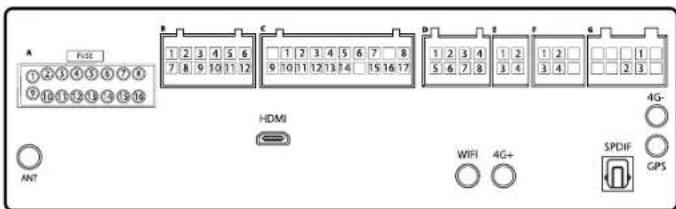
| NO. | WIRE | A | |
| 1 | PURPLE/ BLACK | RR- | |
| 2 | PURPLE | RR+ | |
| 3 | GREEN | RL+ | |
| 4 | GREEN/ BLACK | RL- | |
| 5 | - | ANT.PWR | |
| 6 | - | SW2 | |
| 7 | - | ILL | |
| 8 | YELLOW | B+ | |
| 9 | WHITE | FL+ | |
| 10 | WHITE/ BLACK | FL- | |
| 11 | GREY | FR+ | |
| 12 | GREY/ BLACK | FR- | |
| 13 | - | SW1 | |
| 14 | - | BACK | |
| 15 | RED | ACC | |
| 16 | BLACK | GND | |
| NO. | WIRE | B |
| 1 | - | LEFT_DET |
| 2 | BLACK | GND |
| 3 | BLACK | GND |
| 4 | BLACK | GND |
| 5 | BLACK | GND |
| 6 | RED | 360_VDD |
| 7 | - | RIGHT_DET |
| 8 | YELLOW | MIN_FRONT |
| 9 | YELLOW | MIN_RIGHT |
| 10 | YELLOW | MIN_REAR |
| 11 | YELLOW | MIN_LEFT |
| 12 | RED | 360_VDD |
| NO. | WIRE | C |
| 1 | RED | AUX_R |
| 2 | WHITE | AUX_L |
| 3 | - | SIM1_DA |
| 4 | - | SIM1_DET |
| 5 | - | SIM1_CLK |
| 6 | - | SIM1_RST |
| 7 | RED | VDD_SIM1 |
| 8 | BLACK | GND |
| 9 | BLACK | GND |
| 10 | WHITE | RCA-FL-OUT |
| 11 | RED | RCA-FR-OUT |
| 12 | BLACK | GND |
| 13 | BLACK | GND |
| 14 | BLACK | GND |
| 15 | - | SUB_OUT |
| 16 | YELLOW | AUX_CVBS |
| 17 | - | MIC1_P |
| NO. | WIRE | D |
| 1 | BLACK | GND |
| 2 | WHITE | RCA-RL-OUT |
| 3 | - | SPDIF_OUT1 |
| 4 | - | UART5_RXD |
| 5 | - | RCA-CENTER-OUT |
| 6 | RED | RCA-RR-OUT |
| 7 | - | SPDIF_OUT2 |
| 8 | - | UART5_TXD |
| NO. | WIRE | E |
| 1 | RED | USB_PWR |
| 2 | BLACK | GND |
| 3 | GREEN | USB_DPO |
| 4 | WHITE | USB_DNO |
| NO. | WIRE | F |
| 1 | RED | USB_PWR |
| 2 | BLACK | GND |
| 3 | GREEN | USB_DP2 |
| 4 | WHITE | USB_DN2 |
| NO. | WIRE | G |
| 1 | RED | SW_B+ |
| 2 | YELLOW | BACK_CAMERA |
| 3 | BLACK | GND |

Designed and engineered by Blaupunkt Competence Centre
NEW ORLEANS 900 DSP
1 104 21 034 20 01
NEW ORLEANS 900 DSP
1 104 21 035 20 01

- BLAUPUNKT
- VELOCITY POWER
- NEW ORLEANS 900 DSP
- WARNUNGEN
- SICHERHEITSHINWEISE
- STRASSENVERKEHRSSICHERHEIT
- ALLGEMEINE SICHERHEITSHINWEISE
- HAFTUNGSAUSSCHLUSS
- VORSICHTSMASSNAHMEN
- ENTSORGUNGSHINWEISE
- RADIOS MIT ABNEHMBAREM BEDIENTEIL - SCHÄDEN AM BEDIENTEIL
- LIEFERUMFANG
- TASTENFUNKTIONEN
- FUNKTIONEN
- BETRIEB
- FEHLERBEHEBUNG
Marke : BLAUPUNKT
Modell : New Orleans 900 DSP
Kategorie : Empfänger