UD-18+ - Schalter ConnectPro - Kostenlose Bedienungsanleitung
Finden Sie kostenlos die Bedienungsanleitung des Geräts UD-18+ ConnectPro als PDF.


Benutzerfragen zu UD-18+ ConnectPro
0 Frage zu diesem Gerät. Beantworten Sie die, die Sie kennen, oder stellen Sie Ihre eigene.
Eine neue Frage zu diesem Gerät stellen
Laden Sie die Anleitung für Ihr Schalter kostenlos im PDF-Format! Finden Sie Ihr Handbuch UD-18+ - ConnectPro und nehmen Sie Ihr elektronisches Gerät wieder in die Hand. Auf dieser Seite sind alle Dokumente veröffentlicht, die für die Verwendung Ihres Geräts notwendig sind. UD-18+ von der Marke ConnectPro.
BEDIENUNGSANLEITUNG UD-18+ ConnectPro
text_image
CONNECTPRO™ UD-12+ / UD-14+ / UD-16+ / UD-18+ / UD-112+ Master-IT USB Flex+ - Advanced USB DYI KVM switch w/ DDM & multi-hotkey Installation Guide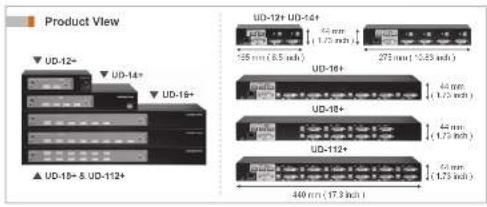
text_image
Product View UD-12+ UD-14+ UD-18+ ▲ UD-10+ & UD-112+ UD-19+ UD-14+ 35 mm (6.5 m/s) 275 mm (10.85 m/s) 44 mm 44 mm 44 mm 440 mm (17.3 m/s)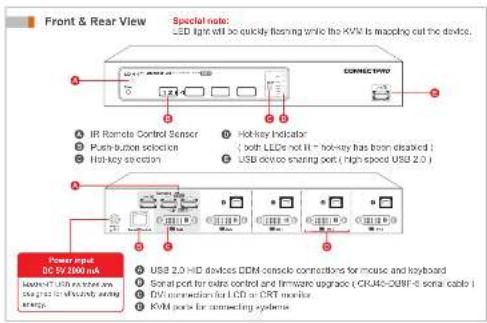
text_image
Front & Rear View Special note: LED light will be quickly flashing while the KVAP is mapping out the device. Connect P/W IP Remote Control Sensor Push-button selection Hot-key socket Hot Key Indicator ( soft LEDs not H - hot-key has been disabled ) USB device sharing port ( high speed USD 2.0 ) Power input DC 5V 2000 nA Select LED to screen or wire SN4-16-21 in which are energy. USB 2.0 HD devices DDR console connections for mouse and keyboard Signal port for extra control and firmware upgrade ( CRJ46-CU9F-6 serial cable ) DVI connections for LCD or DXT monitors KVM ports for connecting system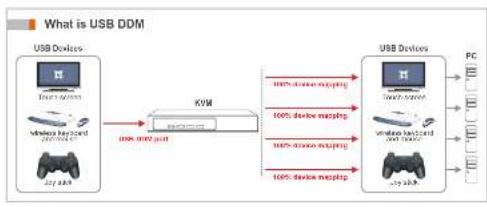
flowchart
graph LR
    A["USB Devices"] -->|USB DDM| B["KVM"]
    B -->|100% device mapping| C["USB Devices"]
    C -->|100% device mapping| B
    B -->|100% device mapping| A
    style A fill:#f9f,stroke:#333
    style C fill:#f9f,stroke:#333
text_image
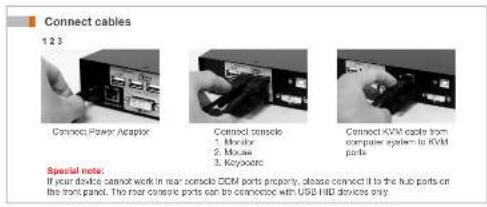
Connect cables 1 2 3 Connect Power Adapter Connect console 1. Module 2. Mouse 3. Keypoints Connect KVM cable from computer system to KVM parts Special note. If your device cannot work in rear console CCM ports properly, please connect it to the hub parts on the track panel. The rear console parts can be concurrency with USB HLD devices only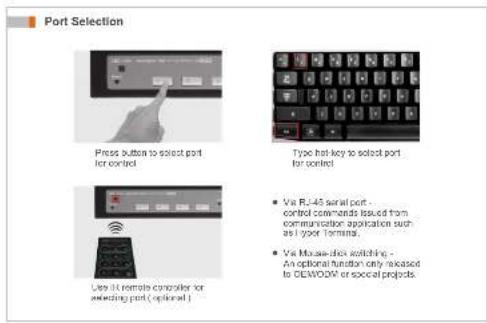
text_image
Port Selection Press button to select port for control Type hot-key to select port for control • Via RL-45 serial port - control commands issued from communication applications such as 1 your format. • Via Mouse-tick switching - An optional function only released to CEWOW or special projects Use it remote computer for selecting port (optional)
text_image
Hot-Key Command 1. Hot-key selection • Via front panel Hot-key select button • Via Hot-key control • Default Hot-key = Ctrl Hotkey + Hot-key + H + New Hot-key 2. Hot-key and functions Hotkey + Hot-key + 1 [ - 6 ] → Switch to Port M1 ( > Port M2 ) Hotkey + Hot-key + A [ - F ] → Switch to Port M3 ( > Port M4 ) Hotkey + Hot-key + Z → Turn switching confirmation buzzer sound call • Default -buzzer sound off Hotkey + Hot-key + B N → Turn on Auto Channel Scan • 8 = last setting interval, default > seconds • N ( 1 ~ 5 ) = 5.8, 15, 20, 30 seconds • Turn off Auto Channel Scan by pressing any key 3. Assign USB port command Hotkey + Hot-key + H + 1 + P + { 1 - 3 - A - F } → Assign USB A1 for a certain port use only Hotkey + Hot-key + H + 0 + P + 0 → Default USB port setting | Sync with RMT port direction |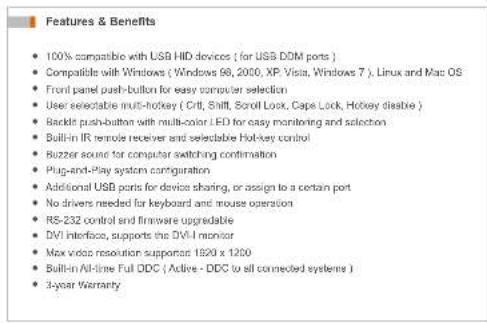
text_image
Features & Benefits • 100% compatible with USB HID devices (for USB DOM ports) • Compatible with Windows (Windows 98, 2000, XP Visia, Windows 7), Linux and Mac OS • Front panel push-button for easy computer selection • User selectable multi-hockey (Crift, Shift, Scroll Lock, Cape Lock, Hickey disable) • Backdot push-button with multi-color LED for easy monitoring and selection • Built-in IR remote receiver and selectable Hot-key control • Buzzer acute for computer switching confirmation • Plug-and-Play system configuration • Additional USB ports for device sharing, or assign to a certain port • No drivers needed for keyboard and mouse operation • RS-232 control and firmware upgradable • DVI interface, supports the DVI-I monitor • Max video resolution supportor 1520 x 1200 • Built-in All-line Full ODC (Active - DDC to all connected systems) • 3-year WarrantySpecification
| UD-12+ | UD-14+ | UD-16+ | UD-18+ | UD-112+ | ||
| Functional | ||||||
| Computer port number | 2 | 4 | 6 | 8 | 12 | |
| Panel button control | 2 | 4 | 6 | 8 | 12 | |
| Button LED color indication | PC On-Line - Green , Selected - Red , Both - Orange | |||||
| IR remote control | Yes ( dual-in receptor, controller optional ) | |||||
| Hot plug-and-play | Yes | |||||
| Hot key control | Yes | |||||
| Auto scan | Yes ( Hot key ) | |||||
| Selectable scan Interval | 5.8, 15, 20, 30 sec (Hot key ) | |||||
| Boop sound | On / Off ( Hot key selectable ) | |||||
| Cable length | 5M ( 15ft ) at Console 5M ( 15ft ) at PC | |||||
| Resolution | Max 1920 x 1200 , DOC1 / DDC28 | |||||
| System connectors | Keyboard & Mouse | USB 3 x 2 | USB 3 x 4 U | USB 3x126 | USB 3 x 8 | |
| Monitor | DVI 24+5 Female x 2 | DVI 24+5 Female x 4 | DVI 24+5 Female x 5 | DVI 24+5 Female x 8 | DVI 24+5 Female x 12 | |
| Console connectors | Keyboard & Mouse | USB A x 2 ( DDM Technology ) | ||||
| Monitor | DVI 24+5 Female x 1 | |||||
| Total USB device sharing port | USB A ( USB 2.0 ) x 4 | USB A ( USB 2.0 ) x 3 | ||||
| Mechanical | ||||||
| Height | 44 mm( 1.73 inch ) | 44 mm( 1.73 inch ) | 44 mm( 1.73 inch ) | 44 mm( 1.73 inch ) | 44 mm( 1.73 inch ) | |
| Width | 165 mm( 8.5 inch ) | 275 mm( 10.83 inch ) | 440 mm( 17.3 inch ) | 440 mm( 17.3 inch ) | 440 mm( 17.3 inch ) | |
| Depth | 76 mm( 2.96 inch ) | 131 mm( 5.16 inch ) | 131 mm( 5.16 inch ) | 131 mm( 5.16 inch ) | 131 mm( 5.16 inch ) | |
| Weight | 030 g( 1.17 lb ) | 1150 g( 2.54 lb ) | 1620 g( 3.57 lb ) | 1850 g( 4.08 lb ) | 1860 g( 4.1 lb ) | |
| Power | ||||||
| Operating voltage | DC 5V ( 2000 mA ) | |||||
| Power frequency | 50-60 Hz | |||||
| Power consumption | 6 W | 7.5 W | 9 W 9.5 W/8.5 W | |||
| Certification | ||||||
| FCC, CE | ||||||
Ordering Information
| Model | Description |
| UD-12+ | 2-port USB DVI KVM Switch with DOM |
| UD-10+ | 4-port USB DVI KVM Switch with DOM |
| UD-16+ | 6-port USB DVI KVM Switch with DOM |
| UD-18+ | 8-port USB DVI KVM Switch with DOM |
| UD-112+ | 12-port USB DVI KVM Switch with DOM |
| Optional part / accessory | |
| Cables | |
| SOU-06 | 6-ft DVH & USB KVM cable |
| SOU-10 | 10-ft DVH & USB KVM cable |
| SOU-15 | 16-ft DVH & USB KVM cable, special length or KVM cables are available ( 26 ft, 50 ft ) |
| CR-46 DB9F-5 | 5-ft serial/control and firmware upgrade cable ( RJ-45 to DB6 female ) |
| Power Adaptor | |
| PAUS DC5V2A | Power supply DC 6V ( 2000 mA ) - AC 110220V for USA |
| * Any other interface is available upon request. | |
| IR Remote Controller | |
| RC-01 | IR remote controller for 2 / 4 port KVM Switch |
| RC-04 | IR remote controller for 6 / 8 / 12 / 15-port KVM Switch |
| Rock Mounting Kit | |
| RMK-1901 | 19" rack mounting bracket set for 4-port KVM Switch |
| RMK-1502 | 19" rack mounting bracket set for 6 / 8 / 12 / 16-port KVM Switch |
| RBK-19 | 19" rack mounting cable support bar |
Limited Warranty For ConnectPRO KVM Switches
ConnectPRO offers a 3-year limited warranty for all of its KVM Switches and KVM Switch modules. ConnectPRO stands behind its products assured that you're purchasing a proven technology with quality and reliability.

CONNECTPRO
ConnectPRO - USA, Taiwan
www.connectpro.com
Corporate Office
20625 Paseo Del Prado Walnut, CA 91789. USA
Tel +1 909 444 9288 Fax +1 909 444 9289
Design Center and Operational Hubs
13F, No 120, Sec. 1, Sarmin Rd,
New Taipei City 220, Taiwan, R.O.C
Tel +896-2-8964-2700 Fax +896-2-8964-2977
IG-UD1246812PLUS_V1-2