NKD-50 - Kopfhörer Bem - Kostenlose Bedienungsanleitung
Finden Sie kostenlos die Bedienungsanleitung des Geräts NKD-50 Bem als PDF.


Benutzerfragen zu NKD-50 Bem
0 Frage zu diesem Gerät. Beantworten Sie die, die Sie kennen, oder stellen Sie Ihre eigene.
Eine neue Frage zu diesem Gerät stellen
Laden Sie die Anleitung für Ihr Kopfhörer kostenlos im PDF-Format! Finden Sie Ihr Handbuch NKD-50 - Bem und nehmen Sie Ihr elektronisches Gerät wieder in die Hand. Auf dieser Seite sind alle Dokumente veröffentlicht, die für die Verwendung Ihres Geräts notwendig sind. NKD-50 von der Marke Bem.
BEDIENUNGSANLEITUNG NKD-50 Bem
bēm®
WIRELESS
NKD-50
WIRELESS STEREO EARBUDS
USER GUIDE
4 Product Overview
6 Charging Earbuds
7 Pairing
10 Basic Operation
11 Technical Specs
15 Maintenance & Troubleshooting
13 FCC Statement
15 Safety Instructions
17 Warranty
Product Overview
Thanks for purchasing the bēm 100% wireless earbuds! NKD 50 Bluetooth® Stereo Earbuds give you complete wireless freedom, eliminating cables of any sort by the use of advanced Bluetooth® 4.1 technology. NKD earbuds will last up to 4 hours, have speaker phone function and come with accessories.
Please keep this User Guide in a convenient location for future reference and visit bemwireless.com for additional information.
Package Contents
NKD Bluetooth Stereo Earbuds x 2
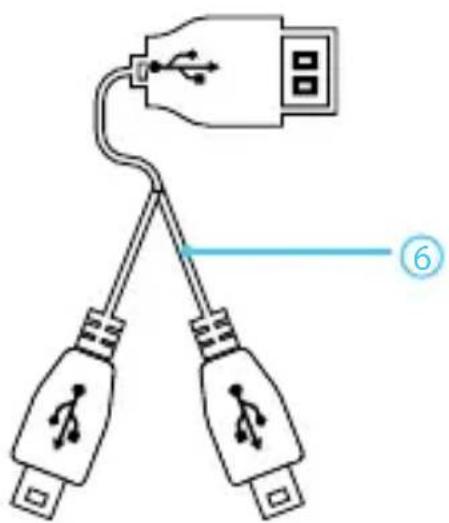
Dual Micro Charging Cable x 1
Carrying Case x 1
Silicone Earbuds x 6
Earbud Tether x 1
User Guide x 1
If any items are missing or damaged, please call bem wireless customer support at 1-855-839-8616 or email support@bemwireless.com to arrange for replacements.
Meet your New NKD 50 Earbuds
Before operating your NKD 50 Earbuds, take a moment to look it over and familiarize yourself with the device.
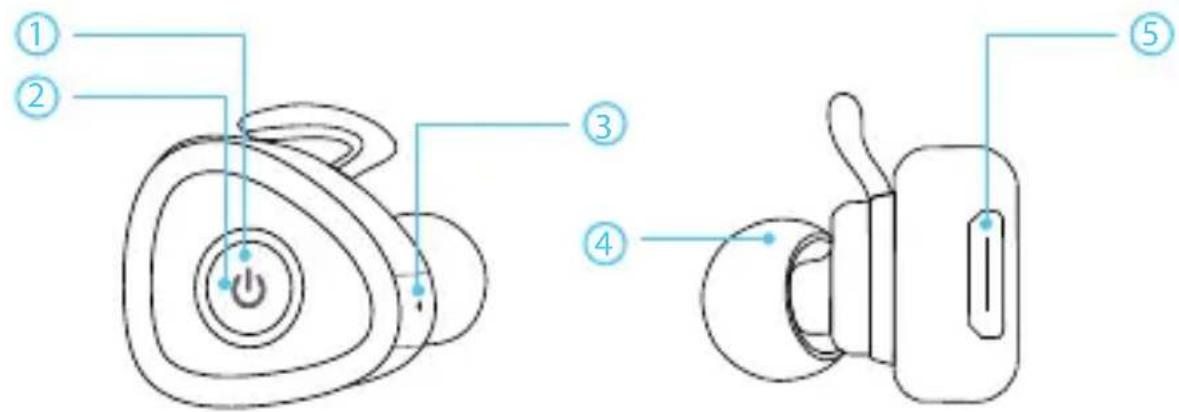
text_image
Diagram of a smart speaker with labeled parts including power button, ear, and switch| Button |
| 1. LED indicator |
| 2. Multi-function Button (MFB) |
| 3. Built in Microphone |
| 4. Earbud |
| 5. Micro USB Charging port |
| 6. Dual Micro Charging Cable |
natural_image
Diagram of two connected audio plugs with a USB port, showing wiring and plug symbols (no text labels)Charging your earbuds
flowchart
graph TD
    A["Device 1"] -->|USB cable to USB cable cross | B["Device 2"]
    B -->|USB cable to USB cable cross | C["Device 3"]
    C -->|USB cable to USB cable cross | D["Device 4"]
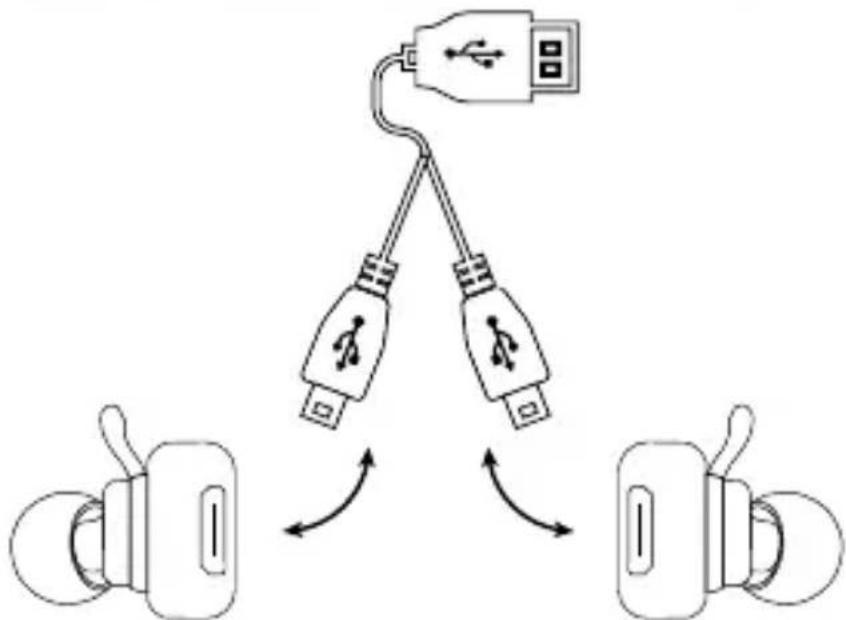
Connect the micro USB ends of the dual charging cable to the Micro USB charging port and the standard USB end to a PC USB port or into an AC plug charger.
The LED indicator will be red while charging. It will turn blue after approximately 2 hours. The battery is now fully charged.
If the LED indicator flashes three times every 20 seconds, it means the battery is running low. Once this happens, you have approximately 5-10 minutes of use before the earbuds power off automatically.
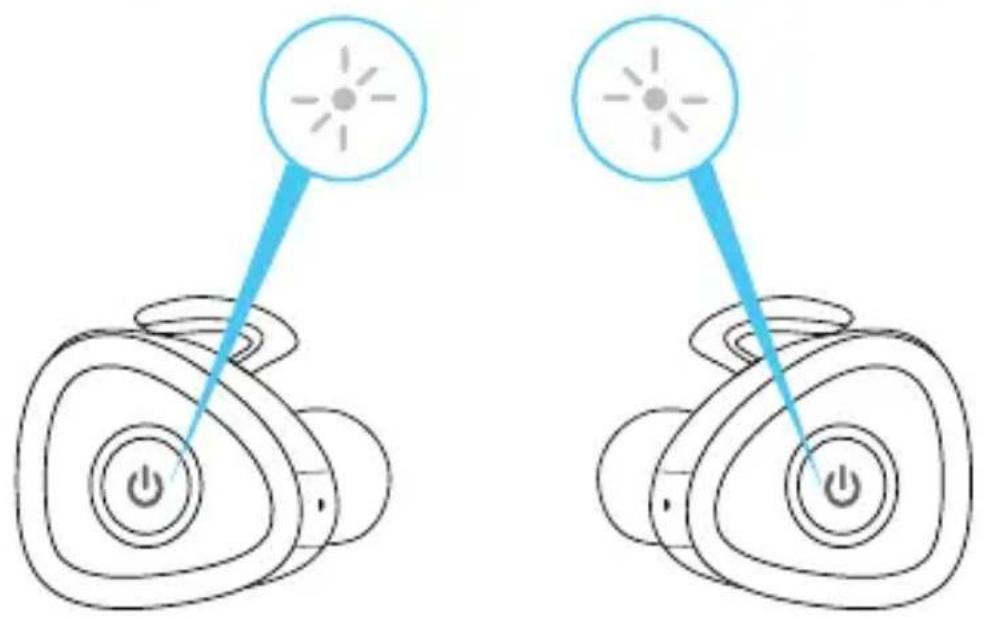
Pairing your earbuds together
natural_image
Two identical illustrations of a device with power button and light source, connected by blue lines (no text or symbols)- Start by pushing the MFB button on both earbuds at the same time for up to 10 seconds. You will hear an audible cue saying 'Power On' and both earbuds will be flashing red and blue. Release the MFB when this happens.
- Once connected, you will hear a single beep on the left earbud and a single beep on the right earbud. Another audible cue will be heard stating 'Connected' and then 'Left Channel' and 'Right Channel' confirmation checks will be performed.
Pairing your earbuds with a bluetooth device
text_image
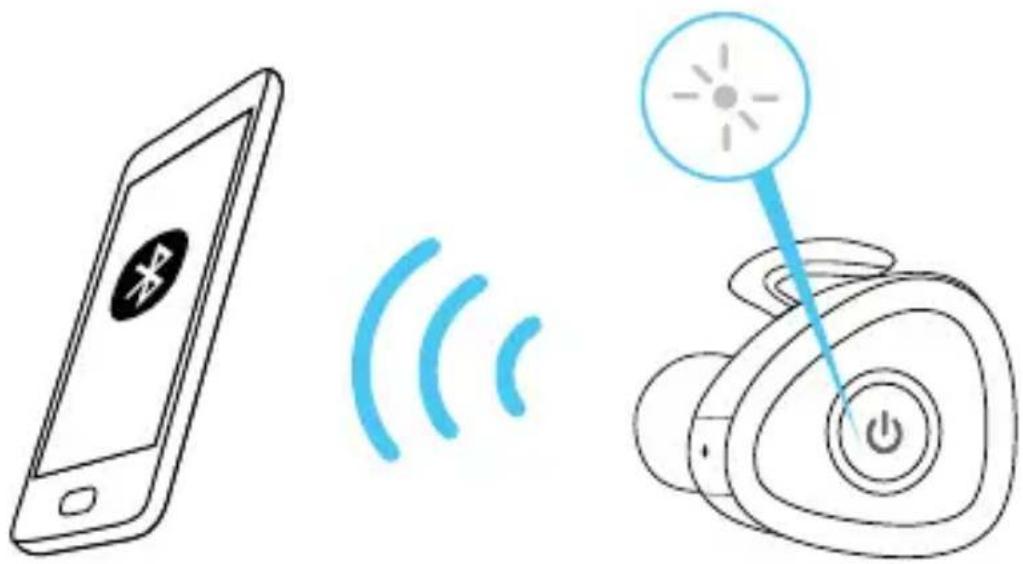
Diagram showing a smartphone connected to wireless signals and a smart speaker with power button, illustrating wireless communication and wireless control.- Once the earbuds have paired, you will hear a single beep in the left channel and an audible cue stating the earbud is "Pairing".
- Only the left earbud will be flashing red and blue during this time.
- Activate the Bluetooth feature on your device, and search for Bluetooth devices (check your device's manual if you're unsure how to do this).
- Select 'HC-S0362' from list of found devices.
Pairing your earbuds with a bluetooth device (cont)
- If asked for a passcode, enter '0000' or '1234' and the earphones will then be connected to your device.
- After pairing successfully, the LED indicator will flash blue and you will hear a double beep and an audible cue "Pairing successful"; you can then answer the phone or listen to your music.
Pairing new devices
- Make sure the Bluetooth is turned off on any previously paired devices.
- Follow the "Pairing" your earbuds with a Bluetooth device' instructions from step 1.
Note: The next time the earbuds are switched on, they will automatically search for and attempt to connect to the last paired device.
Basic Operation
| Function Button | Button |
| Power On Press & hold MFB 4 seconds | PMFB 4 seconds |
| Power Off Press & hold MFB 4 seconds | PMFB 4 seconds |
| Answer/ End call Press the MFB once | the MFB once |
| Redial Last Call Press the MFB twice quickly | the MFB twice quickly |
| Music Play/Pause Press the MFB once | the MFB once |
| State Red Light Blue | Red Light | Blue Light |
| Power On | √ | |
| Power Off | √ | |
| Charging | √ | |
| Charging Full | √ | |
| Low Battery | √ | |
| Pairing Mode | √ | √ |
| Incoming/Outgoing Call | √ |
Technical Specifications
| Product name NKD 50 | NKD 50 |
| Model Number EN70150 | EN70150 |
| Bluetooth Version V4.1 | V4.1 |
| Bluetooth Range Up to 30 ft | Up to 30 ft |
| Play time Up to 4 hours | Up to 4 hours |
| Charge time Up to 2 hours | Up to 2 hours |
| Standby time Up to 125 hours | Up to 125 hours |
| Charge port Micro USB | Micro USB |
| Battery Type 3.7 V, 50 mAh | 3.7 V, 50 mAh |
Note: If you do not actively use the earphones for longer than 3 minutes and they are not connected to a bluetooth device, they will automatically power off to conserve power
Maintenance
Turn off your earbuds before placing them in your pocket or bag. If the MFB is accidentally depressed, your mobile phone may place an unintended call.
Do not use liquid to clean the earbuds or case.
Do not use abrasive cleaners to clean the earbuds Dispose of the battery and the earbuds according to local regulations. Do not dispose of them as household waste.
Troubleshooting
If you cannot connect the earbuds to your device, please try the following:
- Ensure that the earbuds are charged, switched on, paired with and connected to your device
- Check the earbuds are within 30 feet of your device and that there are no obstructions (such as walls or other electronic devices) between the earphones and the device.
- Only one device may be paired to these earphones at a time, so please ensure there are no conflicting Bluetooth devices trying to connect to the earphones
FCC Statement
- This device complies with Part 15 of the FCC Rules.
Operation is subject to the following two conditions:
(1) This device may not cause harmful interference.
(2) This device must accept any interference received, including
interference that may cause undesired operation.

text_image
FEDERAL COMMUNICATIONS COMMISSION USA NOISSIMO
- Changes or modifications not expressly approved by the party responsible for compliance could void the user's authority to operate the equipment.
NOTE: This equipment has been tested and found to comply with the limits for a Class B digital device, pursuant to Part 15 of the FCC Rules. These limits are designed to provide reasonable protection against harmful interference in a residential installation.
This equipment generates uses and can radiate radio frequency energy and, if not installed and used in accordance with the instructions, may cause harmful interference to radio communications.
FCC Statement (cont)
However, there is no guarantee that interference will not occur in a particular installation. If this equipment does cause harmful interference to radio or television reception, which can be determined by turning the equipment off and on, the user is encouraged to try to correct the interference by one or more of the following measures:
Reorient or relocate the receiving antenna.
Increase the separation between the equipment and receiver.
Connect the equipment into an outlet on a circuit different from that to which the receiver is connected.
Consult the dealer or an experienced radio/TV technician for help.
FCC Radiation Exposure Statement
This equipment complies with FCC radiation exposure limits set forth for an uncontrolled environment. This equipment should be installed and operated with minimum distance 20cm between the radiator & your body.
Safety Instructions
This product is specially designed based on full attention to safety; in order to encourage accident-free operation, please follow the guidelines listed below:
- Check and observe local laws regarding the use of a mobile phone and earbuds while driving. It is your responsibility to drive safely. Consider pulling of the road before making or answering a call
- Never leave your earbud above any airbag deployment area inside your car as serious injury may result if an airbag deploys
- Never allow children to play with the earbuds - small parts may become a choking hazard
- Observe all signs and displays that require an electrical device or RF radio product to be switched off in designated areas
- Do not drop, unpack, open, hit, bend, puncture, burn or otherwise attempt to damage/modify the earbuds
- Avoid using the earbuds in the rain or near basins or sinks where parts may come in contact with water
- Set the volume properly to prevent damage to the unit and personal injury
• Do not attempt to modify the earbuds
Safety Instructions (cont)
- Do not use the earbuds outdoors in the rain or in stormy conditions under way
- Do not clean the earbuds while they are being charged
• Do not attempt to force open housings - Only charge the earbuds built in battery in accordance with the instructions described in this user guide.
- Do not leave the earbuds in direct sunlight for an extended period of time
- Do not leave the earbuds near open flames
- Do not dispose of the earbuds in a fire, as it will result in explosion.
natural_image
Simple line drawing of a trash bin with crossed lines indicating no waste or discharge (no text or symbols)Correct Disposal of this Product
This marking indicates that this product should not be disposed of with other household wastes throughout the EU. To prevent possible harm to the environment or human health from uncontrolled waste disposal, recycle it responsibly to promote the sustainable reuse of material resources.
To return your used device, please use the return and collection systems or contact the retailer where the product was purchased. Retailers can take this product for environmentally safe recycling.
90-Day Limited Warranty
bēm wireless warranties this product against defects in materials and/or workmanship under normal use for a period of NINETY (90) DAYS from the date of purchase by the original purchaser ("Warranty Period"). If a defect arises and a valid claim is received within the Warranty Period, at its option bēm wireless will either 1) Repair the defect at no charge, using new or refurbished replacement parts or 2) Replace the product with a new product that is at least functionally equivalent to the original product. A replacement product or part, including a user-installable part installed in accordance with instructions provided by bēm wireless, assumes the remaining warranty of the original product. When a product or part is exchanged, any replacement item becomes your property and the replaced item becomes bēm wireless's property.
Obtaining Service: To obtain warranty service, call bēm wireless at 1-855-839-8616 or e-mail support@bemwireless.com. Please be prepared to describe the product that needs service and the nature of the problem. A purchase receipt will be required. All repairs and
replacements must be authorized in advance. Service options, parts availability and response times will vary. You are responsible for delivery including the cost of delivery of the product or any parts to the authorized service center for replacements, per our instructions.
Limits and Exclusions: Coverage under this Limited Warranty is limited to the United States of America, including the District of Columbia and the U.S. Territories of Guam, Puerto Rico and U.S. Virgin Islands. This warranty gives you specific legal rights and you may also have other rights which vary from state to state. This Limited Warranty applies only to products manufactured by or for bēm wireless that can be identified by the bēm wireless trademark, trade name, or logo affixed to them or its packaging. The Limited Warranty does not apply to any non-bēm wireless products.
bēm wireless 2654 Corporate Parkway Algonquin, IL 60102 USA www.bemwireless.com ©2016 bēm wireless All Rights Reserved. Made in China
Stay in Touch!
For questions, comments, or to purchase additional bēm wireless products, go to: bemwireless.com.
You can also follow us at:

facebook.com/bemwireless

youtube.com/bemwireless
bemwireless.com
bēm wireless | 2654 Corporate Parkway Algonquin IL 60102
© 2016 bém wireless