
Aruba RAP-108 - Zugangspunkt HP - Kostenlose Bedienungsanleitung
Finden Sie kostenlos die Bedienungsanleitung des Geräts Aruba RAP-108 HP als PDF.


| Produkttyp | WLAN-Zugangspunkt |
| Marke | HP |
| Modell | Aruba RAP-108 |
| Abmessungen (B x T x H) | 200 x 200 x 45 mm |
| Gewicht | 400 g |
| Stromversorgung | PoE (Power over Ethernet) 802.3af oder externes Netzteil (12 V DC) |
| Leistungsaufnahme | max. 12,95 W (PoE) |
| WLAN-Standards | IEEE 802.11a/b/g/n/ac |
| Frequenzbänder | 2,4 GHz und 5 GHz (Dualband) |
| Maximale Datenrate | bis zu 867 Mbit/s (5 GHz) + 300 Mbit/s (2,4 GHz) |
| Antennen | 2 integrierte Rundstrahlantennen (2x2 MIMO) |
| Schnittstellen | 1x 10/100/1000 Ethernet (RJ-45 PoE), 1x USB 2.0 (optional) |
| Verwaltung | Webinterface, CLI, SNMP, Aruba Central (Cloud) |
| Sicherheit | WPA2, WPA3, 802.1X, MAC-Filter, VLAN-Unterstützung |
| Montage | Wand- oder Deckenmontage (Haltebügel im Lieferumfang) |
| Betriebstemperatur | 0 °C bis +40 °C |
| Luftfeuchtigkeit | 5% bis 95% (nicht kondensierend) |
| Zertifizierungen | CE, FCC, RoHS |
| Lieferumfang | Zugangspunkt, Montagehalterung, Schnellstartanleitung, Netzteil (optional) |
Häufig gestellte Fragen - Aruba RAP-108 HP
Benutzerfragen zu Aruba RAP-108 HP
0 Frage zu diesem Gerät. Beantworten Sie die, die Sie kennen, oder stellen Sie Ihre eigene.
Eine neue Frage zu diesem Gerät stellen
Laden Sie die Anleitung für Ihr Zugangspunkt kostenlos im PDF-Format! Finden Sie Ihr Handbuch Aruba RAP-108 - HP und nehmen Sie Ihr elektronisches Gerät wieder in die Hand. Auf dieser Seite sind alle Dokumente veröffentlicht, die für die Verwendung Ihres Geräts notwendig sind. Aruba RAP-108 von der Marke HP.
BEDIENUNGSANLEITUNG Aruba RAP-108 HP
Aruba RAP-108 und RAP-109 Remote Access Point
Installationsanleitung
Die Aruba RAP-108 und RAP-109 sind Dual-Radio-, Dual-Band-Remote-Access-Points, die den IEEE-802.11n-Standard für leistungsstarke WLANs unterstützen. Diese Access Points nutzen MIMO-Technologie (Multiple-in, Multiple-out) und andere High-Throughput-Modus-Techniken, um leistungsstarke 802.11n-2,4-GHz- und 5-GHz-Funktionalität zu bieten und gleichzeitig bestehende 802.11a/b/g-WLAN-Dienste zu unterstützen.
Der RAP-108/RAP-109 wird mit Aruba Instant Software ausgeliefert. Daher arbeitet der RAP-108/RAP-109 ab Werk als Virtual Controller (VC) oder als Instant AP. Der RAP-108/RAP-109 kann jedoch in einen Remote AP (RAP) umgewandelt werden. Informationen zur Umwandlung von IAP zu RAP finden Sie unter RAP-Umwandlung.

Der RAP-108/RAP-109 erfordert Aruba Instant 3.2 oder ArubaOS 6.2.
Der Aruba RAP-108/RAP-109 Remote Access Point bietet die folgenden Funktionen:
- Funk-Transceiver
- Protokollunabhängige Netzwerkfunktionalität • IEEE 802.11a/b/g/n-Betrieb als drahtloser Access Point • IEEE 802.11a/b/g/n-Betrieb als drahtloser Air Monitor • Kompatibilität mit IEEE 802.3af und 802.3at
Lieferumfang
• RAP-108 oder RAP-109 Remote Access Point • RAP-108/RAP-109-Montageständer • Installationsanleitung

Informieren Sie Ihren Lieferanten, wenn Teile fehlerhaft, fehlend oder beschädigt sind. Bewahren Sie nach Möglichkeit den Karton einschließlich der Originalverpackungsmaterialien auf. Verwenden Sie diese Materialien, um das Gerät bei Bedarf für die Rücksendung an den Lieferanten neu zu verpacken.
Hardware-Übersicht des RAP-108/RAP-109
Abbildung 1 Anschlüsse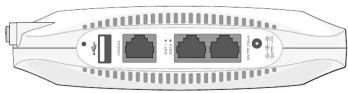
Reset-Taste
Die Reset-Taste kann verwendet werden, um den AP auf die Werkseinstellungen zurückzusetzen. So setzen Sie den AP zurück: 1. Schalten Sie den AP aus. 2. Halten Sie die Reset-Taste mit einem kleinen, schmalen Gegenstand wie einer Büroklammer gedrückt. 3. Schalten Sie den AP ein, ohne die Reset-Taste loszulassen. Die Strom-LED blinkt innerhalb von 5 Sekunden.
- Lassen Sie die Reset-Taste los.
Die Power-LED blinkt innerhalb von 15 Sekunden erneut und zeigt damit an, dass der Reset abgeschlossen ist. Der AP bootet nun mit den Werkseinstellungen weiter.
USB-Schnittstelle
Der RAP-108/RAP-109 ist mit einer USB-Schnittstelle für die Verbindung mit Mobilfunkmodems ausgestattet.

Die USB-Schnittstelle ist deaktiviert, wenn der RAP-108/RAP-109 über 802.3af PoE mit Strom versorgt wird.
Konsolenport
Verwenden Sie den Konsolenport, um ein Terminal für die direkte lokale Verwaltung anzuschließen.
ENET 0
Für die primäre Netzwerkanbindung ist der RAP-108/RAP-109 mit einem 10/100/1000BASE-T (RJ-45) Auto-Sensing, MDI/MDX Gigabit-Ethernet-Port ausgestattet. Dieser Port unterstützt IEEE 802.3af Power over Ethernet (PoE) und akzeptiert 48 VDC als standarddefiniertes Powered Device (PD) von einer Power Sourcing Equipment
(PSE) wie einem PoE-Midspan-Injektor oder einer Netzwerkinfrastruktur, die PoE unterstützt.
ENET 1
Für die sekundäre Netzwerkanbindung ist der RAP-108/RAP-109 mit einem 10/100BASE-T (RJ-45) Auto-Sensing, MDI/MDX Fast-Ethernet-Port ausgestattet.
Gleichstromanschluss
Wenn PoE nicht verfügbar ist, kann ein optionales Aruba AP AC-DC-Adapterkit (separat erhältlich) verwendet werden, um den RAP-108/RAP-109 mit Strom zu versorgen.
Externe Antennenanschlüsse (nur RAP-108)
Der RAP-108 ist mit zwei RP-SMA-Außenantennenanschlüssen ausgestattet und erfordert die Verwendung von zwei Dualband-Antennen. Diese Anschlüsse sind mit ANT0 und ANT1 gekennzeichnet und entsprechen den Funkketten 0 und 1.
Um eine genaue Einstellung und Meldung der HF-Leistung in der Software sowie die Einhaltung etwaiger behördlicher Beschränkungen zu gewährleisten, muss bei der Bereitstellung des RAP-108 der korrekte Gewinn der verwendeten Antennen (angepasst an eventuelle zusätzliche Kabeldämpfung, falls zutreffend) in der Software eingegeben werden. Dafür werden zwei Antennengewinnwerte benötigt, einer für jedes unterstützte Band (2,4 GHz und 5 GHz). Diese Werte können dem Antennendatenblatt oder den Spezifikationen entnommen werden. Der Antennengewinn für den RAP-109 ist bereits fest auf die korrekten Werte eingestellt, sodass auf dieser Plattform keine weiteren Maßnahmen erforderlich sind.
Abbildung 2 LEDs
LEDs
• PWR: Zeigt an, ob der RAP-108/RAP-109 eingeschaltet ist - ENET0 und ENET1: Zeigt den Status der Ethernet-Ports des RAP-108/RAP-109 an • 5 GHz: Zeigt den Status des 802.11a/n-Funks an • 2,4 GHz: Zeigt den Status des 802.11b/g/n-Funks an
Tabelle 1 Bedeutung der LEDs der RAP-108/RAP-109-Serie LED Farbe/Status Bedeutung
| PWR Off No power to AP | ||
| Red steady System initializing | ||
| Green flashing Device booting, not ready | ||
| Green steady Device ready | ||
| ENET0 | Off No | link |
| Amber 10/100 Mbps link | ||
| Green 1000 Mbps link | ||
| Flashing Ethernet link activity | ||
| ENET1 Off No link | ||
| Green 10/100 Mbps link | ||
| Flashing Ethernet link activity | ||
| 5 GHz Off 5 GHz radio is disabled | ||
| Amber steady | 5 GHz radio enabled in WLAN mode | |
| Green steady 5 GHz radio enabled in 11n mode | ||
| Green flashing 5 GHz Air Monitor mode | ||
Tabelle 1 Bedeutung der LEDs der RAP-108/RAP-109-Serie (Fortsetzung) LED Farbe/Status Bedeutung
| 2.4 GHz | Off 2.4 GHz radio disabled | |
| Amber steady | 2.4 GHz radio enabled in WLAN mode | |
| Green steady 2.4 GHz radio enabled in 11n mode | ||
| Green flashing 2.4 GHz Air Monitor mode | ||
Installation des AP
Tischmontage
Der RAP-10S/RAP-109 wird mit einem Ständer für die Verwendung auf ebenen (d. h. Tisch-)Oberflächen geliefert. Platzieren Sie den RAP-10S/RAP-109 im Ständer (siehe Abbildung 3) und stellen Sie den Ständer auf eine ebene, waagerechte Fläche.
So befestigen Sie den RAP am Ständer:
- Richten Sie den Mittelstift des Ständers an der Aussparung am Gerät aus.
- Richten Sie die Montagepfosten auf der Rückseite des AP an den entsprechenden Öffnungen am Ständer aus.
- Drehen Sie den AP im Uhrzeigersinn, bis er einrastet.
Abbildung 3 Standfuß-Installation
Anschließen der erforderlichen Kabel
Der RAP-108/RAP-109 muss an ein Netzwerkgerät mit Internetzugang angeschlossen werden, z. B. an einen Router oder ein Modem. So schließen Sie die Installation des RAP-108/RAP-109 ab:
- Schließen Sie ein Ende des mitgelieferten RJ-45-Kabels an den Port E0 des RAP-108/RAP-109 an.
- Schließen Sie das andere Ende des RJ-45-Kabels an einen freien RJ-45-Port Ihres Modems oder Routers an.
- Befestigen Sie den mitgelieferten Netzadapter am DC-IN-Port des RAP-108/RAP-109.
- Schließen Sie das andere Ende des Netzadapters an eine Steckdose an.
Der RAP-108/RAP-109 ist jetzt eingeschaltet. Um dies zu überprüfen, stellen Sie sicher, dass die PWR-LED dauerhaft grün leuchtet.
Überprüfung der erfolgreichen Installation
Sobald die PWR-LED des RAP-108/RAP-109 aufleuchtet, benötigt das Gerät 2 bis 3 Minuten, um den Bootvorgang abzuschließen. Sobald der Bootvorgang abgeschlossen ist, können Sie sich mit Ihrem Firmen- oder Unternehmensnetzwerk verbinden.
RAP-Konvertierung
Wenn Ihr Netzwerkadministrator Sie angewiesen hat, den RAP-108/RAP-109 für den RAP-Modus zu konvertieren, befolgen Sie den unten beschriebenen Prozess, um die RAP-Konvertierung abzuschließen.
- Schalten Sie den RAP-108/RAP-109 ein.
- Verbinden Sie sich mit der Instant-SSID.
- Melden Sie sich beim RAP-108/RAP-109 an, indem Sie zu http://instant.arubanetworks.com navigieren und sich in der Instant-WebUI anmelden. Der Standard-Benutzername ist admin und das Standard-Passwort ist admin. Weitere Informationen finden Sie in der beiliegenden Aruba Instant Kurzanleitung.
- Navigieren Sie oben rechts zur Registerkarte Wartung.
- Klicken Sie auf die Registerkarte Konvertieren.
- Wählen Sie im Dropdown-Menü Remote-APs, die von einem Mobility Controller verwaltet werden.
- Geben Sie die IP-Adresse des Controllers ein. Diese erhalten Sie von Ihrem Netzwerkadministrator.
- Klicken Sie auf Jetzt konvertieren, um die Konvertierung abzuschließen (siehe Abbildung 4).
- Der RAP-108/RAP-109 wird neu gestartet und beginnt im RAP-Modus zu arbeiten.
Abbildung 4 IAP-RAP-Umwandlung über das Internet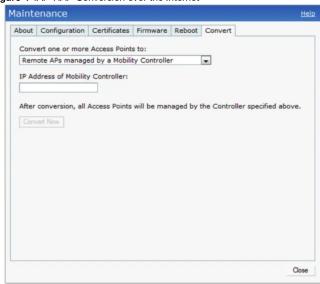
Produktspezifikationen
Elektrisch
■ 1 x 10/100/1000Base-T Auto-Sensing Ethernet RJ-45 Schnittstelle
■ 1x 10/100Base-T Auto-Sensing Ethernet RJ-45 Schnittstelle
MDI/MDX
- IEEE 802.3 (10Base-T), IEEE 802.3u (100Base-T), IEEE 802.3ab (1000Base-T)
■ Power over Ethernet (IEEE 802.3af und 802.3at konform), 56V DC/350mA
• Stromversorgung: 12 VDC Stromschnittstelle, unterstützt die Stromversorgung über ein AC-zu-DC-Netzteil

Wenn in den USA oder Kanada ein anderes Netzteil als das von Aruba Networks mitgelieferte verwendet wird, sollte es cULus (NRTL) gelistet sein, mit einer Ausgangsleistung von 12 VDC, mindestens 1,25 A, mit der Kennzeichnung "LPS" oder "Klasse 2" und für den Anschluss an eine Standardsteckdose in den USA und Kanada geeignet sein.
Weitere Spezifikationen zu diesem Produkt finden Sie im Datenblatt. Das Datenblatt finden Sie unter www.arubanetworks.com.
Ordnungsgemäße Entsorgung von Aruba-Geräten
Aktuelle Informationen zur globalen Umweltkonformität und zu Aruba-Produkten finden Sie auf unserer Website unter www.arubanetworks.com.
Elektro- und Elektronik-Altgeräte

Aruba-Produkte am Ende ihrer Lebensdauer unterliegen in den EU-Mitgliedstaaten, Norwegen und der Schweiz der getrennten Sammlung und Behandlung und sind daher mit dem links abgebildeten Symbol (durchgestrichene Mülltonne) gekennzeichnet. Die Behandlung dieser Produkte am Ende ihrer Lebensdauer in diesen Ländern muss den geltenden nationalen Gesetzen der Länder entsprechen, die die Richtlinie umsetzen.
2002/96/EG über Elektro- und Elektronik-Altgeräte (WEEE).
EU-RoHS

Aruba-Produkte entsprechen auch der EU-Richtlinie 2002/95/EG zur Beschränkung der Verwendung bestimmter gefährlicher Stoffe in Elektro- und Elektronikgeräten (RoHS). Die EU-RoHS beschränkt die Verwendung bestimmter gefährlicher Materialien bei der
Herstellung von Elektro- und Elektronikgeräten. Insbesondere sind die gemäß der RoHS-Richtlinie beschränkten Materialien Blei (einschließlich Lot in Leiterplattenbaugruppen), Cadmium, Quecksilber, sechswertiges Chrom und Brom. Einige Aruba-Produkte unterliegen den in Anhang 7 der RoHS-Richtlinie aufgeführten Ausnahmen (Blei in Lot in Leiterplattenbaugruppen). Produkte und Verpackungen sind mit dem links abgebildeten „RoHS“-Label gekennzeichnet, das die Übereinstimmung mit dieser Richtlinie anzeigt.
China-RoHS
Aruba-Produkte entsprechen auch den chinesischen Anforderungen an Umweltdeklarationen und sind mit dem links abgebildeten „EFUP 10“-Label gekennzeichnet.
| 产品内含危害物质揭露表 | ||||||
| 零部件名称 | 危害物质项目 | |||||
| 铅 | 镉 | 汞 | 灰微铬 | PBB | PBDE(多溴二苯醚) | |
| (Pb) | (Cd) | (Hg) | (Cr + ) | (多溴联苯) | ||
| 含铜及铜材金属件 | × | ○ | ○ | ○ | ○ | ○ |
| 含玻璃电阻 | × | ○ | ○ | ○ | ○ | ○ |
| 低温锡材 | × | ○ | ○ | ○ | ○ | ○ |
| α :表示此部件使用的所有同类材料中此种毒或害物质的含量均低于 SJ/T11363-2006规定的限制要求, 有 | ||||||
| :表示此部件使用至少一种同类材料中,此种毒或害物质的含量高于 SJ/T11363-2006规定的限制要求, 有 | ||||||
Sicherheits- und behördliche Konformität
Aruba Networks stellt ein mehrsprachiges Dokument zur Verfügung, das länderspezifische Beschränkungen sowie zusätzliche Sicherheits- und behördliche Informationen für alle Aruba Access Points enthält. Dieses Dokument kann unter folgender Adresse eingesehen oder heruntergeladen werden: www.arubanetworks.com/safety_addendum
Regulatorische Modellnamen
Die folgenden regulatorischen Modellnamen gelten für den RAP-108/109:
• RAP-108: APINR108
• RAP-109: APINR109

Aruba Access Points müssen von einem professionellen Installateur installiert werden. Der professionelle Installateur ist dafür verantwortlich, dass eine Erdung vorhanden ist und den geltenden örtlichen und nationalen Elektrovorschriften entspricht.
FCC

RF-Strahlungsexpositionserklärung: Dieses Gerät entspricht den FCC-Grenzwerten für die Exposition gegenüber HF-Strahlung. Die für diesen Sender verwendete(n) Antenne(n) muss/müssen so installiert werden, dass ein Abstand von mindestens 20 cm zu allen Personen eingehalten wird, und darf/dürfen nicht zusammen mit einer anderen Antenne oder einem anderen Sender aufgestellt oder betrieben werden.

Beim Betrieb im Frequenzbereich von 5,15 bis 5,25 GHz ist dieses Gerät auf die Verwendung in Innenräumen beschränkt, um das Potenzial für schädliche Interferenzen mit gleichkanaligen mobilen Satellitensystemen zu verringern.
Dieses Gerät ist elektronisch gekennzeichnet, und die FCC-ID wird in der WebUI unter dem Menü „Über“ angezeigt.
Dieses Gerät erfüllt Teil 15 der FCC-Bestimmungen. Der Betrieb unterliegt den folgenden zwei Bedingungen:
- Dieses Gerät darf keine schädlichen Interferenzen verursachen, und
- Dieses Gerät muss alle empfangenen Interferenzen akzeptieren, einschließlich Interferenzen, die einen unerwünschten Betrieb verursachen können.
Änderungen, die nicht ausdrücklich von Aruba Networks genehmigt wurden, können die Berechtigung des Benutzers zum Betrieb des Geräts aufheben.

Dieses Gerät wurde getestet und entspricht den Grenzwerten für ein digitales Gerät der Klasse B gemäß Teil 15 der FCC-Bestimmungen. Diese Grenzwerte sollen einen angemessenen Schutz gegen schädliche Interferenzen in einer Wohnanlage bieten.
Dieses Gerät erzeugt, verwendet und kann Hochfrequenzenergie ausstrahlen. Wenn es nicht gemäß den Anweisungen installiert und verwendet wird, kann es schädliche Interferenzen mit dem Funkverkehr verursachen. Es gibt jedoch keine Garantie, dass in einer bestimmten Installation keine Interferenzen auftreten. Wenn dieses Gerät schädliche Interferenzen mit dem Radio- oder Fernsehempfang verursacht, was durch Ein- und Ausschalten des Geräts festgestellt werden kann, wird der Benutzer aufgefordert, die Interferenzen durch eine oder mehrere der folgenden Maßnahmen zu beheben:
• Richten Sie die Empfangsantenne neu aus oder stellen Sie sie an einen anderen Ort.
- Vergrößern Sie den Abstand zwischen dem Gerät und dem Empfänger.
- Schließen Sie das Gerät an eine Steckdose an, die zu einem anderen Stromkreis gehört als der, an den der Empfänger angeschlossen ist.
• Ziehen Sie den Händler oder einen erfahrenen Radio-/Fernsehtechniker zu Rate.
EMV-Konformität und Warnhinweis
• IEC 60601-1-2: 2007
• EN 60601-1-2: 2007
Dieses Gerät wurde getestet und entspricht den Grenzwerten der Norm für medizinische Geräte IEC 60601-1-2:2007. Das Gerät erfüllt auch die Anforderungen der EN 60601-1-2:2007, was die Konformitätsvermutung mit der Richtlinie 2007/47/EG der Europäischen Union für medizinische Geräte begründet. Die Grenzwerte sollen einen angemessenen Schutz vor schädlichen Störungen in einer typischen medizinischen Installation bieten. Dieses Gerät erzeugt, verwendet und kann Hochfrequenzenergie abstrahlen. Wenn es nicht gemäß den Anweisungen des Herstellers installiert und verwendet wird, kann es schädliche Störungen bei anderen Geräten in der Nähe verursachen. Es gibt jedoch keine Garantie, dass in einer bestimmten Installation keine Störungen auftreten. Wenn dieses Gerät Störungen bei anderen Geräten verursacht, was durch Ein- und Ausschalten des Geräts festgestellt werden kann, wird der Benutzer aufgefordert, eine oder mehrere der folgenden Maßnahmen zu ergreifen, um die Störungen zu beheben.
• Richten Sie das Gerät, das die Störung empfängt, neu aus oder stellen Sie es an einen anderen Ort.
- Vergrößern Sie den Abstand zwischen den Geräten.
- Schließen Sie das Gerät an eine Steckdose an, die zu einem anderen Stromkreis gehört als die der anderen Geräte.
- Wenden Sie sich an den Hersteller oder den technischen Kundendienst.
Die Modelle APINR108 und APINR109 haben kein Anwendungsteil gemäß IEC 60601-1. Der Schutz gegen elektrischen Schlag ist Klasse II.
Das Gerät ist nicht gegen das Eindringen von Flüssigkeiten geschützt und hat die Schutzklasse IPX0 gemäß IEC 60601-1 und IEC 60529. Das Gerät ist nicht für den Einsatz in Gegenwart von brennbaren Gemischen geeignet.
Das Gerät gilt als Gerät für den Dauerbetrieb gemäß IEC 60601-1.
Stromverbrauch - 56 VDC 802.3at Power over Ethernet oder 12 VDC, 1,25 A für externe Wechselstromversorgung (Netzteil separat erhältlich); Maximale Leistungsaufnahme - 12,5 W (ohne angeschlossenes USB-Gerät); 15 W (mit angeschlossenem USB-Gerät).
Mechanische Abmessungen: 160 mm x 160 mm x 41 mm; 300 g.
Umgebung: Betriebstemperatur: 0 °C bis +40 °C (+32 °F bis +104 °F); Luftfeuchtigkeit: 5 bis 95 % nicht kondensierend. Lagertemperatur: -40 °C bis +70 °C (-40 °F bis +158 °F).

Aruba RAP-108 und RAP-109 Remote Access Point
Installationsanleitung

Kontaktaufnahme mit Aruba Networks
Tabelle 1
| Web Site Support | |
| Main Site http://www.arubanetworks.com | |
| Support Site https://support.arubanetworks.com | |
| Software Licensing Site https://licensing.arubanetworks.com/login.php | |
| Wireless Security Incident Response Team (WSRT) | http://www.arubanetworks.com/support/wasrt.php |
| Americas and APAC Support Email support@arubanetworks.com | |
| EMEA Support Email emea.support@arubanetworks.com | |
| WSRT Email Please email details of any security problem found in an Aruba product. | wsrt@arubanetworks.com |
Tabelle 2
| Telephone Support | |
| Aruba Corporate +1 (408) 227-4500 | |
| FAX +1 (408) 227-4550 | |
Urheberrecht
© 2010 Aruba Networks, Inc., AirWave ® , Aruba Networks ® , Aruba Mobility Management System ® , Bluescanner, For Wireless That Works ® , Mobile Edge Architecture, People Move. Networks Must Follow., RFProtect ® , The All Wireless Workplace Is Now Open For Business, and The Mobile Edge Company ® sind Marken von Aruba Networks, Inc. Alle Rechte vorbehalten. Alle anderen Marken sind Eigentum ihrer jeweiligen Inhaber.
Open-Source-Code
Bestimmte Aruba-Produkte enthalten Open-Source-Softwarecode, der von Dritten entwickelt wurde, einschließlich Softwarecode, der der GNU General Public License ("GPL"), der GNU Lesser General Public License ("LGPL") oder anderen Open-Source-Lizenzen unterliegt. Der verwendete Open-Source-Code ist auf dieser Website zu finden: http://www.arubanetworks.com/open_source
Rechtlicher Hinweis
Die Nutzung von Aruba Networks, Inc. Switching-Plattformen und -Software durch alle Einzelpersonen oder Unternehmen zur Beendigung von VPN-Client-Geräten anderer Anbieter stellt die vollständige Übernahme der Haftung durch diese Einzelperson oder dieses Unternehmen für diese Handlung dar und entlastet Aruba Networks, Inc. in vollem Umfang von allen rechtlichen Schritten, die gegen sie im Hinblick auf Urheberrechtsverletzungen im Namen dieser Anbieter unternommen werden könnten.
Garantie
Dieses Hardwareprodukt ist durch die Standardgarantie von Aruba von einem Jahr Teilen/Arbeit geschützt. Weitere Informationen finden Sie in den ARUBACARE SERVICE- UND SUPPORT-BEDINGUNGEN. Das Verändern dieses Geräts (z. B. durch Lackieren) führt zum Verlust der Garantie.

APURA®
Netzwerke
www.arubanetworks.com
1344 Crossman Avenue Sunnyvale, Kalifornien 94089
Sunnyvale, Kalifornien 94089. Telefon: 408.227.4500
Fax: 408.227.4550
Aruba RAP-108 und RAP-109 Remote Access Point | Installationsanleitung Teilenummer 0511191-02 | Dezember 2012
- ARUBA RAP-108 UND RAP-109 REMOTE ACCESS POINT
- INSTALLATIONSANLEITUNG
- LIEFERUMFANG
- HARDWARE-ÜBERSICHT DES RAP-108/RAP
- RESET-TASTE
- USB-SCHNITTSTELLE
- KONSOLENPORT
- ENET
- GLEICHSTROMANSCHLUSS
- EXTERNE ANTENNENANSCHLÜSSE (NUR RAP-108)
- LEDS
- INSTALLATION DES AP
- TISCHMONTAGE
- ANSCHLIESSEN DER ERFORDERLICHEN KABEL
- ÜBERPRÜFUNG DER ERFOLGREICHEN INSTALLATION
- RAP-KONVERTIERUNG
- PRODUKTSPEZIFIKATIONEN
- ELEKTRISCH
- ORDNUNGSGEMÄSSE ENTSORGUNG VON ARUBA-GERÄTEN
- ELEKTRO- UND ELEKTRONIK-ALTGERÄTE
- EU-ROHS
- CHINA-ROHS
- SICHERHEITS- UND BEHÖRDLICHE KONFORMITÄT
- REGULATORISCHE MODELLNAMEN
- FCC
- EMV-KONFORMITÄT UND WARNHINWEIS
- KONTAKTAUFNAHME MIT ARUBA NETWORKS
- TABELLE
- URHEBERRECHT
- OPEN-SOURCE-CODE
- RECHTLICHER HINWEIS
- GARANTIE
- APURA®
Marke : HP
Modell : Aruba RAP-108
Kategorie : Zugangspunkt