
RH77H90507H - Kühlschrank SAMSUNG - Kostenlose Bedienungsanleitung
Finden Sie kostenlos die Bedienungsanleitung des Geräts RH77H90507H SAMSUNG als PDF.


Benutzerfragen zu RH77H90507H SAMSUNG
0 Frage zu diesem Gerät. Beantworten Sie die, die Sie kennen, oder stellen Sie Ihre eigene.
Eine neue Frage zu diesem Gerät stellen
Laden Sie die Anleitung für Ihr Kühlschrank kostenlos im PDF-Format! Finden Sie Ihr Handbuch RH77H90507H - SAMSUNG und nehmen Sie Ihr elektronisches Gerät wieder in die Hand. Auf dieser Seite sind alle Dokumente veröffentlicht, die für die Verwendung Ihres Geräts notwendig sind. RH77H90507H von der Marke SAMSUNG.
BEDIENUNGSANLEITUNG RH77H90507H SAMSUNG


Refrigerator user manual
imagine the possibilities
Thank you for purchasing this Samsung product.
Free Standing Appliance
SAMSUNG
Contents
SAFETY INFORMATION 2
SETTING UP YOUR REFRIGERATOR 15
OPERATING YOUR SAMSUNG REFRIGERATOR 29
TROUBLESHOOTING 47
Safety information
SAFETY INFORMATION
- Before operating the appliance, please read this manual thoroughly and retain it in a safe place near the appliance for your future reference.
- Use this appliance only for its intended purpose as described in this instruction manual.
This appliance is not intended for use by persons (including children) with reduced physical, sensory or mental capabilities, or lack of experience and knowledge, unless they have been given supervision or instruction concerning use
of the appliance by a person responsible for their safety.
- This appliance can be used by children aged from 8 years and above and persons with reduced physical, sensory or mental capabilities or lack of experience and knowledge if they have been given supervision or instruction concerning use of the appliance in a safe way and understand the hazards involved.
Children shall not play with the appliance.
Cleaning and user maintenance shall not be made by children without supervision.
- Warnings and Important Safety Instructions in this manual do not cover all possible conditions and situations that may occur. It is your responsibility to use common sense, caution, and care when installing, maintaining, and operating your appliance.
- Because the following operating instructions cover various models, the characteristics of your refrigerator may differ slightly from those described in this manual and not all warning signs may be applicable. If you have any questions or concerns, contact your nearest service center or find help and information online at www.samsung.com.
Important safety symbols and precautions:
| WARNING | Hazards or unsafe practices that may result in severe personal injury or death. |
| CAUTION | Hazards or unsafe practices that may result in minor personal injury or property damage. |
| Do NOT attempt. | |
| Do NOT disassemble. | |
| Do NOT touch. | |
| Follow directions carefully. | |
| Unplug the power plug from the wall socket. | |
| Make sure the machine is grounded to prevent electric shock. | |
| Call the contact center for help. | |
| Note. | |
These warning signs are here to prevent injury to you and others.
Please follow them carefully. After reading this section, keep it in a safe place for future reference.

SEVERE WARNING SIGNS FOR TRANSPORTATION AND SITE

- When transporting and installing the appliance, care should be taken to ensure that no parts of the refrigerating circuit are damaged.
- R-600a or R-134a is used as a refrigerant.
Check the compressor label on the rear of the appliance or the rating label inside the refrigerator to see which refrigerant is used for your refrigerator.
- When this product contains flammable gas (Refrigerant R-600a),
-Refrigerant leaking from the pipe work could ignite or cause an eye injury. If a leak is detected, avoid any naked flames or potential sources of ignition and air the room in which the appliance is standing for several minutes.
-In order to avoid the creation of a flammable gas-air mixture if a leak in the refrigerating circuit occurs,
the size of the room in which the appliance may be sited depends on the amount of refrigerant used.
- Never start up an appliance showing any signs of damage. If in doubt, consult your dealer.
The room where the refrigerator will be sited must be 1 m ^3 in size for every 8 g of R-600a refrigerant inside the appliance.
The amount of refrigerant in your particular appliance is shown on the identification plate inside the appliance.
- Refrigerant squirting out of the pipes could ignite or cause an eye injury. When refrigerant leaks from the pipe, avoid any naked flames and move anything flammable away from the product and ventilate the room immediately.
-Failing to do so may result in fire or explosion.
-If the appliance contains isobutane refrigerant (R-600a), a natural gas with high environmental compatibility that is, however, also combustible.
When transporting and installing the appliance, care should be taken to ensure that no parts of the refrigerating circuit are damaged.

SEVERE WARNING SIGNS FOR INSTALLATION

- Do not install this appliance in a humid, oily or dusty location, in a location exposed to direct sunlight and water (rain drops).
-Deteriorated insulation of electrical parts may cause an electric shock or fire.
- Do not place this refrigerator in direct sunlight or expose to the heat from stoves, room heaters or other appliances.
- Do not plug several appliances into the same multiple power board. The refrigerator should always be plugged into its own individual electrical outlet which has a voltage rating that matched the rating plate.
-This provides the best performance and also prevents overloading house wiring circuits, which could cause a fire hazard from overheated wires. If the wall socket is loose, do not insert the power plug.
-There is a risk of electric shock or fire.
- Do not use a cord that shows cracks or abrasion damage along its length or at either end.
- Do not bend the power cord excessively or place heavy articles on it.
- Do not use aerosols near the refrigerator.
-Aerosols used near the refrigerator may cause an explosion or fire.
- Do not install this appliance in a location where gas may leak.
-This may result in an electric shock or fire.

- The installation or any service of this appliance is recommended by a qualified technician or service company.
-Failing to do so may result
in an electric shock, fire, explosion, problems with the product, or injury.
- This refrigerator must be properly installed and located in accordance with the manual before it is used.
- Connect the power plug in the proper position with the cord hanging down.
-If you connect the power plug upside down, the wire can get cut off and cause fire or an electric shock.
• Make sure that the power plug is not squashed or damaged by the back of the refrigerator.
- When moving the refrigerator, be careful not to roll over or damage the power cord.
-This constitutes a fire hazard.
- The appliance must be positioned so that the plug is accessible after installation.

• The refrigerator must be grounded.
-You must ground the refrigerator to prevent any power leakages or electric shocks caused by current leakage from the refrigerator.
- Never use gas pipes,
telephone lines or other potential lightening rods as ground.
-Improper use of the ground plug can result in an electric shock.

- If the power cord is damaged, have it replaced immediately by the manufacturer or its service agent.
- The fuse on the refrigerator must be changed by a qualified technician or service company.
-Failing to do so may result in an electric shock or personal injury.

CAUTION SIGNS FOR INSTALLATION

- Keep ventilation opening in the appliance enclosure or mounting structure clear of obstruction.
- Allow the appliance to stand for 2 hours after installation.
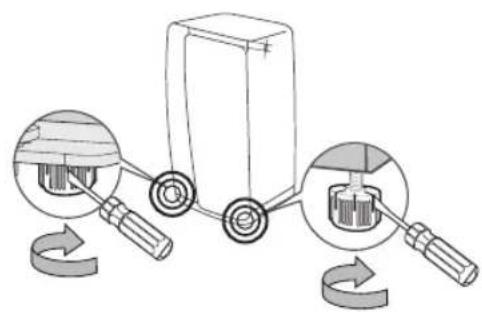
text_image
Diagram illustrating a mechanical device with labeled parts and rotation arrows, showing internal components and motion.-When installing the refrigerator, make sure both legs contact the floor for secure installation. Legs are located at the bottom back of each door. Insert a flathead screwdriver and turn it in the direction of the arrow until it is level.
-Always balance the load on each door.
-Overload on any one door may fell the refrigerator, causing physical injury.

SEVERE WARNING SIGNS FOR USING

- Do not insert the power plug with wet hands.
- Do not store items on top of the appliance.
-When you open or close the door, items may fall and cause a personal injury and/or material damage.
- Do not put items filled with water on the refrigerator. - If spilled, there is a risk of fire or electric shock.
- Do not let children hang on the door.
-Failure to do so may cause serious personal injury.
- Do not leave the doors of the refrigerator open while the refrigerator is unattended and do not let children enter inside the refrigerator.
- Do not allow babies or children to go inside the drawers.
-It can cause death from suffocation by entrapment or personal injury.
- Do not sit on the Freezer door.
-The door can be broken and cause personal injury.
- When remove the divider from the drawer to clean or other reason, should reassemble the divider with provided screws to prevent children trapped.
- Never put fingers or other objects into the dispenser hole.
-Failure to do so may cause personal injury or material damage.
- Do not store volatile or flammable substances such as benzene, thinner, alcohol, ether or LP gas in the refrigerator.
-The storage of any of such products may cause an explosion.
- Do not store low temperature-sensitive pharmaceutical products, scientific materials or other low temperature-sensitive products in the refrigerator.
-Products that require strict temperature controls must not be stored in the refrigerator.
- Do not place or use electrical appliances inside the refrigerator, unless they are of a type recommended by the
manufacturer.
- Do not use a hair dryer to dry the inside of the refrigerator. Do not place a lighted candle in the refrigerator for removing bad odours.
-This may result in an electric shock or fire.
- Do not touch the inside walls of the freezer or products stored in the freezer with wet hands.
-This may cause frostbite.
- Do not use mechanical devices or any other means to accelerate the defrosting process, other than those recommended by the manufacturer.
- Do not damage the refrigerant circuit.

- This product is intended only for the storage of food in a domestic environment.
- Bottles should be stored tightly together so that they do not fall out.
- In the event of a gas leak (such as propane gas, LP gas, etc.), ventilate immediately without touching the power plug.
Do not touch the appliance or power cord.
-Do not use a ventilating fan.
-A spark may result in an explosion or fire.
- Use only the LED Lamps provided by manufacturer or service agent.
• Children should be supervised to ensure that they do not play with and/or climb into the appliance.

- Do not disassemble or repair the refrigerator by yourself.
-You run a risk of causing a fire, malfunction and/or personal injury. In case of malfunction, please contact your service agent.

- If the appliance generates a strange noise, a burning or smell or smoke, unplug the power plug immediately and contact your nearest service centre.
-Failing to do so may result in an electric shock or fire hazards.
- If you experience difficulty when changing the light,
contact service agent.
- If the products is equipped with LED Lamps, do not disassemble the Lamp Cover and LED Lamps by yourself.
-Please contact your service agent.
- If any dust or water is in the refrigerator, pull out power plug and contact your Samsung Electronics service centre.
-There is a risk of fire.

CAUTION SIGNS FOR USING

• To get best performance from the product,
-Do not place foods too closely in front of the vents at the rear of the appliance as it can obstruct free air circulation in the refrigerator compartment.
-Wrap the food up properly or place it in airtight containers before putting it into the refrigerator.
-Do not put any newly introduced food for freezing near to already existing food.
- Do not place carbonated or fizzy drinks in the freezer compartment.
Do not put bottles or glass containers in the freezer.
-When the contents freeze, the glass may break and cause personal injury and property damage.
- Do not change or modify the functionality of the refrigerator.
-Changes or modifications may result in a personal injury and/or property damage. Any changes or modifications
performed by a 3rd party on this completed appliance are neither covered under Samsung warranty service, nor is Samsung responsible for safety issues and damages that result from 3rd party modifications.
- Do not block air holes.
-If the air holes are blocked, especially with a plastic bag, the refrigerator can be over cooled.
If this cooling period lasts too long, the water filter may break and cause water leakage.
-Do not put any newly introduced food for freezing near to already existing food.
- Please observe maximum storage times and expiry dates of frozen goods.
- Do not spray volatile material such as insecticide onto the surface of the appliance.
-As well as being harmful to humans, it may also result in an electric shock, fire or problems with the product.
- Do not apply strong shock or excessive force onto the surface of glass.
-Broken glass may result in a personal injury and/or property damage.

CAUTION SIGNS FOR CLEANING AND MAINTENANCE

- Do not directly spray water inside or outside the refrigerator.
-There is a risk of fire or electric shock.
- Do not use or place any substances sensitive to temperature such as inflammable sprays, inflammable objects, dry ice, medicine, or chemicals near the refrigerator. Do not keep volatile or inflammable objects or substances (benzene, thinner, propane gas, etc.) in the refrigerator.
-This refrigerator is for storing food only.
-This may result in a fire or an explosion.
- Do not spray cleaning products directly on the display.
-Printed letters on the display
may come off.
- Remove any foreign matter or dust from the power plug pins.
But do not use a wet or damp cloth when cleaning the plug, remove any foreign material or dust from the power plug pins.
-Otherwise there is a risk of fire or electric shock.
- Never put fingers or other objects into the dispenser hole and ice chute.
-It may cause a personal injury or material damage.
- Clean the unreachable parts such as hinges by using a brush or toothbrush.

- Unplug the refrigerator before cleaning and performing maintenance.
- If any foreign substance such as water has entered the appliance, unplug the power plug and contact your nearest service centre.
-Failing to do so may result in an electric shock or fire.

SEVERE WARNING SIGNS FOR DISPOSAL

- Ensure that none of the pipes on the back of the appliance are damaged prior to disposal.
- R-600a or R-134a is used as a refrigerant.
Check the compressor label on the rear of the appliance or the rating label inside the refrigerator to see which refrigerant is used for your refrigerator.
When this product contains flammable gas (Refrigerant R-134a), contact your local authority in regard to safe disposal of this product.
Cyclopentane is used as an insulation blowing gas.
The gases in insulation material require special disposal procedure.
Please contact your local authorities in regard to the environmentally safe disposal of this product.
Ensure that none of the pipes on the back of the appliances are damaged prior to disposal.
The pipes shall be broken in
the open space.
- When disposing of this product or other refrigerators, remove the door/door seals, door latch so that small children or animals cannot become trapped inside.
Leave the shelves in place so that children may not easily climb inside.
Children should be supervised to ensure that they do not play with the old appliance.
- Please dispose of the packaging material for this product in an environmentally friendly manner.

ADDITIONAL TIPS FOR PROPER USAGE
- In the event of a power failure, call the local office of your Electricity Company and ask how long it is going to last.
-Most power failures that are corrected within an hour or two will not affect your refrigerator temperatures. However, you should minimise the number of door openings while the power is off.
-Should the power failure last more than 24 hours, remove all frozen food.
- If keys are provided with the refrigerator, the keys should be kept out of the reach of children and not be in the vicinity of the appliance.
- The appliance might not operate consistently (possibility of temperature becoming too warm in the refrigerator) when sited for an extended period of time below the cold end of the range of temperature for which the refrigerating appliance is designed.
- Do not store food which
spoils easily at low temperature, such as bananas, melons.
- Your appliance is frost free, which means there is no need to manually defrost your appliance, as this will be carried out automatically.
- Temperature rise during defrosting can comply with ISO requirements. But if you want to prevent an undue rise in the temperature of the frozen food while defrosting the appliance, please wrap the frozen food up in several layers of newspaper.
- Any increase in temperature of frozen food during defrosting can shorten its storage life.
Saving Energy Tips
-Install the appliance in a cool, dry room with adequate ventilation.
Ensure that it is not exposed to direct sunlight and never put it near a direct source of heat (radiator, for example).
- Never block any vents or grills on the appliance.
-Allow warm food to cool down before placing it in the appliance.
-Put frozen food in the refrigerator to thaw.
You can then use the low temperatures of the frozen products to cool food in the refrigerator.
-Do not keep the door of the appliance open for too long when putting food in or taking food out.
The shorter time for which the door is open, the less ice will form in the freezer.
-Clean the rear of the refrigerator regularly.
Dust increases energy consumption.
-Do not set temperature colder than necessary.
-Ensure sufficient air flow at the refrigerator base and at
the back of the refrigerator. Do not cover air vent openings.
-Allow clearance to the right, left, back and top when installing.
This will help reduce power consumption and keep your energy bills lower.
-For the most efficient use of energy, please keep the all inner fittings such as baskets, drawers, shelves on the position supplied by manufacturer.
This appliance is intended to be used in household and similar applications such as
-staff kitchen areas in shops, offices and other working environments;
-farm houses and by clients in hotels, motels and other residential type environments;
-bed and breakfast type environments;
-catering and similar non-retail applications.
Setting up your refrigerator
GETTING READY TO INSTALL THE REFRIGERATOR
Congratulations on your purchase of the Samsung refrigerator.
We hope you enjoy the state-of-art features and efficiencies that this new appliance offers.
Selecting the best location for the Refrigerator
- Select a location with easy access to a water supply.
- Select a location without direct exposure to sunlight.
- Select a location with level (or nearly level) flooring.
- Select a location with enough space for the refrigerator doors to open easily.
- Select a location that allows sufficient space to the right, left, back, and top for air circulation.
- Select a location that allows you to move the refrigerator easily if it needs maintenance or service.
- Do not install the refrigerator in locations where the temperature is over 43 °C or below 5 °C.
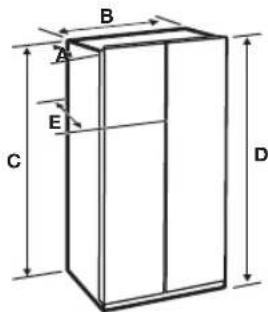
text_image
B A E C D| Depth “A” 893 mm | |
| Width “B” 912 mm | |
| Height “C” 1742 mm | |
| Overall Height “D” 1774 mm | |
| Depth “E” 896 mm |
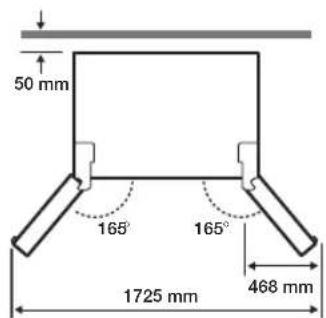
text_image
50 mm 165° 165° 1725 mm 468 mm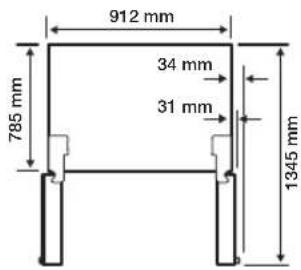
text_image
912 mm 785 mm 34 mm 31 mm 1345 mm
• Each measurement based on the design dimension, so it may differ depending on the measuring method.
When moving your refrigerator
To prevent floor damage, be sure the front leveling legs are in the up position (above the floor). Refer to "How to level the refrigerator" in the manual on page 21.
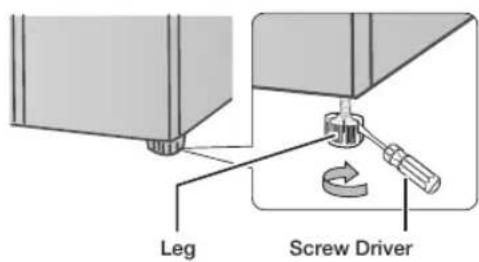
text_image
Leg Screw DriverFlooring
For proper installation, you must place this refrigerator on a level, hard surface that is the same height as the rest of the floor.
This surface should be strong enough to support a fully loaded refrigerator.
To protect the finish of the flooring, cut a large section of the cardboard carton and place it under the refrigerator where you are working.
When moving the refrigerator, you need to pull and push it straight forwards or back.
Do not wiggle it from side to side.
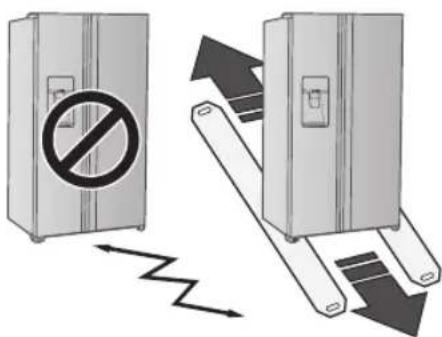
text_image
Diagram illustrating a device with a prohibition symbol and a broken mechanism, showing directional arrows and motion.Required Tools (Not provided)
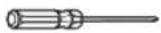 | 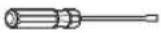 | 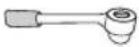 |
| Philips screwdriver (+) | Flat-blade screw driver (-) | Socket wrench 10 mm |
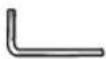 | ||
| Allen wrench 5 mm |
SETTING UP THE REFRIGERATOR
Now that you have your new Refrigerator installed in place, you are ready to set up and enjoy the features and functions of the appliance.
By completing the following steps, your Refrigerator should be fully operational.
If not, first check the power supply and electricity source or try the troubleshooting section at the back of this user's guide.
If you have any further questions, contact your Samsung Electronics service centre.
- Place the Refrigerator in an appropriate location with reasonable clearance between the wall and the Refrigerator.
Refer to installation instructions in this manual.
-
Once the Refrigerator is plugged in, make sure the interior light comes on when you open the doors.
-
Set the Temperature control to the coldest temperature and wait for an hour.
The Freezer will get slightly chilled and the motor will run smoothly.
- After powering the Refrigerator, it will take a few hours to reach the appropriate temperature.
You can store food and drinks in the Refrigerator after the temperature is sufficiently cool.
-
Once installation is complete, press the dispenser lever to check if the water or the ice is properly dispensed.
-
Make sure the front side of the refrigerator is 0.6 degree higher than its rear side.
SETTING UP THE REFRIGERATOR DOORS
If your entrance won't allow the refrigerator to pass easily through it, you can remove the doors.
Separating the water supply line from the refrigerator
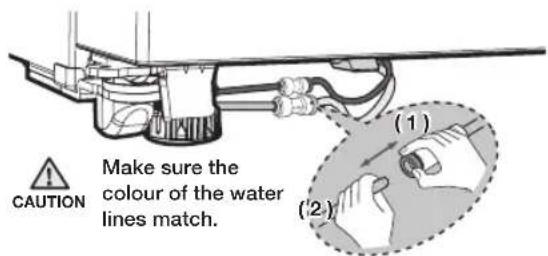
- Pull the two water lines (which are in the Fixer) out to the front.

natural_image
Diagram showing a hand holding a tool next to a device, with an inset illustrating the process (no text or symbols present)- Remove two water lines (White one is for water and the other one is for ice) by pressing the coupler (1) and pulling the water line (2) away.
text_image
CAUTION Make sure the colour of the water lines match. (1) (2)
When reconnecting the supply hoses, make sure the same colored hoses are inserted with each other.
Reattaching the Water Supply Line
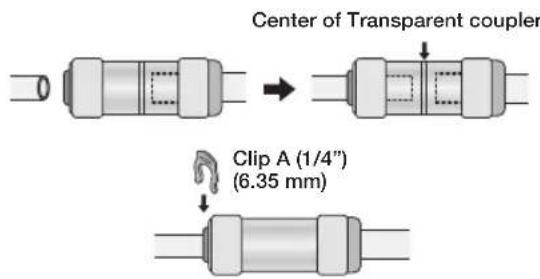
- The Water Line must be fully Inserted to the centre of transparent coupler to prevent water leakage from the dispenser.
- Insert the 2 clips in the install pack and check that each clip holds the line firmly.
text_image
Center of Transparent coupler Clip A (1/4") (6.35 mm)
Do not cut the water line. Gently separate it from the coupler.

Keep the clips out of the reach of children and make sure that children do not play with them or put them into their mouths.
DISASSEMBLE THE FREEZER DOORS
- Disconnect the power cord, and remove 2 cover screws using a Phillips screwdriver (1). Then open the refrigerator door and pull the hooks on the sides to loosen the cover (2). Lift up the cover and towards you to detach it (3).
-Detach the hinge cover with the door open and then close the door once the hinge cover has been detached.

natural_image
Technical line drawing of a mechanical assembly with two cylindrical components and mounting brackets (no text or symbols)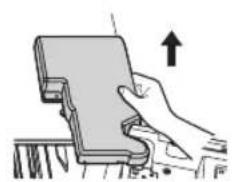
natural_image
Illustration of a hand holding a device with an upward arrow indicating motion (no text or symbols)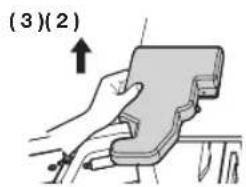
text_image
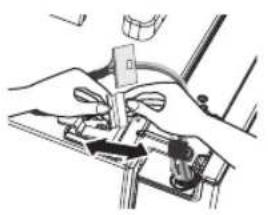
(3)(2)- Remove the hinge cover and then disconnect the electrical wire connector.
natural_image
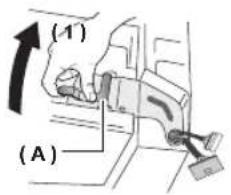
Illustration of hands using a tool to adjust or install a mechanical component (no text or symbols visible)- Flip the clamp (A) up in direction (1) and then pull it off in direction (2).
text_image
(A) (1)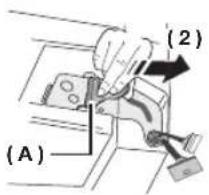
text_image
(A) (2)- Remove the hinge (B).
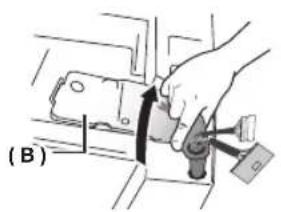
natural_image
Diagram of a hand holding a tool interacting with a vehicle component, labeled (B), with no visible text or symbols.- Lift up the door and detach it from the refrigerator.

- Be careful not to damage the electrical wires when assembling or disassembling the doors.
• Make sure the doors do not fall over and become damaged while they are detached from the refrigerator.
RE-ATTACHING THE FREEZER DOORS

- Be sure to re-attach the Freezer Door before re-attaching the Fridge Door.
- Before re-attaching, make sure that all the wire connectors at the bottom of the Freezer Door are connected.
How to Assemble Door
- Attach the doors to the hinges at the bottom of the refrigerator.
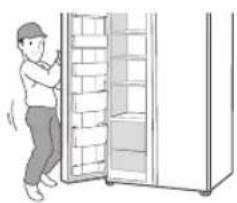
natural_image
Illustration of a person standing beside a cabinet with shelves open (no text or symbols visible)- Insert the hinge (B) into the hinge slot on the refrigerator and then press down over the hinge hole on the door.
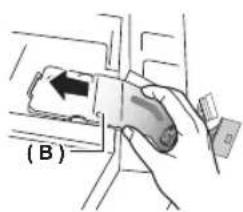
text_image
(B)- Insert the clamp (A) in the direction of arrow (1) and then lower it in the direction of arrow (2) to lock it in place.
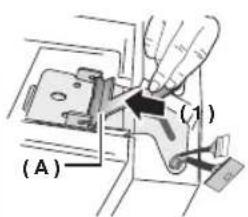
text_image
(A) (1)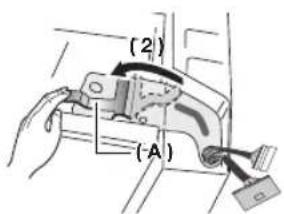
text_image
(2) (A)- Hook up the electrical wire connector.
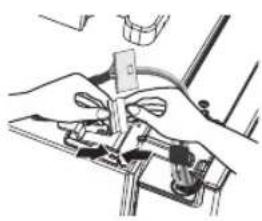
natural_image
Illustration of hands operating a mechanical device with no visible text or symbols- Insert 2 front parts of the cover first, push down on both side parts of the cover, and then secure the cover in place using a Phillips screwdriver.
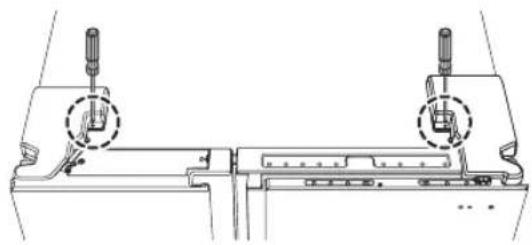
natural_image
Technical line drawing of a mechanical assembly with two cylindrical components and a central component (no text or symbols)
- The doors can be assembled in the reverse order of their disassembly.
- The display may not function properly if you neglect to connect the electrical wires while assembling the door.
DISASSEMBLE THE REFRIGERATOR DOORS (SHOW CASE OF COLD COMPARTMENT)
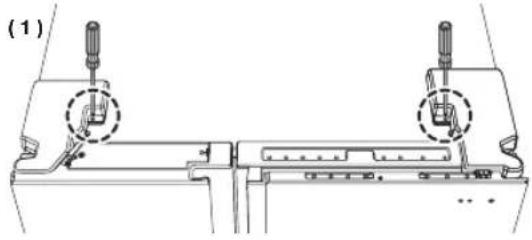
- Disconnect the power cord, and remove 2 cover screws using a Phillips screwdriver (1). Then open the refrigerator door and pull the hooks on the sides to loosen the cover (2). Lift up the cover and towards you to detach it (3).
-Detach the hinge cover with the door open and then close the door once the hinge cover has been detached.
natural_image
Technical line drawing of a mechanical assembly with two inserted components (no text or symbols)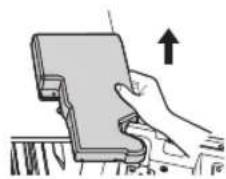
natural_image
Illustration of a hand holding a device with an upward arrow, no text or symbols present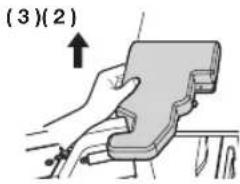
text_image
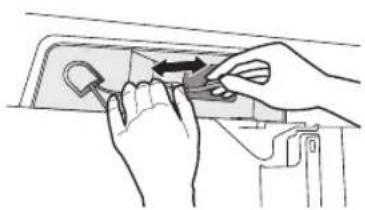
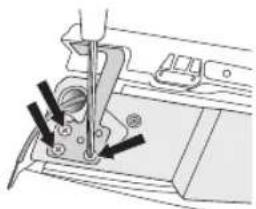
(3)(2)- Disassemble the housing connector.
natural_image
Illustration of hands using a tool to adjust or install a component (no text or symbols visible)- Disassemble the three fastening screws on the top hinge of the show case.
natural_image
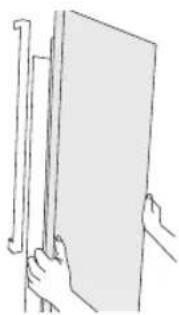
Technical line drawing of a sewing machine needle and base (no text or symbols)- Disassemble the show case.
natural_image
Line drawing of a hand holding a blank sheet with a ruler, no text or symbols presentDISASSEMBLE THE REFRIGERATOR DOORS
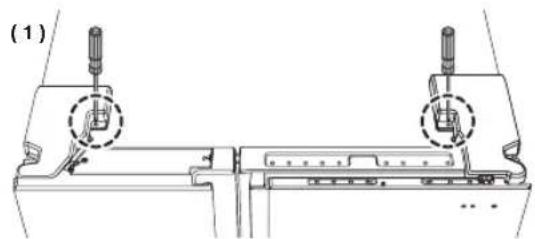
- Disconnect the power cord, and remove 2 cover screws using a Phillips screwdriver (1). Then open the refrigerator door and pull the hooks on the sides to loosen the cover (2). Lift up the cover and towards you to detach it (3).
-Detach the hinge cover with the door open and then close the door once the hinge cover has been detached.
natural_image
Technical line drawing of a mechanical assembly with two mounting holes and a central component (no text or symbols)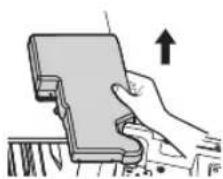
natural_image
Illustration of a hand holding a device with an upward arrow, no text or symbols present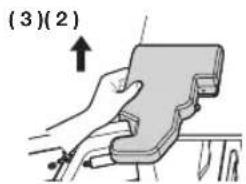
text_image
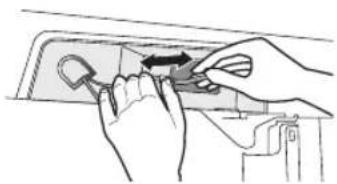
(3)(2)- Disassemble the housing connector.
natural_image
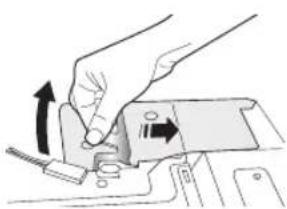
Illustration of hands using a tool to adjust a key on a door panel (no text or symbols visible)- Push the fixer hinge up, and pull it forward to remove it.
natural_image
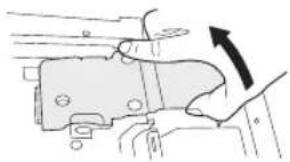
Illustration of a hand turning a mechanical component with arrows indicating motion (no text or symbols)- Disassemble the top hinge from the front of the door.
natural_image
Mechanical assembly diagram showing a hand turning a component with an arrow indicating rotation (no text or labels)- Disassemble the show case.
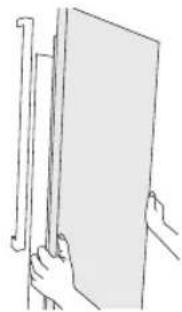
natural_image
Line drawing of a hand holding a flatboard with a ruler, no text or symbols present
Fix the wire on the Hinge Hook to prevent the damage on the wire when reassembling.
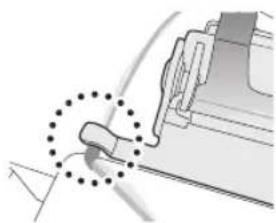
natural_image
Pure mechanical diagram showing a tool interacting with a bracket (no text or symbols)RE-ATTACHING REFRIGERATOR DOORS
To reattach the REFRIGERATOR doors, assemble parts in reverse order.
LEVELING THE REFRIGERATOR AND ADJUSTING HEIGHT AND GAP OF THE DOORS
How to level the refrigerator
To avoid a hazard due to instability of the refrigerator, please place the refrigerator on a horizontal support and levelled in accordance with the following instruction for installation.
Failing to do so may result in the refrigerator tipping and a personal injury.
If the front of the appliance is slightly higher than the rear, the door can be opened and closed more easily.
Setting up the refrigerator on an uneven surface will cause the refrigerator to be uneven.
-When install the refrigerator, the legs should touch the floor surely. The legs should be located on the back of under the each door. Insert it with flathead screwdriver and tighten up to arrow direction.
-Do not put the food on only one side when store the food. If put it on only one side, it is able to occur the conduction and injury.
If the freezer side is lower:
- Insert a flathead screwdriver into the height leveler located at the bottom back of the freezer door and turn it in the direction of the arrow until it is level.
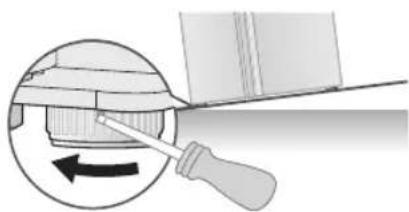
natural_image
Diagram showing a screwdriver inserted into a mechanical component, with an arrow indicating rotation (no text or symbols present)If the refrigerator side is lower:
- Insert a flathead screwdriver into the height leveler located at the bottom back of the refrigerator door and turn in the direction of the arrow until it is level.
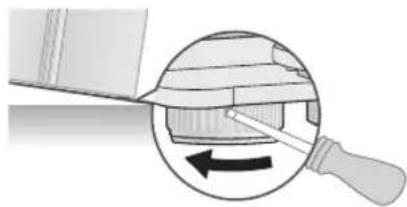
natural_image
Diagram showing a tool interacting with a mechanical component, with an arrow indicating rotation (no text or symbols present)
- Raise the front of the refrigerator so that the doors close by themselves. Adjusting the levelers so that the back of the refrigerator is much higher than the front of the refrigerator can make it difficult to open the doors.
- If the back of the refrigerator is not level, support the bottom with an appropriately sized object and secure the object in place using tape. Slide the refrigerator into its spot and then adjust the level. - When pushing the refrigerator in, be careful no to damage the floor.
HOW TO ADJUST THE DOOR HEIGHT
If refrigerator door is lower than the other:
- The door height levels can be adjusted using the adjustment nut located at the bottom of refrigerator door. - Raising the door too high can cause the door to interfere with the hinge cover when it is opened or closed.
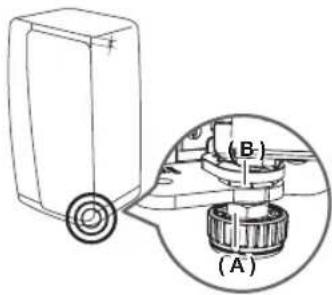
text_image
(A) (B)- Open the door that needs to be adjusted and loosen the clamping nut (A) at the bottom of the door by turning it in the clockwise direction (←) using the spanner included in the product package.
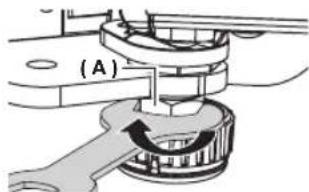
text_image
(A)- Adjust the height of the door by turning the adjustment nut (B) in the counterclockwise direction (→ with a spanner. (Turn it in the counterclockwise direction (→ to increase the height of the door and in the clockwise direction (←) to decrease it.) -Open the door and adjust it from the inside.
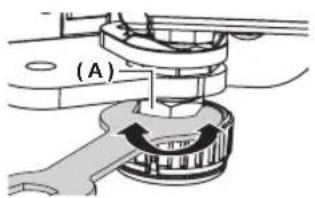
text_image
(A)- Once the doors are level, turn the clamping nut (A) in the counterclockwise direction (→) to tighten it.
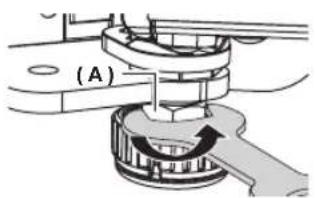
text_image
(A)
Adjusting the level when the refrigerator is empty can result in the refrigerator becoming uneven again once items have been placed inside.
If this occurs, adjust the level again.
HOW TO ADJUST THE DOOR GAP
If the gap between the refrigerator door and the freezer door is uneven:
- Use the gap adjustor located at the top of the refrigerator door (right side).
-
Excessive force can cause the adjustor bolt to break.
-
Remove the refrigerator door's hinge cover.
-Detach the hinge cover with the door open and then close the door once the hinge cover has been detached.
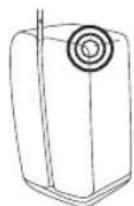
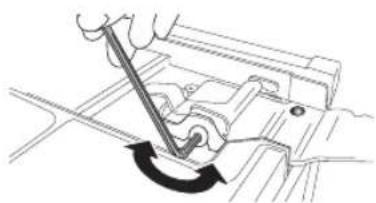
- Adjust the gap using a 4 mm Allen wrench (not included).
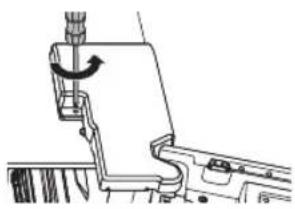
natural_image
Technical line drawing of a mechanical assembly with no visible text or symbols- Rotate the bolt in the clockwise direction (←) to widen the gap.
Rotate it in the counterclockwise direction (→) to narrow the gap.
Adjust until the gap between the refrigerator door and the freezer door appears even.
natural_image
Diagram of a hand using a tool to adjust or install a mechanical component, showing a curved arrow indicating rotation (no text or symbols present)
When arranging the cables, take caution not to tear or peel off the cable coating.
HOW TO ADJUST THE REFRIGERATOR DOOR GAP (BACK)
If the gap between the refrigerator door and the refrigerator is uneven:
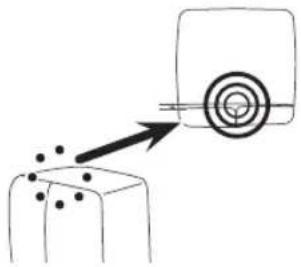
- Use the adjustors located at the top edge inside each door.
natural_image
Simple line drawing of a target with an arrow pointing to a target on a block (no text or symbols)- Open the door where the gap with the refrigerator is narrower and then turn the adjustor in the counterclockwise direction (→ until the gap is even.
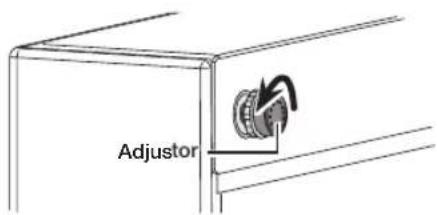
text_image
Adjustor- Once the gap between the door and the refrigerator has been adjusted, turn the adjustor nut in the clockwise direction ( ) to lock the adjustor in place.
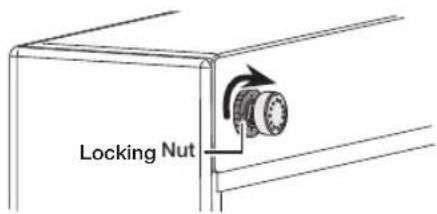
text_image
Locking NutCHECKING THE WATER DISPENSER LINE
A water dispenser is one of the helpful features on your new Samsung Refrigerator.
To help promote better health, the Samsung water filter removes unwanted particles from your water. However, it does not sterilize or destroy microorganisms.
You may need to purchase a water purifying system to do that.
In order for the ice maker to operate properly, a water pressure of 20\~125 psi (138\~862 kPa) (pound per square inch) is required.
Under normal conditions, a 170 cc (5.75 oz.) paper cup can be filled in 10 seconds.
If the Refrigerator is installed in an area with low water pressure (below 20 psi), you can install a booster pump to compensate for the low pressure. Make sure the water storage tank inside the Refrigerator is properly filled.
To do this, press the water dispenser lever until the water runs from the water outlet.

Water line installation kits are available at extra cost from your dealer. We recommend using a water supply kit that contains copper tubing.

The new hose-sets supplied with the appliance are to be used and that old hose-sets should not be reused.

Check the accessory list.
Connecting to the water supply line
- First, shut off the main water supply line.
- Locate the nearest cold, drinking water line.
- Follow the Water Line Installation Instructions in the installation kit.
CAUTION
The water line must be connected to the cold water pipe. If it is connected to the hot water pipe, it may cause the purifier to malfunction.
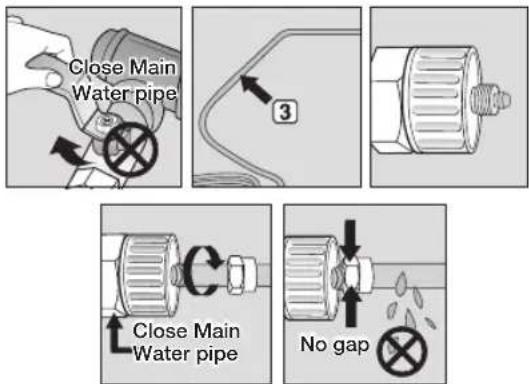
- After connecting the water supply to the water filter, turn your main water supply back on and Dispense about 3 L to clear and prime the water filter.
Connecting the water line to the refrigerator
- Remove the cap from water line on the unit and insert compression nut to the water line on the unit after disassembling from provided water line.
- Connect both water line from the unit and water line in the kit.
- Tighten the compression nut onto the compression fitting. Be careful no gap between two items.
- Turn water on and check for any leakage.
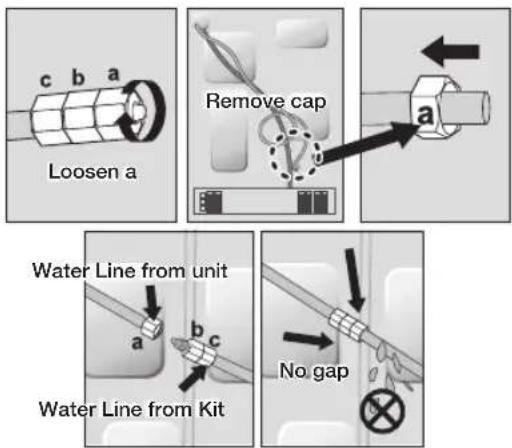

Only connect the water line to a drinkable water source.
If you have to repair or disassemble the water line, cut off 6.5 mm of the plastic tubing to make sure you get a snug, leak-free connection.

Before being used, the leakage in these places should be examined.
- Samsung Warranty does not cover WATER LINE INSTALLATION.
- It'll be done at customer's charge unless the retail price includes installation cost.
- Please contact Plumber or Authorized Installer for the installation if needed.
- If Water leakage occurs due to improper installation, Please contact installer.

text_image
No Leak-
Slip the compression nut (A) through the supplied plastic tubing (A).
-
Tighten the compression nut (A) onto the 1/4" compression fitting.
-If you are using copper tubing, slip the compression nut (B) (not included) and ferrule (not included) on copper tubing (not included) as shown.
- If you are using plastic tubing (B), insert the molded end (Bulb) of the plastic tubing (B) into the compression fitting.

Do not use without the molded end(Bulb) of the plastic tubing ( B ).
- Tighten the compression nut (B) onto the compression fitting.
Do not over-tighten the compression nut ( B ).
- Turn water on and check for any leakage.

Only connect the water line to a drinkable water source.
If you have to repair or disassemble the water line, cut off 1/4" of the plastic tubing to make sure you get a snug, leak-free connection.
BEFORE USING ICEMAKER
Remove
-Remove the Icemaker Bucket by lifting it up and pulling it out slowly.
-Grip the handle as shown in the figure.
-Remove the Ice Bucket slowly to prevent damage.
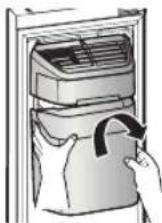
Figure 1

Do not use excessive force when removing the drawer cover.
Otherwise, the cover may break and cause injury.

Before removing any accessories, make sure that no food is in the way.
When possible, remove the food altogether to reduce the risk of accidents.
Install
-Assemble the icemaker in the reverse order of disassembly.
-Push the bucket in firmly until you hear a clicking sound.
Before calling service
-Any sounds you hear when the ice maker dumps ice into the bucket are part of normal operation.
-If you don't dispense ice for a long period of time, the ice may form clumps in the ice bucket. If ice clumps form, remove the remaining ice and empty the bucket.
-When ice does not come out, check for ice stuck in the chute and remove it.
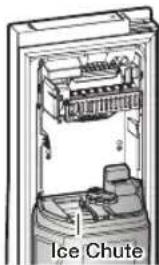
natural_image
Interior view of an ice chute appliance showing internal components and casing (no text or symbols)Figure 3

- When Ice Off blinks on the display panel, reinsert the bucket and/or make sure it's installed properly.
- When the door is open, the ice and water dispenser do not work.
- If you close the door hard, it may cause water spilling over the ice maker.
- To prevent dropping the ice bucket, use both hands when removing it.
- To prevent injury, be sure to clean up any ice or water that may have dropped on the floor.
- Do not let the children hang on the ice dispenser or on the bucket. They may get hurt.
- Be sure not to put your hand or any object into the ice chute. It may cause personal injury or damage mechanical parts.
Removing residual matter inside the water supply line after installing filter.
- Turn ON the main water supply.
- Push the Dispenser Lever.
- Flush 1 gallons of water through the filter before use. (Flush approximately 6 minutes.)
This will clean the water supply system and remove air from the lines. - Additional flushing may be required in some households.
- Open the refrigerator door and make sure there are no water leaks coming from the water filter.
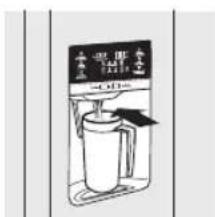
text_image
水杯 水 -1000g

A newly installed water filter cartridge may cause water to briefly spurt from the water dispenser.
This is due to air getting into the line. It should pose no problem to operation.
Check the amount of water supplied to the ice tray.
-
Lift up the icemaker cover and gently pull it out.
-
When you press the Test button for 3 seconds, the ice cube container is filled with water from the water supply tap.
Check to make sure the amount of water is correct (see the illustration below).
If the water level is too low, the ice cubes will be small.
This is a water pressure problem from within the main water pipes, not the refrigerator.
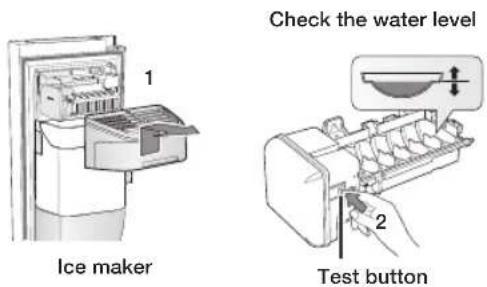

- It will take a few minutes for the water to reach the correct level after you push the Test button.
- Do not press the test button continuously when the tray is filled with ice or water.
Water may overflow or ice jamming may occur.
- When the bucket is not installed, the ice maker does not work.
- When Ice Off blinks on the display panel, reinsert the bucket and/or make sure it's installed properly.
Operating your Samsung refrigerator
USING THE CONTROL PANEL
COOLSELECT MODEL (RH77H90*)
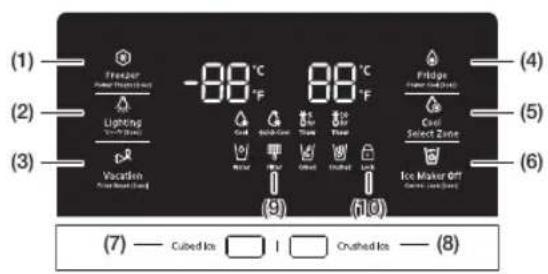
text_image
(1) Freezer Power High-Pressure Lighting Water/Heat (2) Vaccation Power Heat (Warm) (3) -88°C °F Cool Heat Cool Thermal Thermal Heat Cured Ice Cured Ice (4) Fridge Power High-Pressure Cool Select Zone (5) (6) Ice Maker Off Current Heat (Warm) (7) — Cubed Ice □ | □ | Crushed Ice — (8)DISPENSER MODEL (RH77H80*)
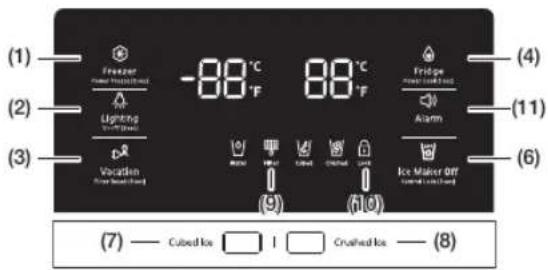
text_image
(1) —— Freezer — Power Wharf/Heat (2) —— Lighting — Power Wharf/Heat (3) —— p& Vocation — Power Wharf/Heat (4) —— Fridge — Power Wharf/Heat (5) —— Alarm (6) —— Ice Maker Off (7) —— Cubed Ice □ I □ Crushed Ice —— (8)NORMAL MODEL
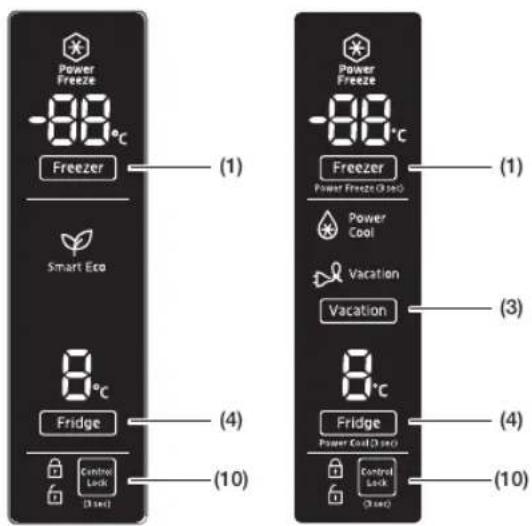
text_image
Power Freeze -88°C Freezer (1) Smart Eco 8°C Fridge (4) Control Lock (3 sec) (10) Power Freeze -88°C Freezer Power Freeze (3 sec) (1) Power Cool Vacation Vacation (3) 8°C Fridge Power Cool (3 sec) (4) Control Lock (3 sec) (10)(1) Freezer / Power Freeze (3 sec)
The Freezer button serves two purposes:
-To set the Freezer to your desired temperature.
-To turn the Power Freeze function on and off.
- To set the Freezer temperature, touch the Freezer button.
You can set the temperature between 5 °F (-15 °C) and -8 °F (-23 °C).
- Power Freeze function
Touch and hold this button for 3 seconds to decrease the time needed to freeze products in the Freezer.
It can be helpful if you need to quickly freeze easily spoiled items or if the temperature in the freezer has warmed dramatically.
(For example, if the door was left open.) When you use this function, the energy consumption of the refrigerator will increase.
Remember to turn it off when you don't need it and return the freezer to your original temperature setting.
If you need to freeze a large amount of food, activate the Power Freeze function at least 20 hours before you put the food into the freezer.
(2) Lighting / °C ↔ °F (3 sec)

The Lighting button serves two purposes:
-To turn the dispenser light on and off
-To switch the temperature units between ^ C and ^ F.
- Light Function
Touching the Lighting button turns on the Dispenser LED lamp in continuous mode so that it stays on continuously.
The button also lights up.
If you want the Dispenser lamp to come on only when some one uses the dispenser, press the Lighting button to turn the continuous mode off.
- To switch the temperature units between ^ C and ^ F.
Touch and hold this button for 3 seconds to select the temperature display you want. Each time you press and hold the button, the °C and °F temperature modes alternate and the °C or °F icon lights up, indicating your selection.
(3) Vacation / Filter Reset (3 sec)
The Vacation button serves two purposes:
-To turn Vacation mode on and off -To reset the water filter life indicator.
- Vacation Function
If you are going on vacation or business trip or you do not need to use the refrigerator, press the Vacation button.
When you select vacation button for fridge compartment off, display LED of Vacation will be on.
It is strongly requested to remove foods in the fresh-food compartment and do not leave the door open when you select Vacation function.

- Water Filter Life Indicator Function After you replace the water filter, touch and hold this button for 3 seconds to reset the water filter life indicator. When you reset the water filter life indicator, the Filter icon on the panel turns Off.
The Filter icon will turn red to let you know it is time to change the water filter after six months (about 300 gallons).
Some areas have large amounts of lime in their water, which causes the water filter to clog more quickly.
If this is the case in your area, you will have to change the filter more frequently than every six months.
(4) Fridge / Power Cool (3 sec)

The Fridge button serves two purposes:
-To set the Fridge to your desired temperature.
-To turn the Power Cool function on and off.
- To set the Fridge temperature, press the Fridge button.
You can set the temperature between 44^ F ( 7^ C) and 34^ F ( 1^ C).
- Power Cool function
Touch and hold this button for 3 seconds to decrease the time needed to cool products in the Refrigerator.
It can be helpful if you need to quickly cool easily spoiled items or if the temperature in the fridge has warmed dramatically.
(For example, if the door was left open)
(5) Cool Select Zone

Touch this button to select your desired CoolSelect Zone type.
(Refer to the detailed information on the page 39.)
(6) Ice Maker Off
The Ice Maker Off button serves two purposes:
-To turn the ice maker on and off
-To turn the Control Lock Function on and off.
-Note that Ice Maker Off mode will be deactivated if you press and hold the ice lever for more than 5 seconds.
- Ice Maker Off Function
If you don't want to make more ice, press the Ice Maker Off button.

- Control Lock Function
Touch and hold this button for 3 seconds to lock the display and the dispenser buttons so the buttons cannot be used.
When Control Lock is on, the refrigerator does not dispense ice or water, even if the Dispenser Lever is pressed.
The Control Lock icon lights up to indicate you've activated the Control Lock function. Press for 3 seconds to unlock.
If the ice maker function is ON, and the water line is not connected, there will be a water valve noise from the back of the unit.
Press the Ice Maker Off (Control Lock (3 sec)) button for less than 3 seconds until the Ice Off Indicator (💡) lights up.
To save electricity, the Panel Display turns off automatically under the following conditions: When no button has been pressed, when no doors are open, or when no Dispenser Lever has been pushed.
However, the icon indicating your cubed or crushed ice selection, will stay on.
When you press a button, open a door, or push a Dispenser Lever, the Panel Display will turn on again.
Except for the Water, and Cubed / Crushed Ice buttons, all function buttons will become operational after you remove your finger from the button you are currently pressing.
| Water | |
| Water | The indicator is supposed to turn on at all times as it indicates that the water can be dispensed properly. |
| (7) Cubed Ice(8) Crushed Ice | |
| CubedCrushed | Press the Cubed Ice or Crushed Ice button to select the type of ice you want dispensed.Each time you press the button, the cubed and crushed ice modes alternate and the Cubed or Crushed ice icon lights up, indicating your selection.If you don't need ice, turn the function off to save on water and energy consumption (See Ice Maker Off below). |
| (9) Filter | |
| Water filter usageThis icon lights up when you need to change the filter, usually after the refrigerator has dispensed about 300 gallons of water (after about 6 months). The icon will blink red for several seconds when you open or close the door.After you install the new water filter, reset the filter indicator by touching and holding the Hold 3 sec for Filter Reset button for 3 seconds.-If water is not dispensing or dispensing slowly, you need to replace the water filter because the water filter is clogged.-Some areas have large amounts of lime in their water, which causes the water filter to clog more quickly. | |
| (10) Control Lock | |
| This icon lights up when you activate the Lock function.When the Control Lock icon is lit, all the panel buttons, including the Ice button and the dispensers, are locked and de-activated.Press and hold the Ice Maker Off/Control Lock button for 3 seconds to turn Control Lock off and re-activate the panel buttons. | |
| (11) Alarm | |
| Touching this button turns the door open alarm on and off.If the door alarm is set to On, an alarm beeps if any refrigerator door is left open for more than two minutes.The beeping stops when you close the door.The door alarm function is pre-set to On in the factory.You can turn it off by pressing and then releasing the Alarm button.You can turn it back on in the same fashion.The icon lights up when the function is on.When the Door Alarm function is on and the alarm sound is triggered, the Door Alarm Icon will blink while the alarm sounds. | |
PARTS AND FEATURES
Use this page to become more familiar with the parts and features of the Refrigerator. (This image may different depends on the model.)
RH77H90*, RH77H80*
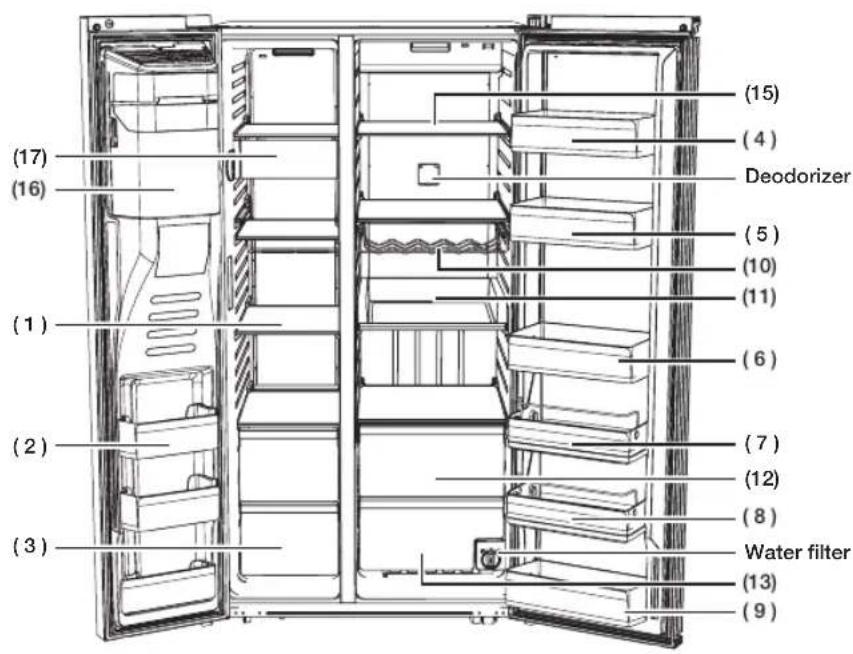
text_image
(17) (16) (1) (2) (3) (4) (5) (10) (11) (6) (7) (12) (8) Water filter (13) (9) (15)NORMAL MODEL
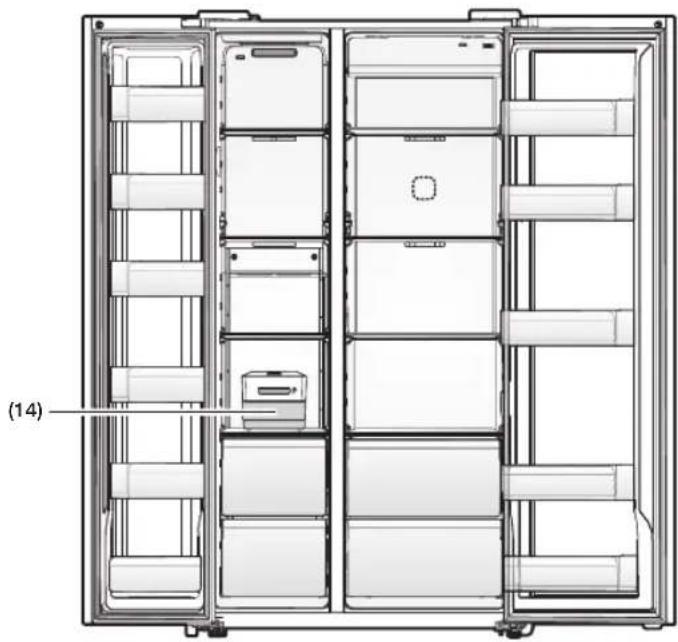
natural_image
Technical line drawing of a refrigerator internal compartments (no text or symbols)English - 33
(1) Freezer Shelves
This is used for storing meat, fish, ice cream and other types of frozen food.
(2) Multipurpose Freezer Compartments
Features tall freezer compartments for more efficient food storage. However, do not use these compartments for items you intend to store for a long time.
(3) Dried Food and Meat Storage Bin
This is used for long-term storage of dried food and meat. Wrap the items in aluminum foil or kitchen wrap before storing them.
(4) Cheese Case
This is used for storing eggs, cheese, butter, and other types of dairy products.
(5) Sauce Case
Used for storing different types of sauces.
(6) Drink Case
This is used for storing water, milk, juice, and other types of beverage.
(7) Snack Case (Optional)
This is used for storing salads and side dishes.
(8) Kids' Case (Optional)
Located at a height within easy reach of children. Use for storing yogurt, snacks, and other items for kids.
(9) Multi Case
It is used for storing the dehydrated food such as dried noodle (spaghetti), beef jerky etc.
(10) Wine Rack (Optional)
Helps wines maintain their taste by providing an optimized place for storing your wine bottles.
(11) EZ slide shelves (Optional)
It is easier to take out the food.
(12) Cool Select Zone (Optional)
This is used for storing items that need to be kept slightly colder and meat and fish that will be prepared right away.
(13) Well-Being Vegetable Bin
This is used for keeping fruit and vegetables fresh.
(14) Ice Storage Box
This is used for storing ice. Alternatively, you can take out the bin and free up more space inside the freezer.
(15) Refrigerator Shelves
This is used for storing general types of food that require refrigeration.
(16) Ice Maker Bucket (Only dispenser model)
Designed to store lots of ice easily.

Do not put your fingers, hands or any other objects in the ice chute or the ice maker bucket. Doing so can cause personal injury or material damage
(17) Snack Bin (Optional)
This is used for storing small frozen food such as the ice cream.

- If you plan to go away for a significant time, empty the refrigerator and turn it off. Wipe the excess moisture from the inside of the appliance and leave the doors open. This helps keep odor and mold from developing.
- If the refrigerator is not to be used for a long period of time, pull out the power plug. -Deterioration in the power cord insulation may cause fire.
CONTROLLING THE TEMPERATURE
Basic temperature of Freezer and Refrigerator Compartments
The basic and recommended temperatures of the Freezer and Fridge compartments are -2 °F and 37 °F (or -19 °C and 3 °C) respectively. If the temperature of the Freezer or Refrigerator Compartments are too high or low, adjust the temperature manually.
Controlling the Freezer temperature
RH77*
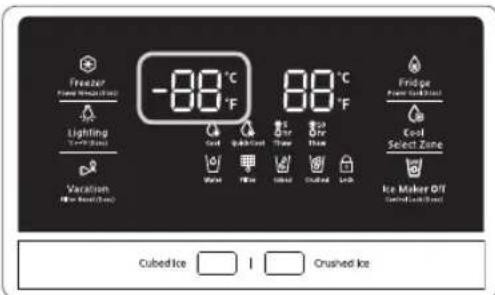
text_image
-88°C 88°C Freezer Power (kcal/mol) Lighting -700 gm Vacation Non-Rise (mm) Cubed Ice Crushed Ice Findge Power (kcal/mol) Cost Select Zone Ice Maker OY Control (mm)Recommend Temp (Freezer) : -2 °F (or -19 °C) (This image may different depends on the model.)
The Freezer temperature can be set between -8 °F and 5 °F (or between -23 °C and -15 °C) to suit your particular needs. Press the Freezer button repeatedly until the desired temperature is shown in the temperature display.
The temperature will change by 1 °F (or 1 °C) with each press. See below.
$$ \begin{array}{l}\text { Fahrenheit }: 0 ^ {\circ} \mathrm{F} \rightarrow - 1 ^ {\circ} \mathrm{F} \rightarrow - 2 ^ {\circ} \mathrm{F} \rightarrow - 3 ^ {\circ} \mathrm{F} \rightarrow - 4 ^ {\circ} \mathrm{F}\\rightarrow - 5 ^ {\circ} \mathrm{F} \rightarrow - 6 ^ {\circ} \mathrm{F} \rightarrow - 7 ^ {\circ} \mathrm{F} \rightarrow - 8 ^ {\circ} \mathrm{F} \rightarrow 5 ^ {\circ} \mathrm{F} \rightarrow 4 ^ {\circ} \mathrm{F} \rightarrow\3 ^ {\circ} \mathrm{F} \rightarrow 2 ^ {\circ} \mathrm{F} \rightarrow 1 ^ {\circ} \mathrm{F} \rightarrow 0 ^ {\circ} \mathrm{F}.\end{array} $$
$$ \begin{array}{l}\text { Centigrade }: - 1 8 ^ {\circ} \mathrm{C} \rightarrow - 1 9 ^ {\circ} \mathrm{C} \rightarrow - 2 0 ^ {\circ} \mathrm{C} \rightarrow - 2 1 ^ {\circ} \mathrm{C}\\rightarrow - 2 2 ^ {\circ} \mathrm{C} \rightarrow - 2 3 ^ {\circ} \mathrm{C} \rightarrow - 1 5 ^ {\circ} \mathrm{C} \rightarrow - 1 6 ^ {\circ} \mathrm{C} \rightarrow - 1 7 ^ {\circ} \mathrm{C}\\rightarrow - 1 8 ^ {\circ} \mathrm{C}.\end{array} $$
Keep in mind that foods such as ice cream may-melt at 4 °F (or -15.5 °C).
The temperature display will move sequentially from -8 °F to 5 °F (or from -23 °C to -15 °C).
Controlling the Fridge temperature
RH77*
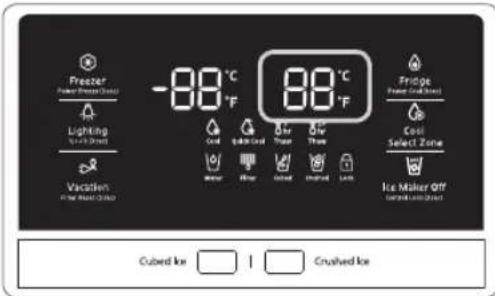
text_image
Freezer Power Freeze Outlet Lighting +/- 50% Outlet Vacation +/- 50% Outlet -88 °C °F 88 °C °F Cool lighter Cool Throat Throat Clear Clear Iced Fridge Power Freeze Outlet Cool Select Zone Ice Maker Off +/- 50% Outlet Cubed Ice Crushed IceRecommend Temp (Fridge) : 37 °F (or 3 °C) (This image may different depends on the model.)
The fridge temperature can be set between 34 °F and 44 °F (or between 1 °C and 7 °C) to suit your particular needs.
Press the Fridge button repeatedly until the desired temperature is shown in the temperature display. The temperature will change by 1 °F (or 1 °C) with each press. See below.
$$ \begin{array}{l}\text { F a h r e n h e i t }: 3 7 ^ {\circ} \mathrm{F} \rightarrow 3 6 ^ {\circ} \mathrm{F} \rightarrow 3 5 ^ {\circ} \mathrm{F} \rightarrow 3 4 ^ {\circ} \mathrm{F} \rightarrow\4 4 ^ {\circ} \mathrm{F} \rightarrow 4 3 ^ {\circ} \mathrm{F} \rightarrow 4 2 ^ {\circ} \mathrm{F} \rightarrow 4 1 ^ {\circ} \mathrm{F} \rightarrow 4 0 ^ {\circ} \mathrm{F} \rightarrow 3 9 ^ {\circ} \mathrm{F}\\rightarrow 3 8 ^ {\circ} \mathrm{F} \rightarrow 3 7 ^ {\circ} \mathrm{F}.\end{array} $$
$$ \begin{array}{l}\text { Centigrade: } 3 ^ {\circ} \mathrm{C} \rightarrow 2 ^ {\circ} \mathrm{C} \rightarrow 1 ^ {\circ} \mathrm{C} \rightarrow 7 ^ {\circ} \mathrm{C} \rightarrow 6 ^ {\circ} \mathrm{C}\\rightarrow 5 ^ {\circ} \mathrm{C} \rightarrow 4 ^ {\circ} \mathrm{C} \rightarrow 3 ^ {\circ} \mathrm{C}.\end{array} $$
The temperature control process for the Fridge works just like the Freezer process.
Press the Fridge button to set your desired temperature.
After a few seconds, the Fridge will begin adjusting towards the newly set temperature.
This will be reflected in the digital display.

- The temperature of the Freezer or Fridge may rise when you open the doors too frequently, or if a large amount of warm or hot food is placed inside.
- This may cause the digital display to blink. Once the Freezer and Fridge temperatures return to their normal set temperatures, the blinking will stop.
- If the blinking continues, you may need to "reset" the Refrigerator.
Try unplugging the appliance, wait for around 10 minutes, and then plug the power cord back in.
USING THE COLD WATER DISPENSER
Push the appropriate ice type button to select what you want dispensed.
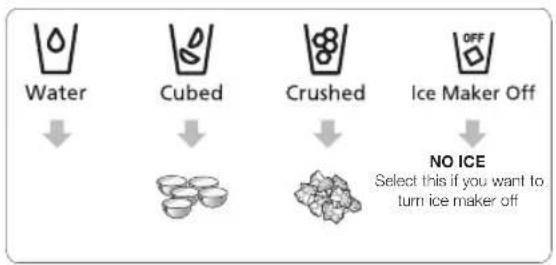
flowchart
graph TD
    A["Water"] --> B["Cubed"]
    B --> C["Crushed"]
    C --> D["Ice Maker Off"]
    D --> E["NO ICE\nSelect this if you want to turn ice maker off"]
Using the ice lever (1)
Push the Ice lever dispenser (1) gently with your glass.
Ice will be released from the dispenser.
You can choose the type of ice by pushing the cubed or crushed button first.
Using the Water lever (2)
Push the Water lever dispenser (2) gently with your glass.
Water will be released from the dispenser.
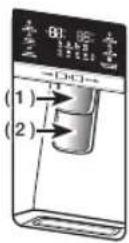

Even if you push the water and Ice lever at about the same time, the dispenser operates only the option you actually selected or pushed first.

Please wait 1 second before removing the cup after dispensing water to prevent spills.
Do not pull out the lever dispenser after dispensing ice or water.
It comes back automatically.
Using the Ice & Water Dispenser together
To get ice and water, push the ice lever (1) first for ice, then move your glass down and press the water dispenser lever (2) for water.

Please wait 2 seconds before removing the glass under the dispenser to prevent spills.
If the Refrigerator door opens, the Dispenser does not work.
- Do not pull the lever out. You could damage or break the lever's spring.
- To clean the ice bin/bucket, wash with a mild detergent, rinse well, and dry thoroughly it. Do not use harsh or abrasive cleaners or solvents.
- In case ice doesn't come out, pull out the ice bucket and press the test button located on the right side of ice maker.
- Do not press the test button continuously when the tray is filled with ice or water. Water may overflow or ice may jam the bucket.

- When you press the Test button, you will hear the refrigerator chime (ding-dong). When the chime sounds, release the Test button.
- The chime sounds automatically again to let you know the ice maker is working well.

If a power failure occurs, ice cubes may melt then freeze together when the power comes back on, causing the dispenser to be out of order.
To prevent this problem, after a power failure, pull out the ice bucket and discard the residual ice or water.

After you dump the ice from the ice bucket, you should press the dispenser lever once with the 'ICE CUBED' or 'CRUSHED' function ON.
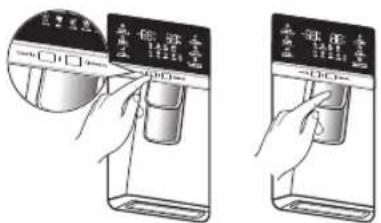
text_image
Diagram showing two hand-drawn steps of a device control panel with Chinese labels and a magnified view of the screen.The ice maker will make new ice faster after you return the ice bucket to the refrigerator.

- Do not put your fingers, hands, or any unsuitable objects in the chute or ice-maker bucket.
-This can cause personal injury or material damage.
- Use only the ice maker provided with the refrigerator.
- The water line to this refrigerator must be installed / connected by a suitably qualified person and must be connected to a potable water supply.
- The ice maker requires water pressure of 20 - 125 psi (138\~862 kPa) to operate properly.

- If you are going on a long vacation or business trip and won't be using the water or ice dispensers for that period of time, close the water valve to prevent leaks.
- If you have not used the ice maker for a while, or you have opened the Freezer door frequently, the ice may stick together. If this occurs, empty the ice bucket or break up the ice with a wooden kitchen tool. Do not use sharp items such as knives or forks.
- When you remove the ice bucket, there may still be some residual ice in the ice maker. The ice maker may eject this ice into the freezer.
Using the ice Dispenser
Press the ice button to select the type of ice you want.
Place your cup under the ice outlet, and then push gently against the dispenser pad.
Make sure the glass is in line with the dispenser to prevent the ice from bouncing out.
If you select Cubed Ice after using the Crushed Ice feature, a small amount of residual crushed ice might be produced.

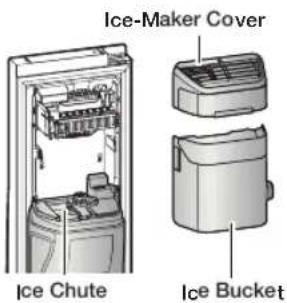
text_image
Ice-Maker Cover Ice Chu Ice Bucket te
- If ice does not dispense, pull out the icemaker cover and press test button located on the ice maker.
- Do not press the test button continuously when the tray is filled with ice or water.
Water may overflow or the ice may jam the icemaker or dispenser.

text_image
Test button
For more space, you can store food with Guard FRE-UPP instead of the ice bucket, and remove the COVER-ICE MAKER and Snack Bin.
If you remove the ice bucket, ICE OFF will blink on the display panel.
Furthermore, you can remove the freezer Upper drawer and put the shelf on that place.
Since it does not affect thermal and mechanical characteristics.
A declared storage volume of frozen food storage compartment is calculated with "Guard FRE-UPP" positioned and "COVER-ICE MAKER", "Snack Bin", "Upper Drawer" removed.
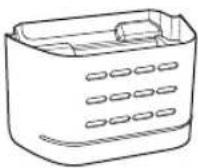
GUARD FRE (Freezer)-UPP (Optional)
text_image
Ice-Maker Cover Ice Chute Ice Bucket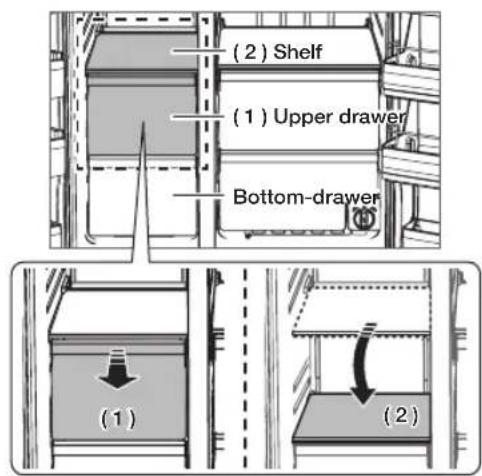
text_image
(2) Shelf (1) Upper drawer Bottom-drawer (1) (2)USING THE COOLSELECT ZONE™ DRAWER (OPTIONAL)
The CoolSelect Zone™ Drawer is designed to make your busy life just a little bit easier.
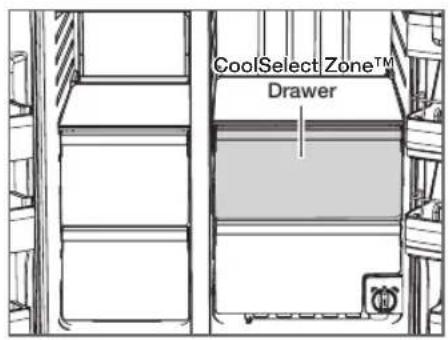
text_image
CoolSelect Zone™ DrawerThaw

When "Thaw" is selected, cool air is alternately blown into the CoolSelect Zone Drawer.
Depending on the weight of the frozen food, you can select a 5 hrs, 10 hrs thawing time.
When "Thaw" ends, food is in a half-frozen state, making it easy to cut for cooking.
In addition, when "Thaw" ends, the CoolSelect Zone Drawer returns to the original "Cool" condition.
To cancel this function mid cycle, just press CoolSelect Zone button and select other function.
Quick Cool

You can use the "Quick Cool" operation with the CoolSelect Zone™ Drawer to quickly cool 1\~3 canned beverages in about an hour.
When the “Quick Cool” process ends, the CoolSelect Zone™ Drawer automatically returns to the original “Cool” condition.
To cancel this operation, press the "Quick Cool" button again and the CoolSelect Zone™ Drawer returns to the previously set temperature.
Cool

When "Cool" is selected, the temperature in the CoolSelect Zone™ Drawer will be the same as the overall temperature setting of the refrigerator. The drawer digital panel shows the same temperature as that of the refrigerator display panel.
Since the "Cool" function mimics the refrigerator temperature, you have extra general storage space.

Depending on the size and thickness of the meat or fish, thawing times may vary.

When "Thaw" is in operation, any items that you do not want affected should be moved out of the drawer.
SMART ECO FEATURES
Smart Eco System
Keep freshness of food using 4 sensors according to the operating environment, usage pattern and the refrigerator operating status while saving electricity costs.
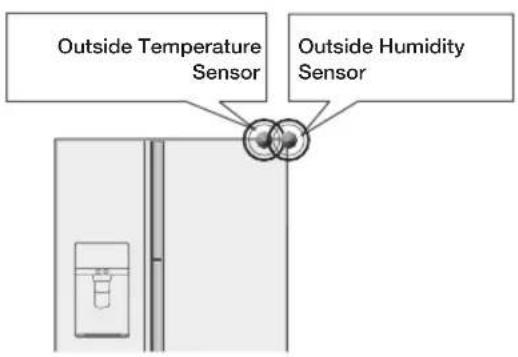
text_image
Outside Temperature Sensor Outside Humidity Sensor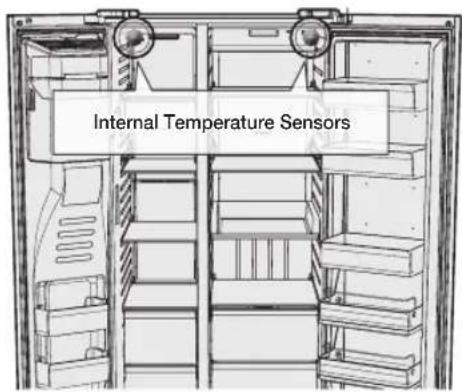
text_image
Internal Temperature SensorsFRIDGE MULTI-PURPOSE DOOR BIN
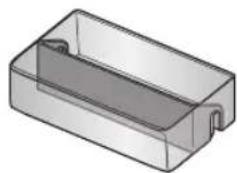
A detachable divider makes it convenient to store food.
Food products can be stored by items.
- Put the divider in place when storing slim-size condiment bottles and canned drinks together.
natural_image
3D rendering of a rectangular plastic housing with a recessed top and side gap (no text or symbols)• Take out the divider when storing carton-size milks or drinks.
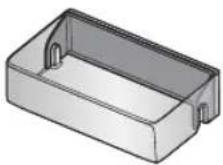
How to use the divider
- Insert the divider as shown in the diagram to compartmentalize the case.
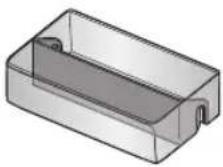
- When not in use, simply flip it around and move it out of the way as shown in the diagram.
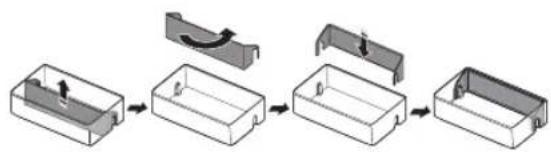
flowchart
graph LR
    A["Initial Component"] --> B["Step 1: Rotation of curved component"]
    B --> C["Step 2: Inserted part"]
    C --> D["Step 3: Cut into rectangular box"]
    D --> E["Final Box"]
How to use the multi supporter
- When not in use, leave the Multi Supporter flipped over as shown in the diagram.
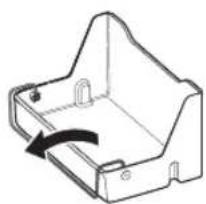
natural_image
Technical line drawing of a mechanical housing component with an arrow indicating rotation (no text or symbols)- Flip the Multi Supporter to position 1 to prevent items from falling out and over.
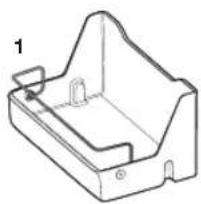
natural_image
Technical line drawing of a mechanical housing or bracket component (no text or symbols)- Flip the Multi Supporter to position 2 to use it as a divider.
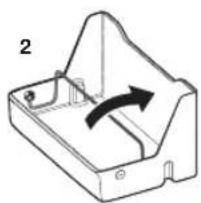
natural_image
Technical line drawing of a mechanical component with an arrow indicating rotation (no text or symbols)REMOVING THE REFRIGERATOR ACCESSORIES
- Shelves (Freezer/Fridge)
- Open the door completely and then lift up the shelf as you pull it out to remove it.

text_image
(1) Rear- If you are unable to open the door completely, pull out the shelf, lift it up, and turn it to remove it.
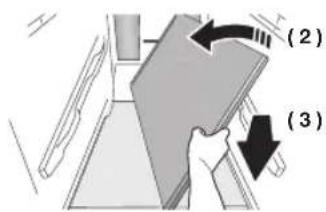
text_image
(2) (3)
Be careful not to insert the shelf upside down.

Glass containers can scratch the surface of the glass shelves.
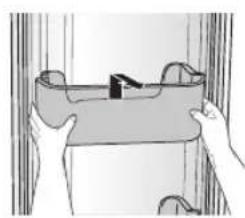
- Door Bin
- Remove the Door Bin by holding the door bin with both hands and then gently lift it up.
natural_image
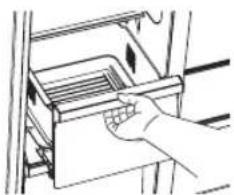
Illustration of hands holding a rectangular object with a small object inside, against a curtain background (no text or symbols)- Drawer
- Remove the Drawer by pulling it out and lifting it up slightly.
natural_image
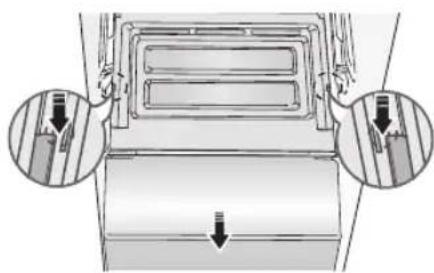
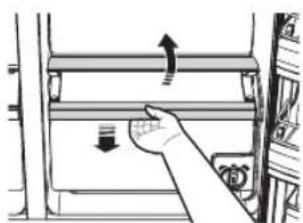
Hand placing a tray into an oven with arrows indicating direction (no text or symbols)- Vegetable Bin/Dry Bin Cover
• Take out the bin above the Vegetable Bin (refrigerator)/Dry Bin (freezer).
- Press down on the clips on either side of the Vegetable Bin (refrigerator)/Dry Bin (freezer) and pull them out towards you to remove the bin.
natural_image
Diagram of a vehicle air vent with two circular insets showing internal components (no text or labels)(Optional)
-
Vegetable Bin/Dry Bin
-
Before taking out the Vegetable Bin/Dry Bin, you need to remove the multipurpose compartments from the door.
- Lift the bin up slightly as you pull it out.
natural_image
Hand pressing down on a mechanical component with directional arrows (no text or symbols)-
Ice Bucket (Freezer)
-
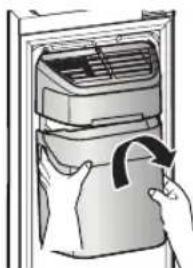
Remove the Icemaker Bucket by lifting it up and pulling it out slowly.
• Grip the handle as shown in the figure. - Remove the Ice Bucket slowly to prevent damage.
natural_image
Illustration of a hand inserting a bag into an air conditioner unit (no text or symbols visible)
Do not use excessive force when removing the drawer cover. You can break the cover and cause injury.

Before removing any accessories, make sure that no food is in the way. When possible, remove the food altogether to reduce the risk of accidents.
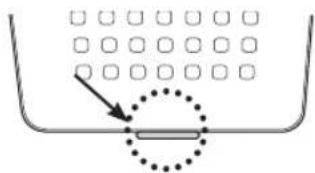
- Removing the Deodorizer
- Pull out the shelf slightly and then pull out the unit while pushing the deodorizer cover clip up using a flathead screwdriver.
text_image
Diagram showing a container with a dotted line and a rectangular object inside, possibly indicating a measurement or solution.-
Cleaning the Deodorizer
-
Clean the deodorizer once every two years or whenever you feel its performance has diminished.
- Dry the deodorizer under the sun for 24 hours and then replace it in the reverse order of its removal.
CLEANING THE REFRIGERATOR

- Do not use benzene, thinner, Clorox, or car detergent to clean the refrigerator. They can damage the surface of the appliance and may cause a fire.
- Do not spray the refrigerator with water while it is plugged in. This can cause an electric shock. To clean the refrigerator, follow these steps:
-
Unplug the power code of the refrigerator.
-
Slightly dampen a soft lint-free cloth or paper towel with water.

Do not use any kind of detergent to clean the refrigerator because that can discolour or damage the refrigerator.
-
Wipe the inside and outside of refrigerator until it is clean and dry.
-
Plug the power cord of the refrigerator back in.
CHANGING THE INTERIOR LIGHTS
Freezer / Fridge LED Lamp
- If the LED Lamp Cover is stained with foreign substances, the LED lamp may not look bright. Wipe the surface cover with clean dry cloth to return the light to full brightness.

Do not disassemble or replace the LED lighting yourself. To replace the LED lights, contact a Samsung service centre or your authorized Samsung dealer.

If you attempt to replace the LED lamps yourself, you risk subjecting yourself to an electric shock or serious personal injury.
TO IMPROVE THE COOLING PERFORMANCE

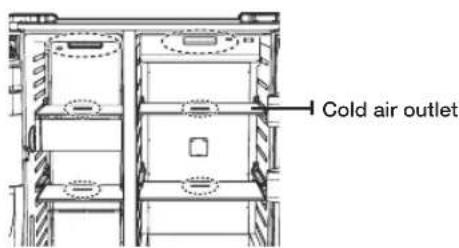
If the cold air outlet is blocked by food items, the cold air cannot penetrate the entire compartment and will be unable to freeze the food efficiently which results in a degraded cooling performance.
text_image
Cold air outletCHANGING THE WATER FILTER

To reduce risk of water damage to your property DO NOT use generic brands of water filers in your SAMSUNG Refrigerator.
USE ONLY SAMSUNG BRAND WATER FILTERS. SAMSUNG is not legally responsible for any damage, including, but not limited to property damage caused by water leakage from the use of a generic water filter.
SAMSUNG Refrigerators are designed to work ONLY WITH SAMSUNG Water Filters.
The "Filter Indicator" light lets you know when it is time to change your water filter cartridge.
To give you preparation time to get a new filter, the red light will come on just before the capacity of the current filter runs out.
Changing the filter on time provides you with the freshest, cleanest water from your fridge.
To change the water filter, follow these steps:
- Turn the water filter 90° counter-clockwise.
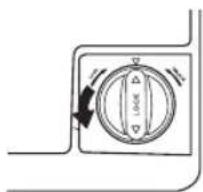
natural_image
Diagram of a washing machine dial with directional arrows indicating rotation (no text or symbols)- Pull the water filter from the filter housing.
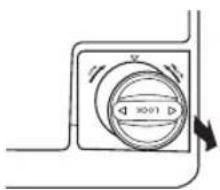
text_image
Diagram of a device control panel with directional arrows and measurement labels- Insert new water filter inside the filter housing.
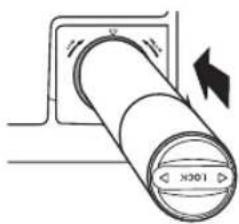
natural_image
Diagram of a cylindrical device with directional arrows indicating motion or force, no text or symbols present- Turn the new water filter 90° clockwise.
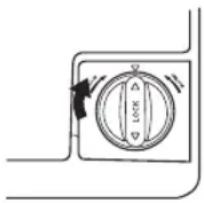
natural_image
Simple line drawing of a door switch with a circular dial and directional arrows (no text or symbols)- Press the "Lighting / °F (3 sec)" button ( ) for about 3 seconds to reset the water filter. The color of indicator changes from red to light off.

A newly installed water filter cartridge may cause water to briefly spurt from the water dispenser.
This is due to air getting into the line. It should pose no problem to operation.

When you replace the water filter, water can drip from the bottom front of the refrigerator.
Make sure to clean up any drips or spills after you have changed the filter.
Removing residual matter inside the water supply line after installing a new filter
- Press the Water button, and then push the Dispenser Lever with a cup or glass.
- Flush 1 gallon of water through the filter, one cup or glass at a time.
(Flush approximately 6 minutes.)
This will clean the water supply system and remove air from the lines.
-Additional flushing may be required in some households. - Open the refrigerator door and make sure there are no water leaks coming from the water filter.
Reverse Osmosis Water Supply IMPORTANT :
The pressure of the water supply coming out of a reverse osmosis system going to the water inlet valve of the refrigerator needs to be between 35 and 120 psi (241 and 827 kPa). If a reverse osmosis water filtration system is connected to your cold water supply, the water pressure to the reverse osmosis system needs to be a minimum of 40 to 60 psi (276 to 414 kPa.) If the water pressure to the reverse osmosis system is less than 40 to 60 psi (276 to 414 kPa):
- Check to see whether the sediment filter in the reverse osmosis system is blocked. Replace the filter if necessary.
- Allow the storage tank on the reverse osmosis system to refill after heavy usage.
- If your refrigerator has a water filter, it may further reduce the water pressure when used in conjunction with a reverse osmosis system. Remove the water filter.
If you have questions about your water pressure, call a licensed, qualified plumber.
Ordering replacement filters
To order more water filter cartridges, contact your authorized Samsung dealer.
USING THE ICE MAKER (OPTIONAL)
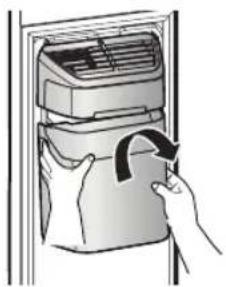
• To Remove the Ice Bucket.
-Hold the handle as shown in figure1.
-Lift up and pull the Bucket out slowly.
-Take out Ice Bucket out slowly to prevent damage.
-When you reinstall the ice bucket, press and hold the ICE button for 6 seconds.
natural_image
Illustration of a hand inserting a bag into an air conditioner unit (no text or symbols visible)- Normal Operation
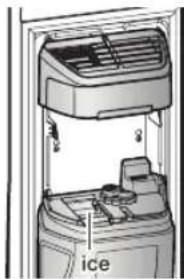
-Any sounds you hear when the ice maker dumps ice into the bucket are part of normal operation.
-Ice may clump in the bucket if you do not dispense ice for long periods of time. If this occurs, remove all the ice and empty the bucket.
-If ice does not come out, check for any ice stuck in the chute and remove it.
-The first batch of ice cubes after installation may be small because air has entered the water line. Any air will be purged during normal use.
text_image
ice
- When ICE OFF blinks on the display panel, reinsert the ice bucket and/or make sure it's installed properly.
- When the door is open, the ice and water dispenser do not work.
- If you close the door hard, it may cause water to spill over the ice maker.
- To prevent the ice bucket from dropping, use both hands when removing it.
- To prevent injury, be sure to clean up any ice or water that may have dropped on the floor.
- Do not let the children hang on the ice dispenser or on the bucket. They may get hurt.
- Be sure not to put your hand or any object into the ice chute. It may cause personal injury or damage mechanical parts.
- Use care when storing food in plastic bags in the freezer. Incorrectly stored bags can get caught in the ice bucket's Motor and prevent the refrigerator from dispensing ice or cause the freezer door to open unexpectedly.

natural_image
Technical line drawing of a mechanical assembly with a magnified inset showing a circular detail (no text or symbols)Troubleshooting
| PROBLEM SOLUTION | |
| The refrigerator does not work at all or it does not chill sufficiently. | Check that the power plug is properly connected.Is the temperature control on the display panel set to the correct temperature?Try setting it to a lower temperature.Is the refrigerator in direct sunlight or located too near a heat source?Is the back of the refrigerator too close to the wall and therefore keeping air from circulating? |
| The food in the fridge is frozen. | Is the temperature control on the display panel set to the correct temperature?Try setting it to a warmer temperature.Is the temperature in the room very low?Did you store the food with a high water content in the coldest part of the fridge? |
| You hear unusual noise or sounds. | Check that the refrigerator is level and stable.Is the back of the refrigerator too close to the wall and therefore keeping air from circulating?Was anything dropped behind or under the refrigerator?If you hear a “ticking” sound from inside the refrigerator, this is normal.It occurs because various parts contract or expand in response to temperature changes in the refrigerator interior. |
| The front corners of the appliance are hot and condensation is occurring. | Some heat is normal as anti-condensators are installed in the front corners of the refrigerator to prevent condensation.Is the refrigerator door ajar?Condensation can occur when you leave the door open for a long time.Water condensation in a drawer may occur if the drawer contains vegetables.The condensation will dissipate naturally as time passes. |
| Ice is not dispensing. | Did you wait for 12 hours after installation of the water supply line before making ice?Is the water line connected and the shut-off valve open?Did you manually stop the ice making function?Make sure Ice is set to Cubed or Crushed.Are there any ice clumps in the ice maker bucket? Remove them.Is the freezer temperature too warm? Try setting the freezer temperature lower. |
| You can hear water bubbling in the refrigerator. | This is normal.The bubbling comes from the refrigerant coolant liquid circulating through the refrigerator. |
| There is a bad smell in the refrigerator. | Has a food item spoiled?Make sure that strong smelling food (for example, fish) is wrapped so that it is airtight.Clean out your freezer periodically and throw away any spoiled or suspect food. |
| Frost forms on the walls of the freezer. | Is the air vent blocked?Remove any obstructions so air can circulate freely.Allow sufficient space between the foods stored for efficient air circulation.Is the freezer door closed properly? |
| The water dispenser is not functioning. | Is the water line connected and the shut-off valve open?Has the water supply line tubing been crushed or kinked?Make sure the tubing is free and clear of any obstruction.Is the water tank frozen because the refrigerator temperature is too low?Try selecting a warmer setting on the main display panel. |
| What can be done when freezer door is not closed well. | Push lever dispenser and check water supply.Push lever dispenser (Ice mode) and check operation of auger motor.Remove objects on shelves that might obstruct drive auger.Precautions: If you have not dispensed the water or ice for an extended time, the ice bucket may accumulate ice chunk that interferes with the drive auger, causing the inability to dispense.Remove the remaining ice of bucket and object that might obstruct drive Auger. Please operate dispenser (water & ice) and it will improve auto-closing of freezer door. |
Memo
Ambient Room Temperature Limits
This refrigerator is designed to operate in ambient temperatures specified by its temperature class marked on the rating plate.
| Class Symbol | Ambient Temperature range (°C) | ||
| IEC 62552 (ISO 15502) | ISO 8561 | ||
| Extended Temperate SN | +10 to +32 +10 to | +32 | |
| Temperate N +16 to | +32 +16 to +32 | ||
| Subtropical ST+16 to | +38 +18 to +38 | ||
| Tropical T+16 to +43 | +18 to +43 | ||

Internal temperatures may be affected by such factors as the location of the fridge/freezer, ambient temperature and the frequency with which you open the door. Adjust the temperature as required to compensate for these factors.
English
natural_image
Symbol of a waste bin with crossed lines indicating no waste, and a solid rectangle below (no text or labels)Correct Disposal of This Product
(Waste Electrical & Electronic Equipment)
(Applicable in countries with separate collection systems)
This marking on the product, accessories or literature indicates that the product and its electronic accessories (e.g. charger, headset, USB cable) should not be disposed of with other household waste at the end of their working life. To prevent possible harm to the environment or human health from uncontrolled waste disposal, please separate these items from other types of waste and recycle them responsibly to promote the sustainable reuse of material resources. Household users should contact either the retailer where they purchased this product, or their local government office, for details of where and how they can take these items for environmentally safe recycling.
Business users should contact their supplier and check the terms and conditions of the purchase contract. This product and its electronic accessories should not be mixed with other commercial wastes for disposal.
For more information on safe disposal and recycling, visit our web site www.samsung.com or contact our Helpline numbers on below contact SAMSUNG WORLD WIDE.
Contact SAMSUNG WORLD WIDE
If you have any questions or comments relating to Samsung products, please contact the SAMSUNG customer care center.
Samsung India Electronics Pvt Ltd., 21st Floor, Two Horizon Center,
Sector 43, Golf Course Road, Gurgaon 122002
1800 3000 8282 (Toll Free)
1800 266 8282 (Toll Free)
1800110011 (Toll Free)
30308282
www.samsung.com/in/support


रेफ्रिजरेटर
उपयोगकर्ता मार्गदर्शिका
संभावनाओं की कल्पना करें
Samsung उत्पाद खरीदने के लिए धन्यवादा
फ्री:शुल्क स्टैंडिंग उपकरण
SAMSUNG
सामग्रियाँ
सुरक्षा जानकारी 2
अपने रेफ्रिजरेटर को सेट करना 15
अपने SAMSUNG रेफ्रिजरेटर को संचालित करना 29
समस्या-निवारण 47
सुरक्षा जानकारी
सुरक्षा जानकारी
- उपकरण को चलाने से पहले, कृपया इस मैनुअल को पूरी तरह पढ़े और भविष्य में देखने के लिए इसे उपकरण के पास किसी सुरक्षित स्थान पर रखें।
- इस उपकरण का उपयोग इस निर्देश पुर्स्तिका में वर्णित नियत उद्धेश्य के लिए ही करें! यह उपकरण क्षीण शारीरिक, संवेदक या मानसिक क्षमताओं, या कम अनुभव एवं झान वाले व्यक्तियों (बच्चों सहित) के उपयोग हेतु नहीं बनाया गया है, बशर्ते उन्हें उनकी सुरक्षा के लिए किसी जिम्मेदार व्यक्ति द्वारा उपकरण के उपयोग संबंधी पर्थवेक्षण या निर्देश प्रदान किया गया हो।
- इस उपयोकरण का उपयोग 8 साल या उससे बड़े बच्चों तथा क्षीण शारीरिक,
संवेद्क या मानसिक क्षमताएँ या कम
अनुभव एवं ज्ञान वाले व्यक्तियों द्वारा किया
जा सकता है बशर्ते कि उन्हें उपकरण को
सुरक्षित तरीके से उपयोग से जुड़े पर्यवे क्षण
या निर्देश प्रदान किए गए हैं और वे इससे
उत्पन्न खतरों को समझते हैं।
बच्चों को उपकरण के साथ नहीं खेलने
देना चाहिए।
पर्यवेक्षण के बिना बच्चों को सफाई और
उपयोगकर्ती रखरखाव नहीं करना चाहिए।
- इस मार्गदर्शिका में दी गई चेतावनियों और सुरक्षा निर्देशों में, उत्पन्न हो सकने वाली सभी स्थितियाँ और परिस्थितियाँ शामिल नहीं हैं।
अपने उपकरण की स्थापना, रखरखाव
और संचालन करते समय अपने विवेक,
सावधानी और ध्यान का उपयोग करने की
जिम्मेदारी आपकी है।
- चूँकि इन निम्न संचालन निर्देश विभिन्न मॉडल पर लागू होते हैं, इसलिए आपके रेफ्रिजरेटर की विशेषताएँ इस मार्गदर्शिका में वर्णित विशेषताओं से थोड़ी भिन्न हो सकती हैं और हो सकता है सभी चैतावनी चिह्न लागू न हो। अगर आपका कोई प्रश्र या चिंता है, तो अपने निकटतम सेवा केंद्र से संपर्क करें या www.samsung.com पर ऑनलाइन सहायता और जानकारी प्रास करें।
महत्वपूर्ण सुरक्षा प्रतीक और सावधानियाँः
| बेतवनी | खतरे या असुरक्षित व्यवहार जिनसे गंभीर निजी चोट लग सकती हैया मृत्यु हो सकती है। |
| सायधानी | खतरे या असुरक्षित व्यवहार जिनसे हल्की निजी चोट लग सकती हैया संपत्ति की क्षति हो सकती है। |
| इसका प्रयास न करें। | |
| इसे खोलें नहीं। | |
| इसे स्पर्श न करें। | |
| निर्देशों का सावधानीपूर्वक पालन करें। | |
| दीवार के सॉकेट से बिजली के प्लग को निकाल दें। | |
| बिजली के झटके से बचने के लिए सुनिश्रित करें की मशीन स्थिर है। | |
| सहायता के लिए संपर्क केंद्र पर कॉल करें। | |
| नोटा |
ये चेतावनी चिह्न यहाँं आपको तथा अन्य लोगों को चोट से बचाने के लिए हैं। कृपया उनका ध्यानपूर्वक अनुसरण करें। इस अनुभाग को पढ़ने के बाद, इसे भावी संदर्भ के लिए किसी सुरक्षित स्थान में रखें।

परिवहन और साइट के लिए गंभीर चेतावनी चिह्न

- उपकरण का परिवहन और स्थापना करते समय यह सुनिश्रित करने के लिए सावधानी बरती जानी चाहिए कि प्रशीतन सर्किट का कोई भाग क्षतिग्रस्त तो नहीं है।
- रेफ्रिजर्सेंट के रूप में R-600a या R-134a का उपयोग किया जाता है आपके रेफ्रिजर्सेटर के लिए उपयोग किए गए प्रशीतक का पता लगाने के लिए उपकरण के पिछले हिस्से में कंप्रेशर लेबल या फ्रिज के अंदर रेटिंग लेबल देखें।
- चूकि इस उत्पाद में ज्वलनशील गैस (रेफ्रिजरेंट R-600a) मौजूद है, -पाइप सेरिसने वाले रेफ्रिजरेंट से आग लग सकती हैया ऑँखों को चोट पहुँच सकती है
यदि रिसाव का पता लगता है, तो अग्नि या प्रज्वलन के संभावित स्त्रोत से बर्चे और उपकरण वाले कमरे में कुछ समय तक हवा आने दें।
-प्रशीतन सर्किट में रिसाव पाए जाने की स्थिति में ज्वलनशील गैस-वायु मिश्रण के निर्माण से बचने के लिए, उपकरण वाले कमरेका आकार प्रयुक्त प्रशीतक की मात्रा पर निर्भर हो सकता है।
-क्षति कलक्षण इंगित करने वाले उपकरण को कभी आरंभ न करें अगर कोई शंका है,
तो अपने डीलर से परामर्शलें। उपकरण के भीतर स्थित R-600a रेफ्रिजरेंट के प्रत्येक 8 ग्राम के लिए स्थान का आकार 1 मी³ होना चाहिए। आपके व्यक्तिगत उपकरण में रेफ्रिजरेंट की मात्रा उपकरण के भीतर लगी पहचान प्लेट पर दिखाई गई है।
- पाइपों से रिसने वाले रेफ्रिजर्सेंट से आग लग सकती है या ऑँखों को चोट पहुँच सकती है।
जब पाइप से रेफ्रिजरेंट रिस रहा हो, तो अनावृत ज्वाला से बचें और किसी भी ज्वलनशील पदार्थ को उत्पाद से दूर ले जाएँ और कमरे मेंतुरंत हवा का संचार करें।
-ऐसा करनेमें विफल रहने पर आग लग सकती है या विस्फोट हो सकता है। -इस उपकरण मेंआइसोब्यूटेन रेफ्रिजरेंट (R-600a) शामिल होने पर भी यह गैस उच्च पर्यावरणीय संगतता वाली प्राकृतिक गैस है, यद्यपि यह ज्वलनशील भी होती है उपकरण के स्थानांतरण एवं स्थापना के दौरान प्रशीतन सर्किट के किसी भी भाग का क्षितिग्रस्त न होना सुनिश्रित करने के लिए सावधानी बरतनी चाहिए।

स्थापना के लिए गंभीर चेतावनी चिह्न

- इस उपकरण को किसी नम, तेलीय या धूलयुक्त स्थान, किसी ऐसे स्थान पर न रखें जहाँ सीधा सूर्यप्रकाश और पानी (वर्षा की बूंदें) आता हो।
-विद्युतीय हिस्सों में खराब विद्युत-रोधन के कारण बिजली के झटके या आग लग सकती है।
- इस रे फ्रिजरेटर को सीधे सूर्यप्रकाश में न रखें या स्टोव, रूम हीटर या अन्य उपकरणों की गर्मी से दूर रखें।
- एकाधिक पावर बोर्ड में अनेक उपकरणों के प्लग न लगाएँ रेफ्रिजरेटर का प्लग हमेशा अपने अलग बिजली के आउटलेट में लगा होना चाहिए जिसकी वोल्टेज रेटिंग, रेटिंग प्लेट से मेल खाती हो।
-इससेसर्वश्रेष प्रदर्शन मिलता है और इससे घर का वायरिंग सर्किट ओवरलोड होने से भी बचता है, जिससे अत्यधिक गर्म तारों से आग का खतरा हो सकता है। यदि दीवार का सॉकेट ढीला हो, तो उसमें प्लग न लगाएँ
-इससेबिजली के झटके या आग का जोखिम होता है
- ऐसे किसी तार का उपयोग न करें जिसकी पूरी लंबाई या किसी छोर में दरारें या घर्षण क्षति नजर आ रही हो।
- बिजली के तार को अधिक न मोड़ें या इस पर कोई भारी चीज न रख दें।
- रेफ्रिजस्टर के पास वतिलयनों का उपयोग न करें -रेफ्रिजस्टर के पास वतिलयनों का उपयोग करने से विस्फोट हो सकता है या आग लग सकती है।
- इस उपकरण को किसी ऐसे स्थान पर स्थापित न करें जहाँं गैस रिस सकती हो। -इसेकारण बिजली का झटका या आग लग सकती है।

- इस उपकरण की स्थापना या कोई भी सर्विस, योग्य तकनीशियन या सर्विस कंपनी से करने की अनुशंसा की जाती है।
-ऐसा करनेमें विफल रहने पर बिजली का झटका, आग लग सकती है, विस्फोट हो सकता है, उत्पाद में समस्याएँ हो सकती हैं या चोट लग सकती है।
- यह रे फ्रिजरेटर उचित तरीके से स्थापित किया जाना चाहिए और उपयोग से पूर्व पुस्तिका के अनुसार अवस्थित होना चाहिए।
- तार को नीचे लटकाकर बिजली के प्लग को उचित स्थिति में कनेक्ट करें! -अगर आप बिजली केप्लग को उल्टा लगाते हैं, तो तार कट सकता है और आग या बिजली का झटका लग सकता है।
- रेफ्रिजस्टर के पिछले हिस्से द्वारा बिजली के प्लग का कुचलना या क्षतिग्रस्त न होना सुनिश्रित कर्शे
- रेफ्रिजरेटर का स्थान बदलने के दौरान, बिजली के तार को क्षतिग्रस्त न होने दें -इससेआग का जोखिम हो सकता है।
- उपकरण इस प्रकार रखना चाहिए कि स्थापना के बाद प्लग तक आसानी से पुहुँचा जा सके।

- रेफ्रिजरेटर ग्राउंड किया गया होना चाहिए।
-बिजली लीक्ष रोकने या रेफ्रिजरेटर से वर्तमान लीकेज के कारण बिजली के झटके से बचने के लिए आपको रेफ्रिजरेटर को ग्राउंड कर देना चाहिए।
- गैस पाइप, टेलीफोन लाइन या अन्य संभावित बिजली-संवाहकों का उपयोग ग्राउंड की तरह कभी न करें। -ग्राङ्क प्लग के अनुचित उपयोग के कारण बिजली के झटके लग सकते हैं।

- यदि बिजली का तार क्षतिग्रस्त हो, तो इसे निर्माता या किसी सर्विस एजेंट द्वारा तत्काल बदलवाएँ।
- रेफ्रिजरेटर पर लगा फ्यूँज योग्य तकनीशियन या सर्विस कंपनी द्वारा ही बदला जाना चाहिए। -ऐसा करनेमें विफल रहने पर बिजली का झटका या निजी चोट लग सकती है।

स्थापना के लिए सावधानी चिह

- उपकरण अंतः क्षेत्र या स्थापना संरचना में मौजूद वायुसंचार छिद्र में किसी भी तरह की रूकावट न आने दें।
- स्थापना के बाद उपकरण को 2 घंटे तक खड़ा रहने दें।
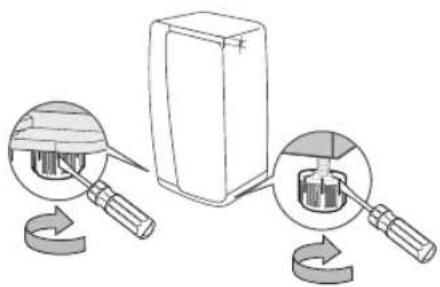
text_image
Diagram illustrating a mechanical device with labeled parts and rotation arrows, showing internal components before and after assembly.-रेफ्रिजस्टर को स्थापित करते समय, सुनिश्रित करें कि सुरक्षित स्थापना के लिए दोनों पाँव फर्श पर हों। पाँव प्रत्येक दस्वाजे के निचले भाग के पीछे स्थित होते हैं चपटे सिरे वाला स्क्रूड़ाइवर का उपयोग करें और जब तक कि उसके पाँव बराबर नहीं हो जाते तीर की दिशा में घुमाते रहें।
-हमेशा दोनों दस्वाजों के भार को बराबर रखें।
-किसी भी एक दरवाजेपर अधिक भार होने से शेफ्रिजरेटर गिर सकता हैं, जिसके कारण उसे क्षति पहुँच सकती हैं

उपयोग के लिए गंभीर चेतावनी चिह्न

• गीले हाथों से बिजली का प्लग न लगाएँ।
- उपकरण के शीर्ष पर सामान न रखें। -जब आप दरवाजा खोलतेया बंद करते हैं, तो सामान गिर सकते हैं तथा उससे निजी चोट और/या उपकरण क्षतिग्रस्त हो सकता है।
- पानी से भरे आइटम को रेफ्रिजरेटर पर न रखें। -इसकेफैलने से आग या बिजली के झटके का खतरा होता है।
- बच्चों को दरवाजे से लटकने न दें। - ऐसा करनेमें विफल रहने पर गंभीर निजी चोट लग सकती है।
- जब रेफ्रिजरेटर के पास कोई न हो तो उसके दरवाजों को खुला न छोड़े और बच्चों को रेफ्रिजरेटर के भीतर प्रवेश न करने दें।
- शिशुओं और बच्चों को दराज़ के भीतर न जाने दें।
-इसकेकारण फंसने की वजह से दम घुटने से मृत्यु हो सकती है या निजी चोट लग सकती है।
- फ्रीज़र के दस्वाज़े पर न बैंतें -दस्वाज़ा दूट सकता है और निजी चोट लग सकती है।
- बच्चों के पंसने के जोखिम को कम करने
के लिए, अगर आपने दराज से विभाजक को निकाला है तो सफाई या अन्य कार्वाई के बाद आपको प्रदान किए पेचों के साथ विभाजक को पुनः स्थापित करना होगा।
- डिस्पेंसर के छिद्र में उंगलियाँ या अन्य वस्तुएँ कभी न डालें -ऐसा करनेमें विफल रहने पर गंभीर निजी चोट लग सकती है या सामग्री की क्षति हो सकती है।
- रेफ्रिजरेटर के अंदर वाष्पशील या ज्वलनशील पदार्थ जैसे बेंजीन, थिनर, एल्कोहल, ईथर या LP गैस न रखें। -एसेउत्पादों के संग्रहण से विस्फोट हो सकता है।
- रेफ्रिजरेटर में तापमान-संवेदी औषधीय उत्पाद, वैज्ञानिक सामग्रियाँ या अन्य तापमान-संवेदी उत्पाद न रखें। -एसेउत्पादों को रेफ्रिजरेटर में नहीं रखा जाना चाहिए जिनके लिए सख्त तापमान नियंत्रणों की आवश्यकता होती है।
- रेफ्रिजरेटर के अंदर बिजली के उपकरण को न रखें या उनका उपयोग न करें, बशर्तें वे निर्माता द्वारा अनुशंसित श्रेणी के हों।
- रेफ्रिजरेटर के अंदरूनी हिस्से को सूखाने के लिए हेयर ड्रायर का उपयोग न करें। दुर्गध हटाने के लिए रेफ्रिजरेटर के अंदर जलती मोमबत्ती न रखें
-इसेककारण बिजली का झटका या आग लग सकती है।
- गीले हाथों से फ्रीजर के अंदसूनी दीवारों या फ्रीजर में रखे उत्पादों को न छूएँ -इससेशीतद्श हो सकता है।
- विहिमीकरण प्रक्रिया को तेज करने के लिए निर्माता द्वारा अनुशंसित मशीनी उपकरण या किसी दूसरे उपाय के अलावा किसी अन्य उपकरण या उपाय का उपयोग न करें।
- प्रशीतक सर्किट को क्षति न पहुँचाएँ।

- यह उत्पाद घरे लू परिवेश में केवल खाध्य पदार्थ के भंडारण के लिए नियत है
- बोतलों को एकदम सटाकर रखना चाहिए ताकि वे गिर न जाएँ।
- गैस रिसाव (जैसे प्रोपेन गैस, LP गैस आदि) की स्थिति में, बिना बिजली के प्लग को छूए तत्काल हवा का प्रवाह करें। उपकरण या बिजली के तार को न छूएँ। -किसी हवादार पंखे का उपयोग न करें। -एक चियारी से विस्फोट या आग लग सकती है।
- केवल निर्माता या सर्विस एजेंट द्वारा प्रदान की गई LED लैंप का ही उपयोग करें।
- बच्चों की देखरेख की जानी चाहिए ताकि उनका उपकरण के साथ न खेलना और/या उसपर न चढ़ना सुनिश्रित किया जा सके।

- रेफ्रिजरेटर का वियोजन या मरम्मत स्वयं न करें।
-इससेआप, आग लगने, खराब होने और/या निजी चोट का जोखिम उठाते हैं। खराबी होने की स्थिति में, कृपया अपने सर्विस एजेंट से संपर्क करें।

- यदि उपकरण अजीब आवाज, जलन या गंध या धुआँ पैदा करता है, तो तत्काल बिजली प्लग निकालें और अपने निकटतम सेवा केंद्र से संपर्क करें।
-ऐसा करनेमें विफल रहने पर बिजली या आग के जोखिम हो सकते हैं
- यदि आप लाइट बदलने में परेशानी महसूस करते हैं, तो सर्विस एजेंट से संपर्क करें।
- अगर उत्पादों में LED लैंप लगी हैं, तो स्वयं लैंप कवर या LED लैंप को न खोलें। -कभया अपने सविस एजेंट से संपर्क करें।
- अगर रे फ्रिजरेटर मेंधूल या पानी है, तो बिजली के प्लग को निकाल दें और अपने Samsung Electronics सेवा केंद्र से संपर्क करें।
-आग लगनेका जोखिम बना रहता है

उपयोग के लिए सावधानी चिह्न

- उत्पाद से सर्वश्रेष प्रदर्शन पाने के लिए,
-खाद्य पदार्थों को उपकरण कपिछले भाग में निकासों के सामने बहुत पास न रखें क्योंकि इससे रेफ्रिजरेटर कंपार्टमेंट में स्वतंत्र वायु संचार बाधित हो सकता है। -भोजन को रेफ्रिजरेटर में रखने से पहले उचित तरीके से ढकें या किसी वायुरुद्ध पात्र में रखें।
-ल्त्रत बनाए गए भोजन को फ्रीज़ि करने के लिए पहले से मौजूद भोजन के पास न रखें।
- कार्बोने ट युक्त या गैस युक्त पेय पदार्थों को प्रैरिजर कंपार्टमेंट में न रखें। बोतल या काँच के पात्रों को फ्रीजर में न रखें।
-जब अंदर रखा पदार्थ जम जाता है, तो काँच ूट सकता है और निजी चोट लग सकती है और संपत्ति को क्षति हो सकती है।
- रेफ्रिजरेटर की कार्यक्षमता को परिवर्तित या संशोधित न करें।
-परिवर्तां या संशोधनों से निजी चोट और/या संपत्ति को क्षति हो सकती है। इस पूर्ण उपकरण पर तृतीय पक्ष द्वारा किया गया कोई भी परिवर्तन या संशोधन न तो Samsung वास्टी सेवा में शामिल है और न ही तृतीय पक्ष के संशोधनों से होने वाली सुरक्षा समस्याओं और क्षतियों के लिए
Samsung जिम्मेदार हैं
- वायु छिद्रों को अवरोधित न करें। -अगर वायुछिद्र अवरोधित हो जाते हैं, विशेष रूप से प्लास्टिक बैंग से, तो रेफ्रिजरेटर आवश्यकता से अधिक ठंडा हो सकता हैं अगर कूलिंग अवधि बहुत देर तक बनी रहती है, तो पानी का फिल्टर टूट सकता हैं और पानी रिस सकता हैं -तुर्त बनाए गए भोजन को फ्रीज़ करने के लिए पहले से मौजूद भोजन के पास न रखेंं
- कृपया जमे हुए सामानों के अधिकतम संग्रहण समय और समासि तिथियों का ध्यान रखें।
- उपकरण की सतह पर कीटनाशक जैसे ज्वलनशील पदार्थ का स्प्रे न करें -मानवों केलिए खतरनाक होने के साथ- साथ, इसके परिणामस्वरूप बिजली का झटका, आग लग सकती है या उत्पाद में समस्याएँ आ सकती हैं।
- काँँच की सतह पर तेज झटका या अत्यधिक बल न लगाएँ -ूटेकाँँच से निजी चोट और/या संपत्ति को क्षति हो सकती है।

सफाई और रखरखाव के लिए सावधानी चिह्न

- रेफ्रिजरेटर के अंदर या बाहर पानी का सीधा छिड्काव न करें
-इससेआग या बिजली के झटके का खतरा होता है।
- किन्हीं तापमान संवेदी पदार्थों जैसे ज्वलनशील स्प्रे, ज्वलनशील वस्तुएँ, सूखी बर्फ, द्वाई या रसायनों का उपयोग रेफ्रिजरेटर के पास न करें या इन्हें उसके पास न रखों रेफ्रिजरेटर में विस्फोटक या ज्वलनशील वस्तुएँ या पदार्थ (बेंजीन, थिनर, प्रोपेन गैस आदि) न रखों।
-यह सेफ्रिजर्सेटर केवल भोजन संश्रहीत करने के लिए है।
-इसेककारण आग लग सकती है या विस्फोट हो सकता है।
- प्रदर्श न पर सफाई उत्पादों को सीधे स्प्रे न करें -प्रदर्शम पर लगे मुद्रित पत्र छूट सकते हैं।
- बिजली के प्लग के पिन से बाह्य पदार्थ या धूल को निकालें लेकिन प्लग साफ करने, बिजली के प्लग के पिन से बाह्य पदार्थ या धूल को निकालने के लिए गीले या नम कपड़े का उपयोग न करें
-अन्यथा इससेआग या बिजली के झटके का खतरा होता है
- डिस्पेंसर के छिद्र और बर्फ के शूट में उंगलियाँ या अन्य वस्तुएँ कभी न डालों -इससेनिजी चोट लग सकती है या सामग्री की क्षति हो सकती है।
- पहुँच से दूर स्थित पुजों जैसे कब्जे को ब्रश या दाँतो के ब्रश से साफ करें।

- सफाई एवं रखरखाव करने से पहले रेफ्रिजरेटर का प्लग निकाल लों
- अगर कोई बाहरी पदार्थ जैसे पानी उपकरण में प्रवेश कर गया है, तो बिजली के प्लग को निकाल दें और अपने निकटतम सेवा केंद्र से संपर्क करें। -ऐसा करेनमें विफल रहने पर बिजली का झटका या आग लग सकती है।

निपटान के लिए गंभीर चेतावनी चिह्न

- निपटान से पहले सुनिश्रित करें कि उपकरण के पीछे लगा कोई पाइप क्षतिग्रस्त नहीं है।
- रेफ्रिजरेंट के रूप में R-600a या R-134a का उपयोग किया गया है। आपके रेफ्रिजरेंटर में किस रेफ्रिजरेंट का उपयोग किया गया है यह देखने के लिए उपकरण के पीछे लगे कंप्रेसर लेबल या रेफ्रिजरेंटर के अंदर लगे रेटिंग लेबल को देखें।
चूकि इस उत्पाद में ज्वलनशील गैस (रेफ्रिजरेंट R-134a) मौजूद है, इसलिए इस उत्पाद के सुरक्षित निपटान के संबंध में स्थानीय प्राधिकरण से संपर्क करें। रोधन को उड़ाने वाली गैस के रूप में साइक्लोपेंटेन का उपयोग किया गया है। रोधन सामग्री में स्थित गैसों के निपटान के लिए विशेष निपटान प्रक्रिया की आवश्यकता होती है। इस उत्पाद के पर्यावरण की दृष्टि से सुरक्षित निपाटन के संबंध में अपने स्थानीय प्राधिकरणों से संपर्क करें।
निपटान से पहले सुनिश्रित करें कि उपकरण के पीछे लगा कोई पाइप क्षतिग्रस्त नहीं है
पाइपों को एक स्थान पर तोड़ा जाना चाहिए।
- इस उत्पाद या किसी अन्य रे फ्रिजरेटर का निपटान करते समय, दरवाजों/दरवाजों की सील, दरवाजों की सिटकनी निकाल दें ताकि छोटे बच्चे या जानवर इसके अंदर न फैसें। शेल्फ को ऐसे स्थान पर रखें जहाँं बच्चे आसानी से भीतर न चढ़ पाएँ। बच्चों की देखरेख की जानी चाहिए ताकि उनका उपकरण के साथ न खेलना और/या उसपर न चढ़ना सुनिश्रित किया जा सके।
- कृपया इस उत्पाद की पैकेजिंग सामग्री का निपटान पर्यविरण-अनुकूल तरीके से कर्शे
उचित उपयोग के लिए अतिरिक्त युक्तियाँ
- बिजली चले जाने की स्थिति में अपनी बिजली कंपनी के स्थानीय कार्यालय में कॉल करें और पूँछें कि यह कब तक आएगी।
-एक या दो घंटो मेंसुधार ली जाने वाली बिजली विफलताओं से आपके रेफ्रिजरेटर पर कोई प्रभाव नहीं पड़ता है। हालाँकि, बिजली न होने पर आपको दरवाजा बार- बार नहीं खोलना चाहिए।
-लेकिन अगर बिजली 24 घंटे से अधिक समय तक नहीं आती है, तो सभी जमे भोजन को निकाल दें।
- अगर रे फ्रिजरेटर के साथ चाबियाँ प्रदान की गई हैं, तो चाबियों को बच्चों की पहुँच से दूर रखना चाहिए और इन्हें उपकरण के पास नहीं छोड़ना चाहिए।
- जब उपकरण को अधिक समय तक तापमान की उस सीमा के अंतिम शीत बिंदु पर चलाया जाता है जिसके लिए उसे डिज्ञाइन किया गया है, तो हो सकता है कि उपकरण संगत रूप से (रेफ्रिजरेटर में तापमान बहुत गर्म होने की संभावना) कार्य न करे
- ऐसे भेजन को संग्रहीत न करें जो कम तापमान पर खराब हो जाता है, जैसे केले, खरबूजो।
- आपका उपकरण तुषार मुक्त है, जिसका
अर्थ है कि अपने उपकरण को मैन्युअल रूप से विहिमीकृत करने की आवश्यकता नहीं है, क्योंकि यह स्वचालित रूप से हो जाएगा।
- विहिमीकरण के दौरान तापमान का बढ़ना ISO आवश्यकताओं के अनुपालन में हो सकता है
लेकिन अगर आप उपकरण के विहिमीकरण के दौरान जमें हुए भोजन के तापमान में अनावश्यक वृद्धि से बचना चाहते हैं, तो कृपया जमे हुए भोजन को समाचारपत्रों की कई परतों में लपेट दें। - विहिमीकरण के दौरान जमे भोजन के तापमान में किसी भी प्रकार की वृद्धि से उसका संग्रहण समय कम हो सकता है
बिजली की बचत करने की युक्तियाँं
-उपकरण को पर्यम हवा वाले एक तंडे, सूखे कमरे स्थापित करें। सुनिश्रित करें कि यह सीधे सूर्य के प्रकाश के संपर्क में नहीं आ रहा है और कभी भी इसे गर्मी के प्रत्यक्ष स्त्रोत (उदाहरण के लिए रेडिएटर) के पास न रखें।
-उपकरण केनिकासों या जालियों को कभी अवरोधित न करें।
-गर्मभोजन को उपकरण में रखने से पहले भोजन को तंडा होने दें।
-पिघलानके लिए जमे हुए भोजन को रेफ्रिजरेटर में रखें।
तब आप रेफ्रिजरेटर में भोजन को ठंडा करने के लिए जमे उत्पादों के निम्न तापमानों का उपयोग कर सकते हैं।
-भोजन रखतेया बाहर निकालते समय उपकरण के दरवाज़े को बहुत देर तक खोलकर न रखें।
आप जितने कम समय के लिए दरवाजा खोलेंगे, प्रीजर में उतनी कम बर्फ जमेगी।
-रेफ्रिजरेटर के पिछले भाग को दैनिक रूप से साफ करें। धूल से बिजली की खपत बढ़ती है।
-तापमान को आवश्यकता सेअधिक ठंडे पर सेट न करें।
-रेफ्रिजरेटर के नीचे और उसकी पिछली दीवार पर पर्यास वायु निकास सुनिश्चित करें।
वायु निकास छिद्रों को न रोकें। -स्थापना करतेसमय दाई, बाई, पीछे और ऊपर की ओर खाली स्थान छोड़े इससे आपको बिजली की खपत को कम करने में सहायता मिलेगी और आपके बिजली के बिल कम रहेंगे। -ऊर्जाके सबसे प्रभावी उपयोग के लिए, कृपया भीतर की सभी फिटिंग जैसे टोकरी दराज, शेल्फ को उसी स्थान पर रखें जैस निर्माता द्वारा आपूर्ति किया गया है।
यह उपकरण केवल घरेलू या इसी प्रकार के स्थानों पर उपयोग किए जाने के लिए बनाया गया है, जैसे किँ
-क्षानों, कार्यालयों और अन्य कार्यस्थलों में कर्मचारियों के लिए बने रसोईघरों में; -फार्महाउस में और होटलों, मोटलों और अन्य आवासीय स्थानों पर क्लाइंट द्वारा; -विश्राम और खान-पान वालेपरिवेश में; -क्टरिंग और इसी प्रकार के गैर-खुदरा स्थानों पर.
अपने रेफ्रिजरेटर को सेंट करना
रेफ्रिजरेटर को स्थापित करने के लिए तैयार होना
Samsung रेफ्रिजर्सेटर खरीदने पर आपको बधाई।
हम आशा करते हैं कि आप बहुत सी अत्यधुनिक सुविधाओं और क्षमताओं का आनंद लेंगे जो यह नया उपकरण आपको प्रदान कोशा।
रे फ्रिजस्टर के लिए सर्वोंत्तम स्थान का चयन करना
- ऐस `स्थान का चयन करें जहाँ पानी की आपतिं आसानी से हो सके।
- ऐस 'स्थान का चयन करें जहीं सर्य का प्रकाश सीधा न पड़ता हो।
- किसी समतल (या लगभग समतल) सतह वाल `स्थान का चयन करें।
- किसी ऐस ` स्थान का चयन करें जहाँ' रे फ्रिजेटर के दरवाजे आसानी से खुल सर्के
- ऐस 'स्थान का चयन करें जहाँ दाएँ, बाएँ, पीछे और ऊपर वायु के प्रवाह के लिए पर्यास स्थान हो।
- ऐस 'स्थान का चयन करें जहाँ सखरखाव या सरिंस की आवश्यकता पड़ने पर आप रेफ्रिजरेटर को आसानी से घूमा सर्कों
- रेफ्रिजरेटर को ऐसे स्थान पर स्थापित न करें जहाँतापमान 43 °C से अधिक या 5 °C से कम हो।
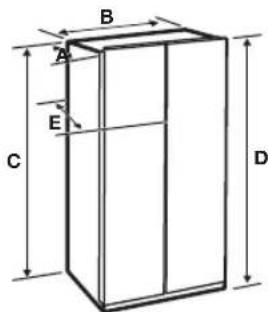
text_image
B A E C D| गहराई “A” 893 मिनी | |
| चौड़ाई “B” 912 मिनी | |
| ऊळचाई “C” 1742 मिनी | |
| सूफ्ण ऊंचाई “D” 1774 मिनी | |
| गहराई “E” 896 मिनी |
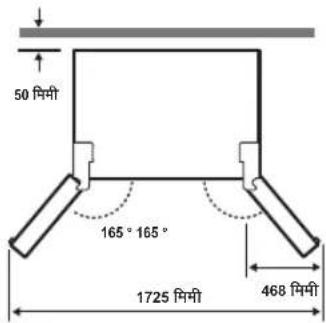
text_image
50 m/m 165° 165° 1725 m/m 468 m/m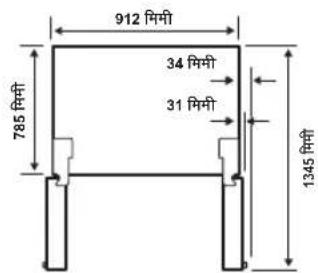
text_image
912 मिंगी 785 मिंगी 34 मिंगी 31 मिंगी 1345 मिंगी
- प्रत्य`क माप डिज्ञाइन के आयाम पर आधारित होता है, इसलिए मापन विधि के आधार पर उसमेंभिन्नता हो सकती हैं.
अपने रेफ्रिजरेटर को स्थानांतरित करते समय
सतह को श्वितिग्रस्त होने से बचाने के लिए, सुनिश्वित करें कि आगे के समतल करने वाले पाये ऊपरी (सतह से ऊपर) दिशा में हैं।
इस मार्गदर्शिका में पष्ठ 21 पर दिए "श्रिजरेटर को समतल करने के तरीके" देखें
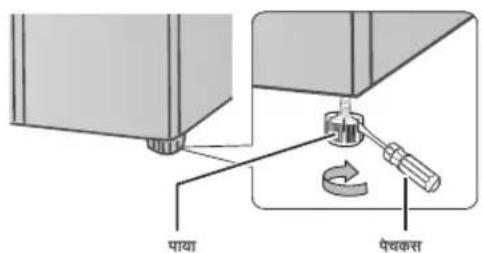
text_image
पाया पैचकस्तसतह
उचित रथापना के लिए, रेफ्रिजरेटर को ऐसी समतल, ठोस सतह पर रखा जाना चाहिए जिसकी उँचाई बाकी सतह के समान हो।
यह सतह पूरी तरह से भरे रेफ्रिजर्टर का समक्षा करने मे सक्षम होनी चाहिए। तल की फिनिश को सुरक्षित करने के लिए, कार्डबोर्डके डब्बे का एक बड़ा भाग काटें और उसे रेफ्रिजर्टर के नीचेउस स्थान स्थान रस्थें जहाँ आप काम कर रहें हैं। अपने रेफ्रिजर्टर को स्थानांतिर्ति करते समय, आपको उसे सीघे आगे या पीछे खीवना होगा।
इसे एक तरफ से दूसरी तरफ न हिलाएँ
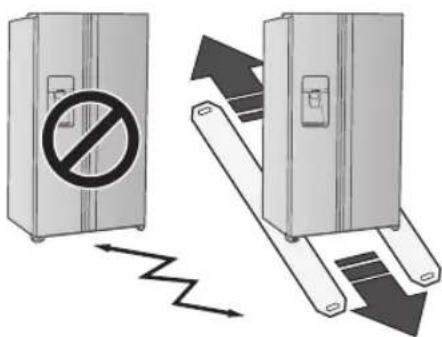
text_image
Diagram illustrating a device with a prohibition symbol and a mechanical device, showing directional movement of the device.आवश्यक टल (प्रदान नहीं किए गए)
 |  |  |
| फिलिप्स पेवकस (+) फ्ल | ‘ट ब्लोड पेवकस (-) सॉंक | ‘ट रिच 10 मिर्मी |
 | ||
| एलन रिच 5 मिर्मी |
रेफ्रिजरेटर को सेट करना
अब जब आपका नया रेफ्रिज्टरेटर अपने स्थान पर स्थापित है, तो आप सेट करने और इस उपकरण के सुविधाओं और फ्रम्बन का आनंद उठाने के लिए क्यार है। निम्न चरणों को पूरा करके, आपका रेफ्रिज्टरेटर पूरी तरह से संचालनीय होना चाहिए। अगर ऐसा नहीं हैं, तो पहले बिजली की आपूर्ति और बिजली के स्रोत जाँचें या इस उपयोगकर्ता मार्गदर्शिका के अंत में दिया गया समस्या-निवारण अनुभाग देखें। अगर आपके कोई और प्रश्न हैं, तो अपने Samsung Electronics सेवा केंद्र से सपर्क करं।
- रे क्रिजरेटर को उसकेऔर दीवार के बीच में पर्याल खाली जगह के साथ उचित स्थान पर सखें इस मार्फिशिका में दिए गए स्थापना निर्देश देखें
- एकबार रे फ्रिजेटर प्लग कर दिए जाने पर, सुनिश्वित करें कि आपकेद्वारा दस्वाज़ा खोलनेपर भीतर की लाइट जल जाती है।
- तापमान निय त्रण को सबसे ठंड़े तापमान पर से ट करें और एक घंटे तक प्रतीक्षा करें फ्रीजर थोडा ठंडा हो जाएगा और मोटर आराम से चलने लगेगी
- र फ्रिजरेटर को चालू करनेके बाद, इसे उचित तापमान पर पहुँचने मेंकु छ घ्ठे लाणा जब रेफ्रिजरेटर का तापमान पर्याष रूप से ठंडा हो जाए, तो आप रेफ्रिजरेटर में भोजन और पेय पदार्थ सख सकते हैं
- स्थापना पूर्ण हो जाने पर, यह जाँचने के लिए कि पानी या बर्फ अच्छी तरह से डिस्पेंस हुआ है या नहीं, डिस्पेंसर लीवर दबाएँ।
- सुनिश्वित करें कि रेफ्रिजरेटर का अगला भाग उसके पिछले भाग की तुलना में 0.6 डिग्री ऊपर हो।
रेफ्रिजरेटर के दरवाजों को सेट करना
अगर आपके दरवाजों से रेफिजरेटर नहीं निकल पा रहा हैतो आप रेफिजरेटर के दरवाजों को निकाल सकते हैं।
पानी आपूर्तिलाइन को रेफ्रिजरेटर से अलग करना
- दोनों पानी की लाइनों को (जो फिक्सर म‘हैं) सामने से खींचें।
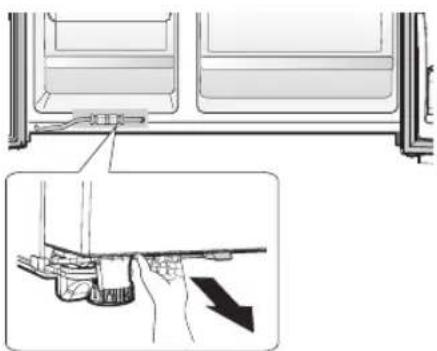
natural_image
Diagram showing a hand holding a tool inside a refrigerator with an inset close-up of the handle (no text or symbols)- कप्लर (1) को दबाकर और पानी की लाइन (2) को खींचकर दोनों पानी की लाइनों (सफेद वाली पानी के लिए और दूसरी बर्फ के लिए) के निकालें
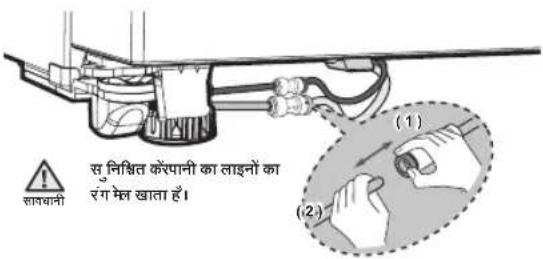
text_image
सुनिश्वित कॉर्पानी का लाइनों का रंग मेंख खाता हैं (1) (2)
आपूर्ति पाइप को फिर से जोडते समय, यह सुनिश्वित करें कि एक ही रंगों वाली पाइपों को एक दूसरे के साथ लगाया जाएँ।
पानी की आपूर्ति लाइन को फिर से लगाना
- डिस्प सर से पानी के रिसाव को रोकने के लिए पानी की लाइन पारदर्शी कप्लर के केंद्र से परी तरह से लगी होनी चाहिए।
- स्थापना प ैक में 2 किलप को लगाएँर जाँचे कि हर किलप लाइन पर ठीक से लगी हो।
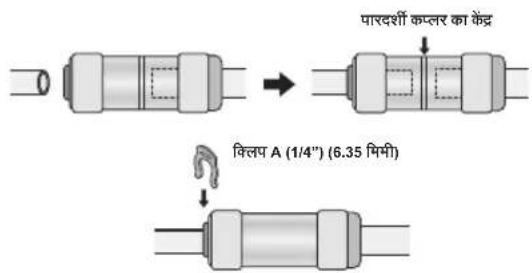
text_image
पारदर्शी कप्तर का केंद्र किलप A (1/4") (6.35 मिमी)
पानी की लाइन को कार्टे नहीं. इसे आराम से कप्लार से निकाल दें

विलप को बच्चों की पूँच से दूर रखें और सुनिश्वित करें कि बच्चे उनके साथ न खेलें या उन्हें अपने मूँह मेंन डालों
फ्रीज़र के दरवाजों को खोलें
- पावर कॉड़ 'अलग करें, और एक फिलिप्स पेचकश (1) का उपयोग कर 2 कवर पेच निकालें।
फिर रेफ्रिजस्टर के दरवाजे को खोलें और कवर (2) को खोलने के लिए साइड में लगे हूक को खींचे।
कवर को ऊपर उठाएँ और उसे अपनी तरफ खींचकर निकालें ( 3 )।
-दस्वाजः को खोलकर कब्जे के कवर को निकालें और फिर कब्जे के कवर को निकालने के बाद दस्वाजः को बंद कर दें
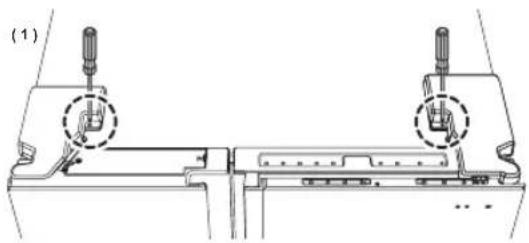
natural_image
Technical line drawing of a mechanical assembly with two screw fasteners and a central component (no text or symbols)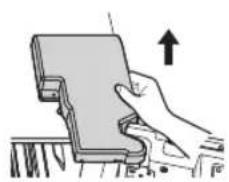
natural_image
Illustration of a hand holding a device with an upward arrow, no text or symbols present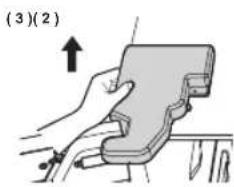
text_image
(3)(2)- कब्जे के कवर को निकालें और फिर इलैविट्रूकल वायर कनेक्टर को डिस्कनेक्ट कर दें।
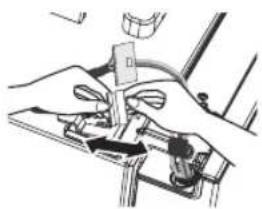
natural_image
Illustration of hands using a tool to adjust or install a mechanical component (no text or symbols visible)- कल प (A) ऊपर की ओर फिलप करें (1) और फिर उसे (2) दिशा में खीचों।
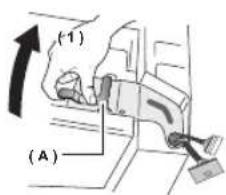
text_image
(1) (A)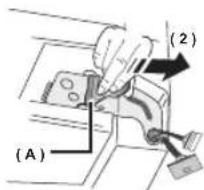
text_image
(A) (2)- कबजा (B) निकाल
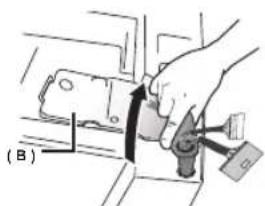
text_image
(B)- द्ववाजँ को ऊपर उठाएँ और उसे रैफ्रिजरेटर से निकालें।

- दस्वाजों को निकालत` या लगाते समय ध्यान रखें कि बिजली का तार क्षतिग्रस्त न हो।
- सुनिश्वित करेकि रेफिजरेटर से दरवाजों को निकालते समय दरवाजों न गिरें और क्षतिग्रस्त न हों
फ्रीज़र के दस्वाजों को पुनः लगाना

- फ्रिज के दस्वाज़े को पुनः लगाने से पहले फ्रीजर का दस्वाज़ा पुनः लगाना सूनिश्रित करें।
- पुनः लगाने से पहले, सुनिश्वित करें कि फ्रीज़र के दरवाजे के नीचे लगे सभी तार के कनेक्टर कनेबट हैं।
दस्वाज़े को लगाने के तरीका
- दस्वाजों को र पूरिजरेटर को नीचे लगे कब्जों में लगाएँ।
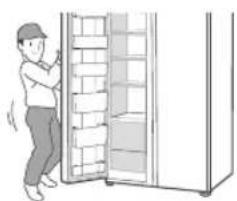
natural_image
Illustration of a person standing next to a cabinet with shelves (no text or symbols visible)- कब्ज` (B) को शफ्रिजरेटर पर लगे कब्जे के स्लॉट भेडाले और फिर दरवाजे के कब्जे के छिद्र को नीचे द्वाएँ।
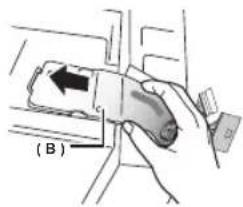
text_image
(B)- कलँ प (A) को तीर की दिशा (1) में डालें और फिर इसे स्थान में लॉक करने के लिए तीर की दिशा (2) में नीचे करें।
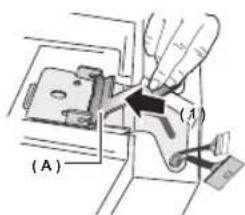
text_image
(A)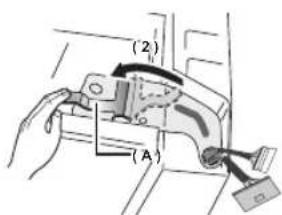
text_image
(2) (A)- इल ^5 किट्रकल वायर कनेक्टर को जोड़ी।
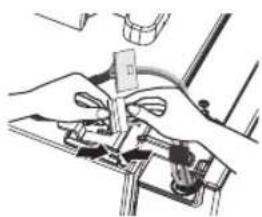
natural_image
Illustration of hands operating a mechanical device with no visible text or symbols- कवर के 2 सामने के भागों को पहले लगाएँ, कवर के दोर्नों तरफ के भागों को नीचे दबाएँ और फिर फिलिप्स पेचकस का उपयोग करके कवर को स्थान पर कस दैं
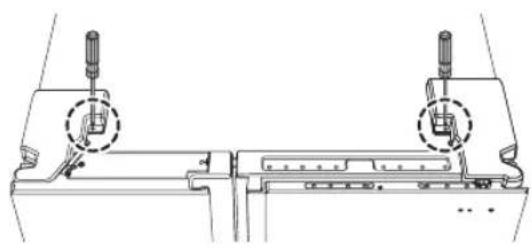
natural_image
Technical line drawing of a mechanical assembly with two cylindrical components and a base plate (no text or symbols)
- दस्वाजों को,उन्हें खोलने के विपरीत क्रम में अर्सेबल किया जा सकता है।
- दरवाज ` को लगाते समय अगर आप बिजली के तारों को लगाना भूल जाते हं तो हो सकता है कि प्रदर्शन ठीक से कार्य न करें।
रेफ्रिजरेटर के दस्वाजे खोलें (ठंडे कंपार्टमेंट का शो केस)
- पावर कॉड़ अलग करें, और एक फिलिप्स पेचकश ( 1 ) का उपयोग कर 2 कवर पेच निकालें। फिर सेफ्रिजेस्टर के दरवाज़े को खोलें और कवर ( 2 ) को खोलने के लिए साइड में लगे हुक को खीचें। कवर को ऊपर उठाएँ और उसे अपनी तरफ खींचकर निकालें ( 3 )। -दरवाज़े को खोलकर कब्जे केकवर को निकालें और फिर कब्जे केकवर को निकालने के बाद दरवाज़े को बंद कर दें

natural_image
Technical line drawing of a mechanical assembly with two cylindrical components and a central component (no text or symbols)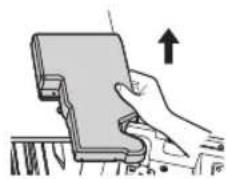
natural_image
Illustration of a hand holding a device with an upward arrow, no text or symbols present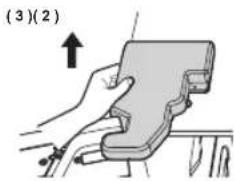
text_image
(3)(2)- हाउसि ग कनेक्टर को खोलों।
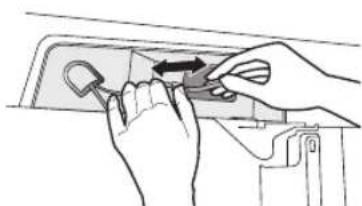
natural_image
Illustration of hands using a tool to adjust or install a component, no text or symbols present- शो के स के शीर्ष कब्जे पर कसे जानेवाले तीन पेचों को खोलों
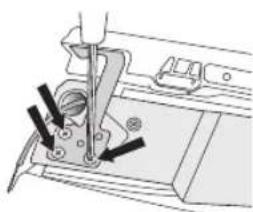
natural_image
Mechanical sewing machine needle and base assembly (no text or symbols visible)- शो के स को खोलों।
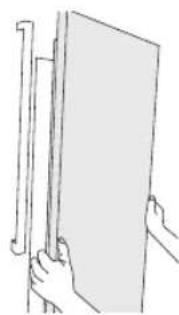
natural_image
Line drawing of two hands holding a blank sheet with a ruler, no text or symbols presentरेफ्रिजरेटर के दस्वाज़े खोलें
- पावर कॉड़ अलग करें, और एक फिलिप्स पेचकश ( 1 ) का उपयोग कर 2 कवर पेच निकालें
फिर शफ्रिजंस्टर के दरवाज़े को खोलें और कवर (2) को खोलने के लिए साइड में लगे हृक को खीचें।
कवर को ऊपर उठाएँ और उसे अपनी तरफ खींचकर निकालें ( 3 )।
-दरवाज़े को खोलकर कब्जे के कवर को निकालें और फिर कब्जे के कवर को निकालने केबाद दरवाज़े को बंद कर दें
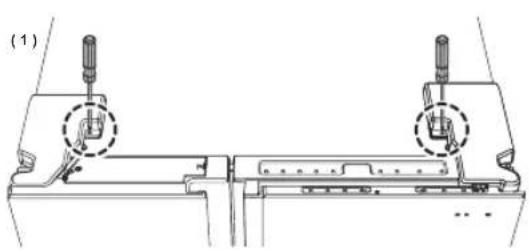
text_image
(1)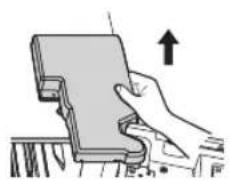
natural_image
Illustration of a hand holding a rectangular object with an upward arrow, no text or symbols present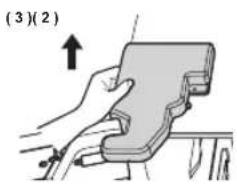
text_image
(3)(2)- हाउसि ग कनेक्टर को खोलों
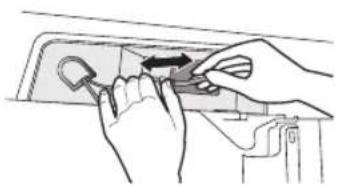
natural_image
Illustration of hands using a tool to adjust or install a component on a door (no text or symbols visible)- फिक्सर कब्जे को ऊपर की ओर दबाएँ और निकालने के लिए उसे आगे की ओर खीचें।
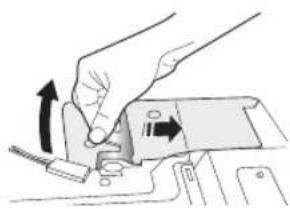
natural_image
Illustration of a hand turning a mechanical component with arrows indicating motion (no text or symbols)- दरवाज 'के सामने से शीर्ष कब्जे को खोलों।
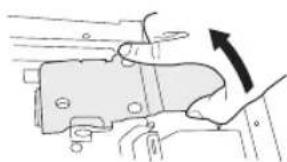
natural_image
Diagram of a mechanical component being inserted into a housing, with an arrow indicating direction (no text or symbols present)- शो के स को खोलें।
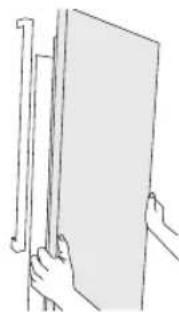
natural_image
Line drawing of hands holding a blank sheet with a ruler, no text or symbols present
लगाते समय तार को क्षति सं बचाने क लिए उस हिंज डुक पर बांधी
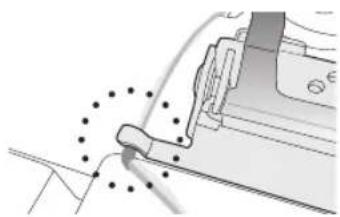
natural_image
Mechanical assembly diagram showing a tool interacting with a bracket (no text or symbols visible)रेफ्रिजरेटर के दरवाजों को पुनः लगाना
रेफ्रिजर्स्टर के दस्वाजों को पुनः लगाने के लिए, पुज्रों को विपरीत क्रम मेंलगाएँ
रेफ्रिजरेटर को समतल करना और ऊँचाई और दरवाजों के अंतर को समायोजित करना
रेफ्रिजरेटर को समतल कैसे करें
रेफ्रिजरेटर की अस्थिरता के कारण होने वाले खतरे से बचने के लिए, कृपया रेफ्रिजरेटर को क्षैतिज और स्थापना के निम्न निर्देशों के अनुसार समतल किए गए स्थान पर रखें।
ऐसा करने में विफल रहने पर रेफ्रिजरेटर झुक सकता है और निजी चोट लग सकती है।
अगर उपकरण का सामने का भाग, पिछले भाग से थोड़ा सा ऊंचा हो, तो दरवाजा अधिक आसानी से खोला और बंद किया जा सकता है।
रेफ्रिजरेटर को किसी असमतल सतह पर सेट करने से रेफ्रिजरेटर अस्थिर हो जाएगा।
-कृपया सुनिश्रित करें कि रेफ्रिजरेटर को स्थापित करते समय उसके पाये सतह को स्पर्श करें। पाये प्रत्येक दरवाजे के पिछले निचले भाग में लगे हैं। एक चपटा पेचकस लगाएँ और समतल होने तक इसे तीर की दिशा में घुमाएँ
-भोजन संद्रहीत करते समय कृपया केवल दरवाजे में ही भोजन न रखें।
केवल दरवाज़े में भोजन रखा होने से रेफ्रिजरेटर आगे की ओर गिर सकता हैं और चोट लग सकती है।
अगर फ्रीज़र की तरफ का हिस्सा नीचा हैं तो:
- फ्रीज़र क ' दरवाजे के पिछले हिस्से में नीचे स्थित उँचाई समायोजक में चपटा पेचकस डालें और उसके संतुलित होने तक उसे तीर की दिशा में घुमाएँ।
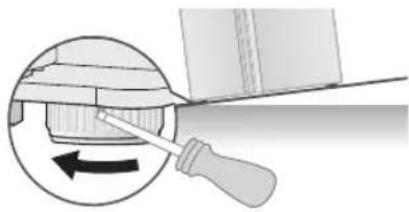
natural_image
Diagram showing a tool interacting with a mechanical component, with an arrow indicating rotation (no text or symbols present)अगर रेफ्रिजरेटर की तरह का हिस्सा नीचा हैं तो:
- रेफ्रिजेस्टर के दरवाज़े के पिछले हिस्से मेनीचे स्थित ऊँचाई समायोजक में चपटा फ्व्रकस डालें और उसके स्तुलित होने तक उसे तीर की दिशा में घुमाएँ।
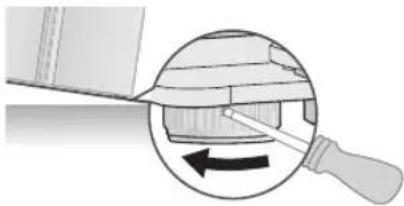
natural_image
Diagram showing a tool interacting with a mechanical component, with an arrow indicating rotation (no text or symbols present)
- रेफिजरेटर के आगे के हिस्से को उठाएँ लाकि दरवाज़े अपने आप बंद हो जाएँ। स्थिरकता ओंको समायोजित करें चूकि रेफिजरेटर का पिछला हिस्सा, उसके अगले हिस्से से काफी उँचा होने पर दरवाजों को खोलना कृतिन हो सकता है।
- अगर र `फ्रिजेटर का पिछला हिस्सा समतल नहीं है', तो निचले हिस्सो में कोई उचित आकार की वस्तुरख दें और टेप से उसे वहीं लगा दें रेफ्रिजेटर को उसके स्थान पर बिसकाएँ और फिर सतह को समायोजित करें - रेफ्रिजेटर को ढकेलते समय ध्यान रखें कि सतह क्षितप्रस्त न हो।
दरवाजे की ऊँचाई समायोजित करने का तरीका
अगर रे फ्रिजस्टर का दरवाजा अन्य से नीचा हैं तोः
- रेफ्रिजरेटर के दरवाज़े के नीचे स्थित समायोजन नट का उपयोग करके दरवाज़े की ऊचाई के स्तरों को समायोजित किया जा सकता है। - दरवाज़े ‘को बुल्त ऊंचा उठाने पर वह खोलते या बंद करते समय कब्जे के कवर से टकरा सकता है।
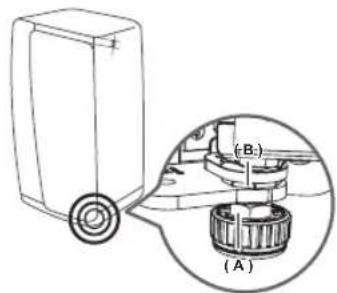
text_image
(A) (B)- उस दर्वाजः को खोले जिस समायोजित किया जाना है और दर्वाजः के निचले हिस्से में लगे क्लैंषि नट (A) को उत्पाद पैंकेज में सम्मिलित स्पैनर का उपयोग करके घडी की दिशा (मां खोले
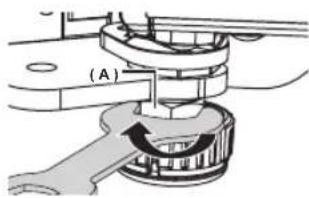
text_image
(A)- समायोजन नट (B) को एक स्प "नर से घड़ी की विपरीत दिशा ( ) घुमाकर दस्वाजे की उंज्ञाई समायोजित करें (दरवाजे की ऊँ चाई बढ़नेके लिए उसे घड़ी की विपरीत दिशा ( ) और घटाने के लिए घड़ी की दिशा ( ) में घमारैं)
- दरवाजा खोलें और इसे भीतर से समायोजित करें
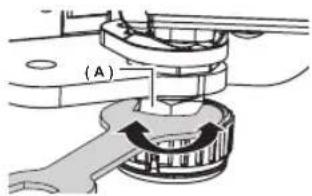
text_image
(A)- एकबार दस्वाज्र `स्थिर हो जाने पर, क्लैपिंग नट (A) को कसने के लिए घड़ी की विपरीत दिशा ( ) ने धुमाएँ।
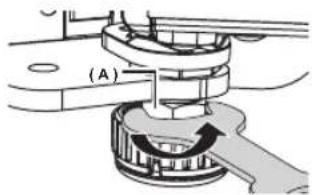
text_image
(A)
खाली होने पर रेफ्रिजरेटर के संतुलन को समायोजित करने से, रेफ्रिजरेटर उस समय अर्स्थिर हो सकता हैं जब उसमें सामान रखा जाएपा।
अगर ऐसा होता है, तो सतुलन को फु़ा: समायोजित करें।
दरवाजों के अंतर को समायोजित करने का तरीका
अगर रैफिजरेटर के दरवाजे और फ्रीजर के दरवाजे के बीच अंतर असमान है तो:
- रे फ्रिजरेटर के दस्वाज़े के शीर्ष पर (दाई ओर) स्थिर अंतर समायोजक का उपयोग करें
-
अत्यधिक बल लगान ' सेसमायोजक का बोल्ट टूट सकता है
-
र फ्रिजरेटर के दस्वाज़के कब्जे के कवर को निकालों
- दरवाज़े को खोलकर कब्ज़े के कवर को निकालें और फिर कब्ज़े के कवर को निकालने केबाद दरवाज़े को बंद कर दें
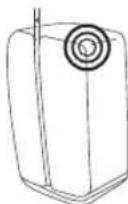
- 4 मिमी एलन रि 'च (सम्मिलित नहीं) का उपयोग करके अतर को समायोजित करं।
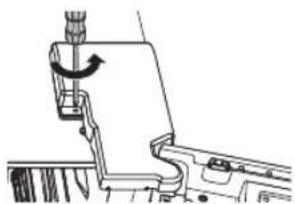
natural_image
Technical line drawing of a mechanical assembly with no visible text or symbols- अंतर को चौड़ा करने के लिए बोल्ट को घड़ी की दिशा ( ) घुमार्णी अंतर को कम करने के लिए उसे घडी की विपरीत दिशा ( ) घुमार्णी इसे तब तक समायोजित करें जब तक रेफ्रिजरेटर के दस्वाजे और फ्रीजर के दस्वाजे का अंतर समान न हो जाए

natural_image
Technical line drawing of a mechanical component with a tool and curved arrow indicating rotation (no text or symbols)
केबल लगाते समय, ध्यान रखें कि केवल की परत टट या छिल न जाएँ
रेफ्रिजरेटर के दरवाजे के अंतर (पीछे) को समायोजित करने का तरीका
अगर रेफ्रिजरेटर के दसवाज़े और रेफ्रिजरेटर के बीच अंतर असमान है तो:
- हर दस्वाज `के भीतर शीर्ष किनारों पर लगे समायोजकों का उपयोग करें।
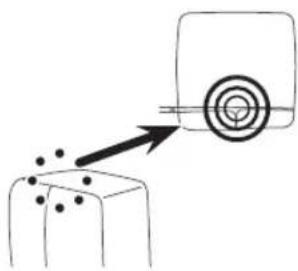
natural_image
Simple line drawing of a target with an arrow pointing to a target and scattered dots (no text or symbols)- जहा "सेरफिजर्स्टर के साथ दरवाजे का अंतर कम हो, वहाँ से दरवाजा खोले और फिर अंतर के समान होने तक समायोजक को घड़ी की विपरीत दिशा
( ) न घुमारैं
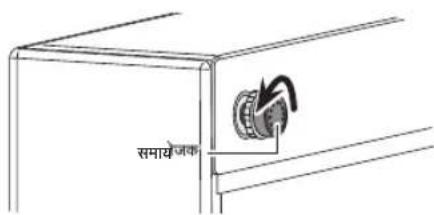
text_image
समायोजक- एकबार जब दरवाज़े और रेफ्रिज्ञरेटर के बीच का अंतर समायोजित हो जाए, तब समायोजक नट को उसके स्थान पर लॉक करने के लिए उसे घड़ी की दिशा
( ) ٢ ٦ ٧
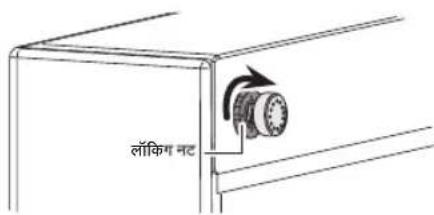
text_image
लॉकिंग नटपानी डिस्पेंसर लाइन की जाँच करना
पानी का डिस्पेंसर आपके नए Samsung रेफ्रिजरेटर की उपयोगी सुविधाओं मेंसे एक है।
बेहतर स्वारथ्य को बढ़ावा देने के लिए, Samsung का पानी का फिल्टर आपके पानी से अवंछित करणों को निकाल देता है।
यद्यापि, यह सूक्ष्मजीवों को नष्ट नहीं कर पाता है।
ऐसा करने के लिए आपको एक पानी शुद्धिकरण सिस्टम खरीदना पड़ सकता है। आइस मेंकर केठीक से काम करने के लिए, 20\~125 psi (138\~862 kPa) (पाउंड प्रति वर्ग इंव) पानी के दाब की आवश्यकता होती है।
सामान्य परिस्थितियों में, एक 170 cc (5.75 oz.) पेपर कप को 10 सेकंड में भरा जा सकता है।
अगर रेफ्रिजरेटर किसी ऐसे स्थान पर स्थापित हैं जहाँ पानी का दाब कम (20 psi से कम) है, तो कम दाब की प्रतिपूर्ति करने के लिए आप एक बूस्टर पंप स्थापित कर सकते हैं।
सुनिश्वित करें कि रेफ्रिजेस्टर के भीतर लगी पानी संश्रहण की टंकी ठीक प्रकार भरी हैं। ऐसा करने के लिए, पानी के डिद्येंसर के लीवर को तब तक द्वाएँ जब तक पानी के आउटलेंट सेपानी बाहर न निकले।

पानी की लाइन की स्थापना किट को अपने डीलर से अतिरिक्ति शुल्क देकर प्राप्त किया जा सकंता है।
हम ताँँकी ट्यूँक्षि वाली पानी आपूर्तिकिट का उपयोग करने की अनुशंसा करते हैं।

उपकरण के साथ दिए गए नए होज सेंट का उपयोग किया जाना चाहिए और पुराने होज सेंट का दोबारा उपयोग नहीं किया जाना चाहिए.

नीचे दी गई सहायक उपकरणों की सूची देखें।
पानी की आपूर्ति लाइन से कनेक्ट करना
- पहल` मुख्य पानी की आपूर्ति लाइन को बंद कर दें।
- निकटतम ठ डे, पीने वाले पानी की लाइन का पता लगाएँ।
- स्थापना किट म े दिए गए पानी की लाइन स्थापित करने के निर्देशों का पालन करें।
सावधानी
पानी की लाइन, तंड़ पानी की पाइप से अवश्य जुड़ी होनी चाहिए अगर यह किसी गर्मपानी की पाइप से कनेक्ट है, तो इस्सेपानी शोधक खराब हो सकता है

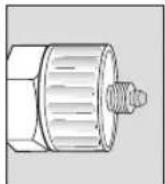
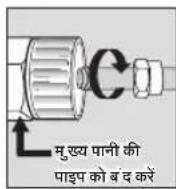
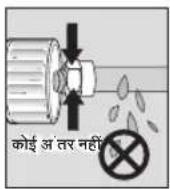
- पानी की आपूर्तिको पानी के फिल्टर से कनेकट करने के बाद, आपनी मुख्य पानी की आपूर्ति को चालूकर्ण और पारदर्शीं और मुख्य पानी के फिल्टर में लगभग 3 लीटर पानी भर्से
पानी की लाइन को रैफ्रिजरे टर से कनेक्ट करना
- इकाई पर लग` पानी की लाइन के कैप को निकाल दें और फिर प्रदान की गई पानी की लाइन से अलग करने के बाद संभीडन नट को इकाई की पानी की लाइन पर लगाँं
- इकाई और किट की पानी की लाइन स `दोनों पानी की लाइन को कनेक्ट करें
- स पीड़न नट को संपीड़न फिटिंग पर कस दें ध्यान रखें कि दोनों आइटम के बीच कोई अंतर न हो।
- पानी चालू करें और फिर पानी के रिसने की जाँच करें।
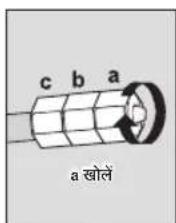
text_image
c b a a खोले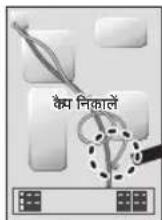

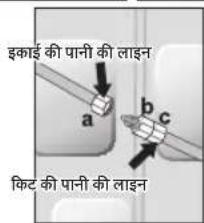
text_image
इकाई की पानी की लाइन a b c किट की पानी की लाइन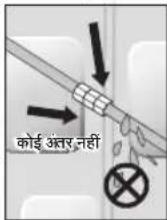

पानी की लाइन को क्चल पीने योग्य पानी के खोत से कनेक्ट करें
अगर आपको पानी की लाइन की मरम्मत करने या खोलने की आवश्यकता पड़े, तो प्लारिटक ट्यूबिंग का 6.5 गिमी हिस्पा काट दें ताकि आपको एक सही और स्साव-मुक्त कनेक्शन प्राप हो।

उपयोग करने से पहले, इन स्थानों में रिसाव की जाँच की जानी चाहिए
- Samsung वार टी में पानी की लाइन की स्थापना शामिल नहीं घू
- अगर खुदरा मूल्य मेरस्थापना शुल्क शामिल नहीं हैं तो इसे ग्राहक के खबचें पर किया जाएणा
- अगर आवश्यक हो तो स्थापना क ` लिए प्लंबर या प्राधिकृत स्थापनाकर्ता से संपर्क करें।
- अगर गलत स्थापना की वजह स ` पानी का रिसाव होता है, तो कृपया स्थापनाकर्ता से संपर्क करें।
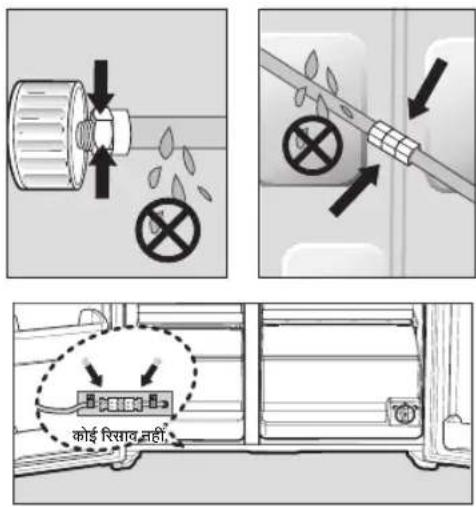
- स पीड़न नट (A) को आपूर्ति की गई प्लास्टिक ट्यूबिंग (A) के लगाएँ।
- स पीड़न नट (A) को 1/4" संपीड़न फिटिंग पर कर्सें
-अगर आप ता बे की ल्यूबिंग का उपयोग कर रहे हैं, तो सपीड़न नट (B) (सम्मिलित नहीं) और फेरल (सम्मिलित नहीं) को ताँबीकी ट्यूक्षि (सम्मिलित नहीं) पर लगाएँ जैसा कि दिखाया गया हैं।
-अगर आप प्लास्टिक की ट शूबिंग (B) का उपयोग कर रहे हैं, तो प्लास्टिक त्यबिंग (B) के मोल्ड किए गए सिरे (बल्ब) को संपीड़न फिटिंग में लगाएँ

प्लास्टिक द्यूर्बिंग ( B ) के मोल्ड किए गए सिरे (बल्ब) के बिना उपयोग न करें।
- स पीड़न नट (B) को संपीड़न फिटिंग पर कस दें संपीड़न नट (B) को बक्त अधिक न कसें।
- पानी चालू करें और फिर पानी के रिसने की जाँच करें।

पानी की लाइन को केवल पीनयोष्य पानी के स्थोत सेकने कट केंश अगर आपको पानी की लाइन की मरम्मत करने या खोलने की आवश्यकता पड़े, तो प्लासिटक टूयूबिंग का 1/4" हिस्सा काट देताकि आपको एक सही और सिसाव-मुक्त कन्ध्रशन प्रास हो।
आइस मेकर का उपयोग करने से पहले
निकालें
-आइसम 'कर बकेट को ऊपर उठाकर और धीरे से बाहर खींच कर उसे निकालों।
-ह ैं डल को इस तरह पकड़े जैसा चित्र में दिखाया गया है।
-क्षति स ` बचाने के लिए आइस बकेट को धीरे से निकालें।
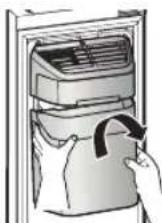
चित्र 1

दराज़ा के कवर को निकालते समय अत्यधिक बल का उपयोग न करें अन्यथा, कवर टूट सकता है या चोट लग सकती है।

सहायक उपकरणों को निकालने से पहले सुनिश्चित करें कि रास्ते में कोई भोजन नहीं है।
संभव होने पर दुर्धिना के जोखिम को कम करने के लिए सारे भोजन को निकाल दें।
स्थापना करें
-आइसम 'कर को निकालने के विपरीत क्रम में लगाएँ।
-बक'ट को मजबूती सेतब तक दबाएँ जब तक किलक की आवाज सुनाई न दे
सर्विस कॉल करने से पहले
-आइस मे कर द्वारा बकेट में बर्फ डाले जाने पर आपको सुनाई देने वाली आवाज सामान्य संचालन का भाग है।
-अगर आप ल 'बे समय तक बफनहीं निकालते हैं, तो आइस बकेट में बफ का ढेर बन सकता हैं।
अगर बर्फ का ढेर बनता है, तो शेष बर्फ को निकाल दें और बकेट को खाली दें।
-जब बफ़ ू बाहर न निकले, तो देखें कि शुट में बफ़ तो नहीं है और उसे निकाल दें

text_image
आइस शूटचित्र 3

- जब प्रदर्शन पैनल पर Ice Off (बर्फ बंद) चमकता है तो बके ट को पुनुः लगाएँ और/या सुनिश्रित करें यह ठीक प्रकार लगी है।
- दस्वाजा खोल ` जानेपर, बफर और पानी का डिस्पेंसर कार्यनहीं करता है।
- अगर आप दस्वाज `को बहुत तेम बंद करते है तो आइस मेकर के ऊपर पानी फैल सकता है।
- आइस बक 'ट को गिरने से बचाने के लिए उसे दोनों हाथों से निकालें।
- चोट स `बचने के लिए, पानी पर गिरी बर्फ या पानी को ध्यान से साफ करें
- बच्चों को आइस डिस्प ैसर या बकेट पर न लटकने दें इससे उन्हें चोट लग सकती हें
- आइस शूट में हाथ या कोई अन्य वस्तुन रखें इससे निजी चोट लग सकती हैया या त्रिकुर्गों क्षतिग्रस्त हो सकते हैं
फिल्टर की स्थापना के बाद पानी की आपूर्ति लाइन के भीतर से शेष सामग्री को निकाल दें।
- मुख्य पानी की आपूर्ति को चालू करें।
- डिस्प सर लीवर को दबाएँ।
- उपयोग करन` से पहले फिल्टर से 1 गैलन पानी गुजारों (लगभग 6 मिन्ट तक पानी बहाएं) इससे पानी आपूर्ति सिस्टम साफ हो जाएणा और लाइन से वायु निकल जाएणी
- कुछ घरों में अतिरिक पानी गुजारना पड़ सकता है
- र `फिजरेटर का दस्वाजा खोलें और सुनिश्रित करें पानी के फिल्टर से पानी नहीं रिस रहा है।
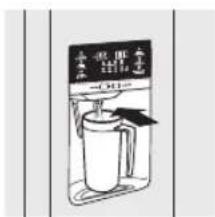
text_image
水杯 水杯 水杯 -0.01

नए लगाए गए पानी क फिल्टर क काटिज से पानी क डिस्पेंसर से थोड़ा पानी निकल सकता है
ऐसा लाइन मेंवायु जाने के कारण होने से होता हैं इससे संचालन मेंकोई समस्या नहीं होनी चाहिए।
आइस ट्रे में जाने वाली पानी की मात्रा की जाँच करें।
-
आइसमे कर कवर को ऊपर उताएँ और इसे आराम से बाहर खीचें।
-
जब आप Test (परीक्षण) बटन को 3 स 'कंड तक द्वाते हैं, तो आइस क्यूब क्टेनर, पानी आपूर्ति की टंकी से पानी से भर जाता है यह सुनिक्षित करने के लिए जाँच करें कि पानी की मात्रा सही है (नीचे दिया गया चित्रे केखें)। अगर पानी का स्तर बहुत कम है, आइस क्यूब छोटी होगी। यह मृख्य पानी के पाइप में से पानी के दाब की समत्या हैं, रैफिजरेटर की नहीं
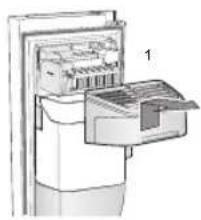
natural_image
Diagram of a refrigerator with a hand inserting a tray into the refrigerator (no text or symbols visible)आइस मकर
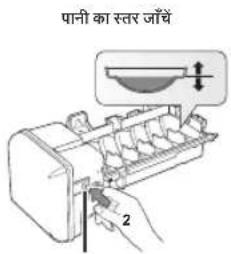
text_image
पानी का स्तर जाँचे 2Test (परीक्षण) बटन

- Test (परीक्षण) बटन दबाने के बाद पानी को सही स्तर तक पहुँचने में कुछ मिनट लग सकतेहै।
- जब ट्र ` बर्फ या पानी से भरी हो test (परीक्षण) बटन को लगातार न द्वाएँ। पानी पैल सकता है या बर्फ अवरुद्ध हो सकती है।
- जब बक`ट स्थापित न हो, तो हो सकता हैं कि आइस मेकर कार्यन करे।
- जब प्रदश 'न पैनल पर Ice Off (बर्फ बंद) चमकता है, तो बकेट को पु नः लगाएँ और/या सुनिश्रित करें यह ठीक प्रकार लगी है
अपने samsung रेफ्रिजरेटर को संचालित करना
नियंत्रण पेनल का उपयोग करना
कूलसलेक्ट माँडल (RH77H90*)
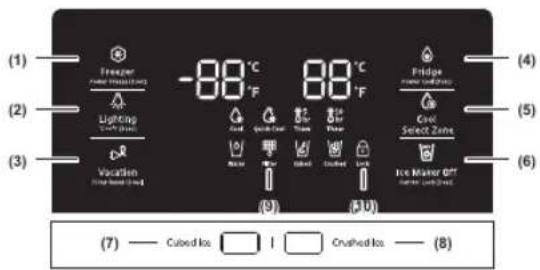
text_image
(1) Freezer (2) Lighting (3) Vacation (4) Fridge (5) Cool (6) Select Zone (7) Cubed Ice I Crushed Ice (8)डिस्पेंसर मॉडल (RH77H80*)
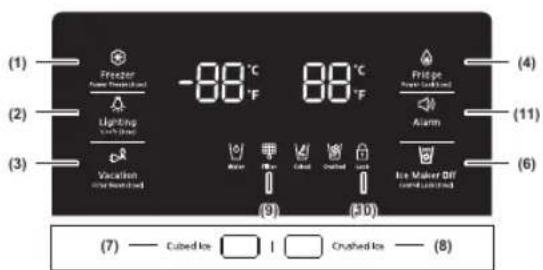
text_image
(1) Freezer Power/Heat/Heat Lighting (2) Warm Vacation (3) Dusted Heat -88°C °F 88°C °F Pidge Power/Heat/Heat Alarm (4) (11) (6) (7) Cured Ice □ I □ Crushed Ice — (8)सामान्य मॉडल
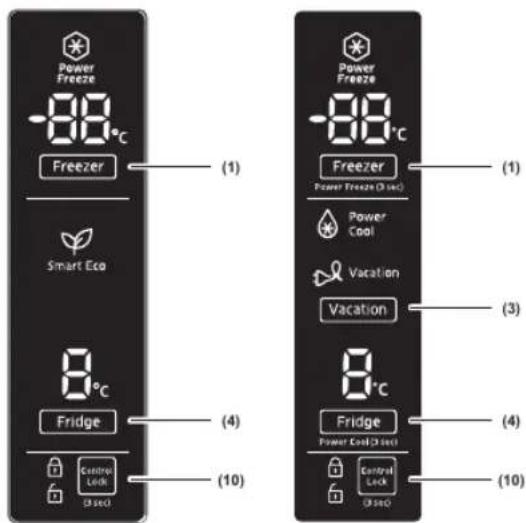
text_image
Power Freeze -88°C Freezer (1) Smart Eco 8°C Fridge (4) Control Lock (3 sec) (10) Power Freeze -88°C Freezer Power Freeze (3 sec) (1) Power Cool Vacation Vacation 8°C Fridge Power Cool (3 sec) (4) Control Lock (3 sec) (10)(1)
Freezer / Power Freeze (3 sec)
(फ्रीज़र / पावर फ्रीज़ (3 से कंड))
Freezer (फ्रीजर) बटन दो उद्देश्यों को पूरा करता हैं:
-प्रीज़र को आपक' इच्छत तापमान पर सेट करना।
-Power Freeze (पावर फ्रीज) फं कश्न को चालू और बंद करना
-
फ्रीज़र तापमान स `ट करने के लिए, Freezer (फ्रीज़र) बटन स्पर्श करें। आप 5 °F (-15 °C) और -8 °F (-23 °C) के बीच तापमान सेट कर सकते हैं।
-
Power Freeze (पावर फ्रीज़) फ्रं क्षन फ्रीज़र में उत्पादों को फ्रीज़ करने के लिए आवश्यक समय को कम करने के लिए इस बटन को 3 सेकंड तक स्पर्श करके रखें यह उस स्थिति में उपयोगी हो सकता हैं जब आपको आसानी सेखराब होने वाल आइटम को तेज्री से फ्रीज़ करना हो या फ्रीज़र में तापमान अचान गर्म हो गया हो।
(उदाहरण के लिए, दरवाजा खुल छोड़ दिया गया हो) जब आप इस फंक्षन का उपयोग करें, तो रैफ्रिजेस्टर की बिजली की खपत्त बढ़ जाएगी।
जब आपको इसकी आवश्यकता न हों तो ध्यान से इसबंद करे और फ्रीज़र को वापस मूल तापमान सेंटिंग पर सेट कर दें अगर आपको अधिक मात्रा में भोजन फ्रीज़ करना हैं, तो फ्रीज़र मेंभोजन रखने से कम से कम 20 घंटे पहले Power Freeze (पावर फ्रीज़) फ्रवश्न को सक्रिय कर दें
| (2) | Lighting / °C←→°F (3 sec)(लाइटिंग / °C←→°F (3 सेकंड)) |
| Lighting (लाइटिंग) बटन दो उद्देश्यों को पूरा करता हैं:-डिस्प ̃सर की लाइट को चालूओर बंद करने के लिए-तापमान की इकाझ्यों को °C और °F के बीच स्विच करने के लिए।1. लाइट फः क्षनLighting (लाइटिंग) बटन को स्पर्श करने से डिस्पेंसर LED लैप सतत मोड में चालू हो जाती है ताकि यह निरंतर चालू रहे।बटन भी चमकने लगता हैंअगर आप डिस्पेंसर लैप को केचल तब चालू करना चाहते हैं जो कोई डिस्पेंसर का अपयोग करे, तो सतत मोड को ब्र करने के लिएLighting (लाइटिंग) बटन को दबाएँं2. तापमान की इकाझ्यों को °C और °F के बीच स्विच करने के लिए।अपने इष्टित तापमान प्रदर्शन का चयन करने के लिए इस बटन को 3 सेकंड तक दबाकर रखें।हर बार जब्र आप इस बटन को दबाकर रखते हैं, तो °C और °Fतापमान मोड बदलतो हैं और °C या °F आइकन चमकते हैं जो आपका चयन दर्शिता है। |
| (3) | Vacation / Filter Reset (3 sec)(छुडी / फिल्टर रीसेट (3 संकंड)) |
| Vacation (छुडी) बटन दो उद्धेश्यों को पूरा करता हैं:-Vacation (छुडी) मोड को चालूया बंद करने के लिए-पानी के फिल्टर का जीवन संकेतक रीसेट करने के लिए।1. Vacation (छुडी) पंक्वशनअगर आप छुडियों या व्यावस्याषिक यात्रा पर जा रहे हैंया आपको रेक्रिजरेटर का उपयोग करने की आवश्यकता नहीं है, तो Vacation (छुडी) बटन दबाएँ। जब आप फ्रिज कंपार्टमेंट को बंद करनेके लिए vacation (छुडी) बटन का चयन कर्से तो Vacation (छुडी) की LED चालू हो जाएणीइस बात की दृढ़ता से अनुर्शंसा की जाती है कि जब आप Vacation (छुडी) बटन का चयन करें तो ताज़ा भोजन के कंपार्टमेंट सेभोजन को निकाल दें और दरवाजे को खुला न छोड़े।2. Water Filter Life Indicator (पानी के फिल्टर के जीवन का संकेतक) पंक्वशनजब आप पानी के फिल्टर को प्रतिस्थापित कर लें, तो पानी के फिल्टर के जीवन का संकेतक रीसेट करने के लिए इस बटन को 3 संकंड तक दबाकर रखें। जब आप पानी के फिल्टर के जीवन के संकेतक को रीसेट कर दें हैं, पैंनल पर लगया फिल्टर आइकन बंद हो जाता है।छ: महीन(लगभग 300 गै लन) के बाद आपको यह बताने के लिए फिल्टर आइकन लाल हो जाएणा कि पानी के फिल्टर को बदलने का समय हो गया है।कुछ क्षेत्रों के पानी में अधिक मात्रा चूना होता दै जिससे पानी का फिल्टर अधिक तेजी से अवरुद्ध हो जाता हैंअगर आपके क्षेत्र में भी यही स्थिति हैं, तो हर छ: महीनों की बजाय कम अंतराल पर फिल्टर को बदलना होगा। | |
| (4) Fridge / Power Cool (3 sec) (फ्रिज / पावर कूल (3 सेकंड़)) | |
| Fridge (फ्रिज) बटन दो उद्धेश्यों को पूरा करता है:-Fridge (फ्रिज) को अपन ` इचिछत तापमान पर सेट करने के लिए।-Power Cool (पावर कूल) फंकश्न को चालू या बंद करने के लिए।1. फ्रिज का तापमान स`ट करने के लिए, Fridge (फ्रिज) बटन दबाएँ।आप तापमान को 44 °F (7 °C) और 34 °F (1 °C) के बीच सेंट कर सकते हैं।2. Power Cool (पावर कूल) फंकश्नरेफ्रिजरेटर मेंसखे उत्पादों को ठडा करने में लगने वाले समय को कम करने के लिए इस बटन को 3 सेकंड तक स्पर्श करके रखें।अगर आप जल्दी खराब होने वाले आइटम को तेजी सेठड़ा करना चाहतेहेंं या अगर फ्रिज का तापमान अचानक बढ़ जाता हैं तो यह उपयोगी हो सकता है।(उदाहरण के लिए, अगर दरवाज़ा रुक्ता छोड़ दिया गया हो) | |
| (5) Cool Select Zone (कूल सलेक्ट जोन) | |
| अपने इच्छित CoolSelect Zone (कूल सलेक्ट जोन) प्रकार का चयन करने के लिए इस बटन को स्पर्श करें।(मुँ 39 पर दी गई विस्तत जानकारी केखों।) | |
| (6) Ice Maker Off (आइस म `कर बंद) | |
| आइस मेकर बंद करें बटन दो उद्द्रेश्य पूर्ण करता है:-आइस म `कर को चालू या बंद करना-निय 'त्रण लॉक फंकशन को चालू या बंद करना-ध्यान रह', यदि आप आइस लीवर को 5 सेकंड से अधिक समय तक दबाकर रखेंगे तो आइस मेकर ऑफ मोड निष्क्रिय हो जाएगा।1. आइस म `कर बंद करें फंकशनअगर आप और बर्फ नहीं बनाना चाहते हैं, तो आइस मेकर बंद करें बटन दबाएं।2. निय 'त्रण लॉक फंकशनप्रदर्शन और डिस्पेंसर बटन लॉक करने के लिए इस बटन को 3 सेकंड तक दबाकर रखें ताकि इन बटनों का उपयोग नहीं किया जा सके।भले ही डिस्पेंसर लीवर को दबाकर रखा जाए, ले किन नियंक्रण लॉक चालू होने पर रेफिजरेटर बर्फ या पानी को डिस्पेंस नहीं करता है।यह झंगित कर्ने के लिए कि आपने नियंत्रण लॉक फंकशन संक्रिय किया हैं या नहीं नियंत्रण लॉक आइकन जल जाता हैं अनलॉक करने के लिए 3 सेकंड तक दबाए रखें।आइस मेकर फंकशन चालू होने और पानी की लाइन जुडी न होनेपर पिळेके डिस्सेसे पानी का वॉल्व शोर कर सकता है। जब तक रबफ बंद हैं संकेतक ( [IMAGE] ) जल नहीं जाता, तब तक कम-सेक-कम 3 सेकंड के लिए आइस मेकर बंद करें (नियंक्रण लॉक [3 सेकंड]) बटन दबाकर रखें। | |
बिजली की बचत करने के लिए, पैनाल प्रदर्शन निग्म्न परिस्थितियों में अपने आप बंद हो जाता हैःः जब कोई बटन न दबाया जाए, जब दरवाजा न खोला जाए या जब डिस्पेंसर लीवर को न दबाया जाए। हालांकि, आपके क्यूब्र वाली या कुचली हुई बफ़ा का चयन दिखाने वाला आइकन चालू स्हेगा। जब आप कोई बटन दबाते हैं, दरवाजा खोलते हैं या डिस्पेंसर लीवर को दबाते हैंतो पैनल प्रदर्शन पुनः चालू हो जाता हैं जिस बटन को आप अपी दबा रहे हैं, उससे जंगली उठाने के बाद केवल Water (पानी) और Cubed (क्यूब) / Crushed (कुचली हुई) बफ़बटन को छोड़कर, सभी फंवशन बटन संचालनीय हो जाएगं।
| Water (पानी) | |
| Water | यह संकेतक हमे शा चालूरहना चाहिए क्योंकि यह उस प्रक्रिया को इंगित करता है, जिससे पता चलता है कि पानी सही डंग से डिस्फेस हो रहा है या नहीं। |
| (7) | Cubed Ice (क्यूब वाली बर्फ) |
| (8) | Crushed Ice (कुचली हुई बर्फ) |
| आप जिस प्रकार की बर्फ निकालना चाहते हैं उसका चयन करने के लिए Cubed Ice (क्यूब वाली बर्फ) या Crushed Ice (कुचली हुई बर्फ) बटन को दबाएँ।हर बार जब इस बटन को दबाएँगे, तो क्यूब वाली बर्फ और कुच्चली हुई बर्फ मोड बदलते हैं और Cubed (क्यूब वाली बर्फ) या Crushed (कुचली हुई बर्फ) बर्फ आइकन चमकते हैं, जो आपके चयन को दर्शिंस हैं।अगर आपको बर्फ की आवश्यकता नहीं है, तो पानी और बिजली की बचत करने के लिए इस फंक्षेन को बंद कर दें (नीचे आइस मेकर बंद करेंदें खें।) | |
(9) Filter (पिक्टर)
| पानी के फिल्टर का उपयोगजब आपको फिल्टर को बदलने का आवश्यकता होती है तो यहआइकन प्रकाशित होता है, सामान्यतः जब रेफ्रिजरेटर से 300 गैलनपानी निकाल लिया जाता है (6 महीनों के बाद)।आपके दरवाजे के खोलने या बंद करने पर आडकन कई सेंकेंड तकलाल टिमटिमाता रहेगा।जब आप नया पानी का फिल्टर स्थापित कर लें, तो Filter Reset(फिल्टर रीसेट) बटन के Hold 3sec (3 सेंकंड दबाएँ) को 3 से केडस्पर्श करके फिल्टर स कैक्तक को रीसेट कर दें-अगर पानी नहीं निकल रहा ह° या धीरनिकल रहा है , तो आपकोपानी का फिल्टर बदलना होगा क्योंकि पानी का फिल्टर अवरुद्धहो जुका हैं।-कु छ क्षेत्रों के पानी में अधिक मात्रा चूना होता है, जिससे पानी का फिल्टर अधिक तेजी स अवरुद्ध हो जाता है। |
| (10) Control Lock (निय ऋण लॉक) | |
| आपके द्वारा लॉक फंचशन संक्रिय करने पर यह आइकन जल जाता है।जब नियंत्रण लॉक आइकन जल रहा हो, तो बर्फ बटन और डिस्पेंसरसहित सभी पैनल बटन लॉक और निष्क्रिय हो जाते है।नियंत्रण लॉक बंद और पैनल बटन को पुनः संक्रिय करने के लिए 3सेकंड तक आइस मेकर बंद करें/नियंत्रण लॉक बटन को दबाकर रखें। | |
(11) Alarm (अलाम ̈)
| इस बटन को स्पर्श करने से दरवाजा खुलने का अलार्म चालू या बंद होता है।अगर दरवाजे का अलार्म चालू पर सेट हो, तो अगर रेफ्रिजरेटर का कोई भी दरवाजा दो मिनट से अधिक समय तक खुला रहने पर अलार्म बीप की आवाज करता है। | |
| दरवाजा बंद हो जाने पर बीप की आवाज बंद हो जाती बें फैचटरी में दरवाजे का अलार्मफ़वशन चालू पर प्री-सेट होता है।आप Alarm (अलार्म) बटन को दबाकर और फिर छोड़कर उसे बंद कर सकते हैंआप इसी तरीके से उसे वापस चालू कर सकते हैं फ़वशन चालू होने पर आइकन प्रकाशित होता है।जब Door Alarm (दरवाजे का अलार्म) फं क्षन चालू होता है और अलार्म की ध्वनि सुमाई देने लगती है, तो अलार्म की ध्वनि के दौरानDoor Alarm (दरवाजे का अलार्म) आइकन ब्लिंक करने लगता है। |
पुर्जे और सुविधाएँ
रेफ्रिजरेटर के पुज़ों और सुविधाओं को और अच्छसे जानने के लिए इस पृष्ठ का उपयोग करें (यह छवि मॉडल के अनुसार अलग-अलग हो सकती है।)
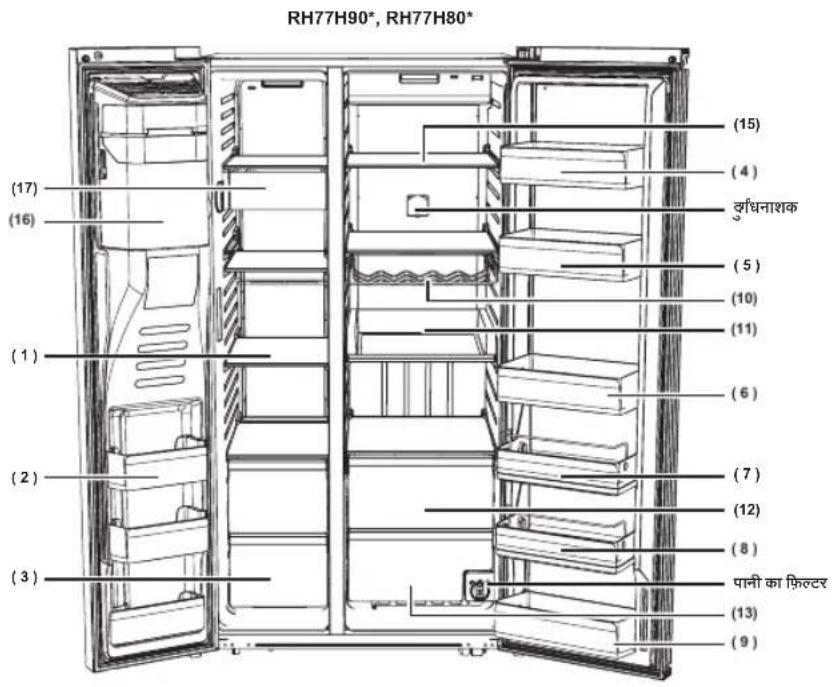
text_image
RH77H90*, RH77H80* (15) (4) रूधिनाशक (5) (10) (11) (6) (7) (12) (8) पानी का फिक्टर (13) (9) (17) (16) (1) (2) (3)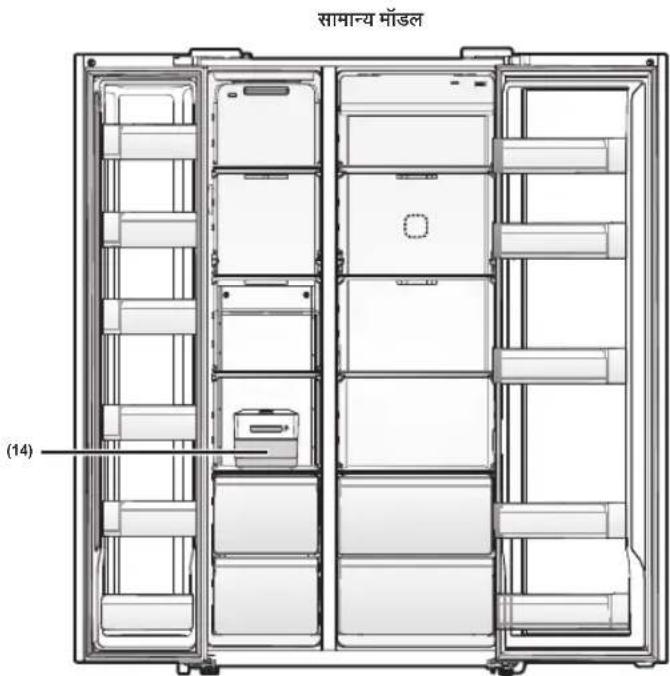
text_image
सामान्य मॉडल (14)हिंदी - 33
text_image
Folta A(1) फ्रीजर श 'लफ
इसका उपयोग माँस, मछली, जमे हुए डम्पलिंग, आइस क्रीम और अन्य प्रकार के जमे हुए भोजन संग्रहीत कर्ने के लिए किया जाता है।
(2) बह -उद्देशीय फ्रीजर कंपाटमेंट
अधिक प्रभावी भोजन संग्रहण केलिए लंबे फ्रीज़ कंपार्सेंट लगे हैं। हालांकि, इन कंपार्टिंट का उपयोग आइस क्रीम या ऐसे पदाथों के लिए न करे जिन्हें आप लंबे समय तक संग्रहीत करना चाहते हैं।
(3) स खा भोजन और माँस संग्रहण पात्र
इसका अपयोग सूखे भोजन और माँस को लबेसमय तक संग्रहीत करने के लिए किया जाता है। आइटम को संग्रहीत करने से पहलेउन्हें एल्यूमीनियम फॉडल या रसोई के रूप में लपेटे।
(4) चीज़ क 'स
इसका उपयोग अंडे, चीज़, मकखन, और अन्य प्रकार के डेखरी उत्पाद संग्रहीत करने के लिए किया जाता है।
(5) साँस क 、स
इसका उपयोग भिन्न प्रकार की सॉस को संग्रहीत करने के लिए किया जाता है
(6) ड़ि क केस
इसका उपयोग पानी, दूध, जूस, और अन्य प्रकार केपे य पदार्थसंग्रहीत करने के लिए किया जाता हैं।
(7) स्न तक केस (वैकल्पिक)
इसका उपयोग सलाद और अतिरिक्त व्यंजनों को संग्रहीत करनेके लिए किया जाता है
(8) बच्चों का क 'स (वैकलिपक)
यह उस ऊंचाई पर लगा है जहाँ तक बच्चे आसानी से पृषु़ूव सर्को। दही, स्नैंक और बच्चों के अन्य आइटम संग्रहीत करने के लिए इसका उपयोग करें
(9) मल्टी क 'स
इसका उपयोग सुखाई गई न्यूडल (स्पैंघी), झटका गोमांस आदि जेंसे पानी-रहित भोजन को संग्रहीत करने के लिए किया जाता है।
(10) शराब की र "क (वंकल्पिक)
शराब की बोतलों को संभहीत करने के लिए इष्टम स्थान प्रदान करके शराब के स्वाद को बनाए रखने में सहायता करता ँब
(11) EZ रूलाइड श 'ल्फ (वैकलिपक)
भोजन को बाहर निकालना आसान है।
(12) Cool Select Zone (कूल सलेक्ट जोन) (वैंकल्पिक)
इसका उपयोग ऐसे आइटम को संग्रहीत करने में, जिन्हें थोड़ा ठंडा रखने की आवश्यकता होती है और मांस और मछली को संग्रहीत करने के लिए किया जाता हं जिन्हें जुरंत बनाना होता है।
(13) स 'हतमंद सब्जी पात्र
इसका उपयोग फलों और सब्जियों को ताजा रखने के लिए किया जाता है।
(14) बफ़ संग्रहण बॉक्स
इसका उपयोग बर्फको संग्रहीत करने के लिए किया जाता है वैकल्पिक रूप सं आप पात्र को बाहर निकाल सकतेहैं और फ्रीज़र के भीत्तर अधिक स्थान खाली कर सकते हैं
(15) र फ्रिजरेटर शेल्फ
इसका उपयोग सामान्य प्रकार के भोजनों को रखने के लिए किया जाता हैं, जिन्डें रेफ्रिजरेशन की आवश्यकता होती हैं
(16) आइस मकर बकट (केयल डिस्पेंसर माँडल)
आसानी से बहुत सारी बर्फ संग्रहीत करने के लिए बनाया गया।

आइस शूट या आइस मेकर बकेट में अपनी उंगली, हाथ या कोई अन्य वस्त न रखों
ऐसा करने से निजी चोट लग सकती है या सामग्री की क्षति हो सकती हैं
(17) स्न ैक पात्र (वैंकल्पिक)
इसका उपयोग छोटे जमे हुए भोजन जैसे आइस क्रीमि को संग्रहीत करने के लिए किया जाता है।

- अगर आप बहुत अधिक समय केलिए बाहर जाने की योजना बनाते हैं, तो रैफिजरेटर को खाली करें और उसेंबंद कर दें उपकरण के भीतर से अधिक नमी को पोँछ दें और दरवाजों को खुला छोड़ दें यह दृंधि और फफूँद को उत्पन्न होनेसे रोकता हैं
- यदि ल 'बे समय तक रेफिजरेटर का उपयोग नहीं होगा, तो बिजली का प्लग निकाल वें
-बिजली के तार में विद्यत-रोधन श्रीण पड़नसे आग लग सकती है।
तापमान को नियंत्रित करना
फ्रीज़र और रेफ्रिजस्टर कंपार्टमेंट का मल तापमान
फ्रीजर और फ्रिज कंपार्मेंट का मूल और अनुशंसित तापमान क्रमशः -2 °F और 37 °F (या -19 °C और 3 °C) होता है।
अगर फ्रीजर या रे फ्रिजेश्टर का तापमान बहुत अधिक या कम है, तो तापमान को मैनुअल रूप से समायोजित करें।
फ्रीज़र का तापमान नियंत्रित करना
RH77*
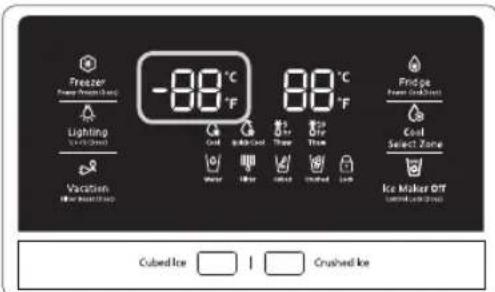
text_image
Freezer Freezer (Cool) Lighting Lighting (Cool) Vacation Air Water Storage -88°C -88°C 88°C Fridge Flame (Cool) Cool Select Zone Ice Maker OT cool/water/cool Cubed Ice Crushed Iceअनुशंसित तापमान (फ्रीज़र) : -2 °F (या -19 °C ) (यह छवि मॉडल के आधार पर भिन्न हो सकती है।)
आपकी विशेष आवश्यकताओं को पूरा करने के लिए फ्रीज़र का तापमान -8 °F और 5 °F (या -23 °C और -15 °C) के बीच सेंट किया जा सकता है।तापमान प्रदर्शन पर इचिछत तापमान दिखाई देने तक Freezer (फ्रीज़र) बटन को लगातार दबाते रहें। हर बार दबाए जाने पर तापमान 1 °F (या 1 °C) बदलेणा नीचे देखें।
फारे नहाइटः 0 °F → -1 °F → -2 °F → -3 °F → -4 °F → -5 °F → -6 °F → -7 °F → -8 °F → 5 °F → 4 °F → 3 °F → 2 °F → 1 °F → 0 °FI
सेंटीपोडः : -18 °C → -19 °C → -20 °C → -21 °C → -22 °C → -23 °C → -15 °C → -16 °C → -17 °C → -18 °Cl
ध्यान रखें कि आइस क्रीम जैसा भोजन 4 °F (या -15.5 °C) पर पिघल सकता हैं। तापमान प्रदर्शन क्रमानुसार रूप से -8 °F से 5 °F (या -23 °C से -15 °C) तक स्थानातरित होगा।
फ्रिज का तापमान नियंत्रित करना
RH77*
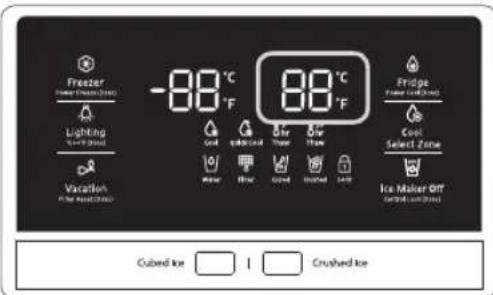
text_image
Freezer Lighting Vacation -88°C -88°C Fridge Cool Select Zone Cool Ice Maker Off Cubed Ice I Crushed Iceअनुशंसित तापमान (फिज) : 37 °F (या 3 °C) (यह छवि मॉडल के आधार पर भिन्न हो सकती है।)
आपकी विशेष आवश्यकताओं को पूरा करने के लिए फ्रिज का तापमान 34 °F और 44 °F (या 1 °C और 7 °C के बीच) के बीच सेंट किया जा सकता है। तापमान प्रदर्शन पर इच्छित तापमान दिखाई देने तक Fridge (फ्रिज) बटन को लगातार दबाते रहे
हर बार द्वाए जाने पर तापमान 1 °F (या 1 °C) बदलेगा। नीचे देखें।
फारेनहाइट : 37 °F > 36 °F > 35 °F > 34 °F > 44 °F > 43 °F > 42 °F > 41 °F > 40 °F > 39 °F > 38 °F > 37 °F
सैटीप्रेडः : 3 °C → 2 °C → 1 °C → 7 °C → 6 °C → 5 °C → 4 °C → 3 °C
फ्रिज की तापमान नियंत्रण प्रक्रिया बिल्कुल फ्रीज़र की प्रक्रिया की तरह ही कार्य करती है।
अपना इच्छित तापमान सेट करने के लिए Fridge (फ्रिज) बटन दबाँँ कुछ सेंकड बाद, फ्रिज नए सेंट किए गए तापमान की ओर समायोजित होना आर्भ कर दे गा।
यह डिजिटल प्रदर्शन में प्रदर्शित होगा

- जब आप दरवाजों को बहूत ज्यादा बार खोलते हैंया अगर बड़ी मात्रा में गर्म भोजन रैफ्रिज्टर में रखा जाता हैतो फ्रीजर या फ्रिज का तापमान बढ़ सकता है।
- इसक ` कारण डिजिटल प्रदर्शन चमकने लगता है। प्रैज़र और फ्रिज जब सामान्य तापमान पर वापस लौट जातेहैं तो चमकना बंद हो जाता है
- आगर चमकना जारी रहता ह ू, तो हो सकता ही आपको रैफ्रजरे टर को "रीस्ट" करना पड़े उपकरण का प्लग निकालें लगभग 10 मिनट तक प्रतीक्षा करें और फिर बिजली केतार को वापस ल्पाएं।
ठंडे पानी के डिस्पेंसर का उपयोग करना
आप क्या निकालना चाहते हैं उसका चयन करने के लिए उचित बर्फ प्रकार का बटन दबाएँ

Water


Cubed


Crushed


Ice Maker Off

NO ICE (वर्फ नहीं)
अगर आप आइस मेंकर को ब्द करना चाटते हैं तो इसका ध्यन करें
बर्फ लीवर (1) का उपयोग करना
बर्फ लीवर डिस्पेंसर (1) को अपने गिलास से धीरे से दवाएँ
डिस्पेंसर से बर्फ निकलेगी।
आप पहले cubed (क्पूष्ठ वाली) या crushed (कुचली हुई) बटन को दबाकर बर्फे के प्रकार का चयन कर सकते हैं
पानी के लीवर (2) का उपयोग करना
पानी के लीवर डिस्पेंसर (2) को अपने गिलास से धीरे से दबाएं
डिस्पेंसर से पानी निकलने लगेशा।


अगर आप पानी और बर्फ के लीवर को लगभग एक ही समय पर दबाते है, तो भी डिस्पेंसर केचल उसी विकल्प पर सं चालन करता है जो वास्तय में पहले दबाया गया था

पानी निकालने के बाद पानी को पैंलने से रोकने के लिए कृपया कप को हटाने से पहले 1 सेकंड तक प्रतीक्षा करें।
बर्फ या पानी निकालने के बाद लीवर डिर्पेंसर को खीचिनहीं यह अपने आप वापस आ जाता है
बर्फ और पानी के डिस्पेंसर को एक साथ उपयोग करना
बर्फ और पानी प्राप करने के लिए, तो पहले बर्फ के लिए बर्फ के लीवर (1) को खीचें, फिर अपने गिलास को नीचे करें और पानी के लिए पानी के लीवर (2) को द्वाएँ

पानी को फैलने से रोकने के लिए कृपया गिलास को हटानेंसे पहले 2 सेकंड तक प्रतीक्षा करें।
रेफ्रिजरेटर का दस्वाजा खुला होने पर डिस्फेसर काम नहीं करता है।
- लीवर को बाहर न खींच ।
आप लीवर की स्प्रिंग को क्षतिग्रस्तर कर सकते हैं या तोड़ सकते हूं - बफ़ के पात्र/बके ट को साफ करनेंक लिए, हल्के डिटजेंट से धोए, दीवार साफ करें और उसे पूरी तरह साफ करें कठोर या खुकरे व्लीनर या विलाथकों का उपयोग न करें।
- अगर बफ़ ' बाहर नहीं आती है, तो आइस बकेट को बाहर निकाले और आइस मेकर के दाईओर लगे परीक्षण बटन को दबाएँ।
- ट्रे जब रफ या पानी से भरी हो तो परीक्षण बटन को लगातार न द्बाएँ पानी फैल सकता है या रफ से बकेट जाम हो सकती है।

- जब आप Test (परीक्षण) बटन दवात ' हैं, तो आपको रेफिजरेटर की झनझनाहट (डिंग-डोंग) सुनाई लेपी. झनझनाहट की आवाज़ आने पर Test (परीक्षण) बटन को छोड़ वें
- झनझनाहट की आवाज फिर स ` अपने आप सुनाई देगी जो आपको येबताएणी कि आइस म्कर ठीक प्रकार कार्य कर रहा है।

अगर बिजली चली जाती है, तो बर्फ की क्युष्र पिघल सकती हैं और बिजली वापस आने पर एक साथ जम सकती हैं, इससे डिस्पेक्सर खराब हो सकता है।
इस समस्या से बचनके लिए, बिजली जाने के बाद आइस बकेट को निकालें और शेष बर्फ या पानी को हटा दें।

जब आप आइस बकेट से बर्फ को हटा दें, तो आपको 'ICE CUBED' (क्यूब वाली बर्फ) या 'CRUSHED' (कुचली हुई बर्फ) फंबशन चालू रहते हुए एकबार डिस्पेंसर लीवर दबा का चाहिए।
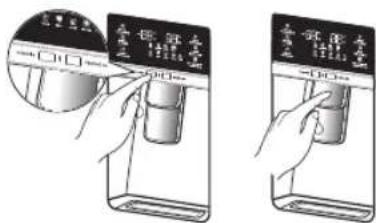
text_image
Illustration showing two steps of a device with Chinese labels, one being opened and the other holding a container.जब आप आइस बकेट को रेफ्रिजरेटर को वापस लगाईं, तो आइस मेकर तैजी से नई बर्फ बनाएणा

- आइस शूट या आइस मेकर बकेट में अपनी उंगली, हाथ या कोई अन्य वस्तन रखों।
-ऐसा करन` से निजी चोट लग सकती हैया सामग्री की क्षति हो सकती है।
- केवल रे फ्रिज्स्टर के साथ प्रदान किए गए आइस मेकर का उपयोग करें।
- इस र `फ्रिजरेटर की पानी की लाइन किसी उपयुक्त योग्य व्यक्ति द्वारा ही स्थापित / कनेक्ट की जानी चाहिए और पीने योग्य पानी की आपूर्ति से कनेक्ट होनी चाहिए?
- आइस म `कर को ठीक से कार्य करनेकेलिए 20 - 125 psi (138\~862 kPa) के पानी के दाब की आवश्यकता होती है।

- अगर आप ल बी छुड्धियों या व्यावसाथिक यात्रा पर जा रहें हैं और उस दौरान पानी या आइस डिप्पेंसर का उपयोग नहीं करेंगे, तो सिसाव से बचने के लिए पानी के बाल्व को बंद कर दें।
• अगर आपन `कुळा समय सं' आइस मेकर का उपयोग नहीं किया है या आपने
फ्रीजर केदस्वाज़े को बार-बार खोला हैं तो बर्फ एक साथ चिपक सकती हैं!
अगर ऐसा होता है आइस बक्फेट को खाली करें या स्सोई क लकड़ी ककिसी
उपकरण सेबर्फ को तोड़े
चाकृष्या काँटिजँ से तेजधार आइटम का उपयोग न करें।
- जब आप आइस बक 'ट को निकालते हैं, तो उस समय भी आइस मेकर में थोड़ी बर्फ शेष बच सकती द्व
आइस मेकर इस बर्फको फ्रीजर में निकाल सकता है।
बर्फ के डिस्पेंसर का उपयोग करना
अपना इच्छत बर्फ प्रकार चुनने के लिए Ice (बर्फ) बटन दबाएँ अपने कप को बर्फ के आउटलेट के नीचे लगाएँ और फिर आराम से डिस्पेंसर पैंड को दबाएँ
बर्फ को निकलकर बाहर गिरने से बचाने के लिए सुनिश्वित करें कि गिलास डिस्पेंसर की सीध में है।
अगर आप Crushed Ice (कुचली हुई बर्फ) सुविधा का उपयोग करने के बाद Cubed Ice (क्यूब्ब वाली बर्फ) चुमते हैं तो कुचली हुई बर्फ की शेष बची मात्रा निकल सकती है।
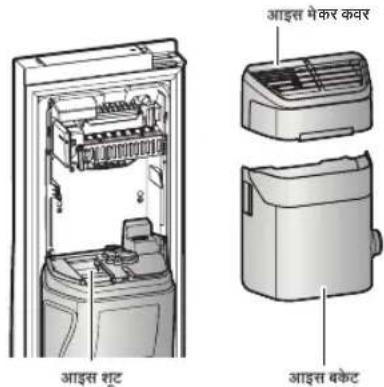
text_image
आइस श्रट आइस मेकर कवर आइस बकेट
- अगर बफ़ नहीं निकलती है, आइसम्फकर कवर को खींचें और आइस मेफर पर लगे test (परीक्षण) बटन को दबाएँ।
- जब ट्र ` बर्फ या पानी से भरी हो test (परीक्षण) बटन को लगातार न दबापृ पानी फैल सकता हैं या बर्फ से आइसमोकर या डिस्फेंसर जाम हो सकता है।
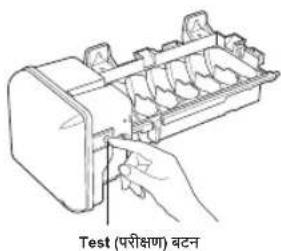
text_image
Test (परीक्षण) बटन
अधिक स्थान के लिए, आप आइस बकेट की बजाय गार्ड फ्री-अप में भोजन संग्रहीत कर सकते हैं और कवर-आइस मेकर और स्नैक बिन को निकाल सकते हैं।
अगर आप आइस बेकट के निकालते हैं, तो प्रदर्शन पैनल पर ICE OFF (बर्फ बंद) चमकेगा।
इसके अलावा, आप फ्रीज़र के उपरी दराज को निकाल सकते हैं और उस स्थान पर शेल्फ लगा सकता हैं.
क्योंकि इससे ऊष्मीय और यांत्रिक विशिष्टताओं पर कोई प्रभाव नहीं पड़ता है
जमे हुर भोजन को संग्रहीत करने के के पार्टेंट के घोषित संग्रहण वॉल्यूम की गणना "गार्ड फ्री-अप" को लगाकर और "कवर-आइस मेकर", "स्नैंक बिन", "उपरी दराज" को निकाल कर की जाती है
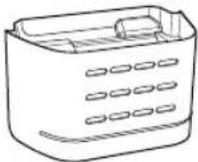
GUARD FRE-UPP (गार्ड फ्री-अप) (कैकल्पिक)
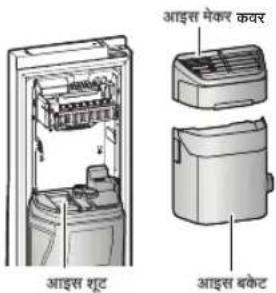
text_image
आइस श्रूट आइस मेकर कवर आइस बकेट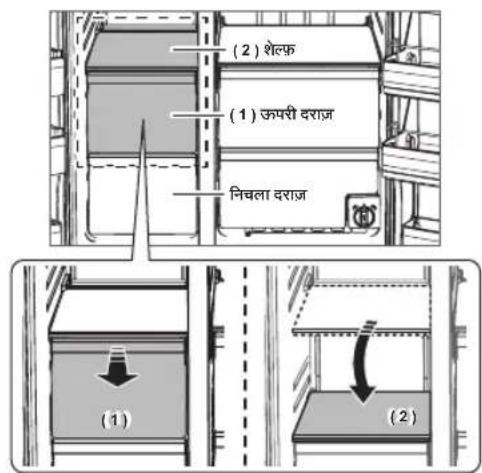
text_image
(2) शेल्फ (1) ऊपरी दराज निवला दराज (1) (2)COOLSELECT ZONE™ दराज़ (वैकल्पिक) का उपयोग करना
CoolSelect Zone™ दराज़ को आपके व्यस्त जीवन को थोड़ा सा आसान बनाने के लिए डिज्ञाइन किया गया है।
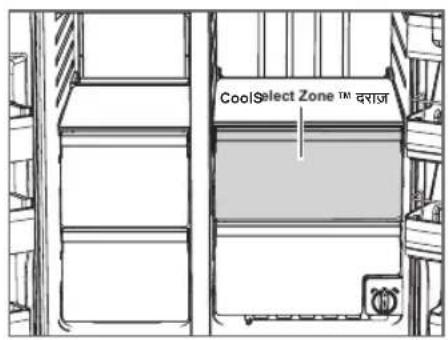
text_image
CoolSelect Zone ™ ™ दराजThaw (पिघलाना)

जब "Thaw (पिघलाना)" चयनित होता है, तो CoolSelect Zone दराज में वैंकल्पिक रूप से ठंडी हवा प्रवाहित की जाती है।
जमे हुए भोजन के भार के आधार पर, आप 5 घंटे, 10 घ्टे का पिघलाने का समय चून सकते हैं।
जब "Thaw (पिघलाना)" समास होता है, तो भोजन आधी जमी स्थिति में होगा, जिसे पकाने के लिए काटना आसान होगा।
इसके अतिरिक्त, जब "Thaw (पिघलाना)" समात होता हैं तो CoolSelect Zone दराज मुल "Cool (ढ़ा)" स्थिति में आ जाता है।
इस फंवशन को बीच में रद्ध करने के लिए, बस CoolSelect Zone (कूलसल्केट जोन) बटन दबाएँ और अन्य फंवशन का चयन करें
Quick Cool (त्वरित ठंडा)

आप 1\~3 डिब्बा बंद पेख पदार्थों को एक घंटे में तेजी से ठंडा करने के लिए
CoolSelect Zone™ दराज में "Quick Cool (त्वरित तंडा)" संचालन का उपयोग कर सकते हैं।
जब "Quick Cool (त्वरित ठंडा)" प्रक्रिया समास होती है, तो CoolSelect Zone™ दराज अपने आप मूल "Cool (ठंडा)" स्थिति में वापस आ जाता है।
इस संचालन को रद्ध करने के लिए, "Quick Cool (त्वरित ठंडा)" बटन को दोबारा दबाएँ और CoolSelect Zone™ दराज पिछले सेट तापमान पर लौट जाता है।
Cool (टंडा)

"Cool (उड़ा)" चयनित होने पर, CoolSelect Zone™ दराज का तापमान सपूर्ण फ्रीज़र की तापमान सेटिंग के समान हो जाएणा दराज का डिजिटल पैंनल, फ्रिज़रेटर के प्रदर्शन पैंनल के समान ही तापमान प्रदर्शित करता है। चूकि "Cool (उड़ा)" फंवशन रैफ्रिज़रेटर के तापमान का अनुसरण करता है, तो आपके पास अतिरिक सामान्य संग्रहण स्थान होता है।

माँस या मछली के आकार और मोटाई के आधार पर, पिघलने का समय भिन्न हो सकता है

जब "Thaw (पिघलाना)" संचालन मेंहोता है, तो उन सभी आइटम को दराज से निकाल देना चाहिए जिन्हें आप प्रभावित करना नहीं चाहते हैं
SMART ECO (स्मार्ट ईको) सुविधाएँ
Smart Eco (स्मार्ट ईको) सिस्टम
संचालनीय परिवेश, उपयोग के तरीके और रेक्रिजेस्टर की संचालन रिथति के अनुसार 4 संवेदकों का उपयोग करके भोजन को ताज़ा रखता हैं और इस्से बिजली की बचत भी होती है।
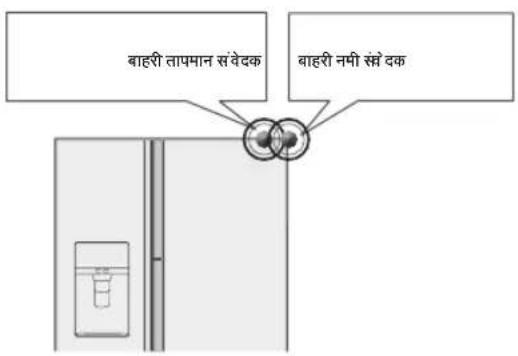
text_image
बाहरी तापमान संवेदक बाहरी नमी संसे दक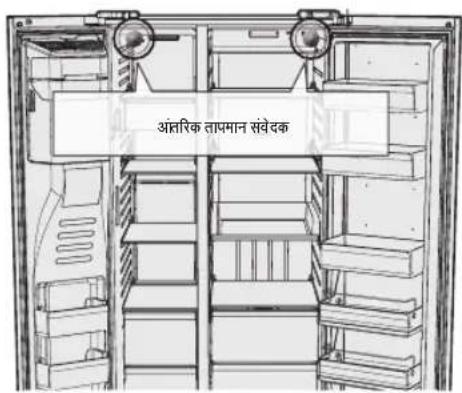
text_image
अंत्तारिक ताप्मान संवेदकफ्रिज बह-उद्देशीय दरवाजा पात्र
एक अलग हो जाने वाले विभाजक से भोजन संप्रहीत करना आसान हो जाता है।
आइटम के अनुसार खाध्य उत्पाद एकत्रित किए जा सकते हैं।
- छोटी चटनी की बोतलों और क "न वाले पेथ-पदार्थों को एक साथ संग्रहीत करने के लिए विभाजक को उसके स्थान पर लगाएँ।
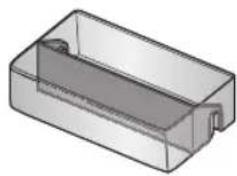
natural_image
3D rendering of a rectangular mechanical part with a slot and end caps (no text or symbols)- डब्ब 'में दूध या पेय-पदार्थसंग्रहीत करते समय विभाजक को निकाल दें।
विभाजक को उपयोग करने का तरीका
- के स के कंपार्टमेंट में बॉटने कलिए विभाजक को लगाएँ जैसा कि चित्र में दिखाया गया है
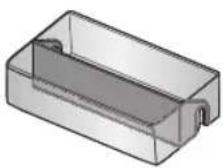
- उपयोग म ` नहीं होने पर, बस इसे हल्का सा झटका दें और इसे बाहर निकाल दें जैसा कि चित्र में दिखाया गया है।
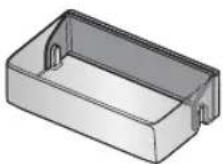
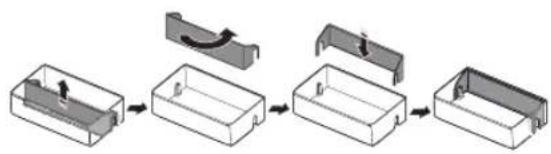
flowchart
graph LR
    A["Rectangular Box with Arrow"] --> B["Curved Arrow"]
    B --> C["Rectangular Box with Arrow"]
    C --> D["Final Container"]
मल्टी-सपोर्टर का उपयोग करने का तरीका
- उपयोग म ̈ नहीं होने पर, मल्टी-सपोर्टर को ऊपर की ओर पिलप करके रखें जैसा कि चित्र में दिखाया गया है।
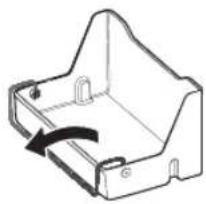
natural_image
Technical line drawing of a mechanical bracket with an arrow indicating rotation (no text or symbols)- आइटम को बाहर फै लने से बचाने के लिए मल्टी-सपोई को स्थिति 1 में फिलप करें।
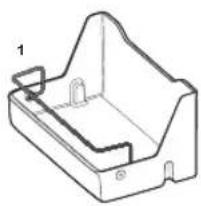
natural_image
Technical line drawing of a mechanical housing or bracket component (no text or symbols)- एक विभाजक के रूप में उपयोग करने के लिए मल्टी-सपोर्टर को स्थिति 2 में फिलय करें।
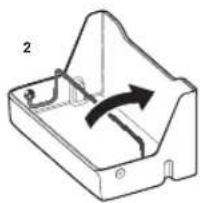
natural_image
Technical line drawing of a mechanical component with an arrow indicating rotation (no text or symbols)रेफ्रिजर्सेटर के सहायक उपकरणों को निकलना
- श 'ल्फ (फीजर/फिज)
- दरवाजः ू को पूरी तरह खोलें और फिर शेल्फ को थोड़ा ऊपर उठाएँ और निकालने के लिए उसे बाहर खीचौं।
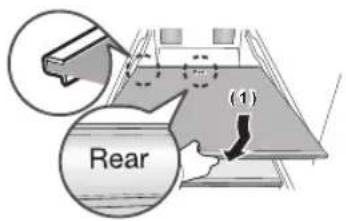
text_image
Rear (1)- अगर आप दस्वाज़ ` को पूरी तरह नहीं खोल पा रहे हैं, तो शेल्फ को बाहर निकालें, उसे ऊपर उठाएँ और निकालने के लिए थोड़ा सा मोड़ दें।
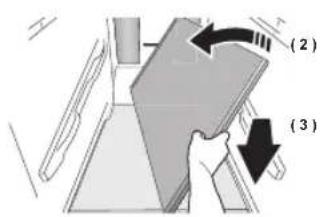
text_image
(2) (3)
शेलफ को उल्टा न लगाएँ और उल्टा न रखें।

काँच के कटेनर, काँच की शेल्फ की सतह पर खरोंच डाल सकते हैं।
- दरवाज`का पात्र
- दरवाज 'को पात्र को दोनों हाथों से पकड़े और उसे आराम से ऊपर उठाकर निकालों
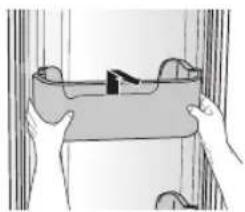
natural_image
Illustration of two hands holding a rectangular object with a handle, against a plain curtain background (no text or symbols)- दराज
- दराज़ को बाहर खींचकर और थोडा सा ऊपर उठाकर निकाल ।
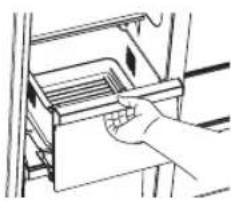
natural_image
Hand placing a tray into a refrigerator with arrows indicating motion (no text or symbols)- सब्जी का पात्र/ड़ाई बिन कवर
- सब्जी क ` पात्र (रेफ्रिजरेटर)/ड़ाई बिन (फ्रिजर) के ऊपर लगे पात्र को निकालें।
- सब्जी क ` पात्र (रेफ्रिजरे टर)/ड़ॉई बिन (फ्रिजर) दोनों तरफ लगी किलप को नीचे द्बाएँ और पात्र को निकलनेके लिए उन्हें अपनी ओर खीचें।
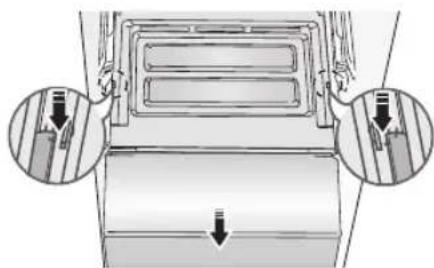
natural_image
Diagram of a car air vent with two circular insets showing internal components (no text or labels)(वैकल्पिक)
- संबजी का पात्र/ड़ाई बिन
- सब्जी क ` पात्र/ड़ाई बिन को बाहर निकालने से पहले, आपको दस्वाजे से बहु-उद्धेशीय कपार्शेंट को निकालना होगा।
• पात्र को थोडा ऊपर उठाए ° और बाहर खींच ले
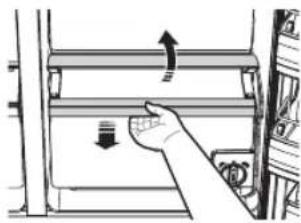
natural_image
Hand pressing down on a mechanical device with directional arrows (no text or symbols)- आइस बक'ट (फ्रीजर)
- आइसम 'कर बकेट को ऊपर उठाकर और धीरेसे बाहर खींच कर उसे निकालों
• हैंडल को इस तरह पकड़े जैसा चित्र में दिखाया गया है।
- क्षति स ` बचाने के लिए आइस बकेट को धीरे से निकालें।
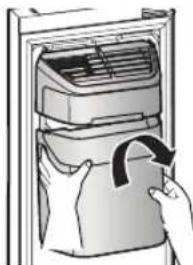
natural_image
Illustration of a hand placing a bag into an air conditioner unit (no text or symbols visible)
दराज़ के कवर को निकालते समय अत्यधिक बल का उपयोग न करें आप कवर को तोड़ सकते हैं और चोट लग सकती है।

सहायक उपकरणों को निकालने से पहले सुनिश्वित करें कि रास्ते में कोई भोजन नहीं है।
संभव होने पर दुर्धटना के जोखिम को कम करने के लिए सारे भोजन को निकाल दें।
- दुर्गधरोधी को निकालना
शेल्फ को थोड़ा सा बाहर खींचें और फिर चपटे पेचकस से लुईधरोधी कवर की किलप को ऊपर की ओर दबातेहु ए उसे बाहर निकालें।
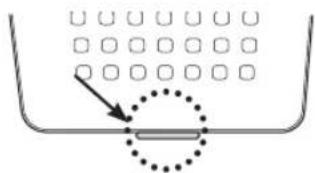
text_image
Diagram showing a container with a dotted line and an arrow pointing to a grid of squares, likely illustrating a physics or engineering concept.- दृग्धरोधी को साफ करना
- दुर्गधरोधी को हर दो वर्ष में एक बार या जब भी आपको लगे कि उसका प्रदर्शन कम हो गया है, बदल दें।
- दुर्गधरोधी को 24 घंटे तक धूप में सुखाएँ और फिर उसे निकालने के विपरीत क्रम में वाफस लगा दें।
रेफ्रिजरेटर को साफ करना

- रेफ्रिजरेटर की सफाई के लिए बेंजीन, थिनर या क्लोरोक्स या कार डिटर्जैंट का उपयोग न करें। वे उपकरण की सतह को क्षति पढुँचा सकते हैं और आग लगा सकते हैं।
- बिजली का प्लग लगा होन ` पर रेफ्रिजरेटर पर पानी का स्प्रे न करें इससे बिजली का झटका लग सकता है। रेफ्रिजरेटर को साफ करने के लिए, निम्न चरणों का पालन करें:
- रैफ्रिजरेटर की बिजली की तार को प्लग से निकाल दें
- मुलायम रोएँ रहित कपड़े या कागज केतौलियो को थोड़ा पानी में भिगाएँ

रेफ्रिजरेटर को साफ करने के लिए किसी प्रकार के डिटर्जेंट का उपयोग न करें क्यौकि वह रेफ्रिजरेटर का शं उड़ा सकता है या उसे क्षतिग्रस्त कर सकता है।
- रैफिजरेटर के साफ और सूखा होने तक उसे भीतर और बाहर से पोछें
- रैफ्रिजरेटर की बिजली की तार को प्लग में लगाएँ
आंतरिक लाइट बदलना
फ्रीजर / फ्रिज LED लैंप
- अगर LED ल प कवर बाहरी पदाथाँ से गंदा हो गया है, तो हो सकता है कि LED लैप स्पष्ट प्रकाश न दो। पूरी चमकती रौशनी वापस पाने के लिए सतही कवर को साफ सूखे कपड़े से साफ करें।

LED प्रकार की लाइडिको स्वयं न निकालें या प्रतिस्थापित न करें LED लाइट प्रतिस्थापित करने केलिए, Samsung सं वा केंद्र या अपने प्राधिकृत Samsung डीलर से सपर्क करें

अगर आप स्वयं LED लैंप को प्रतिस्थापित करने का प्रयास करते हैं, तो आप बिजली के झटके या गंभीर निजी चोट का जोखिम उठातेहैं।
कृलिंग प्रदर्शन को बेहतर बनाने के लिए

अगर भोजन के आइटम से ठंडी वायु का आउटलेट अवरोधित हो गया है, तो ठंजी वायु पूरे कंपार्भेंट में नहीं कैल पाएगी और इससे भोजन प्रभावी रूप जम नहीं पाएणा जिससे कूलिंग प्रदर्शन में कमी आएगी।
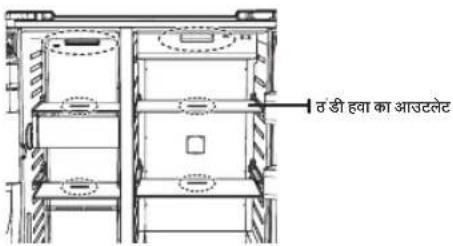
text_image
त डी हवा का आउटलेटपानी के फिल्टर को बदलना

अपनी संपति में पानी से होने वाली क्षिति के जोखिम को कम करने के लिए अपने SAMSUNG रेफिजरेटर में सामान्य ब्राँड के पानी के फिल्टर का उपयोग न करें।
केवल SAMSUNG ब्राँड के पानी के फिल्टर का उपयोग करें।
SAMSUNG, सामान्य पानी के फिल्टर के उपयोग से होने वाले पानी के रिसाव के कारण होने वाली किसी भी क्षाति के लिए कानूनी रूप से जिम्बेदार नहीं है, इसमेंसंभत्ति की क्षाति की शामिल है लेकिन यह इसी तक सीमित नहीं है।
SAMSUNG रेफ्रिजरेटर को केवल SAMSUNG के पानी के फिल्टर के साथ कार्य करने के लिए डिज्ञाइन किया गया है।
"Filter Indicator (फिल्टर संकेतक)" लाइट आपको बताती है कि आपको बताती हैं की पानी के फिल्टर के कार्टिज को बदलने का समय कब होता है।
नया फिल्टर लाने के लिए आपको थोड़ा समय देने के लिए, लाल लाइट वर्तमान फिल्टर की क्षमता समाह होने से थोड़ा पहले जलने लगेगी
समय पर फिल्टर बदलने से आपको अपने फ्रिज से सबसे ताजा और साफ पानी मिलता है।
पानी के फिल्टर को बदलने के लिए निम्न चरणों का पालन करें:
- पानी के फिल्टर को 90° घड़ी की विपरीत दिशा में घुमाएँ।
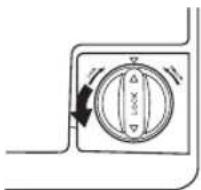
- पानी के फिल्टर को फिल्टर हाउसिंग से खींचें।
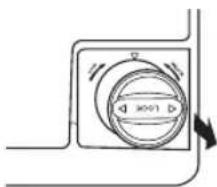
text_image
3001- नए पानी के फिल्टर को फिल्टर हाउसिंग में लगाएँ।
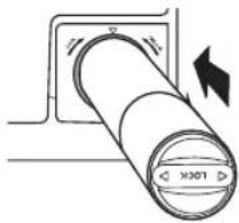
natural_image
Diagram of a cylindrical device with directional arrows indicating motion or force (no text or symbols)- नए पानी के फिल्टर को 90° घड़ी की दिशा में घुमाएँ।
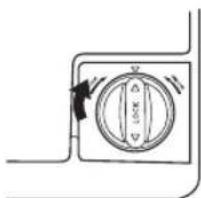
natural_image
Pure diagram of a circular component with internal divisions and directional arrows, no text or symbols present.- पानी का फिल्टर रीस 'ट करने के लिए "Lighting/°C↔°F (3 sec) (लाइंतिंग / °C < >°F (3 सेकंड))" बटन (को लगभग 3 से कंड तक दबाकर रखें लाल रंग का सकेतक बंद हो जागण।

नए लगाए गए पानी के फिल्टर के काटिज से पानी के डिस्पेंसर से थोडा पानी छलक सकता है। ऐसा लाइन में पानी चले जाने के कारण होता है। इससे संचालन में कोई समस्या नहीं आनी चाहिए।

पानी का फिल्टर बदलने पर, रैफिजरेंटर के निचले हिस्से भेपानी फेल सकता हैं। यह बस एक अस्थायी स्थिति है इसलिए पानी को साफ कर दें और इसे उपयोग करें।
एक नए फिल्टर की स्थापना के बाद पानी की आपूर्ति लाइन के भीतर से शेष सामग्री को निकाल दें
- Water (पानी) बटन दबाए और फिर एक कप या गिलास से डिस्पेंसर लीवर को दबाएँ
- फिन्टर स ` 1 गैलन पानी बहाएँ, एक समय पर एक या एक गिलास (लगभग 6 मिनट तक बहाएँ) इससे पानी आपूतिसिस्टम साफ हों जाएगा और लाइन सं वायु निकल जाएगी -कु छ घरों में अतिरिक्त पानी गुजारना पड़ सकता हो।
- र `फिजेस्टर का दरवाजा खोलें और सुनिश्वित करें पानी के फिल्टर से पानी नहीं रिस रहा हैं
विपरीत परासरण पानी की आपूर्ति महत्वपूर्ण:
विपरीत परासरण सिस्टम से आने वाली पानी का आपूर्ति, जो रेफ्रिजरेटर के पानी प्रवेश वाल्य में जाती है, का दाब 35 और 120 psi (241 और 827 kPa) के बीच होना चाहिए।
आर आपकी ठंडे पानी की आपूर्ति से विपरीत परासरण पानी फिल्टर करने वाला सिस्टम कनेकट है, तो विपरीत परासरण सिस्टम में पानी का दाब कम से कम 40 से 60 psi (276 से 414 kPa.) होना चाहिए
अगर विपरीत परासरण सिस्टम में पानी का दाब 40 से60 psi (276 से 414 kPa) से कम हैं तो:
- जा चैंकि क्या विपरीत परासरण सिस्टम में अवसाद फिल्टर अवरुद्ध हो गया है। अगर आवश्यकता पड़े तो फिल्टर को बदलों
- अधिक उपयोग क ` बाद विपरीत परासरण सिस्टम को संग्रहण टैक से जोड़े।
- अगर आपक ` रेफ्रिजरेटर में पानी का फिल्टर है, तो विपरीत परासरण सिस्टम के स्थाथ उपयोग किए जानेपर यह पानी के दाब को और कम कर सकता है। पानी के फिल्टर को निकाल दें।
अगर अपने पानी के दाब के बारे मेंआपकेकोई प्रश्न हं, तो एक लाइस्सधारी, योम्य प्लंबर को कॉल करें।
प्रतिस्थापना फिल्टर का आदेश देना
पानी के फिल्टर के अधिक कार्टिज का आदेश क्से के लिए, अपने प्राधिकृत Samsung डीलर से संपर्क करें।
आइस मेकर (वैकल्पिक) का उपयोग करना
- आइस बक 'ट को निकालने के लिए।
-ह उल को उस तरह पकई जै सा चित्र 1 में दिखाया गया है
-ऊपर उठाए ई और बकेट को धीरे से बाहर निकालें।
-क्षिति स ` बचाने के लिए आइस बकेट को धीरे सेबाहर निकालें।
-जब आप आइस बक' ट को पुनः स्थापित करें, तो ICE (बर्फ) बटन को 6 सेकंड के लिए दबाएं
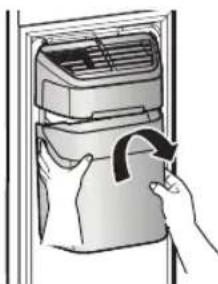
natural_image
Illustration of a hand inserting a bag into an air conditioner unit (no text or symbols visible)- सामान्य स चालन
-आइस म 'कर द्वारा बकेट में बफि डाले जाने पर आपको सुनाई देने वाली आवाज सामान्य संचालन का भाग है।
-अगर आप ल बे समय तक बर्फनहीं निकालते हैं, तो बकेट में बर्फ का देर बन सकता है।
अगर ऐसा होता है, तो बर्फ को निकालें और बकेट को खाली कंस
-अगर बफ़ बाहर न निकलू तो देखें कि शूट मेबफ़ तो नहीं है और उसे निकाल दें।
-स्थापना क` बाद पहली बार निकलने वाली बर्फ की क्यूब्र छोटी हो सकती हैं क्योंकि पानी की लाइन मेवायु प्रवेश कर जाती है। सामान्य उपयोग केदौरान वायु निकल जाणी।
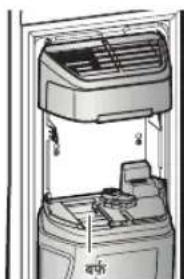
natural_image
Interior view of a refrigerated appliance showing airflow and ventilation system (no text or symbols)
- जब प्रद्श न पैनल पर ICE OFF (बर्फ बंट) चमकता है, तो आइस बकेट को पुनः लगाएँ और/या सुनिश्वित करें यह ठीक प्रकार लगी है
- दस्वाजा खोल ` जाने पर, बर्फ और पानी का डिस्पेंसर कार्य नहीं करता है।
- अगर आप दरवाजः ` को बहुत तेज बंद करते हैं, तो आइस मेकर के ऊपर पानी फैल सकता है।
- आइस बक 'ट को गिरने सेबचाने के लिए उसे दोनों हाथों सेनिकालें।
- चोट स `बचने के लिए, पानी पर गिरी बर्फ या पानी को ध्यान से साफ करें।
- बच्चों को आइस डिस्प 'सर या बकेट पर न लटकने दें। उन्हें चोट सकती हैं
- आइस श ूट मेंहाथ या कोई अन्य वस्तु न रखें। इससे निजी चोट लग सकती है या सामग्री की क्षति हो सकती है
- फ्रीजर म ूलास्टिक कबै में बोजन संग्रहीत करते समय ध्यान रखें। गलत तरीक से रखे गए लास्टिक के बैंग आइस बकेट की ऑगर मोटर में आ सकरोहं और रेफ्रिजरटर को बर्फ निकालभसे रोक सकते हैया अनापेक्षित रूप से फ्रीजर का दरवाज्रा खुल सकता है।
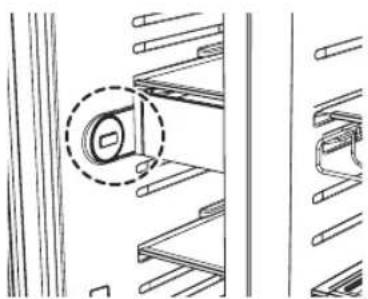
natural_image
Technical line drawing of a mechanical assembly with no visible text or symbolsसमर्या-निवारण
| समस्या समाधान | |
| रेफ्रिजरेटर बिल्कुल कार्य नहीं कर रहा है या यह पयामि रूप से ठंडा नहीं कर रहा है। | जा ̃चे कि पावर प्लग टीक से कनेक्ट है।क्या प्रदश 'न पैनल पर तापमान नियंत्रण सहीं तापमान पर स्ट है?इसे कम तापमान पर सेंट करने का प्रयास करेंक्या र ̃फ्रिजरेटर सीधी धूप में या किसी गर्म चोत के पास स्थित है?क्या र ̃फ्रिजरेटर का पिछला भाग दीवार के बहुत पास है और इसलिए हवा प्रवाहित नहीं हो रही है? |
| फ्रिज में रखा भोजन जमा हुआ हैं · | क्या प्रदश 'न पैनल पर तापमान नियंत्रण सहीं तापमान पर सेंट है?इसे गर्म तापमान पर सेंट करने का प्रयास करें।क्या कमर ̃ का तापमान बहुत कम है?क्या आपन ̃ फ्रिज के सबसे उंडे भाग में पानी की अधिक मात्रा वाला भोजन संग्रहीत किया है? |
| आपको असामान्य शोर या ध्वनियां सुनाई दती है। | जा ̃चे कि रेफ्रिजरेटर संतुलित और स्थिर है।क्या र ̃फ्रिजरेटर का पिछला भाग दीवार के बहुत पास है और इसलिए हवा प्रवाहित नहीं हो रही है?क्या रेफ्रिजरेटर के पीछे या नीचे कोई चीज गिर गई है?अगर आपक ̃ उपकरण के भीतर "टिक-टिक" की आवाज सुनाई देसकती है; यह सामान्य हैजब तापमान परिवर्तन के कारण विविध साहयक उपकरण सकुषित या विस्तूत होते हैं तब टिक-टिक की आवाज सुनाई देती है। |
| उपकरण के सामने के कोने गर्म हैं और संघनन हो रहा है। | थोड़ी गर्मी सामान्य ह ̃ क्योंकि संघनन से बचने के लिए रेफ्रिजरेटर के सामने के कोनों में संघनन रोधी लोग हैं।क्या र ̃फ्रिजरेटर का दरवाजा थोड़ा सा खुला है?अगर आप दरवाजे को लंबे सामय तक खुला छोड देते हैं तो संघनन हो सकता है।अगर दराज म ̃ सब्जियाँरस्थी हैं तो उसमें पानी का संघनन हो सकता है।समय के साथ संघनन अपनेआप दूर हो जाएणा |
| बर्फ नहीं निकल रहीं है। · व्या आपन | 'पानी की आपूर्तिकी स्थापना के बाद बर्फ जमाने ̃ सेपहले 12 घ्टे तक प्रतीक्षा की?क्या पानी की लाइन कन ̃ क्ट है और शट-ऑफ वाल्य खुला है?क्या आपन ̃ मैन्युअल रूप सेबर्फ बनाने वाला फंबशन बंद किया है?सुनिश्चित करें Ice (बर्फ) Cubed (व्यूब वाली) Crushed (कुचली हुई) पर सेंट है।क्या आइस म ̃कर बके ट मेबर्फ का डेर जम गया है? उन्हेंनिकालू।क्या फ्रीजर का तापमान बह ̃ुत गर्म है? फ्रीजर के तापमान को कम पर सेंट करने का प्रयास करें |
| आप रेफ्रिजेंटर में पानी के बुदबुदाने की आवाज सुन सकते हैं | यह सामान्य ह ̃।बुदबुदानकी आवाज र फ्रिजेंट कूलेट तरल के रफ्रिजरेटर क वितरण ककारण आती है। |
| रेफ्रिजरेटर केभीतर बदबू हो रहीं है। | क्या कोई भोजन आइटम खराब हो गया ह ̃?सुनिश्चित करें की तीक्षण गंध वाला भोजन (उदाहरण के लिए माछली) को लेपेटा गया है ताकि वह वायुरुद्ध रहींसमय-समय पर अपन ̃ फ्रीजर की सफाई करें और किसी भी खराब या संदेहरपद भोजन के फेंक दै। |
| फ्रीजर की दीवारों पर तुषार जम गया है। | क्या वाय ̃ छिद्र अवरोधित है?किसी भी अवरोध को निकाल दें ताकि वायु स्वतंत्रता से प्रवाहित हो सकेप्रभावी वाय ̃ प्रवाह के लिए संभहीत किए गए भोजन के बीच पयास स्थान रखें।क्या फ्रीजर का दरवाजा ̃ ठीक से बंद हैं? |
| पानी का डिस्पेंसर काम नहीं कर रहा है। | क्या पानी की लाइन कन`कट है और शट-ऑफ वाल्व खुला है?क्या पानी की आप ूर्ति लाइन की टयूबिंग कुचल या मुड़ गई है?सु निश्वित करें कि ट्यूबिंग खुली है और कोई अवरोध नहीं हैक्या र`फ्रिजरेटर का तापमान बहुत कम होने के कारण पानी की टंकी जम गई है?मुख्य डिजिटल प्रदर्श्न पर कुछ अधिक गर्म सेंटिंग का चयन करने का प्रयास करें |
| फ्रीजर का दरवाजा सहीं ढंग सेबंद न होने पर क्या किया जासकता है। | लीवर डिस्प`सर को ढकेलें और पानी की आपूर्ति जाँचे!लीवर डिस्प`सर (बर्फ मोड) को ढकेलें और औगर मोटर का संचालन जाँचे।शेल्फ से उन ऑब्जेक्ट को निकालें, जिनसे ड्राइव औगर बाधित हो सकता है।सावधानियाः: अगर आपनेएक विस्तृत अवधि तक पानी या बर्फको डिस्पेंस नहीं किया है, तो आइस बकेट में ढेर सारा बर्फ जमाहो सकता है, जिससे ड्राइव औगर में गडबडी और डिस्पेंस करने में समस्या हो सकती हैशेष आइस बकेट और उन ऑब्जेक्ट को निकालें जो ड्राइव औगर को बाधित कर सकते हैं।कृष्या डिस्पेंसर (पानी और बर्फ) संचालित करें और फ्रीजर का दरवाजा बेक्तर ढंग से स्वतः बंद होने लगेग।। |
मेमो
परिवेशी कक्ष तापमान सीमाएँ
इस रेफ्रिजेटर को उस परिवेशी तापमान में संचालित करने के लिए डिजाइन किया गया हैं जो रेंटिंग प्लेट पर चिहित इसकी तापमान श्रेणी द्वारा निर्दिष्ट है।
| श्रेणी परतीक | परविशी तापमान सीमा (°C) | ||
| IEC 62552 (ISO 15502) | ISO 8561 | ||
| वस्तृत परभिति SN +10 से +32 तक +10 से +32 तक | |||
| परभिति N +16 से +32 तक +16 से +32 तक | |||
| उपोषणकटबिंधीय ST +16 से +38 तक +18 से +38 तक | |||
| उषणकटबिंधीय T +16 से +43 तक +18 से +43 तक | |||

फिज/फ्रीज़र के स्थान, परिवेश के तापमान और आपके द्वारा दरवाजा खोले जाने की आवृत्ति जैसे कारकों से रेफ्रिजरेटर का आंतरिक तापमान प्रभावित हो सकता है। इन कारकों की प्रतिपूर्तिकरने के लिए तापमान को आवश्यकतनुसार समायोजित करें.
text_image
हिन्दीइस उत्पाद का सही निपटान
अपशिट विधुतीय और इलोक्ट्रॉनिक उपकरण
(पृथक संब्रहण प्रणालियों वाले देश्कों में लागू)
उत्पाद, सहायक पुजों अथवा लिट्रेकर पर यह मार्किंग दर्शती है कि उत्पाद और इनेक्ट्रॉनिक पुजों (अर्थार चार्जर, हेडस्टें, यू.एस.बी. केबल) को इनकी कार्य अवधि के अंत में अन्य घरेलू अपशिष्ट के लाथ नष्ट नाहों किया जाना चाहिए। अनियंत्रित अपशिष्ट निप्टान के कारण पर्यावरण या मानव स्वास्थ्य को हो सकनें वाली हानि को रोकने के लिए, कृपया इन आइटमों को अन्य प्रकार के अपशिष्ट से अलग कर दें तथा साम्भ्री संसाधनों के सतत्ति पुन: उभयोग को बढ़ाचा देने के लिए इनें से पुम: उपयोग मेंलाएं।
घरेलू प्रम्योतिओं को इस बरेमें विकरण के लिए सिक्तरा जहां से उन्दोंने यह उत्पाद खरीदा, अथवा स्थानीय सस्कारी कार्यालय सेंस 'र्फक करन्ता चाहिए कि वे इन आड़टमों को पर्याकरण की दृष्टि से सुरक्षित रीसाड़ित्विंग केलिए कहाँं और कैसे ले जाएं।
य्यावस्तायिक प्रयोकातों को अपने सप्लायर से संपर्क करना चाहिए तथा खरीद कॉन्ट्रेक्ट की शर्तें देखनी चाहिए। इस उत्याद और इसके पुरोँ के निप्टान के लिए इसेअन्य वाणिजिक अमशिष के साथ नहीं मिलाना चाहिए।
सुरक्षित निपटान और रिसाइकल करनेके बारे मेंअधिक जानकारी के लिए हमारी वेब्साइट www.samsung.com पर जाएँ या नीचे दिए हेल्पलाइन नंबर पर SAMSUNG WORLD WIDE से संर्क करें।
SAMSUNG WORLD WIDE सस्परक करें
अगर Samsung उत्पादों से संबंधित आपके कोई प्रश्न या टिप्पणियां है, तो कृपया SAMSUNG ग्राहक से वा क्ष्द्र से स्पकर करें.
Samsung India Electronics Pvt Ltd., 21st Floor, Two Horizon Center, Sector 43,
Golf Course Road, Gurgaon 122002
1800 3000 8282 (Toll Free)
1800 266 8282 (Toll Free)
1800110011 (Toll Free)
30308282
www.samsung.com/in/support
This product is RoHS compliant
DA68-02976B-07