
JS-210 - Schrittzähler TUNTURI - Kostenlose Bedienungsanleitung
Finden Sie kostenlos die Bedienungsanleitung des Geräts JS-210 TUNTURI als PDF.


| Produkttyp | Schrittzähler mit Pulsmessung |
| Modell | JS-210 |
| Marke | Tunturi |
| Abmessungen (B x H x T) | 44,5 x 18,3 x 70,5 mm |
| Gewicht (ohne Batterien) | 39 g |
| Stromversorgung | 2 x LR44 1,5 V Batterien |
| Batterielebensdauer | ca. 1 Jahr (nur Schrittzähler) |
| Schrittzählerbereich | 0 - 999.999 Schritte |
| Distanzbereich | 0,00 - 9999,99 km (Meilen) |
| Kalorienbereich | 0,0 - 99999,9 kcal |
| Aktivitätszeitbereich | 0 - 99 h 59 min 59 s |
| Pulsbereich (JS-210) | 40 - 240 bpm |
| Pulsspeicher (JS-210) | 10 Speicherplätze (RE0 - RE9) |
| Schrittlängeneinstellung | 25 - 150 cm (10 - 60 Zoll) |
| Gewichtseinstellung | 20 - 200 kg (45 - 440 lbs) |
| Betriebstemperatur | 0 °C bis +50 °C |
| Lagertemperatur | -10 °C bis +60 °C |
| Display | LCD |
| Hintergrundbeleuchtung | Nicht vorhanden (nur JS-210B) |
| Sensitivitätseinstellung | Schiebeschalter (+/-) |
| Befestigung | Gürtelclip |
| Wartung | Nicht in Wasser tauchen; mit weichem, trockenem Tuch reinigen |
| Sicherheitshinweise | Gerät vor Stößen, Staub und Feuchtigkeit schützen; nur neue Batterien verwenden |
| Reparatur | Keine vom Benutzer zu wartenden Teile; Gehäuse nicht öffnen |
Häufig gestellte Fragen - JS-210 TUNTURI
Benutzerfragen zu JS-210 TUNTURI
0 Frage zu diesem Gerät. Beantworten Sie die, die Sie kennen, oder stellen Sie Ihre eigene.
Eine neue Frage zu diesem Gerät stellen
Laden Sie die Anleitung für Ihr Schrittzähler kostenlos im PDF-Format! Finden Sie Ihr Handbuch JS-210 - TUNTURI und nehmen Sie Ihr elektronisches Gerät wieder in die Hand. Auf dieser Seite sind alle Dokumente veröffentlicht, die für die Verwendung Ihres Geräts notwendig sind. JS-210 von der Marke TUNTURI.
BEDIENUNGSANLEITUNG JS-210 TUNTURI

natural_image
Black-and-white photo of a person walking crosswalk inside a circular frame (no text or symbols visible)Pedometer with Pulse
Multi-function Pedometer
JS-210
JS-210B
Congratulations on your purchase of the easy-using, multifunction pedometer. This product has several unique features for user who participates in an active lifestyle. These features include pedometer, calorie burnt counter, distance monitor and activity time monitor. More important is this unit not only a million steps counter, but also pulse pedometer. In order for suitable usage, please read this manual guide before using.
Remark: This unit just be used as normal sporting meter, can't be used as medical indicator.
∅FEATURES
| FEATURES | JS-210 | JS-210B | FEATURES | JS-210 | JS-210B |
| Pulse monitor | √ | ✗ | Accumulative activity calorie monitor | √ | √ |
| 10 memories of pulse | √ | ✗ | Stride length input | √ | √ |
| Accumulative step monitor | √ | √ | Body weight input | √ | √ |
| Accumulative activity time monitor | √ | √ | CMINCH, KMWILE alternative | √ | √ |
| Accumulative activity distance monitor | √ | √ | EL backlight | ✗ | √ |
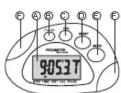
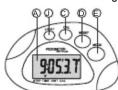
NAME AND FUNCTIONS (Diag. A)
A. Liquid Crystal Display (LCD)
B. Pulse Button Set the unit of heart rate display
c. Calorie Button Display the calorie burnt
1


JS-210B
( A) Diag.
D.RESET Button Clear the accumulative data or
adjust the data
E.MODE Button Alternate display between
different modes
F.Pulse Sensor Monitor the pulse
G.Motion Sensitivity Slide Switch Increase or
decrease the unit's response to motion
("+ "signal stands for increasing, "-"
signal stands for decreasing)
H.Belt Clip Clip the pedometer to belt or clothes
I.Battery Door
J.EL backlight Button Light for 5 seconds
2
-
BATTERY INSTALLATION
- Gently press and pull the battery compartment door right to open it.
- In set two LR4 4 size 1.5 V batteries (or
equivalent) into battery slots. Then replace the battery compartment door. (Diag. B)
Note
- When the display becomes dim, please replace the battery.
● After replacing the battery, all data will be cleared. The pedometer will return to the initial default status. Please re-input your personal data.
- If there is no display or function turbulence after changing battery. Just fetch the battery out from meter, and replace it back after 15 seconds. Or you can use a forceps to make short circuit of battery. As diag C, then replace the battery.

(Diag. B)

(Diag.C)
3
■ METRIC/IMPERIAL SYSTEM SETTING, STRIDE, WEIGHT SETTING
- Hold [MODE], [CAL], [RESET] the 3 buttons together to enter into metric/imperial system setting model.(Resetting after change battery may also enter into this mode)
- There is "CM" flashing on LCD, means metric system ("CM" is length unit). Press [RESET] to sw it ch be t w e e n "C M" and "inch"(inch" is inch for length). Press [MODE] button to confirm the setting, then the stri de par am e ter wil I flash pending for setting. (Diag.D)
- Press [RESET] button to set stride, then [MODE] button to confirm this setting. Weight parameter flashes for resetting. (Diag. E)
- Press [RESET] button to adjust it (long hold is fast setting) and press [MODE] button to confirm this setting and quit to pedometer mode.
Remark:
- When stride unit is "CM", weight unit defaults
as "KG", distance unit defaults as "KM". - The stride data will be a very important
4
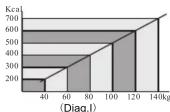
calories. Please refer to the calorie burnt per day for people of different body weight.(Diag.l)
■ EL BACKLIGHT (JS-210B)
Press LIGHT to last 5 seconds backlight
⚠️Remark: Please don't activate the backlight if have no use for it. This will save the power.
■ HOW TO TAKE A PULSE AND RECORD PULSE MEMORY (JS-210)
A person's pulse rate is that the heart beats within a given period of time. This unit will feel the heart signal by two hands pressing the stainless steel sensors and attempt to calculate approximately how many times the heart will beat in one minute. Many factors such as smoking, eating and strain can affect the heart rate. Monitoring pulse rate can be useful for determining how hard the people exercise and the information can be used to plan an effective exercise routine. It is difficult to obtain a pulse reading for the individuals with an irregular heart beat or cardiovascular deficits. Monitoring the pulse
8
parameter to measure distance, and weight data is also important to calorie measurement. So, please set it seriously.
- Stride parameter range is 25\~150 cm(or 10\~60 inch), default value is 50 cm(or 20 inch). Each press [RESET] to add 0.5 unit from low to high, until coming back to another circle.
- Weight parameter range is 20\~200 KGS (or 45\~440 pounds), default value is 70 KGS (or 155 pounds). Each press [RESET] to add 0.5 unit from low to high, until coming back to another circle.
- If no operation within 30 seconds, it will quit setting mode automatically.
- Stride is a changing data, so you can use an average value. As Diag . F

Diag, F)
■ SETTING OF STRIDE LENGTH AND BODY WEIGHT
Press and hold MODE button for 4 seconds to enter into stride set. Please refer to the SETTING of metric and imperial system, stride length and body weight.
5
in this way can not be used for curing disease.
.Press PULSE button to ente into pulse test mode, the heart icon [♥] in the lower line will display and the signal [▶] will point to PULSE. (Diag.J)

(Diag,J)
⚠️ Note: Press MODE button or the unit cannot read a pulse within 15 seconds, it will automatically return to step display.
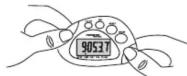
- Lightly press the two stainless steel sensors with your left and right thumbs, your left and right index fingers
should hold the pe do meter back to make sure your both thumbs to press the sensors tight. When measure pulse, your both hands can not connect. (Diag.K)
(Diag.K)
- Make sure your thumbs to touch the sensor enough and maintain a steady position and do not wobble. If your thumbs touch the sensor correctly, the heart sign will flash in the LCD.
Note: ● The unit can not count step during measuring pulse or recalling pulse memory.
9
■ HOW TO WEAR THE PEDOMETER
Attach the pedometer to the belt, slack or the training attire. Make sure that the pedometer is securely attached in a horizontal
po si ti on. Aft er w ear r it, press RESET button for 3 seconds to clear the former exercise data. (Diag.G)
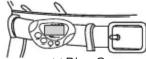
)Diag.G
⚠️Note: The improper positioning of the pedometer may result in incorrect measurements.
■ MOTION SENSITIVITY ADJUSTMENT Before first use the pedometer, please adjust the motion sensitivity.
.Wear the pedometer according to the requirements, and change the mode to STEP, then start to walk. Please record your walking steps.
- Comparing the steps the pedometer shows and real walking steps. If the steps the pedometer shows is more than your real walking steps, please adjust the sensitivity button to direction "-". Contrarily, adjust the sensitivity button to direction "+".
Then repeat the first step until steps the pedometer shows is the same as the real walking steps.
6
Note:
For the same person and pedometer, after you adjust the sensitivity button, please do not change it any more.
■ HOW TO DISPLAY DISTANCE, ACTIVI TIME, STEP AND CALORIE
- Press MODE button to switch step, activity time, distance walked and calorie burnt display mode.
- Press CAL button to display the calorie burnt.
- In the step, distance or calorie display mode, press RESET button for 3 seconds to clear all the data record and enter into step display.
⚠️Note: When count the step, if no step signal within 3 seconds, the pedometer will automatically stop counting time. At once it receives the step signal, it will start to count time automatically. If no walking within 4 minutes, the pedometer will turn off automatically and keep the record of all the data. Press any button or walk, the pedometer will turn on automatically.
■SUGGESTED STEPS PER DAY
In order to keep fit, it is necessary for a person weighting 60kg to walk 10,000 steps to consume 300
7
- If, for some reason, the unit cannot read a pulse within a given time it will automatically return to the step mode. Press PULSE button and try to take your pulse again
- Do not move your thumbs or rub the sensors during measuring pulse, oth er wi se , t he pu l se re a ding is obviously high. In this way, press MODE button to exit and press PULSE button to measure pulse again.
● Make sure to cover the sensors fully with your thumbs, otherwise, the unit can not feel the pulse signal. In winter or your thumbs are too coarse, please wet your thumbs, then measure the pulse.
4.Pulse Memory
When your thumbs away from sensors, it will only record the last pulse reading before it turns to zero. Or press PULSE button to record the real-time pulse reading during measuring the pulse. RE1 stands for the last pulse memory, similarly, the series number is RE2,RE3……RE9,RE0. RE0 stands for the first pulse memory.
Note: When the pulse memory is full up to 10, the former pulse memory will be covered by the pulse after RE 9. Namely, the foremost pulse memory (RE0, RE1, RE2… in turn) will be cleared in turn automatically.
5.RECALL PULSE MEMORY
When stopping measuring the pulse, press PULSE button continuously to recall the pulse memory RE1, RE2……RE9, RE0 in turn.
⚠️Note: At the status of recalling pulse memory, press MODE button to exit and measure pulse. Or hold the sensors directly to exit and measure the pulse. If no recalling operation within 6 seconds, the unit will enter into step mode.
6.CLEAR PULSE MEMORY
If you want to clear one pulse memory, recall it first and then press RESET button once to clear it. The memory series number will change automatically in turn. If you want to clear all the pulse memory, press RESET button for 3 seconds at the status of recalling pulse memory to clear them.
THE FOLLOWING WRONG USE MAY CAUSE INCORRECT STEP COUNTING
- The user does not wear the appliance in the right place, such as putting the pedometer in pocket, the edge of pocket, on the abdomen center or the side of the body. (refer to Fig.G for correct place for wearing the pedometer).
- Walking in the crowded making the steps not standard.
- Jogging or running
- Swerve, go upstairs or downstairs or on bus
- Forget to adjust the sensitivity (refer the 'sensitivity adjustment')
- Hard shock or damp on the appliance
- The pedometer is not vertical to the ground when walking.
- Walking on the uneven road
∅TROUBLE SHOOTING AND EXPLANATION
| Problems | Cause | Operation / Procedure |
| NO display | Battery install incorrectly | Install battery correctly |
| Low battery | Put in new battery | |
| Steps error | Appliance wear incorrect | Wear the appliance correctly |
| Sensitivity adjustment incorrectly | Adjust the sensitivity correctly |
12
| Problems | Cause | Operation / Procedure |
| Distance error | Not the same stride length | Make the stride length as the same as possible |
| Wrong parameter of stride length | Set correct parameter of stride length | |
| Calorie error | Incorrect weight data | Set correct user weight |
| Pulse rate error | Finger placement incorrectly | Insure the finger is touching the sensor and the pressure is effective |
SPECIFICATIONS
Operating Modes: step, activity time, distance, calorie burnt, pulse(JS-210)
Accumulative activity time: 0\~99h59m59s
Step Counter: 0 \~ 999,999 steps
Distance Travelled: 0.00 \~ 9999.99 km (mile)
Calorie burnt:0.0\~99999.9 KCAL
Back light: 5S(JS-210B)
Pulse range: 40 \~ 240bpm(JS-210)
Pulse memory:10 memory(JS-210)
Stride Distance: 25 \~ 150 cm (10 \~ 60 inch)
Weight Range: 20 \~ 200 kg (45 \~ 440 lbs)
Operation Temperature: 0\~+50(32 F\~+140 F)
Storage Temperature: -10\~+60(14°F\~+168°F)
Power Source: 2 pcs LR44 1.5V batteries or equivalent
13
10
Battery life: approx. one year for pedometer only Product Size: 70.5 (D) x 44.5(W) x18.3 (L) mm Weight: 39g (without batteries)
MAINTENANCE
- Do not immerse the unit in water. If the unit contacts with water, dry it immediately with a soft lint-free cloth.
2.Do not clean the unit with an abrasive or corrosive materials. Abrasive cleaning agents may scratch the plastic parts and corrode the electronic circuits. - Do not subject the unit to excessive force, shock, dust, temperature, or humidity. Such treatment may result in malfunction, a shorter electronic life span, damage to the batteries, or distorted parts.
- Only use new batteries as specified in this instruction manual. Do not mix new batteries and old ones, since the old batteries may leak.
- Do not tamper with the unit's internal components. Doing so will terminate the unit's warranty and may cause damage. The unit contains no user serviceable parts.
14

natural_image
Solid gray image with no visible content, text, or symbols.


- NAME AND FUNCTIONS (Diag. A)
- -
- BATTERY INSTALLATION
- Note
- ■ METRIC/IMPERIAL SYSTEM SETTING, STRIDE, WEIGHT SETTING
- Remark:
- ■ EL BACKLIGHT (JS-210B)
- ■ HOW TO TAKE A PULSE AND RECORD PULSE MEMORY (JS-210)
- ■ SETTING OF STRIDE LENGTH AND BODY WEIGHT
- ■ HOW TO WEAR THE PEDOMETER
- ■ MOTION SENSITIVITY ADJUSTMENT Before first use the pedometer, please adjust the motion sensitivity.
- Note:
- ■ HOW TO DISPLAY DISTANCE, ACTIVI TIME, STEP AND CALORIE
- ■SUGGESTED STEPS PER DAY
- 4.Pulse Memory
- 5.RECALL PULSE MEMORY
- 6.CLEAR PULSE MEMORY
- THE FOLLOWING WRONG USE MAY CAUSE INCORRECT STEP COUNTING
- SPECIFICATIONS
- MAINTENANCE
Marke : TUNTURI
Modell : JS-210
Kategorie : Schrittzähler