
Impact SDW 5061 - Kopfhörer SENNHEISER - Kostenlose Bedienungsanleitung
Finden Sie kostenlos die Bedienungsanleitung des Geräts Impact SDW 5061 SENNHEISER als PDF.


| Produkttyp | DECT-Kopfhörer (Headset) mit Basisstation |
| Modell | Impact SDW 5061 (Typ SCDH3/SCDH2) |
| Hersteller | Sennheiser Communications A/S (EPOS) |
| Frequenzbereich | DECT (1,88–1,90 GHz) |
| Reichweite | Bis zu 100 m (außerhalb), einstellbar (10 m, 50 m, 100 m) |
| Gesprächszeit | Ca. 10 Stunden (typisch) |
| Ladezeit | 30 Minuten für 50 %, 1,5 Stunden für 100 % |
| Akku | Lithium-Ionen, wiederaufladbar |
| Anschlüsse | USB (Basisstation) und Klinke (optional) |
| Gewicht (Headset) | Ca. 20 g |
| Gewicht (Basisstation) | Ca. 100 g |
| Abmessungen Headset | Ca. 150 x 50 x 150 mm (H x B x T) |
| Abmessungen Basisstation | Ca. 85 x 85 x 30 mm |
| Farbe | Schwarz |
| Lieferumfang | Headset, Basisstation, USB-Kabel, Ohrpolster, Kurzanleitung |
| Kompatibilität | Softphones über EPOS Connect (PC/Mac) |
| Hauptfunktionen | Anrufannahme/-ablehnung, Stummschaltung, Lautstärkeregelung, Konferenz mit bis zu 3 Gästen, Musikwiedergabe, Sprachansagen |
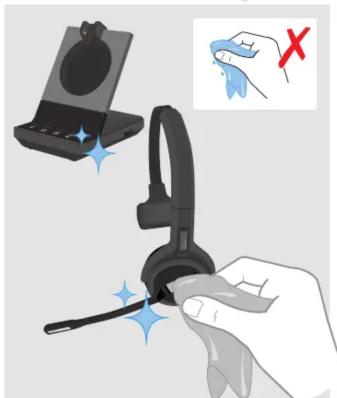
| Reinigung | Mit weichem, trockenem Tuch; keine aggressiven Reinigungsmittel |
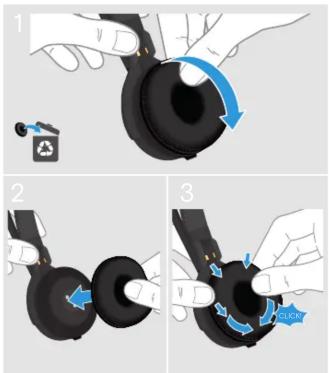
| Wechsel des Ohrpolsters | Siehe Anleitung; Ohrpolster abnehmbar und austauschbar |
| Sicherheit | Nur mit mitgeliefertem Netzteil verwenden; nicht in Flüssigkeiten tauchen |
| Garantie | 2 Jahre (gesetzliche Gewährleistung) |
Häufig gestellte Fragen - Impact SDW 5061 SENNHEISER
Benutzerfragen zu Impact SDW 5061 SENNHEISER
0 Frage zu diesem Gerät. Beantworten Sie die, die Sie kennen, oder stellen Sie Ihre eigene.
Eine neue Frage zu diesem Gerät stellen
Laden Sie die Anleitung für Ihr Kopfhörer kostenlos im PDF-Format! Finden Sie Ihr Handbuch Impact SDW 5061 - SENNHEISER und nehmen Sie Ihr elektronisches Gerät wieder in die Hand. Auf dieser Seite sind alle Dokumente veröffentlicht, die für die Verwendung Ihres Geräts notwendig sind. Impact SDW 5061 von der Marke SENNHEISER.
BEDIENUNGSANLEITUNG Impact SDW 5061 SENNHEISER
EPOS
SENNHEISER
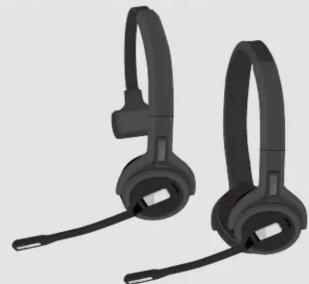
natural_image
Two black head earphones with ear tags, shown side by side (no text or symbols visible)SDW 5000 series
SDW 30 HS | SDW 60 HS
EN Quick Guide
NL Mini handleiding
Skrócona
DE Kurzanleitung
Γρήγορος
instrukcja
FR Guide express
οδηγος
obslugi RU Knatzes
IT Guida rapida
DA Kvikvejledning
КО КРАТКОС РУКОВОЛСТВО
ES Guía rápida
3v Shabbgur Ei Bih
TR 华药 Kulayuz
PT Guia Rapido
Pikaopas
JA イツイド
Type: SCDH3, SCDH2


For easy setup, configuration and softphone call control
and softphone call control settings download
FPOS Connect on
www.eposaudio.com/connect

For Compatibility guide go to
www.eposaudio.com/compatibility

For Instruction manual go to
www.eposaudio.com/support
Sennheiser Communications A/S
Industriparken 27, DK-2750 Ballerup, Denmark
www.eposaudio.com
Printed in China, Publ. 11/19, 770-00086/AO3
Package contents | Lieferumfang | Contenu de la boîte | Contenuti della confezione | Contenido del embalaje | Conteúdo da embalagem | Inhoud verpakking | Перехóμανα συσκευασίας | Pakkens indhold | Innehåll i förpackningen | Pakkauksen sisältö | Zawartość opakowania | Содержимое упаковки | Kutunun içeriği | パッケージ内容
SDW 30 HS SDW 60 HS
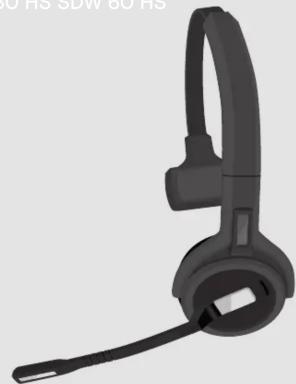
natural_image
3D rendering of a black headband headset with ear strap (no text or symbols visible)
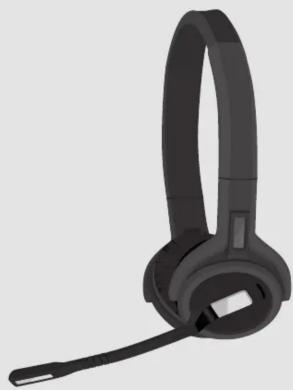
natural_image
3D rendering of a black headband headset with a microphone (no text or symbols visible)Charging the headset | Headset laden | Charger le micro-casque | Ricarica delle cuffie | Carga del auricular | Carregar o headset | De headset opladen | Фóption tuv akoustików | Opladning af headsettet | Ladda headsetet | Headsetin lataaminen | Ładowanie słuchawek | Зарядка гарнитуры | Kulaklığı şarj etme | ヘッドセットの充電
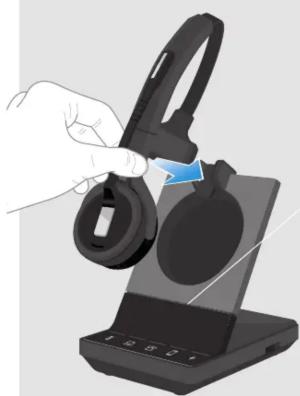
natural_image
Hand holding a black hard hat next to a smartphone charging station (no visible text or symbols)50%
100%

[Non-Text]
[Non-Text]
30 min
1:30 h
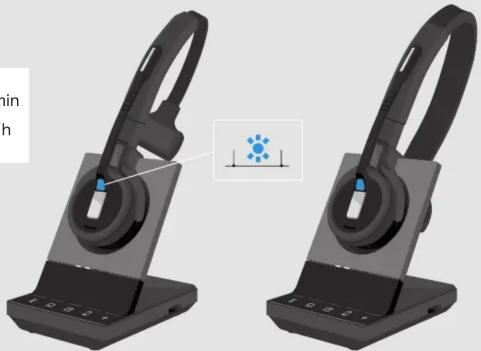
natural_image
3D rendering of two black headsets with a blue indicator light icon, shown from front and side views (no text or symbols on the devices themselves)Adjusting and wearing the headset | Headset anpassen und tragen | Ajuster et porter le micro-casque |
Regolazione e posizionamento delle cuffhe | Cómo ajustar y llevar el auricular | Ajustar e usar o auscultador |
De headset aanpassen en dragen | Hipodappoyi | kat spappoyi | 100 akvotikos | Sadan justeres og bæres headsettet | Justera och bära headsetet | Kuulokkeiden säätäminen i ja käyttäminen | Dostosowanie i poszenie zestawów słuchawkowych |
Настройка и ношение гарнитуры | Kulaklığın takılması ve ayarlanması |ヘッドセットの調整と装着
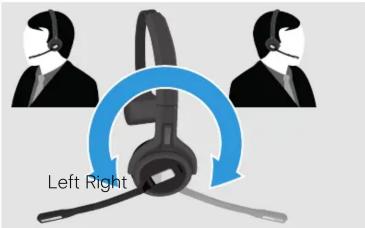
natural_image
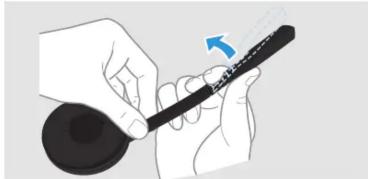
Illustration of a hand holding a pen or stylus with a blue arrow indicating motion (no text or symbols)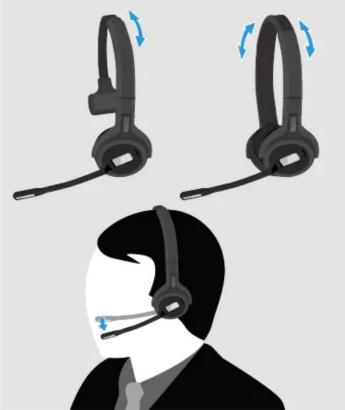
natural_image
Illustration of a person wearing a headset with headband and earphones, showing motion changes (no text or symbols)Adjusting the volume | Lautstärke einstellen | Régler le volume | Regolazione del volume | Ajuste del volumen | Ajustar o volume | Het volume regelen | Púθμιση της έντασης ήχου | Justering af lydstyrken | Justera volymen | Äänenvoimakkuuden säätäminen | Regulacja głośności | Регулировка громкости | Ses seviyesini ayarlama | 音量の調整

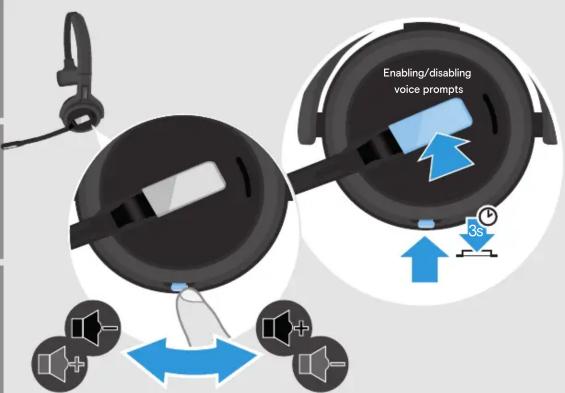
During active call:
Changes the
speech volume
VOLUME 2

During music
reproduction:
Changes the
music volume
VOLUME 3

no active call/music:
Changes ring tone,
beeps & voice prompts@volume
prompts volume
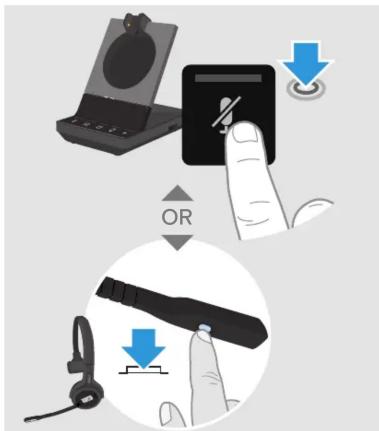
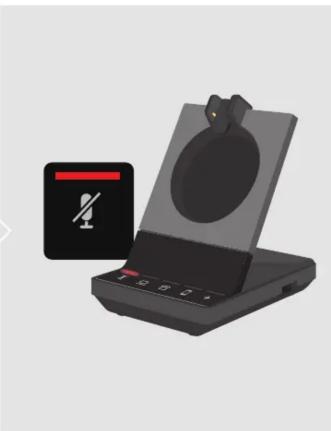
Muting the headset | Headset stummschalten | Couper le son du micro-casque | Silenziare le cuffie | Silenciar el auricular | Colocar o headset em mute | De headset dempen | Σιγαση του ακοστικού | Alfbydelse af mikrofonen | Stänga av headsetljudet | Headsetin mykistäminen | Wyciszanie zestawu słuchawkowego | Отключение звука на гарнитype | Kulakligi sessize alma |
natural_image
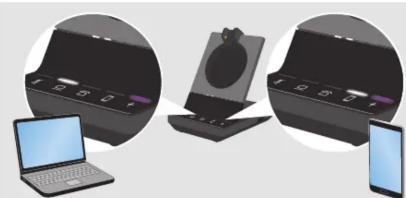
Illustration of a portable electronic device with a black screen and a red-and-white battery icon (no text or symbols)Listening to music | Musik hören | Écouter de la musique | Ascolto di musica | Escuchar música | Ouvir música | Naar muziek luisteren | Ακρόση μουσικής | Afspilning af musik | Lyssna på musik | Musiikin kuunteleminen | Sluchanie muzyki | Прослушивание музыки | Mūzik dinlme | 音楽鑑賞
natural_image
Illustration of three electronic devices: a desktop case, a laptop with a screen, and a smartphone with a mouse (no text or symbols visible)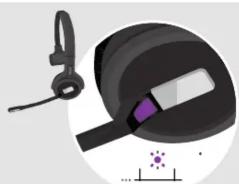
natural_image
Illustration of a black hard hat with a white stripe and a purple stripe, next to a small scale bar (no text or symbols)* LED on/off via
EPOS Connect
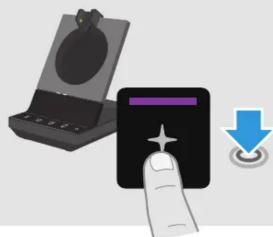
natural_image
Illustration of a hand pressing a black button with a star symbol, next to an open device (no text or symbols present)OR


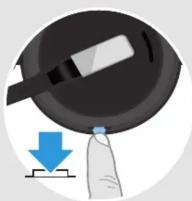
Preparing a call | Telefonat vorbereiten | Préparer un appel | Preparazione di una chiamata | Preparación de una llamada | Preparar uma chamada | Een oproep voorbereiden | Προστομασία κλήσης | Forberedelse af opkald | Förbereda ett samtal | Puhelun valmisteleminen | Przygotowanie rozmowy | Подготовка к звонку | Bir arama hazırlama | 通話の準備
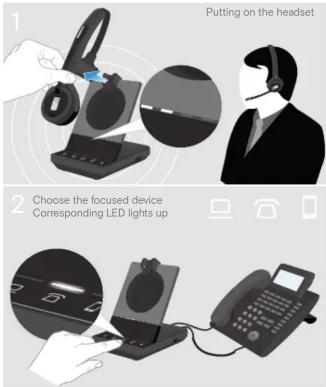
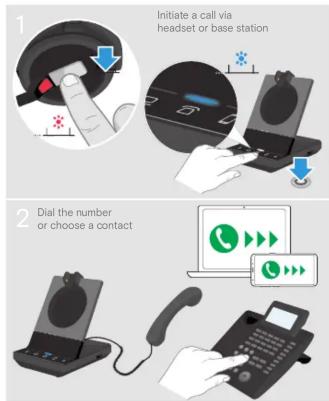
Making a call | Anruf tätigen | Faire un appel | Effettuazione di una chiamata | Realizar una llamada | Efetuar uma chamada | Een oproep plaatsen | Πραγματοποίηση κλήσης | Sådan foretages et opkald | Ringa | Puhelun soittaminen | Nawiązywanie połączenia | Совершение звонка | Arama yapma | 通話の発信
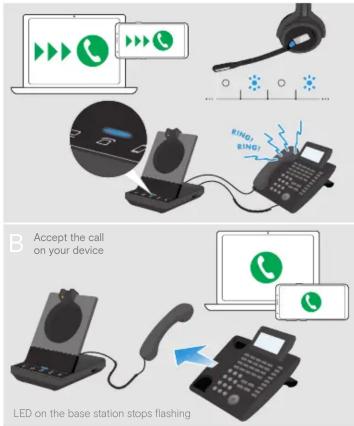
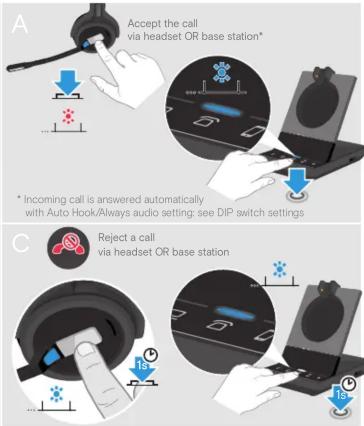
Accepting/Rejecting calls | Anrufe annehmen/abweisen | Acceptor / Refuser des appels | Accettare/Rifutare una chiamata | Aceptar/Rechazar llamadas | Aceitar/rejeitar chamadas | Oproepen accepteren/weigeren | Αποδοχή/Απόρρυψη κλήσεων | Besvare/afvise opkald | Ta emot/avvisa samtal | Puheluiden hyväksyminen/hylkäminen | Przyjmowanie/odrzucanie połączeń | Прием/отклонение вызовов | Arama kabul/ret | 通話の応答/拒否
Call control overview | Übersicht Anrufsteuerung | Aperçu du contrôle d'appel | Panoramica sul controllo della chiamata | Resumen del control de llamada | Vista geral do controlo de chamadas | Overzicht call control functies | Επισκότηση κεριομού κλήσεων | Oversigt over opkaldsstyring | Översikt av samtalskontroll | Puhelun hallinnan yleiskatsaus | Przegląd kontroli połączeń | Обзор управления звонками | Arama kontrollerine genel bakış | 通話コントロールの概要
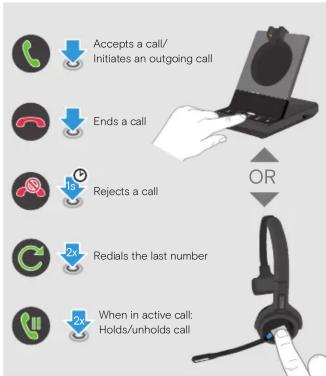
flowchart
graph TD
    A["Accepts a call/Initiates an outgoing call"] --> B["Ends a call"]
    B --> C["Rejects a call"]
    C --> D["Redials the last number"]
    D --> E["When in active call/Holds/unholds call"]
Managing multiple calls | Mehrere Telefonate verwalten | Gérer plusieurs appels | Gestione di più chiamate | Gestionar varias llamadas | Gerir várias chamadas | Meerdere gesprekken afhandelen | Διαχείριση πολλαπλών κλήσων | Händtering af flere opkald | Hantera flera samtal | Monen puhelun hallitseminen | Zarządzanie kilkoma połączeniami | Управление несколькими звонками | Birden çok kulakliği yönetime | 複数通話の管理
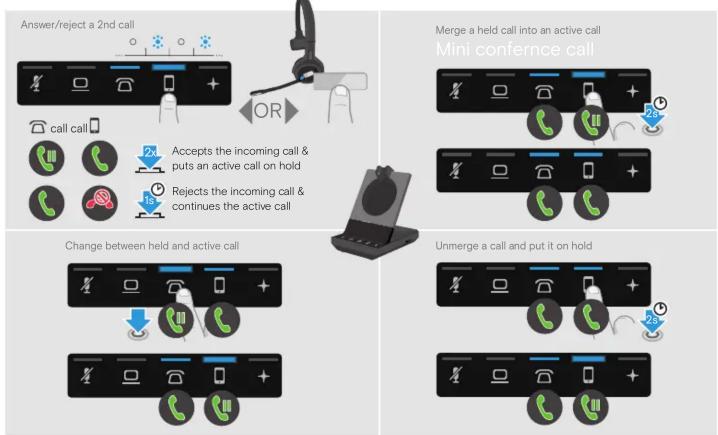
flowchart
graph TD
    A["Answer/reject a 2nd call"] --> B["OR"]
    B --> C{Accepts the incoming call & puts an active call on hold}
    C --> D{Rejects the incoming call & continues the active call}
    D --> E["Merge a held call into an active call"]
    E --> F["Mini conference call"]
    F --> G{Change between held and active call}
    G --> H["Unmerge a call and put it on hold"]
Leaving the DECT range | DECT-Reichweite verlassen | Quitter le rayon de portée DECT | Uscita dalla portata DECT | Salida del alcance DECT | Abandonar o alcance DECT | Het DECT-bereik verlaten | E'ooç ó to’ tyu çúβάλεια DECT | Uden for DECT-signalets rækkevidde | Lämna DECT-räckvidden | DECT-alueelta poistuminen | Opuszczanie zakresu DECT | Выход за пределы зоны действия DECT-coödernienia | DECT erişim mesafesinden čikma | DECT 動作範囲外への移動
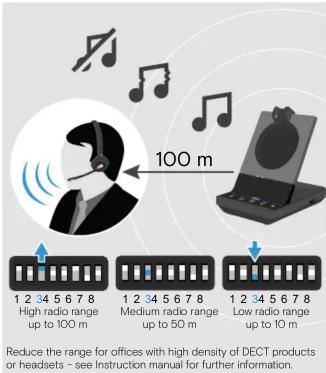
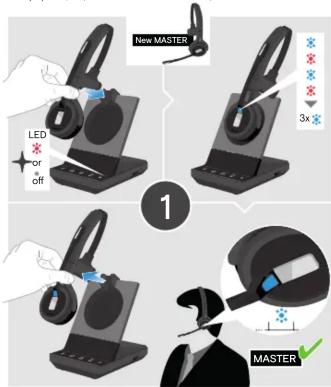
Preparing a conference | Telefonkonferenz vorbereiten | Préparer un appel en conférence | Preparazione di una conferenza | Preparación de una conferencia | Preparar uma conferència | Een vergadering voorbereiden | Простотицаอía διάσκεύης | Forberedelse af telefonmøde | Förbereda en konferens | Neuvottelupuhelun valmisteleminen Przygotowanie konferenciji | Подготовка к телефонной конференции | Bir konferans hazirlama | 会議の準備
Holding a conference with up to 3 guest DECT headsets | Telefonkonferenz mit bis zu 3 DECT-Gast-Headsets durchführen | Faire un appel en conférence jusqu'à 3 micro-casques DECT invités | Creazione di una telefonceranza con fino a 3 cuffie DECT ospiti | Organización de una conferencia con hasta 3 auriculares DECT invitados | Efetuar uma conferència com até 3 headsets CONvidados | Een vergadering opzetten met 3 DECT-gastheadsets | Δεζαγυγή διάσκευής έκαι ακουστικά DECT επίοκεπτών | Telefonmade oder op tect 3 DECT-gasteheadset | Hålla en konferens med upp till 3 gästande DECT-headset | Neuvotteln pitäminen jopa 3:n vieras DECT-headsetin kanssa | Prowadzenie konferencции z maksymalnie 3 zestawami sluchawkowymi DECT gości | [Rejim telefonной конференции с поддержкой до 3 rostевых DECT- Garminitur] 3 adete kadar misafir DECT kulaklik ile konferans görgüsmesi yapma | 最大 3台のゲスト DECT ヘッドセットでの会議
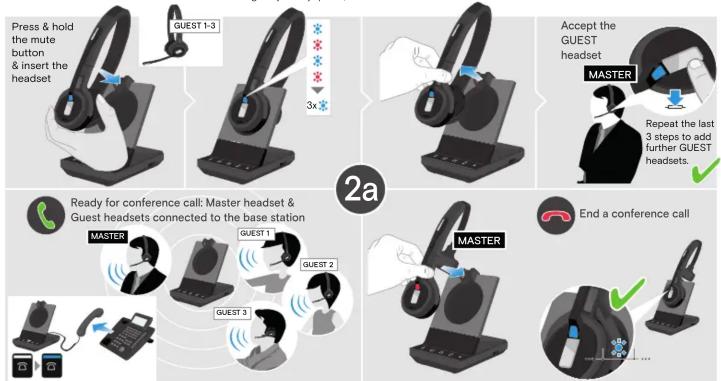
flowchart
graph TD
    A["Press & hold the mute button & insert the headset"] --> B["GUEST 1-3"]
    B --> C["3x*"]
    C --> D["Accept the GUEST headset"]
    D --> E["Repeat the last 3 steps to add further GUEST headsets. ✓"]
    E --> F["End a conference call"]
    F --> G["Master"]
    G --> H["MASTER"]
    H --> I["MASTER"]
    I --> J["MASTER"]
    J --> K["MASTER"]
    K --> L["MASTER"]
    L --> M["MASTER"]
    M --> N["MASTER"]
    N --> O["MASTER"]
    O --> P["MASTER"]
    P --> Q["MASTER"]
    Q --> R["MASTER"]
    R --> S["MASTER"]
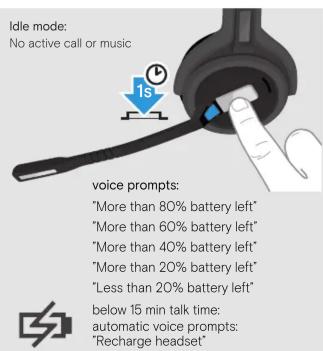
Verifying remaining battery life | Verbleibende Akkulaufzeit abfragen | Vérifier la capacité restante de la batterie | Verifica della durata residua della batteria | Comprobación de la bateria' restante | Verificar a duração restante da bateria | Resterende batterijduur controleren | Enaλήθευση υπολεπιμενης διάρκειας σωής της μπαταρίας | Kontrol af tilbageærende batteritid | Verifiera återstående batteritid | Jäljellä olevan akunkeston todentaminen | Sprawdzanie pozostalej zywotności baterii | Проверка остешегося заряда батареи | Kalan pil süresini doğrulama | バッデー measuringの確認
Cleaning the product | Produkt reinigen | Nettoyage de l'appareil | Pulizia del prodotto | Limpiar el producto | Limpar o produto | Product reinigen | Kaθαριομός προϊόντος | Rengøring af produktet | Rengör produkten | Puhdista tuote | Czyszczenie produktu | Очистка изделия | Ürünün temizlenmesi | 製品の手入れ
natural_image
Illustration of a hand holding a black headset with a cable, showing a device and a blue tool (no text or symbols present)Replacing the ear pad | Ohrpolster austauschen | Remplacer l'oreillette | Sostituzione di un cuscinetto auricolare | Sustitución de la almohadilla | Substituir a almofada do auscultador | Het oorkussentje vervangen | Avitkatástačn tou stoiojčiou yia to auti | Udskifting af æruden | Byta óronkuden | Korvatynyn vaihtaminen | Wymiana wkładki dousznej | Замена амбушюр | Kulak yastiğini değiştirme | バッテリー残量の確認
Using a guest Bluetooth/USB headset | Bluetooth-/USB-Gast-Headset verwenden | Utiliser un micro-casque invité USB / Bluetooth | Utilizzo di un paio di cuffe Bluetooth/USB ospiti | Uso de un auricular Bluetooth/USB invitado | Usar um headset Bluetooth/USB convidado | Eem Bluetooth/USB-gastheadset gebruiken | Xpfrktən əkəʊtɪkəʊ Bluetooth/USB στικόκτη | Brug af Bluetooth/USB-gastheadset | Anvând ett gistande Bluetooth/USB-headset | Veras-Bluetooth/USB-headsetin käyttäminen | Stosowat - zestawu skuchawkowego | Uspocia / USB-potecia / USB-potecia | Bluetooth/USB-8-raprityra | Bir misafir Bluetooth/USB kulakik kullanma | Glasts Bluetooth/USB b-ヘッドセットの使用
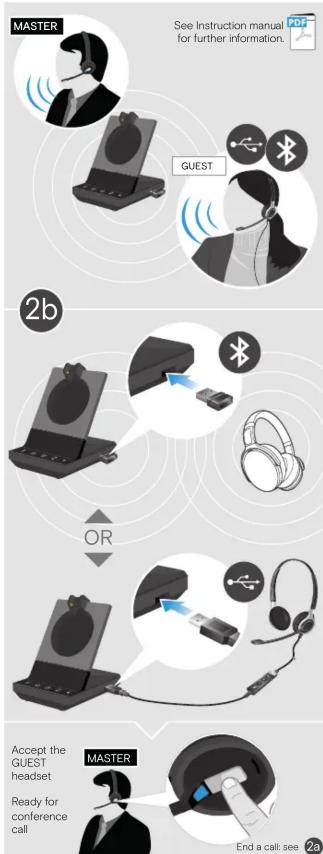
flowchart
graph TD
    A["Master"] --> B["GUEST"]
    B --> C["OR"]
    C --> D["Master"]
    D --> E["Ready for conference call"]
    E --> F["Accept the GUEST headset"]
    F --> G["End a call: see 2a"]