TR-Q511 - Drohne Top Race - Kostenlose Bedienungsanleitung
Finden Sie kostenlos die Bedienungsanleitung des Geräts TR-Q511 Top Race als PDF.


Benutzerfragen zu TR-Q511 Top Race
0 Frage zu diesem Gerät. Beantworten Sie die, die Sie kennen, oder stellen Sie Ihre eigene.
Eine neue Frage zu diesem Gerät stellen
Laden Sie die Anleitung für Ihr Drohne kostenlos im PDF-Format! Finden Sie Ihr Handbuch TR-Q511 - Top Race und nehmen Sie Ihr elektronisches Gerät wieder in die Hand. Auf dieser Seite sind alle Dokumente veröffentlicht, die für die Verwendung Ihres Geräts notwendig sind. TR-Q511 von der Marke Top Race.
BEDIENUNGSANLEITUNG TR-Q511 Top Race
Fine-tuning Flight Operations
Forward/Backward Drift
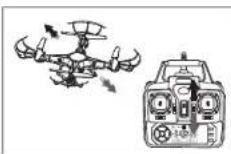
If the TR-Q511 keeps drifting forward or backward, correct it by pressing the fine-tuning button up/down as shown.
Sideways Drift Left/Right
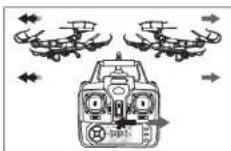
If the TR-Q511 keeps drifting left or right, correct it by pressing the fine-tuning button left/right as shown.
pinning
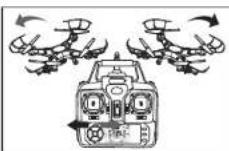
If the TR-Q511 keeps spinning left or right, correct it by pressing the fine-tuning button left/right as shown.
MODE 1
Operations
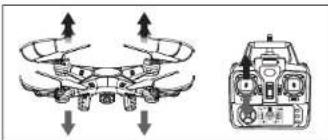
Hover up and down
natural_image
Diagram of a drone with directional arrows indicating flight or movement, alongside a close-up of its internal components (no text or symbols present)Push the left throttle stick up or down and the Tr-Q511 will fly up or down, as shown above.
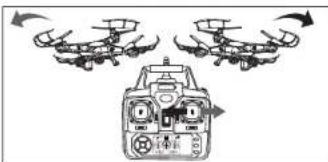
Turn left and right
natural_image
Diagram of a drone with three drones in flight, showing directional arrows (no text or symbols)Push the right throttle stick left or right and the Tr-Q511 will fly left or right, as shown above.
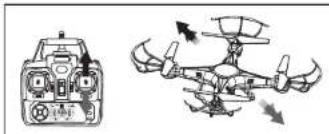
Forward and backward
natural_image
Diagram of a drone with control panel and rotor blades, showing airflow direction (no text or labels)Push the right direction stick up or down and the Tr-Q511 will fly forward or backward, as shown above.
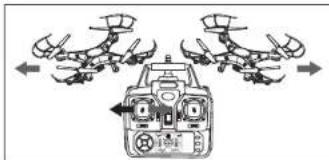
Sideways Flight
flowchart
graph TD
    A["Top Drones"] --> B["Central Control Unit"]
    C["Top Drones"] --> B
    D["Top Drones"] --> B
    E["Top Drones"] --> B
    F["Top Drones"] --> B
    G["Top Drones"] --> B
    H["Top Drones"] --> B
    I["Bottom Drones"] --> B
    J["Bottom Drones"] --> B
    K["Bottom Drones"] --> B
    L["Bottom Drones"] --> B
    M["Bottom Drones"] --> B
    N["Bottom Drones"] --> B
    O["Bottom Drones"] --> B
    P["Bottom Drones"] --> B
    Q["Bottom Drones"] --> B
    R["Bottom Drones"] --> B
    S["Bottom Drones"] --> B
    T["Bottom Drones"] --> B
    U["Bottom Drones"] --> B
    V["Bottom Drones"] --> B
    W["Bottom Drones"] --> B
    X["Bottom Drones"] --> B
    Y["Bottom Drones"] --> B
    Z["Bottom Drones"] --> B
    AA["Bottom Drones"] --> B
    AB["Bottom Drones"] --> B
    AC["Bottom Drones"] --> B
    AD["Bottom Drones"] --> B
    AE["Bottom Drones"] --> B
    AF["Bottom Drones"] --> B
    AG["Bottom Drones"] --> B
    AH["Bottom Drones"] --> B
    AI["Bottom Drones"] --> B
    AJ["Bottom Drones"] --> B
    AK["Bottom Drones"] --> B
    AL["Bottom Drones"] --> B
    AM["Bottom Drones"] --> B
    AN["Bottom Drones"] --> B
    AO["Bottom Drones"] --> B
    AP["Bottom Drones"] --> B
    AQ["Bottom Drones"] --> B
    AR["Bottom Drones"] --> B
    AS["Bottom Drones"] --> B
    AT["Bottom Drones"] --> B
    AU["Bottom Drones"] --> B
    AV["Bottom Drones"] --> B
    AW["Bottom Drones"] --> B
    AX["Bottom Drones"] --> B
    AY["Top Drones"] --> Z
    AZ["Top Drones"] --> Z
    BA["Top Drones"] --> Z
    BB["Top Drones"] --> Z
    BC["Top Drones"] --> Z
    BD["Top Drones"] --> Z
    BE["Top Drones"] --> Z
    BF["Top Drones"] --> Z
    BG["Top Drones"] --> Z
    BH["Top Drones"] --> Z
    BI["Top Drones"] --> Z
    BJ["Top Drones"] --> Z
    BK["Top Drones"] --> Z
    BL["Top Drones"] --> Z
    BM["Top Drones"] --> Z
    BN["Top Drones"] --> Z
    BO["Top Drones"] --> Z
    BP["Top Drones"] --> Z
    BQ["Top Drones"] --> Z
Push the left direction stick left or right to make the Tr-Q511 fly left or right, as shown above.
INTRODUCTION TO QUADCOPTER FUNCTIONS
LOW VOLTAGE PROTECTION:
Once the TR-Q511 battery is drained to a low level, the power will be shut off from the rotors.
oVER-CURRENT PROTECTION:
If the rotor blades ever become jammed, the control system will automatically shut off power to the rotors. RESET FACTORY DEFAULTS:
To fix erratic flight or to restore factory default settings, follow the steps below:
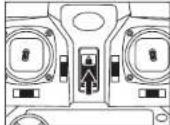
Turn on power to the transmitter
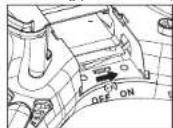
Power up the TR-Q511
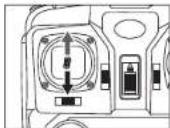
The TR-Q511 will slowly flash. Next push the left throttle stick all the way forward and all the way back. The TR-Q511 lights will stay lit and stop flashing.
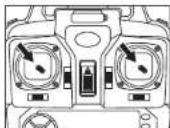
Place the TR-Q511 on level surface. Then, push both left and right levers to the bottom right corner. Now the TR-Q511 lights will change from normal to quickly flashing. After a few seconds, the lights will return to normal indicating that the TR-Q511 has been reset.
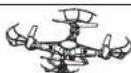
THROWING TR-Q511 INTO FLIGHT:
The TR-QS11 is equipped with a 6-axis gyroscope, allowing you to initiate flight by throwing it into the air. Throw the copter and immediately push the throttle up. The TR-QS11 will level off and hover smoothly.
3-D INVERSION FUNCTIONALITY:
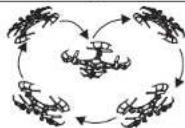
Once you have mastered basic flight, you can try exciting aerial maneuvers and stunts! Fly the TR-Q511 to a height of at least 9 feet(3 meters). Next press the 3-D Inversion switch on the right rear of the transmitter, then push the right control stick in any direction to cause a 360 flip.
TIP: 3-D Inversion works best with a full battery charge.
INSTALL CAMERA
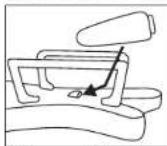
Slide camera into holder on the battery cover.
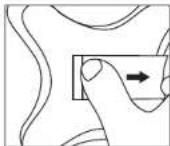
Carefully open the battery cover with camera on it
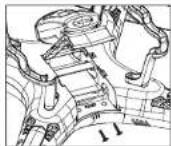
Tighten the screws into the camera, as shown
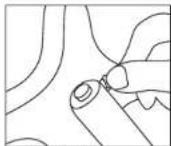
Replace the battery cover with camera and insert the 3-pin plug into the side.
PHOTOGRAPHY/VIDEO INSTRUCTIONS:
To begin, insert the 3-pin plug from the camera into the TR-Q511. Next, turn the TR-Q511 power on. The RED indicator light should flash and turn to a steady GREEN. NOTE: If the RED light flashes off, it means the SD Card is not in the camera. Insert the SD card and the indicator light will turn GREEN.
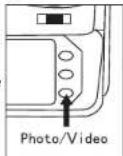
PHOTO: To take a phot, press the Photo/Video button once. You should hear a beep and a photo will be taken.
VIDEO: To take a video, press and hold the photo/video until you hear three beeps. The RED light will flash while video is being taken. To stop the Video, press the button again and the light turns GREEN.