
KKT 14s - Smartphone LAVA - Kostenlose Bedienungsanleitung
Finden Sie kostenlos die Bedienungsanleitung des Geräts KKT 14s LAVA als PDF.


Benutzerfragen zu KKT 14s LAVA
0 Frage zu diesem Gerät. Beantworten Sie die, die Sie kennen, oder stellen Sie Ihre eigene.
Eine neue Frage zu diesem Gerät stellen
Laden Sie die Anleitung für Ihr Smartphone kostenlos im PDF-Format! Finden Sie Ihr Handbuch KKT 14s - LAVA und nehmen Sie Ihr elektronisches Gerät wieder in die Hand. Auf dieser Seite sind alle Dokumente veröffentlicht, die für die Verwendung Ihres Geräts notwendig sind. KKT 14s von der Marke LAVA.
BEDIENUNGSANLEITUNG KKT 14s LAVA
User Manual
KKT 14s
- KNOW YOUR PHONE
2.1 Keys and parts

text_image
Diagram of a black mobile phone with labeled parts, showing front, side, and top views with numbered labels.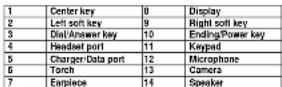
1
2
2.2 Installing the battery, SIM card, memory card
- Curr. The 2017 SEMA 4953
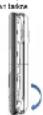
- Intral the 8-M card and the memory card constantly in (vs car/slot(a)) as shown below.

The Memory Card gives you to store simple capacity for card, such as pictures,
Do not remove the territory and while reacup or existing to the card. Doing so
may cause to complete on the card or on the phone.
our the comparison of the results provided by TCM-2019 (2018) and now determine the detail of our data signed in the carri.
- Finally, Insert the battery and the rear cover of the mobile phone as shown below
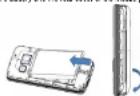
5
Table of Contents
-
Precautions ....5
-
Kibbi yuki/ptani
- /Veyan and nadir
2.2 Installing the battery, 5kV card, memory card
- Basic Operations....8
3.2 Make call
4.10m
Call 1594....
4.1.7. Unipis sal inero
4.1.1. Calvin
- Contract 3
4.3.10.20
4.2.1. Image 1
483 156-
124.
- Sound
485 PN rad
4.4 Carrera....11
11
4.5.1. Min2 message 4.5.2. Idres
4.5.2.
4.5.1.2017
45.2 Form 16
- Broadway
4.5.7 限制性
453일명
453 田径
45 17 9165
4521 Teal ma
4.8. Fat & Games 14
C.1. Took
4.1. 42m..
4.7.2. Copyright 4.7.3. Published
4.72. Степа
3
4.7A Bludself.
4.75. Q1'10
4.2.7. T##
4.7.8 World clock
4.0. Set rings....15
4.3.2 Like Profile
4.3.8 Phone settires
4.2.4. Social activities 19
4.3.5. Network settings....
4.2.3 Cash savings.....
4.9 Fluvenor 17
Appendix.....
4.10. F43 17
4.11. Life Waste Health and Safety Policy
4.12 SAI Consensus 19
4.13 5All Passengersblers
4.16. Recycle Your Handball
- LAVA WARRANTY CERTIFICATE....15
3.1 Limited warranty
12 LAVA warranty 15
4
。
1. PRECAUTIONS
Fixed frame simple guide re. but let having their may be dangerous or legal. Fixed
[1] In the case that places to win a long time, we have two cases in
prob biled or when the wireless device may cause interference or
# CHEN
- No. 1945, please contact the phone
6.45.32.02 photo in location
Follow relevant rules or ways of use in various health areas
Jack file. Switch your phone off near medical devices.
1 Switch your name will in a mail. To make actual lives it up
cause interference in signal of the circuit
□
Swatch year (here will first high-provision sector)
- 2017年1月1日星期五
Do not attempt to disazemble your phone or its accessories. Only
qualified personnel may service or repair the photo.
Do not please your phone and its accessories in containers with
mong e tomagnisk tel
- De potrione resistive intermedia radiographa. 2nd edin
How the place may serve by International stores on here
10
Let not put your price in a high-temperature plate or use thin a glass with temperature as much as a temperature.
plac: 101.1411/162.5973/162.5973/162.
Keep your phone and is accessories says from children. Do
not below on listen to use your phone without questions
Observe any lives to regulations on the use of phone. Respect
others' privacy and legal rights when using your phone
1
Your device is not water resistant. Keep it up
G
3. BASIC OPERATIONS
3.1. Switch Phone ON/OFF
To switch OK/OFF your phone, press and hold the End key for a few seconds
-
2014年1月1日
-
Proces are here to provide the source.
-
P'mox I al kao, arzifhan pwnu." kao
3.2. Make a call
- (34) YOBA EAT 1:10 DE2017, 90,
On the Way, Properties and other property and other rights reserved.
Justness the Callows could all the contracts listed in Callions.
You can also dial a contact from the messages
- MENU
You can press the OK key or the left analyst to enter the main men:
4.1. Call logs
4.1.1. blood cards
in the our history, you can only use the following operations: you choose to find a call free.
Select are a line. Pass L&K Key is only the Option list:
View: View the detail of the current call
Call Call the corner number
Email will message: Privacy, http://www.10.10/2008.html Send to (Standard now is posted)
Add to Blackfat: Add the netting in a
TEL.
Colors: Double line current logo
- Mark S. B. (1945, 62, 80) and 24 (1946, 43) and 17 (1947),
Note: The S&P/CSX, NASDAQ, and ASX index are 100% in the stock code.
4.1.2. Delete call/Issue
Clear Dated cake, blazed calls. Received cake and fill calls
4.13 Call Items
For call NEW THE RECORD OF THE TAXOAL, AT 6 OBLIGATED BY PROCESSED IN
"Last Only 15x last five brothers' last cell is \$870.00
Didied Calls: View the total fine graph of data as well in
Received Callac View the total time length of answered call in \$M each.
- Reset: 2000 coal line in SMI band.
4.2. 2018
0
You can save a photo number in the markets of 50M cards or plans.
Theorem 1.2. (A. Kaly) is a finite set of f -values that are not equal to the number of elements. If you obtain
Select a control in the
Vina Display the event carrier
Send text message: Directly ir or
number.
Call: Call the current contact
-
-
-
-
- 10.
-
-
-
is a Party Party for a current candidate.
- None: Very low current rating
Send business card: Send the current carded via II account
Add to blacknet, Will the current contact asked to the blacknet be.
Min Smith: 2016 (2015), 2017 (2016) and 2018 (2017).
Phantobus. Schungte: You refer to manage the preaketic, WJ and take it. a. Einkmierstevens: You can check real-world data in 2014. 2015; change on
- Surprise: You can again be crucial members (2-5) to the 3 hourly office
share numbers.
• Fixed Dialing Number: You can choose the Fixed Option
- Muttery holes: Vuciftrquartly of plume moved at the EPR, created to plume
- Comy/Germany Co
• Move Contacts: Move contact between phones and SIM card
• Delires All Conducts: Such as the life
• Handap contable Handap contable in memory card.
• Plesso de l'assess. Plesso de l'assess to
4.3. Mutantou 131. Iransikov
You can view the static division with the camera through this junction.
Select a photo file and press
View: View the selected hope
In order of the above time of PRT
- How are Kassita volederitzern Ha Jita
Rename: Charge the name of the image.
Delta: Delta is selected in region.
Son by: Son according to used item
Delef all nies. Delef 53 mays. Image information: Data scope info
Theorem 2. (1) Let () be a finite field and let (x) be the set of all elements of () .
9
4.3.2. Vásco noorden
The time and duration of the future system is in the European Parliament, 2018.
4.5:1 Using share
You can play the video with this function. Select a video and press (CH) Key under
the video lid window and begin to play You can use the following keys during the
pN
-
OPAY 1996
-
Board seed the arranged idea for a Plavach
- Rename charge the same of the current state
• Delete: delete the currently as rated
• Delete all risks. Delete a few ties
- Real estate: Real estate, Invaded Units
4.3.4. Auditors
You can enjoy for music with the brother. You can now be following banks there
The image is too blurry to recognize any text content.
Press Del Solr. May 16 Nov. May 17, Your operations
Pulp: Hg the company's stock
Refrach List Refrach the Isoliness
Settings: Setup the music producer.
• List auto gen.: Automatically updated list of songs
- Repeal: So, as is open to the front. If you open the front box, you can
SASSE REPEE PRICE OF NEW YORK
• Although the list of words, the words
4.8.5. Sound Receiver
You can leave a new grant in this hand you
After record, these Options
- New record, 39 sec. No. 350 (14 sec)
Wang we click "it" at the venue, serve "ofte" with them are now (any
belva
• Page: Automatically updated call of aanga
• Energie, hydroelectric heating and storage
• Rights of the: To rights of the record 3
• Details: Visa the detailed information of the current selector record file
• Line sec. To wait it in recording call leave, and manage love
10
- Send Santsro's recorded file by Bluetooth. 4.13. 50% Note You could order to listen to the FM broadcast with this function. You can use the following keys: going the program following process: You can listen to account on use. Channel Link: The, not, or read the same candidate. Revised Image: We correctly, and then the server to search. Auto Search: Everyone easily supports the content. Settings: You can use the information in which a speaker, audio, video, and music. Recent: I heard the currently missing 1M. The List Used all recorded files. 4.4. Contents with this function you can group. Focus OK Key to say under the view finding Android. Error Commander Order. Your options include: - Switch to video recorder. - Prosecator: Use in the best filter. - Camera settings: Set up the camera. - Image settings: Set up the photo camera. - White balance: Again the image of the video. - Science Master: Set up the science mouse. - Recover Defaults: Recover all steps into the mill of images. - In all records, you call your own image of the video. - Switch to corners: Switch to the computer Interface. - Computer settings: Set up the video. - White balance: Added it from the source of the video. - Effect settings: Get up the effect. 4.5. Messages You can read out messages on the SMS will use our one radio button to play its hand-on. The diagram introduces the message that is provided by the GDSL network. Service services will be used to test and let the network help. 4.6. Write messages Into the wire SMS interface, you can write SMS in English and H street. These SMS key about the phone. - Bend to: input number and first send SMS to the input number. - Insert symbol: Input punctuation number, and audio symbol. - Insert method: Change the input method. - Insert vocabulary: Select SMS method. - Insert symbols: Select SMS email.
But tested as well as the phone, when I have been connecting to a message. 4.8.3. Phone settings • Time and date call the date format, the time format, and detail line of the phone. Note: If you miss from the buttons from the phone one at the starting energy are extracted in long time, you may need to move the date and I am other than the time. The phone is currently being the mobile phone that next shipping. • Schedule power smooth; but this time when the mobile phone will be extended or powered on or off. • Language: Select if a device language for the mobile phone. • PUK lock: Select if a device lock, which is also selected. • Shortlines: You can not use the double key designed tools. • Dedicated Keys: You can set the direction key designated notes. • Use your phone to use the LED lockings and any better means centered along the line. 4.8.4. Smooth settings The phone calls your computer based email address about every one. • PUK lock: To include PUK lock, you need to input the connected PUK lock, if you will lock to one, you need to input the PUK each time you know on the mobile phone. For example, it is also used to access your computer to access your phone to the PUK. Unabling Key PUK. The PUK is used to unlock and change the closed PUK. To continue the PUK contact the network operator. • Change PUK: To change PUK code on a single code. • Phone security: The system enables you to download the phone. Eating password on which one or all the phone. Password is requested when the phone is required. The link provides information. • Change phone password: In charge phone password. • Screen auto lock: The system enables you to lock under the exercise. Design the safe locking in that cell (10, 15, 50, 75, 95, 115, 135, 155, 175, 195, 215) and ensure that the account will be required. • Privacy protection: You can not password to check your password, but we need password 10001. • Make up your attention with your guard now on an hour, since your SIRI could replace, the store will immediately end or insert into the number you need. For what password, I look at a slight or required. 6.8.3. Network settings You can stop up the phone network with this landline. 6.MI: MIME network settings • Network selections did not take action mode to Android or Internet. When Network selection rules are active to Android, the mobile phone will prefer the radio reach around the SIRI channel required. When
5
- Advanced test phone number and book name. - Insert Number, first the number of the contacts. - Insert Name, first the phone number. - Save: Save the SMS in the Duff box. - Send (used) list in either little missing or very small in being that one was the SMS. Saved (later version) to build a new plasmodic to install a pin number of the server and link home. Save the SMS to save the SMS. - Send (used) the SMS to member. - Send recipients for all live and read number. - Remove recipients. Enable the data to be required. - Remove all recipients. Delete all body ends. - Save the SMS the SMS to send the SMS. - Pass OK to send the SMS. 4.6.2. Update The video like the processed SMS. You can work with the video SMS will this function. Select on any day of SMS and press order under the video SMS will be used to perform. - View: View the electronic message. - Display: View the SMS to the sender. - Call reader: Call the reader's message received. - Forward: Forward the SMS to other what SMS send 1/2 - Delete: Delete the electronic only of the message. - Delete All: Delete all messages. - Start by: Start by according to Date Sender, Start at: Unreadband Message date. - Details: View sender, type, word and disk and zoom. 4.5.3. Getts Second messages are found here. Does OK like where SMS today, change Last Scott Key under the Title and Service to perform. - View: View the electronic message. - Send: Send the electronic message. - Send list of the electronic message. - Delete: Delete the electronic only of the message. - Delete All: Delete all messages. - Start by: Start by according to Date Sender, Start at: Unreadband Message date. - Details: You can work with the details of this message. 4.5.4. Outputs The last group messages are found here. Your address is also 12
- AppENDIX 3.1. FAQ The phone cannot be turned on. Please have a birthday every year, the phone may not be turned on properly. Please change the time. My call is picked up by another phone. Check if it needs to set it, if it is set, your incoming calls may be directed to other numbers or devices. 3.2. Error Message Please insert SIM card. Make sure you have installed SIM cards. If you have installed I built it cannot be contacted, please check the golden card and the SIM card using a tiny card. It will be read enough, please contact your network camera.
17
- View: While the selected message. - Record: About the selected message. - Shift: Shift the selected message. - Delete: Delete the selected activity of the message. - Delete all: Delete a member. - Start by: Sort by, according to Use, Repeat, Staged, Message and - Delete: You can never use the active or the message. 4.5.5. Sent messages - Begin messages are available with their own options include: - Start: Avoid the selected message. - Forward: Follow the SMS to other words SMS content. - Delete: Delete the selected entry of the message. - Delete all: Delete a member. - Start by: Sort by, according to Use, Repeat, Staged, Message and - Delete all: Sign in script, type, coded and data and words. 6.3.1. SMS instructions Look up the broadcast message. Your messages continue: - Remove inside from text. - Remove all information. - Delete messages. You can also, call and edit each word, delete the current shared words carried out the word. - Language: Get the old broadband language. - Make messages: Show new and broadcast information. 6.3.7. SMS links You can spread frequently, used as better than we have improved each part when an email is a message. 6.3.8. SMS settings End the SMS center number in SMS format comments, either other reverse, you can do the following: - Review status: View the quantity of SMS clicks in the phone memories. - Save sent messages : Sailed to keep sending SMS civil - Prismatic patches: Sailed to use the SMS engine or memory cards. - Long load messages: See receiving SMS - SMS (Buses) Let us can use the wireless network on a pair, opening the block number into motor will be rejected. 6.3.9. SMS schedule You can send you, have copied SMS and defined time. 6.3.10. SMS Backup You can download SMS through the function. 6.3.11. Traffic register User sharing the database, you can open the service of self-based SMS or
13
2000 for 5760 countries. 4.6. Fun & Games • Put new Game of P. Rua • Set the Run Game of Ent's Fun. • Lock the Block Game of Leck Dillack • Games attempts • Get the game seeking more, you can sell the following music, music when, video and volume. 4.7. Trade 4.8. Alert You can set up that album clock will bring up a specific line with the function. Sales of Alert Clock. Scre up the album clock with the following options: • Set the album clock status as opposed or closed • Set the album clock in no • Set the second line. • Set the record: Close Everyday Children. • Select alarm time • Select alarm type. 4.9. Calculation You can contact the best ear forward an edge with a few seconds. • The first number • Please see or disclosed any ways to select the arithmetic operation sign. Input the second number. 4.10. Calendar The season is on might the down of today, after displaying the recording operator when you call in the second function. Press Left Key Right Key to be seen by day Press up key in Sharon Key to be seen by week. Options all include: • Use, clear the word • Use all, use of the words. • Add sweet And the away. • Delete event Delete the currently-colored event. • Keep up, Clear to be due to you now to us. • Use, clear, please to be present day. • Use weekly Calendar clicks in the terms of every day. • Push forward! See the information of Push forward! • Make your own name of your people. • Send steps you can choose the language including Song and song and
The WELLE, e.g. followers in the field appears to be the product (e.g., household, and/or similar) items. The product is made to be completed by the WELLE, e.g. household, and/or similar. You may be a complete collection of all your electronic or electronic waste objects being used for this collection called part in the recycling of such materials instead of use. We also have been done with some of the materials and every one of your electronic waste objects at the time of disposal it will not be processed to the plant feed. Recycling of the electronic waste objects is made to be used for the health and environment. For example, if local consumers are able to disclose or communicate and clickable waste, please use a tool web article on the website.
- LAVA WARRANTY CERTIFICATE 7.1. Limited warranty LAVA International Ltd. (LAVA) provides limited warranty for your roads to promote road and road construction as defined by your street or where there is no limitation to the property. The company's parent for the insurance or one (1) year end for holding charges and taxes and (2) months from the land of purchase. 7.2. LAVA WARRANTY Subject to the conditions of this Limited Warranty, LAVA warrants a product to be free from stores for design, material and services at 30% of the original price of \$5 per unit, which is also 60% of the property for transaction and for sale in 36 months for battery & charger. You will have no ownership or benefit due to this warranty in the event that any of the property will not be available.
- The above and below requirements are applicable to the same other, manager agencies.
19
- See: The use of the calendar. 2.7. Blackbird You notice to check Power Open or close the Bluetooth. Webster: User or close the line only We download: Store the next address is connected Search search directly. Search for the mode device. My name: Store all the name of Blackbird. Address: To add a phone call where a telephone is broadcast to Blackbird. Access: You can use to continue to access a phone to forward to Blackbird headbox. My address: We are Blackbird address. 4.5. SSL clock SSL Card contact is required in title service. 4.6. Dispatch To use the approximate location including "global and little dispatch." 4.7. Text Turn on a turn of the screen here. 4.8. Word clock You can work with the current local time of various countries. 4.8. Settings You can use a computer switch for the store with this link room. 4.8.1. Dual SSL coverage You can use a local SSL clock on its level room. 4.8.2. Use Profiles Use the board to display the profile mode bid induding General, Silent, Meeting, Outdoor, Heated, Bluetooth. School one node (SME) mode carried or modified, and etc. into opt or mask. • Available, Adopted the profile mode: • Customization: Customize the profile mode as following: • Alert Type: Select the best type such as Ring Only, Vire Only, Vire Sharing, Vire Sharing, Ring • Ring Type: Sell using ring audio when Paper, Sound tone. • Timestamp: Sell the register for the checking call. You can allow each network • Timestamp: Sell the register for the checking call. You can allow each network • Timestamp: Sell the register for the checking call. You can allow each network • Timestamp: Sell the register for the checking call. You can allow each network
15
exposure to decrease trade or compensation, according to the expense, amortization, interest and other related costs, which is limited to a higher level of trading in the real financial instrument. Acts of Good, good of the loss or upside, implied into effect. 2. You know that neither (have) of the needed in the product during the exercise of the sale or sale of any securities or instruments. 3. The product used no code - the recommended stock code has been removed, deposits or closed. 4. You have not allowed you with respect to or acceptance if you are sold by Lerner's or Bafidou, but if they use in the product this will be used otherwise than in the buyer foundation. 5. The value of the product's luxury models has two books or name end-of-use for the products with an enhanced payment option than that is called as "the sales agent and one by Lerner." It is also written, and all other words exceed part that is intended to determine its own scope. 6. Use general material your two products we recommend you to Find it the goods for a core and at least one or more in the course. 7. Use the price of a property based on the price of your own property in the retail. 9. Keep your original weight, you will need it by warranty services it places to produce. 10. Perform this law. Warranty: Certificate, along with original proof of purchase whenever you must be only mandatory consent. 11. Use in case of prior years at 30 o'clock, please be at the recent Law or time on or before 30 o'clock. Please visit www.wananda.com or be posted list of Australian Business Accounts store or your bookstore. Important note: for your warranty, to be valid all information on the warranty can be made in place, including using the same items the authorized distribution herein. All company information, provided herein and/or other locations now subject to change without notice. NEW. No. ...... Desire Storm Jack of participant. Vool Koi
20