
Mavic Air 2 Battery Charging Hub - Drohne DJI - Kostenlose Bedienungsanleitung
Finden Sie kostenlos die Bedienungsanleitung des Geräts Mavic Air 2 Battery Charging Hub DJI als PDF.


| Produkttyp | Lade-Hub für Drohnenakkus |
| Modell | P2CH |
| Kompatible Akkus | DJI Mavic Air 2 Intelligent Flight Battery (PB2-3500mAh-11.55V) |
| Kompatibles Ladegerät | DJI Mavic Air 2 Ladegerät (P2C38) |
| Anzahl der Akkufächer | 3 (sequentielles Laden) |
| Eingangsspannung / -strom | 8,4–13,2 V, max. 2,82 A |
| Ausgangsspannung / -strom | 8,4–13,2 V, max. 2,82 A |
| Ladezeit pro Akku | ca. 1 Stunde 40 Minuten |
| Betriebstemperatur | 5 bis 40 °C |
| LED-Anzeigen | Status-LED: gelb (kein Akku), grün blinkend (lädt), grün (voll), gelb blinkend (Temperaturfehler), rot (Strom-/Akkufehler) |
| Ladereihenfolge | Der Akku mit dem höchsten Ladezustand wird zuerst geladen. |
| Pflege und Reinigung | Metallkontakte bei Verschmutzung mit einem trockenen, sauberen Tuch reinigen. |
| Sicherheitshinweise | Nur mit kompatiblen Akkus und Ladegeräten verwenden; nicht bei Temperaturen unter 5 °C oder über 45 °C laden; auf ebener, stabiler Fläche betreiben. |
| Ersatzteile / Reparierbarkeit | Keine vom Benutzer austauschbaren Teile; bei Defekt bitte den DJI-Support kontaktieren. |
| Abmessungen (ca.) | 100 × 70 × 30 mm (Schätzung) |
| Gewicht (ca.) | 100 g (Schätzung) |
Häufig gestellte Fragen - Mavic Air 2 Battery Charging Hub DJI
- Gelb dauerhaft: Kein Akku eingelegt
- Grün blinkend: Ladevorgang läuft
- Grün dauerhaft: Alle Akkus vollgeladen
- Gelb blinkend: Akkutemperatur zu niedrig oder zu hoch
- Rot dauerhaft: Netzteil- oder Akkufehler
Benutzerfragen zu Mavic Air 2 Battery Charging Hub DJI
0 Frage zu diesem Gerät. Beantworten Sie die, die Sie kennen, oder stellen Sie Ihre eigene.
Eine neue Frage zu diesem Gerät stellen
Laden Sie die Anleitung für Ihr Drohne kostenlos im PDF-Format! Finden Sie Ihr Handbuch Mavic Air 2 Battery Charging Hub - DJI und nehmen Sie Ihr elektronisches Gerät wieder in die Hand. Auf dieser Seite sind alle Dokumente veröffentlicht, die für die Verwendung Ihres Geräts notwendig sind. Mavic Air 2 Battery Charging Hub von der Marke DJI.
BEDIENUNGSANLEITUNG Mavic Air 2 Battery Charging Hub DJI
MAVIC AIR 2
Battery Charging Hub
User Guide
使用说明
使用說明
ユーザーガイド
사용자 가이드
Bedienungsanleitung
Guía del usuario
Guide d'utilisateur
Guida all'uso
Gebruikershandleiding
Manual do utilizador
Guia do Usuário
Руководство пользователя
v1.0 2020.04

natural_image
Technical line drawing of a rectangular electronic component with multiple slots and connectors (no text or symbols)EN
Disclaimer
Please read this entire document and all safe and lawful practices DJI™ provided carefully before use. Failure to read and follow instructions and warnings may result in serious injury to yourself or others, damage to your DJI product, or damage to other objects in the vicinity. By using this product, you hereby signify that you have read this disclaimer and warning carefully and that you understand and agree to abide by the terms and conditions herein. You agree that you are solely responsible for your own conduct while using this product, and for any consequences thereof, DJI accepts no liability for damage, injury or any legal responsibility incurred directly or indirectly from the use of this product.
DJI is a trademark of SZ DJI TECHNOLOGY CO., LTD. (abbreviated as "DJI") and its affiliated companies. Names of products, brands, etc., appearing in this document are trademarks or registered trademarks of their respective owner companies. This product and document are copyrighted by DJI with all rights reserved. No part of this product or document shall be reproduced in any form without the prior written consent or authorization of DJI.
This document and all other collateral documents are subject to change at the sole discretion of DJI. For up to date product information, visit http://www.dji.com and click on the product page for this product.
This disclaimer is available in various languages. In the event of divergence among different versions, the English version shall prevail.
Warnings
- The Charging Hub is only compatible with the MAVIC™ Air 2 Battery Charger. DO NOT attempt to use the Charging Hub with any other battery charger.
- The Charging Hub is only compatible with PB2-3500mAh-11.55V Intelligent Flight Batteries. DO NOT attempt to use the Charging Hub with other battery models.
- Place the Charging Hub on a flat and stable surface when in use. Make sure the device is properly insulated to prevent fire hazards.
- DO NOT attempt to touch the metal terminals on the Charging Hub.
- Clean the metal terminals with a clean, dry cloth if there is any noticeable buildup.
Introduction
The Mavic Air 2 Battery Charging Hub is designed for use with the Mavic Air 2 Intelligent Flight Battery. When used with the Mavic Air 2 Charger, it can charge up to three Intelligent Flight Batteries in sequence according to their power levels, from high to low. The charging time for one battery is approximately 1 hour 40 minutes.
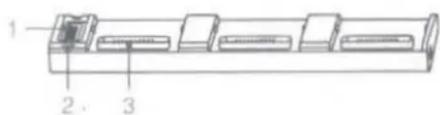
- Power Port
- Status LED Indicator
- Battery Port
Usage
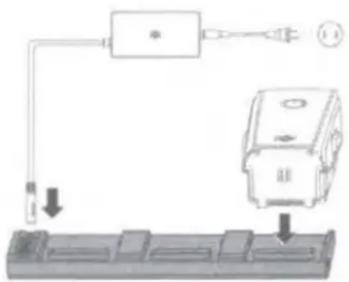
- Connect the Mavic Air 2 Battery Charger to a power outlet (100-240 V, 50-60 Hz), then connect the Charging Hub to the Mavic Air 2 Battery Charger.
- Insert the Intelligent Flight Battery into the battery port to begin charging. The Intelligent Flight Battery with the highest power level will be charged first and the rest in sequence according to their power levels. Refer to the Status LED Indicator Descriptions section for more information about the blinking patterns of Status LED indicator. The Intelligent Flight Battery can be disconnected from the Charging Hub when charging is complete.
Battery Charging Temperature Range
The Intelligent Flight Batteries can be charged when its temperature is between 5°C (41°F) and 45°C (113°F). DO NOT charge when the temperature of the battery is lower than 5°C (41°F) or higher than 45°C (113°F). Charging will stop if the temperature of the battery increases higher than 55°C (131°F).
Status LED Indicator Descriptions
| Blinking Pattern | Descriptions |
| Solid yellow | No battery attached |
| Pulses green | Charging |
| Solid green | All batteries are fully charged |
| Blinks yellow | Temperature of batteries is too low or too high (no further operation needed) |
| Solid red | Power supply or battery error (unplug and plug the batteries or charger to resume charging) |
Specifications
| Product Model | P2CH |
| Compatible Battery Charger | P2C38 |
| Compatible Battery Model | PB2-3500mAh-11.55V |
| Operating Temperature | 5 to 40°C (41 to 104°F) |
| Input | 8.4-13.2 V, 2.82 A max |
| Output | 8.4-13.2 V, 2.82 A max |
| Charging Time | Approx. 1 hour 40 minutes (single battery) |
Please refer to http://www.dji.com/service for after-sales service for your product where applicable. DJI shall mean SZ DJI TECHNOLOGY CO., LTD. and/or its affiliated companies where applicable.
CHS
免责声明和警告
使用本产品之前,请仔细阅读并遵循本文及大疆 ^™ 创新(DJI ^™ )提供的所有安全指引,否则可能会给您和周围的人带来伤害,损坏本产品或其它周围物品。一旦使用本产品,即视为您已经仔细阅读本文档,理解、认可和接受本声明全部条款和内容。您承诺对使用本产品以及可能带来的后果负全部责任。大疆创新(DJI)对于直接或间接使用本产品而造成的损坏、伤害以及任何法律责任不予负责。
DJI 是深圳市大疆创新科技有限公司及其关联公司的商标。本文出现的产品名称、品牌等,均为其所属公司的商标。本产品及手册为大疆创新版权所有。未经许可,不得以任何形式复制翻印。
本文档及本产品所有相关的文档最终解释权归大疆创新(DJI)所有。如有更新,恕不另行通知。请访问 www.dji.com 官方网站以获取最新的产品信息。
DJI Support
DJI 技术支持
DJI 技術支援
DJI サポート
DJI 고객지원
DJI Support
Asistencia técnica de DJI
Service client DJI
Assistenza DJI
DJI Support
Suporte DJI
Suporte DJI
Техническая поддержка DJI
http://www.dji.com/support


Marke : DJI
Modell : Mavic Air 2 Battery Charging Hub
Kategorie : Drohne