Docking Station MacBook Pro - Support voiture LandingZone - Kostenlose Bedienungsanleitung
Finden Sie kostenlos die Bedienungsanleitung des Geräts Docking Station MacBook Pro LandingZone als PDF.


| Produkttyp | Dockingstation für MacBook Pro mit Touch Bar |
| Marke | LandingZone |
| Modell | Docking Station MacBook Pro |
| Abmessungen (ca.) | 300 x 200 x 50 mm |
| Gewicht (ca.) | 500 g |
| Stromversorgung | 96 W Netzteil (im Lieferumfang enthalten) |
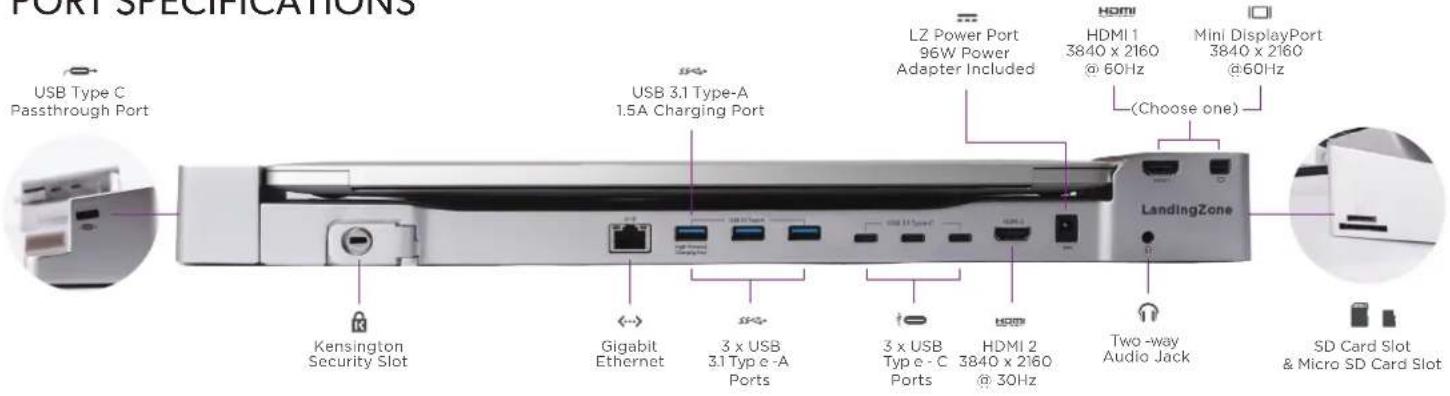
| Anschlüsse | 3x USB 3.1 Typ-A, 3x USB Typ-C, HDMI 1 (4K@60Hz), HDMI 2 (4K@30Hz), Mini DisplayPort (4K@60Hz), Gigabit Ethernet, Audio-Kombianschluss, SD- und MicroSD-Kartenslot, Kensington-Sicherheitsslot |
| Videoausgabe | HDMI 1 und Mini DisplayPort bis 3840x2160@60Hz, HDMI 2 bis 3840x2160@30Hz (gleichzeitige Nutzung nur eines Ausgangs) |
| Ladefunktion | USB 3.1 Typ-A mit 1,5 A Ladestrom; keine gleichzeitige Ladung mehrerer Hochleistungsgeräte |
| Kompatible Geräte | MacBook Pro mit Touch Bar (2016 und neuer) |
| Lieferumfang | Dockingstation, 96W Netzteil, Kurzanleitung, Garantiekarte |
| Material | Aluminium, Kunststoff |
| Farbe | Silber |
| Garantie | 2 Jahre (Herstellergarantie) |
| Reinigung | Mit einem trockenen, fusselfreien Tuch abwischen |
| Sicherheitshinweise | Keine gleichzeitige Ladung mehrerer Hochleistungsgeräte; vor dem Andocken Smartphone/Tablet vom Hochleistungs-Ladeport trennen |
| Hersteller-Support | www.landingzone.net oder 888-872-8251 |
Häufig gestellte Fragen - Docking Station MacBook Pro LandingZone
Benutzerfragen zu Docking Station MacBook Pro LandingZone
0 Frage zu diesem Gerät. Beantworten Sie die, die Sie kennen, oder stellen Sie Ihre eigene.
Eine neue Frage zu diesem Gerät stellen
Laden Sie die Anleitung für Ihr Support voiture kostenlos im PDF-Format! Finden Sie Ihr Handbuch Docking Station MacBook Pro - LandingZone und nehmen Sie Ihr elektronisches Gerät wieder in die Hand. Auf dieser Seite sind alle Dokumente veröffentlicht, die für die Verwendung Ihres Geräts notwendig sind. Docking Station MacBook Pro von der Marke LandingZone.
BEDIENUNGSANLEITUNG Docking Station MacBook Pro LandingZone

LandingZone
Docking Station
for Macbook Pro with Touch Bar
QUICK START GUIDE
ITEMS IN THE BOX
- LandingZone Docking Station for MacBook Pro with Touch Bar
• 96W Power Adapter - Quick Start Guide
• Warranty & Registration Card
PORT SPECIFICATIONS
text_image
PORT SPECIFICATIONS USB Type C Passthrough Port USB 3.1 Type-A 1.5A Charging Port LZ Power Port 96W Power Adapter Included HDMI HDMI 1 3840 x 2160 @ 60Hz Mini DisplayPort 3840 x 2160 @60Hz (Choose one) LandingZone Kensington Security Slot Gigabit Ethernet 3 x USB 3.1 Typ e -A Ports 3 x USB Typ e - C Ports HDMI 2 3840 x 2160 @ 30Hz Two-way Audio Jack SD Card Slot & Micro SD Card SlotDOCKING

flowchart
graph LR
    A["1"] --> B["2"]
    B --> C["3"]
    C --> D["4"]
    style A fill:#f9f,stroke:#333
    style B fill:#ccf,stroke:#333
    style C fill:#cfc,stroke:#333
    style D fill:#fcc,stroke:#333
1 Connect the LandingZone to a power source using the included power adapter.
2 Place the MacBook Pro on the LandingZone.
3 Slide the MacBook left to connect to the Type-C ports on the left wing of the LandingZone.
4 Push the right wing of the LandingZone into the ports on the MacBook Pro.
UNDOCKING
flowchart
graph LR
    A["1"] --> B["2"]
    B --> C["3"]
    C --> D["4"]
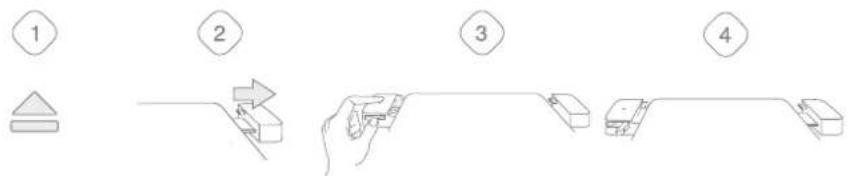
1 Safely eject all devices from the MacBook Pro.
2 Slide the right wing of the LandingZone out of the MacBook Pro.
3 Push the release lever on the left wing of the LandingZone.
4 Remove the MacBook from the LandingZone.
WARNINGS
- The LandingZone is not designed to charge multiple high-powered devices, such as smartphones or tablets, at the same time.
- Do not dock your Macbook Pro to the LandingZone if a smartphone or tablet is already connected to the High-Powered Charging Port. Please disconnect any smartphone or tablet before docking and reconnect it after the MacBook has been docked.
- The Mini DisplayPort on the LandingZone uses Type-C Alt Mode and some older Mini DisplayPort Adapters may not be compatible with this new standard.
- The LandingZone is designed to work with the 20.5V power adapter included with the LandingZone. Using a higher voltage power adapter may damage the LandingZone and MacBook.
SUPPORT & FURTHER DOCUMENTATION
For more a detailed manual and other information, please visit landingzone.net/support/user-guides.
For technical questions and support, please contact us at www.landingzone.net or 888-872-8251