
BodySense Smart Scale - Waagen eufy - Kostenlose Bedienungsanleitung
Finden Sie kostenlos die Bedienungsanleitung des Geräts BodySense Smart Scale eufy als PDF.


| Produkttyp | Personenwaage (Körperanalysewaage) |
| Modell | BodySense Smart Scale |
| Marke | eufy |
| Abmessungen (B x T x H) | 30 x 30 x 2,5 cm |
| Gewicht | ca. 1,8 kg |
| Maximale Belastung | 180 kg |
| Mindestbelastung | 5 kg |
| Teilung (Genauigkeit) | 0,1 kg |
| Stromversorgung | 4 x AAA-Batterien (im Lieferumfang enthalten) |
| Display | LED-Anzeige |
| Konnektivität | Bluetooth 4.0 (oder höher) |
| Kompatible App | eufyLife App (iOS und Android) |
| Körperanalyse-Funktionen | Gewicht, BMI, Körperfettanteil, Muskelmasse, Knochenmasse, Körperwasser |
| Material | Gehärtetes Glas, Kunststoff |
| Einheiten | kg, lb, st (umschaltbar) |
| Automatische Abschaltung | Ja, nach ca. 15 Sekunden Inaktivität |
| Benutzerprofile | Bis zu 16 Benutzer |
| Altersempfehlung | Ab 10 Jahren |
| Farbe | Weiß |
| Lieferumfang | Waage, Bedienungsanleitung, 4 x AAA-Batterien |
| Garantie | 1 Jahr |
| Zertifizierungen | CE, RoHS |
| Reinigung und Pflege | Mit einem feuchten Tuch reinigen; nicht ins Wasser tauchen |
| Sicherheitshinweise | Nicht auf nassen Böden verwenden; nicht fallen lassen |
| Reparatur / Austauschbare Teile | Nur Batterien sind vom Benutzer austauschbar |
Häufig gestellte Fragen - BodySense Smart Scale eufy
Benutzerfragen zu BodySense Smart Scale eufy
0 Frage zu diesem Gerät. Beantworten Sie die, die Sie kennen, oder stellen Sie Ihre eigene.
Eine neue Frage zu diesem Gerät stellen
Laden Sie die Anleitung für Ihr Waagen kostenlos im PDF-Format! Finden Sie Ihr Handbuch BodySense Smart Scale - eufy und nehmen Sie Ihr elektronisches Gerät wieder in die Hand. Auf dieser Seite sind alle Dokumente veröffentlicht, die für die Verwendung Ihres Geräts notwendig sind. BodySense Smart Scale von der Marke eufy.
BEDIENUNGSANLEITUNG BodySense Smart Scale eufy

Health & Wellness
Owner's Manual
BodySense Smart Scale

For FAQs and more information, please visit:
www.eufylife.com
Product Number T9140
SM-A451-V03
Important Safety Instructions
- Read all instructions before using the device. Keep the manual for future reference.
- Only use the device as described in this user manual. Any misuse may cause electric shocks, burns, start a fire or other unexpected hazards.
- This device can be used by individuals over 16 years old and persons with reduced physical, sensory or mental capabilities or lack of experience and knowledge if they have been given supervision or instruction concerning use of the appliance in a safe way and understand the hazards involved. Children should not play with the appliance. Cleaning and user maintenance should not be done by children without supervision.
- Be aware that this device is designed for individuals to measure their weight and to monitor their body composition. Any information provided by this device is in no way meant to treat, cure, or prevent diseases or illnesses from happening.
- DO NOT use this device if you are pregnant or if you suspect you may be pregnant. The effects of this device on a fetus are unknown and untested.
- DO NOT use this device if you use a wearable or implanted electronic device such as a defibrillator or pacemaker.
- This device should not be used by individuals who are acutely or chronically ill, suffering from diseases or taking medications that can affect water levels. The accuracy of the readings for these individuals has not been verified. Specific medical advice should be obtained from a physician.
- The device is equipped with a data transmission function that emits electromagnetic energy. Portable Radio Frequency (RF) communications equipment (including peripherals such as antenna cables and external antennas) should not be used within 30 cm (12 inches) of the device, otherwise, performance may be affected.
- Do not modify this device.
- Do not expose this device to extreme temperatures, direct sunlight, moisture, or corrosive environments.
- To prevent slipping, do not step on the device after bathing or showering.
- This device should not be used when it is adjacent to or stacked on top of another device because it could cause the device to operate improperly. If such use is necessary, this device and the other device should be observed to verify that they are operating normally.
- This device is powered by four AAA batteries. Do not attempt to recharge non-rechargeable batteries as this can cause the batteries to leak or explode.
-
This device can be powered by rechargeable batteries.
-
Do not mix and use different types of batteries together e.g. lithium-ion (Li-ion) and nickel-metal hydride (NiMH) batteries.
- Do not mix new and used batteries.
- Used batteries should be placed in a sealed plastic bag and disposed of safely according to local environmental regulations.
- If the device will not be used for an extended period of time, remove batteries before storing the device in a cool and dry place.
Usage Tips:
To ensure measurement accuracy, follow the instructions below when you start your measurement:
- Place the scale on a flat, hard surface. Soft surfaces such as carpeting will affect the performance of the scale.
- Step on the platform with bare feet. Stand still and keep full contact with the electrodes until the measurement is complete.
- For the most consistent measurements, weigh yourself at the same time of day and location.
- Avoid weighing yourself immediately after strenuous exercise, sitting in the sauna, taking a bath, or drinking and eating.
- The condition of the skin on the bottom of your feet can affect the measurement. The natural effects of aging or activity can make this skin hard. Take the reading with clean, slightly damp feet for best accuracy.
- Body fat percentage estimates will vary with the amount of water in the body, and can be affected by dehydration or overhydration due to factors such as alcohol consumption, menstruation, illness, intense exercise etc.
What's In the Box
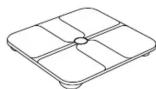


BodySense Smart Scale AAA Battery (×4) Owner's Manual
Inserting the Batteries
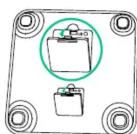
① Turn the scale over and place it on a flat surface.
2 Open the battery door and insert four AAA batteries. Make sure the positive and negative ends are facing the correct polarity directions marked in the battery compartment.
digits "288.8" will show on the LED display.
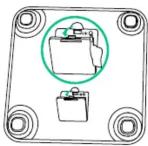
3 Close the battery door and wait until the digits "fare shown on the LED display.

LO will appear on the LED display when the batteries are low. Replace all four batteries at the same time. Do not mix new and used batteries.
Selecting the Measuring Unit
Step on the scale to turn it on. Press the Unit button at the bottom of the scale to cycle through and select the measuring unit: Pound / Stone / Kilogram. The measuring unit can be selected from within the app as well.
Installing the EufyLife App and Pairing
1 Download the EufyLife app from the App Store (iOS devices) or Google Play (Android devices).
2 Enable Bluetooth on your smartphone or tablet.
3 Open the EufyLife app and follow the on-screen instructions to pair the scale with your device.
- Once paired, the app and scale will automatically connect the next time the app is opened.
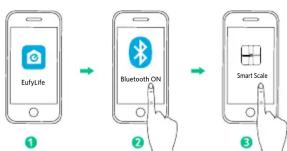
flowchart
graph LR
    A["EufyLife"] --> B["Bluetooth ON"]
    B --> C["Smart Scale"]
| Status Icon | Indicates | |
| Flashing | Pairing | |
| Solid | Connected |

This scale is compatible with devices running iOS 8.0 and above or Android 4.3 and above.
Do not pair the scale from your smartphone's Bluetooth menu. Use the EufyLife app to pair the scale with your smartphone.
Starting a Measurement
Before taking your first measurement, you will need to create and set up a user ID in the EufyLife app. It is possible to create up to 16 user IDs.
1 Place the scale on a hard and flat surface.
2 Open the EufyLife app and select Smart Scale on the device homepage.
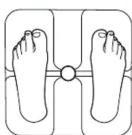
Step barefoot onto the scale. An analysis of your body's composition will begin automatically.

Step on the center of the scale barefoot. Stand still and keep full contact with the electrodes until the measurement is complete.
Weight-Only Measurement
This scale can also be used as a conventional weight-reading scale. You can simply step on the scale to measure your current weight without opening the EufyLife app.
Maintenance
Regularly clean the scale with a dry or slightly dampened soft cloth.
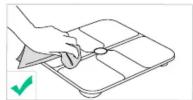
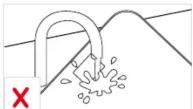
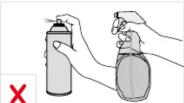

- Do not wash the scale with water or immerse it in water. - Never use detergents to clean the scale as this may cause it to malfunction or discolor.
Troubleshooting
Error Message
| Error Display | Description Solution | |
| ol | Overload. The device will power off. | Stop using this scale for measurement. |
| lo | Low battery. The device will power off. | Replace all four batteries at the same time. |
| Err | Measurement failure. | Step barefoot and keep full contact with the electrodes.Stand still until the measurement on the LED display locks. |
When Measuring
| Issue Cause Solution | ||
| Abnormal measurement results:Too highToo lowHuge difference between two recent measurements | Incorrect posture.Device is placed on soft carpeting or uneven surface.Feet are too dry. | Step onto the scale barefoot and stand still.Place the device on a hard and flat surface.Wipe your feet with a damp cloth, keeping them slightly damp.Install four new batteries.Replace all four batteries at the same time.Stand barefoot on the scale and keep feet in full contact with the electrodes when taking a measurement. |
| LED display does not turn on after stepping onto the scale. | Batteries not installed.Worn batteries. | |
| Scale does not proceed to analyse body composition. | Taking a measurement while wearing shoes or socks. |
Specifications
| Product Model T9140 | |
| Power Source 6 V (4 × AAA batteries) | |
| LED Display 3.1 × 1.3 in / 80 × 32 mm | |
| Measurement Unitse Pound / Stone / Kilogram | |
| Unit Increments 0.1 lb / 0.1 kg | |
| Body Fat Unit Increments | 0.1 % |
| Body Water Unit Increments | 0.1% |
| Muscle Mass Unit Increments | 0.1% |
| Measurement Range 11b - 397lb / 0st 11lb - 28st 5lb / 5kg - 180kg | |
| Working Environment | Temperature: 10 - 40 °CHumidity: 20 - 90% RH |
| Storage Environment | Temperature: -10 - 50 °CHumidity: <= 90% RH |
| Dimension | 12 × 12 × 1 in / 300 × 300 × 26 mm |
| Net Weight | 3.67 lb / 1.66 kg |
Notice

This symbol means the product must not be discarded as household waste, and should be delivered to an appropriate collection facility for recycling. Proper disposal and recycling helps protect natural resources, human health and the environment. For more information on disposal and recycling of this product, contact your local municipality, disposal service, or the shop where you bought this product.

This symbol means "Refer to instruction manual or booklet".
FCC Statement
This device complies with Part 15 of the FCC Rules. Operation is subject to the following two conditions: (1) This device may not cause harmful interference, and (2) this device must accept any interference received, including interference that may cause undesired operation.
Warning: Changes or modifications not expressly approved by the party responsible for compliance could void the user's authority to operate the equipment.
Note: This equipment has been tested and found to comply with the limits for a Class B digital device, pursuant to Part 15 of the FCC Rules. These limits are designed to provide reasonable protection against harmful interference in a residential installation.
This equipment generates, uses and can radiate radio frequency energy and, if not installed and used in accordance with the instructions, may cause harmful interference to radio communications. However, there is no guarantee that interference will not occur in a particular installation. If this equipment does cause harmful interference to radio or television reception, which can be determined by turning the equipment off and on, the user is encouraged to try to correct the interference by one or more of the following measures: (1) Reorient or relocate the receiving antenna. (2) Increase the separation between the equipment and receiver. (3) Connect the equipment into an outlet on a circuit different from that to which the receiver is connected. (4) Consult the dealer or an experienced radio / TV technician for help.
RF Warning Statement
The device has been evaluated to meet general RF exposure requirements. The device can be used in portable exposure conditions without restriction.
Customer Service

15-month limited warranty

Lifetime technical support

support@eufylife.com

1-800-988-7973 (US) Mon-Fri 9am-5pm (PST)

@EufyOfficial

@EufyOfficial

@EufyOfficial

@EufyOfficial