RST-001 - Hocker Impact - Kostenlose Bedienungsanleitung
Finden Sie kostenlos die Bedienungsanleitung des Geräts RST-001 Impact als PDF.


Benutzerfragen zu RST-001 Impact
0 Frage zu diesem Gerät. Beantworten Sie die, die Sie kennen, oder stellen Sie Ihre eigene.
Eine neue Frage zu diesem Gerät stellen
Laden Sie die Anleitung für Ihr Hocker kostenlos im PDF-Format! Finden Sie Ihr Handbuch RST-001 - Impact und nehmen Sie Ihr elektronisches Gerät wieder in die Hand. Auf dieser Seite sind alle Dokumente veröffentlicht, die für die Verwendung Ihres Geräts notwendig sind. RST-001 von der Marke Impact.
BEDIENUNGSANLEITUNG RST-001 Impact
impact®
RST-001
Posing Stool
ASSEMBLY INSTRUCTIONS
text_image
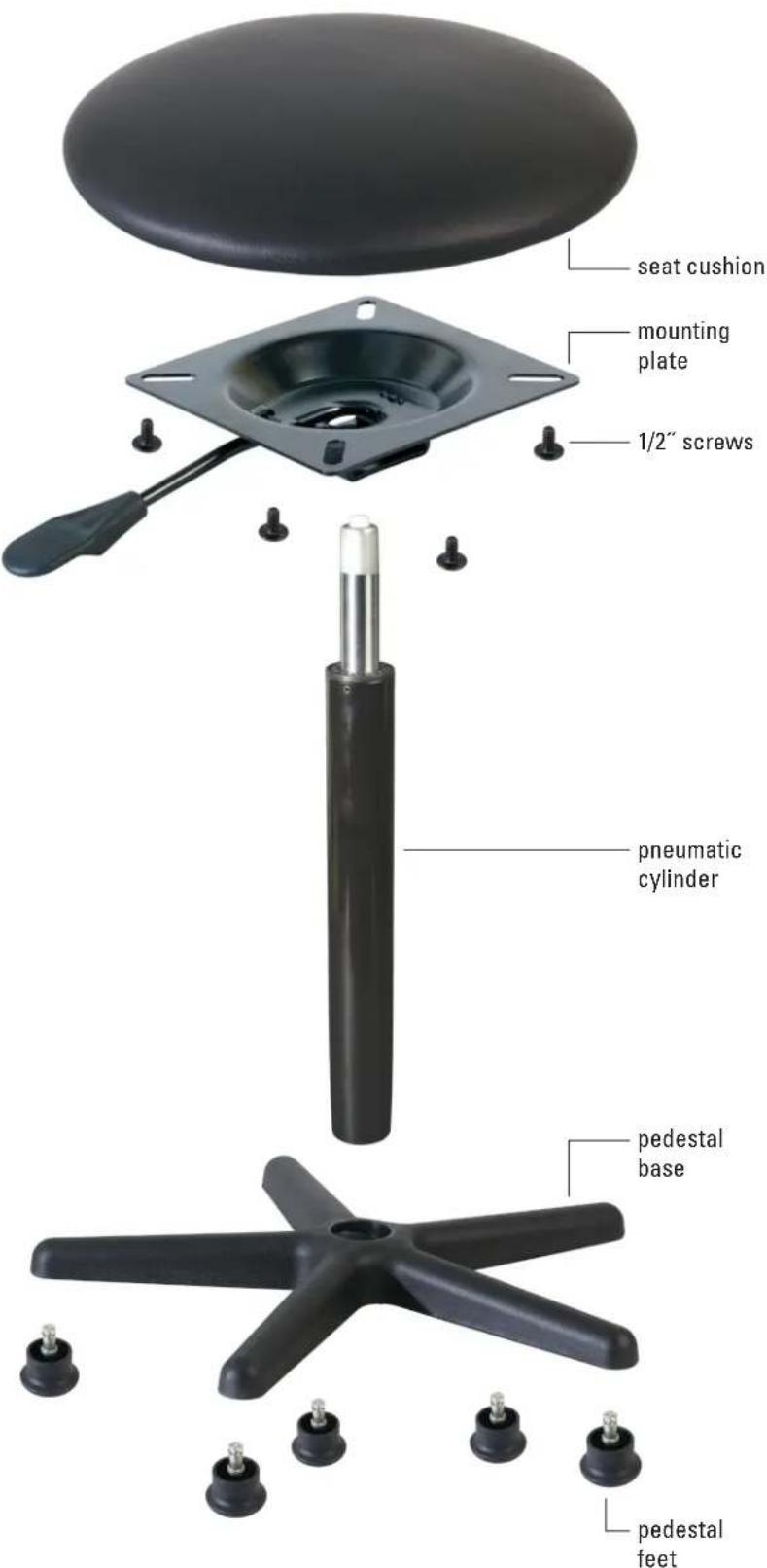
seat cushion mounting plate 1/2" screws pneumatic cylinder pedestal base pedestal feetParts List
1 - seat cushion
1 - mounting plate
4 - 1/2" screws
1 - pneumatic cylinder
1 - pedestal base
5 – pedestal feet
Step One
Remove all the parts from the carton and make certain you have all the items in the parts list above and in the correct quantity.
Step Two
Insert the pedestal feet into the pedestal base. Be sure all feet are inserted securely.
Step Three
Insert the pneumatic cylinder into the pedestal base.
Step Four
Attach the mounting plate to the seat cushion using the four 1/2" screws. Tighten the screws firmly.
Step Five
Push the mounting plate and the seat cushion down onto the pneumatic cylinder until it is secure.
To adjust the seat height, pull up on the lever and either push down on the seat to lower or pull up to raise the height. Make certain all screws are tightened fully before using this stool.
Specifications
Weight capacity: 220.5 lb. (100 kg)
Height: 20 to 30 in. (50.8 to 76.2 cm)
Base diameter: 22 in. (55.9 cm)
Seat diameter: 14 in. (35.6 cm)
Feet type: Pedestal
Material: Chrome-plated steel cylinder, high-impact nylon
One-Year Limited Warranty
This IMPACT product is warranted to the original purchaser to be free from defects in materials and workmanship under normal consumer use for a period of one (1) year from the original purchase date or thirty (30) days after replacement, whichever occurs later. The warranty provider's responsibility with respect to this limited warranty shall be limited solely to repair or replacement, at the provider's discretion, of any product that fails during normal use of this product in its intended manner and in its intended environment. Inoperability of the product or part(s) shall be determined by the warranty provider. If the product has been discontinued, the warranty provider reserves the right to replace it with a model of equivalent quality and function.
This warranty does not cover damage or defect caused by misuse, neglect, accident, alteration, abuse, improper installation or maintenance. EXCEPT AS PROVIDED HEREIN, THE WARRANTY PROVIDER MAKES NEITHER ANY EXPRESS WARRANTIES NOR ANY IMPLIED WARRANTIES, INCLUDING BUT NOT LIMITED TO ANY IMPLIED WARRANTY OF MERCHANTABILITY OR FITNESS FOR A PARTICULAR PURPOSE. This warranty provides you with specific legal rights, and you may also have additional rights that vary from state to state.
To obtain warranty coverage, contact the Impact Customer Service Department to obtain a return merchandise authorization ("RMA") number, and return the defective product to Impact along with the RMA number and proof of purchase. Shipment of the defective product is at the purchaser's own risk and expense.
For more information or to arrange service, visit www.impactstudiolighting.com or call Customer Service at 212-594-2353.

IMPACT®
A Gradus Group Brand
Product warranty provided by the Gradus Group.
www.gradusgroup.com
IMPACT is a registered trademark of the Gradus Group.
© 2020 Gradus Group LLC. All Rights Reserved.