VXR10 - Mikrofon Movo - Kostenlose Bedienungsanleitung
Finden Sie kostenlos die Bedienungsanleitung des Geräts VXR10 Movo als PDF.


Waehlen Sie Ihre Sprache und Ihre E-Mail-Adresse: wir senden Ihnen eine speziell uebersetzte Version.
Benutzerfragen zu VXR10 Movo
0 Frage zu diesem Gerät. Beantworten Sie die, die Sie kennen, oder stellen Sie Ihre eigene.
Eine neue Frage zu diesem Gerät stellen
Noch keine Fragen. Stellen Sie die erste.
Laden Sie die Anleitung für Ihr Mikrofon kostenlos im PDF-Format! Finden Sie Ihr Handbuch VXR10 - Movo und nehmen Sie Ihr elektronisches Gerät wieder in die Hand. Auf dieser Seite sind alle Dokumente veröffentlicht, die für die Verwendung Ihres Geräts notwendig sind. VXR10 von der Marke Movo.
BEDIENUNGSANLEITUNG VXR10 Movo
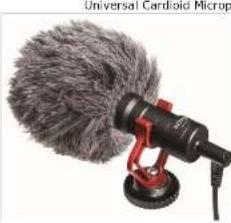 | Instruction ManualThank you for purchasing Move VXR10!The Move VXR10 is a cardioed microphone, which specially design to improve the sound quality of videos on the basis of built-in microphones.With both TRS cable and TRRS output cable included, it can be used on smartphones, cameras, camcorders, audio recorders, PCs, and other audio/video recording devices.VXR10 comes out in compact size and light weight aluminium structure. It will not be a heavy burden while shooting. Plug and play design, no need to worry the battery status. Included inside with a anti-shock mount, which effectively reduce unwanted vibration, cable and handling noise. Also included a turn windproof slide, which specifically used for min/marine the wind and environmental noise for outdoor recording, make sure the sound crystal clear. | FeaturesCompact on-camera microphone• Compatible with smartphones, DSLR cameras, Consumer Camcorders, PCs etc.Rugged metal constructionNo battery requiredProfession: furry windshield includedSpecificationsTransitions Electrical CondenserSolar pattern CordoidFrequency Response 35.19kHz / 2dB Sensitivity -4dB +/- 128 / 3dB+V/Pe, 1kHz Single to twice Scale 74dB 3/4 Flags 3.5mm TRS and TRRS connectorDimensions 82°-61 mmNet Weight 50g | Parts List: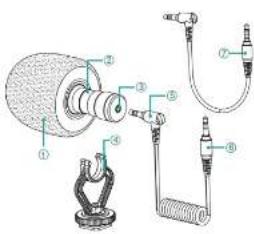 | 1 Furry windshield2 Microphone3 3.5mm audio jacket4 Shock mount5 3.5mm audio output cable6 3.5mm to TRS audio output cable7 3.5mm to TRRS audio output cableWhat's difference?1 3.5 mm TRRS connector-For Smartphone, tablet or Mac2 3.5 mm TRS connector-For cameras, camcorders, audio recorders and other audio/video recording devices. |
Using the microphone with a Smartphone, tablet or MSc.1. Plug the 3.5 mm TRRS connector into the audio jack of your smartphone, tablets or Mac.2. Open the audio jack or video recording app and 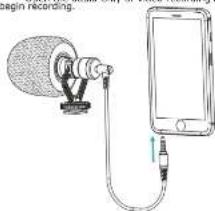 | Using the microphone with cameras, camcorders, audio recorders and other audio/video recording devices.1. Look the microphone on the camera hot shoe | 2. Plug the 3.5 mm TRS connector into the audio input jack of your device (audio recorder, amplifier, PC, logo) | Specifications10-0-10-20-30-40-50-D5W8 | Movophoto Incwww.movophoto.comsupport@movophoto.com |